keyless CADILLAC SRX 2005 1.G User Guide
[x] Cancel search | Manufacturer: CADILLAC, Model Year: 2005, Model line: SRX, Model: CADILLAC SRX 2005 1.GPages: 442, PDF Size: 2.52 MB
Page 84 of 442
Testing the Alarm
1. From inside the vehicle, roll down the window, then
get out of the vehicle, keeping the door open.
2. From outside of the vehicle, with the door open,
lock the vehicle using the power door lock switch
or the remote keyless entry transmitter and
close the door. Wait approximately 30 seconds until
the security light goes off.
3. Reach in and unlock the door using the manual
lock and open the door. The horn will sound and
the exterior lamps will ash.
You can turn off the alarm by unlocking the driver’s door
with your key, using the unlock button on the remote
keyless entry transmitter or by starting the car with
a valid key.
If the alarm does not sound when it should, check to
see if the horn works. The horn fuse may be blown. To
replace the fuse, seeFuses and Circuit Breakers on
page 5-94. If the fuse does not need to be replaced, you
may need to have your vehicle serviced.
To reduce the possibility of theft, always arm the
theft-deterrent system when leaving your vehicle.
Immobilizer
This device complies with Part 15 of the FCC Rules.
Operation is subject to the following two conditions:
1. This device may not cause interference.
2. This device must accept any interference received,
including interference that may cause undesired
operation.
This device complies with RSS-210 of Industry Canada.
Operation is subject to the following two conditions:
1. This device may not cause interference.
2. This device must accept any interference received,
including interference that may cause undesired
operation of the device.
Changes or modications to this system by other than
an authorized service facility could void authorization to
use this equipment.
2-18
Page 120 of 442
The vehicle must be in PARK (P) to recall the stored
driving positions.
Press one of the numbered memory buttons to recall
the stored setting. Each time a memory button is
pressed, a single beep will sound.
Three chimes will sound and the setting will not be
recalled if you press button 1 or 2 when the vehicle is
not in PARK (P).
If you would like the stored driving positions to be
recalled when unlocking your vehicle with the remote
keyless entry transmitter or when you place the
key in the ignition, seeDIC Vehicle Personalization on
page 3-66.
To stop recall movement of the memory feature at any
time, press one of the power seat or mirror controls.
Two personalized exit positions can also be
programmed. Use the following steps to program exit
positions:
1. Press memory seat button 1 or the button with the
unlock symbol on the remote keyless entry
transmitter with the number 1 on the back to recall
the driving position.
2. Adjust the driver’s seat to the desired exit position.3. Press and hold the exit button located above
buttons 1 and 2 on the driver’s door armrest
for at least three seconds.
Two beeps will sound to conrm that the exit
position has been saved.
4. Repeat the procedure for a second driver using
memory seat button 2 or the remote keyless
entry transmitter with the number 2 on the back.
To recall the stored exit positions, press and release the
exit button. One beep will sound, and the seat will
move to the previously stored exit position for the
currently identied driver. If an exit position has not
been stored for this driver, the seat will move all the way
back. The position of the outside mirrors is not stored
or recalled for the exit position.
The vehicle must be in PARK (P) to recall the exit
positions.
Three chimes will sound and the exit setting will not be
recalled if you press the exit button when the vehicle
is not in PARK (P).
If you would like your stored exit position to be recalled
when unlocking the vehicle with the remote keyless
entry transmitter or when the ignition is turned off and
the driver’s door is opened, seeDIC Vehicle
Personalization on page 3-66.
2-54
Page 139 of 442
Exterior Lighting Battery Saver
If the parking lamps or headlamps have been left on,
the exterior lamps will turn off about 10 minutes after the
ignition is turned to OFF. This protects against draining
the battery in case you have accidentally left the
headlamps or parking lamps on. The battery saver does
not work if the headlamps are turned on after the
ignition is turned to OFF.
If you need to leave the lamps on for more than
10 minutes, use the exterior lamp control to turn the
lamps back on.
Instrument Panel Brightness
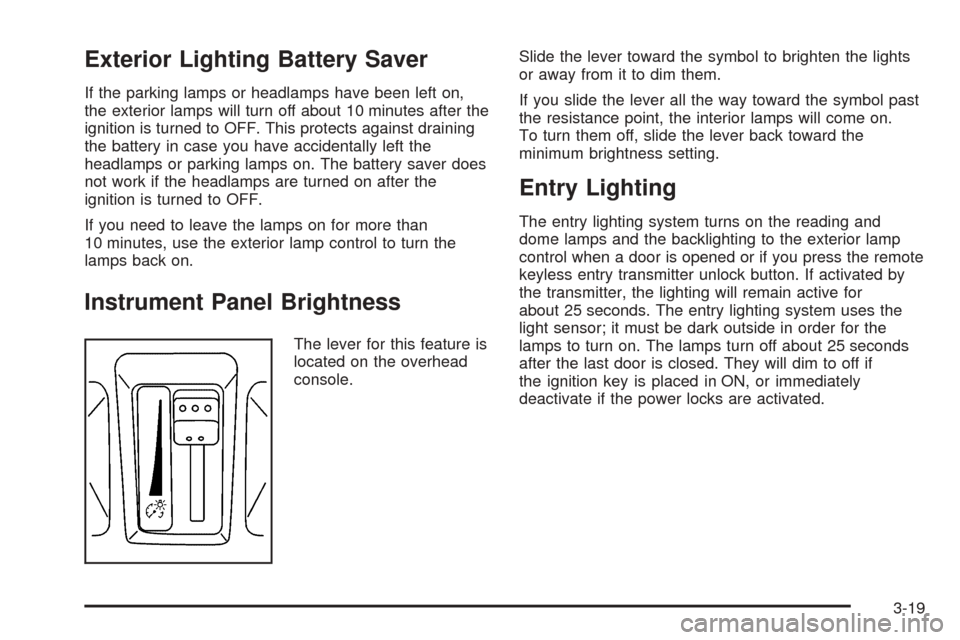
The lever for this feature is
located on the overhead
console.Slide the lever toward the symbol to brighten the lights
or away from it to dim them.
If you slide the lever all the way toward the symbol past
the resistance point, the interior lamps will come on.
To turn them off, slide the lever back toward the
minimum brightness setting.
Entry Lighting
The entry lighting system turns on the reading and
dome lamps and the backlighting to the exterior lamp
control when a door is opened or if you press the remote
keyless entry transmitter unlock button. If activated by
the transmitter, the lighting will remain active for
about 25 seconds. The entry lighting system uses the
light sensor; it must be dark outside in order for the
lamps to turn on. The lamps turn off about 25 seconds
after the last door is closed. They will dim to off if
the ignition key is placed in ON, or immediately
deactivate if the power locks are activated.
3-19
Page 186 of 442

DIC Vehicle Personalization
Your vehicle is equipped with personalization that allows
you to program certain features to a preferred setting
for up to two people. The number of programmable
features varies depending upon which model of
the vehicle is purchased.
On all vehicles, features such as climate control
settings, radio preset settings, exterior lighting at unlock,
remote lock and unlock conrmation, and automatic
door locks have already been programmed for
your convenience.
Some vehicles are equipped with additional features
that can be programmed including the seat and outside
rearview mirror position.
If your vehicle is equipped with the ability to program
additional personalization features, the driver’s
preferences are recalled by pressing the unlock button
on the remote keyless entry transmitter, 1 or 2, or
by pressing the appropriate memory button, 1 or 2,
located on the driver’s door. Certain features can
be programmed not to recall until the key is placed in
the ignition. To change feature preferences, see
“Entering the Personalization Menu” following.
Entering the Personalization Menu
To enter the feature programming mode, use the
following procedure:
1. Turn the ignition to ON, but do not start the engine.
Make sure the vehicle is in PARK (P).
2. If your vehicle has memory settings, press the
appropriate memory button, 1 or 2, located on
the driver’s door armrest. The DIC display will show
either Driver 1 or 2 depending on which button
was selected.
3. Press the TUNE/SEL knob once to access the main
menu of the DIC.
4. Turn the TUNE/SEL knob until SETUP is highlighted.
5. Press the TUNE/SEL knob once to access the
SETUP menu.
6. Scroll to the feature you want to change, and press
the TUNE/SEL knob to turn the feature on or off.
If the feature is turned on, a check mark will appear
next to the feature name.
If none of the personalization items are turned on,
turn on the personalization menu by pressing the
TUNE/SEL knob. The list of features will then appear,
and you can repeat Step 6.
3-66
Page 187 of 442

Personalization Features
The following choices are available for programming:
Personalization Name
This feature allows you to type in a name that will
appear on the DIC display whenever the corresponding
remote keyless entry transmitter is used or one of
the buttons on the driver’s door armrest (1 or 2) is
pressed.
If a customized name is not programmed, the system
will show Driver 1 or Driver 2 to correspond with
the numbers on the back of the remote keyless entry
transmitters.
To program a name, use the following procedure:
1. Enter the Personalization menu by following the
instructions listed previously.
2. Select the PERSONALIZATION NAME menu item
by pressing the TUNE/SEL knob once.
You will see a cursor on the screen.3. Turn the TUNE/SEL knob until you reach the rst
letter you want; the letter will be highlighted. There
is a complete alphabet with both upper and
lower case letters and the numbers zero through
nine. Also included are spaces and other non-letter
characters such as the ampersand (&).
4. Press the TUNE/SEL knob once to select the letter.
The letter will then appear on the display.
If you make a mistake, press the TUNE/SEL knob
repeatedly to cycle through all the characters
until you reach the character you wish to change.
5. Repeat Steps 3 and 4 until the name you want is
complete. You can program up to 16 characters.
The name you selected is now set. You can either exit
the programming mode by following the instructions
later in this section or program the next feature available
on your vehicle.
Congure Display Keys
This feature allows you to customize the functions of the
four soft keys located to the left and right of the audio
display. See “Congurable Radio Display Keys”
underRadio with CD on page 3-81for programming
information.
3-67
Page 188 of 442
Remote Recall Memory
If your vehicle has the optional memory package, you
will have this feature. When this feature is turned on, you
can recall any previously programmed seat, adjustable
pedals and mirror controls when the unlock button
on the remote keyless entry transmitter is pressed.
Programmable Modes
Mode 1:ON
Mode 2:OFF
Before your vehicle was shipped from the factory, it was
programmed to Mode 2. The mode to which the
vehicle was programmed may have been changed since
it left the factory.
To program the vehicle to a different mode, the following
procedure:
1. Enter the personalization portion of the SETUP
menu following the instructions listed previously.
2. Scroll to REMOTE RECALL MEMORY to
highlight it.
3. Press the TUNE/SEL knob to switch back and forth
between on and off.
When the mode is turned on, a check mark will
appear next to the feature name.The mode you selected is now set. You can either exit
the programming mode by following the instructions
later in this section or program the next feature available
on your vehicle.
Remote Exit Recall
If your vehicle has the optional memory package, you
will have this feature. When this feature is turned on, you
can recall any previously programmed exit position for
the driver’s seat when the unlock button on the
remote keyless entry transmitter is pressed.
Programmable Modes
Mode 1:ON
Mode 2:OFF
Before your vehicle was shipped from the factory, it was
programmed to Mode 2. The mode to which the
vehicle was programmed may have been changed since
it left the factory.
3-68
Page 191 of 442

To determine the mode to which the vehicle is
programmed or to program the vehicle to a different
mode, use the following procedure:
1. Enter the personalization portion of the SETUP
menu following the instructions listed previously.
2. Scroll to TWILIGHT DELAY using the TUNE/SEL
knob to highlight it.
3. Press the TUNE/SEL knob to scroll through the
available delay settings. When the delay time
you want is highlighted, press the TUNE/SEL knob
once to select it.
When the mode is turned on, an X will appear in
the box to the left.
If you choose Mode 1, the exterior lamps will not
illuminate when you exit the vehicle. Only one mode
can be selected at a time.
The mode you selected is now set. You can either exit
the programming mode by following the instructions
later in this section or program the next feature available
on your vehicle.Lights Flash at Unlock
This feature ashes the exterior lamps when the remote
keyless entry transmitter is used to unlock the vehicle.
The lamps will ash for approximately 20 seconds
unless a door is opened, the ignition is turned to
ACCESSORY, ON or START or the remote keyless
entry transmitter is used to lock the vehicle.
Programmable Modes
Mode 1:ON
Mode 2:OFF
Before your vehicle was shipped from the factory, it was
programmed to Mode 1. The mode to which the
vehicle was programmed may have been changed since
it left the factory.
3-71
Page 192 of 442
To program the vehicle to a different mode, use the
following procedure:
1. Enter the personalization portion of the SETUP
menu following the instructions listed previously.
2. Scroll to LIGHTS FLASH AT UNLOCK to
highlight it.
3. Press the TUNE/SEL knob to switch back and forth
between on and off.
When the mode is turned on, a check mark will
appear next to the feature name.
The mode you selected is now set. You can either exit
the programming mode by following the instructions
later in this section or program the next feature available
on your vehicle.
Lights Flash at Lock
This feature allows the exterior lamps to ash once
when the remote keyless entry transmitter is used to
lock the vehicle. All doors must be closed for this feature
to work, and the lamps will not ash if the parking
lamps or headlamps are on.
Programmable Modes
Mode 1:ON
Mode 2:OFFBefore your vehicle was shipped from the factory, it was
programmed to Mode 1. The mode to which the
vehicle was programmed may have been changed since
it left the factory.
To program the vehicle to a different mode, use the
following procedure:
1. Enter the personalization portion of the SETUP
menu following the instructions listed previously.
2. Scroll to LIGHTS FLASH AT LOCK to highlight it.
3. Press the TUNE/SEL knob to switch back and forth
between on and off.
When the mode is turned on, a check mark will
appear next to the feature name.
You can select this feature by itself, or you can combine
it with Horn Sounds At Lock so that both the lights
ash and the horn chirps when you lock your vehicle.
The mode you selected is now set. You can either
exit the programming mode by following the instructions
later in this section or program the next feature
available on your vehicle.
3-72
Page 193 of 442

Horn Sounds at Lock
This feature sounds the horn once when the remote
keyless entry transmitter is used to lock the vehicle.
All doors must be closed for this feature to work.
Programmable Modes
Mode 1:ON
Mode 2:OFF
Before your vehicle was shipped from the factory, it was
programmed to Mode 2. The mode to which the
vehicle was programmed may have been changed since
it left the factory.
To program the vehicle to a different mode, use the
following procedure:
1. Enter the personalization portion of the SETUP
menu following the instructions listed previously.
2. Scroll to HORN SOUNDS AT LOCK to highlight it.
3. Press the TUNE/SEL knob to switch back and
forth between on and off.
When the mode is turned on, a check mark will
appear next to the feature name.If you select this feature to be on, Lights Flash At Lock
will also be on. You can choose Lights Flash At Lock
by itself, but Horn Sounds At Lock will always have
Lights Flash At Lock enabled when it is selected.
The mode you selected is now set. You can either exit
the programming mode by following the instructions
later in this section or program the next feature available
on your vehicle.
Exterior Lights at Unlock
This feature turns on the exterior lamps when the
remote keyless entry transmitter is used to unlock the
vehicle. The lamps will remain on for about 20 seconds
unless a door is opened, the ignition is turned to
ACCESSORY, ON or START or the remote keyless
entry transmitter is used to lock the vehicle.
Programmable Modes
Mode 1:ON
Mode 2:OFF
3-73
Page 196 of 442
Doors Unlock Key Out
This feature allows the doors to automatically unlock
when the key is removed from the ignition.
Programmable Modes
Mode 1:ON
Mode 2:OFF
Before your vehicle was shipped from the factory, it was
programmed to Mode 2. The mode to which the
vehicle was programmed may have been changed since
it left the factory.
To program the vehicle to a different mode, use the
following procedure:
1. Enter the personalization portion of the SETUP
menu following the instructions listed previously.
2. Scroll to DOORS UNLOCK KEY OUT.
3. Press the TUNE/SEL knob to switch between on
and off.
When the mode is turned on, a check mark will
appear next to the feature name.
The mode you selected is now set. You can either exit
the programming mode by following the instructions
later in this section or program the next feature available
on your vehicle.
Delayed Locking
This feature delays the locking of the vehicle’s doors for
up to ve seconds after a power door lock switch or
the lock button on the remote keyless entry transmitter
is pressed. The ve second delay occurs after the
last door is closed.
Programmable Modes
Mode 1:ON
Mode 2:OFF
Before your vehicle was shipped from the factory, it was
programmed to Mode 1. The mode to which the
vehicle was programmed may have been changed since
it left the factory.
To program the vehicle to a different mode, use the
following procedure:
1. Enter the personalization portion of the SETUP
menu following the instructions listed previously.
2. Scroll to DELAYED LOCKING using the TUNE/SEL
knob to highlight it.
3. Press the TUNE/SEL knob to switch back and forth
between on and off.
When the mode is turned on, a check mark will
appear next to the feature name.
3-76