audio CADILLAC SRX 2005 1.G Owner's Guide
[x] Cancel search | Manufacturer: CADILLAC, Model Year: 2005, Model line: SRX, Model: CADILLAC SRX 2005 1.GPages: 442, PDF Size: 2.52 MB
Page 231 of 442
Cleaning the Video Screen
Pour some isopropyl or rubbing alcohol on a clean cloth
and gently wipe the video screen. Do not spray
directly onto the screen and do not press too hard or
too long on the video screen.
Theft-Deterrent Feature
THEFTLOCK®is designed to discourage theft of your
vehicle’s radio. The feature works automatically by
learning a portion of the Vehicle Identication Number
(VIN). If the radio is moved to a different vehicle, it
will not operate. If the radio is removed from your
vehicle, the original VIN in the radio can be used to
trace the radio back to your vehicle.
With THEFTLOCK
®activated, the radio will not operate
if stolen.
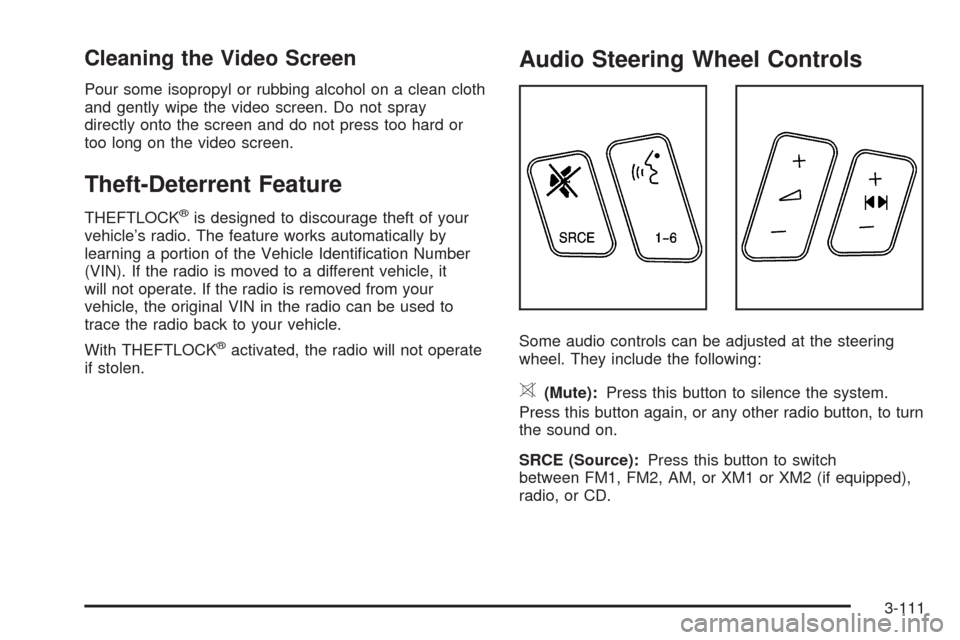
Audio Steering Wheel Controls
Some audio controls can be adjusted at the steering
wheel. They include the following:
>(Mute):Press this button to silence the system.
Press this button again, or any other radio button, to turn
the sound on.
SRCE (Source):Press this button to switch
between FM1, FM2, AM, or XM1 or XM2 (if equipped),
radio, or CD.
3-111
Page 232 of 442

g(OnStar/Voice Recognition):If your vehicle has
the Radio with CD or Radio with Six-Disc CD audio
system, press this button to interact with the OnStar
®
system. See the OnStar®manual provided with
your vehicle for more information.
If your vehicle has the navigation system, press this
button to initiate voice recognition. See “Voice
Recognition” in the Navigation System manual for more
information. You may be able to interact with the
OnStar
®system using this button. See the OnStar®
manual provided with your vehicle for more information.
1–6 (Preset Stations):Press this button to play
stations that are programmed on the radio preset
pushbuttons. The radio will only seek preset stations
with a strong signal that are in the selected band.
When a CD is playing, press this button to go to the
next track.
When a CD is playing in the six-disc CD changer, press
this button to go to the next available CD, if multiple
CDs are loaded.+
u— (Volume):Press this button to increase or to
decrease the volume.
+
tu— (Seek):Press either arrow to go to the
next or the previous radio station and stay there.
The radio will only seek stations with a strong signal
that are in the selected band.
When a CD is playing, press the minus sign to go to the
start of the current track, if more than 10 seconds
have played. Press the plus sign to go to the next track.
If either the minus or the plus button are pressed
more than once, the player will continue moving
backward or forward through the CD.
Press and hold the SEEK plus or minus button, until
you hear a beep. The CD will fast forward or fast reverse
through the CD. Press either button again to play the
passage.
If you have the navigation system, some of the audio
steering wheel controls work when a DVD is playing in
the navigation radio. See the Navigation System
manual for more information.
3-112
Page 314 of 442
How to Reset the Engine Oil Life
System and the Oil Life Indicator
The Engine Oil Life System calculates when to change
your engine oil and lter based on vehicle use.
Anytime your oil is changed, reset the system so it can
calculate when the next oil change is required. If a
situation occurs where you change your oil prior to a
Change Engine Oil Message in the DIC being turned on,
reset the system.
Base Audio System
Press the CLR button located to the right of the DIC
display to acknowledge the Change Engine Oil
message. This will clear the message from the display
and reset it.
To reset the oil life indicator, use the following steps:
1. Press the up or down arrow on the INFO button
located to the right of the DIC display to access
the DIC menu.
2. Once XXX% ENGINE OIL LIFE menu item is
highlighted, press and hold the CLR button.
The percentage will return to 100, and the oil life
indicator will be reset.
3. Turn the key to OFF.If the Change Engine Oil message comes back on
when you start your vehicle or the percentage does not
return to 100, the engine oil life system has not reset.
Repeat the procedure.
Navigation System
If you have the navigation system, see “Vehicle
Customization” in the SRX Navigation System Owner
Supplement for how to reset the oil life indicator.
What to Do with Used Oil
Used engine oil contains certain elements that may be
unhealthy for your skin and could even cause cancer.
Do not let used oil stay on your skin for very long. Clean
your skin and nails with soap and water, or a good
hand cleaner. Wash or properly dispose of clothing or
rags containing used engine oil. See the manufacturer’s
warnings about the use and disposal of oil products.
Used oil can be a threat to the environment. If you
change your own oil, be sure to drain all the oil from the
lter before disposal. Never dispose of oil by putting it in
the trash, pouring it on the ground, into sewers, or into
streams or bodies of water. Instead, recycle it by taking it
to a place that collects used oil. If you have a problem
properly disposing of your used oil, ask your dealer, a
service station or a local recycling center for help.
5-20
Page 317 of 442
How to Reset the Change Transmission
Fluid Message and the Transmission
Fluid Indicator
After the transmission uid has been changed, the
Change Trans Fluid message and the transmission uid
life indicator must be reset. To reset the message
and indicator, use one of the following procedures:
Base Audio System
Press the CLR (Clear) button located to the right of the
Driver Information Center (DIC) display to acknowledge
the CHANGE TRANS FLUID message. This will
clear the message from the display and reset it.
To reset the transmission uid life indicator, use the
following steps:
1. Press the up or down arrow on the INFO
(Information) button located to the right of
the DIC display to access the DIC menu.
2. Once the XXX% TRANS FLUID LIFE menu item
is highlighted, press and hold the CLR button.
The percentage will return to 100, and the
transmission uid life indicator will be reset.
3. Repeat the steps if the percentage does not
return to 100.
Navigation System
If your vehicle has a navigation system, see your
navigation system supplement for instructions on how to
reset the transmission uid life indicator.
Engine Coolant
The cooling system in your vehicle is lled with
DEX-COOL®engine coolant. This coolant is designed
to remain in your vehicle for ve years or 150,000 miles
(240 000 km), whichever occurs rst, if you add only
DEX-COOL
®extended life coolant.
The following explains your cooling system and how to
add coolant when it is low. If you have a problem
with engine overheating, seeEngine Overheating on
page 5-26.
5-23
Page 394 of 442

Relays Usage
SPARE Not Used
REV LAMP
RELAY MICROISRVM (Inside Rearview Mirror),
License Plate Lamp Assembly
Fuses Usage
L FRT HTD
SEAT MODDriver’s Heated Seat Module
MEM/ADAPT
SEATDriver’s Power Seat Switch, Memory
Seat Module
THEFTUniversal Garage Door Opener,
Intrusion Sensor, Diversity Antenna
Module
REVERSE
LAMPISRVM (Inside Rearview Mirror),
License Plate Lamp Assembly
SPARE Not Used
POSITION
LAMPTaillamp Assemblies, Front Position
Lamp Assemblies
SPARE Not Used
ELC COMP ELC Compressor, ELC Solenoid
AUDIO Radio, OnStar Module
FFS SW Flip Fold Seat Switch
REAR DR MOD Rear Door Modules
Fuses Usage
FFSM Flip Fold Seat Module
DRIVER
DR MODDriver’s Door Module
BASSTaillamps, Center High-Mounted
Stop Lamp, Flasher Module, ABS
Module, Trailer Lamps
HDLP
LEVELINGHeadlamp Leveling System Chassis
Sensors (Export Only)
SPARE Not Used
CCP CCP (Climate Control Panel)
IGN 3Heated Seat Modules, Air Inlet
Motor, Shifter Assembly
J Cases Usage
AMP Audio Amplier
ELC ELC Compressor
Circuit
BreakersUsage
SEAT C/BPower Seat Switches, Memory Seat
Module
5-100
Page 429 of 442

A
Accessory Power Outlets.................................3-23
Additives, Fuel................................................. 5-6
Add-On Electrical Equipment............................5-94
Adjustable Throttle and Brake Pedal..................2-23
Air Cleaner/Filter, Engine.................................5-21
Air Conditioning..............................................3-25
Airbag
Readiness Light..........................................3-37
Airbag Sensing and Diagnostic Module (SDM)....7-10
Airbag System................................................1-47
How Does an Airbag Restrain?......................1-55
Servicing Your Airbag-Equipped Vehicle..........1-58
What Makes an Airbag Inate?......................1-55
What Will You See After an Airbag Inates?....1-56
When Should an Airbag Inate?....................1-54
Where Are the Airbags?...............................1-50
All-Wheel Drive...............................................5-45
All-Wheel Drive (AWD) System.........................2-28
Antenna, Diversity Antenna System..................3-114
Antenna, XM™ Satellite Radio Antenna System . . . 3-114
Anti-Lock Brake System (ABS)........................... 4-7
Anti-Lock Brake, System Warning Light..............3-39
Appearance Care............................................5-84
Aluminum or Chrome-Plated Wheels..............5-90
Care of Safety Belts....................................5-88
Chemical Paint Spotting...............................5-91
Cleaning Exterior Lamps/Lenses....................5-88Appearance Care (cont.)
Cleaning the Inside of Your Vehicle................5-85
Fabric/Carpet..............................................5-86
Finish Care.................................................5-89
Finish Damage............................................5-91
Instrument Panel, Vinyl, and Other Plastic
Surfaces.................................................5-87
Leather......................................................5-87
Sheet Metal Damage...................................5-91
Speaker Covers..........................................5-88
Tires..........................................................5-90
Underbody Maintenance...............................5-91
Vehicle Care/Appearance Materials................5-92
Washing Your Vehicle...................................5-88
Weatherstrips..............................................5-88
Windshield and Wiper Blades........................5-89
Wood Panels..............................................5-87
Ashtrays........................................................3-24
Assist Handles...............................................2-47
Audio System(s).............................................3-80
Audio Steering Wheel Controls....................3-111
Care of Your CD and DVD Player................3-113
Care of Your CDs and DVDs.......................3-113
Diversity Antenna System............................3-114
Navigation/Radio System, see Navigation
Manual...................................................3-98
Radio with CD............................................3-81
Setting the Time..........................................3-80
1
Page 430 of 442

Audio System(s) (cont.)
Theft-Deterrent Feature...............................3-111
Understanding Radio Reception...................3-113
XM™ Satellite Radio Antenna System...........3-114
Automatic Transmission
Fluid..........................................................5-22
Operation...................................................2-25
B
Battery..........................................................5-39
Exterior Lighting Battery Saver......................3-19
Before Leaving on a Long Trip.........................4-36
Brake
Anti-Lock Brake System (ABS)........................ 4-7
Emergencies................................................ 4-8
Panic Assist................................................4-11
Parking......................................................2-28
System Warning Light..................................3-38
Brake Pedal, Throttle.......................................2-23
Brakes..........................................................5-36
Braking........................................................... 4-6
Braking in Emergencies..................................... 4-8
Break-In, New Vehicle.....................................2-20
Bulb Replacement...........................................5-49
High Intensity Discharge (HID) Lighting...........5-49
Buying New Tires...........................................5-64
C
California Fuel.................................................. 5-6
Canadian Owners................................................ ii
Capacities and Specications..........................5-103
Carbon Monoxide...................2-12, 2-33, 4-39, 4-52
Care of
Safety Belts................................................5-88
Your CD and DVD Player...........................3-113
Your CDs and DVDs..................................3-113
Cargo Cover..................................................2-49
Cargo Management System.............................2-49
Cell Phone Storage Area.................................2-47
Center Console Storage Area...........................2-47
Chains, Tire...................................................5-68
Charging System Light....................................3-38
Check
Engine Light...............................................3-42
Checking Things Under the Hood......................5-10
Chemical Paint Spotting...................................5-91
Child Restraints
Child Restraint Systems...............................1-34
Infants and Young Children...........................1-30
Lower Anchorages and Top Tethers for
Children (LATCH System)..........................1-40
Older Children.............................................1-28
Securing a Child Restraint Designed for the
LATCH System........................................1-42
2
Page 439 of 442

Safety Belts (cont.)
Questions and Answers About Safety Belts.....1-14
Rear Safety Belt Comfort Guides for Children
and Small Adults......................................1-25
Rear Seat Passengers.................................1-22
Right Front Passenger Position......................1-22
Safety Belt Extender....................................1-27
Safety Belt Use During Pregnancy.................1-21
Safety Belts Are for Everyone.......................1-10
Safety Warnings and Symbols.............................. iii
Scheduled Maintenance..................................... 6-4
Seats
Head Restraints............................................ 1-7
Heated Seats............................................... 1-4
Manual Passenger......................................... 1-2
Memory.....................................................2-53
Power Lumbar.............................................. 1-3
Power Seats................................................. 1-2
Rear Seat Operation...................................... 1-8
Reclining Seatbacks...................................... 1-5
Stowable Seat.............................................. 1-8
Secondary Latch System.................................5-79
Securing a Child Restraint
Designed for the LATCH System...................1-42
Rear Seat Position......................................1-42
Right Front Seat Position..............................1-45
Security Light.................................................3-46Service........................................................... 5-3
Adding Equipment to the Outside of Your
Vehicle..................................................... 5-5
Doing Your Own Work................................... 5-4
Engine Soon Light.......................................3-42
Publications Ordering Information...................7-12
Servicing Your Airbag-Equipped Vehicle..............1-58
Setting the Time.............................................3-80
Sheet Metal Damage.......................................5-91
Shifting Into Park (P).......................................2-30
Shifting Out of Park (P)...................................2-32
Signals, Turn and Lane-Change.......................... 3-8
Spare Tire
Compact....................................................5-84
Installing....................................................5-73
Removing...................................................5-71
Storing.......................................................5-81
Specications, Capacities...............................5-103
Speedometer..................................................3-35
Sport Mode Light............................................3-45
StabiliTrak
®System.........................................4-11
Starting Your Engine.......................................2-23
Status of Vehicle Systems, DIC........................3-49
Steering........................................................4-12
Steering Wheel Controls, Audio.......................3-111
Steering Wheel, Tilt Wheel................................. 3-7
11