lights CADILLAC SRX 2006 1.G User Guide
[x] Cancel search | Manufacturer: CADILLAC, Model Year: 2006, Model line: SRX, Model: CADILLAC SRX 2006 1.GPages: 456, PDF Size: 2.55 MB
Page 162 of 456
Warning Lights, Gages, and
Indicators
This part describes the warning lights and gages that
may be on your vehicle. The pictures will help you
locate them.
Warning lights and gages can signal that something is
wrong before it becomes serious enough to cause
an expensive repair or replacement. Paying attention to
your warning lights and gages could also save you
or others from injury.
Warning lights come on when there may be or is a
problem with one of your vehicle’s functions. As you
will see in the details on the next few pages, some
warning lights come on briey when you start the engine
just to let you know they’re working. If you are familiar
with this section, you should not be alarmed when
this happens.Gages can indicate when there may be or is a problem
with one of your vehicle’s functions. Often gages
and warning lights work together to let you know when
there’s a problem with your vehicle.
When one of the warning lights comes on and stays on
when you are driving, or when one of the gages
shows there may be a problem, check the section that
tells you what to do about it. Follow this manual’s
advice. Waiting to do repairs can be costly – and even
dangerous. So please get to know your warning
lights and gages. They’re a big help.
Your vehicle also has a Driver Information Center (DIC)
that works along with the warning lights and gages.
SeeDriver Information Center (DIC) on page 3-49for
more information.
3-34
Page 176 of 456
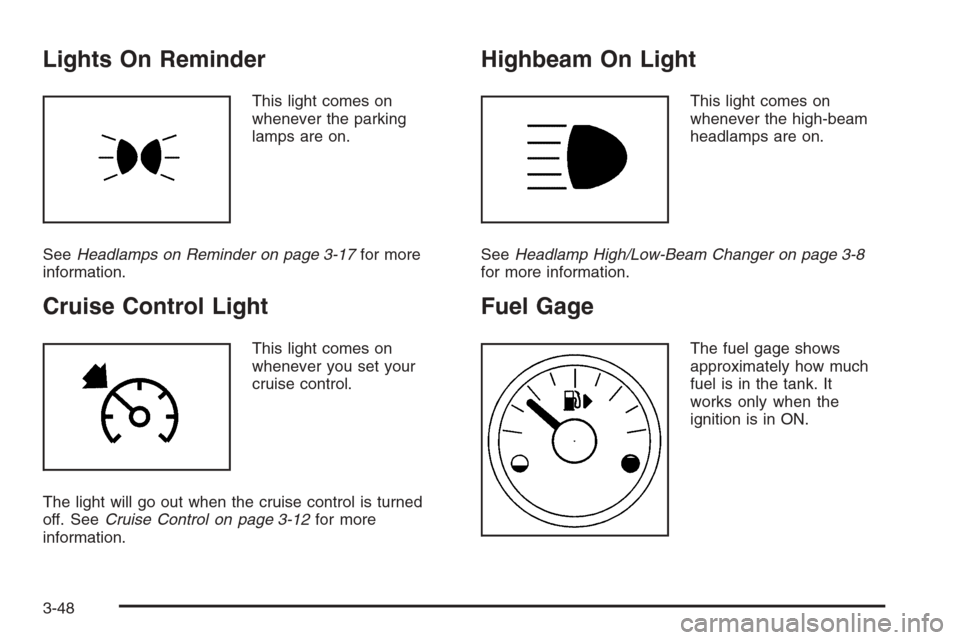
Lights On Reminder
This light comes on
whenever the parking
lamps are on.
SeeHeadlamps on Reminder on page 3-17for more
information.
Cruise Control Light
This light comes on
whenever you set your
cruise control.
The light will go out when the cruise control is turned
off. SeeCruise Control on page 3-12for more
information.
Highbeam On Light
This light comes on
whenever the high-beam
headlamps are on.
SeeHeadlamp High/Low-Beam Changer on page 3-8
for more information.
Fuel Gage
The fuel gage shows
approximately how much
fuel is in the tank. It
works only when the
ignition is in ON.
3-48
Page 201 of 456

To determine the mode to which the vehicle is
programmed or to program the vehicle to a different
mode, use the following procedure:
1. Enter the personalization portion of the SETUP
menu following the instructions listed previously.
2. Turn the TUNE/SEL knob until TWILIGHT DELAY
is highlighted.
3. Press the TUNE/SEL knob to scroll through and
select the available delay settings.
If you choose Mode 1, the exterior lamps will not
illuminate when you exit the vehicle. Only one mode
can be selected at a time.
The mode you selected is now set. You can either exit
the programming mode by following the instructions
later in this section or program the next feature available
on your vehicle.
Lights Flash at Unlock
This feature ashes the exterior lamps when the remote
keyless entry transmitter is used to unlock the vehicle.
The lamps will ash for approximately 20 seconds
unless a door is opened, the ignition is turned to
ACCESSORY, ON, or START, or the remote keyless
entry transmitter is used to lock the vehicle.Programmable Modes
Mode 1:ON
Mode 2:OFF
Before your vehicle was shipped from the factory, it was
programmed to Mode 1. The mode to which the
vehicle was programmed may have been changed since
it left the factory.
To program the vehicle to a different mode, use the
following procedure:
1. Enter the personalization portion of the SETUP
menu following the instructions listed previously.
2. Turn the TUNE/SEL knob until LIGHTS FLASH AT
UNLOCK is highlighted.
3. Press the TUNE/SEL knob to switch back and forth
between on and off.
When the mode is turned on, a check mark will
appear next to the feature name.
The mode you selected is now set. You can either exit
the programming mode by following the instructions
later in this section or program the next feature available
on your vehicle.
3-73
Page 202 of 456

Lights Flash at Lock
This feature allows the exterior lamps to ash once
when the remote keyless entry transmitter is used to
lock the vehicle. All doors must be closed for this feature
to work, and the lamps will not ash if the parking
lamps or headlamps are on.
Programmable Modes
Mode 1:ON
Mode 2:OFF
Before your vehicle was shipped from the factory, it was
programmed to Mode 1. The mode to which the
vehicle was programmed may have been changed since
it left the factory.
To program the vehicle to a different mode, use the
following procedure:
1. Enter the personalization portion of the SETUP
menu following the instructions listed previously.
2. Turn the TUNE/SEL knob until LIGHTS FLASH AT
LOCK is highlighted.
3. Press the TUNE/SEL knob to switch back and forth
between on and off.
When the mode is turned on, a check mark will
appear next to the feature name.You can select this feature by itself, or you can combine
it with Horn Sounds At Lock so that both the lights
ash and the horn chirps when you lock your vehicle.
The mode you selected is now set. You can either
exit the programming mode by following the instructions
later in this section or program the next feature
available on your vehicle.
Horn Sounds at Lock
This feature sounds the horn once when the remote
keyless entry transmitter is used to lock the vehicle. All
doors must be closed for this feature to work.
Programmable Modes
Mode 1:ON
Mode 2:OFF
Before your vehicle was shipped from the factory, it was
programmed to Mode 2. The mode to which the
vehicle was programmed may have been changed since
it left the factory.
3-74
Page 203 of 456

To program the vehicle to a different mode, use the
following procedure:
1. Enter the personalization portion of the SETUP
menu following the instructions listed previously.
2. Turn the TUNE/SEL knob until HORN SOUNDS AT
LOCK is highlighted.
3. Press the TUNE/SEL knob to switch back and forth
between on and off.
When the mode is turned on, a check mark will
appear next to the feature name.
If you select this feature to be on, Lights Flash At Lock
will also be on. You can choose Lights Flash At Lock
by itself, but Horn Sounds At Lock will always have
Lights Flash At Lock enabled when it is selected.
The mode you selected is now set. You can either exit
the programming mode by following the instructions
later in this section or program the next feature available
on your vehicle.
Exterior Lights at Unlock
This feature turns on the exterior lamps when the
remote keyless entry transmitter is used to unlock the
vehicle. The lamps will remain on for about 20 seconds
unless a door is opened, the ignition is turned to
ACCESSORY, ON, or START, or the remote keyless
entry transmitter is used to lock the vehicle.Programmable Modes
Mode 1:ON
Mode 2:OFF
Before your vehicle was shipped from the factory, it
was programmed to Mode 1. The mode to which
the vehicle was programmed may have been changed
since it left the factory.
To program the vehicle to a different mode, use the
following procedure:
1. Enter the personalization portion of the SETUP
menu following the instructions listed previously.
2. Turn the TUNE/SEL knob until EXT. LIGHT AT
UNLOCK is highlighted.
3. Press the TUNE/SEL knob to switch back and forth
between on and off.
When the mode is turned on, a check mark will
appear next to the feature name.
The mode you selected is now set. You can either exit
the programming mode by following the instructions
later in this section or program the next feature available
on your vehicle.
3-75
Page 265 of 456
When you drive over obstacles or rough terrain, keep
a rm grip on the steering wheel. Ruts, troughs, or other
surface features can jerk the wheel out of your hands
if you are not prepared.
When you drive over bumps, rocks, or other obstacles,
your wheels can leave the ground. If this happens,
even with one or two wheels, you cannot control the
vehicle as well or at all.
Because you will be on an unpaved surface, it is
especially important to avoid sudden acceleration,
sudden turns, or sudden braking.
In a way, off-road driving requires a different kind of
alertness from driving on paved roads and highways.
There are no road signs, posted speed limits, or signal
lights. You have to use your own good judgment
about what is safe and what is not.
Drinking and driving can be very dangerous on any
road. And this is certainly true for off-road driving.
At the very time you need special alertness and driving
skills, your reexes, perceptions, and judgment can
be affected by even a small amount of alcohol.
You could have a serious — or even fatal — accident
if you drink and drive or ride with a driver who has been
drinking. SeeDrunken Driving on page 4-3.Driving on Off-Road Hills
Off-road driving often takes you up, down, or across a
hill. Driving safely on hills requires good judgment
and understanding of what your vehicle can and cannot
do. There are some hills that simply cannot be driven,
no matter how well built the vehicle.
{CAUTION:
Many hills are simply too steep for any vehicle.
If you drive up them, you will stall. If you drive
down them, you cannot control your speed. If
you drive across them, you will roll over. You
could be seriously injured or killed. If you have
any doubt about the steepness, do not drive
the hill.
4-21
Page 275 of 456
No one can see as well at night as in the daytime.
But as we get older these differences increase.
A 50-year-old driver may require at least twice as much
light to see the same thing at night as a 20-year-old.
What you do in the daytime can also affect your
night vision. For example, if you spend the day in bright
sunshine you are wise to wear sunglasses. Your
eyes will have less trouble adjusting to night. But if you
are driving, do not wear sunglasses at night. They
may cut down on glare from headlamps, but they also
make a lot of things invisible.
You can be temporarily blinded by approaching
headlamps. It can take a second or two, or even several
seconds, for your eyes to re-adjust to the dark. When
you are faced with severe glare, as from a driver
who does not lower the high beams, or a vehicle with
misaimed headlamps, slow down a little. Avoid
staring directly into the approaching headlamps.Keep the windshield and all the glass on your vehicle
clean — inside and out. Glare at night is made
much worse by dirt on the glass. Even the inside of the
glass can build up a lm caused by dust. Dirty glass
makes lights dazzle and ash more than clean
glass would, making the pupils of your eyes contract
repeatedly.
Remember that the headlamps light up far less of a
roadway when you are in a turn or curve. Keep
your eyes moving; that way, it is easier to pick out dimly
lighted objects. Just as the headlamps should be
checked regularly for proper aim, so should your eyes
be examined regularly. Some drivers suffer from
night blindness — the inability to see in dim light — and
are not even aware of it.
4-31
Page 328 of 456
How to Reset the Change Transmission
Fluid Message and the Transmission
Fluid Indicator
After the transmission uid has been changed, the
Change Trans Fluid message and the transmission uid
life indicator must be reset. To reset the message
and indicator, use one of the following procedures:
Base Audio System
Press the CLR (Clear) button located to the right of the
Driver Information Center (DIC) display to acknowledge
the CHANGE TRANS FLUID message. This will
clear the message from the display and reset it.
To reset the transmission uid life indicator, use the
following steps:
1. Press the up or down arrow on the INFO
(Information) button located to the right of the DIC
display to access the DIC menu.
2. Once the XXX% TRANS FLUID LIFE menu item is
highlighted, press and hold the CLR button.
The percentage will return to 100, and the
transmission uid life indicator will be reset.
3. Repeat the steps if the percentage does not
return to 100.
Navigation System
If your vehicle has a navigation system, see your
navigation system supplement for instructions on how to
reset the transmission uid life indicator.
Engine Coolant
The cooling system in your vehicle is lled with
DEX-COOL®engine coolant. This coolant is designed
to remain in your vehicle for ve years or 150,000 miles
(240 000 km), whichever occurs rst, if you add only
DEX-COOL
®extended life coolant.
The following explains your cooling system and how to
add coolant when it is low. If you have a problem
with engine overheating, seeEngine Overheating on
page 5-27.
A 50/50 mixture of clean, drinkable water and
DEX-COOL
®coolant will:
Give freezing protection down to−34°F (−37°C).
Give boiling protection up to 265°F (129°C).
Protect against rust and corrosion.
Help keep the proper engine temperature.
Let the warning lights and gages work as they
should.
5-24
Page 449 of 456

I
Ignition Positions.............................................2-23
Immobilizer....................................................2-20
Immobilizer Operation......................................2-20
Infants and Young Children, Restraints...............1-33
Ination - Tire Pressure...................................5-59
Instrument Panel
Overview..................................................... 3-4
Instrument Panel (I/P)
Brightness..................................................3-20
Cluster.......................................................3-35
J
Jump Starting.................................................5-40
K
Keyless Entry System....................................... 2-4
Keys............................................................... 2-3
L
Labeling, Tire Sidewall.....................................5-54
Lamps
Exterior Lighting Battery Saver......................3-20
Fog ...........................................................3-19
Reading.....................................................3-21
LATCH System
Child Restraints...........................................1-40
Level Control..................................................4-51
Liftgate, Power...............................................2-12
Light
Airbag Readiness........................................3-38
Anti-Lock Brake System Warning...................3-40
Brake System Warning.................................3-39
Charging System.........................................3-39
Cruise Control.............................................3-48
Engine Coolant Temperature Warning.............3-42
Fog Lamp ..................................................3-47
Highbeam On.............................................3-48
Lights On Reminder.....................................3-48
Malfunction Indicator....................................3-43
Oil Pressure...............................................3-46
Safety Belt Reminder...................................3-37
Security.....................................................3-47
7
Page 456 of 456
V
Vehicle
Control........................................................ 4-6
Damage Warnings........................................... iv
Loading......................................................4-44
Symbols......................................................... iv
Vehicle Data Collection and Event Data
Recorders..................................................7-10
Vehicle Identication
Number (VIN).............................................5-93
Service Parts Identication Label...................5-93
Vehicle Personalization....................................2-54
DIC ...........................................................3-67
Memory Seat and Mirrors.............................2-54
Ventilation Adjustment......................................3-31
Visors...........................................................2-18
W
Warning Lights, Gages and Indicators................3-34
Warnings
DIC Warnings and Messages........................3-59
Hazard Warning Flashers............................... 3-6
Other Warning Devices.................................. 3-6
Safety and Symbols......................................... iii
Vehicle Damage.............................................. ivWheels
Alignment and Tire Balance..........................5-68
Different Size..............................................5-66
Replacement...............................................5-68
Where to Put the Restraint...............................1-40
Windows.......................................................2-15
Power ........................................................2-16
Windshield
Washer......................................................3-10
Washer Fluid..............................................5-36
Wiper Blade Replacement.............................5-51
Wiper Blades, Cleaning................................5-89
Wiper Fuses...............................................5-94
Wipers......................................................... 3-9
Windshield, Rear Washer/Wiper........................3-11
Winter Driving................................................4-39
Wiper Activated Headlamps..............................3-17
X
XM™ Satellite Radio Antenna System..............3-116
Y
Your Vehicle and the Environment....................... 6-2
14