audio CADILLAC SRX 2006 1.G Owner's Manual
[x] Cancel search | Manufacturer: CADILLAC, Model Year: 2006, Model line: SRX, Model: CADILLAC SRX 2006 1.GPages: 456, PDF Size: 2.55 MB
Page 216 of 456
Setting the Tone (Bass/Treble)
To adjust the bass, midrange, and treble, perform the
following steps:
1. Press the TUNE/SEL knob to enter the main menu.
2. Turn the TUNE/SEL knob until BASS-MID-TREBLE
appears on the display.
3. Press the TUNE/SEL knob to enter the tone
settings.
4. Press the TUNE/SEL knob to scroll through the
settings.
5. Turn the TUNE/SEL knob to increase or to decrease
the bass, midrange, or treble. If a station is weak or
noisy, decrease the treble.
6. Press the TUNE/SEL knob to set the adjustment.
7. Press the CLR button to exit the display. To
return to the original display repeatedly press
the CLR button or wait for the display to time out.AUDIO EQUALIZER:This feature allows you to select
customized equalization settings. To choose an
equalization setting (EQ0 through EQ5), perform the
following steps:
1. Press the TUNE/SEL knob to enter the main menu.
2. Turn the TUNE/SEL knob until EQUALIZER
appears on the display.
3. Press the TUNE/SEL knob to set the equalization
setting. The equalization setting will appear on the
display.
4. Press the CLR button to exit the display. To return
to the original display, repeatedly press the CLR
button or wait for the display to time out.
The equalization settings are preset to EQ0 (Normal),
EQ1 (Pop), EQ2 (Rock), EQ3 (Jazz), EQ4 (Talk),
and EQ5 (Country).
3-88
Page 217 of 456
Adjusting the Speakers (Balance/Fade)
To adjust the balance or fade, perform the
following steps:
1. Press the TUNE/SEL knob to enter the main menu.
2. Turn the TUNE/SEL knob until BASS-MID-TREBLE
appears on the display.
3. Press the TUNE/SEL knob to enter the tone
settings.
4. Press the TUNE/SEL knob to scroll to BALANCE or
FADER.
5. Turn the TUNE/SEL knob to adjust the BALANCE
to the right or the left speakers and the FADER to
the front or the rear speakers.
6. Press the TUNE/SEL knob to set the adjustment.
7. Press the CLR button to exit the display. To
return to the original display, repeatedly press
the CLR button or wait for the display to time out.
EQ0 will not appear on the display when in this mode.
Using DSP
Available only with the premium Bose®audio system,
this feature is used to provide a choice of ve different
listening experiences: DSP normal, talk, spacious,
rear seat, and driver seat. DSP can be used while
listening to the radio or the CD player. The radio keeps
separate DSP settings for each band, preset, and
source. To select a DSP choice, perform the
following steps:
1. Press the TUNE/SEL knob to enter the main menu.
2. Turn the TUNE/SEL knob until one of the ve
settings appears on the display.
3. Press the TUNE/SEL knob to select a DSP setting.
4. Press the CLR button to exit the display. To
return to the original display, repeatedly press
the CLR button or wait for the display to time out.
DSP NORMAL:This setting provides the best overall
audio performance for all passengers. DSP NORMAL
will not appear on the display when in this mode.
TALK:This setting should be used when listening to
non-musical material such as news, talk shows,
sports broadcasts, and books on tape. Talk makes
spoken words sound very clear.
3-89
Page 218 of 456
SPACIOUS:This setting is used to make the listening
space seem larger.
REAR SEAT:This setting adjusts the audio to give the
rear seat passenger(s) the best possible sound
quality. Sound quality for the front seat passengers may
be different when this setting is used.
DRIVER SEAT:This setting adjusts the audio to give
the driver the best possible sound quality. Sound quality
for the front and rear seat passenger(s) may be
different when this setting is used.
RDS Messages
ALERT:Alert warns of local and national emergencies.
When, an alert announcement comes on the current
radio station or a related network station, ALERT
will appear on the display. You will hear the
announcement, even if the volume is low or a CD is
playing. If a CD is playing, play will stop during
the announcement. Alert announcements cannot be
turned off. If the radio tunes to a related network station
for the announcement, it will return to the original
station when the announcement is nished.ALERT will not be affected by tests of the emergency
broadcast system. This feature is not supported by
all RDS stations.
MSG (Message):If the current RDS station has a
message, MSG will appear on the display. The message
may display the artist, song title, call in phone numbers,
etc. If the entire message does not appear on the
display, parts of the message will appear every
three seconds until the message is completed. Once
the completed message has been displayed, MSG will
disappear from the display until another new message
is received.
To display the last message, perform the
following steps:
1. Press the TUNE/SEL knob to enter the main menu.
2. Turn the TUNE/SEL knob until CLOCK/INFO
DISP appears on the display.
3. Press the TUNE/SEL knob. The message will
appear on the display.
Once the message has been displayed, MSG will
disappear from the display until another new message
is received.
3-90
Page 221 of 456
XM™ Radio Messages
Radio Display
MessageCondition Action Required
XL (Explicit Language
Channels)XL on the radio display,
after the channel name,
indicates content with
explicit language.These channels, or any others, can be blocked at a
customer’s request, by calling 1-800-852-XMXM (9696).
XM Updating Updating
encryption codeThe encryption code in the receiver is being updated, and
no action is required. This process should take no longer
than 30 seconds.
No XM Signal Loss of signal The system is functioning correctly, but the vehicle is in a
location that is blocking the XM™ signal. When the vehicle
is moved into an open area, the signal should return.
Loading XM Acquiring channel audio
(after 4 second delay)The audio system is acquiring and processing audio and
text data. No action is needed. This message should
disappear shortly.
Channel Off Air Channel not in service This channel is not currently in service. Tune in to another
channel.
Channel Unavail Channel no longer
availableThis previously assigned channel is no longer assigned.
Tune to another station. If this station was one of the
presets, choose another station for that preset button.
No Artist Info Artist Name/Feature not
availableNo artist information is available at this time on this channel.
The system is working properly.
No Title Info Song/Program Title not
availableNo song title information is available at this time on this
channel. The system is working properly.
3-93
Page 223 of 456
Using the Single CD Player
Insert a CD partway into the slot, label side up. The
player will pull it in. If the ignition and the radio are on the
CD will begin playing. A CD may be loaded with the radio
off but it will not start playing until the radio is on.
If the ignition or radio is turned off with a CD in the
player, it will stay in the player. When the ignition
or radio is turned on, the CD will start to play where it
stopped, if it was the last selected audio source.
When the CD is inserted, CD will appear on the display.
As each new track starts to play, the track number
will appear on the display.
The CD player can play the smaller 3 inch (8 cm)
single CDs with an adapter ring. Full-size CDs and the
smaller CDs are loaded in the same manner.
If playing a CD-R, the sound quality may be reduced
due to CD-R quality, the method of recording, the quality
of the music that has been recorded, and the way the
CD-R has been handled. There may be an increase
in skipping, difficulty in nding tracks, and/or difficulty in
loading and ejecting. If these problems occur, check
the bottom surface of the CD. If the surface of the CD is
damaged, such as cracked, broken, or scratched, the
CD will not play properly. If the surface of the CD
is soiled, seeCare of Your CDs and DVDs on
page 3-115for more information.If there is no apparent damage, try a known good CD.
Do not add any label to a CD, it could get caught in the
CD player. If a CD is recorded on a personal computer
and a description label is needed, try labeling the top of
the recorded CD with a marking pen instead.
Notice:If you add any label to a CD, insert more
than one CD into the slot at a time, or attempt
to play scratched or damaged CDs, you could
damage the CD player. When using the CD player,
use only CDs in good condition without any
label, load one CD at a time, and keep the CD player
and the loading slot free of foreign materials,
liquids, and debris.
If an error appears on the display, see “CD Messages”
later in this section.
When a CD is inserted the CD functions will appear on
the display above the rm keys, in place of the preset
stations (if programmed).
F1 PREV (Previous):Press this rm key to go to the
previous track. Press and hold this rm key to
reverse quickly within a track. Release the rm key to
play the passage. The elapsed time of the track
will appear on the display.
F2 NEXT:Press this rm key to go to the next track.
Press and hold this rm key to advance quickly within a
track. Release the rm key to play the passage. The
elapsed time of the track will appear on the display.
3-95
Page 229 of 456
Each set of headphones has a volume knob. To adjust
the volume, adjust this knob.
The transmitters are located above the video display
screen. The headphones will shut off to save battery
power if they lose the signal from the system after about
four minutes. The signal may be lost if the system is
turned off or if the headphones are out of range of the
signal transmitters.
Notice:Do not store the headphones in heat or
direct sunlight. This could damage the headphones
and repairs will not be covered by your warranty.
Keep the headphones stored in a cool, dry place.
Battery Replacement
To change the batteries, do the following:
1. Loosen the screw on the battery compartment door
located on the left side of the headphone earpiece.
2. Replace the two AAA batteries in the compartment.
Make sure that they are installed correctly, using
the diagram on the inside of the battery
compartment.
3. Tighten the screws to close the compartment door.
If the headphones are to be stored for a long period
of time, remove the batteries and keep them in a cool,
dry place.
Stereo RCA Jacks
The RCA jacks are located on the front of the DVD
player faceplate. These jacks allow audio and video
signals to be connected from an auxiliary device such as
a camcorder or a video game unit to the RSE system.
The left jack is for left audio input, the right jack is
for right audio input, and the center jack is used
for video input. The system requires standard RCA
cables, not included, to connect the auxiliary device to
the RCA jacks. Refer to the manufacturer’s instructions
for proper usage.
To use the auxiliary audio and video inputs, connect
an external auxiliary device such as a camcorder to
the RCA jacks and turn on both the auxiliary device
power and the power on the front of the RSE player.
To have use of these jacks, select AUX using the
MODE button on the DVD player faceplate or the
remote control.
3-101
Page 230 of 456
How to Change the Video Format when in
the Auxiliary Mode
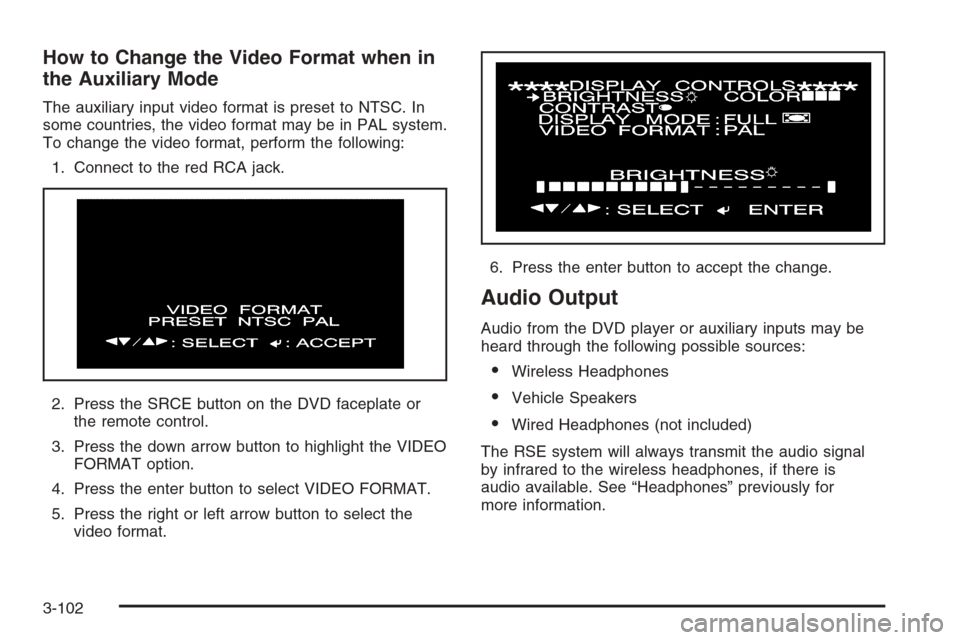
The auxiliary input video format is preset to NTSC. In
some countries, the video format may be in PAL system.
To change the video format, perform the following:
1. Connect to the red RCA jack.
2. Press the SRCE button on the DVD faceplate or
the remote control.
3. Press the down arrow button to highlight the VIDEO
FORMAT option.
4. Press the enter button to select VIDEO FORMAT.
5. Press the right or left arrow button to select the
video format.6. Press the enter button to accept the change.
Audio Output
Audio from the DVD player or auxiliary inputs may be
heard through the following possible sources:
Wireless Headphones
Vehicle Speakers
Wired Headphones (not included)
The RSE system will always transmit the audio signal
by infrared to the wireless headphones, if there is
audio available. See “Headphones” previously for
more information.
3-102
Page 231 of 456
The RSE system is capable of outputting audio to the
vehicle speakers by using the radio. The RSE
system may be selected as an audio source on the
radio if the RSE system power is on. Once the
RSE system is selected as an audio source on the
radio, adjust the speaker volume on the radio, if
necessary. If the RSE system power is not on, the RSE
system will not be an available source on the radio.
Refer to the radio information for the radio that
your vehicle has for more information.
Video Screen
The video screen is located in the oor console. Lift up
the screen by the top or the sides into the full open
position. Adjust the screen’s position as desired. When
the video screen is not in use, close the screen.
The DVD player and display will continue to operate
when the screen is in the up or the down position. The
video screen contains the transmitters for the wireless
headphones and the remote control. If the screen
is in the closed position, the signals will not be available
for the operation of the headphones and the remote
control.
Notice:Avoid directly touching the video screen,
as damage may occur. See “Cleaning the Video
Screen” later in this section for more information.
DVD Player
The DVD player is located in the oor console under the
display. Flip up the display to access the DVD player.
The DVD player can be controlled by the buttons on the
DVD player and by the buttons on the remote control.
See “Remote Control” later in this section for more
information.
The DVD player power may be turned on when the
ignition is in ON, ACCESSORY, or when Retained
Accessory Power (RAP) is active.
The RSE system DVD player is only compatible with
DVDs of the appropriate region code for the country
that the vehicle was sold in. The DVD region code
is printed on the jacket of most DVDs.
The DVD player will also play audio CDs. Not all home
recorded CDs, CD-R or CD-RW formats, will play in
this DVD player.
If an error message appears on the video screen, see
“DVD Messages” later in this section.
3-103
Page 232 of 456
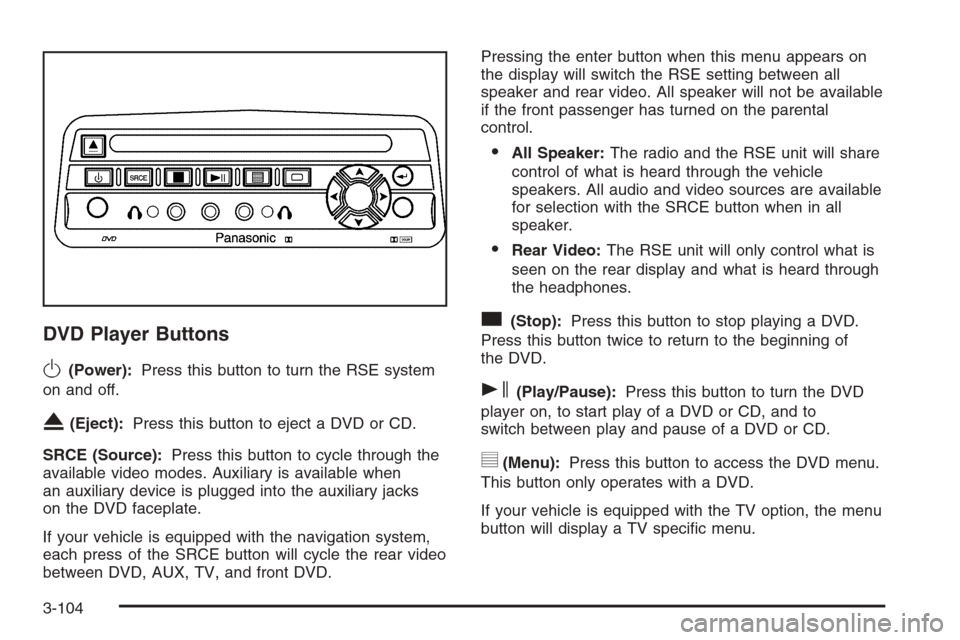
DVD Player Buttons
O(Power):Press this button to turn the RSE system
on and off.
X(Eject):Press this button to eject a DVD or CD.
SRCE (Source):Press this button to cycle through the
available video modes. Auxiliary is available when
an auxiliary device is plugged into the auxiliary jacks
on the DVD faceplate.
If your vehicle is equipped with the navigation system,
each press of the SRCE button will cycle the rear video
between DVD, AUX, TV, and front DVD.Pressing the enter button when this menu appears on
the display will switch the RSE setting between all
speaker and rear video. All speaker will not be available
if the front passenger has turned on the parental
control.
All Speaker:The radio and the RSE unit will share
control of what is heard through the vehicle
speakers. All audio and video sources are available
for selection with the SRCE button when in all
speaker.
Rear Video:The RSE unit will only control what is
seen on the rear display and what is heard through
the headphones.
c(Stop):Press this button to stop playing a DVD.
Press this button twice to return to the beginning of
the DVD.
s(Play/Pause):Press this button to turn the DVD
player on, to start play of a DVD or CD, and to
switch between play and pause of a DVD or CD.
y(Menu):Press this button to access the DVD menu.
This button only operates with a DVD.
If your vehicle is equipped with the TV option, the menu
button will display a TV specic menu.
3-104
Page 233 of 456
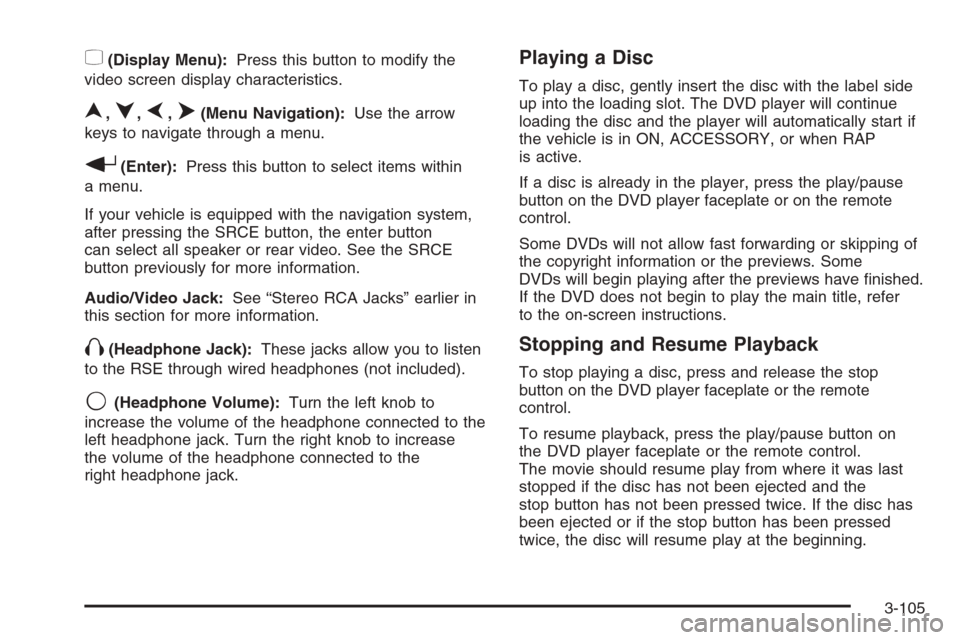
z(Display Menu):Press this button to modify the
video screen display characteristics.
n,q,p,o(Menu Navigation):Use the arrow
keys to navigate through a menu.
r(Enter):Press this button to select items within
a menu.
If your vehicle is equipped with the navigation system,
after pressing the SRCE button, the enter button
can select all speaker or rear video. See the SRCE
button previously for more information.
Audio/Video Jack:See “Stereo RCA Jacks” earlier in
this section for more information.
X(Headphone Jack):These jacks allow you to listen
to the RSE through wired headphones (not included).
9(Headphone Volume):Turn the left knob to
increase the volume of the headphone connected to the
left headphone jack. Turn the right knob to increase
the volume of the headphone connected to the
right headphone jack.
Playing a Disc
To play a disc, gently insert the disc with the label side
up into the loading slot. The DVD player will continue
loading the disc and the player will automatically start if
the vehicle is in ON, ACCESSORY, or when RAP
is active.
If a disc is already in the player, press the play/pause
button on the DVD player faceplate or on the remote
control.
Some DVDs will not allow fast forwarding or skipping of
the copyright information or the previews. Some
DVDs will begin playing after the previews have nished.
If the DVD does not begin to play the main title, refer
to the on-screen instructions.
Stopping and Resume Playback
To stop playing a disc, press and release the stop
button on the DVD player faceplate or the remote
control.
To resume playback, press the play/pause button on
the DVD player faceplate or the remote control.
The movie should resume play from where it was last
stopped if the disc has not been ejected and the
stop button has not been pressed twice. If the disc has
been ejected or if the stop button has been pressed
twice, the disc will resume play at the beginning.
3-105