key CADILLAC SRX 2006 1.G Repair Manual
[x] Cancel search | Manufacturer: CADILLAC, Model Year: 2006, Model line: SRX, Model: CADILLAC SRX 2006 1.GPages: 456, PDF Size: 2.55 MB
Page 233 of 456
z(Display Menu):Press this button to modify the
video screen display characteristics.
n,q,p,o(Menu Navigation):Use the arrow
keys to navigate through a menu.
r(Enter):Press this button to select items within
a menu.
If your vehicle is equipped with the navigation system,
after pressing the SRCE button, the enter button
can select all speaker or rear video. See the SRCE
button previously for more information.
Audio/Video Jack:See “Stereo RCA Jacks” earlier in
this section for more information.
X(Headphone Jack):These jacks allow you to listen
to the RSE through wired headphones (not included).
9(Headphone Volume):Turn the left knob to
increase the volume of the headphone connected to the
left headphone jack. Turn the right knob to increase
the volume of the headphone connected to the
right headphone jack.
Playing a Disc
To play a disc, gently insert the disc with the label side
up into the loading slot. The DVD player will continue
loading the disc and the player will automatically start if
the vehicle is in ON, ACCESSORY, or when RAP
is active.
If a disc is already in the player, press the play/pause
button on the DVD player faceplate or on the remote
control.
Some DVDs will not allow fast forwarding or skipping of
the copyright information or the previews. Some
DVDs will begin playing after the previews have nished.
If the DVD does not begin to play the main title, refer
to the on-screen instructions.
Stopping and Resume Playback
To stop playing a disc, press and release the stop
button on the DVD player faceplate or the remote
control.
To resume playback, press the play/pause button on
the DVD player faceplate or the remote control.
The movie should resume play from where it was last
stopped if the disc has not been ejected and the
stop button has not been pressed twice. If the disc has
been ejected or if the stop button has been pressed
twice, the disc will resume play at the beginning.
3-105
Page 236 of 456
y(Menu):Press this button to access the DVD
main menu.
z(Display):Press this button to switch the video
screen display features: color, contrast, brightness, tint,
and display mode (normal, full, and zoom). Normal
means the horizontal image is not stretched and
the borders at the left and right of the picture are blank.
Full means the horizontal image is stretched across
the display and all of the vertical lines are displayed. No
borders are present. Zoom means the horizontal
image is stretched up and down the display and the
image tends to be stretched at the borders instead of at
the middle. Borders are not displayed. Press the left
or right navigation keys up or down to select the display
mode. Use the Enter key to enter and select
adjustments.
q(Return):Press this button to exit the current
active menu and return to the previous menu. This
button will operate only when a DVD is playing and a
menu is active.
n(Up):Press this button to move up the menu list of
a DVD.
q(Down):Press this button to move down the menu
list of a DVD.
p(Left):Press this button to move to the left of the
menu list of a DVD.
o(Right):Press this button to move to the right of the
menu list of a DVD.
r(Enter):Press this button to select items within
a menu.
e(Audio):Press this button to open a menu that will
operate only when a DVD is playing. The format
and content of this function will vary for each disc.
{(Subtitle):Press this button to open a menu that
will operate only when a DVD is playing. The format and
content of this function will vary for each disc.
3-108
Page 237 of 456
|(Angle):Press this button to open a menu that will
operate only when a DVD is playing. The format and
content of this function will vary for each disc.
u(Next):Press this button to go to the next chapter
or track of a DVD or CD.
t(Previous):Press this button to go to the previous
chapter or track of a DVD or CD.
[(Fast Forward):Press this button to fast forward
through the chapter or track of a DVD or CD. This button
may not work when the DVD is playing the copyright
information or the previews.
r(Rewind):Press this button to rewind through the
chapter or track of a DVD or CD. This button may
not work when the DVD is playing the copyright
information or the previews.
c(Stop):Press this button to stop the play of a DVD
or CD. Press this button twice to return to the beginning
of the DVD.
s(Play/Pause):Press this button to turn the DVD
player on, to start play of a DVD or CD, and to
switch between play and pause of a DVD or CD.
1 through 0 (Numeric Keypad):The numeric keypad
provides the capability of direct chapter, title, and
track number selection.
}10 (Double Digit Entries):Press this button to
select chapter, title, and track numbers greater than 9.
Press this button before inputting the number.
\(Clear):Press this button within three seconds after
inputting a numeric selection, to clear all numeric
inputs.
3-109
Page 248 of 456
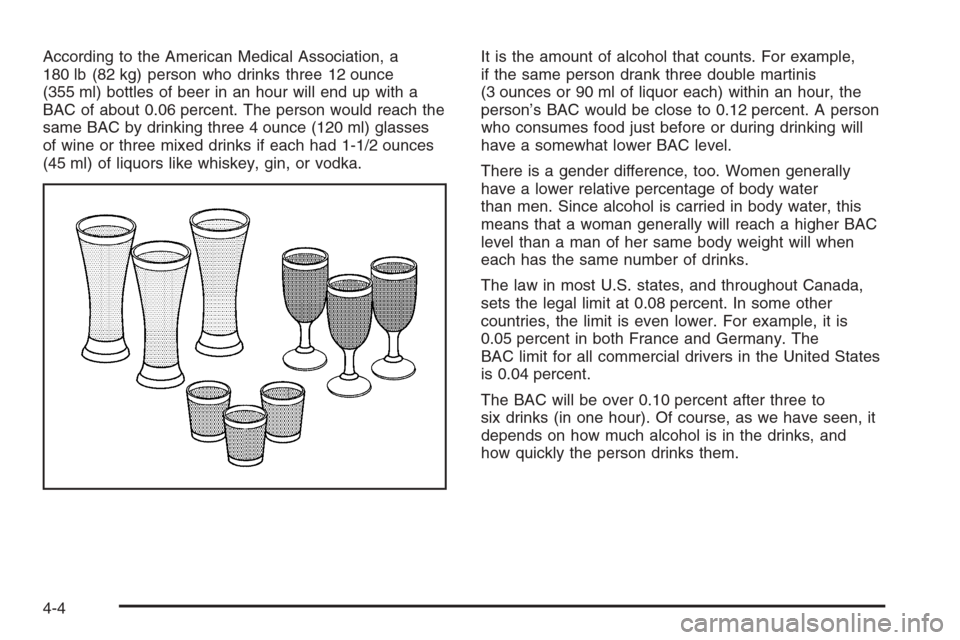
According to the American Medical Association, a
180 lb (82 kg) person who drinks three 12 ounce
(355 ml) bottles of beer in an hour will end up with a
BAC of about 0.06 percent. The person would reach the
same BAC by drinking three 4 ounce (120 ml) glasses
of wine or three mixed drinks if each had 1-1/2 ounces
(45 ml) of liquors like whiskey, gin, or vodka.It is the amount of alcohol that counts. For example,
if the same person drank three double martinis
(3 ounces or 90 ml of liquor each) within an hour, the
person’s BAC would be close to 0.12 percent. A person
who consumes food just before or during drinking will
have a somewhat lower BAC level.
There is a gender difference, too. Women generally
have a lower relative percentage of body water
than men. Since alcohol is carried in body water, this
means that a woman generally will reach a higher BAC
level than a man of her same body weight will when
each has the same number of drinks.
The law in most U.S. states, and throughout Canada,
sets the legal limit at 0.08 percent. In some other
countries, the limit is even lower. For example, it is
0.05 percent in both France and Germany. The
BAC limit for all commercial drivers in the United States
is 0.04 percent.
The BAC will be over 0.10 percent after three to
six drinks (in one hour). Of course, as we have seen, it
depends on how much alcohol is in the drinks, and
how quickly the person drinks them.
4-4
Page 264 of 456
Controlling your vehicle is the key to successful off-road
driving. One of the best ways to control your vehicle
is to control your speed. Here are some things to keep
in mind. At higher speeds:
You approach things faster and you have less time
to scan the terrain for obstacles.
You have less time to react.
You have more vehicle bounce when you drive over
obstacles.
You will need more distance for braking, especially
since you are on an unpaved surface.
{CAUTION:
When you are driving off-road, bouncing and
quick changes in direction can easily throw
you out of position. This could cause you to
lose control and crash. So, whether you are
driving on or off the road, you and your
passengers should wear safety belts.
Scanning the Terrain
Off-road driving can take you over many different kinds
of terrain. You need to be familiar with the terrain
and its many different features. Here are some things to
consider.
Surface Conditions:Off-roading can take you over
hard-packed dirt, gravel, rocks, grass, sand, mud, snow,
or ice. Each of these surfaces affects the steering,
acceleration, and braking of your vehicle in different
ways. Depending upon the kind of surface you are on,
you may experience slipping, sliding, wheel spinning,
delayed acceleration, poor traction, and longer braking
distances.
Surface Obstacles:Unseen or hidden obstacles can
be hazardous. A rock, log, hole, rut, or bump can startle
you if you are not prepared for them. Often these
obstacles are hidden by grass, bushes, snow, or even
the rise and fall of the terrain itself. Here are some
things to consider:
Is the path ahead clear?
Will the surface texture change abruptly up ahead?
Does the travel take you uphill or downhill?
There is more discussion of these subjects later.
Will you have to stop suddenly or change direction
quickly?
4-20
Page 295 of 456
Dolly Towing
Notice:Towing an all-wheel-drive vehicle with all
four wheels on the ground, or even with only two of
its wheels on the ground, will damage drivetrain
components. Do not tow an all-wheel-drive vehicle if
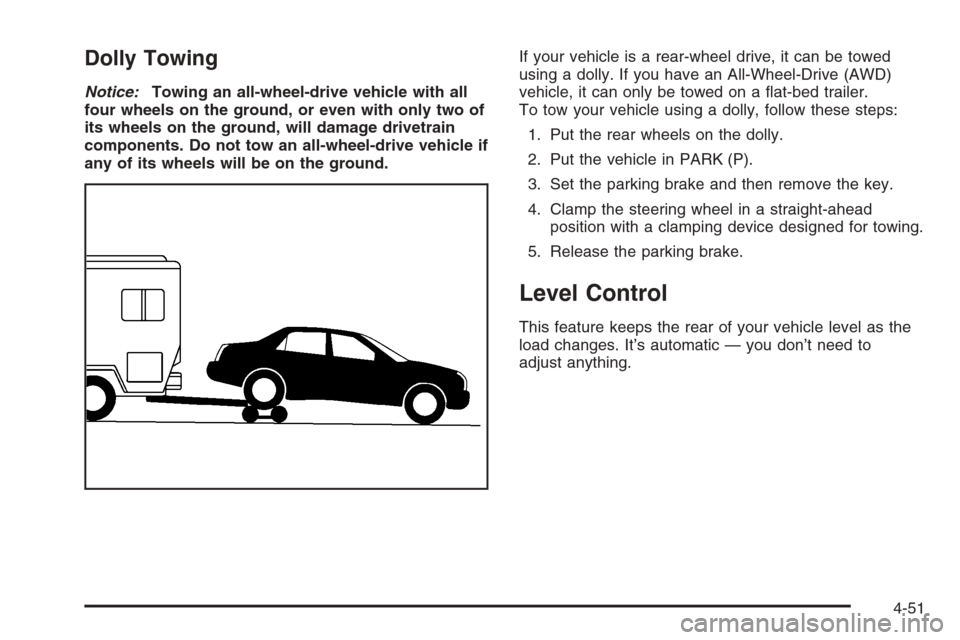
any of its wheels will be on the ground.If your vehicle is a rear-wheel drive, it can be towed
using a dolly. If you have an All-Wheel-Drive (AWD)
vehicle, it can only be towed on a at-bed trailer.
To tow your vehicle using a dolly, follow these steps:
1. Put the rear wheels on the dolly.
2. Put the vehicle in PARK (P).
3. Set the parking brake and then remove the key.
4. Clamp the steering wheel in a straight-ahead
position with a clamping device designed for towing.
5. Release the parking brake.
Level Control
This feature keeps the rear of your vehicle level as the
load changes. It’s automatic — you don’t need to
adjust anything.
4-51
Page 325 of 456

To reset the oil life indicator, use the following steps:
1. Press the up or down arrow on the INFO button
located to the right of the DIC display to access
the DIC menu.
2. Once XXX% ENGINE OIL LIFE menu item is
highlighted, press and hold the CLR button.
The percentage will return to 100, and the oil life
indicator will be reset.
3. Turn the key to OFF.
If the Change Engine Oil message comes back on
when you start your vehicle or the percentage does not
return to 100, the engine oil life system has not reset.
Repeat the procedure.
Navigation System
If you have the navigation system, see “Vehicle
Customization” in the SRX Navigation System Owner
Supplement for how to reset the oil life indicator.
What to Do with Used Oil
Used engine oil contains certain elements that may be
unhealthy for your skin and could even cause cancer.
Do not let used oil stay on your skin for very long. Clean
your skin and nails with soap and water, or a good
hand cleaner. Wash or properly dispose of clothing or
rags containing used engine oil. See the manufacturer’s
warnings about the use and disposal of oil products.
Used oil can be a threat to the environment. If you
change your own oil, be sure to drain all the oil from the
lter before disposal. Never dispose of oil by putting it
in the trash, pouring it on the ground, into sewers, or into
streams or bodies of water. Instead, recycle it by
taking it to a place that collects used oil. If you have a
problem properly disposing of your used oil, ask
your dealer, a service station or a local recycling center
for help.
5-21
Page 339 of 456
Power Steering Fluid
SeeEngine Compartment
Overview on page 5-12for
reservoir location.
When to Check Power Steering Fluid
It is not necessary to regularly check power steering uid
unless you suspect there is a leak in the system or
you hear an unusual noise. A uid loss in this system
could indicate a problem. Have the system inspected
and repaired.
How to Check Power Steering Fluid
To check the power steering uid, do the following:
1. Turn the key off and let the engine compartment
cool down.
2. Wipe the cap and the top of the reservoir clean.
3. Unscrew the cap and wipe the dipstick with a
clean rag.
4. Replace the cap and completely tighten it.
5. Remove the cap again and look at the uid level on
the dipstick.
The level should be within the HOT mark. If necessary,
add only enough uid to bring the level within
the mark.
What to Use
To determine what kind of uid to use, see
Recommended Fluids and Lubricants on page 6-12.
Always use the proper uid. Failure to use the proper
uid can cause leaks and damage hoses and seals.
5-35
Page 366 of 456
Accordingly, when the low tire pressure telltale
illuminates, you should stop and check your tires as
soon as possible, and inate them to the proper
pressure. Driving on a signicantly under-inated tire
causes the tire to overheat and can lead to tire failure.
Under-ination also reduces fuel efficiency and tire
tread life, and may affect the vehicle’s handling
and stopping ability.
Please note that the TPMS is not a substitute for proper
tire maintenance, and it is the driver’s responsibility to
maintain correct tire pressure, even if under-ination has
not reached the level to trigger illumination of the
TPMS low tire pressure telltale.
The Tire and Loading Information Label shows the size
of your vehicle’s original tires and their recommended
cold ination pressures. SeeLoading Your Vehicle
on page 4-44, for the location of the tire and loading
information label. Also seeInation - Tire Pressure
on page 5-59.
Your vehicle’s TPMS can warn you about a low tire
pressure condition but it does not replace normal
tire maintenance. SeeTire Inspection and Rotation on
page 5-64andTires on page 5-52.
Notice:Do not use a tire sealant if your vehicle has
Tire Pressure Monitors. The liquid sealant can
damage the tire pressure monitor sensors.TPM Sensor Identication Codes
Each TPM sensor has a unique identication code. Any
time you replace one or more of the TPM sensors,
the identication codes will need to be matched to the
new tire/wheel position. Each tire/wheel position is
matched to a sensor, by increasing or decreasing the
tire’s air pressure. The sensors are matched to the
tire/wheel positions in the following order: left front (LF),
right front (RF), right rear (RR), and left rear (LR).
You will have one minute to match the rst tire/wheel
position, and ve minutes overall, to match all
four tire/wheel positions. If it takes longer than
one minute, to match the rst tire and wheel, or more
than ve minutes to match all four tire and wheel
positions the matching process stops and you will need
to start over.
The TPM matching process is outlined below:
1. Set the parking brake.
2. Turn the ignition switch to ON with the engine off.
3. Using the Remote Keyless Entry (RKE) transmitter,
lock and unlock the vehicle’s doors.
4. Press the lock and unlock buttons, at the same
time, on the RKE transmitter. A single horn chirp
will sound, indicating that the TPM system is ready,
and the sensor matching process can begin.
5. Start with the driver’s side front tire.
5-62
Page 367 of 456
6. Remove the valve cap from the valve stem.
Activate the TPM sensor by increasing or
decreasing the tire’s air pressure for ve seconds,
or until a horn chirp sounds. The horn chirp,
which may take up to 30 seconds, conrms that the
sensor identication code has been matched to
this tire position. To decrease the tire’s air-pressure
use the pointed end of the valve cap, a pencil-style
air pressure gage, or a key.
7. Proceed to the passenger’s side front tire, and
repeat the procedure in Step 6.
8. Proceed to the passenger’s side rear tire, and
repeat the procedure in Step 6.
9. Proceed to the driver’s side rear tire, and repeat the
procedure in Step 6.
10. After hearing the conrming double horn chirp, for
the left rear tire, exit the matching process by
turning the ignition switch to OFF.
11. Set all four tires to the recommended air pressure
level as indicated on the tire and loading information
label.
12. Put the valve caps back on the valve stems.
The spare tire does not have a TPMS sensor. If you
replace one of the road tires with the spare, the SERVICE
TIRE MONITOR message will be displayed on the
DIC screen. This message should go off once you
re-install the road tire containing the TPMS sensor.The SERVICE TIRE MONITOR message is also
displayed when the TPMS is malfunctioning. One or more
missing or inoperable TPMS sensors will cause the
SERVICE TIRE MONITOR message to be displayed.
See your GM dealer for service.
Federal Communications Commission
(FCC) and Industry and Science Canada
This device complies with Part 15 of the FCC Rules.
Operation is subject to the following two conditions:
1. This device may not cause interference.
2. This device must accept any interference received,
including interference that may cause undesired
operation.
This device complies with RSS-210 of Industry Canada.
Operation is subject to the following two conditions:
1. This device may not cause interference, and
2. This device must accept any interference received,
including interference that may cause undesired
operation of the device.
Changes or modications to this system by other than
an authorized service facility could void authorization to
use this equipment.
5-63