light CADILLAC SRX 2006 1.G Manual PDF
[x] Cancel search | Manufacturer: CADILLAC, Model Year: 2006, Model line: SRX, Model: CADILLAC SRX 2006 1.GPages: 456, PDF Size: 2.55 MB
Page 230 of 456
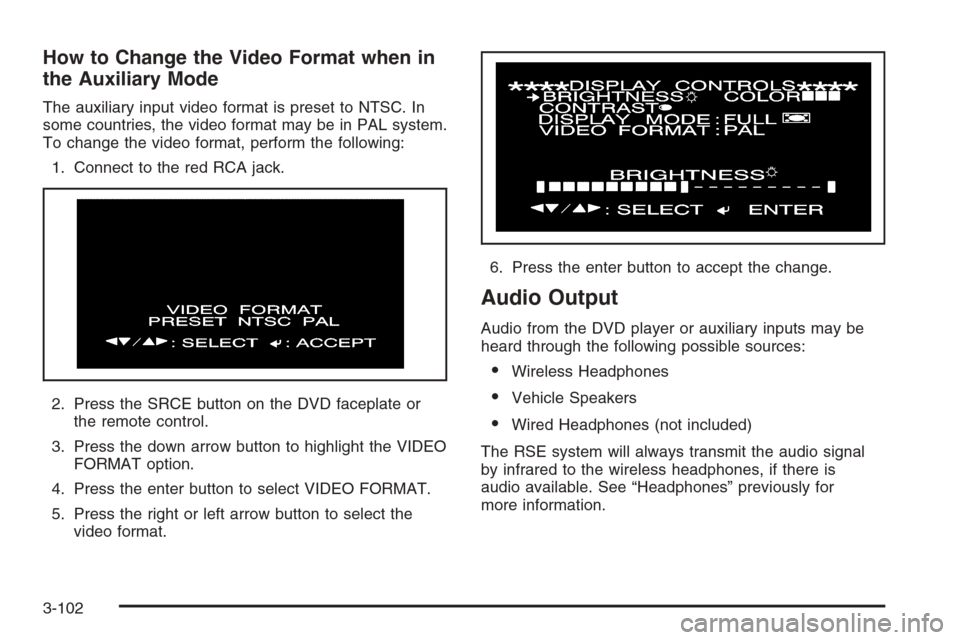
How to Change the Video Format when in
the Auxiliary Mode
The auxiliary input video format is preset to NTSC. In
some countries, the video format may be in PAL system.
To change the video format, perform the following:
1. Connect to the red RCA jack.
2. Press the SRCE button on the DVD faceplate or
the remote control.
3. Press the down arrow button to highlight the VIDEO
FORMAT option.
4. Press the enter button to select VIDEO FORMAT.
5. Press the right or left arrow button to select the
video format.6. Press the enter button to accept the change.
Audio Output
Audio from the DVD player or auxiliary inputs may be
heard through the following possible sources:
Wireless Headphones
Vehicle Speakers
Wired Headphones (not included)
The RSE system will always transmit the audio signal
by infrared to the wireless headphones, if there is
audio available. See “Headphones” previously for
more information.
3-102
Page 234 of 456
Ejecting a Disc
Press the eject button on the DVD player faceplate to
eject the disc. There is not an eject button on the remote
control.
If a disc is ejected from the player, but is not removed,
the DVD player will reload the disc within 25 to
30 seconds. The disc will be stored in the DVD player.
The DVD player will not resume play of the disc
automatically.
DVD Messages
The following errors may be displayed on the video
screen:
Disc Format Error:This message will be displayed
if a disc is inserted upside down, if the disc is not
readable, or if the disc format is not compatible. The
disc will be automatically ejected from the
DVD player.
Load/Eject Error:This message will be displayed if
the disc is not properly loaded or ejected.
Disc Play Error:This message will be displayed if
the DVD player cannot play the disc. Severely
scratched or damaged discs will cause this error.
The disc will be automatically ejected from the
DVD player.
Region Code Error:This message will be
displayed if the region code of the DVD is not
compatible with the DVD player. The disc will be
automatically ejected from the DVD player.
No Disc:This message will be displayed if the
PLAY button is pressed and no disc is in the player.
Parental Control Button:This button is located on the
navigation system screen. Press this button while a
DVD or CD is playing to freeze the video and mute the
audio. The video screen will display Parental Control
ON and the power indicator light on the DVD player will
ash. It will also disable all other button operations
from the remote control and the DVD player, with the
exception of the eject button. The driver will then be able
to gain the attention of the rear seat passengers.
Press this button again to restore normal operation of
the DVD player.
This button may also be used to turn the DVD player
power on and automatically resume play if the vehicle is
in an enabled power mode.
3-106
Page 235 of 456
Remote Control
To use the remote control, aim it at the transmitter
window above the video screen and press the desired
button. Direct sunlight or very bright light may affect
the ability of the RSE system to receive signals from the
remote control. If the remote control does not seem to
be working, the batteries may need to be replaced. See
“Battery Replacement” later in this section.
Objects blocking the line of sight may also affect the
function of the remote control.
Notice:Storing the remote control in a hot area or
in direct sunlight may damage it, and the repairs
will not be covered by your warranty. Keep the
remote control stored in a cool, dry place.
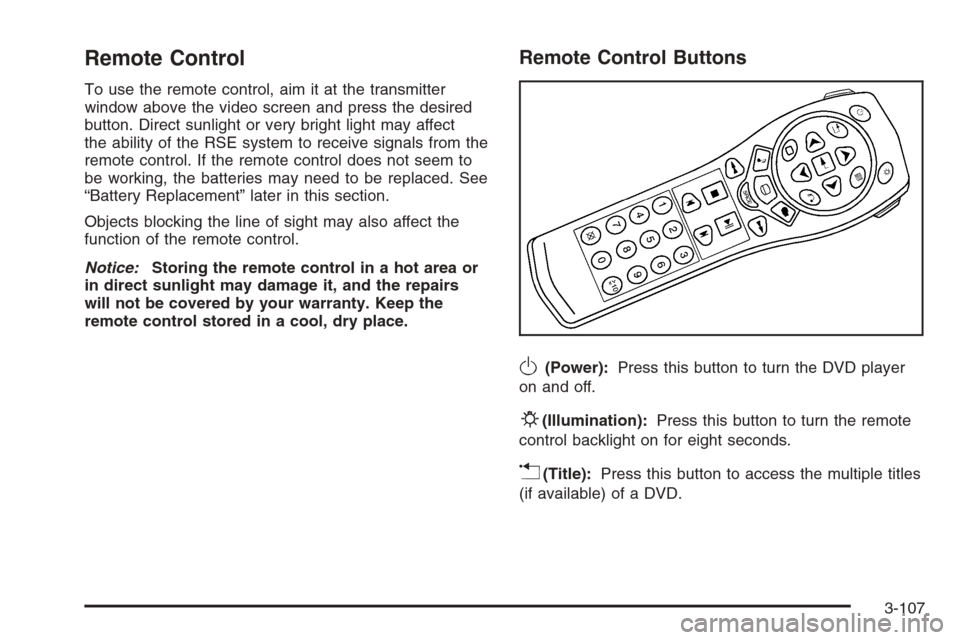
Remote Control Buttons
O(Power):Press this button to turn the DVD player
on and off.
P(Illumination):Press this button to turn the remote
control backlight on for eight seconds.
v(Title):Press this button to access the multiple titles
(if available) of a DVD.
3-107
Page 238 of 456
Battery Replacement
To change the batteries, do the following:
1. Remove the battery compartment door located on
the bottom of the remote control.
2. Replace the two AA batteries in the compartment.
Make sure that they are installed correctly, using
the diagram on the inside of the battery
compartment.
3. Close the battery door securely.
If the remote control is to be stored for a long period of
time, remove the batteries and keep them in a cool,
dry place.
Tips and Troubleshooting Chart
Problem Recommended Action
No power. The ignition might not be
in on or accessory.
The parental control
button might have been
turned on. The power
indicator light will ash.
Disc will not play. The system might be off.
The parental control
button might have been
turned on. The power
indicator light will ash.
The system might be in
auxiliary source mode.
Press the MODE button
to switch between the
DVD player and the
auxiliary source.
The disc is upside down
or is not compatible.
The picture does not ll
the screen. There are
black borders on the
top and bottom or on
both sides or it looks
stretched out.Press the DISP button on
the DVD player or on the
remote control. Change
the display mode.
3-110
Page 239 of 456
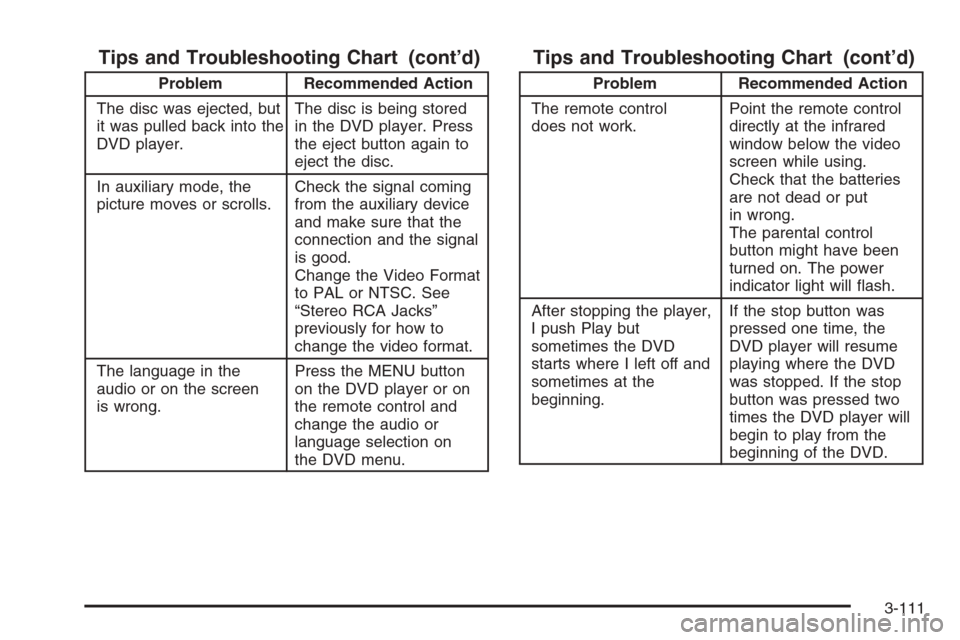
Tips and Troubleshooting Chart (cont’d)
Problem Recommended Action
The disc was ejected, but
it was pulled back into the
DVD player.The disc is being stored
in the DVD player. Press
the eject button again to
eject the disc.
In auxiliary mode, the
picture moves or scrolls.Check the signal coming
from the auxiliary device
and make sure that the
connection and the signal
is good.
Change the Video Format
to PAL or NTSC. See
“Stereo RCA Jacks”
previously for how to
change the video format.
The language in the
audio or on the screen
is wrong.Press the MENU button
on the DVD player or on
the remote control and
change the audio or
language selection on
the DVD menu.
Tips and Troubleshooting Chart (cont’d)
Problem Recommended Action
The remote control
does not work.Point the remote control
directly at the infrared
window below the video
screen while using.
Check that the batteries
are not dead or put
in wrong.
The parental control
button might have been
turned on. The power
indicator light will ash.
After stopping the player,
I push Play but
sometimes the DVD
starts where I left off and
sometimes at the
beginning.If the stop button was
pressed one time, the
DVD player will resume
playing where the DVD
was stopped. If the stop
button was pressed two
times the DVD player will
begin to play from the
beginning of the DVD.
3-111
Page 243 of 456
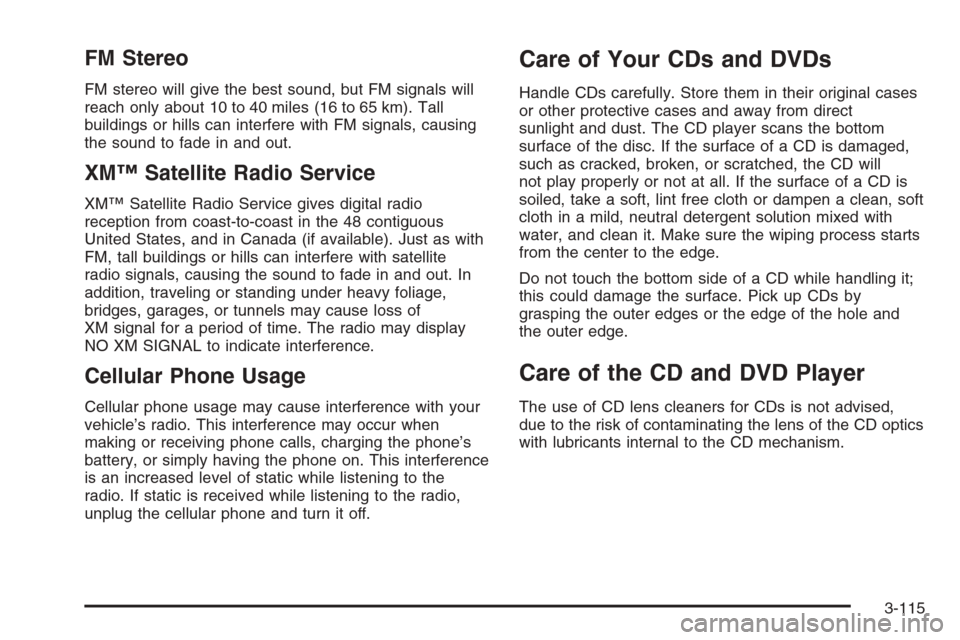
FM Stereo
FM stereo will give the best sound, but FM signals will
reach only about 10 to 40 miles (16 to 65 km). Tall
buildings or hills can interfere with FM signals, causing
the sound to fade in and out.
XM™ Satellite Radio Service
XM™ Satellite Radio Service gives digital radio
reception from coast-to-coast in the 48 contiguous
United States, and in Canada (if available). Just as with
FM, tall buildings or hills can interfere with satellite
radio signals, causing the sound to fade in and out. In
addition, traveling or standing under heavy foliage,
bridges, garages, or tunnels may cause loss of
XM signal for a period of time. The radio may display
NO XM SIGNAL to indicate interference.
Cellular Phone Usage
Cellular phone usage may cause interference with your
vehicle’s radio. This interference may occur when
making or receiving phone calls, charging the phone’s
battery, or simply having the phone on. This interference
is an increased level of static while listening to the
radio. If static is received while listening to the radio,
unplug the cellular phone and turn it off.
Care of Your CDs and DVDs
Handle CDs carefully. Store them in their original cases
or other protective cases and away from direct
sunlight and dust. The CD player scans the bottom
surface of the disc. If the surface of a CD is damaged,
such as cracked, broken, or scratched, the CD will
not play properly or not at all. If the surface of a CD is
soiled, take a soft, lint free cloth or dampen a clean, soft
cloth in a mild, neutral detergent solution mixed with
water, and clean it. Make sure the wiping process starts
from the center to the edge.
Do not touch the bottom side of a CD while handling it;
this could damage the surface. Pick up CDs by
grasping the outer edges or the edge of the hole and
the outer edge.
Care of the CD and DVD Player
The use of CD lens cleaners for CDs is not advised,
due to the risk of contaminating the lens of the CD optics
with lubricants internal to the CD mechanism.
3-115
Page 250 of 456

Control of a Vehicle
You have three systems that make your vehicle go
where you want it to go. They are the brakes, the
steering, and the accelerator. All three systems have
to do their work at the places where the tires meet
the road.
Sometimes, as when you are driving on snow or ice, it
is easy to ask more of those control systems than
the tires and road can provide. That means you can lose
control of your vehicle. SeeStabiliTrak
®System on
page 4-11.
Adding non-GM accessories can affect your vehicle’s
performance. SeeAccessories and Modications
on page 5-3.
Braking
SeeBrake System Warning Light on page 3-39.
Braking action involves perception time and
reaction time.
First, you have to decide to push on the brake pedal.
That is perception time. Then you have to bring up your
foot and do it. That is reaction time.
Average reaction time is about three-fourths of a
second. But that is only an average. It might be less
with one driver and as long as two or three seconds ormore with another. Age, physical condition, alertness,
coordination, and eyesight all play a part. So do alcohol,
drugs, and frustration. But even in three-fourths of a
second, a vehicle moving at 60 mph (100 km/h) travels
66 feet (20 m). That could be a lot of distance in an
emergency, so keeping enough space between
your vehicle and others is important.
And, of course, actual stopping distances vary greatly
with the surface of the road, whether it is pavement
or gravel; the condition of the road, whether it is
wet, dry, or icy; tire tread; the condition of your brakes;
the weight of the vehicle; and the amount of brake
force applied.
Avoid needless heavy braking. Some people drive
in spurts — heavy acceleration followed by heavy
braking — rather than keeping pace with traffic. This is
a mistake. Your brakes may not have time to cool
between hard stops. Your brakes will wear out much
faster if you do a lot of heavy braking. If you keep pace
with the traffic and allow realistic following distances,
you will eliminate a lot of unnecessary braking.
That means better braking and longer brake life.
If your engine ever stops while you are driving, brake
normally but do not pump your brakes. If you do,
the pedal may get harder to push down. If your engine
stops, you will still have some power brake assist.
But you will use it when you brake. Once the power
assist is used up, it may take longer to stop and
the brake pedal will be harder to push.
4-6
Page 251 of 456

Adding non-GM accessories can affect your vehicle’s
performance. SeeAccessories and Modications
on page 5-3.
Anti-Lock Brake System (ABS)
Your vehicle has the Anti-Lock Brake System (ABS), an
advanced electronic braking system that will help
prevent a braking skid.
When you start your engine and begin to drive away,
ABS will check itself. You may hear a momentary motor
or clicking noise while this test is going on. This is
normal.
If there is a problem with
the ABS, this warning light
will stay on. See
Anti-Lock Brake System
Warning Light on
page 3-40.Let us say the road is wet and you are driving safely.
Suddenly, an animal jumps out in front of you. You slam
on the brakes and continue braking. Here is what
happens with ABS:
A computer senses that wheels are slowing down. If
one of the wheels is about to stop rolling, the computer
will separately work the brakes at each front wheel
and at both rear wheels.
4-7
Page 253 of 456

Traction Control System (TCS)
Your vehicle has a traction control system that limits
wheel spin. This is especially useful in slippery
road conditions. On a rear-wheel-drive vehicle, the
system operates if it senses that one or both of the rear
wheels are spinning or beginning to lose traction. On
an All-Wheel-Drive (AWD) vehicle, the system will
operate if it senses that any of the wheels are spinning
or beginning to lose traction. When this happens,
the system brakes the spinning wheel(s) and/or reduces
engine power to limit wheel spin.
You may feel or hear the system working, but this
is normal.
This warning light will
come on to let you know if
there’s a problem with
your traction control
system.SeeTraction Control System (TCS) Warning Light on
page 3-41. When this warning light is on, the system will
not limit wheel spin. Adjust your driving accordingly.
The traction control system automatically comes
on whenever you start your vehicle. To limit wheel spin,
especially in slippery road conditions, you should
always leave the system on. But you can turn the
traction control system off if you ever need to.
Notice:Do not repeatedly brake or accelerate
heavily when the TCS is off. You could damage your
vehicle’s driveline.
When the TCS is switched off on AWD vehicles, you
may still feel the system working. This is normal
and necessary with the AWD hardware on your vehicle.
You should turn the system off if your vehicle ever
gets stuck in sand, mud or snow and rocking the vehicle
is required. SeeRocking Your Vehicle to Get It Out
on page 4-44andIf Your Vehicle is Stuck in Sand, Mud,
Ice, or Snow on page 4-43for more information. See
alsoWinter Driving on page 4-39for information
on using TCS when driving in snowy or icy conditions.
4-9
Page 254 of 456
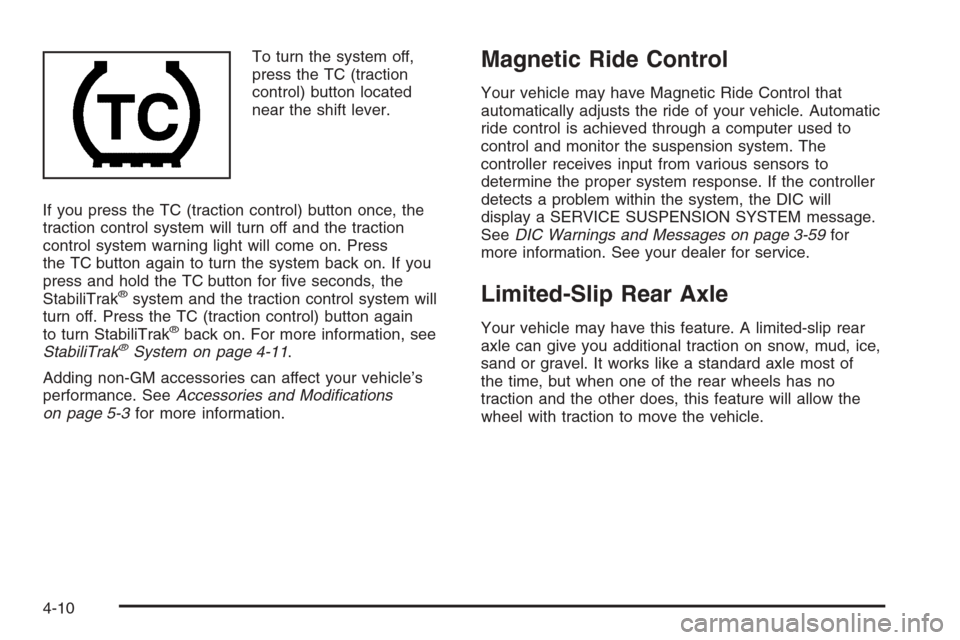
To turn the system off,
press the TC (traction
control) button located
near the shift lever.
If you press the TC (traction control) button once, the
traction control system will turn off and the traction
control system warning light will come on. Press
the TC button again to turn the system back on. If you
press and hold the TC button for ve seconds, the
StabiliTrak
®system and the traction control system will
turn off. Press the TC (traction control) button again
to turn StabiliTrak
®back on. For more information, see
StabiliTrak®System on page 4-11.
Adding non-GM accessories can affect your vehicle’s
performance. SeeAccessories and Modications
on page 5-3for more information.
Magnetic Ride Control
Your vehicle may have Magnetic Ride Control that
automatically adjusts the ride of your vehicle. Automatic
ride control is achieved through a computer used to
control and monitor the suspension system. The
controller receives input from various sensors to
determine the proper system response. If the controller
detects a problem within the system, the DIC will
display a SERVICE SUSPENSION SYSTEM message.
SeeDIC Warnings and Messages on page 3-59for
more information. See your dealer for service.
Limited-Slip Rear Axle
Your vehicle may have this feature. A limited-slip rear
axle can give you additional traction on snow, mud, ice,
sand or gravel. It works like a standard axle most of
the time, but when one of the rear wheels has no
traction and the other does, this feature will allow the
wheel with traction to move the vehicle.
4-10