mirror CADILLAC SRX 2007 1.G Owners Manual
[x] Cancel search | Manufacturer: CADILLAC, Model Year: 2007, Model line: SRX, Model: CADILLAC SRX 2007 1.GPages: 522, PDF Size: 2.71 MB
Page 1 of 522
Seats and Restraint Systems
....................... 7
Front Seats
.............................................. 9
Rear Seats
............................................. 18
Safety Belts
............................................ 22
Child Restraints
...................................... 43
Airbag System
........................................ 70
Restraint System Check
......................... 89
Features and Controls
................................ 91
Keys
....................................................... 93
Doors and Locks
.................................. 100
Windows
............................................... 108
Theft-Deterrent Systems
....................... 112
Starting and Operating Your Vehicle
....... 116
Mirrors
.................................................. 134
OnStar
®System
................................... 139Universal Home Remote System
.......... 143
Storage Areas
...................................... 153
Sunroof
................................................ 156
Instrument Panel
....................................... 161
Instrument Panel Overview
................... 164
Climate Controls
................................... 189
Warning Lights, Gages, and
Indicators
.......................................... 197
Driver Information Center (DIC)
............ 214
Audio System(s)
................................... 240
Driving Your Vehicle
................................. 273
Your Driving, the Road, and
Your Vehicle
..................................... 274
Towing
................................................. 328
2007 Cadillac SRX Owner ManualM
1
Page 7 of 522
Front Seats..................................................... 9
Manual Seats................................................ 9
Power Seats............................................... 10
Power Lumbar............................................. 10
Heated Seats.............................................. 11
Memory Seat and Mirrors............................ 12
Reclining Seatbacks.................................... 14
Head Restraints.......................................... 17
Rear Seats.................................................... 18
Rear Seat Operation................................... 18
Stowable Seat............................................. 20
Safety Belts.................................................. 22
Safety Belts: They Are for Everyone........... 22
Questions and Answers About Safety
Belts........................................................ 26
How to Wear Safety Belts Properly............. 27
Driver Position............................................. 27Safety Belt Use During Pregnancy.............. 35
Right Front Passenger Position................... 36
Rear Seat Passengers................................ 36
Rear Safety Belt Comfort Guides................ 39
Safety Belt Pretensioners............................ 42
Safety Belt Extender................................... 42
Child Restraints............................................ 43
Older Children............................................. 43
Infants and Young Children......................... 46
Child Restraint Systems.............................. 49
Where to Put the Restraint.......................... 53
Lower Anchors and Tethers for Children
(LATCH).................................................. 55
Securing a Child Restraint in a Rear
Seat Position........................................... 62
Securing a Child Restraint in the Right
Front Seat Position.................................. 65
Section 1 Seats and Restraint Systems
7
Page 12 of 522
Memory Seat and Mirrors
If your vehicle has the memory feature, you can
program and recall memory settings for the driver’s
seating and outside rearview mirror driving
positions for up to two drivers. If your vehicle has
the adjustable throttle and brake pedal feature,
you can also program and recall memory settings
for the throttle and brake pedal driving positions.
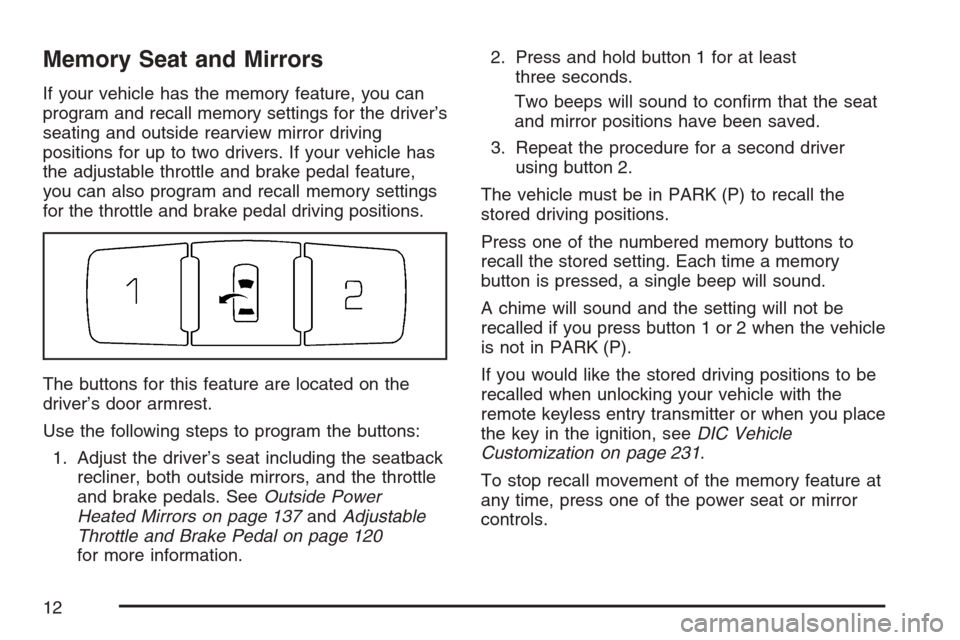
The buttons for this feature are located on the
driver’s door armrest.
Use the following steps to program the buttons:
1. Adjust the driver’s seat including the seatback
recliner, both outside mirrors, and the throttle
and brake pedals. SeeOutside Power
Heated Mirrors on page 137andAdjustable
Throttle and Brake Pedal on page 120
for more information.2. Press and hold button 1 for at least
three seconds.
Two beeps will sound to conrm that the seat
and mirror positions have been saved.
3. Repeat the procedure for a second driver
using button 2.
The vehicle must be in PARK (P) to recall the
stored driving positions.
Press one of the numbered memory buttons to
recall the stored setting. Each time a memory
button is pressed, a single beep will sound.
A chime will sound and the setting will not be
recalled if you press button 1 or 2 when the vehicle
is not in PARK (P).
If you would like the stored driving positions to be
recalled when unlocking your vehicle with the
remote keyless entry transmitter or when you place
the key in the ignition, seeDIC Vehicle
Customization on page 231.
To stop recall movement of the memory feature at
any time, press one of the power seat or mirror
controls.
12
Page 13 of 522
Two personalized exit positions can also be
programmed. Use the following steps to program
exit positions:
1. Press memory seat button 1 or the button with
the unlock symbol on the remote keyless
entry transmitter with the number 1 on
the back to recall the driving position.
2. Adjust the driver’s seat to the desired exit
position.
3. Press and hold the exit button located above
buttons 1 and 2 on the driver’s door armrest
for at least three seconds.
Two beeps will sound to conrm that the exit
position has been saved.
4. Repeat the procedure for a second driver
using memory seat button 2 or the remote
keyless entry transmitter with the number 2 on
the back.To recall the stored exit positions, press and
release the exit button. One beep will sound, and
the seat will move to the previously stored exit
position for the currently identied driver. If an exit
position has not been stored for this driver, the
seat will move all the way back. The position of the
outside mirrors is not stored or recalled for the
exit position.
The vehicle must be in PARK (P) to recall the exit
positions.
A chime will sound and the exit setting will not be
recalled if you press the exit button when the
vehicle is not in PARK (P).
If you would like your stored exit position to be
recalled when unlocking the vehicle with the
remote keyless entry transmitter or when the
ignition is turned off and the driver’s door is
opened, seeDIC Vehicle Customization on
page 231.
13
Page 92 of 522
Mirrors......................................................... 134
Automatic Dimming Rearview Mirror
with OnStar
®.......................................... 134
Automatic Dimming Rearview Mirror
with OnStar
®and Compass................... 134
Outside Power Heated Mirrors................... 137
Outside Automatic Dimming Mirror............. 138
Outside Curb View Assist Mirror................ 138
Outside Convex Mirror............................... 139
OnStar
®System.......................................... 139
Universal Home Remote System................ 143
Universal Home Remote System
(With Three Round LED)....................... 143
Universal Home Remote System
(With One Triangular LED)..................... 143Universal Home Remote System
Operation (With Three Round LED)....... 144
Universal Home Remote System
Operation (With One Triangular LED)....... 150
Storage Areas............................................. 153
Glove Box................................................. 153
Cupholder(s).............................................. 154
Cell Phone Storage Area........................... 154
Center Console Storage Area.................... 154
Luggage Carrier........................................ 154
Cargo Cover............................................. 155
Cargo Management System...................... 155
Sunroof....................................................... 156
Sunroof (Ultra View
®) ................................ 156
Sunroof (Ultra View®Plus)........................ 158
Section 2 Features and Controls
92
Page 112 of 522
Sun Visors
Swing down the primary visor to block out glare.
It can also be detached from the center mount and
moved to the side to block glare from that
direction.
The driver’s sunshade may also have buttons for
a built-in garage door opener. SeeUniversal
Home Remote System (With Three Round LED)
on page 143orUniversal Home Remote
System (With One Triangular LED) on page 143
for more information.
Lighted Visor Vanity Mirror
Pull the visor down and lift the cover. The light will
automatically come on. The light will go out when
you close the cover.
Theft-Deterrent Systems
Vehicle theft is big business, especially in some
cities. Although your vehicle has a number of
theft-deterrent features, we know that nothing we
put on it can make it impossible to steal.
Theft-Deterrent System
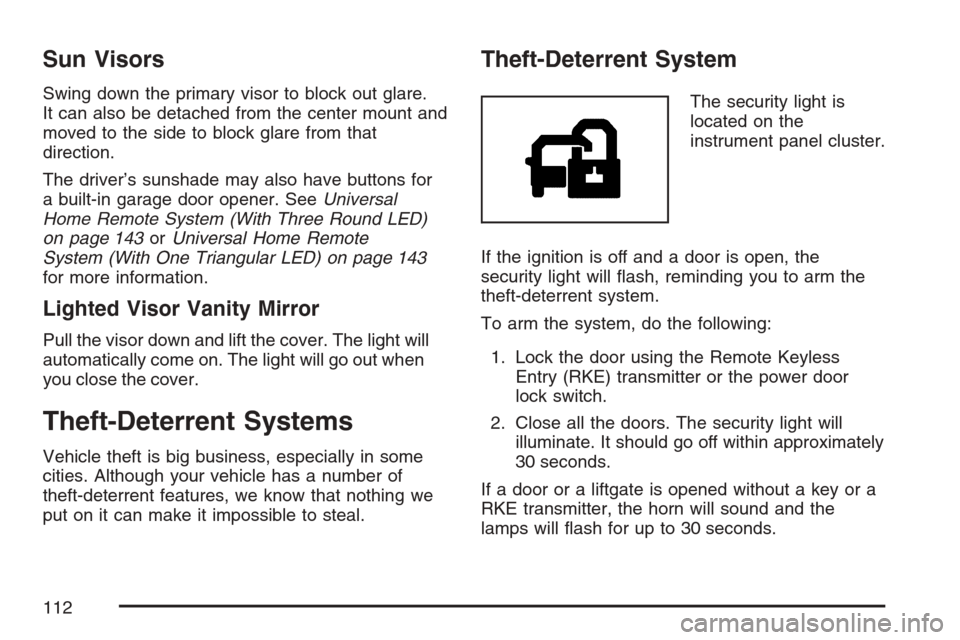
The security light is
located on the
instrument panel cluster.
If the ignition is off and a door is open, the
security light will ash, reminding you to arm the
theft-deterrent system.
To arm the system, do the following:
1. Lock the door using the Remote Keyless
Entry (RKE) transmitter or the power door
lock switch.
2. Close all the doors. The security light will
illuminate. It should go off within approximately
30 seconds.
If a door or a liftgate is opened without a key or a
RKE transmitter, the horn will sound and the
lamps will ash for up to 30 seconds.
112
Page 134 of 522

Mirrors
Automatic Dimming Rearview Mirror
with OnStar
®
The vehicle may have an automatic dimming
inside rearview mirror with OnStar®controls. For
more information about OnStar®, seeOnStar®
System on page 139.
O(On/Off):The on/off button, located on the
lower left side of the mirror, is used for the
automatic dimming functions of the rearview mirror.
Mirror Operation
The automatic dimming feature comes on each
time the vehicle is started. Automatic dimming
reduces the glare of lights from behind the vehicle.
To turn the automatic dimming feature on or off,
press and release the on/off button. The indicator
light will illuminate when this feature is on.
Cleaning the Mirror
When cleaning the mirror, use a paper towel or
similar material dampened with glass cleaner.
Do not spray glass cleaner directly on the mirror
as that may cause the liquid cleaner to enter
the mirror housing.
Automatic Dimming Rearview Mirror
with OnStar
®and Compass
The vehicle may have an automatic dimming
inside rearview mirror with a compass and
OnStar
®controls. For more information about
OnStar®, seeOnStar®System on page 139.
The mirror has an eight-point compass display in
the upper right corner of the mirror. When on,
the compass automatically calibrates, or sets the
driving direction, as the vehicle is driven. If the
vehicle has the navigation option, the direction the
vehicle is facing will be displayed on the
navigation screen.
O(On/Off):The on/off button is located on the
lower left side of the mirror and is used for
the automatic dimming and compass functions of
the rearview mirror.
134
Page 135 of 522
Mirror Operation
The automatic dimming feature comes on each
time the vehicle is started.
To turn the automatic dimming feature on or off,
press the on/off or AUTO button. The indicator light
will illuminate when this feature is on.
Compass Operation
Press the on/off button once to turn the compass
on or off.
When the ignition and the compass feature are
on, the compass will show two character boxes for
approximately two seconds. After two seconds,
the mirror will display the current compass
direction.
Compass Calibration
If after two seconds the display does not show a
compass direction, (N for North for example), there
may be a strong magnetic eld interfering with
the compass. Such interference may be caused by
a magnetic antenna mount, note pad holder, or
similar object. If the letter C appears in the
compass window, the compass may need to be
reset or calibrated.The mirror can be calibrated by driving the vehicle
in circles at 5 mph (8 km/h) or less until the
display reads a direction.
The compass can be calibrated by pressing and
holding the on/off button until a C is shown in
the compass display.
Compass Variance
Compass variance is the difference between
earth’s magnetic north and true geographic north.
If the mirror is not adjusted for compass
variance, the compass could give false readings.
The mirror is set in zone eight upon leaving
the factory. It will be necessary to adjust the
compass to compensate for compass variance if
the vehicle is driven outside zone eight. Under
certain circumstances, such as a long distance,
cross-country trip, it will be necessary to adjust the
compass variance.
135
Page 136 of 522
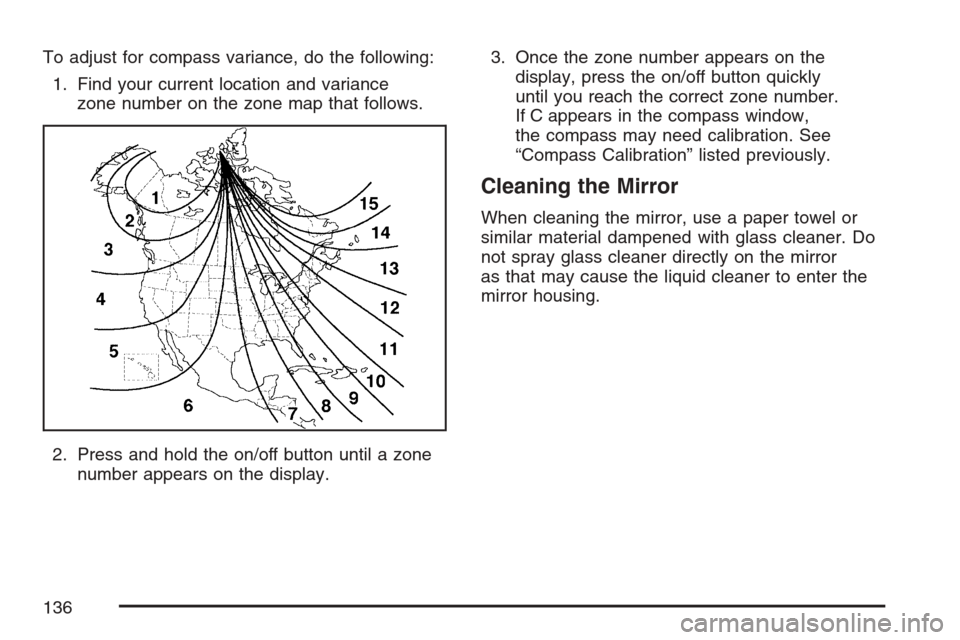
To adjust for compass variance, do the following:
1. Find your current location and variance
zone number on the zone map that follows.
2. Press and hold the on/off button until a zone
number appears on the display.3. Once the zone number appears on the
display, press the on/off button quickly
until you reach the correct zone number.
If C appears in the compass window,
the compass may need calibration. See
“Compass Calibration” listed previously.
Cleaning the Mirror
When cleaning the mirror, use a paper towel or
similar material dampened with glass cleaner. Do
not spray glass cleaner directly on the mirror
as that may cause the liquid cleaner to enter the
mirror housing.
136
Page 137 of 522
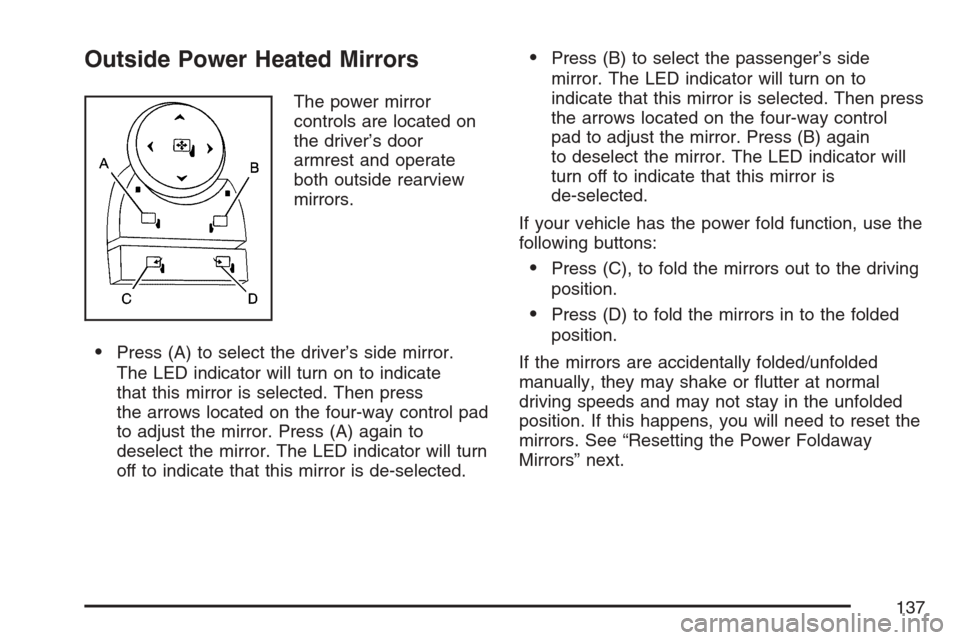
Outside Power Heated Mirrors
The power mirror
controls are located on
the driver’s door
armrest and operate
both outside rearview
mirrors.
Press (A) to select the driver’s side mirror.
The LED indicator will turn on to indicate
that this mirror is selected. Then press
the arrows located on the four-way control pad
to adjust the mirror. Press (A) again to
deselect the mirror. The LED indicator will turn
off to indicate that this mirror is de-selected.
Press (B) to select the passenger’s side
mirror. The LED indicator will turn on to
indicate that this mirror is selected. Then press
the arrows located on the four-way control
pad to adjust the mirror. Press (B) again
to deselect the mirror. The LED indicator will
turn off to indicate that this mirror is
de-selected.
If your vehicle has the power fold function, use the
following buttons:
Press (C), to fold the mirrors out to the driving
position.
Press (D) to fold the mirrors in to the folded
position.
If the mirrors are accidentally folded/unfolded
manually, they may shake or utter at normal
driving speeds and may not stay in the unfolded
position. If this happens, you will need to reset the
mirrors. See “Resetting the Power Foldaway
Mirrors” next.
137