battery CADILLAC SRX 2008 1.G User Guide
[x] Cancel search | Manufacturer: CADILLAC, Model Year: 2008, Model line: SRX, Model: CADILLAC SRX 2008 1.GPages: 448, PDF Size: 5.61 MB
Page 116 of 448
Shifting Out of PARK (P)
This vehicle is equipped with an electronic shift lock
release system. The shift lock release is designed to:
Prevent ignition key removal unless the shift
lever is in PARK (P) with the shift lever button
fully released, and
Prevent movement of the shift lever out of
PARK (P), unless the ignition is in ON/RUN or
ACC/ACCESSORY and the regular brake pedal
is applied.
The shift lock release is always functional except in
the case of an uncharged or low voltage (less than
9 volt) battery.
If your vehicle has an uncharged battery or a battery
with low voltage, try charging or jump starting the
battery. SeeJump Starting on page 5-40for more
information.
To shift out of PARK (P) use the following:
1. Apply the brake pedal.
2. Then press the shift lever button.
3. Move the shift lever to the desired position.If you still are unable to shift out of PARK (P):
1. Fully release the shift lever button.
2. While holding down the brake pedal, press the
shift lever button again.
3. Move the shift lever to the desired position.
If you still cannot move the shift lever from PARK (P),
consult your dealer/retailer or a professional towing
service.
Parking Over Things That Burn
{CAUTION:
Things that can burn could touch hot exhaust
parts under your vehicle and ignite. Do not
park over papers, leaves, dry grass, or other
things that can burn.
2-38
Page 127 of 448

On some vehicles, you may have to hold the button for
a few seconds and give the command “ONSTAR” in
order to activate the OnStar Hands-Free Calling feature.
On some vehicles, the mute button can be used to
dial numbers into voicemail systems, or to dial phone
extensions. See the OnStar Owner’s Guide for
more information.
How OnStar Service Works
In order to provide you with OnStar services, your
vehicle’s OnStar system has the capability of recording
and transmitting vehicle information. This information
is automatically sent to an OnStar Call Center at
the time of an OnStar button press, Emergency button
press or if your airbags or AACN system deploys.
The vehicle information usually includes your GPS
location and, in the event of a crash, additional
information regarding the accident that your vehicle
has been involved in (e.g. the direction from which your
vehicle was hit). When you use the Virtual Advisor
feature of OnStar Hands-Free Calling, your vehicle
also sends OnStar your GPS location so that we can
provide you with location-based services.
OnStar service cannot work unless your vehicle is
in a place where OnStar has an agreement with
a wireless service provider for service in that area.OnStar service also cannot work unless you are in a
place where the wireless service provider OnStar
has hired for that area has coverage, network capacity
and reception when the service is needed, and
technology that is compatible with the OnStar service.
Not all services are available everywhere, particularly
in remote or enclosed areas, or at all times.
OnStar service that involves location information about
your vehicle cannot work unless GPS satellite signals
are unobstructed and available in that place as well.
Your vehicle must have a working electrical system
(including adequate battery power) for the OnStar
equipment to operate. There are other problems OnStar
cannot control that may prevent OnStar from providing
OnStar service to you at any particular time or place.
Some examples are damage to important parts of your
vehicle in an accident, hills, tall buildings, tunnels,
weather or wireless phone network congestion.
Your Responsibility
You may need to increase the volume of your radio
to hear the OnStar advisor. If the light next to the
OnStar buttons is red, this means that your system is
not functioning properly and should be checked by
your dealer/retailer. If the light appears clear (no light
is appearing), your OnStar subscription has expired.
You can always press the OnStar button to conrm
that your OnStar equipment is active.
2-49
Page 131 of 448
Programming Universal Home
Remote — Fixed Code
If you have questions or need help programming
the Universal Home Remote System, call
1-866-572-2728 or go to www.learcar2u.com.
Most garage door openers sold before 1996 are
Fixed Code units.
Programming a garage door opener involves
time-sensitive actions, so read the entire procedure
before you begin. If you do not follow these actions,
the device will time out and you will have to repeat
the procedure.To program up to three devices:
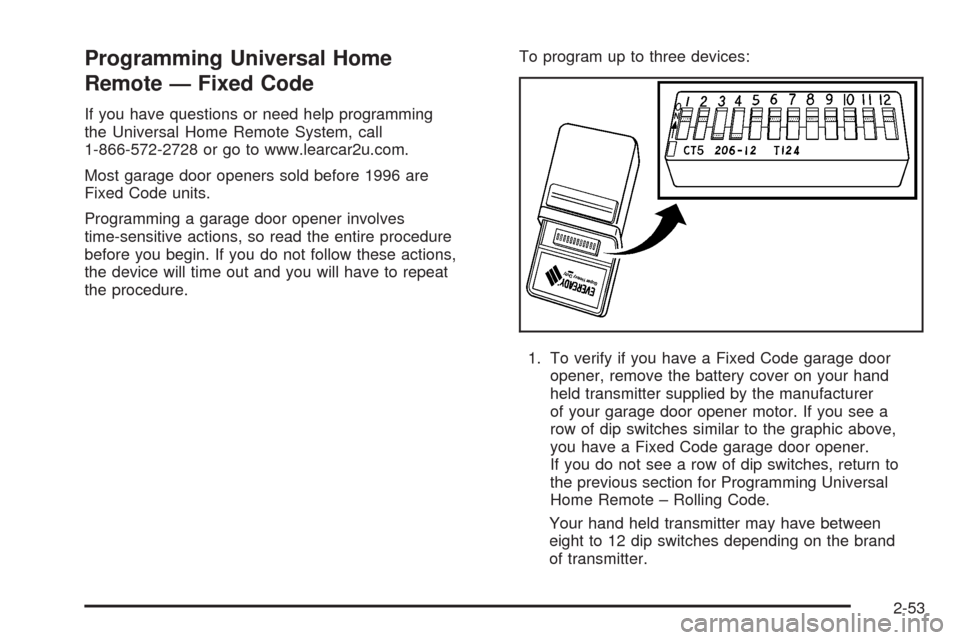
1. To verify if you have a Fixed Code garage door
opener, remove the battery cover on your hand
held transmitter supplied by the manufacturer
of your garage door opener motor. If you see a
row of dip switches similar to the graphic above,
you have a Fixed Code garage door opener.
If you do not see a row of dip switches, return to
the previous section for Programming Universal
Home Remote – Rolling Code.
Your hand held transmitter may have between
eight to 12 dip switches depending on the brand
of transmitter.
2-53
Page 141 of 448
Instrument Panel Overview...............................3-4
Hazard Warning Flashers................................3-6
Other Warning Devices...................................3-6
Horn.............................................................3-6
Tilt Wheel.....................................................3-6
Heated Steering Wheel...................................3-7
Turn Signal/Multifunction Lever.........................3-7
Turn and Lane-Change Signals........................3-8
Headlamp High/Low-Beam Changer..................3-8
Flash-to-Pass.................................................3-9
Windshield Wipers..........................................3-9
Windshield Washer.......................................3-10
Rear Window Wiper/Washer...........................3-11
Headlamp Washer........................................3-12
Cruise Control..............................................3-12
Headlamps..................................................3-16
Wiper Activated Headlamps............................3-16Headlamps on Reminder................................3-16
Daytime Running Lamps (DRL).......................3-17
Fog Lamps..................................................3-18
Exterior Lighting Battery Saver........................3-19
Instrument Panel Brightness...........................3-19
Entry Lighting...............................................3-19
Parade Dimming...........................................3-19
Reading Lamps............................................3-20
Electric Power Management...........................3-20
Accessory Power Outlet(s).............................3-21
Ashtray(s) and Cigarette Lighter......................3-21
Analog Clock...............................................3-22
Climate Controls............................................3-23
Dual Climate Control System..........................3-23
Outlet Adjustment.........................................3-29
Rear Air Conditioning System.........................3-29
Passenger Compartment Air Filter..................
.3-30
Section 3 Instrument Panel
3-1
Page 159 of 448
Exterior Lighting Battery Saver
The exterior lamps turn off about 10 minutes after the
ignition is turned to LOCK/OFF, if the parking lamps or
headlamps have been left on. This protects against
draining the battery. The battery saver does not work if
the headlamps are turned on after the ignition is turned
to LOCK/OFF.
To keep the lamps on for more than 10 minutes, turn
the lamps back on with the exterior lamp control.
Instrument Panel Brightness
Turn the knob clockwise
or counterclockwise to
brighten or dim the
interior lights.
To turn on the dome lamps, turn the knob completely
clockwise as far as it will go. The dome lamps stay
on until they are turned off.
Entry Lighting
The entry lighting system turns on the reading and dome
lamps and the backlighting to the exterior lamp control,
when a door is opened or if the Remote Keyless Entry
(RKE) transmitter unlock button is pressed. If activated
by the RKE, the lighting stays on for about 25 seconds.
The entry lighting system uses the light sensor on the
instrument panel; so it must be dark outside in order for
the lamps to turn on. The lamps turn off about 25 seconds
after the last door is closed. They dim then turn off if the
ignition key is turned to ON/RUN. They immediately turn
off if the power locks are used.
Parade Dimming
This feature does not let the instrument panel
backlight dim during daylight hours while the key is in
the ignition and the headlamps are on. Parade dimming
automatically works with the light sensor, located on top
of the dashboard. If it is dark enough outside and the
parking lamps are on, the backlight on the instrument
panel can be adjusted by turning the instrument panel
brightness knob clockwise or counterclockwise to
brighten or dim the lighting. SeeInstrument Panel
Brightness on page 3-19.
3-19
Page 160 of 448
Reading Lamps
The reading lamps are located on the overhead console.
These lamps come on automatically when any door is
opened.
For manual operation, press the button next to each
lamp to turn it on or off.
If the reading lamps are left on, they automatically shut
off 10 minutes after the ignition has been turned off.
Electric Power Management
The vehicle has Electric Power Management (EPM)
that estimates the battery’s temperature and state
of charge. It then adjusts the voltage for best
performance and extended life of the battery.
When the battery’s state of charge is low, the voltage is
raised slightly to quickly put the charge back in. When the
state of charge is high, the voltage is lowered slightly to
prevent overcharging. If the vehicle has a voltmeter gage
or a voltage display on the Driver Information Center
(DIC), you may see the voltage move up or down. This is
normal. If there is a problem, an alert will be displayed.The battery can be discharged at idle if the electrical
loads are very high. This is true for all vehicles.
This is because the generator (alternator) may not be
spinning fast enough at idle to produce all the power that
is needed for very high electrical loads.
A high electrical load occurs when several of the
following loads are on: headlamps, high beams, fog
lamps, rear window defogger, climate control fan at
high speed, heated seats, engine cooling fans, trailer
loads, and loads plugged into accessory power outlets.
EPM works to prevent excessive discharge of the
battery. It does this by balancing the generator’s output
and the vehicle’s electrical needs. It can increase engine
idle speed to generate more power, whenever needed.
It can temporarily reduce the power demands of some
accessories.
Normally, these actions occur in steps or levels, without
being noticeable. In rare cases at the highest levels of
corrective action, this action may be noticeable to the
driver. If so, a Driver Information Center (DIC) message
might be displayed, such as Battery Saver Active or
Service Battery Charging System. If this message is
displayed, it is recommended that the driver reduce the
electrical loads as much as possible. SeeDIC Warnings
and Messages on page 3-53.
3-20
Page 161 of 448
Accessory Power Outlet(s)
The accessory power outlets can be used to plug in
electrical equipment such as a cellular telephone,
CB radio, etc.
The vehicle has one outlet in front of the center
console on the instrument panel and one in the rear
compartment. Your vehicle may have one or two outlets
in the rear of the center console.
There is a small cap that must be removed to access the
accessory power outlet. When not using the outlet be
sure to cover it with the protective cap.
Notice:Leaving electrical equipment plugged in
for an extended period of time while the vehicle is
off will drain the battery. Power is always supplied
to the outlets. Always unplug electrical equipment
when not in use and do not plug in equipment
that exceeds the maximum 20 ampere rating.
Certain accessory power plugs may not be compatible
to the accessory power outlet and could result in blown
vehicle or adapter fuses. If you experience a problem,
see your dealer for additional information on the
accessory power outlets.Notice:Adding any electrical equipment to your
vehicle may damage it or keep other components
from working as they should. The repairs would not
be covered by your warranty. Do not use equipment
exceeding maximum amperage rating of 20 amperes.
Check with your dealer/retailer before adding
electrical equipment.
Follow the proper installation instructions that are
included with any electrical equipment you install.
Notice:Improper use of the power outlet can
cause damage not covered by your warranty.
Do not hang any type of accessory or accessory
bracket from the plug because the power outlets
are designed for accessory power plugs only.
Ashtray(s) and Cigarette Lighter
Your vehicle may have an ashtray and cigarette lighter.
Notice:If you put papers, pins, or other ammable
items in the ashtray, hot cigarettes or other smoking
materials could ignite them and possibly damage
your vehicle. Never put ammable items in the
ashtray.
3-21
Page 184 of 448
Emissions Inspection and Maintenance
Programs
Some state/provincial and local governments have or
might begin programs to inspect the emission control
equipment on your vehicle. Failure to pass this
inspection could prevent you from getting a vehicle
registration.
Here are some things you need to know to help your
vehicle pass an inspection:
Your vehicle will not pass this inspection if the check
engine light is on or not working properly.
Your vehicle will not pass this inspection if the OBD
(on-board diagnostic) system determines that critical
emission control systems have not been completely
diagnosed by the system. The vehicle would be
considered not ready for inspection. This can happen if
you have recently replaced the battery or if the battery
has run down. The diagnostic system is designed to
evaluate critical emission control systems during normal
driving. This can take several days of routine driving. If
you have done this and your vehicle still does not pass
the inspection for lack of OBD system readiness, your
dealer/retailer can prepare the vehicle for inspection.
Oil Pressure Light
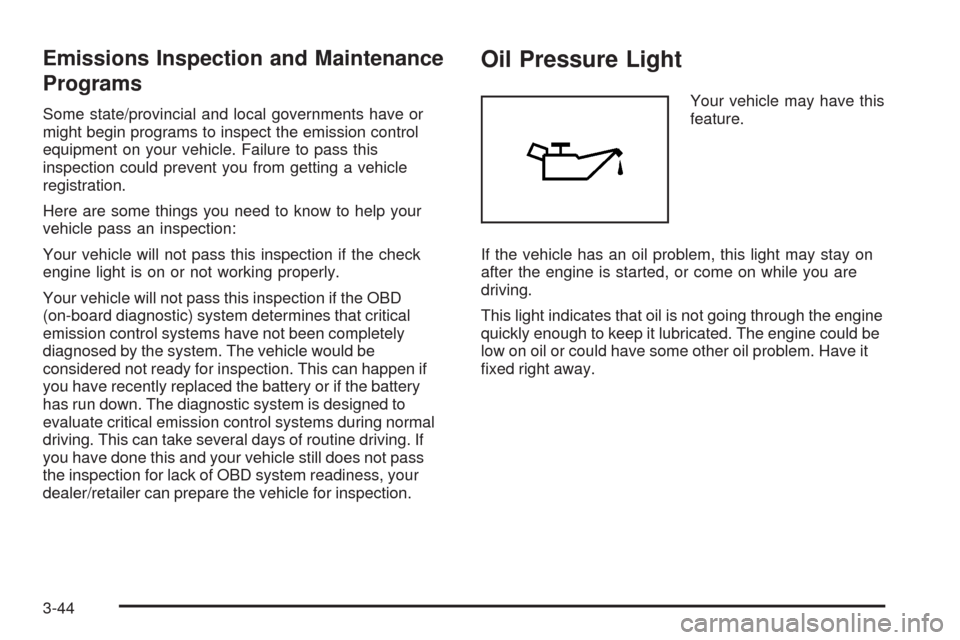
Your vehicle may have this
feature.
If the vehicle has an oil problem, this light may stay on
after the engine is started, or come on while you are
driving.
This light indicates that oil is not going through the engine
quickly enough to keep it lubricated. The engine could be
low on oil or could have some other oil problem. Have it
xed right away.
3-44
Page 190 of 448
TIMER ON/OFF
This display can be used like a stopwatch. You can
record the time it takes to travel from one point to
another. To access the timer, press the trip/fuel
button until 00:00:00 TIMER OFF displays.
To turn on the timer, press the set/reset button until
TIMER ON displays. The timer will then start.
To turn off the timer, press the set/reset button again
until TIMER OFF displays. The timer will stop and
display the end timing value.
To reset the timer, press and hold the set/reset button
after the timer has been stopped. The display will return
to zero.
AVERAGE SPEED
This display shows the average speed of the vehicle in
either miles per hour (mph) or kilometers per hour (km/h).
This average is calculated based on the various vehicle
speeds recorded since the last reset of this display. To
reset this display, press the set/reset button. The display
will return to zero.
BATTERY VOLTAGE
This display shows the current battery voltage. Your
vehicle’s charging system regulates voltage based
on the state of the battery. The battery voltage may
uctuate when viewing this information on the DIC.
This is normal.
If there is a problem with the battery charging system, the
charging system light will illuminate and/or the DIC will
display a message. SeeCharging System Light on
page 3-37,DIC Warnings and Messages on page 3-53
andElectric Power Management on page 3-20for more
information.
Blank Display
This display shows no information.
3-50
Page 193 of 448
DIC Warnings and Messages
These messages appear if there is a problem detected
in one of your vehicle’s systems.
You must acknowledge a message to clear it from the
screen for further use. To clear a message, press
the set/reset button.
Be sure to take any message that appears on the
screen seriously and remember that clearing the
message only makes the message disappear,
not the problem.
AUTOMATIC LIGHT CONTROL OFF
This message displays when the automatic headlamps
are turned off.
AUTOMATIC LIGHT CONTROL ON
This message displays when the automatic headlamps
are turned on.
BATTERY SAVER ACTIVE
This message displays when the system detects that the
battery voltage is dropping below expected levels. The
battery saver system starts reducing certain features of
the vehicle that you may be able to notice. At the point
that the features are disabled, this message is displayed.
It means that the vehicle is trying to save the charge in
the battery.
Turn off all unnecessary accessories to allow the battery
to recharge.
The normal battery voltage range is 11.5 to 15.5 volts.
You can monitor battery voltage on the Driver Information
Center (DIC) by pressing the trip/fuel button until
BATTERY VOLTAGE is displayed.
CHANGE ENGINE OIL SOON
When this message displays, it means that service is
required for your vehicle. See your dealer/retailer.
SeeEngine Oil on page 5-16andScheduled
Maintenance on page 6-4for more information.
When you reset the CHANGE ENGINE OIL SOON
message by clearing it from the display, you still must
reset the engine oil life system separately. For more
information on resetting the engine oil life system,
seeEngine Oil Life System on page 5-19.
3-53