remote control CADILLAC SRX 2009 1.G User Guide
[x] Cancel search | Manufacturer: CADILLAC, Model Year: 2009, Model line: SRX, Model: CADILLAC SRX 2009 1.GPages: 442, PDF Size: 2.42 MB
Page 128 of 442
Be sure to keep the original remote control
transmitter for use in other vehicles, as well as,
for future programming. You only need the original
remote control transmitter for Fixed Code programming.
It is also recommended that upon the sale or lease
termination of the vehicle, the programmed buttons
should be erased for security purposes. See “Erasing
Universal Home Remote Buttons” later in this section.
When programming a garage door, it is advised to
park outside of the garage. Be sure that people
and objects are clear of the garage door or security
device you are programming.
Programming Universal Home
Remote — Rolling Code
If you have questions or need help programming the
Universal Home Remote System, call 1-866-572-2728
or go to learcar2u.com.
Most garage door openers sold after 1996 are Rolling
Code units.Programming a garage door opener involves
time-sensitive actions, so read the entire procedure
before you begin. If you do not follow these actions,
the device will time out and you will have to repeat
the procedure.
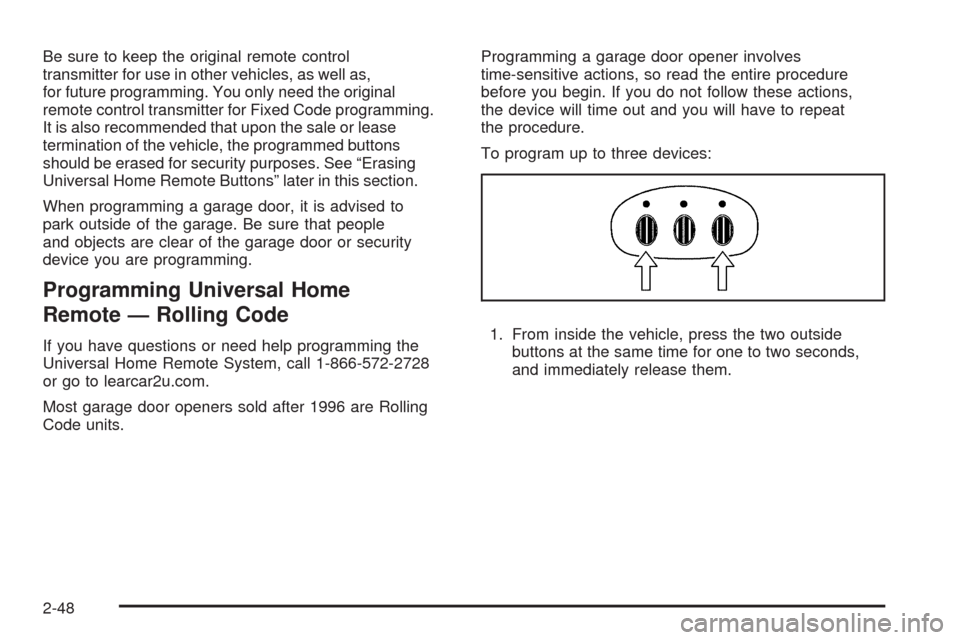
To program up to three devices:
1. From inside the vehicle, press the two outside
buttons at the same time for one to two seconds,
and immediately release them.
2-48
Page 129 of 442
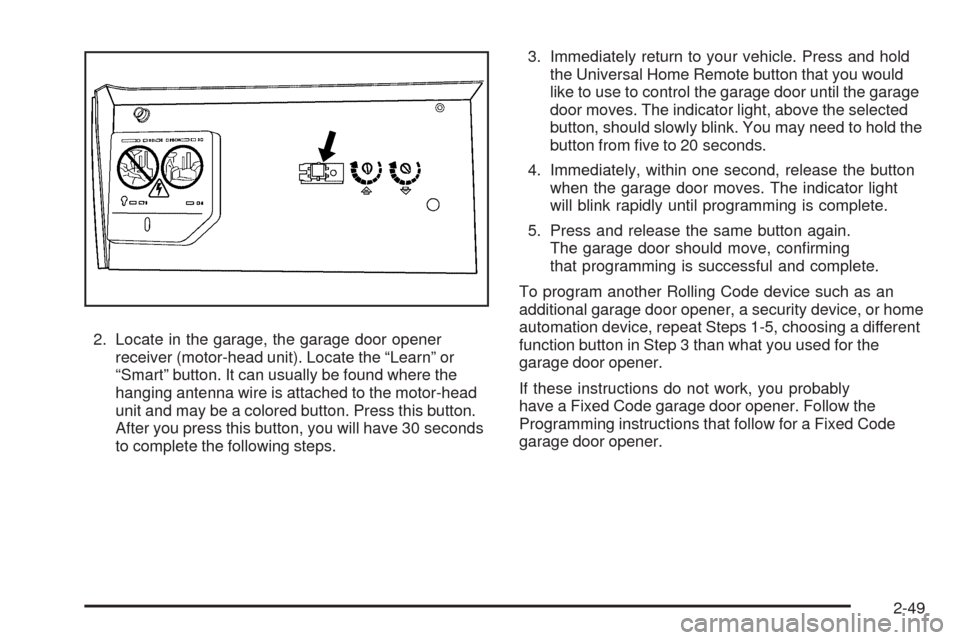
2. Locate in the garage, the garage door opener
receiver (motor-head unit). Locate the “Learn” or
“Smart” button. It can usually be found where the
hanging antenna wire is attached to the motor-head
unit and may be a colored button. Press this button.
After you press this button, you will have 30 seconds
to complete the following steps.3. Immediately return to your vehicle. Press and hold
the Universal Home Remote button that you would
like to use to control the garage door until the garage
door moves. The indicator light, above the selected
button, should slowly blink. You may need to hold the
button from ve to 20 seconds.
4. Immediately, within one second, release the button
when the garage door moves. The indicator light
will blink rapidly until programming is complete.
5. Press and release the same button again.
The garage door should move, conrming
that programming is successful and complete.
To program another Rolling Code device such as an
additional garage door opener, a security device, or home
automation device, repeat Steps 1-5, choosing a different
function button in Step 3 than what you used for the
garage door opener.
If these instructions do not work, you probably
have a Fixed Code garage door opener. Follow the
Programming instructions that follow for a Fixed Code
garage door opener.
2-49
Page 133 of 442
5. After entering all of the switch positions, again,
rmly press and release all three buttons at the
same time. The indicator lights will turn on.
6. Press and hold the button you would like to use to
control the garage door until the garage door moves.
The indicator light above the selected button should
slowly blink. You may need to hold the button from
ve to 55 seconds.
7. Immediately release the button when the garage
door moves. The indicator light will blink rapidly
until programming is complete.
8. Press and release the same button again.
The garage door should move, conrming
that programming is successful and complete.
To program another Fixed Code device such as an
additional garage door opener, a security device, or home
automation device, repeat Steps 1-8, choosing a different
button in Step 6 than what you used for the garage door
opener.
Using Universal Home Remote
Press and hold the appropriate button for at least
half of a second. The indicator light will come on while
the signal is being transmitted.
Reprogramming Universal Home
Remote Buttons
You can reprogram any of the three buttons by repeating
the instructions.
Erasing Universal Home Remote
Buttons
You should erase the programmed buttons when you
sell or terminate your lease.
To erase either Rolling Code or Fixed Code on the
Universal Home Remote device:
1. Press and hold the two outside buttons at the
same time for approximately 20 seconds, until
the indicator lights, located directly above the
buttons, begin to blink rapidly.
2. Once the indicator lights begin to blink, release both
buttons. The codes from all buttons will be erased.
For help or information on the Universal Home Remote
System, call the customer assistance phone number
underCustomer Assistance Offices on page 7-6.
2-53
Page 193 of 442
REAR ACCESS OPEN
This message displays when the liftgate is not closed
completely. Make sure that the liftgate is closed
completely.
REMOTE KEY LEARNING ACTIVE
This message displays while you are matching a
Remote Keyless Entry (RKE) transmitter to your vehicle.
See “Matching Transmitter(s) to Your Vehicle” under
Remote Keyless Entry (RKE) System Operation
on page 2-4andDIC Operation and Displays on
page 3-46for more information.
REPLACE BATTERY IN REMOTE KEY
This message displays when the battery in the Remote
Keyless Entry (RKE) transmitter needs to be replaced.
To replace the battery, see “Battery Replacement” under
Remote Keyless Entry (RKE) System Operation on
page 2-4.
RIGHT REAR DOOR OPEN
This message displays when the passenger side rear
door is not closed completely. Make sure that the door is
closed completely.
SERVICE AIR BAG
This message displays when there is a problem with the
airbag system. Have your vehicle serviced by your
dealer/retailer immediately. SeeAirbag Readiness Light
on page 3-32for more information.
SERVICE A/C SYSTEM
This message displays when the air delivery mode
door or the electronic sensors that control the air
conditioning and heating systems are no longer working.
Have the climate control system serviced by your
dealer/retailer if you notice a drop in heating and air
conditioning efficiency.
SERVICE BATTERY CHARGING
SYSTEM
This message displays when there is a problem with the
generator and battery charging systems. Driving with
this problem could drain the battery. Turn off all
unnecessary accessories. Stop and turn off the vehicle
as soon as it is safe to do so. Have the electrical
system checked by your dealer/retailer. Under certain
conditions, the charging system light may also turn on in
the instrument panel cluster. SeeCharging System
Light on page 3-35for more information.
3-55
Page 319 of 442
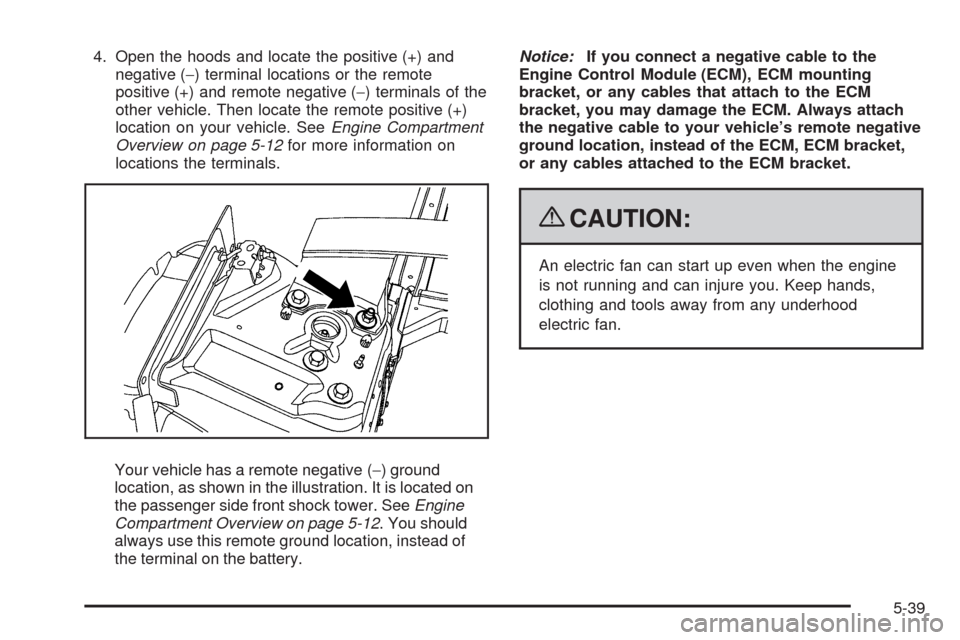
4. Open the hoods and locate the positive (+) and
negative (−) terminal locations or the remote
positive (+) and remote negative (−) terminals of the
other vehicle. Then locate the remote positive (+)
location on your vehicle. SeeEngine Compartment
Overview on page 5-12for more information on
locations the terminals.
Your vehicle has a remote negative (−) ground
location, as shown in the illustration. It is located on
the passenger side front shock tower. SeeEngine
Compartment Overview on page 5-12. You should
always use this remote ground location, instead of
the terminal on the battery.Notice:If you connect a negative cable to the
Engine Control Module (ECM), ECM mounting
bracket, or any cables that attach to the ECM
bracket, you may damage the ECM. Always attach
the negative cable to your vehicle’s remote negative
ground location, instead of the ECM, ECM bracket,
or any cables attached to the ECM bracket.
{CAUTION:
An electric fan can start up even when the engine
is not running and can injure you. Keep hands,
clothing and tools away from any underhood
electric fan.
5-39
Page 385 of 442
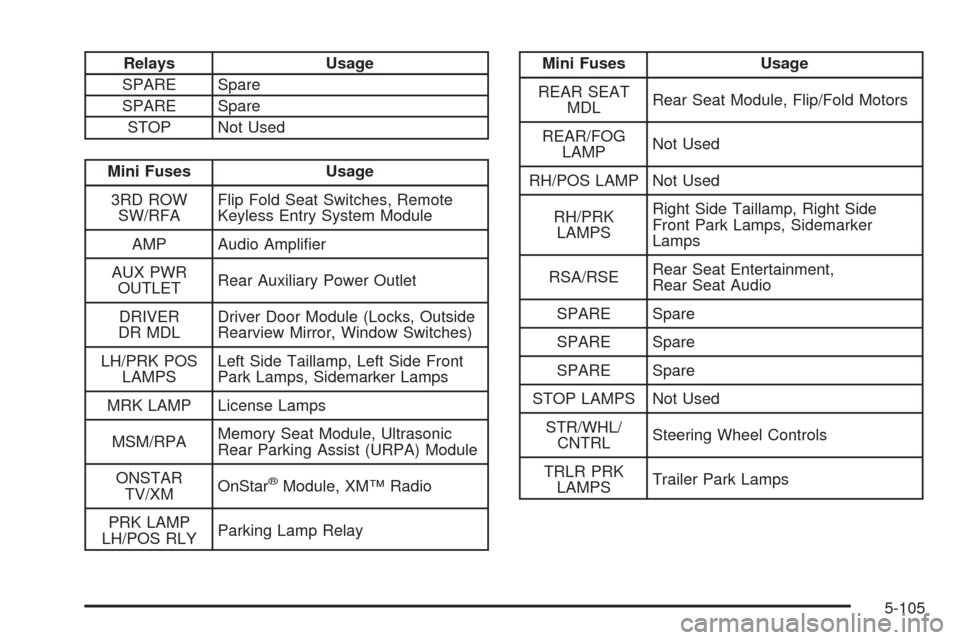
Relays Usage
SPARE Spare
SPARE Spare
STOP Not Used
Mini Fuses Usage
3RD ROW
SW/RFAFlip Fold Seat Switches, Remote
Keyless Entry System Module
AMP Audio Amplier
AUX PWR
OUTLETRear Auxiliary Power Outlet
DRIVER
DR MDLDriver Door Module (Locks, Outside
Rearview Mirror, Window Switches)
LH/PRK POS
LAMPSLeft Side Taillamp, Left Side Front
Park Lamps, Sidemarker Lamps
MRK LAMP License Lamps
MSM/RPAMemory Seat Module, Ultrasonic
Rear Parking Assist (URPA) Module
ONSTAR
TV/XMOnStar
®Module, XM™ Radio
PRK LAMP
LH/POS RLYParking Lamp Relay
Mini Fuses Usage
REAR SEAT
MDLRear Seat Module, Flip/Fold Motors
REAR/FOG
LAMPNot Used
RH/POS LAMP Not Used
RH/PRK
LAMPSRight Side Taillamp, Right Side
Front Park Lamps, Sidemarker
Lamps
RSA/RSERear Seat Entertainment,
Rear Seat Audio
SPARE Spare
SPARE Spare
SPARE Spare
STOP LAMPS Not Used
STR/WHL/
CNTRLSteering Wheel Controls
TRLR PRK
LAMPSTrailer Park Lamps
5-105
Page 438 of 442
Power (cont.)
Lumbar Controls........................................... 1-4
Retained Accessory.....................................2-24
Seat ............................................................ 1-3
Steering Fluid.............................................5-31
Windows....................................................2-16
Privacy..........................................................7-16
Event Data Recorders..................................7-17
Navigation System.......................................7-18
OnStar .......................................................7-18
Radio Frequency Identication.......................7-18
Programmable Automatic Door Locks.................2-10
R
Radio Frequency Identication (RFID),
Privacy......................................................7-18
Radio(s)........................................................3-72
Radios
Navigation/Radio System,
see Navigation Manual..............................3-88
Rear Seat Audio..........................................3-88
Reception...................................................3-91
Setting the Clock.........................................3-69
Theft-Deterrent............................................3-90
Reading Lamps..............................................3-19
Rear Air Conditioning System...........................3-27Rear Axle......................................................5-43
Limited-Slip.................................................. 4-8
Rear Door Security Locks................................2-11
Rear Seat Audio (RSA)....................................3-88
Rear Seat Entertainment System.......................3-88
Rear Seat Operation.......................................1-11
Rear Side Window Antenna..............................3-92
Rear Windshield Washer/Wiper.........................3-11
Rearview Mirror, Automatic Dimming..................2-38
Reclining Seatbacks.......................................... 1-6
Recommended Fluids and Lubricants.................6-13
Recreational Vehicle Towing.............................4-36
Remote Keyless Entry (RKE) System.................. 2-4
Remote Keyless Entry (RKE) System,
Operation..................................................... 2-4
Remote Vehicle Start........................................ 2-7
Removing the Flat Tire and Installing the
Spare Tire..................................................5-78
Removing the Spare Tire and Tools...................5-75
Replacement Parts, Maintenance......................6-15
Reporting Safety Defects
Canadian Government..................................7-15
General Motors...........................................7-15
United States Government............................7-14
Restraint System Check
Checking the Restraint Systems....................1-72
Replacing Restraint System Parts
After a Crash..........................................1-73
10
Page 440 of 442
Stabilitrak®System........................................... 4-6
Start Vehicle, Remote....................................... 2-7
Starting the Engine.........................................2-24
Steering.......................................................... 4-8
Steering Wheel Controls, Audio.........................3-90
Steering Wheel, Heated..................................... 3-7
Steering Wheel, Tilt Wheel................................. 3-6
Storage Areas
Cargo Management System..........................2-55
Center Console Storage Area........................2-54
Cupholders.................................................2-54
Glove Box..................................................2-54
Instrument Panel Storage Area......................2-54
Luggage Carrier..........................................2-54
Stowable Seat................................................1-12
Stuck in Sand, Mud, Ice, or Snow.....................4-29
Sun Visors.....................................................2-18
Sunroof.........................................................2-56
T
Tachometer....................................................3-31
TCS Warning Light..........................................3-37
Theft - Deterrent System..................................2-19
Theft-Deterrent, Radio.....................................3-90
Theft-Deterrent Systems...................................2-19
PASS-Key
®III+ Electronic Immobilizer............2-20
PASS-Key®III+ Electronic Immobilizer
Operation................................................2-21Tilt Wheel........................................................ 3-6
Time, Setting..................................................3-69
Tire
Pressure Light.............................................3-39
Tires.............................................................5-48
Aluminum or Chrome-Plated Wheels,
Cleaning.................................................5-95
Buying New Tires........................................5-66
Chains.......................................................5-72
Changing a Flat Tire....................................5-74
Cleaning....................................................5-96
Compact Spare Tire.....................................5-88
Different Size..............................................5-68
High-Speed Operation..................................5-58
If a Tire Goes Flat.......................................5-73
Ination - Tire Pressure................................5-56
Inspection and Rotation................................5-64
Installing the Spare Tire................................5-78
Pressure Monitor Operation...........................5-60
Pressure Monitor System..............................5-59
Removing the Flat Tire.................................5-78
Removing the Spare Tire and Tools...............5-75
Secondary Latch System..............................5-82
Storing a Flat or Spare Tire and Tools............5-85
Tire Sidewall Labeling..................................5-50
Tire Terminology and Denitions....................5-53
Uniform Tire Quality Grading.........................5-68
Wheel Alignment and Tire Balance.................5-70
12
Page 441 of 442
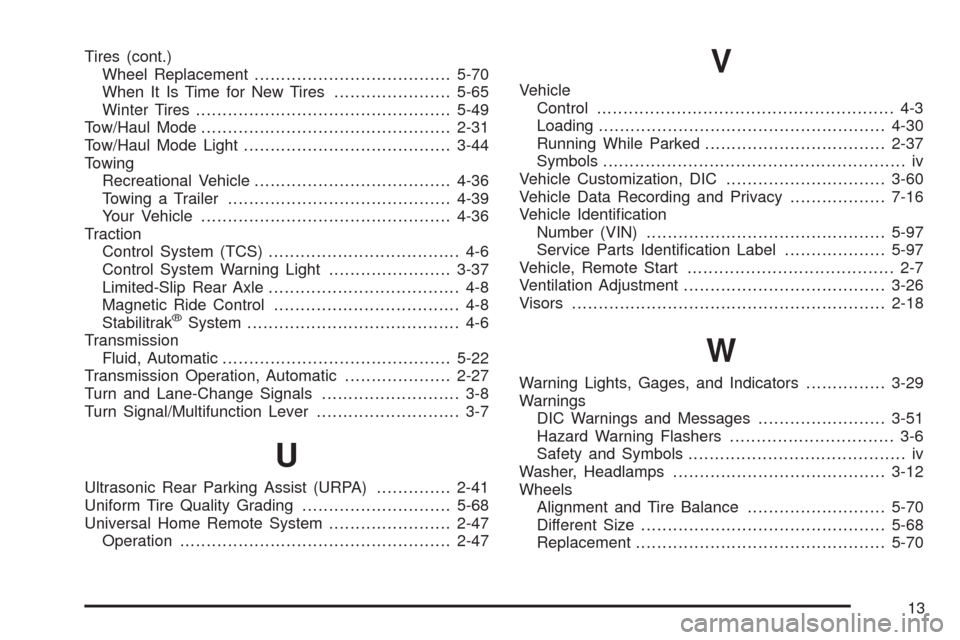
Tires (cont.)
Wheel Replacement.....................................5-70
When It Is Time for New Tires......................5-65
Winter Tires................................................5-49
Tow/Haul Mode ...............................................2-31
Tow/Haul Mode Light.......................................3-44
Towing
Recreational Vehicle.....................................4-36
Towing a Trailer..........................................4-39
Your Vehicle...............................................4-36
Traction
Control System (TCS).................................... 4-6
Control System Warning Light.......................3-37
Limited-Slip Rear Axle.................................... 4-8
Magnetic Ride Control................................... 4-8
Stabilitrak
®System........................................ 4-6
Transmission
Fluid, Automatic...........................................5-22
Transmission Operation, Automatic....................2-27
Turn and Lane-Change Signals.......................... 3-8
Turn Signal/Multifunction Lever........................... 3-7
U
Ultrasonic Rear Parking Assist (URPA)..............2-41
Uniform Tire Quality Grading............................5-68
Universal Home Remote System.......................2-47
Operation...................................................2-47
V
Vehicle
Control........................................................ 4-3
Loading......................................................4-30
Running While Parked..................................2-37
Symbols......................................................... iv
Vehicle Customization, DIC..............................3-60
Vehicle Data Recording and Privacy..................7-16
Vehicle Identication
Number (VIN).............................................5-97
Service Parts Identication Label...................5-97
Vehicle, Remote Start....................................... 2-7
Ventilation Adjustment......................................3-26
Visors...........................................................2-18
W
Warning Lights, Gages, and Indicators...............3-29
Warnings
DIC Warnings and Messages........................3-51
Hazard Warning Flashers............................... 3-6
Safety and Symbols......................................... iv
Washer, Headlamps........................................3-12
Wheels
Alignment and Tire Balance..........................5-70
Different Size..............................................5-68
Replacement...............................................5-70
13