instrument panel CADILLAC SRX 2009 1.G Service Manual
[x] Cancel search | Manufacturer: CADILLAC, Model Year: 2009, Model line: SRX, Model: CADILLAC SRX 2009 1.GPages: 442, PDF Size: 2.42 MB
Page 192 of 442
ICE POSSIBLE DRIVE WITH CARE
This message displays when the outside temperature is
cold enough to create icy road conditions. Adjust your
driving accordingly.
LEFT REAR DOOR OPEN
This message displays when the driver side rear door is
not closed completely. Make sure that the door is
closed completely.
OIL PRESSURE LOW STOP ENGINE
Notice:If you drive your vehicle while the engine
oil pressure is low, severe engine damage may
occur. If a low oil pressure warning appears on the
instrument panel cluster and/or DIC, stop the
vehicle as soon as possible. Do not drive the vehicle
until the cause of the low oil pressure is corrected.
SeeEngine Oil on page 5-16for more information.
This message displays when the vehicle’s engine
oil pressure is low. The oil pressure light may also
appear on the instrument panel cluster. SeeOil
Pressure Light on page 3-42.A multiple chime sounds when this message is
displayed. SeeEngine Oil on page 5-16for more
information.
Stop the vehicle immediately, as engine damage can
result from driving a vehicle with low oil pressure. Have
the vehicle serviced by your dealer/retailer as soon
as possible when this message is displayed.
PARKING ASSIST OFF
If your vehicle has the Ultrasonic Rear Parking Assist
(URPA) system, after the vehicle has been started,
this message displays to remind the driver that
the URPA system has been turned off. Press the
set/reset button to acknowledge this message and clear
it from the DIC display. To turn the URPA system
back on, see “PARKING ASSIST” underDIC Operation
and Displays on page 3-46. SeeUltrasonic Rear
Parking Assist (URPA) on page 2-41for more
information.
PASSENGER DOOR OPEN
This message displays when the passenger side front
door is not closed completely. Make sure that the door is
closed completely.
3-54
Page 193 of 442
REAR ACCESS OPEN
This message displays when the liftgate is not closed
completely. Make sure that the liftgate is closed
completely.
REMOTE KEY LEARNING ACTIVE
This message displays while you are matching a
Remote Keyless Entry (RKE) transmitter to your vehicle.
See “Matching Transmitter(s) to Your Vehicle” under
Remote Keyless Entry (RKE) System Operation
on page 2-4andDIC Operation and Displays on
page 3-46for more information.
REPLACE BATTERY IN REMOTE KEY
This message displays when the battery in the Remote
Keyless Entry (RKE) transmitter needs to be replaced.
To replace the battery, see “Battery Replacement” under
Remote Keyless Entry (RKE) System Operation on
page 2-4.
RIGHT REAR DOOR OPEN
This message displays when the passenger side rear
door is not closed completely. Make sure that the door is
closed completely.
SERVICE AIR BAG
This message displays when there is a problem with the
airbag system. Have your vehicle serviced by your
dealer/retailer immediately. SeeAirbag Readiness Light
on page 3-32for more information.
SERVICE A/C SYSTEM
This message displays when the air delivery mode
door or the electronic sensors that control the air
conditioning and heating systems are no longer working.
Have the climate control system serviced by your
dealer/retailer if you notice a drop in heating and air
conditioning efficiency.
SERVICE BATTERY CHARGING
SYSTEM
This message displays when there is a problem with the
generator and battery charging systems. Driving with
this problem could drain the battery. Turn off all
unnecessary accessories. Stop and turn off the vehicle
as soon as it is safe to do so. Have the electrical
system checked by your dealer/retailer. Under certain
conditions, the charging system light may also turn on in
the instrument panel cluster. SeeCharging System
Light on page 3-35for more information.
3-55
Page 194 of 442
SERVICE BRAKE ASSIST
This message displays if there is a problem with the
brake system. The brake system warning light and the
antilock brake system warning light may also display
on the instrument panel cluster. SeeBrake System
Warning Light on page 3-36andAntilock Brake System
(ABS) Warning Light on page 3-37for more information.
If this happens, stop as soon as possible and turn off
the vehicle. Restart the vehicle and check for the
message on the DIC display. If the message displays
or appears again when you begin driving, the brake
system needs service. See your dealer/retailer as soon
as possible. SeeBrakes on page 5-34for more
information.
SERVICE BRAKE SYSTEM
This message displays, while the ignition is on, when
the brake uid level is low. The brake system warning
light on the instrument panel cluster also comes on.
SeeBrake System Warning Light on page 3-36for more
information. Have the brake system serviced by your
dealer/retailer as soon as possible.
SERVICE PARKING ASSIST
If your vehicle has the Ultrasonic Rear Parking Assist
(URPA) system, this message displays if there is a
problem with the URPA system. Do not use this system
to help you park. SeeUltrasonic Rear Parking Assist
(URPA) on page 2-41for more information. See your
dealer/retailer for service.
SERVICE POWER STEERING
Your vehicle may have a speed variable assist steering
system. SeeSteering on page 4-8.
This message displays if a problem is detected with the
speed variable assist steering system. When this
message is displayed, you may notice that the effort
required to steer the vehicle decreases or feels lighter,
but you will still be able to steer the vehicle.
SERVICE STABILITRAK
This message displays if there has been a problem
detected with the StabiliTrak®system.
If this message comes on while you are driving,
pull off the road as soon as possible and stop carefully.
Try resetting the system by turning the ignition off
then back on. If this message still stays on or comes
3-56
Page 196 of 442
SERVICE VEHICLE SOON
This message displays when a non-emissions related
malfunction occurs. Have your vehicle serviced by your
dealer/retailer as soon as possible.
SPEED LIMITED TO XXX MPH (km/h)
This message displays when your vehicle speed
is limited to 80 mph (128 km/h) because the vehicle
detects a problem in the speed variable assist steering,
magnetic ride control, or automatic leveling control
systems. Have your vehicle serviced by your
dealer/retailer.
STABILITRAK NOT READY
This message may display and the Traction Control
System and StabiliTrak®Warning Light on the
instrument panel cluster may be on after rst driving the
vehicle and exceeding 19 mph (30 km/h) for 30 seconds.
The StabiliTrak
®system is not functional until the
light has turned off. SeeStabiliTrak®System on
page 4-6for more information.
STABILITRAK OFF
This message displays when you turn off StabiliTrak®,
or when the stability control has been automatically
disabled. To limit wheel spin and realize the full benets
of the stability enhancement system, you shouldnormally leave StabiliTrak
®on. However, you should
turn StabiliTrak®off if your vehicle gets stuck in
sand, mud, ice, or snow and you want to rock your
vehicle to attempt to free it, or if you are driving
in extreme off-road conditions and require more wheel
spin. SeeIf Your Vehicle is Stuck in Sand, Mud,
Ice, or Snow on page 4-29. To turn the StabiliTrak
®
system on or off, seeStabiliTrak®System on page 4-6.
There are several conditions that can cause this
message to appear.
One condition is overheating, which could occur if
StabiliTrak®activates continuously for an extended
period of time.
The message also displays if the brake system
warning light is on. SeeBrake System Warning
Light on page 3-36.
The message could display if the stability system
takes longer than usual to complete its diagnostic
checks due to driving conditions.
The message displays if an engine or vehicle
related problem has been detected and the vehicle
needs service. See your dealer/retailer.
The message turns off as soon as the conditions that
caused the message to be displayed are no longer
present.
3-58
Page 236 of 442
StabiliTrak®System
The vehicle is equipped with a vehicle stability
enhancement system called StabiliTrak. It is an advanced
computer controlled system that assists with directional
control of the vehicle in difficult driving conditions.
StabiliTrak activates when the computer senses a
discrepancy between the intended path and the direction
the vehicle is actually traveling. StabiliTrak selectively
applies braking pressure at any one of the vehicle’s
brakes to help steer the vehicle in the intended direction.
When the stability control system activates, the Traction
Control System (TCS)/StabiliTrak light will ash on the
instrument panel. This also occurs when traction control
is activated. A noise may be heard or vibration may be
felt in the brake pedal. This is normal. Continue to steer
the vehicle in the intended direction.
If there is a problem detected with StabiliTrak, a
SERVICE STABILITRAK message will be displayed on
the Driver Information Center (DIC). SeeDIC Warnings
and Messages on page 3-51. When this message is
displayed, the system is not operational. Driving should
be adjusted accordingly.
StabiliTrak comes on automatically whenever the vehicle
is started. To assist with directional control of the vehicle,
the system should always be left on. StabiliTrak canbe turned off if needed by pressing and holding the
TCS/StabiliTrak button until the TCS/StabiliTrak light
comes on the instrument panel and STABILITRAK OFF
appears in the DIC. For information on turning TCS off
and on, see Traction Control System (TCS) following.
If cruise control is being used when StabiliTrak activates,
the cruise control will automatically disengage. Cruise
control may be reengaged when road conditions allow.
SeeCruise Control on page 3-12for more information.
Traction Control System (TCS)
The vehicle has a traction control system that limits wheel
spin. This is especially useful in slippery road conditions.
On a rear-wheel-drive vehicle, the system operates if it
senses that one or both of the rear wheels are spinning or
beginning to lose traction. On an All-Wheel-Drive (AWD)
vehicle, the system will operate if it senses that any of the
wheels are spinning or beginning to lose traction. When
this happens, the system brakes the spinning wheel(s)
and/or reduces engine power to limit wheel spin.
The system may be heard or felt while it is working, but
this is normal.
The TCS warning light will also ash to indicate that the
traction control system is active.
4-6
Page 258 of 442
TheAntilock Brake System (ABS) on page 4-4improves
vehicle stability during hard stops on a slippery roads, but
apply the brakes sooner than when on dry pavement.
Allow greater following distance on any slippery road
and watch for slippery spots. Icy patches can occur on
otherwise clear roads in shaded areas. The surface
of a curve or an overpass can remain icy when the
surrounding roads are clear. Avoid sudden steering
maneuvers and braking while on ice.
Turn off cruise control, if equipped, on slippery surfaces.
Blizzard Conditions
Being stuck in snow can be in a serious situation. Stay
with the vehicle unless there is help nearby. If possible,
use theRoadside Service on page 7-7. To get help and
keep everyone in the vehicle safe:
Turn on theHazard Warning Flashers on page 3-6.
Tie a red cloth to an outside mirror.
{CAUTION:
Snow can trap engine exhaust under the vehicle.
This may cause exhaust gases to get inside.
Engine exhaust contains carbon monoxide (CO)
which cannot be seen or smelled. It can cause
unconsciousness and even death.
If the vehicle is stuck in the snow:
Clear away snow from around the base of your
vehicle, especially any that is blocking the
exhaust pipe.
Check again from time to time to be sure snow
does not collect there.
Open a window about two inches (5 cm) on the
side of the vehicle that is away from the wind to
bring in fresh air.
Fully open the air outlets on or under the
instrument panel.
Adjust the Climate Control system to a setting
that circulates the air inside the vehicle and set
the fan speed to the highest setting. See
Climate Control System in the Index.
CAUTION: (Continued)
4-28
Page 275 of 442
Tow/Haul Mode
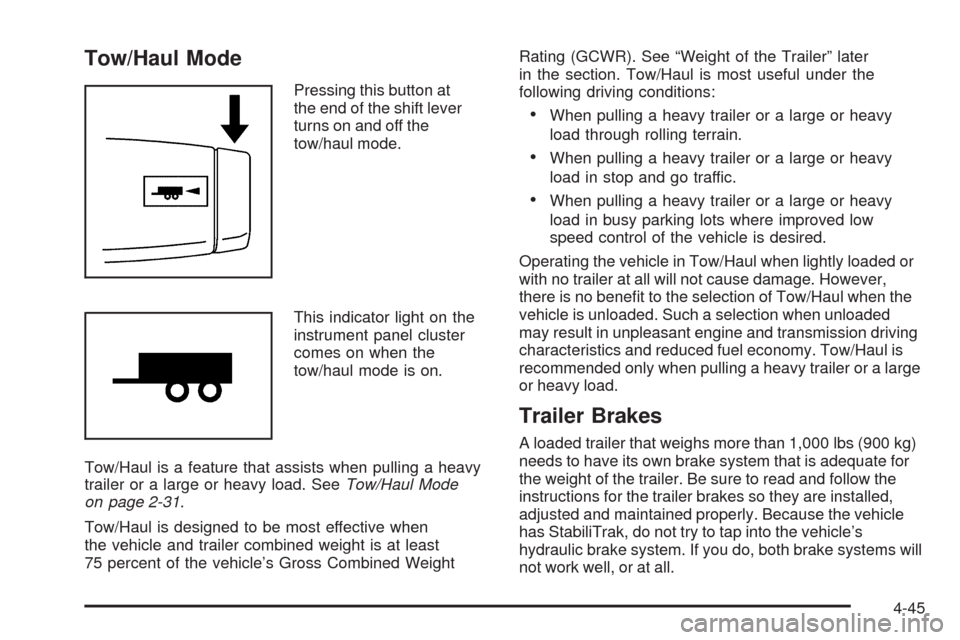
Pressing this button at
the end of the shift lever
turns on and off the
tow/haul mode.
This indicator light on the
instrument panel cluster
comes on when the
tow/haul mode is on.
Tow/Haul is a feature that assists when pulling a heavy
trailer or a large or heavy load. SeeTow/Haul Mode
on page 2-31.
Tow/Haul is designed to be most effective when
the vehicle and trailer combined weight is at least
75 percent of the vehicle’s Gross Combined WeightRating (GCWR). See “Weight of the Trailer” later
in the section. Tow/Haul is most useful under the
following driving conditions:
When pulling a heavy trailer or a large or heavy
load through rolling terrain.
When pulling a heavy trailer or a large or heavy
load in stop and go traffic.
When pulling a heavy trailer or a large or heavy
load in busy parking lots where improved low
speed control of the vehicle is desired.
Operating the vehicle in Tow/Haul when lightly loaded or
with no trailer at all will not cause damage. However,
there is no benet to the selection of Tow/Haul when the
vehicle is unloaded. Such a selection when unloaded
may result in unpleasant engine and transmission driving
characteristics and reduced fuel economy. Tow/Haul is
recommended only when pulling a heavy trailer or a large
or heavy load.
Trailer Brakes
A loaded trailer that weighs more than 1,000 lbs (900 kg)
needs to have its own brake system that is adequate for
the weight of the trailer. Be sure to read and follow the
instructions for the trailer brakes so they are installed,
adjusted and maintained properly. Because the vehicle
has StabiliTrak, do not try to tap into the vehicle’s
hydraulic brake system. If you do, both brake systems will
not work well, or at all.
4-45
Page 276 of 442
Driving with a Trailer
{CAUTION:
When towing a trailer, exhaust gases may collect
at the rear of the vehicle and enter if the liftgate,
trunk/hatch, or rear-most window is open.
Engine exhaust contains carbon monoxide (CO)
which cannot be seen or smelled. It can cause
unconsciousness and even death.
To maximize safety when towing a trailer:
Have the exhaust system inspected for leaks
and make necessary repairs before starting
a trip.
Never drive with the liftgate, trunk/hatch, or
rear-most window open.
Fully open the air outlets on or under the
instrument panel.
Adjust the Climate Control system to a setting
that brings in only outside air and set the fan
speed to the highest setting. See Climate
Control System in the Index.
For more information about carbon monoxide,
seeEngine Exhaust on page 2-36.Towing a trailer requires a certain amount of experience.
Get to know the rig before setting out for the open
road. Get acquainted with the feel of handling and
braking with the added weight of the trailer. And always
keep in mind that the vehicle you are driving is now
longer and not as responsive as the vehicle is by itself.
Before starting, check all trailer hitch parts and
attachments, safety chains, electrical connectors,
lamps, tires and mirror adjustments. If the trailer has
electric brakes, start the vehicle and trailer moving and
then apply the trailer brake controller by hand to be
sure the brakes are working. This checks the electrical
connection at the same time.
During the trip, check occasionally to be sure that the
load is secure, and that the lamps and any trailer brakes
are still working.
While towing a trailer or when exposed to long periods
of sunshine, the oor of the truck bed may become
very warm. Avoid putting items in the truck bed
that might be affected by high ambient temperatures.
4-46
Page 277 of 442
Following Distance
Stay at least twice as far behind the vehicle ahead as
you would when driving the vehicle without a trailer. This
can help to avoid situations that require heavy braking
and sudden turns.
Passing
More passing distance is needed when towing a trailer.
Because the rig is longer, it is necessary to go much
farther beyond the passed vehicle before returning to
the lane.
Backing Up
Hold the bottom of the steering wheel with one hand.
Then, to move the trailer to the left, move that hand
to the left. To move the trailer to the right, move your
hand to the right. Always back up slowly and, if possible,
have someone guide you.
Making Turns
Notice:Making very sharp turns while trailering
could cause the trailer to come in contact with
the vehicle. The vehicle could be damaged.
Avoid making very sharp turns while trailering.
When turning with a trailer, make wider turns than
normal. Do this so the trailer will not strike soft shoulders,
curbs, road signs, trees or other objects. Avoid jerky or
sudden maneuvers. Signal well in advance.
Turn Signals When Towing a Trailer
The arrows on the instrument panel ash whenever
signaling a turn or lane change. Properly hooked up, the
trailer lamps also ash, telling other drivers the vehicle
is turning, changing lanes or stopping.
When towing a trailer, the arrows on the instrument panel
ash for turns even if the bulbs on the trailer are burned
out. For this reason you may think other drivers are
seeing the signal when they are not. It is important to
check occasionally to be sure the trailer bulbs are still
working.
4-47
Page 282 of 442
Buying New Tires.........................................5-66
Different Size Tires and Wheels......................5-68
Uniform Tire Quality Grading..........................5-68
Wheel Alignment and Tire Balance..................5-70
Wheel Replacement......................................5-70
Tire Chains..................................................5-72
If a Tire Goes Flat........................................5-73
Changing a Flat Tire.....................................5-74
Removing the Spare Tire and Tools................5-75
Removing the Flat Tire and Installing the
Spare Tire................................................5-78
Secondary Latch System...............................5-82
Storing a Flat or Spare Tire and Tools............5-85
Compact Spare Tire......................................5-88
Appearance Care............................................5-89
Interior Cleaning...........................................5-89
Fabric/Carpet...............................................5-90
Leather.......................................................5-91
Instrument Panel, Vinyl, and Other
Plastic Surfaces........................................5-92
Wood Panels...............................................5-92
Speaker Covers............................................5-92
Care of Safety Belts......................................5-92Weatherstrips...............................................5-93
Washing Your Vehicle...................................5-93
Cleaning Exterior Lamps/Lenses.....................5-93
Finish Care..................................................5-94
Windshield and Wiper Blades.........................5-94
Aluminum or Chrome-Plated Wheels and Trim . . .5-95
Tires...........................................................5-96
Sheet Metal Damage.....................................5-96
Finish Damage.............................................5-96
Underbody Maintenance................................5-96
Chemical Paint Spotting.................................5-96
Vehicle Identication......................................5-97
Vehicle Identication Number (VIN).................5-97
Service Parts Identication Label.....................5-97
Electrical System............................................5-98
Add-On Electrical Equipment..........................5-98
Windshield Wiper Fuses................................5-98
Power Windows and Other Power Options.......5-98
Fuses and Circuit Breakers............................5-99
Underhood Fuse Block..................................5-99
Rear Underseat Fuse Block (Left Side)..........5-103
Rear Underseat Fuse Block (Right Side)........5-106
Capacities and Specications........................5-109
Section 5 Service and Appearance Care
5-2