instrument panel CADILLAC SRX 2009 1.G Workshop Manual
[x] Cancel search | Manufacturer: CADILLAC, Model Year: 2009, Model line: SRX, Model: CADILLAC SRX 2009 1.GPages: 442, PDF Size: 2.42 MB
Page 285 of 442
If doing some of your own service work, use the proper
service manual. It tells you much more about how to
service the vehicle than this manual can. To order
the proper service manual, seeService Publications
Ordering Information on page 7-15.
This vehicle has an airbag system. Before attempting
to do your own service work, seeServicing Your
Airbag-Equipped Vehicle on page 1-70.
Keep a record with all parts receipts and list the
mileage and the date of any service work performed.
SeeMaintenance Record on page 6-17.
Adding Equipment to the Outside of
the Vehicle
Things added to the outside of the vehicle can affect the
airow around it. This can cause wind noise and can
affect fuel economy and windshield washer performance.
Check with your dealer/retailer before adding equipment
to the outside of the vehicle.
Fuel
Use of the recommended fuel is an important part of
the proper maintenance of this vehicle. To help keep
the engine clean and maintain optimum vehicle
performance, we recommend the use of gasoline
advertised as TOP TIER Detergent Gasoline.
The 8th digit of the Vehicle Identication Number (VIN)
shows the code letter or number that identies the
vehicle’s engine. The VIN is at the top left of the
instrument panel. SeeVehicle Identification Number
(VIN) on page 5-97.
Gasoline Octane
If the vehicle has the 3.6L V6 engine (VIN Code 7), use
regular unleaded gasoline with a posted octane rating of
87 or higher. For best performance or trailer towing, you
could choose to use middle grade 89 octane unleaded
gasoline. If the octane rating is less than 87, you might
notice an audible knocking noise when you drive,
commonly referred to as spark knock. If this occurs, use a
gasoline rated at 87 octane or higher as soon as possible.
If you are using gasoline rated at 87 octane or higher and
you hear heavy knocking, the engine needs service.
5-5
Page 291 of 442

Hood Release
To open the hood, do the following:
1. Pull the hood release
lever with this symbol
on it. It is located inside
the vehicle on the lower
left side of the
instrument panel.
2. Then go to the front of the vehicle and nd the
secondary hood release lever. The lever is located
under the front edge of the grille near the center.
Move the release lever to the side and raise
the hood.
Before closing the hood, be sure all the ller caps are
on properly. Then pull the hood down and close it rmly.
5-11
Page 309 of 442
Coolant Surge Tank Pressure Cap
Notice:If the pressure cap is not tightly installed,
coolant loss and possible engine damage may occur.
Be sure the cap is properly and tightly secured.
The coolant surge tank pressure cap must be fully
installed on the coolant surge tank. SeeEngine
Compartment Overview on page 5-12for more
information on location.
Engine Overheating
The vehicle has several indicators to warn of engine
overheating.
There are two engine hot messages that could be
displayed in the Driver Information Center (DIC).
SeeDIC Warnings and Messages on page 3-51for
more information.
If the engine is overheating, then you will nd a coolant
temperature gage and a coolant warning light on the
instrument panel. SeeEngine Coolant Temperature
Gage on page 3-38andEngine Coolant Temperature
Warning Light on page 3-38for more information.You may decide not to lift the hood when this warning
appears, but instead get service help right away.
SeeRoadside Service on page 7-7.
If you do decide to lift the hood, make sure the vehicle
is parked on a level surface.
Then check to see if the engine cooling fans are
running. If the engine is overheating, both fans should
be running. If they are not, do not continue to run
the engine and have the vehicle serviced.
Notice:Engine damage from running your engine
without coolant is not covered by your warranty.
SeeOverheated Engine Protection Operating Mode
on page 5-31for information on driving to a safe
place in an emergency.
Notice:If the engine catches re while driving with
no coolant, the vehicle can be badly damaged.
The costly repairs would not be covered by
the vehicle warranty. SeeOverheated Engine
Protection Operating Mode on page 5-31for
information on driving to a safe place in an
emergency.
5-29
Page 340 of 442
Federal Communications Commission
(FCC) and Industry and Science Canada
The Tire Pressure Monitor System (TPMS) operates
on a radio frequency and complies with Part 15 of
the FCC Rules. Operation is subject to the following
two conditions:
1. This device may not cause harmful interference.
2. This device must accept any interference received,
including interference that may cause undesired
operation.
The TPMS operates on a radio frequency and complies
with RSS-210 of Industry and Science Canada.
Operation is subject to the following two conditions:
1. This device may not cause interference.
2. This device must accept any interference received,
including interference that may cause undesired
operation of the device.
Changes or modications to this system by other than
an authorized service facility could void authorization to
use this equipment.
Tire Pressure Monitor Operation
This vehicle may have a Tire Pressure Monitor System
(TPMS). The TPMS is designed to warn the driver
when a low tire pressure condition exists. TPMS sensors
are mounted onto each tire and wheel assembly,
excluding the spare tire and wheel assembly. The TPMS
sensors monitor the air pressure in the vehicle’s tires
and transmits the tire pressure readings to a receiver
located in the vehicle.
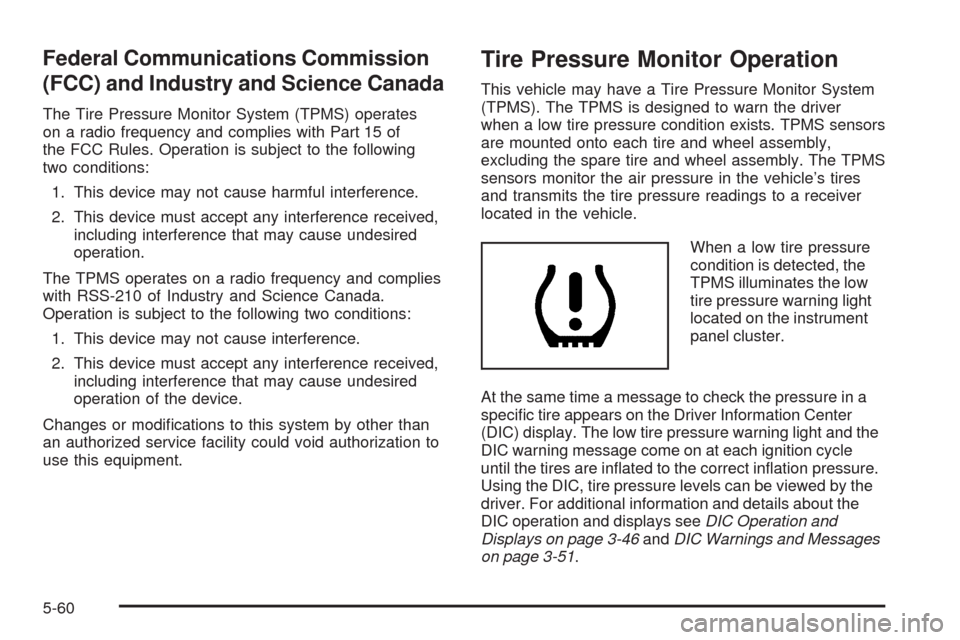
When a low tire pressure
condition is detected, the
TPMS illuminates the low
tire pressure warning light
located on the instrument
panel cluster.
At the same time a message to check the pressure in a
specic tire appears on the Driver Information Center
(DIC) display. The low tire pressure warning light and the
DIC warning message come on at each ignition cycle
until the tires are inated to the correct ination pressure.
Using the DIC, tire pressure levels can be viewed by the
driver. For additional information and details about the
DIC operation and displays seeDIC Operation and
Displays on page 3-46andDIC Warnings and Messages
on page 3-51.
5-60
Page 372 of 442
Instrument Panel, Vinyl, and Other
Plastic Surfaces
A soft cloth dampened with water may be used to
remove dust. If a more thorough cleaning is necessary, a
clean soft cloth dampened with a mild soap solution can
be used to gently remove dust and dirt. Never use spot
lifters or removers on plastic surfaces. Many commercial
cleaners and coatings that are sold to preserve and
protect soft plastic surfaces may permanently change
the appearance and feel of the interior and are not
recommended. Do not use silicone or wax-based
products, or those containing organic solvents to
clean the vehicle’s interior because they can alter the
appearance by increasing the gloss in a non-uniform
manner.
Some commercial products may increase gloss on the
instrument panel. The increase in gloss may cause
annoying reections in the windshield and even make it
difficult to see through the windshield under certain
conditions.
Wood Panels
Use a clean cloth moistened in warm, soapy water (use
mild dish washing soap). Dry the wood immediately
with a clean cloth.
Speaker Covers
Vacuum around a speaker cover gently, so that the
speaker will not be damaged. Clean spots with
just water and mild soap.
Care of Safety Belts
Keep belts clean and dry.
{CAUTION:
Do not bleach or dye safety belts. It may severely
weaken them. In a crash, they might not be able
to provide adequate protection. Clean safety belts
only with mild soap and lukewarm water.
5-92
Page 377 of 442
Vehicle Identication
Vehicle Identication Number (VIN)
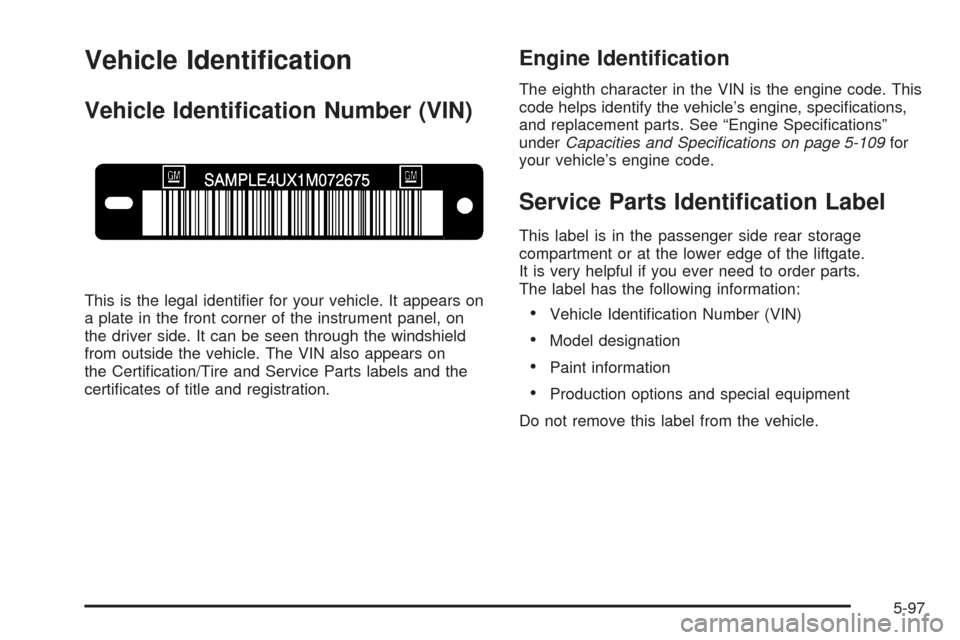
This is the legal identier for your vehicle. It appears on
a plate in the front corner of the instrument panel, on
the driver side. It can be seen through the windshield
from outside the vehicle. The VIN also appears on
the Certication/Tire and Service Parts labels and the
certicates of title and registration.
Engine Identication
The eighth character in the VIN is the engine code. This
code helps identify the vehicle’s engine, specications,
and replacement parts. See “Engine Specications”
underCapacities and Specifications on page 5-109for
your vehicle’s engine code.
Service Parts Identication Label
This label is in the passenger side rear storage
compartment or at the lower edge of the liftgate.
It is very helpful if you ever need to order parts.
The label has the following information:
Vehicle Identication Number (VIN)
Model designation
Paint information
Production options and special equipment
Do not remove this label from the vehicle.
5-97
Page 382 of 442
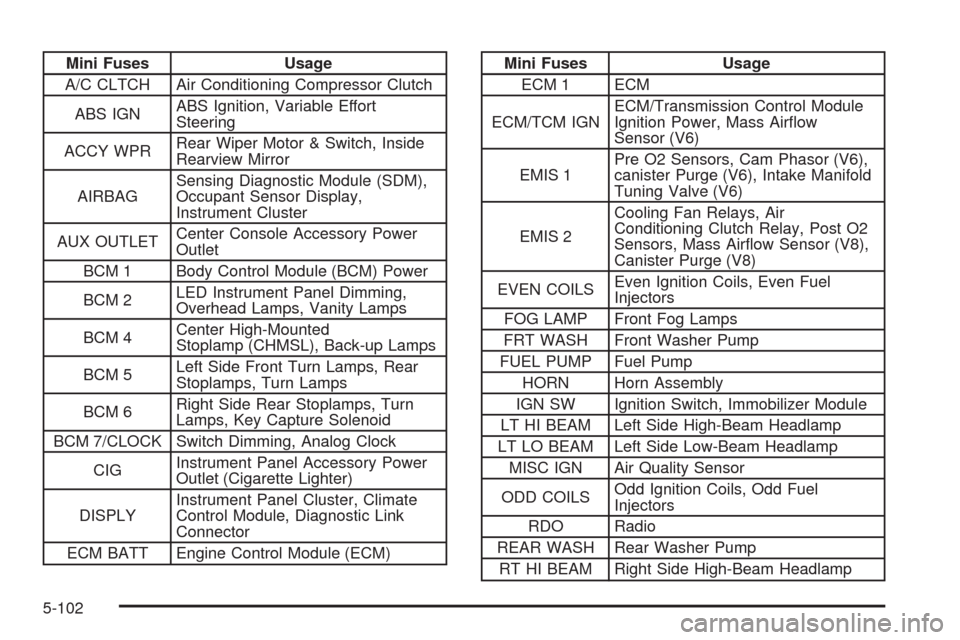
Mini Fuses Usage
A/C CLTCH Air Conditioning Compressor Clutch
ABS IGNABS Ignition, Variable Effort
Steering
ACCY WPRRear Wiper Motor & Switch, Inside
Rearview Mirror
AIRBAGSensing Diagnostic Module (SDM),
Occupant Sensor Display,
Instrument Cluster
AUX OUTLETCenter Console Accessory Power
Outlet
BCM 1 Body Control Module (BCM) Power
BCM 2LED Instrument Panel Dimming,
Overhead Lamps, Vanity Lamps
BCM 4Center High-Mounted
Stoplamp (CHMSL), Back-up Lamps
BCM 5Left Side Front Turn Lamps, Rear
Stoplamps, Turn Lamps
BCM 6Right Side Rear Stoplamps, Turn
Lamps, Key Capture Solenoid
BCM 7/CLOCK Switch Dimming, Analog Clock
CIGInstrument Panel Accessory Power
Outlet (Cigarette Lighter)
DISPLYInstrument Panel Cluster, Climate
Control Module, Diagnostic Link
Connector
ECM BATT Engine Control Module (ECM)Mini Fuses Usage
ECM 1 ECM
ECM/TCM IGNECM/Transmission Control Module
Ignition Power, Mass Airow
Sensor (V6)
EMIS 1Pre O2 Sensors, Cam Phasor (V6),
canister Purge (V6), Intake Manifold
Tuning Valve (V6)
EMIS 2Cooling Fan Relays, Air
Conditioning Clutch Relay, Post O2
Sensors, Mass Airow Sensor (V8),
Canister Purge (V8)
EVEN COILSEven Ignition Coils, Even Fuel
Injectors
FOG LAMP Front Fog Lamps
FRT WASH Front Washer Pump
FUEL PUMP Fuel Pump
HORN Horn Assembly
IGN SW Ignition Switch, Immobilizer Module
LT HI BEAM Left Side High-Beam Headlamp
LT LO BEAM Left Side Low-Beam Headlamp
MISC IGN Air Quality Sensor
ODD COILSOdd Ignition Coils, Odd Fuel
Injectors
RDO Radio
REAR WASH Rear Washer Pump
RT HI BEAM Right Side High-Beam Headlamp
5-102
Page 412 of 442
Customer Assistance and
Information
Customer Satisfaction Procedure
Your satisfaction and goodwill are important to your
dealer and to Cadillac. Normally, any concerns with the
sales transaction or the operation of the vehicle will be
resolved by the dealer’s sales or service departments.
Sometimes, however, despite the best intentions of all
concerned, misunderstandings can occur. If your concern
has not been resolved to your satisfaction, the following
steps should be taken:
STEP ONE:Discuss your concern with a member of
dealership management. Normally, concerns can
be quickly resolved at that level. If the matter has
already been reviewed with the sales, service or parts
manager, contact the owner of the dealership or
the general manager.STEP TWO:If after contacting a member of dealership
management, it appears your concern cannot be
resolved by the dealership without further help, in the
United States, call the Cadillac Customer Assistance
Center, 24 hours a day, at 1-800-458-8006. In Canada,
call the Canadian Cadillac Customer Communication
Centre at 1-888-446-2000.
We encourage you to call the toll-free number in order
to give your inquiry prompt attention. Have the
following information available to give the Customer
Assistance Representative:
Vehicle Identication Number (VIN). This is
available from the vehicle registration or title, or the
plate at the top left of the instrument panel and
visible through the windshield.
Dealership name and location.
Vehicle delivery date and present mileage.
When contacting Cadillac, remember that your concern
will likely be resolved at a dealer’s facility. That is why we
suggest following Step One rst.
7-2
Page 429 of 442
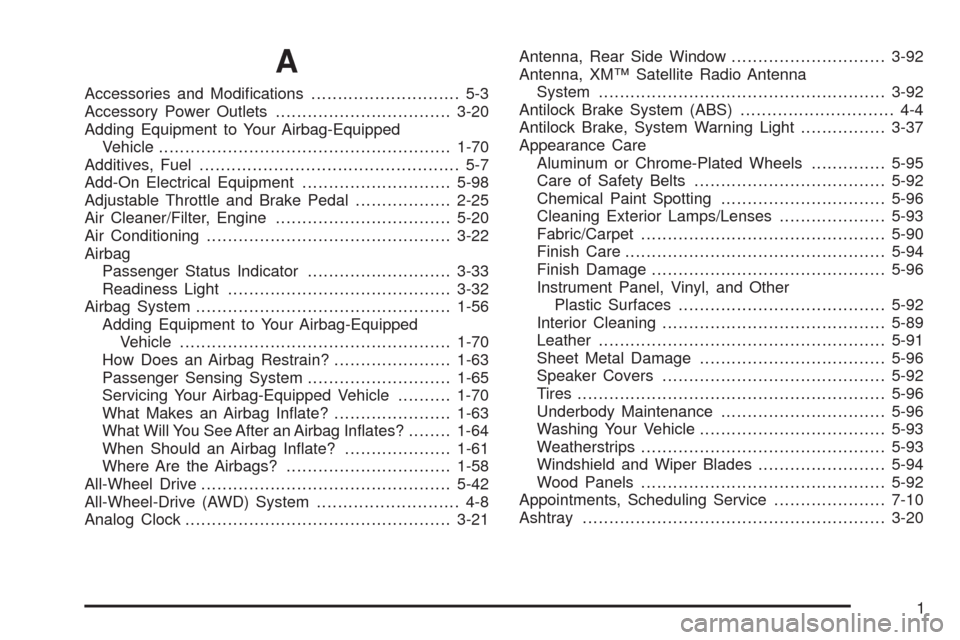
A
Accessories and Modications............................ 5-3
Accessory Power Outlets.................................3-20
Adding Equipment to Your Airbag-Equipped
Vehicle.......................................................1-70
Additives, Fuel................................................. 5-7
Add-On Electrical Equipment............................5-98
Adjustable Throttle and Brake Pedal..................2-25
Air Cleaner/Filter, Engine.................................5-20
Air Conditioning..............................................3-22
Airbag
Passenger Status Indicator...........................3-33
Readiness Light..........................................3-32
Airbag System................................................1-56
Adding Equipment to Your Airbag-Equipped
Vehicle...................................................1-70
How Does an Airbag Restrain?......................1-63
Passenger Sensing System...........................1-65
Servicing Your Airbag-Equipped Vehicle..........1-70
What Makes an Airbag Inate?......................1-63
What Will You See After an Airbag Inates?........1-64
When Should an Airbag Inate?....................1-61
Where Are the Airbags?...............................1-58
All-Wheel Drive...............................................5-42
All-Wheel-Drive (AWD) System........................... 4-8
Analog Clock..................................................3-21Antenna, Rear Side Window.............................3-92
Antenna, XM™ Satellite Radio Antenna
System......................................................3-92
Antilock Brake System (ABS)............................. 4-4
Antilock Brake, System Warning Light................3-37
Appearance Care
Aluminum or Chrome-Plated Wheels..............5-95
Care of Safety Belts....................................5-92
Chemical Paint Spotting...............................5-96
Cleaning Exterior Lamps/Lenses....................5-93
Fabric/Carpet..............................................5-90
Finish Care.................................................5-94
Finish Damage............................................5-96
Instrument Panel, Vinyl, and Other
Plastic Surfaces.......................................5-92
Interior Cleaning..........................................5-89
Leather......................................................5-91
Sheet Metal Damage...................................5-96
Speaker Covers..........................................5-92
Tires..........................................................5-96
Underbody Maintenance...............................5-96
Washing Your Vehicle...................................5-93
Weatherstrips..............................................5-93
Windshield and Wiper Blades........................5-94
Wood Panels..............................................5-92
Appointments, Scheduling Service.....................7-10
Ashtray.........................................................3-20
1
Page 431 of 442

Chemical Paint Spotting...................................5-96
Child Restraints
Child Restraint Systems...............................1-39
Infants and Young Children...........................1-36
Lower Anchors and Tethers for Children..........1-43
Older Children.............................................1-33
Securing a Child Restraint in a
Rear Seat Position...................................1-49
Securing a Child Restraint in the
Right Front Seat Position..........................1-52
Where to Put the Restraint...........................1-42
Cigarette Lighter.............................................3-20
Cleaning
Aluminum or Chrome-Plated Wheels..............5-95
Exterior Lamps/Lenses.................................5-93
Fabric/Carpet..............................................5-90
Finish Care.................................................5-94
Instrument Panel, Vinyl, and Other
Plastic Surfaces.......................................5-92
Interior.......................................................5-89
Leather......................................................5-91
Speaker Covers..........................................5-92
Tires..........................................................5-96
Underbody Maintenance...............................5-96
Washing Your Vehicle...................................5-93
Weatherstrips..............................................5-93
Windshield and Wiper Blades........................5-94
Wood Panels..............................................5-92Climate Control System
Air Filter, Passenger Compartment.................3-28
Dual ..........................................................3-22
Outlet Adjustment........................................3-26
Rear Air Conditioning System........................3-27
Clock............................................................3-21
Clock, Setting.................................................3-69
Collision Damage Repair..................................7-11
Compact Spare Tire........................................5-88
Compass.......................................................2-38
Control of a Vehicle.......................................... 4-3
Coolant
Engine.......................................................5-23
Engine Temperature Gage............................3-38
Engine Temperature Warning Light.................3-38
Surge Tank Pressure Cap.............................5-29
Cooling System..............................................5-22
Cruise Control................................................3-12
Cruise Control Light........................................3-44
Cupholders....................................................2-54
Customer Assistance Information
Courtesy Transportation................................7-10
Customer Assistance for Text
Telephone (TTY) Users............................... 7-6
Customer Assistance Offices........................... 7-6
Customer Satisfaction Procedure..................... 7-2
GM Mobility Reimbursement Program............... 7-7
Reporting Safety Defects to General Motors.......7-15
3