ac fan CADILLAC SRX 2011 2.G User Guide
[x] Cancel search | Manufacturer: CADILLAC, Model Year: 2011, Model line: SRX, Model: CADILLAC SRX 2011 2.GPages: 498, PDF Size: 7.62 MB
Page 115 of 498
Black plate (51,1)Cadillac SRX Owner Manual - 2011
Seats and Restraints 3-51
{WARNING
To reduce the risk of neck and
head injury during a crash,
infants need complete support.
This is because an infant's neck
is not fully developed and its head
weighs so much compared with
the rest of its body. In a crash,
an infant in a rear-facing child
restraint settles into the restraint,
so the crash forces can be
distributed across the strongest
part of an infant's body, the back
and shoulders. Infants should
always be secured in rear-facing
child restraints.
{WARNING
A young child's hip bones are still
so small that the vehicle's regular
safety belt may not remain low
on the hip bones, as it should.
Instead, it may settle up around
the child's abdomen. In a crash,
the belt would apply force on a
body area that is unprotected by
any bony structure. This alone
could cause serious or fatal
injuries. To reduce the risk of
serious or fatal injuries during a
crash, young children should
always be secured in appropriate
child restraints.
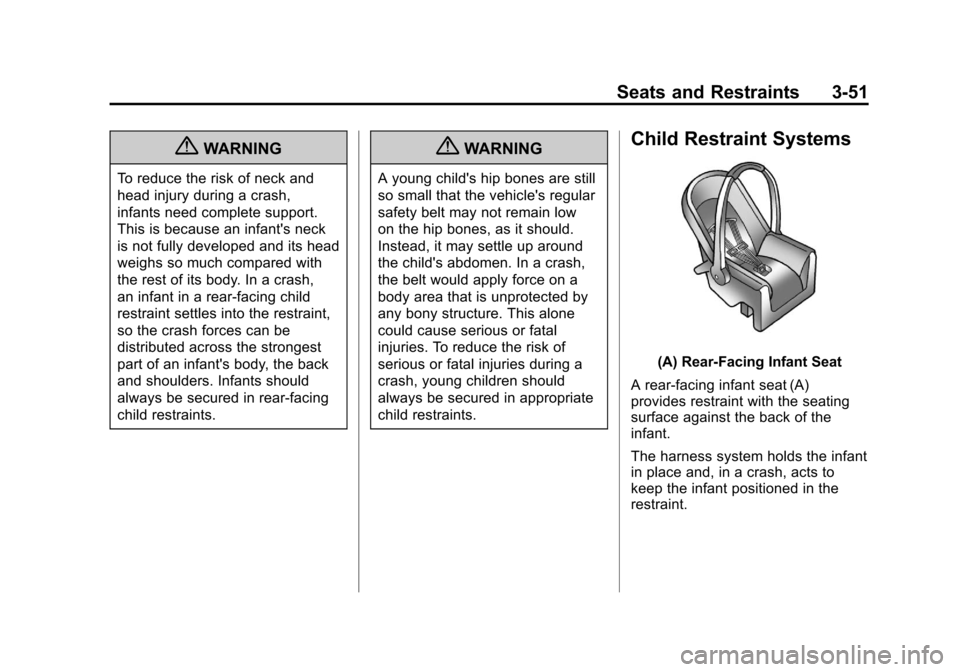
Child Restraint Systems
(A) Rear‐Facing Infant Seat
A rear-facing infant seat (A)
provides restraint with the seating
surface against the back of the
infant.
The harness system holds the infant
in place and, in a crash, acts to
keep the infant positioned in the
restraint.
Page 117 of 498
Black plate (53,1)Cadillac SRX Owner Manual - 2011
Seats and Restraints 3-53
endangered in a crash if the child
restraint is not properly secured in
the vehicle.
When securing an add-on child
restraint, refer to the instructions
that come with the restraint which
may be on the restraint itself or in a
booklet, or both, and to this manual.
The child restraint instructions
are important, so if they are not
available, obtain a replacement
copy from the manufacturer.
Keep in mind that an unsecured
child restraint can move around in a
collision or sudden stop and injure
people in the vehicle. Be sure to
properly secure any child restraint
in the vehicle—even when no
child is in it.
In some areas of the United States
and Canada, Certified Child
Passenger Safety Technicians
(CPSTs) are available to inspect and demonstrate how to correctly
use and install child restraints.
In the U.S., refer to the
National Highway Traffic Safety
Administration (NHTSA) website
to locate the nearest child safety
seat inspection station. For CPST
availability in Canada, check with
Transport Canada or the Provincial
Ministry of Transportation office.
Securing the Child Within the
Child Restraint
{WARNING
A child can be seriously injured
or killed in a crash if the child
is not properly secured in the
child restraint. Secure the child
properly following the instructions
that came with that child restraint.
Where to Put the
Restraint
According to accident statistics,
children and infants are safer
when properly restrained in a child
restraint system or infant restraint
system secured in a rear seating
position.
We recommend that children and
child restraints be secured in a rear
seat, including: an infant or a child
riding in a rear-facing child restraint;
a child riding in a forward-facing
child seat; an older child riding in a
booster seat; and children, who are
large enough, using safety belts.
Page 122 of 498
Black plate (58,1)Cadillac SRX Owner Manual - 2011
3-58 Seats and Restraints
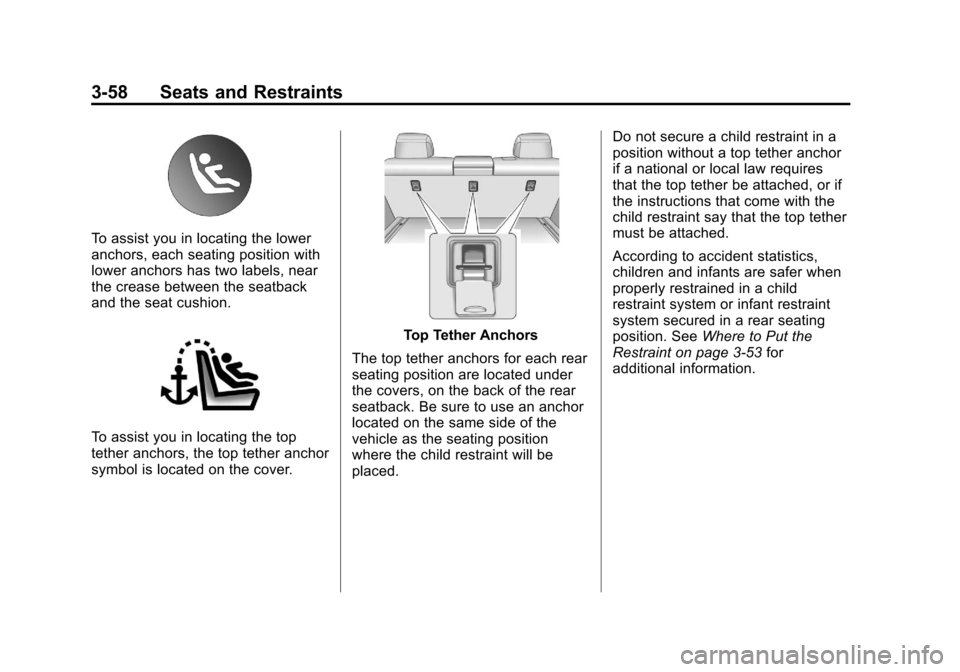
To assist you in locating the lower
anchors, each seating position with
lower anchors has two labels, near
the crease between the seatback
and the seat cushion.
To assist you in locating the top
tether anchors, the top tether anchor
symbol is located on the cover.
Top Tether Anchors
The top tether anchors for each rear
seating position are located under
the covers, on the back of the rear
seatback. Be sure to use an anchor
located on the same side of the
vehicle as the seating position
where the child restraint will be
placed. Do not secure a child restraint in a
position without a top tether anchor
if a national or local law requires
that the top tether be attached, or if
the instructions that come with the
child restraint say that the top tether
must be attached.
According to accident statistics,
children and infants are safer when
properly restrained in a child
restraint system or infant restraint
system secured in a rear seating
position. See
Where to Put the
Restraint on page 3‑53 for
additional information.
Page 187 of 498
Black plate (41,1)Cadillac SRX Owner Manual - 2011
Instruments and Controls 5-41
Climate and Air Quality
Select the Climate and Air Quality
menu and the following will be
displayed:
.Auto Fan Speed
.Air Quality Sensor
.Remote Start Auto Seat Cool
.Remote Start Auto Heated Seats
.Auto Defog
.Auto Rear Defog
Auto Fan Speed
This will allow you to select the
automatic fan speed. This feature
sets the climate control fan speed to
maintain the interior temperature.
Press the MENU / SELECT knob
when Auto Fan Speed is highlighted
to open the menu. Turn the knob
to highlight High, Medium, or Low.
Press the knob to confirm the
selection and move back to the
last menu. Air Quality Sensor
This will allow you to select whether
the system will operate at high or
low sensitivity. Only vehicles with
the dual zone climate control will
have this option.
Press the MENU / SELECT
knob when Air Quality Sensor
is highlighted to open the menu.
Turn the knob to highlight High or
Low Sensitivity. Press the knob to
confirm the selection and move
back to the last menu.
Remote Start Auto Seat Cool
When on, this feature will turn the
vented seats on when using remote
start on warm days.
Press the MENU / SELECT knob
when Remote Start Auto Seat Cool
is highlighted. Turn the knob to
select On or Off. Press the knob
to confirm and go back to the
last menu.
Remote Start Auto Heated Seats
When on, this feature will turn the
heated seats on when using remote
start on cold days.
Press the MENU / SELECT knob
when Remote Start Auto Heated
Seats is highlighted. Turn the knob
to select On or Off. Press the knob
to confirm and go back to the
last menu.
Auto Defog
This will allow you to turn the auto
defog on or off.
Press the MENU / SELECT knob
when Auto Defog is highlighted to
open the menu. Turn the knob to
highlight On or Off. Press the knob
to confirm the selection and move
back to the last menu.
Page 204 of 498
Black plate (8,1)Cadillac SRX Owner Manual - 2011
6-8 Lighting
Battery Load
Management
The vehicle has Electric Power
Management (EPM) that estimates
the battery's temperature and state
of charge. It then adjusts the voltage
for best performance and extended
life of the battery.
When the battery's state of charge
is low, the voltage is raised slightly
to quickly bring the charge back up.
When the state of charge is high,
the voltage is lowered slightly to
prevent overcharging. If the vehicle
has a voltmeter gauge or a voltage
display on the Driver Information
Center (DIC), you may see the
voltage move up or down. This is
normal. If there is a problem, an
alert will be displayed.The battery can be discharged at
idle if the electrical loads are very
high. This is true for all vehicles.
This is because the generator
(alternator) may not be spinning
fast enough at idle to produce all
the power that is needed for very
high electrical loads.
A high electrical load occurs when
several of the following are on,
such as: headlamps, high beams,
fog lamps, rear window defogger,
climate control fan at high speed,
heated seats, engine cooling fans,
trailer loads, and loads plugged into
accessory power outlets.
EPM works to prevent excessive
discharge of the battery. It does this
by balancing the generator's output
and the vehicle's electrical needs.
It can increase engine idle speed to
generate more power, whenever
needed. It can temporarily reduce
the power demands of some
accessories.Normally, these actions occur in
steps or levels, without being
noticeable. In rare cases at the
highest levels of corrective action,
this action may be noticeable to the
driver. If so, a Driver Information
Center (DIC) message might be
displayed, such as BATTERY
SAVER ACTIVE, BATTERY
VOLTAGE LOW, or LOW BATTERY.
If one of these messages displays,
it is recommended that the driver
reduce the electrical loads as much
as possible. See
Driver Information
Center (DIC) on page 5‑28.
Page 269 of 498
Black plate (1,1)Cadillac SRX Owner Manual - 2011
Climate Controls 8-1
Climate Controls
Climate Control Systems
Dual Automatic Climate ControlSystem . . . . . . . . . . . . . . . . . . . . . . 8-1
Rear Climate Control System . . . . . . . . . . . . . . . . . . . . . . 8-5
Air Vents
Air Vents . . . . . . . . . . . . . . . . . . . . . . 8-6
Maintenance
Passenger Compartment AirFilter . . . . . . . . . . . . . . . . . . . . . . . . . 8-6
Climate Control Systems
Dual Automatic Climate Control System
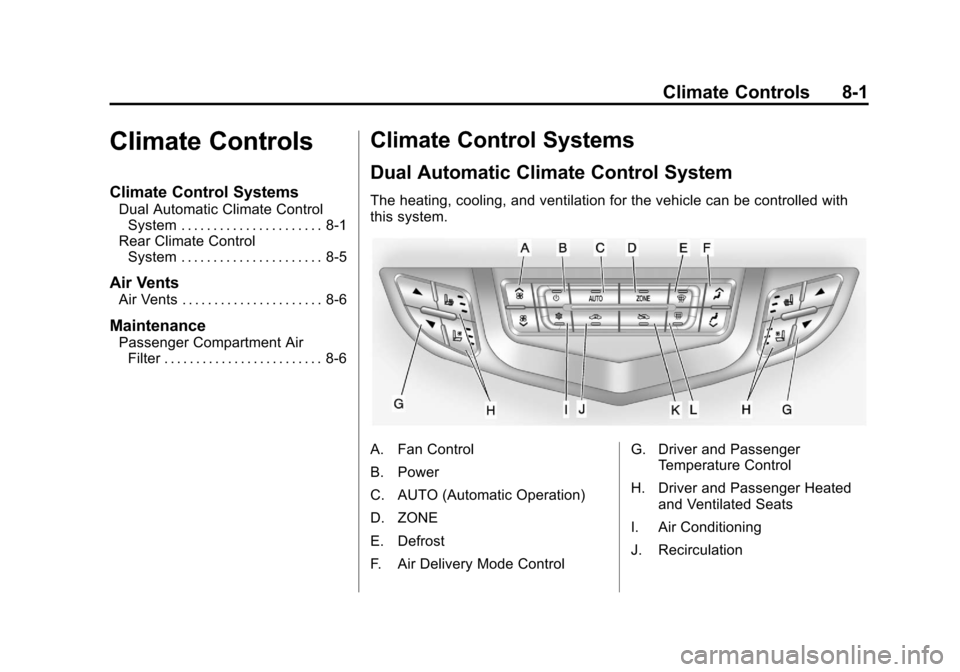
The heating, cooling, and ventilation for the vehicle can be controlled with
this system.
A. Fan Control
B. Power
C. AUTO (Automatic Operation)
D. ZONE
E. Defrost
F. Air Delivery Mode Control G. Driver and Passenger
Temperature Control
H. Driver and Passenger Heated and Ventilated Seats
I. Air Conditioning
J. Recirculation
Page 270 of 498
Black plate (2,1)Cadillac SRX Owner Manual - 2011
8-2 Climate Controls
K. Outside Air
L. Rear Window Defogger
Automatic Operation
The system automatically controls
the fan speed, air delivery, air
conditioning and recirculation in
order to heat or cool the vehicle
to the desired temperature.
When the indicator light is on, the
system is in full automatic operation.
If the air delivery mode or fan
setting is manually adjusted, the
auto indicator turns off and displays
will show the selected settings.
To place the system in automatic
mode do the following:
1. Press AUTO.
2. Set the temperature. Allowthe system time to stabilize.
Then adjust the temperature
as needed for best comfort. English units can be changed
to metric units through the
Driver Information Center (DIC).
See
Vehicle Personalization on
page 5‑40.
Q/R(Driver and Passenger
Temperature Control): The
temperature can be adjusted
separately for the driver and the
passenger. Press to increase or
decrease the temperature.
ZONE: Press to link all climate
zone settings to the driver settings.
The ZONE indicator light turns off.
When the passenger settings are
adjusted, the ZONE indicator light
is on. Manual Operation
O(Power):
Press to turn the
climate control system on or off.
D C(Fan Control): Press to
increase or decrease the fan speed.
Pressing either button cancels
automatic operation and the system
goes into manual mode. Press
AUTO to return to automatic
operation.
H G(Air Delivery Mode Control):
Press to change the direction of the
airflow. The current mode appears
in the display screen. Changing
the mode cancels the automatic
operation and the system goes into
manual mode. Press AUTO to
return to automatic operation.
Page 271 of 498

Black plate (3,1)Cadillac SRX Owner Manual - 2011
Climate Controls 8-3
To change the current mode, select
one of the following:
Y(Vent):Air is directed to the
instrument panel outlets.
\(Bi-Level): Air is divided
between the instrument panel
outlets and the floor outlets.
C(Tri‐Level): Air is divided
between the windshield, instrument
panel, and floor outlets.
[(Floor): Air is directed to the
floor outlets.
-(Defog): Clears the windows of
fog or moisture. Air is directed to the
windshield and floor outlets.
8(Upper): Air is directed to the
windshield outlets.
7(Hi-Level): Air is divided
between the windshield and
instrument panel outlets.
0(Defrost): Clears the
windshield of fog or frost more
quickly. Air is directed to the
windshield.
#(Air Conditioning): Press to
turn the automatic air conditioning
on or off. If the fan is turned off or
the outside temperature falls below
freezing, the air conditioner will
not run.
Press AUTO to return to automatic
operation and the air conditioner
runs as needed. When the indicator
light is on, the air conditioner runs
automatically to cool the air inside
the vehicle or to dry the air needed
to defog the windshield faster.
h(Recirculation): Press to turn
on recirculation. An indicator light
comes on. Air is recirculated to
quickly cool the inside of the vehicle
or prevent outside air and odors
from entering.
Automatic Air Recirculation:
When the AUTO indicator light
is on, the air is automatically
recirculated as needed to help
quickly cool the inside of the
vehicle. The climate control system may
have a sensor to detect air pollution.
In auto recirculation control, the Air
Quality Control system may operate.
To adjust the sensitivity of the
Air Quality Control, see Climate
and Air Quality under
Vehicle
Personalization on page 5‑40.
Auto Defog: The climate control
system may have a sensor to
automatically detect high humidity
inside the vehicle. When high
humidity is detected, the climate
control system may adjust to
outside air supply and turn on the
air conditioner. If the climate control
system does not detect possible
window fogging, it returns to normal
operation. To turn Auto Defog off
or on, see Climate and Air Quality
under Vehicle Personalization on
page 5‑40.
%(Outside Air): Press to turn
on outside air. An indicator light
comes on. Outside air is circulated
through the vehicle.
Page 272 of 498
Black plate (4,1)Cadillac SRX Owner Manual - 2011
8-4 Climate Controls
Rear Window Defogger
=(Rear Window Defogger):
Press to turn the rear window
defogger on or off.
The rear window defogger turns
off automatically after about
10 minutes. If turned on again it
runs for about 5 minutes before
turning off. At higher speeds, the
rear window defogger may stay
on continuously.
The rear window defogger can
be set to automatic operation,
see Climate and Air Quality
under Vehicle Personalization on
page 5‑40. When auto rear defog is
selected, the rear window defogger
turns on automatically when the
interior temperature is cold and the
outside temperature is about 40°F
and below. The auto rear defogger
turns off automatically after about
10 minutes. At higher speeds, the
rear window defogger may stay on
continuously. The heated outside rearview mirrors
turn on when the rear window
defogger button is on and helps to
clear fog or frost from the surface of
the mirror. See
Heated Mirrors on
page 2‑23.
Notice: Do not try to clear frost
or other material from the inside
of the front windshield and rear
window with a razor blade or
anything else that is sharp.
This may damage the rear
window defogger grid and affect
your radio's ability to pick up
stations clearly. The repairs
wouldn't be covered by your
warranty.
Heated and Ventilated Seats:
Press to heat or ventilate the seat.
See Heated and Ventilated Front
Seats on page 3‑11. Remote Start Climate Control
Operation:
For vehicles with the
remote vehicle start feature, the
climate control system may run
when the vehicle is started remotely.
The system uses the driver's
previous settings to heat or cool the
inside of the vehicle. See Remote
Vehicle Start on page 2‑10.
The rear window defogger turns on
if it is cold outside.
Sensors
The solar sensor located on top
of the instrument panel near the
windshield, monitors the solar heat.
The climate control system
uses the sensor information to
adjust the temperature, fan speed,
recirculation, and air delivery mode
for best comfort.
If the sensor is covered the
automatic climate control system
may not work properly.
Page 273 of 498
Black plate (5,1)Cadillac SRX Owner Manual - 2011
Climate Controls 8-5
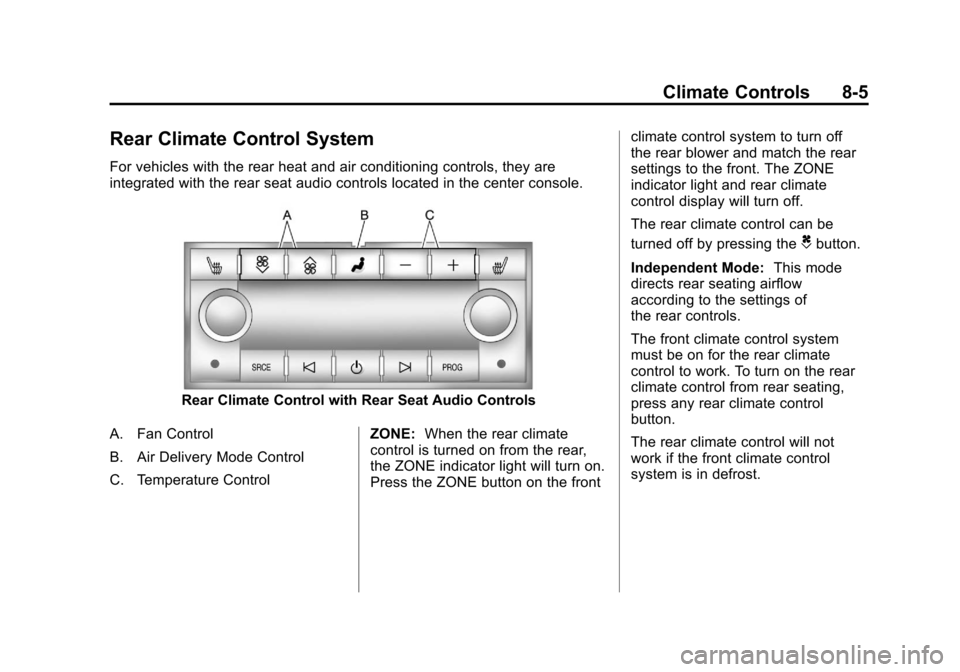
Rear Climate Control System
For vehicles with the rear heat and air conditioning controls, they are
integrated with the rear seat audio controls located in the center console.
Rear Climate Control with Rear Seat Audio Controls
A. Fan Control
B. Air Delivery Mode Control
C. Temperature Control ZONE:
When the rear climate
control is turned on from the rear,
the ZONE indicator light will turn on.
Press the ZONE button on the front climate control system to turn off
the rear blower and match the rear
settings to the front. The ZONE
indicator light and rear climate
control display will turn off.
The rear climate control can be
turned off by pressing the
Cbutton.
Independent Mode: This mode
directs rear seating airflow
according to the settings of
the rear controls.
The front climate control system
must be on for the rear climate
control to work. To turn on the rear
climate control from rear seating,
press any rear climate control
button.
The rear climate control will not
work if the front climate control
system is in defrost.