phone CADILLAC SRX 2011 2.G Owner's Guide
[x] Cancel search | Manufacturer: CADILLAC, Model Year: 2011, Model line: SRX, Model: CADILLAC SRX 2011 2.GPages: 498, PDF Size: 7.62 MB
Page 262 of 498

Black plate (58,1)Cadillac SRX Owner Manual - 2011
7-58 Infotainment System
Pairing a Phone
1. Press
bg. For vehicles with a
navigation system, say “Hands
Free,” after the tone.
2. Say “Bluetooth.”
3. Say “Pair.”The system responds
with instructions and a four‐digit
Personal Identification Number
(PIN). The PIN is used in Step 5.
4. Start the pairing process on the cell phone that you want to pair.
For help with this process, see
your cell phone manufacturer's
user guide. 5. Locate the device named
“Your
Vehicle” in the list on the cell
phone. Follow the instructions
on the cell phone to enter the
PIN number that was provided
in Step 3. After the PIN number
is successfully entered, the
system prompts you to provide a
name for the paired cell phone.
This name will be used to
indicate which phones are
paired and connected to the
vehicle, see “Listing All Paired
and Connected Phones” later in
this section for more information.
6. Repeat Steps 1 through 5 to pair additional phones. Listing All Paired and Connected
Phones
The system can list all cell phones
paired to it. If a paired cell phone is
also connected to the vehicle, the
system responds with
“is connected”
after that phone name.
1. Press
b g. For vehicles with a
navigation system, say “Hands
Free,” after the tone.
2. Say “Bluetooth.”
3. Say “List.”
Page 263 of 498
Black plate (59,1)Cadillac SRX Owner Manual - 2011
Infotainment System 7-59
Deleting a Paired Phone
If the phone name you want to
delete is unknown, see“Listing All
Paired and Connected Phones.”
1. Press
b g. For vehicles with a
navigation system, say “Hands
Free,” after the tone.
2. Say “Bluetooth.”
3. Say “Delete.” The system asks
for which phone to delete.
4. Say the name of the phone you want to delete. Connecting to a Different Phone
To connect to a different cell phone,
the Bluetooth system looks for the
next available cell phone in the
order in which all the available cell
phones were paired. Depending
on which cell phone you want to
connect to, you may have to use
this command several times.
1. Press
b
g. For vehicles with a
navigation system, say “Hands
Free,” after the tone.
2. Say “Bluetooth.”
3. Say “Change phone.”
.If another cell phone is
found, the response will be
“
connected.”
.If another cell phone is not
found, the original phone
remains connected.
Storing and Deleting Phone
Numbers
The system can store up to
30 phone numbers as name tags
in the Hands Free Directory that is
shared between the Bluetooth and
OnStar systems.
The following commands are used
delete and store phone numbers.
Store:This command will store
a phone number, or a group of
numbers as a name tag.
Digit Store: This command allows
a phone number to be stored as a
name tag by entering the digits one
at a time.
Delete: This command is used to
delete individual name tags.
Delete All Name Tags: This
command deletes all stored name
tags in the Hands Free Calling
Directory and the Destinations
Directory.
Page 264 of 498
Black plate (60,1)Cadillac SRX Owner Manual - 2011
7-60 Infotainment System
Using the“Store”Command
1. Press
b g. For vehicles with a
navigation system, say “Hands
Free,” after the tone.
2. Say “Store.”
3. Say the phone number or group of numbers you want to store all
at once with no pauses, then
follow the directions given by the
system to save a name tag for
this number.
Using the “Digit Store” Command
If an unwanted number is
recognized by the system, say
“Clear” at any time to clear the
last number.
To hear all of the numbers
recognized by the system, say
“Verify” at any time.
1. Press
b g. For vehicles with a
navigation system, say “Hands
Free,” after the tone.
2. Say “Digit Store.” 3. Say each digit, one at a time,
that you want to store. After
each digit is entered, the system
repeats back the digit it heard
followed by a tone. After the
last digit has been entered,
say “Store”, and then follow the
directions given by the system to
save a name tag for this number.
Using the “Delete”Command
1. Press
b g. For vehicles with a
navigation system, say “Hands
Free,” after the tone.
2. Say “Delete.”
3. Say the name tag you want to delete. Using the
“Delete All Name Tags”
Command
This command deletes all stored
name tags in the Hands Free
Calling Directory and the
Destinations Directory.
To delete all name tags:
1. Press
b g. For vehicles with a
navigation system, say “Hands
Free,” after the tone.
2. Say “Delete all name tags.”
Listing Stored Numbers
The list command will list all the
stored numbers and name tags.
Using the “List”Command
1. Press
b g. For vehicles with a
navigation system, say “Hands
Free,” after the tone.
2. Say “Directory.”
3. Say “Hands Free Calling.”
4. Say “List.”
Page 265 of 498
Black plate (61,1)Cadillac SRX Owner Manual - 2011
Infotainment System 7-61
Making a Call
Calls can be made using the
following commands.
Dial or Call:The dial or
call command can be used
interchangeably to dial a phone
number or a stored name tag.
Digit Dial: This command allows
a phone number to be dialed by
entering the digits one at a time.
Re‐dial : This command is used to
dial the last number used on the cell
phone.
Using the “Dial”or“Call”
Command
1. Press
b g. For vehicles with a
navigation system, say “Hands
Free,” after the tone.
2. Say “Dial”or“Call.”
3. Say the entire number without pausing or say the name tag.
Once connected, the person called
will be heard through the audio
speakers. Using the
“Digit Dial” Command
The digit dial command allows a
phone number to be dialed by
entering the digits one at a time.
After each digit is entered, the
system repeats back the digit it
heard followed by a tone.
If an unwanted number is
recognized by the system, say
“Clear” at any time to clear the
last number.
To hear all of the numbers
recognized by the system,
say “Verify” at any time.
1. Press
b g. For vehicles with a
navigation system, say “Hands
Free,” after the tone.
2. Say “Digit Dial.”
3. Say each digit, one at a time, that you want to dial. After each
digit is entered, the system
repeats back the digit it heard
followed by a tone. After the
last digit has been entered,
say “Dial.” Once connected, the person called
will be heard through the audio
speakers.
Using the
“Re‐dial”Command
1. Press
b g. For vehicles with a
navigation system, say “Hands
Free,” after the tone.
2. After the tone, say “Re‐dial.”
Once connected, the person called
will be heard through the audio
speakers.
Receiving a Call
When an incoming call is received,
the audio system mutes and a ring
tone is heard in the vehicle.
.Pressb gto answer the call.
.Presscto ignore a call.
Page 266 of 498
Black plate (62,1)Cadillac SRX Owner Manual - 2011
7-62 Infotainment System
Call Waiting
Call waiting must be supported on
the cell phone and enabled by the
wireless service carrier.
.Pressbgto answer an
incoming call when another call
is active. The original call is
placed on hold.
.Pressb gagain to return to the
original call.
.To ignore the incoming call, no
action is required.
.Pressc $to disconnect the
current call and switch to the call
on hold.
Three‐Way Calling
Three‐way calling must be
supported on the cell phone and
enabled by the wireless service
carrier.
1. While on a call, press
b g.
2. Say “Three‐way call.”
3. Use the dial or call command to dial the number of the third party
to be called.
4. Once the call is connected, press
bgto link all callers
together.
Ending a Call
Presscto end a call.
Muting a Call
During a call, all sounds from inside
the vehicle can be muted so that the
person on the other end of the call
cannot hear them.
To mute a call, press
b g, and then
say “Mute Call.”
To cancel mute, press
b g, and
then say “Un‐mute Call.”
Transferring a Call
Audio can be transferred between
the Bluetooth system and the cell
phone.
The cell phone must be paired
and connected with the Bluetooth
system before a call can be
transferred. The connection process
can take up to two minutes after the
ignition is turned to ON/RUN.
Page 267 of 498
Black plate (63,1)Cadillac SRX Owner Manual - 2011
Infotainment System 7-63
To Transfer Audio From the
Bluetooth System to a Cell Phone
During a call with the audio in the
vehicle:
1. Press
bg.
2. Say “Transfer Call.”
To Transfer Audio to the Bluetooth
System From a Cell Phone
During a call with the audio on the
cell phone, press
b g. The audio
transfers to the vehicle. If the audio
does not transfer to the vehicle,
use the audio transfer feature on
the cell phone. See your cell phone
manufacturers user guide for more
information.
Voice Pass-Thru
Voice pass‐thru allows access to
the voice recognition commands on
the cell phone. See your cell phone
manufacturer's user guide to see if
the cell phone supports this feature. To access contacts stored in the cell
phone:
1. Press
b
g. For vehicles with a
navigation system, say “Hands
Free,” after the tone.
2. Say “Bluetooth.” The system
responds “Bluetooth ready”,
followed by a tone.
3. Say “Voice.” The system
responds “OK, accessing
.The cell phone's normal
prompt messages will
go through their cycle
according to the phone's
operating instructions.
Dual Tone Multi-Frequency
(DTMF) Tones
The Bluetooth system can send
numbers and the numbers stored
as name tags during a call. You can
use this feature when calling a
menu‐driven phone system.
Account numbers can also be
stored for use. Sending a Number or Name Tag
During a Call
1. Press
b
g. The system
responds “Ready”, followed by
a tone.
2. Say “Dial.”
3. Say the number or name tag to send.
Clearing the System
Unless information is deleted out
of the in‐vehicle Bluetooth system,
it will be retained indefinitely.
This includes all saved name tags in
the phone book and phone pairing
information. For information on how
to delete this information, see the
previous sections on “Deleting a
Paired Phone” and“Deleting
Name Tags.”
Page 295 of 498
Black plate (19,1)Cadillac SRX Owner Manual - 2011
Driving and Operating 9-19
In an emergency:
1. Brake using a firm and steadypressure. Do not pump the
brakes repeatedly. This may
deplete power assist, requiring
increased brake pedal force.
2. Shift the vehicle to N (Neutral). This can be done while the
vehicle is moving. After shifting
to N (Neutral), firmly apply the
brakes and steer the vehicle to
a safe location.
3. Come to a complete stop, shift to P (Park), and turn the ignition
to OFF. On vehicles with an
automatic transmission, the shift
lever must be in P (Park) to turn
the ignition switch to the OFF
position.
4. Set the parking brake. See Parking Brake on page 9‑31.
ACC/ACCESSORY (Amber LED
Light): This mode allows you to
use some electrical accessories
when the engine is off. With the ignition off, pressing the
button one time without the brake
pedal applied, will place the ignition
system in ACC/ACCESSORY.
The ignition will switch from
ACC/ACCESSORY to OFF after
five minutes to prevent battery
run down.
ON/RUN/START (Green LED
Light):
This mode is for driving and
starting. With the ignition off, and
the brake pedal applied, pressing
the button once will place the
ignition system in ON/RUN/START.
Once engine cranking begins,
release the button. Engine cranking
will continue until the engine starts.
See Starting the Gasoline Engine
on page 9‑19 for more information.
The ignition will then remain in
ON/RUN.Starting the Gasoline
Engine
Place the transmission in the proper
gear by moving the shift lever to
P (Park) or N (Neutral). To restart
the engine when the vehicle is
already moving, use N (Neutral).
Notice: Do not try to shift to
P (Park) if the vehicle is moving.
If you do, you could damage the
transmission. Shift to P (Park)
only when the vehicle is stopped.
The keyless access transmitter must
be inside the vehicle for the ignition
to work.
Cell phone chargers can interfere
with the operation of the Keyless
Access System. Battery chargers
should not be plugged in when
starting or turning off the engine.
Page 328 of 498
Black plate (52,1)Cadillac SRX Owner Manual - 2011
9-52 Driving and Operating
Filling the Tank
{WARNING
Fuel vapor burns violently and a
fuel fire can cause bad injuries.
To help avoid injuries to you and
others, read and follow all the
instructions on the fuel pump
island. Turn off the engine when
refueling. Do not smoke near fuel
or when refueling the vehicle.
Do not use cellular phones. Keep
sparks, flames, and smoking
materials away from fuel. Do not
leave the fuel pump unattended
when refueling the vehicle. This
is against the law in some places.
Do not re-enter the vehicle while
pumping fuel. Keep children away
from the fuel pump; never let
children pump fuel.
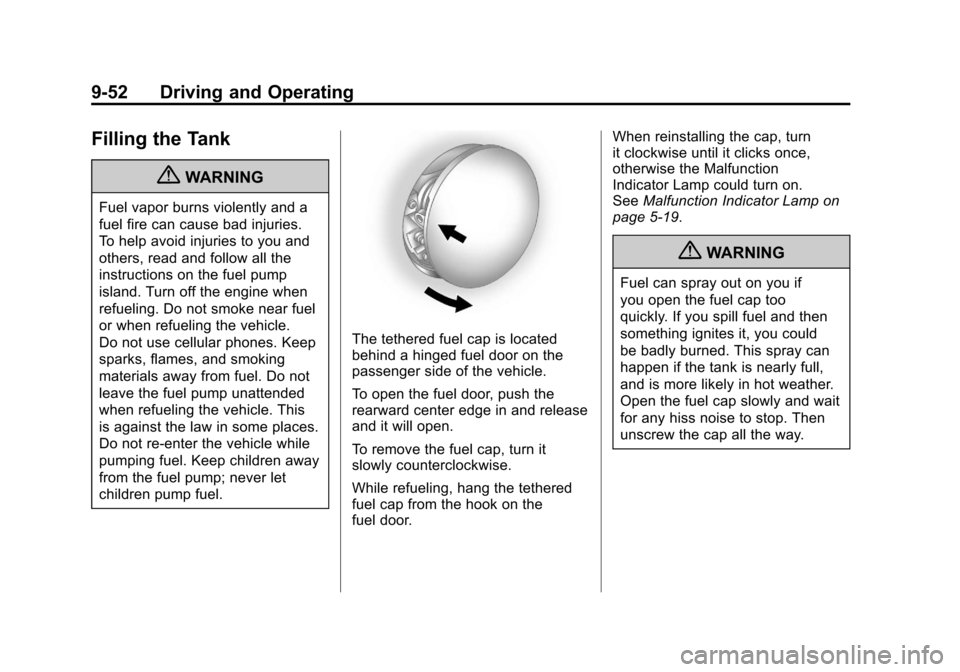
The tethered fuel cap is located
behind a hinged fuel door on the
passenger side of the vehicle.
To open the fuel door, push the
rearward center edge in and release
and it will open.
To remove the fuel cap, turn it
slowly counterclockwise.
While refueling, hang the tethered
fuel cap from the hook on the
fuel door.When reinstalling the cap, turn
it clockwise until it clicks once,
otherwise the Malfunction
Indicator Lamp could turn on.
See
Malfunction Indicator Lamp on
page 5‑19.
{WARNING
Fuel can spray out on you if
you open the fuel cap too
quickly. If you spill fuel and then
something ignites it, you could
be badly burned. This spray can
happen if the tank is nearly full,
and is more likely in hot weather.
Open the fuel cap slowly and wait
for any hiss noise to stop. Then
unscrew the cap all the way.
Page 329 of 498
Black plate (53,1)Cadillac SRX Owner Manual - 2011
Driving and Operating 9-53
Be careful not to spill fuel. Do not
top off or overfill the tank and wait a
few seconds after you have finished
pumping before removing the
nozzle. Clean fuel from painted
surfaces as soon as possible.
SeeExterior Care on page 10‑101.
When replacing the fuel cap, turn it
clockwise until it clicks once. Make
sure the cap is fully installed. The
diagnostic system can determine if
the fuel cap has been left off or
improperly installed. This would
allow fuel to evaporate into the
atmosphere. See Malfunction
Indicator Lamp on page 5‑19.
{WARNING
If a fire starts while you are
refueling, do not remove the
nozzle. Shut off the flow of fuel
by shutting off the pump or by
notifying the station attendant.
Leave the area immediately. Notice:
If a new fuel cap is
needed, be sure to get the right
type of cap from your dealer.
The wrong type fuel cap might
not fit properly, might cause the
malfunction indicator lamp to
light, and could damage the
fuel tank and emissions system.
See Malfunction Indicator Lamp
on page 5‑19.
Filling a Portable Fuel
Container
{WARNING
Never fill a portable fuel
container while it is in the vehicle.
Static electricity discharge from
the container can ignite the fuel
vapor. You can be badly burned
(Continued)
WARNING (Continued)
and the vehicle damaged if this
occurs. To help avoid injury to you
and others:
.Dispense fuel only into
approved containers.
.Do not fill a container while
it is inside a vehicle, in a
vehicle's trunk, pickup bed,
or on any surface other than
the ground.
.Bring the fill nozzle in contact
with the inside of the fill
opening before operating the
nozzle. Contact should be
maintained until the filling is
complete.
.Do not smoke while
pumping fuel.
.Do not use a cellular phone
while pumping fuel.
Page 388 of 498
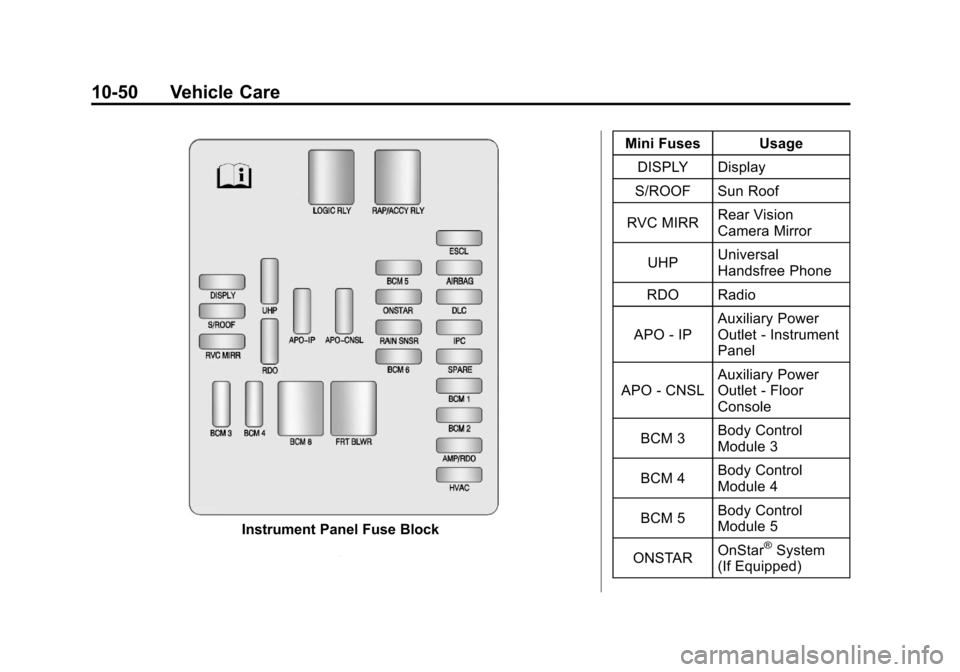
Black plate (50,1)Cadillac SRX Owner Manual - 2011
10-50 Vehicle Care
Instrument Panel Fuse BlockMini Fuses Usage
DISPLY Display
S/ROOF Sun Roof
RVC MIRR Rear Vision
Camera Mirror
UHP Universal
Handsfree Phone
RDO Radio
APO ‐IP Auxiliary Power
Outlet
‐Instrument
Panel
APO ‐CNSL Auxiliary Power
Outlet
‐Floor
Console
BCM 3 Body Control
Module 3
BCM 4 Body Control
Module 4
BCM 5 Body Control
Module 5
ONSTAR OnStar®System
(If Equipped)