radio CADILLAC SRX 2011 2.G Workshop Manual
[x] Cancel search | Manufacturer: CADILLAC, Model Year: 2011, Model line: SRX, Model: CADILLAC SRX 2011 2.GPages: 498, PDF Size: 7.62 MB
Page 272 of 498
Black plate (4,1)Cadillac SRX Owner Manual - 2011
8-4 Climate Controls
Rear Window Defogger
=(Rear Window Defogger):
Press to turn the rear window
defogger on or off.
The rear window defogger turns
off automatically after about
10 minutes. If turned on again it
runs for about 5 minutes before
turning off. At higher speeds, the
rear window defogger may stay
on continuously.
The rear window defogger can
be set to automatic operation,
see Climate and Air Quality
under Vehicle Personalization on
page 5‑40. When auto rear defog is
selected, the rear window defogger
turns on automatically when the
interior temperature is cold and the
outside temperature is about 40°F
and below. The auto rear defogger
turns off automatically after about
10 minutes. At higher speeds, the
rear window defogger may stay on
continuously. The heated outside rearview mirrors
turn on when the rear window
defogger button is on and helps to
clear fog or frost from the surface of
the mirror. See
Heated Mirrors on
page 2‑23.
Notice: Do not try to clear frost
or other material from the inside
of the front windshield and rear
window with a razor blade or
anything else that is sharp.
This may damage the rear
window defogger grid and affect
your radio's ability to pick up
stations clearly. The repairs
wouldn't be covered by your
warranty.
Heated and Ventilated Seats:
Press to heat or ventilate the seat.
See Heated and Ventilated Front
Seats on page 3‑11. Remote Start Climate Control
Operation:
For vehicles with the
remote vehicle start feature, the
climate control system may run
when the vehicle is started remotely.
The system uses the driver's
previous settings to heat or cool the
inside of the vehicle. See Remote
Vehicle Start on page 2‑10.
The rear window defogger turns on
if it is cold outside.
Sensors
The solar sensor located on top
of the instrument panel near the
windshield, monitors the solar heat.
The climate control system
uses the sensor information to
adjust the temperature, fan speed,
recirculation, and air delivery mode
for best comfort.
If the sensor is covered the
automatic climate control system
may not work properly.
Page 294 of 498
Black plate (18,1)Cadillac SRX Owner Manual - 2011
9-18 Driving and Operating
Adjust the throttle and brake pedals
while the vehicle is in P (Park)
without pressing on the pedals.
The pedals cannot be adjusted
while the vehicle is in R (Reverse)
or when cruise control is engaged.
The throttle and brake pedals can
also be adjusted while driving.
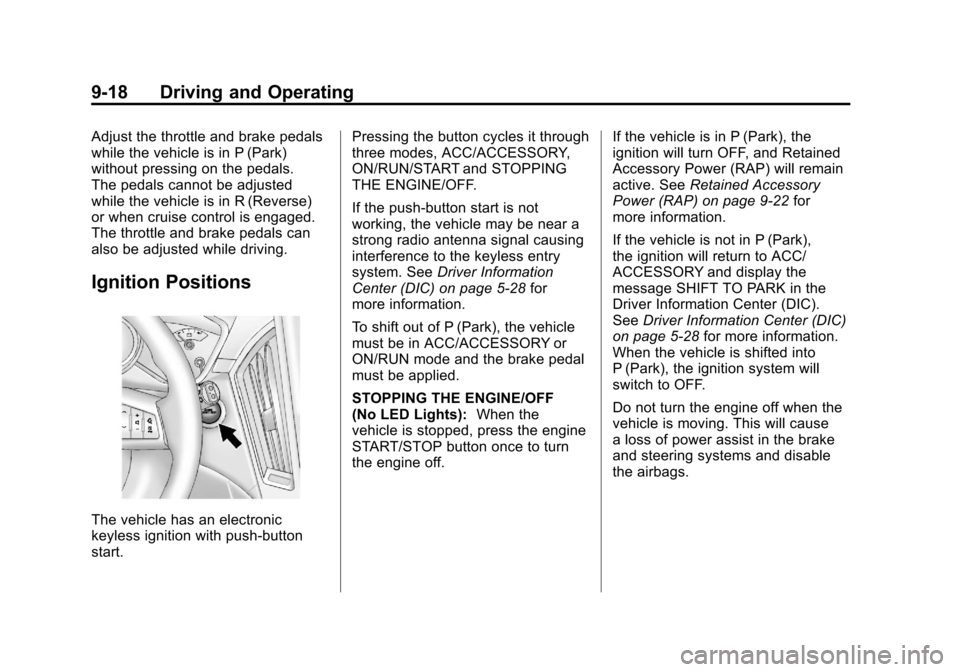
Ignition Positions
The vehicle has an electronic
keyless ignition with push‐button
start.Pressing the button cycles it through
three modes, ACC/ACCESSORY,
ON/RUN/START and STOPPING
THE ENGINE/OFF.
If the push-button start is not
working, the vehicle may be near a
strong radio antenna signal causing
interference to the keyless entry
system. See
Driver Information
Center (DIC) on page 5‑28 for
more information.
To shift out of P (Park), the vehicle
must be in ACC/ACCESSORY or
ON/RUN mode and the brake pedal
must be applied.
STOPPING THE ENGINE/OFF
(No LED Lights): When the
vehicle is stopped, press the engine
START/STOP button once to turn
the engine off. If the vehicle is in P (Park), the
ignition will turn OFF, and Retained
Accessory Power (RAP) will remain
active. See
Retained Accessory
Power (RAP) on page 9‑22 for
more information.
If the vehicle is not in P (Park),
the ignition will return to ACC/
ACCESSORY and display the
message SHIFT TO PARK in the
Driver Information Center (DIC).
See Driver Information Center (DIC)
on page 5‑28 for more information.
When the vehicle is shifted into
P (Park), the ignition system will
switch to OFF.
Do not turn the engine off when the
vehicle is moving. This will cause
a loss of power assist in the brake
and steering systems and disable
the airbags.
Page 388 of 498
Black plate (50,1)Cadillac SRX Owner Manual - 2011
10-50 Vehicle Care
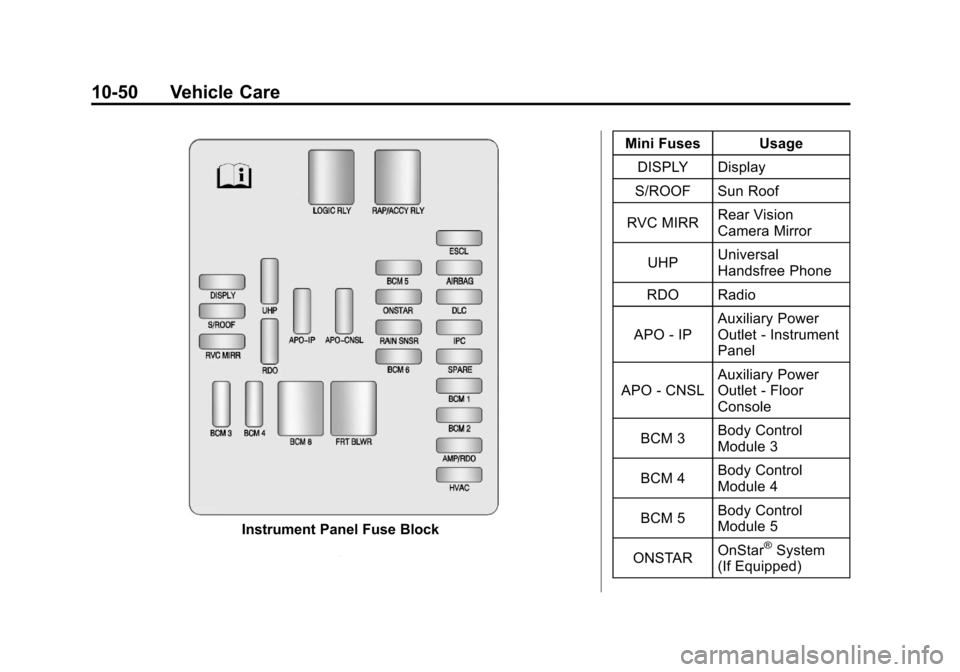
Instrument Panel Fuse BlockMini Fuses Usage
DISPLY Display
S/ROOF Sun Roof
RVC MIRR Rear Vision
Camera Mirror
UHP Universal
Handsfree Phone
RDO Radio
APO ‐IP Auxiliary Power
Outlet
‐Instrument
Panel
APO ‐CNSL Auxiliary Power
Outlet
‐Floor
Console
BCM 3 Body Control
Module 3
BCM 4 Body Control
Module 4
BCM 5 Body Control
Module 5
ONSTAR OnStar®System
(If Equipped)
Page 389 of 498
Black plate (51,1)Cadillac SRX Owner Manual - 2011
Vehicle Care 10-51
Mini Fuses Usage
RAIN SNSR Rain Sensor
BCM 6 Body Control
Module 6
ESCL Electronic Steering
Column Lock
AIRBAG Sensing and
Diagnostic Module
DLC Data Link
Connection
IPC Instrument Panel
Cluster
SPARE Not Used
BCM 1 Body Control
Module 1
BCM 2 Body Control
Module 2 Mini Fuses Usage
AMP/RDO Amplifier/Radio
HVAC Heating Ventilation
& Air Conditioning
J—Case Fuses Usage
BCM 8 Body Control
Module 8
FRT BLWR Front Blower
Relays Usage
LOGIC RLY Logistics Relay
RAP/
ACCY RLY Retained
Accessory Power/
Accessory RelayRear Compartment Fuse
Block
The rear compartment fuse block is
located in the cargo area, on the
driver side of the vehicle behind the
lower trim panel. To open, turn the
latch with a flat bladed tool and pull
the trim panel from the edges to fold
it down.
The vehicle may not be equipped
with all of the fuses, relays, and
features shown.
Page 401 of 498
Black plate (63,1)Cadillac SRX Owner Manual - 2011
Vehicle Care 10-63
Vehicles with P235/65R18,
P235/55R20, or 235/55R20 size
tires require inflation pressure
adjustment when driving
your vehicle at speeds of
160 km/h (100 mph) or higher.
Set the cold inflation pressure to
the maximum inflation pressure
shown on the tire sidewall,
or 260 kPa (38 psi), whichever
is lower. When you end this
high-speed driving, return the tires
to the cold tire inflation pressure
shown on the Tire and Loading
Information label. SeeVehicle
Load Limits on page 9‑12 and
Tire Pressure on page 10‑61.
You will find the maximum load and
inflation pressure molded on the
tire's sidewall, in small letters,
near the rim flange. It will read
something like this: Maximum load
690 kg (1521 lbs) 300 kPa (44 psi)
Max. Press.Tire Pressure Monitor
System
The Tire Pressure Monitor System
(TPMS) uses radio and sensor
technology to check tire pressure
levels. The TPMS sensors monitor
the air pressure in your tires and
transmit tire pressure readings to
a receiver located in the vehicle.
Each tire, including the spare
(if provided), should be checked
monthly when cold and inflated to
the inflation pressure recommended
by the vehicle manufacturer on
the vehicle placard or tire inflation
pressure label. (If your vehicle has
tires of a different size than the size
indicated on the vehicle placard or
tire inflation pressure label, you
should determine the proper tire
inflation pressure for those tires.)
As an added safety feature, your
vehicle has been equipped with a
tire pressure monitoring system
(TPMS) that illuminates a low tire pressure telltale when one or
more of your tires is significantly
under‐inflated.
Accordingly, when the low tire
pressure telltale illuminates, you
should stop and check your tires as
soon as possible, and inflate them
to the proper pressure. Driving on
a significantly under‐inflated tire
causes the tire to overheat and can
lead to tire failure. Under‐inflation
also reduces fuel efficiency and
tire tread life, and may affect the
vehicle's handling and stopping
ability.
Please note that the TPMS is
not a substitute for proper tire
maintenance, and it is the driver's
responsibility to maintain correct
tire pressure, even if under‐inflation
has not reached the level to trigger
illumination of the TPMS low tire
pressure telltale.
Your vehicle has also been
equipped with a TPMS malfunction
indicator to indicate when the
system is not operating properly.
Page 402 of 498
Black plate (64,1)Cadillac SRX Owner Manual - 2011
10-64 Vehicle Care
The TPMS malfunction indicator is
combined with the low tire pressure
telltale. When the system detects a
malfunction, the telltale will flash for
approximately one minute and then
remain continuously illuminated.
This sequence will continue upon
subsequent vehicle start‐ups as
long as the malfunction exists.
When the malfunction indicator
is illuminated, the system may
not be able to detect or signal low
tire pressure as intended. TPMS
malfunctions may occur for a variety
of reasons, including the installation
of replacement or alternate tires or
wheels on the vehicle that prevent
the TPMS from functioning properly.
Always check the TPMS malfunction
telltale after replacing one or more
tires or wheels on your vehicle to
ensure that the replacement or
alternate tires and wheels allow
the TPMS to continue to function
properly.
SeeTire Pressure Monitor
Operation on page 10‑64 for
additional information.Federal Communications
Commission (FCC) and
Industry Canada
See Radio Frequency
Statement on page 13‑20 for
information regarding Part 15
of the Federal Communications
Commission (FCC) rules and
Industry Canada Standards
RSS-210/220/310.
Tire Pressure Monitor
Operation
This vehicle may have a Tire
Pressure Monitor System (TPMS).
The TPMS is designed to warn the
driver when a low tire pressure
condition exists. TPMS sensors are
mounted onto each tire and wheel
assembly, excluding the spare tire
and wheel assembly. The TPMS
sensors monitor the air pressure in
the vehicle's tires and transmit the
tire pressure readings to a receiver
located in the vehicle.
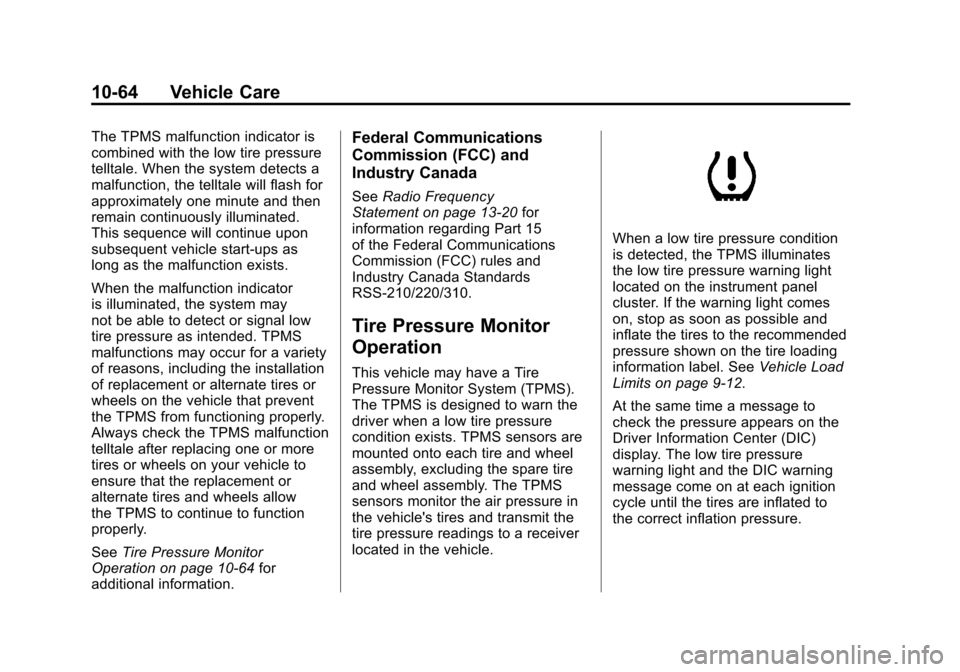
When a low tire pressure condition
is detected, the TPMS illuminates
the low tire pressure warning light
located on the instrument panel
cluster. If the warning light comes
on, stop as soon as possible and
inflate the tires to the recommended
pressure shown on the tire loading
information label. See Vehicle Load
Limits on page 9‑12.
At the same time a message to
check the pressure appears on the
Driver Information Center (DIC)
display. The low tire pressure
warning light and the DIC warning
message come on at each ignition
cycle until the tires are inflated to
the correct inflation pressure.
Page 404 of 498
Black plate (66,1)Cadillac SRX Owner Manual - 2011
10-66 Vehicle Care
.The TPMS sensor matching
process was started but not
completed or not completed
successfully after rotating the
vehicle's tires. The DIC message
and TPMS malfunction light
should go off once the TPMS
sensor matching process
is performed successfully.
See“TPMS Sensor Matching
Process” later in this section.
.One or more TPMS sensors are
missing or damaged. The DIC
message and the TPMS
malfunction light should go
off when the TPMS sensors
are installed and the sensor
matching process is performed
successfully. See your dealer
for service.
.Replacement tires or wheels do
not match your vehicle's original
equipment tires or wheels. Tires
and wheels other than those
recommended for your vehicle
could prevent the TPMS from
functioning properly. See Buying
New Tires on page 10‑70.
.Operating electronic devices or
being near facilities using radio
wave frequencies similar to the
TPMS could cause the TPMS
sensors to malfunction.
If the TPMS is not functioning it
cannot detect or signal a low tire
condition. See your dealer for
service if the TPMS malfunction
light and DIC message comes
on and stays on.
TPMS Sensor Matching
Process
Each TPMS sensor has a unique
identification code. Any time you
rotate your vehicle's tires or replace
one or more of the TPMS sensors,
the identification codes will need to
be matched to the new tire/wheel
position. The sensors are matched
to the tire/wheel positions in the
following order: driver side front tire,
passenger side front tire, passenger
side rear tire, and driver side rear
tire using a TPMS diagnostic tool.
See your dealer for service.
The TPMS sensors can also be
matched to each tire/wheel position
by increasing or decreasing the
tire's air pressure. If increasing the
tire's air pressure, do not exceed
the maximum inflation pressure
indicated on the tire's sidewall.
Page 432 of 498
Black plate (94,1)Cadillac SRX Owner Manual - 2011
10-94 Vehicle Care
Jump Starting
For more information about the
vehicle battery, seeBattery on
page 10‑28.
If the vehicle battery has run down,
you may want to use another
vehicle and some jumper cables to
start your vehicle. Be sure to use
the following steps to do it safely.
{WARNING
Batteries can hurt you. They can
be dangerous because:
.They contain acid that can
burn you.
.They contain gas that can
explode or ignite.
.They contain enough
electricity to burn you.
If you do not follow these steps
exactly, some or all of these
things can hurt you. Notice:
Ignoring these steps
could result in costly damage to
the vehicle that would not be
covered by the warranty.
Trying to start the vehicle by
pushing or pulling it will not
work, and it could damage the
vehicle.
1. Check the other vehicle. It must
have a 12-volt battery with a
negative ground system.
Notice: Only use vehicles with
12-volt systems with negative
grounds to jump start your
vehicle. If the other vehicle's
system is not a 12-volt system
with a negative ground, both
vehicles can be damaged.
2. Get the vehicles close enough so the jumper cables can reach,
but be sure the vehicles are not
touching each other. If they
are, it could cause a ground
connection you do not want.
You would not be able to start your vehicle, and the bad
grounding could damage the
electrical systems.
To avoid the possibility of the
vehicles rolling, set the parking
brake firmly on both vehicles
involved in the jump start
procedure. Put the transmission
in P (Park) before setting the
parking brake.
Notice: If you leave the radio or
other accessories on during the
jump starting procedure, they
could be damaged. The repairs
would not be covered by the
warranty. Always turn off the
radio and other accessories
when jump starting the vehicle.
3. Turn off the ignition on both vehicles. Unplug unnecessary
accessories plugged into the
cigarette lighter or the accessory
power outlet. Turn off the radio
and all lamps that are not
needed. This will avoid sparks,
helping save both batteries and
the radio.
Page 465 of 498
Black plate (1,1)Cadillac SRX Owner Manual - 2011
Customer Information 13-1
Customer
Information
Customer Information
Customer SatisfactionProcedure (U.S. and
Canada) . . . . . . . . . . . . . . . . . . . . 13-1
Customer Satisfaction Procedure (Mexico) . . . . . . . . 13-3
Customer Assistance Offices (U.S. and Canada) . . . . . . . . . 13-5
Customer Assistance Offices (Mexico) . . . . . . . . . . . . . . . . . . . . 13-5
Customer Assistance for Text Telephone (TTY) Users . . . . . 13-6
Online Owner Center . . . . . . . . 13-6
GM Mobility Reimbursement Program . . . . . . . . . . . . . . . . . . . . 13-7
Roadside Service (U.S. and Canada) . . . . . . . . . . . . . . . . . . . . 13-8
Roadside Service (Mexico) . . . . . . . . . . . . . . . . . . 13-10
Scheduling Service Appointments . . . . . . . . . . . . . 13-11 Courtesy Transportation
Program . . . . . . . . . . . . . . . . . . . 13-11
Collision Damage Repair . . . 13-13
Service Publications Ordering Information . . . . . . 13-15Reporting Safety Defects
Reporting Safety Defects to
the United States
Government . . . . . . . . . . . . . . . 13-16
Reporting Safety Defects to the Canadian
Government . . . . . . . . . . . . . . . 13-17
Reporting Safety Defects to General Motors . . . . . . . . . . . 13-17
Vehicle Data Recording and
Privacy
Vehicle Data Recording andPrivacy . . . . . . . . . . . . . . . . . . . . 13-18
Event Data Recorders . . . . . . 13-18
OnStar
®. . . . . . . . . . . . . . . . . . . . 13-19
Navigation System . . . . . . . . . 13-19
Radio Frequency Identification (RFID) . . . . . . . 13-19
Radio Frequency Statement . . . . . . . . . . . . . . . . . 13-20
Customer Information
Customer Satisfaction
Procedure
(U.S. and Canada)
Your satisfaction and goodwill are
important to your dealer and to
Cadillac. Normally, any concerns
with the sales transaction or the
operation of the vehicle will be
resolved by the dealer's sales or
service departments. Sometimes,
however, despite the best intentions
of all concerned, misunderstandings
can occur. If your concern has not
been resolved to your satisfaction,
the following steps should be taken:
STEP ONE: Discuss your
concern with a member of
dealership management. Normally,
concerns can be quickly resolved
at that level. If the matter has
already been reviewed with the
sales, service or parts manager,
contact the owner of the dealership
or the general manager.
Page 482 of 498
Black plate (18,1)Cadillac SRX Owner Manual - 2011
13-18 Customer Information
Vehicle Data
Recording and
Privacy
Your GM vehicle has a number of
sophisticated computers that record
information about the vehicle’s
performance and how it is driven.
For example, your vehicle uses
computer modules to monitor and
control engine and transmission
performance, to monitor the
conditions for airbag deployment
and deploy airbags in a crash, and,
if so equipped, to provide antilock
braking to help the driver control the
vehicle. These modules may store
data to help your dealer technician
service your vehicle. Some modules
may also store data about how you
operate the vehicle, such as rate of
fuel consumption or average speed.
These modules may also retain the
owner’s personal preferences, such
as radio pre-sets, seat positions,
and temperature settings.
Event Data Recorders
This vehicle has an Event Data
Recorder (EDR). The main purpose
of an EDR is to record, in certain
crash or near crash-like situations,
such as an airbag deployment or
hitting a road obstacle, data that
will assist in understanding how
a vehicle's systems performed.
The EDR is designed to record data
related to vehicle dynamics and
safety systems for a short period of
time, typically 30 seconds or less.
The EDR in this vehicle is designed
to record such data as:
.How various systems in your
vehicle were operating
.Whether or not the driver and
passenger safety belts were
buckled/fastened
.How far, if at all, the driver was
pressing the accelerator and/or
brake pedal
.How fast the vehicle was
traveling This data can help provide a better
understanding of the circumstances
in which crashes and injuries occur.
Important:
EDR data is recorded
by your vehicle only if a non-trivial
crash situation occurs; no data is
recorded by the EDR under normal
driving conditions and no personal
data (e.g., name, gender, age,
and crash location) is recorded.
However, other parties, such as
law enforcement, could combine
the EDR data with the type of
personally identifying data
routinely acquired during a
crash investigation.
To read data recorded by an EDR,
special equipment is required, and
access to the vehicle or the EDR is
needed. In addition to the vehicle
manufacturer, other parties, such
as law enforcement, that have the
special equipment, can read the
information if they have access to
the vehicle or the EDR.