change CADILLAC SRX 2012 2.G User Guide
[x] Cancel search | Manufacturer: CADILLAC, Model Year: 2012, Model line: SRX, Model: CADILLAC SRX 2012 2.GPages: 502, PDF Size: 6.23 MB
Page 49 of 502
Black plate (19,1)Cadillac SRX Owner Manual (Include Mex) - 2012
Keys, Doors, and Windows 2-19
Immobilizer
SeeRadio Frequency Statement on
page 13‑21 for information
regarding Part 15 of the Federal
Communications Commission (FCC)
rules and Industry Canada
Standards RSS-GEN/210/220/310.
Immobilizer Operation
This vehicle has a passive
theft-deterrent system.
The system does not have to be
manually armed or disarmed.
The vehicle is automatically
immobilized when the vehicle is
turned off.
The immobilization system is
disarmed when the pushbutton start
is activated to enter the ACC/
ACCESSORY mode or the ON/
RUN/START mode and a valid
transmitter is present in the vehicle.
The security light, located in the
instrument panel cluster, comes on
if there is a problem with arming or
disarming the theft-deterrent
system.
The system has one or more
RKE transmitters matched to an
immobilizer control unit in your
vehicle. Only a correctly matched
RKE transmitter will start the
vehicle. If the transmitter is ever
damaged, you may not be able to
start your vehicle.
When trying to start the vehicle, the
security light comes on briefly when
the ignition is turned on. If the engine does not start and the
security light stays on, there is a
problem with the system. Turn the
ignition off and try again.
If the vehicle will not change ignition
modes (ACC/ACCESSORY,
ON/RUN/START, OFF), and the
RKE transmitter appears to be
undamaged, try another transmitter.
Or, you may try placing the
transmitter in the transmitter pocket
located in the center console. See
“NO REMOTE DETECTED”
under
Key and Lock Messages on
page 5‑36.
If the ignition modes will not change
with the other transmitter, your
vehicle needs service. If the ignition
does change modes, the first
transmitter may be faulty. See your
dealer who can service the
theft-deterrent system and have a
new RKE transmitter programmed to
the vehicle.
Page 68 of 502
Black plate (10,1)Cadillac SRX Owner Manual (Include Mex) - 2012
3-10 Seats and Restraints
Heated and Ventilated
Front Seats
{WARNING
If you cannot feel temperature
change or pain to the skin, the
seat heater may cause burns
even at low temperatures. To
reduce the risk of burns, people
with such a condition should use
care when using the seat heater,
especially for long periods of
time. Do not place anything on
the seat that insulates against
heat, such as a blanket, cushion,
cover, or similar item. This may
cause the seat heater to
overheat. An overheated seat
heater may cause a burn or may
damage the seat.
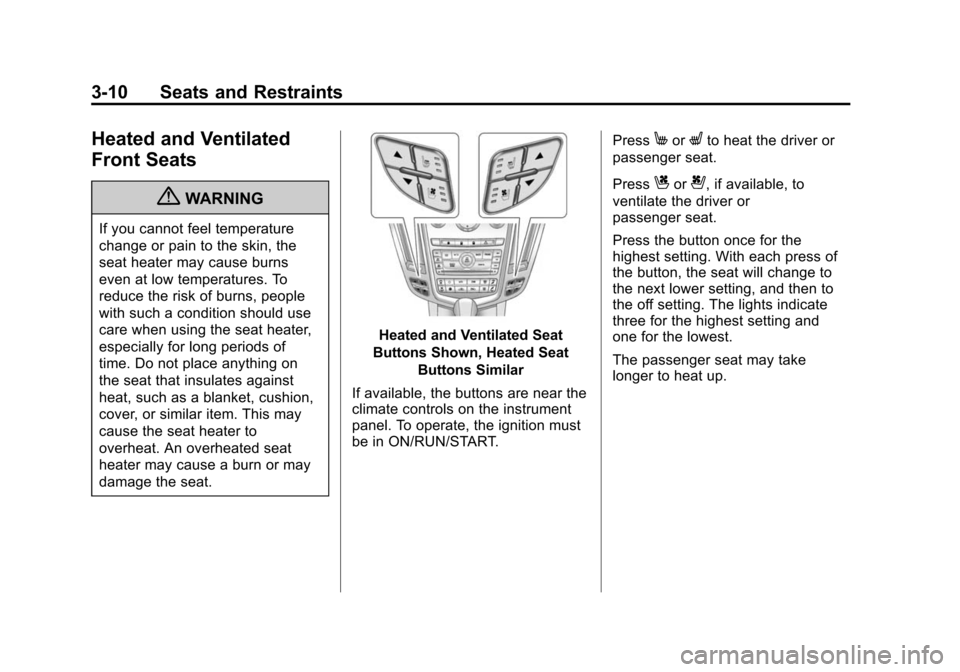
Heated and Ventilated Seat
Buttons Shown, Heated Seat Buttons Similar
If available, the buttons are near the
climate controls on the instrument
panel. To operate, the ignition must
be in ON/RUN/START. Press
MorLto heat the driver or
passenger seat.
Press
Cor{, if available, to
ventilate the driver or
passenger seat.
Press the button once for the
highest setting. With each press of
the button, the seat will change to
the next lower setting, and then to
the off setting. The lights indicate
three for the highest setting and
one for the lowest.
The passenger seat may take
longer to heat up.
Page 71 of 502
Black plate (13,1)Cadillac SRX Owner Manual (Include Mex) - 2012
Seats and Restraints 3-13
Heated Rear Seats
{WARNING
If you cannot feel temperature
change or pain to the skin, the
seat heater may cause burns
even at low temperatures. See
the Warning underHeated and
Ventilated Front Seats on
page 3‑10.
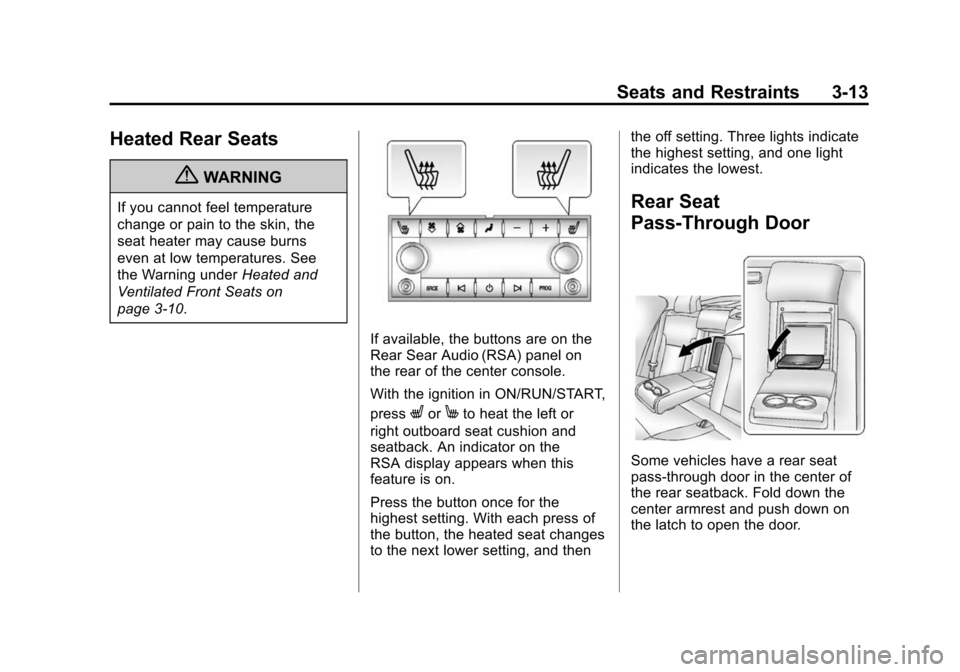
If available, the buttons are on the
Rear Sear Audio (RSA) panel on
the rear of the center console.
With the ignition in ON/RUN/START,
press
LorMto heat the left or
right outboard seat cushion and
seatback. An indicator on the
RSA display appears when this
feature is on.
Press the button once for the
highest setting. With each press of
the button, the heated seat changes
to the next lower setting, and then the off setting. Three lights indicate
the highest setting, and one light
indicates the lowest.
Rear Seat
Pass-Through Door
Some vehicles have a rear seat
pass-through door in the center of
the rear seatback. Fold down the
center armrest and push down on
the latch to open the door.
Page 92 of 502
Black plate (34,1)Cadillac SRX Owner Manual (Include Mex) - 2012
3-34 Seats and Restraints
Servicing the
Airbag-Equipped Vehicle
Airbags affect how the vehicle
should be serviced. There are parts
of the airbag system in several
places around the vehicle. Your
dealer and the service manual have
information about servicing the
vehicle and the airbag system.
To purchase a service manual, see
Service Publications Ordering
Information on page 13‑17.
{WARNING
For up to 10 seconds after the
vehicle is turned off and the
battery is disconnected, an airbag
can still inflate during improper
service. You can be injured if you
are close to an airbag when it
inflates. Avoid yellow connectors.
They are probably part of the
airbag system.(Continued)
WARNING (Continued)
Be sure to follow proper service
procedures, and make sure the
person performing work for you is
qualified to do so.
Adding Equipment to the
Airbag-Equipped Vehicle
Adding accessories that change the
vehicle's frame, bumper system,
height, front end, or side sheet
metal may keep the airbag system
from working properly.
The operation of the airbag system
can also be affected by changing or
moving any parts of the front seats,
safety belts, airbag sensing and
diagnostic module, steering wheel,
instrument panel, roof-rail airbag
modules, ceiling or pillar garnish
trim, overhead console, front
sensors, side impact sensors,
rollover sensor module, airbag
wiring, or cargo restraint system
and convenience net. Your dealer and the service manual
have information about the location
of the airbag sensors, sensing and
diagnostic module, and airbag
wiring.
In addition, the vehicle has a
passenger sensing system that
includes sensors as part of the
front outboard passenger seat. The
passenger sensing system may not
operate properly if the original seat
trim is replaced with non-GM
covers, upholstery, or trim; or with
GM covers, upholstery, or trim
designed for a different vehicle.
Any object, such as an aftermarket
seat heater or a comfort-enhancing
pad or device, installed under or on
top of the seat fabric, could also
interfere with the operation of the
passenger sensing system.
This could either prevent proper
deployment of the passenger
airbag(s) or prevent the passenger
sensing system from properly
turning off the passenger airbag(s).
See
Passenger Sensing System on
page 3‑30.
Page 96 of 502
Black plate (38,1)Cadillac SRX Owner Manual (Include Mex) - 2012
3-38 Seats and Restraints
Infants and Young
Children
Everyone in a vehicle needs
protection! This includes infants and
all other children. Neither the
distance traveled nor the age and
size of the traveler changes the
need, for everyone, to use safety
restraints. In fact, the law in every
state in the United States and in
every Canadian province says
children up to some age must be
restrained while in a vehicle.
{WARNING
Children can be seriously
injured or strangled if a shoulder
belt is wrapped around their
neck and the safety belt
continues to tighten.(Continued)
WARNING (Continued)
Never leave children unattended
in a vehicle and never allow
children to play with the safety
belts.
Airbags plus lap‐shoulder belts offer
protection for adults and older
children, but not for young children
and infants. Neither the vehicle's
safety belt system nor its airbag
system is designed for them. Every
time infants and young children ride
in vehicles, they should have the
protection provided by appropriate
child restraints. Children who are not restrained
properly can strike other people,
or can be thrown out of the vehicle.
{WARNING
Never do this.
Never hold an infant or a child
while riding in a vehicle. Due to
crash forces, an infant or a child
will become so heavy it is not
possible to hold it during a crash.
(Continued)
Page 134 of 502
Black plate (4,1)Cadillac SRX Owner Manual (Include Mex) - 2012
5-4 Instruments and Controls
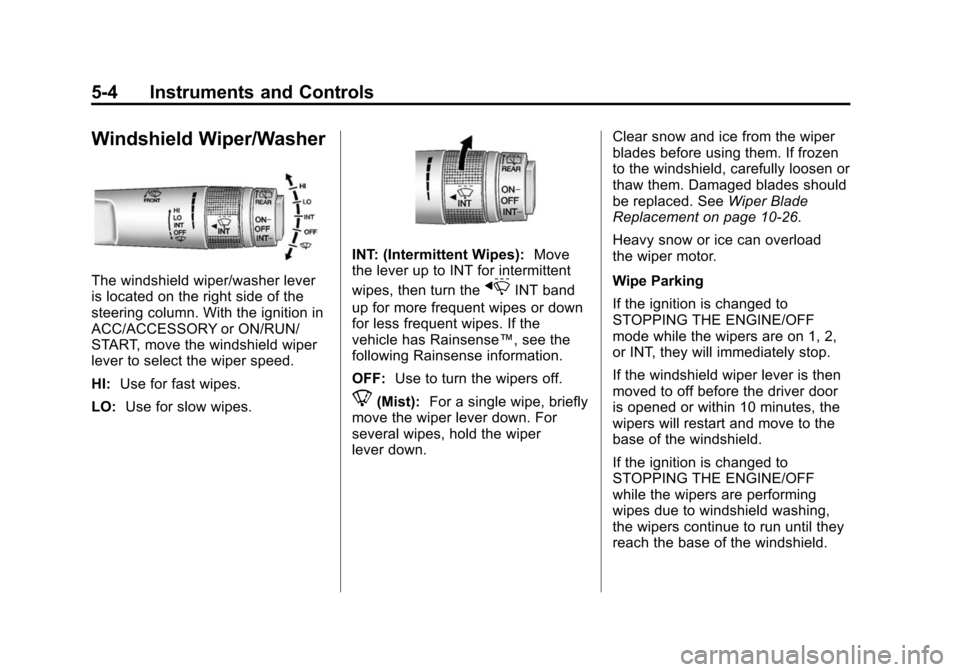
Windshield Wiper/Washer
The windshield wiper/washer lever
is located on the right side of the
steering column. With the ignition in
ACC/ACCESSORY or ON/RUN/
START, move the windshield wiper
lever to select the wiper speed.
HI:Use for fast wipes.
LO: Use for slow wipes.
INT: (Intermittent Wipes): Move
the lever up to INT for intermittent
wipes, then turn the
xINT band
up for more frequent wipes or down
for less frequent wipes. If the
vehicle has Rainsense™, see the
following Rainsense information.
OFF: Use to turn the wipers off.
8(Mist): For a single wipe, briefly
move the wiper lever down. For
several wipes, hold the wiper
lever down. Clear snow and ice from the wiper
blades before using them. If frozen
to the windshield, carefully loosen or
thaw them. Damaged blades should
be replaced. See
Wiper Blade
Replacement on page 10‑26.
Heavy snow or ice can overload
the wiper motor.
Wipe Parking
If the ignition is changed to
STOPPING THE ENGINE/OFF
mode while the wipers are on 1, 2,
or INT, they will immediately stop.
If the windshield wiper lever is then
moved to off before the driver door
is opened or within 10 minutes, the
wipers will restart and move to the
base of the windshield.
If the ignition is changed to
STOPPING THE ENGINE/OFF
while the wipers are performing
wipes due to windshield washing,
the wipers continue to run until they
reach the base of the windshield.
Page 136 of 502
Black plate (6,1)Cadillac SRX Owner Manual (Include Mex) - 2012
5-6 Instruments and Controls
Rear Window Wiper/
Washer
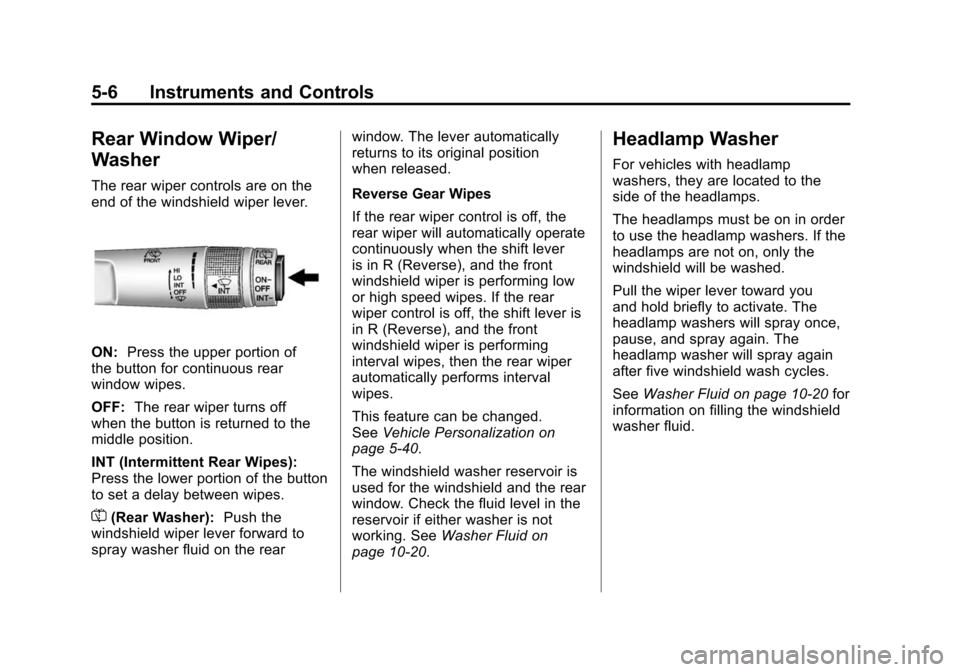
The rear wiper controls are on the
end of the windshield wiper lever.
ON:Press the upper portion of
the button for continuous rear
window wipes.
OFF: The rear wiper turns off
when the button is returned to the
middle position.
INT (Intermittent Rear Wipes):
Press the lower portion of the button
to set a delay between wipes.
=(Rear Washer): Push the
windshield wiper lever forward to
spray washer fluid on the rear window. The lever automatically
returns to its original position
when released.
Reverse Gear Wipes
If the rear wiper control is off, the
rear wiper will automatically operate
continuously when the shift lever
is in R (Reverse), and the front
windshield wiper is performing low
or high speed wipes. If the rear
wiper control is off, the shift lever is
in R (Reverse), and the front
windshield wiper is performing
interval wipes, then the rear wiper
automatically performs interval
wipes.
This feature can be changed.
See
Vehicle Personalization on
page 5‑40.
The windshield washer reservoir is
used for the windshield and the rear
window. Check the fluid level in the
reservoir if either washer is not
working. See Washer Fluid on
page 10‑20.
Headlamp Washer
For vehicles with headlamp
washers, they are located to the
side of the headlamps.
The headlamps must be on in order
to use the headlamp washers. If the
headlamps are not on, only the
windshield will be washed.
Pull the wiper lever toward you
and hold briefly to activate. The
headlamp washers will spray once,
pause, and spray again. The
headlamp washer will spray again
after five windshield wash cycles.
See Washer Fluid on page 10‑20 for
information on filling the windshield
washer fluid.
Page 150 of 502
Black plate (20,1)Cadillac SRX Owner Manual (Include Mex) - 2012
5-20 Instruments and Controls
.Check that good quality fuel is
used. Poor fuel quality causes
the engine not to run as
efficiently as designed and may
cause stalling after start-up,
stalling when the vehicle is
changed into gear, misfiring,
hesitation on acceleration,
or stumbling on acceleration.
These conditions might go away
once the engine is warmed up.
If one or more of these conditions
occurs, change the fuel brand used.
It will require at least one full tank of
the proper fuel to turn the light off.
See Recommended Fuel on
page 9‑47.
If none of the above have made the
light turn off, your dealer can check
the vehicle. The dealer has the
proper test equipment and
diagnostic tools to fix any
mechanical or electrical problems
that might have developed.Emissions Inspection and
Maintenance Programs
Some local governments may have
programs to inspect the on-vehicle
emission control equipment. For the
inspection, the emission system test
equipment is connected to the
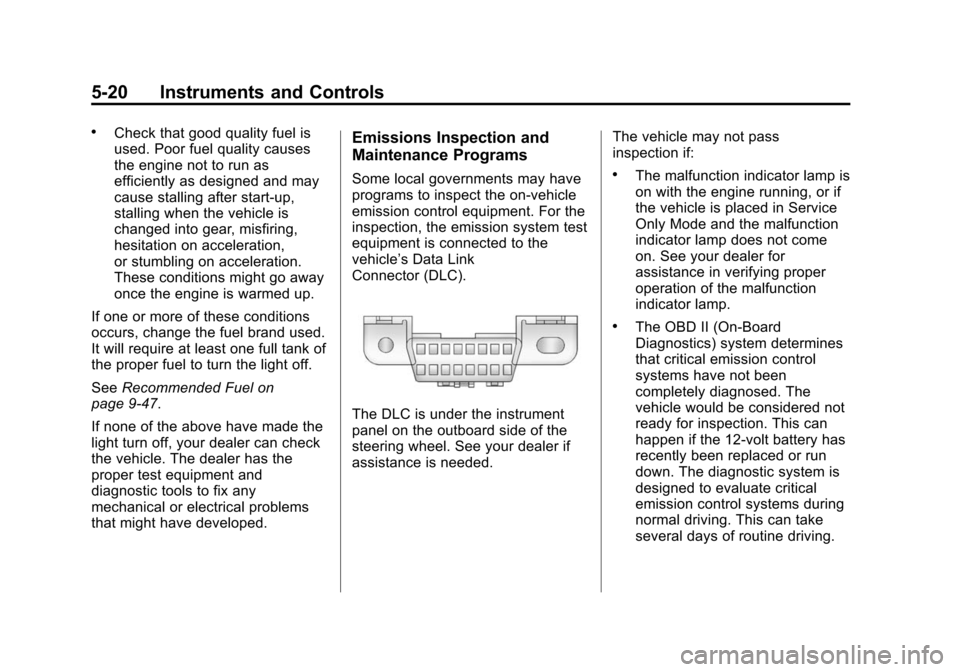
vehicle’s Data Link
Connector (DLC).
The DLC is under the instrument
panel on the outboard side of the
steering wheel. See your dealer if
assistance is needed. The vehicle may not pass
inspection if:
.The malfunction indicator lamp is
on with the engine running, or if
the vehicle is placed in Service
Only Mode and the malfunction
indicator lamp does not come
on. See your dealer for
assistance in verifying proper
operation of the malfunction
indicator lamp.
.The OBD II (On-Board
Diagnostics) system determines
that critical emission control
systems have not been
completely diagnosed. The
vehicle would be considered not
ready for inspection. This can
happen if the 12-volt battery has
recently been replaced or run
down. The diagnostic system is
designed to evaluate critical
emission control systems during
normal driving. This can take
several days of routine driving.
Page 156 of 502
Black plate (26,1)Cadillac SRX Owner Manual (Include Mex) - 2012
5-26 Instruments and Controls
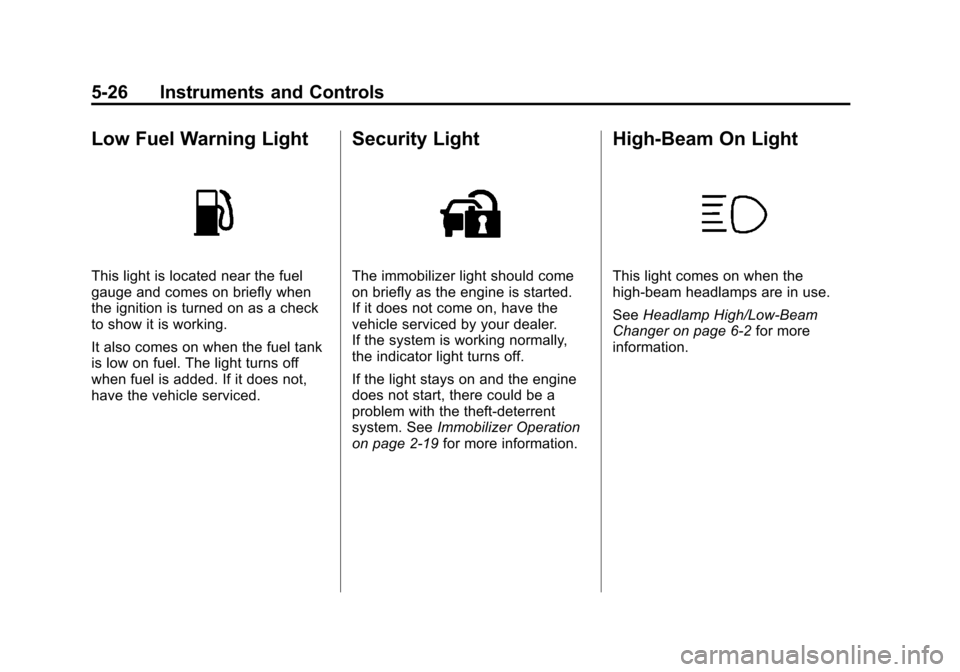
Low Fuel Warning Light
This light is located near the fuel
gauge and comes on briefly when
the ignition is turned on as a check
to show it is working.
It also comes on when the fuel tank
is low on fuel. The light turns off
when fuel is added. If it does not,
have the vehicle serviced.
Security Light
The immobilizer light should come
on briefly as the engine is started.
If it does not come on, have the
vehicle serviced by your dealer.
If the system is working normally,
the indicator light turns off.
If the light stays on and the engine
does not start, there could be a
problem with the theft-deterrent
system. SeeImmobilizer Operation
on page 2‑19 for more information.
High-Beam On Light
This light comes on when the
high-beam headlamps are in use.
SeeHeadlamp High/Low-Beam
Changer on page 6‑2 for more
information.
Page 160 of 502
Black plate (30,1)Cadillac SRX Owner Manual (Include Mex) - 2012
5-30 Instruments and Controls
The Instantaneous Fuel Economy
display shows the current fuel
economy in either liters per
100 kilometers (L/100 km) or miles
per gallon (mpg). This number
reflects only the fuel economy that
the vehicle has right now and
changes frequently as driving
conditions change. Unlike average
economy, this display cannot be
reset.
Fuel Range
The Fuel Range display shows the
approximate distance the vehicle
can be driven without refueling.
The fuel range estimate is based on
an average of the vehicle's fuel
economy over recent driving history
and the amount of fuel remaining in
the fuel tank. Fuel range cannot be
reset.
Fuel Used
The Fuel Used display shows
the approximate liters (L) or
gallons (gal) of fuel that have been
used since last reset.The fuel used can be reset by
pressing the SET/CLR button while
the Fuel Used display is showing.
Average Vehicle Speed
The Average Vehicle Speed display
shows the average speed of the
vehicle in kilometers per hour (km/h)
or miles per hour (mph). This
average is calculated based on the
various vehicle speeds recorded
since the last reset of this value.
The average speed can be reset by
pressing the SET/CLR button while
the Average Vehicle Speed display
is showing.
Timer
This display can be used as a timer.
To start the timer, press SET/CLR
while Timer is displayed. The
display will show the amount of time
that has passed since the timer was
last reset. To stop the timer, press
SET/CLR briefly while Elapsed Time
is displayed. To reset the timer to
zero, press and hold SET/CLR.
Distance to Destination
This display will show the vehicle
distance with estimated time of
arrival to destination. The value can
be cleared or reset by pressing
the SET/CLR button. Move the
thumbwheel up or down to increase
or decrease the destination distance
value. Once the distance value is
set, press SET/CLR to confirm
the value.
Turn-by-Turn
This display is used for the OnStar
or Navigation System Turn-by-Turn
guidance. See
OnStar Overview on
page 14‑1 or the navigation manual,
if the vehicle has navigation, for
more information.
Speed and Curve Assist
This display will show the speed
limit or the advised speed as
determined by the information
provided by the navigation system.
The map database loaded in the
navigation system may need
to be updated periodically to