change CADILLAC SRX 2012 2.G Owners Manual
[x] Cancel search | Manufacturer: CADILLAC, Model Year: 2012, Model line: SRX, Model: CADILLAC SRX 2012 2.GPages: 502, PDF Size: 6.23 MB
Page 3 of 502
Black plate (3,1)Cadillac SRX Owner Manual (Include Mex) - 2012
Introduction iii
The names, logos, emblems,
slogans, vehicle model names, and
vehicle body designs appearing in
this manual including, but not limited
to, GM, the GM logo, CADILLAC,
the CADILLAC Crest and Wreath,
and SRX are trademarks and/or
service marks of General Motors
LLC, its subsidiaries, affiliates,
or licensors.This manual describes features that
may or may not be on your specific
vehicle either because they are
options that you did not purchase or
due to changes subsequent to the
printing of this owner manual.
Please refer to the purchase
documentation relating to your
specific vehicle to confirm each of
the features found on your vehicle.
For vehicles first sold in Canada,
substitute the name
“General
Motors of Canada Limited” for
Cadillac Motor Car Division
wherever it appears in this manual.
Canadian Vehicle Owners
Propriétaires Canadiens
A French language copy of this
manual can be obtained from your
dealer or from:
On peut obtenir un exemplaire de
ce guide en français auprès du
concessionnaire ou à l'adresse
suivante:
Helm, Incorporated
P.O. Box 07130
Detroit, MI 48207
1-800-551-4123
Numéro de poste 6438 de langue
française
www.helminc.com
Litho in U.S.A.
Part No. 20892406 A First Printing©2011 General Motors LLC. All Rights Reserved.
Page 5 of 502

Black plate (5,1)Cadillac SRX Owner Manual (Include Mex) - 2012
Introduction v
Vehicle Symbol Chart
Here are some additional symbols
that may be found on the vehicle
and what they mean. For more
information on the symbol, refer to
the Index.
0:Adjustable Pedals
9:Airbag Readiness Light
#:Air Conditioning
!:Antilock Brake System (ABS)
%:Audio Steering Wheel
Controls or OnStar®
$: Brake System Warning Light
":Charging System
I:Cruise Control
B: Engine Coolant Temperature
O:Exterior Lamps
#:Fog Lamps
.: Fuel Gauge
+:Fuses
3: Headlamp High/Low-Beam
Changer
(: Heated Steering Wheel
j:LATCH System Child
Restraints
*: Malfunction Indicator Lamp
::Oil Pressure
g:Outside Power Foldaway
Mirrors
}: Power
/:Remote Vehicle Start
>:Safety Belt Reminders
7:Tire Pressure Monitor
d:Traction Control/StabiliTrak
M:Windshield Washer Fluid
Page 9 of 502

Black plate (3,1)Cadillac SRX Owner Manual (Include Mex) - 2012
In Brief 1-3
A.Air Vents on page 8‑6.
B. Turn and Lane‐Change Lever. See Turn and Lane-Change
Signals on page 6‑6.
Driver Information Center (DIC)
Controls. See Driver Information
Center (DIC) on page 5‑28.
C. Cruise Control on page 9‑37.
Heated Steering Wheel on
page 5‑3 (If Equipped).
D. Instrument Cluster on
page 5‑11.
E. Steering Wheel Controls on
page 5‑2.
F. AM-FM Radio on page 7‑11.
Navigation System
(If Equipped). See Navigation
System Manual.
G. Driver Information Center (DIC) Display. See Driver Information
Center (DIC) on page 5‑28.
H. Clock (Analog Clock) on
page 5‑7 orClock (Digital
Clock) on page 5‑7. I.
Safety Locks on page 2‑13.
Power Door Locks on
page 2‑12.
Hazard Warning Flashers on
page 6‑5.
J. Exterior Lamp Controls on
page 6‑1.
Front Fog Lamps on page 6‑6
(If Equipped).
Instrument Panel Illumination
Control on page 6‑7.
K. Data Link Connector (DLC) (Out of View). See Malfunction
Indicator Lamp on page 5‑18.
L. Steering Wheel Adjustment on
page 5‑2.
M. Horn on page 5‑3.
N. Adjustable Pedal Control (If Equipped). See Adjustable
Throttle and Brake Pedal on
page 9‑17.
O. Start/Stop Button. See Ignition
Positions on page 9‑18. P.
Windshield Wiper/Washer on
page 5‑4.
Rear Window Wiper/Washer on
page 5‑6.
Q. Heated and Ventilated Front
Seats on page 3‑10
(If Equipped).
R. Parking Brake on page 9‑31.
S. Shift Lever. See Shifting Into
Park on page 9‑22.
T. StabiliTrak
®System on
page 9‑35.
Ultrasonic Parking Assist on
page 9‑40 (If Equipped).
Economy Mode (If Equipped).
See Fuel Economy Mode on
page 9‑29
U. Dual Automatic Climate Control
System on page 8‑1.
Page 15 of 502
Black plate (9,1)Cadillac SRX Owner Manual (Include Mex) - 2012
In Brief 1-9
Easy Exit Driver Seat
This feature moves the seat
rearward allowing the driver more
room to exit the vehicle.
To activate, place the ignition in
OFF and open the driver door. If the
driver door is already open, placing
the ignition in OFF will activate the
easy exit driver seat.
This feature is turned on or off using
the vehicle personalization menu.
SeeVehicle Personalization on
page 5‑40 for more information.Heated and Ventilated
Seats
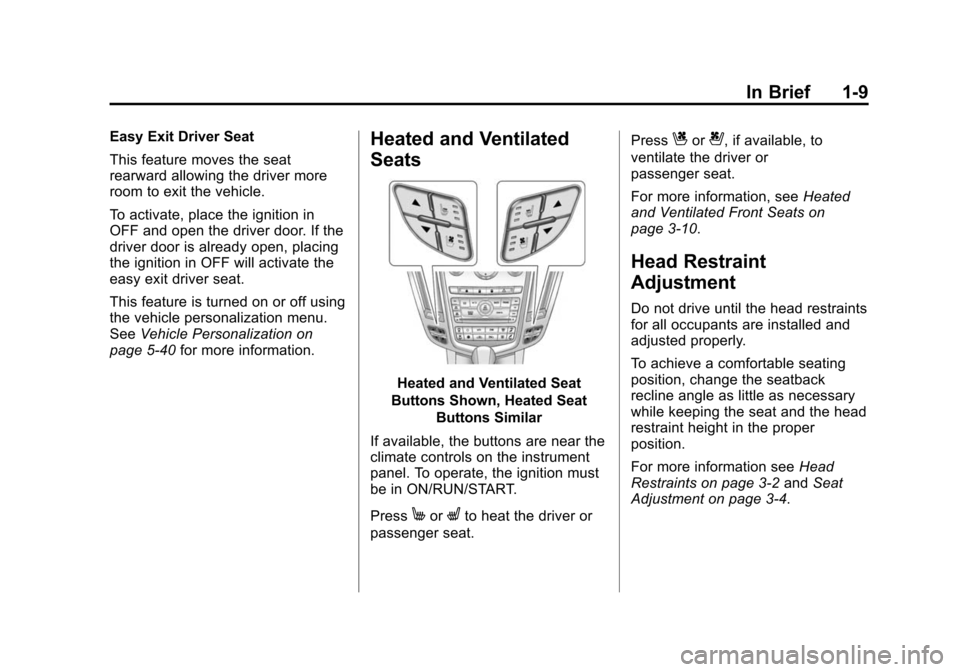
Heated and Ventilated Seat
Buttons Shown, Heated Seat Buttons Similar
If available, the buttons are near the
climate controls on the instrument
panel. To operate, the ignition must
be in ON/RUN/START.
Press
MorLto heat the driver or
passenger seat. Press
Cor{, if available, to
ventilate the driver or
passenger seat.
For more information, see Heated
and Ventilated Front Seats on
page 3‑10.
Head Restraint
Adjustment
Do not drive until the head restraints
for all occupants are installed and
adjusted properly.
To achieve a comfortable seating
position, change the seatback
recline angle as little as necessary
while keeping the seat and the head
restraint height in the proper
position.
For more information see Head
Restraints on page 3‑2 andSeat
Adjustment on page 3‑4.
Page 18 of 502
Black plate (12,1)Cadillac SRX Owner Manual (Include Mex) - 2012
1-12 In Brief
Steering Wheel
Adjustment
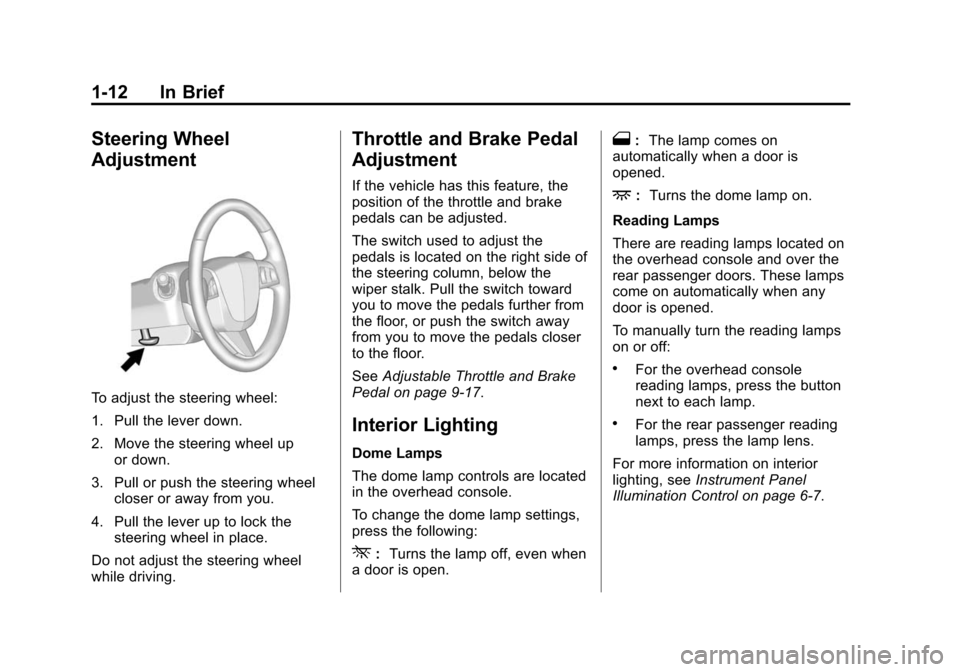
To adjust the steering wheel:
1. Pull the lever down.
2. Move the steering wheel upor down.
3. Pull or push the steering wheel closer or away from you.
4. Pull the lever up to lock the steering wheel in place.
Do not adjust the steering wheel
while driving.
Throttle and Brake Pedal
Adjustment
If the vehicle has this feature, the
position of the throttle and brake
pedals can be adjusted.
The switch used to adjust the
pedals is located on the right side of
the steering column, below the
wiper stalk. Pull the switch toward
you to move the pedals further from
the floor, or push the switch away
from you to move the pedals closer
to the floor.
See Adjustable Throttle and Brake
Pedal on page 9‑17.
Interior Lighting
Dome Lamps
The dome lamp controls are located
in the overhead console.
To change the dome lamp settings,
press the following:
*: Turns the lamp off, even when
a door is open.
1: The lamp comes on
automatically when a door is
opened.
+: Turns the dome lamp on.
Reading Lamps
There are reading lamps located on
the overhead console and over the
rear passenger doors. These lamps
come on automatically when any
door is opened.
To manually turn the reading lamps
on or off:
.For the overhead console
reading lamps, press the button
next to each lamp.
.For the rear passenger reading
lamps, press the lamp lens.
For more information on interior
lighting, see Instrument Panel
Illumination Control on page 6‑7.
Page 23 of 502
Black plate (17,1)Cadillac SRX Owner Manual (Include Mex) - 2012
In Brief 1-17
Setting the 12/24 Hour Format
1. Press the CONFIG button.
2. Select Time and Date Settings.
3. Highlight 12/24 Hour Format.
4. Press the MENU/SELECTbutton to select the 12 hour or
24 hour display format.
Setting the Month & Day Format
1. Press the CONFIG button.
2. Select Time and Date Settings.
3. Highlight Month & Day Format.
4. Press the MENU/SELECT knob to select MM/DD (month/day) or
DD/MM (day/month).
Setting the Auto Time Adjust
(If Equipped)
1. Press the CONFIG button.
2. Select Time and Date Settings.
3. Highlight Auto Time Adjust.
4. Press the MENU/SELECT knob to turn Auto Time Adjust on
or off.Satellite Radio
Vehicles with an XM™ satellite radio
tuner and a valid XM satellite radio
subscription can receive XM
programming.
XM Satellite Radio Service
XM is a satellite radio service based
in the 48 contiguous United States
and 10 Canadian provinces. XM
satellite radio has a wide variety of
programming and commercial-free
music, coast to coast, and in
digital-quality sound. A fee is
required to receive the XM service.
For more information refer to:
.www.xmradio.com or call
1-800-929-2100 (U.S.).
.www.xmradio.ca or call
1-877-438-9677 (Canada).
For more information, see Satellite
Radio on page 7‑14.
Portable Audio Devices
Some vehicles have a 3.5 mm
(1/8 in) auxiliary input and a USB
port located in the center console.
External devices such as iPods
®,
laptop computers, MP3 players, CD
changers, and USB storage devices
may be connected, depending on
the audio system.
For more information, see Auxiliary
Devices (Radio with CD) on
page 7‑28 orAuxiliary Devices
(Radio with CD/DVD and MEM) on
page 7‑33.
Page 29 of 502
Black plate (23,1)Cadillac SRX Owner Manual (Include Mex) - 2012
In Brief 1-23
Engine Oil Life System
The engine oil life system calculates
engine oil life based on vehicle use
and displays the CHANGE ENGINE
OIL SOON message when it is time
to change the engine oil and filter.
The oil life system should be reset
to 100% only following an oil
change.
Resetting the Oil Life System
1. Using the DIC MENU button andthumbwheel on the turn signal
lever, display REMAINING OIL
LIFE on the DIC. See Driver
Information Center (DIC) on
page 5‑28 andEngine Oil
Messages on page 5‑35.
2. Press the SET/CLR button to reset the oil life at 100%.
Be careful not to reset the oil life
display accidentally at any time
other than after the oil is
changed. It cannot be reset
accurately until the next oil
change. The oil life system can also be reset
as follows:
1. Turn the ignition on with the
engine off.
2. Fully press and release the accelerator pedal three times
within five seconds.
If the CHANGE ENGINE OIL
SOON message is not on, the
system is reset.
See Engine Oil Life System on
page 10‑10.
Fuel E85 (85% Ethanol)
Vehicles that have a FlexFuel badge
and a yellow fuel cap can use either
unleaded gasoline or ethanol fuel
containing up to 85% ethanol (E85).
See Fuel E85 (85% Ethanol) on
page 9‑49. For all other vehicles,
use only the unleaded gasoline
described under Recommended
Fuel on page 9‑47.
Driving for Better Fuel
Economy
Driving habits can affect fuel
mileage. Here are some driving tips
to get the best fuel economy
possible.
.Avoid fast starts and accelerate
smoothly.
.Brake gradually and avoid
abrupt stops.
.Avoid idling the engine for long
periods of time.
.When road and weather
conditions are appropriate, use
cruise control.
.Always follow posted speed
limits or drive more slowly when
conditions require.
.Keep vehicle tires properly
inflated.
Page 39 of 502
Black plate (9,1)Cadillac SRX Owner Manual (Include Mex) - 2012
Keys, Doors, and Windows 2-9
Battery Replacement
Notice:When replacing the
battery, do not touch any of the
circuitry on the transmitter. Static
from your body could damage the
transmitter.
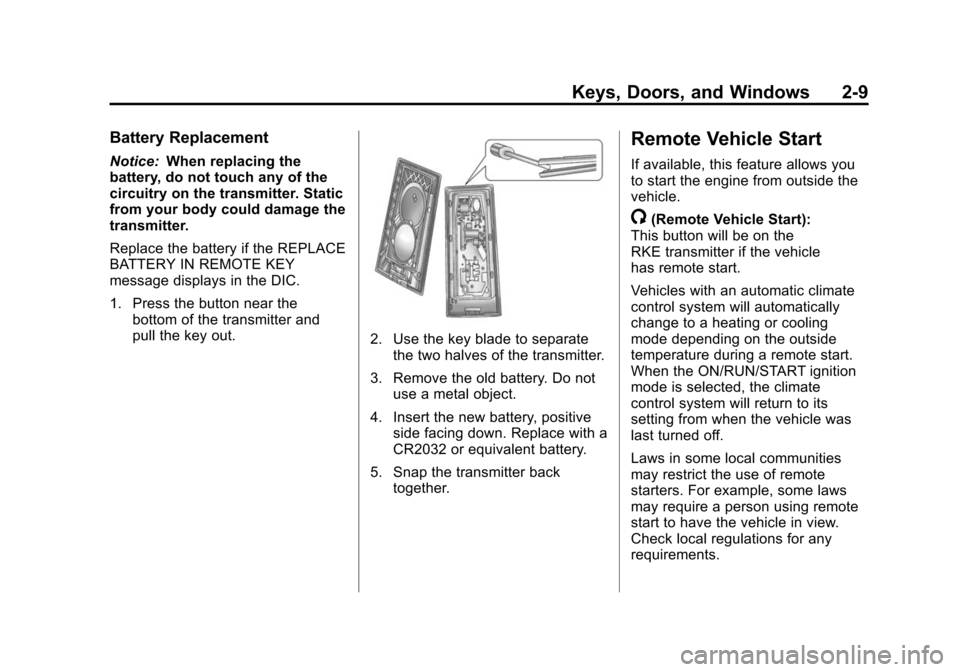
Replace the battery if the REPLACE
BATTERY IN REMOTE KEY
message displays in the DIC.
1. Press the button near the bottom of the transmitter and
pull the key out.
2. Use the key blade to separate
the two halves of the transmitter.
3. Remove the old battery. Do not use a metal object.
4. Insert the new battery, positive side facing down. Replace with a
CR2032 or equivalent battery.
5. Snap the transmitter back together.
Remote Vehicle Start
If available, this feature allows you
to start the engine from outside the
vehicle.
/(Remote Vehicle Start):
This button will be on the
RKE transmitter if the vehicle
has remote start.
Vehicles with an automatic climate
control system will automatically
change to a heating or cooling
mode depending on the outside
temperature during a remote start.
When the ON/RUN/START ignition
mode is selected, the climate
control system will return to its
setting from when the vehicle was
last turned off.
Laws in some local communities
may restrict the use of remote
starters. For example, some laws
may require a person using remote
start to have the vehicle in view.
Check local regulations for any
requirements.
Page 40 of 502
Black plate (10,1)Cadillac SRX Owner Manual (Include Mex) - 2012
2-10 Keys, Doors, and Windows
Other conditions can affect the
performance of the transmitter.
SeeRemote Keyless Entry (RKE)
System on page 2‑3 for additional
information.
Starting the Engine Using Remote
Start
1. Press and release
Qon the
RKE transmitter.
2. Within two seconds, press and hold
/until the turn signal
lamps flash. This confirms the
request to remote start the
vehicle has been received. If the
vehicle' s lamps are not visible,
press and hold
/for at least
two seconds. During the remote start the
doors will be locked and the
parking lamps will remain on as
long as the engine is running.
The engine will shut off after
10 minutes unless a time
extension is done or the ignition
is put in ON/RUN/START.
3. Press the brake pedal and select the ON/RUN/START ignition
mode to drive the vehicle.
Extending Engine Run Time
For a 10-minute extension, repeat
Steps 1 and 2 while the engine is
still running. The remote start can
only be extended once.
When the remote start is extended,
the second 10-minute period will
start immediately. For example, if the vehicle has
been running for five minutes, and
10 minutes are added, the engine
will run for a total of 15 minutes.
A maximum of two remote starts,
or a remote start with an extension,
are allowed between ignition cycles.
The vehicle's ignition must be
changed to ON/RUN/START and
then back to OFF before the remote
start procedure can be used again.
Shutting the Engine Off After a
Remote Start
To cancel a remote start, do any of
the following:.Press/until the parking lamps
turn off.
.Turn on the hazard warning
flashers.
.Turn the vehicle on and then
back off.
Page 47 of 502
Black plate (17,1)Cadillac SRX Owner Manual (Include Mex) - 2012
Keys, Doors, and Windows 2-17
Setting the Power Liftgate
3/4 Mode
To change the liftgate stop position.
1. Turn the liftgate switch to eitherthe MAX, or the 3/4 mode
position and power open the
liftgate.
2. Stop the liftgate movement at the desired height by pressing
any liftgate switch. Manually
adjust the liftgate position if
required.
3. Press and hold the button on the liftgate next to the latch until the
turn signals flash and a beep
sounds to indicate that the new
setting is recorded.
When power opened with the
3/4 mode selected, the liftgate stops
at the new set position. If you do not receive the audible and
visual feedback when setting the
intermediate stop position, you are
attempting to set the height below
the 3/4 open height minimum
(approximately 1.52 m or 5 ft).
The liftgate cannot be set below
that minimum and the new setting
will not be recorded.
Manual Operation of Power
Liftgate
To change the liftgate to manual
operation, turn the mode switch to
the OFF position.
With the power liftgate disabled and
all of the doors unlocked, the liftgate
can be manually opened and
closed. The effort required to
operate a power liftgate is greater
than the effort required to operate a
non-power liftgate.To open the liftgate, press the touch
pad on the handle on the outside of
the liftgate, and lift the gate open. To
close the liftgate, use the pull cup to
lower the liftgate and close. With the
power liftgate disabled, the liftgate
electric latch will still power latch
once contact is made with the
striker. Always close the liftgate
before driving.
If the RKE button is pressed while
power operation is disabled, the turn
signals flash and the liftgate will
not move.
The liftgate has an electric latch.
If the battery is disconnected or has
low voltage, the liftgate will not
open. The liftgate will resume
operation when the battery is
reconnected and charged.