change time CADILLAC SRX 2012 2.G User Guide
[x] Cancel search | Manufacturer: CADILLAC, Model Year: 2012, Model line: SRX, Model: CADILLAC SRX 2012 2.GPages: 502, PDF Size: 6.23 MB
Page 182 of 502
Black plate (2,1)Cadillac SRX Owner Manual (Include Mex) - 2012
6-2 Lighting
It controls the following systems:
.Headlamps
.Taillamps
.Parking Lamps
.License Plate Lamps
.Instrument Panel Lights
.Fog Lamps
The exterior lamps control has
four positions:
O(Off): Briefly turn to this position
to turn the automatic light control off
or on again.
AUTO (Automatic): Turns the
headlamps on automatically at
normal brightness, together with
the following:
.Parking Lamps
.Taillamps
.License Plate Lamps
.Instrument Panel Lights
;(Parking Lamps): Turns the
parking lamps on together with
the following:
.Taillamps
.License Plate Lamps
.Instrument Panel Lights
2(Headlamps): Turns the
headlamps on together with the
lamps listed below. A warning chime
sounds if the driver door is opened
when the ignition switch is off and
the headlamps are on.
.Parking Lamps
.Taillamps
.License Plate Lamps
.Instrument Panel Lights
#(Front Fog Lamps): For
vehicles with fog lamps, press to
turn the lamps on or off.
See Front Fog Lamps on page 6‑6.
Headlamp High/
Low-Beam Changer
Push the turn signal/lane change
lever away from you and release, to
turn the high beams on. To return to
low beams, push the lever again or
pull it toward you and release.
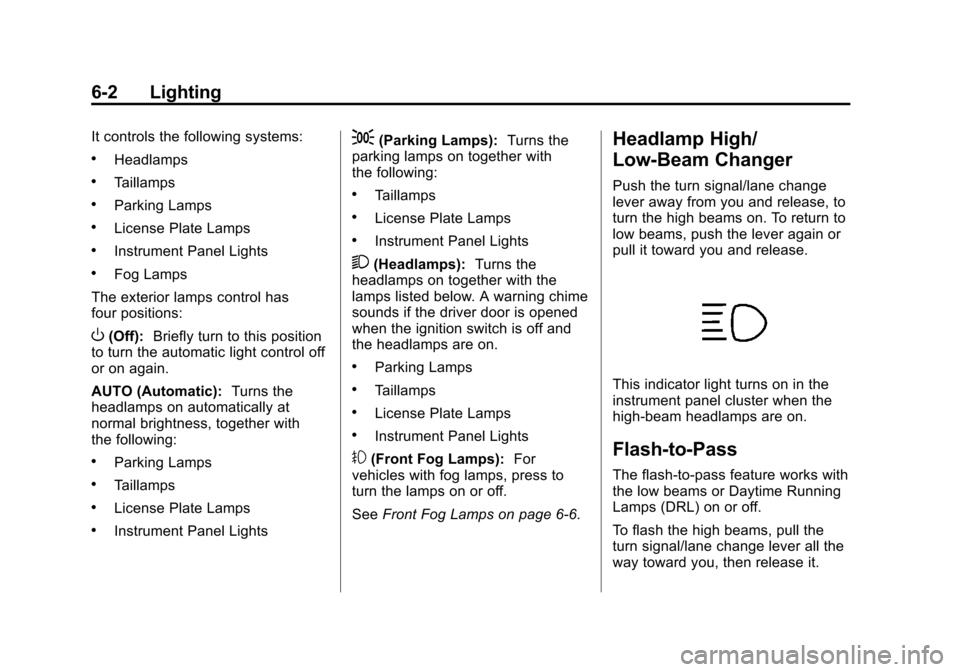
This indicator light turns on in the
instrument panel cluster when the
high‐beam headlamps are on.
Flash-to-Pass
The flash‐to‐pass feature works with
the low beams or Daytime Running
Lamps (DRL) on or off.
To flash the high beams, pull the
turn signal/lane change lever all the
way toward you, then release it.
Page 183 of 502
Black plate (3,1)Cadillac SRX Owner Manual (Include Mex) - 2012
Lighting 6-3
Daytime Running
Lamps (DRL)
Daytime Running Lamps (DRL) can
make it easier for others to see the
front of your vehicle during the day.
Fully functional daytime running
lamps are required on all vehicles
first sold in Canada.
A light sensor on top of the
instrument panel makes the DRL
work, so be sure it is not covered.
The DRL system makes the
low‐beam headlamps come on at a
reduced brightness or for vehicles
with High Intensity Discharge (HID)
headlamps, the DRL lights will come
on when the following conditions
are met:
.The ignition is in the
ON/RUN mode.
.The exterior lamps control is
in AUTO.
.The engine is running.When the DRL are on, only the
low‐beam headlamps, at a reduced
level of brightness, will be on. The
high‐beam headlamps, taillamps,
sidemarker, instrument panel lamps,
and other lamps will not be on.
The headlamps automatically
change from DRL to the regular
headlamps depending on the
darkness of the surroundings.
The other lamps that come on with
the headlamps will also come on.
When it is bright enough outside,
the headlamps go off and the DRL
come on.
To turn the DRL lamps off or on
again, turn the exterior lamps
control to the off position and then
release. For vehicles first sold in
Canada, the DRL cannot be
turned off.
Adaptive Forward
Lighting (AFL)
For vehicles with uplevel
headlamps, the Adaptive Forward
Lighting System (AFL) adjusts the
headlamps to provide greater road
illumination in various driving
conditions.
To enable AFL, set the exterior
lamp control to the AUTO position.
Moving the control out of the AUTO
position will deactivate the system.
AFL will operate when the vehicle
speed is greater than 3 km/h
(2 mph). AFL will not operate when
the transmission is in R (Reverse).
AFL is not immediately operable
after starting the vehicle; driving a
short distance is required to
calibrate the AFL. See
Exterior
Lamp Controls on page 6‑1.
Page 185 of 502
Black plate (5,1)Cadillac SRX Owner Manual (Include Mex) - 2012
Lighting 6-5
If the vehicle is started in a dark
garage, the automatic headlamp
system comes on immediately. If it
is light outside when the vehicle
leaves the garage, there is a slight
delay before the automatic
headlamp system changes to the
DRL. During that delay, the
instrument panel cluster may not be
as bright as usual. Make sure the
instrument panel brightness control
is in full bright position. See
Instrument Panel Illumination
Control on page 6‑7for more
information.
The vehicle can be idled with the
lamps off, even when it is dark
outside. After starting the vehicle,
turn the exterior lamps control to off,
then release it. The lamps will
remain off until the control is turned
to off again. Twilight Sentinel also provides
exterior illumination as you leave
the vehicle. If Twilight Sentinel has
turned on the lamps when the
ignition is turned off, the lamps
remain on until one of the
following occurs:
.The exterior lamp control is
moved from
Oto the parking
lamp position.
.The delay time selected has
elapsed.
See Vehicle Personalization on
page 5‑40 to select the delay time.
You can also select no delay time.
If the ignition is turned off with the
exterior lamps control in the parking
lamp or headlamp position, the
Twilight Sentinel delay will not
occur. The lamps will turn off as
soon as the control is turned off.
The regular headlamp system
should be turned on when needed.
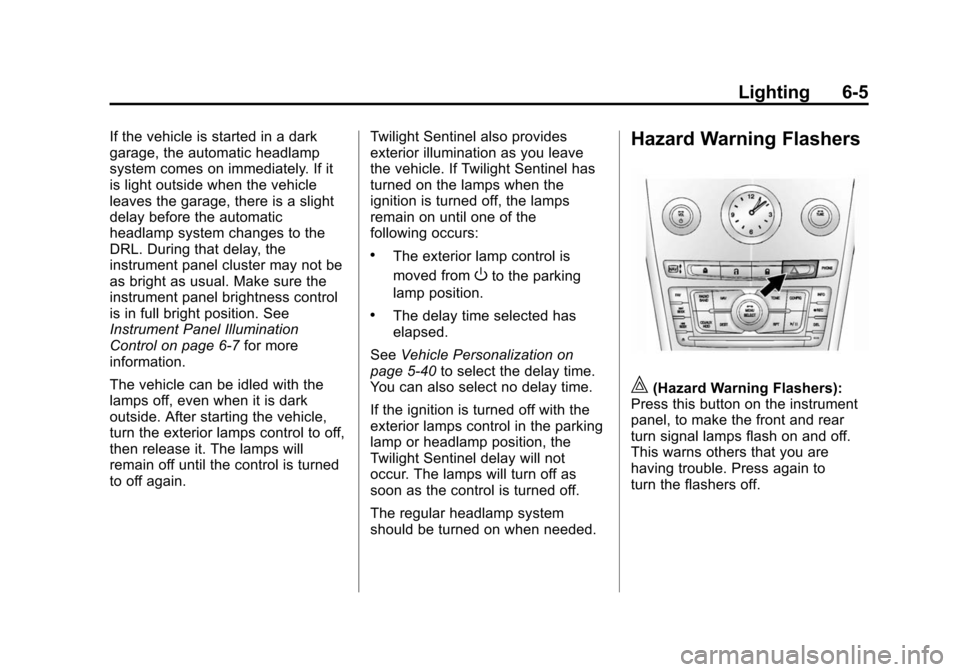
Hazard Warning Flashers
|(Hazard Warning Flashers):
Press this button on the instrument
panel, to make the front and rear
turn signal lamps flash on and off.
This warns others that you are
having trouble. Press again to
turn the flashers off.
Page 186 of 502
Black plate (6,1)Cadillac SRX Owner Manual (Include Mex) - 2012
6-6 Lighting
Turn and Lane-Change
Signals
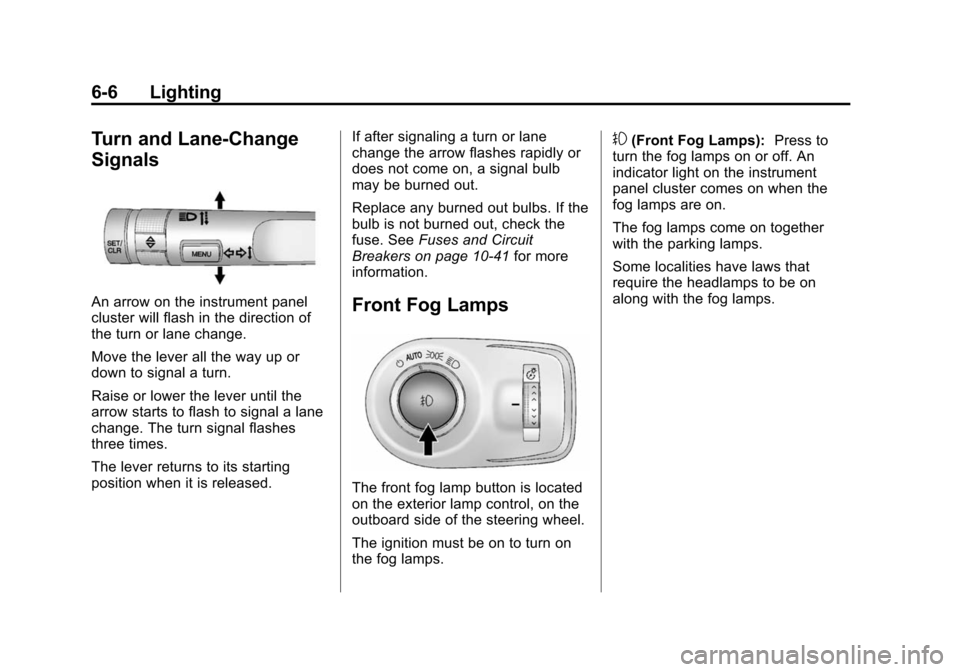
An arrow on the instrument panel
cluster will flash in the direction of
the turn or lane change.
Move the lever all the way up or
down to signal a turn.
Raise or lower the lever until the
arrow starts to flash to signal a lane
change. The turn signal flashes
three times.
The lever returns to its starting
position when it is released.If after signaling a turn or lane
change the arrow flashes rapidly or
does not come on, a signal bulb
may be burned out.
Replace any burned out bulbs. If the
bulb is not burned out, check the
fuse. See
Fuses and Circuit
Breakers on page 10‑41 for more
information.Front Fog Lamps
The front fog lamp button is located
on the exterior lamp control, on the
outboard side of the steering wheel.
The ignition must be on to turn on
the fog lamps.
#(Front Fog Lamps): Press to
turn the fog lamps on or off. An
indicator light on the instrument
panel cluster comes on when the
fog lamps are on.
The fog lamps come on together
with the parking lamps.
Some localities have laws that
require the headlamps to be on
along with the fog lamps.
Page 188 of 502
Black plate (8,1)Cadillac SRX Owner Manual (Include Mex) - 2012
6-8 Lighting
Lighting Features
Entry Lighting
The headlamps, taillamps, license
plate lamps, back‐up lamps, dome
lamps, and most of the interior lights
turn on briefly, when
Kis pressed
on the Remote Keyless Entry (RKE)
transmitter, or when the door handle
is pulled. After about 30 seconds
the exterior lamps turn off, and then
the dome and remaining interior
lights dim to off. The entry lighting
can be manually turned off by
changing the ignition out of the off
position, or by pressing
Qon the
RKE transmitter.
This feature can be changed.
See Vehicle Personalization on
page 5‑40.
Exit Lighting
The headlamps, taillamps, parking
lamps, back‐up lamps, and license
plate lamps come on at night, or in
areas with limited lighting, when a
door is opened after the ignition is
turned off. The dome lamps also
come on when a door is opened
after the ignition is changed to the
off position.
The exterior lights and dome lamp
remain on after the door is closed
for a set amount of time, then
automatically turn off.
The exterior lights turn off
immediately by turning the exterior
lamps control to off.
This feature can be changed.
See Vehicle Personalization on
page 5‑40.
Battery Load
Management
The vehicle has Electric Power
Management (EPM) that estimates
the battery's temperature and state
of charge. It then adjusts the voltage
for best performance and extended
life of the battery.
When the battery's state of charge
is low, the voltage is raised slightly
to quickly bring the charge back up.
When the state of charge is high,
the voltage is lowered slightly to
prevent overcharging. If the vehicle
has a voltmeter gauge or a voltage
display on the Driver Information
Center (DIC), you may see the
voltage move up or down. This is
normal. If there is a problem, an
alert will be displayed.
Page 196 of 502

Black plate (6,1)Cadillac SRX Owner Manual (Include Mex) - 2012
7-6 Infotainment System
D. FAV
.Radio: Opens the
favorites list.
.MEM: Opens the
favorites list.
E.
lSEEK
.Radio: Seeks the next
station.
.CD/DVD: Selects the
next track or fast forwards
within a track.
.MEM: Selects the next
track or fast forwards
within a track.
F.
gSEEK
.Radio: Seeks the previous
station.
.CD/DVD: Selects the
previous track or rewinds
within a track.
.MEM: Selects the previous
track or rewinds within a
track. G.
Y(CD Eject)
.Removes a disc from
the CD slot.
H. RADIO/BAND
.Changes the band while
listening to the radio.
.Selects the radio when
listening to a different
audio source.
I. MEM/CD/AUX
.Selects MEM, CD/DVD,
USB, or a connected
auxiliary audio or auxiliary
audio/video source.
J.
k
.Radio: Pauses time shifted
content.
.CD/DVD: Pauses CD/
DVD‐A and DVD‐V
playback.
.MEM: Pauses MEM
playback. K. CD/DVD Slot
.Insert a disc.
L. MENU/SELECT
.Press: Selects menu items.
.Turn: Open menus,
highlights menu items,
or sets numeric values
while in a menu.
M. TONE
.Opens the tone menu.
N.
/BACK
.Menu: Moves one
level back.
.Character Input: Deletes
the last character.
O. CONFIG
.Opens the settings menu.
P. DEL
.MEM: Deletes the current
track from MEM.
Page 204 of 502
Black plate (14,1)Cadillac SRX Owner Manual (Include Mex) - 2012
7-14 Infotainment System
Time Shifting (Radio with CD/
DVD and MEM)
The radio with MEM time shift
feature can rewind 20 minutes of
FM/AM content. While listening to
the radio, the content from the
current station is always being
buffered.
Press
kto pause the radio. The
radio displays the time shift status
bar. The status bar shows the
amount of content stored in the
buffer and the current pause point.
To resume playback from the
current pause point, press
kagain.
The radio is no longer live, but
played from the time shift buffer.
A status bar displays below the
station number.
Press and hold
gSEEK or
lSEEK to fast forward or
rewind through the time shift buffer.
Hold
lSEEK until the end of the
recorded buffer resumes live
playback. Press and release
gSEEK or
lSEEK to jump forward or back
30 seconds in the time shift buffer.
When the radio station is changed,
the buffer is cleared and
automatically restarted for the
current station. Content from a
previously tuned station is no
longer available.
The time shift feature is not
available while recording or with
other sources of playback.
Pausing AM/FM with the Vehicle
Turned Off
If AM/FM is paused when the
vehicle is turned off, the radio
continues to buffer the current radio
station for up to 20 minutes. If the
vehicle is turned back on within
20 minutes, the radio resumes
playback from the paused point.
Satellite Radio
Vehicles with an XM™ Satellite
Radio tuner and a valid XM Satellite
Radio subscription can receive
XM programming.
XM Satellite Radio Service
XM is a satellite radio service based
in the 48 contiguous United States
and 10 Canadian provinces. XM
Satellite Radio has a wide variety of
programming and commercial-free
music, coast to coast, and in
digital-quality sound. If XM service
needs to be reactivated, the radio
will display “No Subscription Please
Renew on channel XM1.” A service
fee is required to receive the
XM service. For more information,
contact XM at www.xmradio.com or
1-800-929-2100 in the U.S. and
www.xmradio.ca or
1-877-438-9677 in Canada.
Page 206 of 502
Black plate (16,1)Cadillac SRX Owner Manual (Include Mex) - 2012
7-16 Infotainment System
To select a channel using the menu:
1. Turn the MENU/Select knob andselect Channel List.
2. Select the desired channel.
Selecting a Channel Using the
Menu System
1. Turn the MENU/SELECT knob.
2. Select XM Category List.
3. Select the category.
4. Select the channel.
Storing an XM Channel as a
Favorite
Channels from all bands can be
stored in any order in the favorite
pages.
Up to six channels can be stored in
each favorite page and the number
of available favorite pages can
be set. Storing a Channel as a Favorite
To store the channel to a position
in the list, press and hold the
corresponding 1 to 6 button until
the channel can be heard again.
Retrieving Channels
Press the FAV button to open a
favorite page or to change to
another favorite page. Briefly press
one of the 1 to 6 buttons to retrieve
the channel.
Time Shifting (Radio with CD/
DVD and MEM)
The radio with the MEM time shift
feature can rewind 20 minutes of
XM content. While listening to the
radio, the content from the current
channel is always being buffered.
Press
kto pause the radio. The
radio displays the time shift status
bar. The status bar shows the
amount of content stored in the
buffer and the current pause point. To resume playback from the
current pause point, press
kagain.
The radio is no longer live, but
played from the time shift buffer.
A status bar displays below the
channel number.
Press and hold
gSEEK or
lSEEK to fast forward or rewind
through the time shift buffer. Hold
lSEEK until the end of the
recorded buffer resumes live
playback.
Press and release
gSEEK or
lSEEK to go to the next or
previous song in the time shift
buffer.
When the channel is changed, the
buffer is cleared and automatically
restarted for the current channel.
Content from a previously tuned
station is no longer available.
The time shift feature is not
available while recording or with
other sources of playback.
Page 214 of 502
Black plate (24,1)Cadillac SRX Owner Manual (Include Mex) - 2012
7-24 Infotainment System
Changing the Audio Stream
1. Turn the MENU/SELECT knob.
2. Select Audio Stream.
3. Select Change Audio Stream.
4. Press MENU/SELECT to changethe selection.
Select Cancel to exit the menu.
Pausing a DVD
1. Turn the MENU/SELECT knob.
2. Select Pause to pause the disc. Select unpause to start
playback.
Navigating the DVD‐V Disc Menu
Use the following actions to
navigate the title menu on a
DVD‐V Disc.
.Select/Enter
.Cursor UP
.Cursor DOWN
.Cursor RIGHT
.Cursor LEFT
.Up Menu
Use the following actions to
navigate the menu on a DVD‐V Disc
while playing chapters.
.Pause (Play)
.Chapter List
.Title List
.DVD/DVD —DVD on both video
screens
.DVD/AUX —Left video screen/
Right AUX input
.AUX/DVD —Left AUX input/
Right video screen
.AUX/AUX —AUX input on both
video screens
To navigate the menu:
1. Turn the MENU/SELECT knob.
2. Select the action.
Mass Storage
Media (MEM)
Infotainment systems with MEM
storage are able to record up to
1.1 GB (gigabyte) of music from
Audio CDs, MP3/WMA/AAC discs,
and USB storage devices. The MEM
player can also time shift audio from
AM, FM, and XM radio.
Music or content stored in MEM that
you did not create, or have the right
to distribute, must be deleted before
the sale or end of lease of the
vehicle.
Control Buttons
The buttons used to control the
MEM player are:
MEM/CD/AUX: Press to select the
MEM player.
lSEEK/gSEEK: Press to
select tracks or to fast forward or
rewind within a track.
Page 221 of 502
Black plate (31,1)Cadillac SRX Owner Manual (Include Mex) - 2012
Infotainment System 7-31
A Bluetooth phone with MP3
capability cannot be paired to the
vehicle as a phone and an MP3
player at the same time.
Pairing Information:
.Up to five devices can be paired
to the system.
.The pairing process is disabled
when the vehicle is moving.
.The infotainment system
automatically links with the first
available paired device in the
order the device was paired.
.Only one paired device can be
connected to the infotainment
system at a time.
.Pairing should only need to be
completed once, unless changes
to the pairing information have
been made or the device is
deleted.Bluetooth Setup Menu
The Bluetooth Setup menu can be
accessed with or without a device
attached to the USB port.
To select the Bluetooth Setup menu
when a device is attached to the
USB port and active:
1. Turn the MENU/SELECT knob
while in the iPod, Zune, PFD,
or USB device main menu.
2. Select Bluetooth Music Setup.
To select the Bluetooth Music Setup
menu when a device is not attached
to the USB port, or when a device is
attached to the USB port but not
active:
1. Press the AUX button until AUX is the active source.
2. Turn the MENU/SELECT knob.
3. Select Bluetooth Music Setup. To select the Bluetooth Music Setup
menu when a Bluetooth device is
connected and active:
1. Turn the MENU/SELECT knob.
2. Select Bluetooth Music Setup.
Pairing a Device
1. Select Connect To New Device
from the Bluetooth Music
Setup menu.
2. The system asks a series of Yes/No questions to determine
what type of device is being
paired.
3. After the system determines what type of Bluetooth device is
being paired, the Bluetooth
device will need to be put into
discovery mode.