light CADILLAC SRX 2012 2.G Owner's Manual
[x] Cancel search | Manufacturer: CADILLAC, Model Year: 2012, Model line: SRX, Model: CADILLAC SRX 2012 2.GPages: 502, PDF Size: 6.23 MB
Page 82 of 502
Black plate (24,1)Cadillac SRX Owner Manual (Include Mex) - 2012
3-24 Seats and Restraints
{WARNING
Because airbags inflate with great
force and faster than the blink of
an eye, anyone who is up
against, or very close to any
airbag when it inflates can be
seriously injured or killed. Do not
sit unnecessarily close to any
airbag, as you would be if sitting
on the edge of the seat or leaning
forward. Safety belts help keep
you in position before and during
a crash. Always wear a safety
belt, even with airbags. The driver
should sit as far back as possible
while still maintaining control of
the vehicle.
Occupants should not lean on or
sleep against the door or side
windows in seating positions with
seat-mounted side impact airbags
and/or roof-rail airbags.
{WARNING
Children who are up against,
or very close to, any airbag
when it inflates can be seriously
injured or killed. Airbags plus
lap-shoulder belts offer protection
for adults and older children, but
not for young children and infants.
Neither the vehicle's safety belt
system nor its airbag system is
designed for them. Young
children and infants need the
protection that a child restraint
system can provide. Always
secure children properly in the
vehicle. To read how, seeOlder
Children on page 3‑36 orInfants
and Young Children on
page 3‑38.
There is an airbag readiness light
on the instrument panel cluster,
which shows the airbag symbol.
The system checks the airbag
electrical system for malfunctions.
The light tells you if there is an
electrical problem. See Airbag
Readiness Light on page 5‑16 for
more information.
Page 88 of 502
Black plate (30,1)Cadillac SRX Owner Manual (Include Mex) - 2012
3-30 Seats and Restraints
Passenger Sensing
System
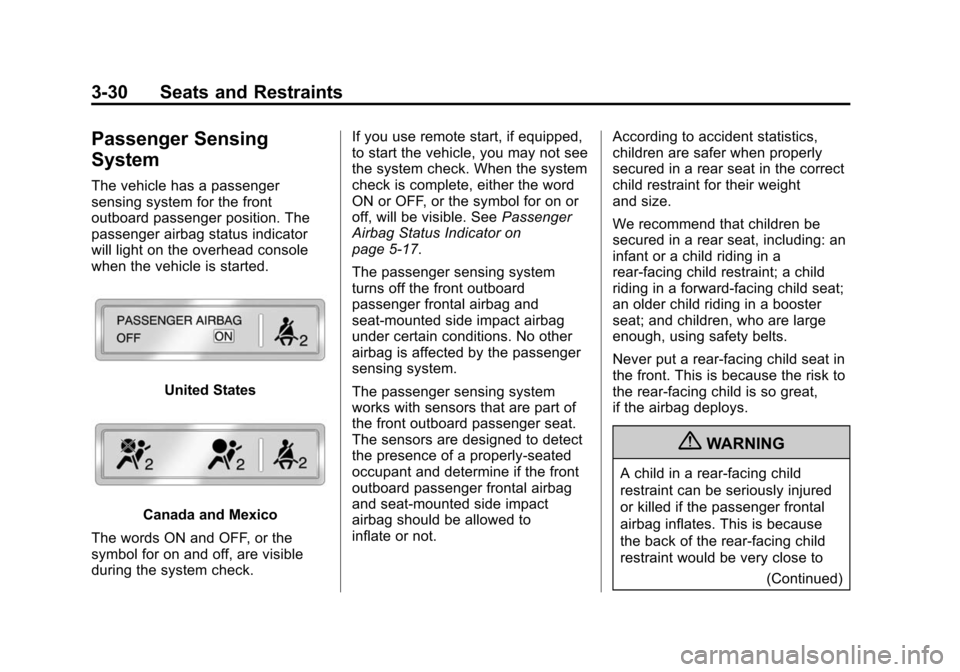
The vehicle has a passenger
sensing system for the front
outboard passenger position. The
passenger airbag status indicator
will light on the overhead console
when the vehicle is started.
United States
Canada and Mexico
The words ON and OFF, or the
symbol for on and off, are visible
during the system check. If you use remote start, if equipped,
to start the vehicle, you may not see
the system check. When the system
check is complete, either the word
ON or OFF, or the symbol for on or
off, will be visible. See
Passenger
Airbag Status Indicator on
page 5‑17.
The passenger sensing system
turns off the front outboard
passenger frontal airbag and
seat-mounted side impact airbag
under certain conditions. No other
airbag is affected by the passenger
sensing system.
The passenger sensing system
works with sensors that are part of
the front outboard passenger seat.
The sensors are designed to detect
the presence of a properly-seated
occupant and determine if the front
outboard passenger frontal airbag
and seat‐mounted side impact
airbag should be allowed to
inflate or not. According to accident statistics,
children are safer when properly
secured in a rear seat in the correct
child restraint for their weight
and size.
We recommend that children be
secured in a rear seat, including: an
infant or a child riding in a
rear-facing child restraint; a child
riding in a forward-facing child seat;
an older child riding in a booster
seat; and children, who are large
enough, using safety belts.
Never put a rear-facing child seat in
the front. This is because the risk to
the rear-facing child is so great,
if the airbag deploys.
{WARNING
A child in a rear-facing child
restraint can be seriously injured
or killed if the passenger frontal
airbag inflates. This is because
the back of the rear-facing child
restraint would be very close to
(Continued)
Page 89 of 502
Black plate (31,1)Cadillac SRX Owner Manual (Include Mex) - 2012
Seats and Restraints 3-31
WARNING (Continued)
the inflating airbag. A child in a
forward-facing child restraint can
be seriously injured or killed if the
passenger frontal airbag inflates
and the passenger seat is in a
forward position.
Even if the passenger sensing
system has turned off the front
outboard passenger airbag(s), no
system is fail-safe. No one can
guarantee that an airbag will not
inflate under some unusual
circumstance, even though the
airbag(s) are off.
Secure rear-facing child restraints
in a rear seat, even if the
airbag(s) are off. If you secure a
forward-facing child restraint in
the front outboard passenger
seat, always move the seat as far
back as it will go. It is better to
secure the child restraint in a
rear seat.The passenger sensing system is
designed to turn off the front
outboard passenger airbag and
seat‐mounted side impact airbag if:
.The front outboard passenger
seat is unoccupied.
.The system determines that an
infant is present in a rear-facing
infant seat.
.The system determines that a
small child is present in a child
restraint.
.The system determines that a
small child is present in a
booster seat.
.A front outboard passenger
takes his/her weight off of the
seat for a period of time.
.The front outboard passenger
seat is occupied by a smaller
person, such as a child who has
outgrown child restraints.
.There is a critical problem with
the airbag system or the
passenger sensing system.When the passenger sensing
system has turned off the front
outboard passenger frontal airbag
and seat‐mounted side impact
airbag, the off indicator will light and
stay lit as a reminder that the
airbags are off. See
Passenger
Airbag Status Indicator on
page 5‑17.
The passenger sensing system is
designed to turn on the front
outboard passenger frontal airbag
and seat‐mounted side impact
airbag anytime the system senses
that a person of adult size is sitting
properly in the front outboard
passenger seat.
When the passenger sensing
system has allowed the airbags to
be enabled, the on indicator will light
and stay lit as a reminder that the
airbags are active.
Page 90 of 502
Black plate (32,1)Cadillac SRX Owner Manual (Include Mex) - 2012
3-32 Seats and Restraints
For some children who have
outgrown child restraints and for
very small adults, the passenger
sensing system may or may not turn
off the front outboard passenger
frontal airbag and seat-mounted
side impact airbag, depending upon
the person’s seating posture and
body build. Everyone in the vehicle
who has outgrown child restraints
should wear a safety belt
properly —whether or not there
is an airbag for that person.
{WARNING
If the airbag readiness light ever
comes on and stays on, it means
that something may be wrong
with the airbag system. To help
avoid injury to yourself or others,
have the vehicle serviced right
away. See Airbag Readiness
Light on page 5‑16 for more
information, including important
safety information.
If the On Indicator Is Lit for a
Child Restraint
If a child restraint has been installed
and the on indicator is lit:
1. Turn the vehicle off.
2. Remove the child restraint from the vehicle.
3. Remove any additional items from the seat such as blankets,
cushions, seat covers, seat
heaters, or seat massagers.
4. Reinstall the child restraint following the directions provided
by the child restraint
manufacturer and refer to
“Securing a Child Restraint in
the Right Front Seat Position ”
under Securing Child Restraints
(Rear Seat) on page 3‑54 or
Securing Child Restraints (Front
Passenger Seat) on page 3‑56. 5. If, after reinstalling the child
restraint and restarting the
vehicle, the on indicator is still lit,
turn the vehicle off. Then slightly
recline the vehicle seatback and
adjust the seat cushion,
if adjustable, to make sure that
the vehicle seatback is not
pushing the child restraint into
the seat cushion.
Also make sure the child
restraint is not trapped under
the vehicle head restraint.
If this happens, adjust the head
restraint. See Head Restraints
on page 3‑2.
6. Restart the vehicle.
If the on indicator is still lit,
secure the child restraint in a
rear seat position in the vehicle,
and check with your dealer.
Page 93 of 502
Black plate (35,1)Cadillac SRX Owner Manual (Include Mex) - 2012
Seats and Restraints 3-35
If the vehicle has rollover roof‐rail
airbags, seeDifferent Size Tires
and Wheels on page 10‑67 for
additional important information.
If your vehicle needs to be modified
because you have a disability and
you have questions about whether
the modifications will affect the
vehicle's airbag system, or if you
have questions about whether the
airbag system will be affected if the
vehicle is modified for any other
reason, call Customer Assistance.
See Customer Assistance Offices
(U.S. and Canada) on page 13‑4 or
Customer Assistance Offices
(Mexico) on page 13‑5.
Airbag System Check
The airbag system does not need
regularly scheduled maintenance or
replacement. Make sure the
airbag readiness light is working.
See Airbag Readiness Light on
page 5‑16 for more information. Notice:
If an airbag covering is
damaged, opened, or broken, the
airbag may not work properly.
Do not open or break the airbag
coverings. If there are any
opened or broken airbag covers,
have the airbag covering and/or
airbag module replaced. For the
location of the airbags, see
Where Are the Airbags? on
page 3‑25. See your dealer for
service.
Replacing Airbag System
Parts after a Crash
{WARNING
A crash can damage the
airbag systems in the vehicle.
A damaged airbag system may
not work properly and may
not protect you and your
passenger(s) in a crash, resulting
in serious injury or even death.
(Continued)
WARNING (Continued)
To help make sure the airbag
systems are working properly
after a crash, have them
inspected and any necessary
replacements made as soon
as possible.
If an airbag inflates, you will need
to replace airbag system parts.
See your dealer for service.
If the airbag readiness light stays on
after the vehicle is started or comes
on when you are driving, the airbag
system may not work properly.
Have the vehicle serviced right
away. See Airbag Readiness Light
on page 5‑16 for more information.
Page 116 of 502
Black plate (58,1)Cadillac SRX Owner Manual (Include Mex) - 2012
3-58 Seats and Restraints
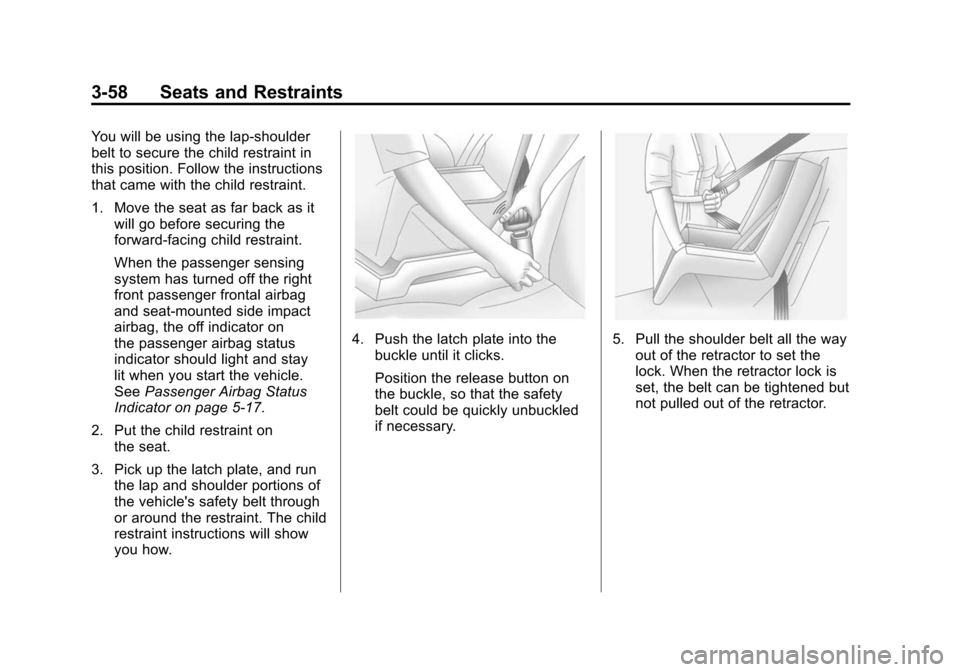
You will be using the lap-shoulder
belt to secure the child restraint in
this position. Follow the instructions
that came with the child restraint.
1. Move the seat as far back as itwill go before securing the
forward-facing child restraint.
When the passenger sensing
system has turned off the right
front passenger frontal airbag
and seat‐mounted side impact
airbag, the off indicator on
the passenger airbag status
indicator should light and stay
lit when you start the vehicle.
See Passenger Airbag Status
Indicator on page 5‑17.
2. Put the child restraint on the seat.
3. Pick up the latch plate, and run the lap and shoulder portions of
the vehicle's safety belt through
or around the restraint. The child
restraint instructions will show
you how.
4. Push the latch plate into thebuckle until it clicks.
Position the release button on
the buckle, so that the safety
belt could be quickly unbuckled
if necessary.5. Pull the shoulder belt all the wayout of the retractor to set the
lock. When the retractor lock is
set, the belt can be tightened but
not pulled out of the retractor.
Page 127 of 502
Black plate (9,1)Cadillac SRX Owner Manual (Include Mex) - 2012
Storage 4-9
Cargo Net
{WARNING
Do not stack items higher than
the upper end of the cargo net or
hang anything from the net. Avoid
items that have sharp edges or
that apply excessive force to the
net. If items are not properly
stored, damage to the net could
occur and items can be thrown
about the vehicle. You or others
could be injured. Always store
items behind the net.
For vehicles equipped with a cargo
net, it can be used to store light
loads, keeping them from falling
over or being thrown into the cabin
during heavy braking.
The net should not be overloaded or
used to store heavy loads. There are four openings in the
headliner: two located behind the
front seats and two behind the
rear seats.
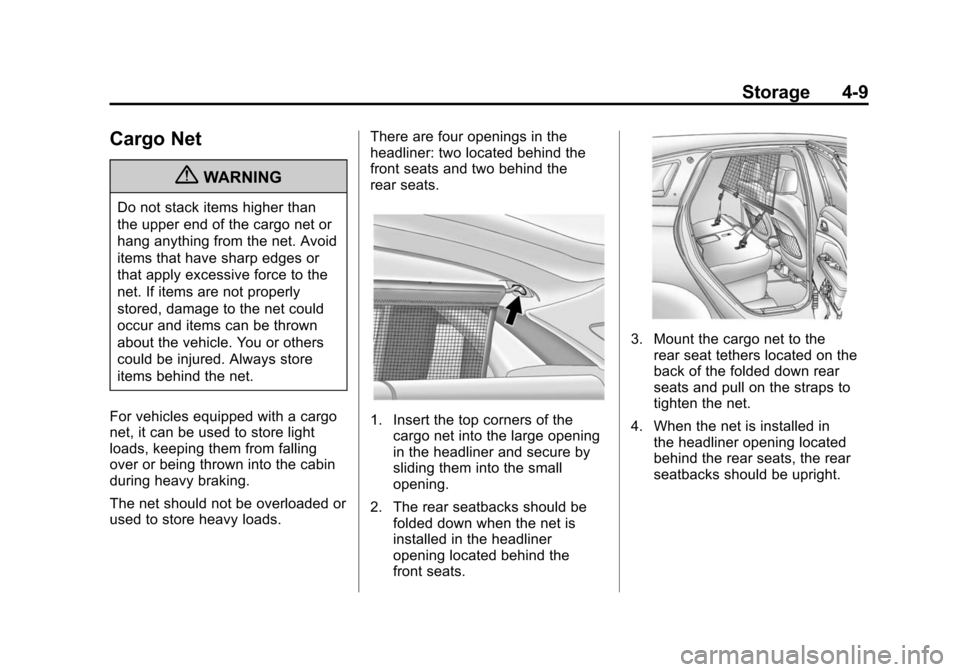
1. Insert the top corners of the
cargo net into the large opening
in the headliner and secure by
sliding them into the small
opening.
2. The rear seatbacks should be folded down when the net is
installed in the headliner
opening located behind the
front seats.
3. Mount the cargo net to therear seat tethers located on the
back of the folded down rear
seats and pull on the straps to
tighten the net.
4. When the net is installed in the headliner opening located
behind the rear seats, the rear
seatbacks should be upright.
Page 131 of 502
Black plate (1,1)Cadillac SRX Owner Manual (Include Mex) - 2012
Instruments and Controls 5-1
Instruments and
Controls
Controls
Steering Wheel Adjustment . . . 5-2
Steering Wheel Controls . . . . . . 5-2
Heated Steering Wheel . . . . . . . 5-3
Horn . . . . . . . . . . . . . . . . . . . . . . . . . . 5-3
Windshield Wiper/Washer . . . . . 5-4
Rear Window Wiper/Washer . . . . . . . . . . . . . . . . . . . . . . 5-6
Headlamp Washer . . . . . . . . . . . . 5-6
Compass . . . . . . . . . . . . . . . . . . . . . 5-7
Clock (Analog Clock) . . . . . . . . . . 5-7
Clock (Digital Clock) . . . . . . . . . . 5-7
Power Outlets . . . . . . . . . . . . . . . . . 5-8
Cigarette Lighter . . . . . . . . . . . . . . 5-9
Ashtrays . . . . . . . . . . . . . . . . . . . . . 5-10
Warning Lights, Gauges, and
Indicators
Warning Lights, Gauges, and Indicators . . . . . . . . . . . . . . . . . . 5-10
Instrument Cluster . . . . . . . . . . . 5-11
Speedometer . . . . . . . . . . . . . . . . 5-12
Odometer . . . . . . . . . . . . . . . . . . . . 5-12
Tachometer . . . . . . . . . . . . . . . . . . 5-12 Fuel Gauge . . . . . . . . . . . . . . . . . . 5-12
Fuel Economy Gauge . . . . . . . . 5-13
Engine Coolant Temperature
Gauge . . . . . . . . . . . . . . . . . . . . . . 5-14
Safety Belt Reminders . . . . . . . 5-15
Airbag Readiness Light . . . . . . 5-16
Passenger Airbag Status
Indicator . . . . . . . . . . . . . . . . . . . . 5-17
Charging System Light . . . . . . 5-18
Malfunction Indicator Lamp . . . . . . . . . . . . . 5-18
Brake System Warning Light . . . . . . . . . . . . . . . . . . . . . . . 5-21
Electric Parking Brake Light . . . . . . . . . . . . . . . . . . . . . . . 5-21
Antilock Brake System (ABS) Warning Light . . . . . . . . . . . . . . 5-22
Traction Off Light . . . . . . . . . . . . 5-23
StabiliTrak
®OFF Light . . . . . . . 5-23
Traction Control System (TCS)/StabiliTrak
®Light . . . . 5-24
Tire Pressure Light . . . . . . . . . . 5-24
Engine Oil Pressure Light . . . . 5-25
Fuel Economy Light . . . . . . . . . 5-25
Low Fuel Warning Light . . . . . . 5-26
Security Light . . . . . . . . . . . . . . . . 5-26
High-Beam On Light . . . . . . . . . 5-26
Adaptive Forward Lighting (AFL) Light . . . . . . . . . . . . . . . . . 5-27 Front Fog Lamp Light . . . . . . . . 5-27
Lamps On Reminder . . . . . . . . . 5-27
Cruise Control Light . . . . . . . . . 5-28
Information Displays
Driver Information
Center (DIC) . . . . . . . . . . . . . . . 5-28
Vehicle Messages
Vehicle Messages . . . . . . . . . . . 5-32
Battery Voltage and ChargingMessages . . . . . . . . . . . . . . . . . . 5-33
Brake System Messages . . . . 5-33
Compass Messages . . . . . . . . . 5-34
Cruise Control Messages . . . . 5-34
Door Ajar Messages . . . . . . . . . 5-34
Engine Cooling System Messages . . . . . . . . . . . . . . . . . . 5-34
Engine Oil Messages . . . . . . . . 5-35
Engine Power Messages . . . . 5-35
Fuel System Messages . . . . . . 5-36
Key and Lock Messages . . . . . 5-36
Lamp Messages . . . . . . . . . . . . . 5-36
Object Detection System Messages . . . . . . . . . . . . . . . . . . 5-37
Ride Control System Messages . . . . . . . . . . . . . . . . . . 5-37
Airbag System Messages . . . . 5-38
Safety Belt Messages . . . . . . . 5-38
Page 133 of 502
Black plate (3,1)Cadillac SRX Owner Manual (Include Mex) - 2012
Instruments and Controls 5-3
yorz:Pressyto select the
next favorite radio station or next
CD, DVD, if equipped, or MP3 track.
Press
zto select the previous
favorite radio station or previous
CD, DVD, if equipped, or MP3 track.
+
x− (Volume): Press + to
increase the volume; press −to
decrease the volume.
b/g(Push to Talk): For vehicles
with an OnStar®, Bluetooth®,
or navigation system, press to
interact with those systems. See
Bluetooth (Overview) on page 7‑47
or Bluetooth (Infotainment Controls)
on page 7‑49 orBluetooth (Voice
Recognition) on page 7‑53 or
Bluetooth (UHP Mexico Only) on
page 7‑59, OnStar Overview on
page 14‑1, or the separate
navigation manual for more
information.
0/c(End Call/Mute): Press to
silence the vehicle speakers only.
Press again to turn the sound on.
For vehicles with OnStar or
Bluetooth systems, press to reject
an incoming call, or end a
current call.
SRCE: Press to select an audio
source. For vehicles with a heated
steering wheel, use the infotainment
buttons to select an audio source.
See Heated Steering Wheel on
page 5‑3 orOverview (Radio with
CD) on page 7‑3 orOverview
(Radio with CD/DVD and MEM) on
page 7‑5 for more information.Heated Steering Wheel
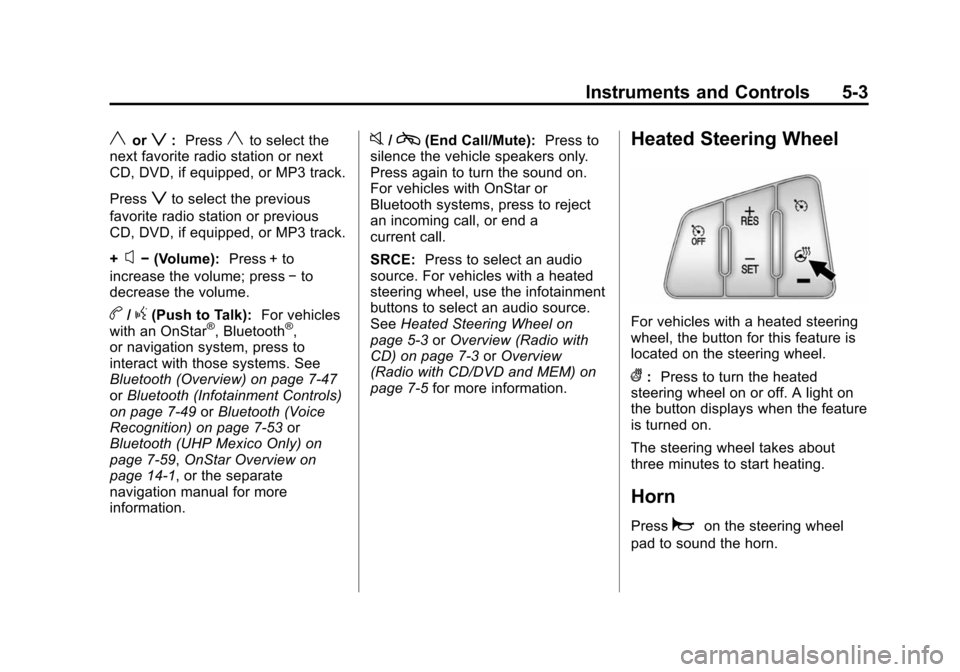
For vehicles with a heated steering
wheel, the button for this feature is
located on the steering wheel.
(:Press to turn the heated
steering wheel on or off. A light on
the button displays when the feature
is turned on.
The steering wheel takes about
three minutes to start heating.
Horn
Pressaon the steering wheel
pad to sound the horn.
Page 138 of 502
Black plate (8,1)Cadillac SRX Owner Manual (Include Mex) - 2012
5-8 Instruments and Controls
Setting the Time and Date
1. Press the CONFIG button.
2. Select Time and Date Settings.
3. Select Set Time or Set Date.
4. Turn the MENU/SELECT knob toadjust the highlighted value.
5. Press the MENU/SELECT knob to select the next value.
6. To save the time or date and return to the Time and Date
Settings menu, press the
BACK
/button at any time or
press the MENU/SELECT knob
after adjusting the minutes
or year.
Setting the 12/24 Hour Format
1. Press the CONFIG button.
2. Select Time and Date Settings.
3. Highlight 12/24 Hour Format.
4. Press the MENU/SELECT knob to select the 12 hour or 24 hour
display format.
Setting the Month & Day
Format
1. Press the CONFIG button.
2. Select Time and Date Settings.
3. Highlight Month & Day Format.
4. Press the MENU/SELECT knobto select MM/DD (month/day) or
DD/MM (day/month).
Setting the Auto Time Adjust
1. Press the CONFIG button.
2. Select Time and Date Settings.
3. Highlight Auto Time Adjust.
4. Press the MENU/SELECT knobto turn Auto Time Adjust on
or off.
Power Outlets
The accessory power outlets can be
used to plug in electrical equipment,
such as a cell phone or MP3 player.
The vehicle has four accessory
power outlets. The power outlets
located below the climate control
system inside the front storage bin,
inside the center floor console, and
on the rear of the center floor
console are powered while the
vehicle is in ON/RUN/START or
ACC/ACCESSORY mode, or until
the driver door is opened within
10 minutes of turning off the vehicle.
The power outlet located in the rear
cargo area is powered at all times.