center console CADILLAC SRX 2015 2.G User Guide
[x] Cancel search | Manufacturer: CADILLAC, Model Year: 2015, Model line: SRX, Model: CADILLAC SRX 2015 2.GPages: 417, PDF Size: 4.59 MB
Page 129 of 417
Black plate (6,1)Cadillac SRX Owner Manual (GMNA-Localizing-U.S./Canada/Mexico-
7707476) - 2015 - crc - 4/8/14
5-6 Instruments and Controls
Clock
The infotainment system controls
are used to access the time and
date settings through the menu
system. See“Home Page” in the
infotainment manual for information
about how to use the menu system.
Setting the Time
To set the time:
1. From the Home Page, press the SETTINGS screen button and
press Time and Date.
2. Press Set Time and press + or −
to increase or decrease hours,
minutes, and AM or PM. Press
12Hr or 24Hr for 12 or 24 hour
clock.
3. Press
}to go back to the
previous menu.
If auto timing is set, the time
displayed on the clock may not
update immediately when driving
into a new time zone. To set the date:
1. Press the SETTINGS screen
button and press Time and Date.
2. Press Set Date and press + or −
to increase or decrease month,
day, or year.
3. Press
}to go back to the
previous menu.
Power Outlets
The accessory power outlets can be
used to plug in electrical equipment,
such as a cell phone or MP3 player.
The vehicle may have five
accessory power outlets.
The accessory power outlets are:
.Below the climate control system
inside the front storage bin.
.Inside the center floor console.
.On the rear of the center floor
console. For vehicles with a rear
climate control system, there will be two accessory power outlets
on the rear of the center floor
console.
.In the rear cargo area.
These are powered while the
vehicle is in ON/RUN/START or
ACC/ACCESSORY mode, or until
the driver door is opened within
10 minutes of turning off the vehicle.
The power outlet located in the rear
cargo area is powered at all times.
There is a small cap that must be
removed to access the accessory
power outlet. When not using the
outlet be sure to cover it with the
protective cap.
{Caution
Leaving electrical equipment
plugged in for an extended period
of time while the vehicle is off will
drain the battery. Power is always
supplied to the rear cargo outlet.
Always unplug electrical (Continued)
Page 130 of 417
Black plate (7,1)Cadillac SRX Owner Manual (GMNA-Localizing-U.S./Canada/Mexico-
7707476) - 2015 - crc - 4/8/14
Instruments and Controls 5-7
Caution (Continued)
equipment when not in use and
do not plug in equipment that
exceeds the maximum 20 ampere
rating.
Certain accessory power plugs may
not be compatible with the
accessory power outlet and could
overload vehicle or adapter fuses.
If a problem is experienced, see
your dealer.
When adding electrical equipment,
be sure to follow the proper
installation instructions included with
the equipment. See Add-On
Electrical Equipment on page 9-67.
{Caution
Hanging heavy equipment from
the power outlet can cause
damage not covered by the
vehicle warranty. The power
(Continued)
Caution (Continued)
outlets are designed for
accessory power plugs only, such
as cell phone charge cords.
Cigarette Lighter
There may be a cigarette lighter
under the climate control system,
inside the front storage bin.
To activate the cigarette lighter,
push it into the heating element and
let go. The lighter pops out when it
is ready to be used.
{Caution
Holding a cigarette lighter in while
it is heating does not let the
lighter back away from the
heating element when it is hot.
Damage from overheating can
occur to the lighter or heating(Continued)
Caution (Continued)
element, or a fuse could be
blown. Do not hold a cigarette
lighter in while it is heating.
Ashtrays
There may be an ashtray under the
climate control system on the center
stack. Press the door to release the
ashtray.
To empty the ashtray, remove it from
the instrument panel by holding the
edges and pulling straight out. To
reinstall, push the tray back into
place.
There may also be ashtrays on the
center floor console behind the shift
lever and in the rear doors.
Page 137 of 417

Black plate (14,1)Cadillac SRX Owner Manual (GMNA-Localizing-U.S./Canada/Mexico-
7707476) - 2015 - crc - 4/8/14
5-14 Instruments and Controls
The airbag readiness light comes on
for several seconds when the
vehicle is started. If the light does
not come on then, have it fixed
immediately.
{Warning
If the airbag readiness light stays
on after the vehicle is started or
comes on while driving, it means
the airbag system might not be
working properly. The airbags in
the vehicle might not inflate in a
crash, or they could even inflate
without a crash. To help avoid
injury, have the vehicle serviced
right away.If there is a problem with the airbag
system, a Driver Information Center
(DIC) message may also come on.
See
Airbag System Messages on
page 5-36.
Passenger Airbag Status
Indicator
The vehicle has a passenger
sensing system. See Passenger
Sensing System on page 3-26 for
important safety information. The
overhead console has a passenger
airbag status indicator.
United States
Canada and Mexico
When the vehicle is started, the
passenger airbag status indicator
will light ON and OFF, or the symbol
for on and off, for several seconds
as a system check. Then, after
several more seconds, the status
indicator will light either ON or OFF,
or either the on or off symbol to let
you know the status of the front
outboard passenger frontal airbag.
Page 218 of 417
Black plate (27,1)Cadillac SRX Owner Manual (GMNA-Localizing-U.S./Canada/Mexico-
7707476) - 2015 - crc - 4/8/14
Driving and Operating 9-27
If driving safely on a wet road and it
becomes necessary to slam on the
brakes and continue braking to
avoid a sudden obstacle, a
computer senses the wheels are
slowing down. If one of the wheels
is about to stop rolling, the computer
will separately work the brakes at
each wheel.
ABS can change the brake pressure
to each wheel, as required, faster
than any driver could. This can help
you steer around the obstacle while
braking hard.
As the brakes are applied, the
computer keeps receiving updates
on wheel speed and controls
braking pressure accordingly.
Remember: ABS does not change
the time needed to get a foot up to
the brake pedal or always decrease
stopping distance. If you get too
close to the vehicle in front of you,
there will not be enough time to
apply the brakes if that vehiclesuddenly slows or stops. Always
leave enough room up ahead to
stop, even with ABS.
Using ABS
Do not pump the brakes. Just hold
the brake pedal down firmly and let
ABS work. You may hear the ABS
pump or motor operating and feel
the brake pedal pulsate. This is
normal.
Braking in Emergencies
ABS allows you to steer and brake
at the same time. In many
emergencies, steering can help
more than even the very best
braking.
Parking Brake
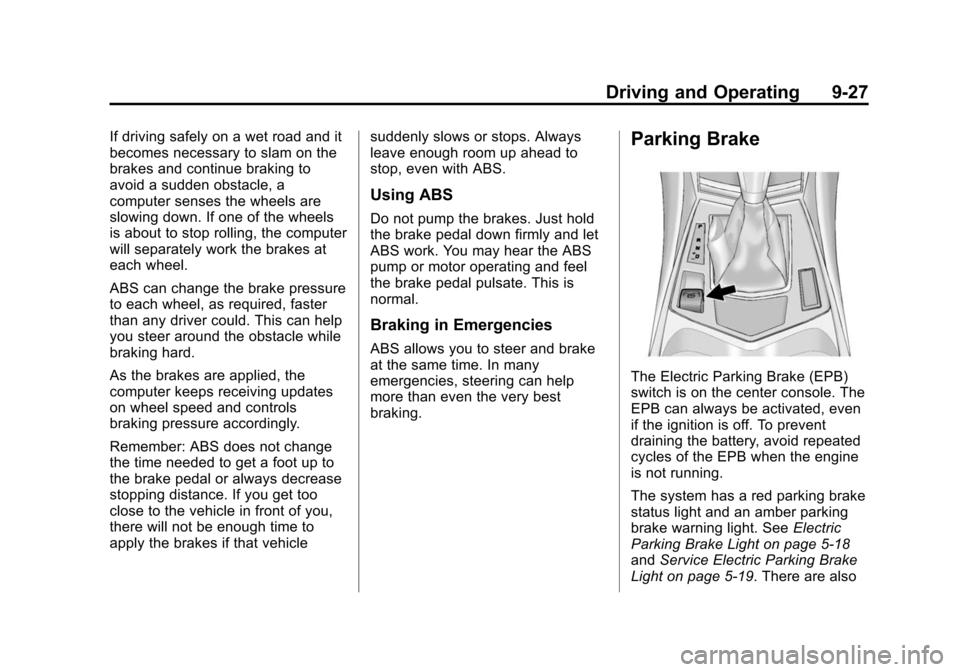
The Electric Parking Brake (EPB)
switch is on the center console. The
EPB can always be activated, even
if the ignition is off. To prevent
draining the battery, avoid repeated
cycles of the EPB when the engine
is not running.
The system has a red parking brake
status light and an amber parking
brake warning light. See
Electric
Parking Brake Light on page 5-18
and Service Electric Parking Brake
Light on page 5-19. There are also
Page 295 of 417
Black plate (36,1)Cadillac SRX Owner Manual (GMNA-Localizing-U.S./Canada/Mexico-
7707476) - 2015 - crc - 4/8/14
10-36 Vehicle Care
Mini Relays Usage15 Run/Crank
Micro
Relays Usage
2 Vacuum Pump
4 Wiper Control
5 Wiper Speed
10 Starter
12 Cool Fan 3
14 Low Beam/HID
U Micro Relays Usage
3 Air Conditioning Compressor Clutch
8 Not UsedInstrument Panel Fuse
Block
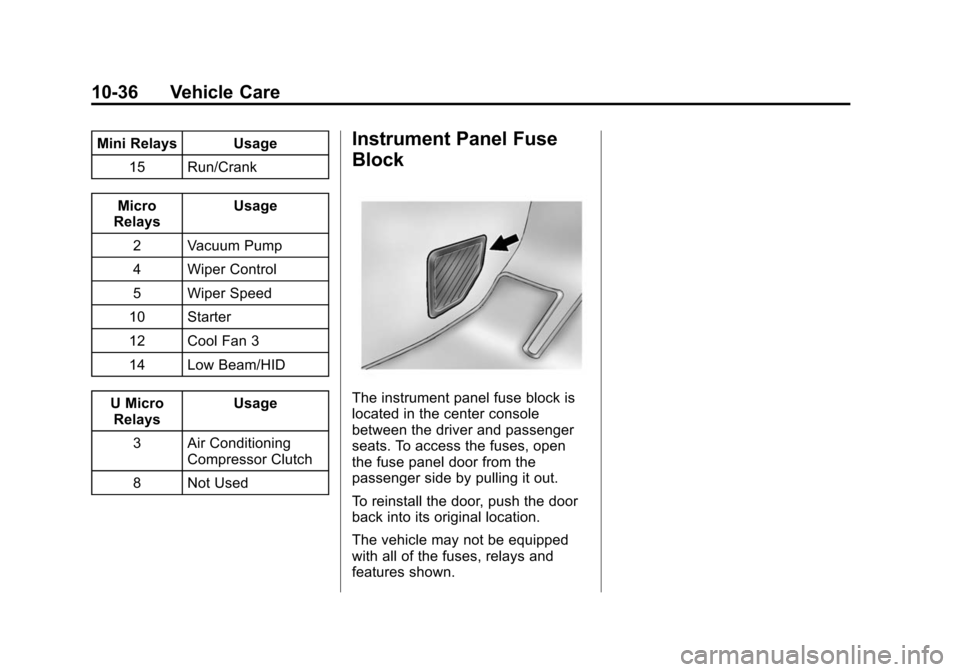
The instrument panel fuse block is
located in the center console
between the driver and passenger
seats. To access the fuses, open
the fuse panel door from the
passenger side by pulling it out.
To reinstall the door, push the door
back into its original location.
The vehicle may not be equipped
with all of the fuses, relays and
features shown.
Page 405 of 417

Black plate (2,1)Cadillac SRX Owner Manual (GMNA-Localizing-U.S./Canada/Mexico-
7707476) - 2015 - crc - 4/8/14
i-2 INDEX
B
Battery . . . . . . . . . . . . . . . . . . . . . . . 10-21Exterior Lighting BatterySaver . . . . . . . . . . . . . . . . . . . . . . . . 6-9
Jump Starting . . . . . . . . . . . . . . . 10-79
Load Management . . . . . . . . . . . . . 6-8
Power Protection . . . . . . . . . . . . . . 6-9
Voltage and Charging Messages . . . . . . . . . . . . . . . . . . . 5-28
Blade Replacement, Wiper . . . 10-23
Brake Pedal and AdjustableThrottle . . . . . . . . . . . . . . . . . . . . . . 9-14
System Warning Light . . . . . . . . 5-18
Brakes . . . . . . . . . . . . . . . . . . . . . . . . 10-19 Antilock . . . . . . . . . . . . . . . . . . . . . . . 9-26
Assist . . . . . . . . . . . . . . . . . . . . . . . . . 9-29
Fluid . . . . . . . . . . . . . . . . . . . . . . . . 10-20
Parking . . . . . . . . . . . . . . . . . . . . . . . 9-27
System Messages . . . . . . . . . . . . 5-28
Braking . . . . . . . . . . . . . . . . . . . . . . . . . 9-3
Braking System Active Emergency . . . . . . . . . . . . 1-18
Break-In, New Vehicle . . . . . . . . . 9-14 Bulb Replacement . . . . . . . . . . . . 10-32
Back-up Lamps . . . . . . . . . . . . . 10-30
Halogen Bulbs . . . . . . . . . . . . . . 10-25
Headlamp Aiming . . . . . . . . . . . 10-25
Headlamps . . . . . . . . . . 10-25, 10-26
High Intensity Discharge(HID) Lighting . . . . . . . . . . . . . 10-26
License Plate Lamps . . . . . . . 10-31
Turn Signal Lamps . . . . . . . . . 10-29
Buying New Tires . . . . . . . . . . . . . 10-57
C
Cadillac Premium Care Maintenance . . . . . . . . . . . . . . . . . 11-3
Calibration . . . . . . . . . . . . . . . . . . . . . . 5-5
California Fuel Requirements . . . . . . . . . . . 9-57
Perchlorate MaterialsRequirements . . . . . . . . . . . . . . . 10-3
Warning . . . . . . . . . . . . . . . . . . . . . . 10-2
Canadian Vehicle Owners . . . . . . . . iii
Capacities and Specifications . . . . . . . . . . . . . . . . 12-2 Carbon Monoxide
Engine Exhaust . . . . . . . . . . . . . . . 9-21
Liftgate . . . . . . . . . . . . . . . . . . . . . . . 2-14
Winter Driving . . . . . . . . . . . . . . . . . 9-7
Cargo Cover . . . . . . . . . . . . . . . . . . . . . . . . . . 4-3
Management System . . . . . . . . . . 4-5
Tie-Downs . . . . . . . . . . . . . . . . . . . . . 4-5
Cargo Lamp . . . . . . . . . . . . . . . . . . . . 6-7
Cargo Net . . . . . . . . . . . . . . . . . . . . . . 4-9
Cautions, Danger, and Warnings . . . . . . . . . . . . . . . . . . . . . . . . iv
Center Console Storage . . . . . . . . 4-3
Chains, Tire . . . . . . . . . . . . . . . . . . 10-61
Charging System Light . . . . . . . . 5-15
Check Engine Light . . . . . . . . . . . . . . . . . . 5-15
Child Restraints Infants and YoungChildren . . . . . . . . . . . . . . . . . . . . . 3-34
Lower Anchors and
Tethers for Children . . . . . . . . . 3-40
Older Children . . . . . . . . . . . . . . . . 3-32
Securing . . . . . . . . . . . . . . . . 3-48, 3-50
Systems . . . . . . . . . . . . . . . . . . . . . . 3-37
Cigarette Lighter . . . . . . . . . . . . . . . . 5-7
Page 414 of 417

Black plate (11,1)Cadillac SRX Owner Manual (GMNA-Localizing-U.S./Canada/Mexico-
7707476) - 2015 - crc - 4/8/14
INDEX i-11
Service (cont'd)Maintenance, General
Information . . . . . . . . . . . . . . . . . . 11-1
Parts Identification Label . . . . . 12-1
Publications Ordering
Information . . . . . . . . . . . . . . . . .13-11
Scheduling Appointments . . . . . 13-7
Vehicle Messages . . . . . . . . . . . . 5-36
Service Electric Parking
Brake Light . . . . . . . . . . . . . . . . . . . 5-19
Services Special Application . . . . . . . . . . . 11-9
Servicing the Airbag . . . . . . . . . . . 3-30
Shift Lock Control Function Check, Automatic
Transmission . . . . . . . . . . . . . . . . 10-23
Shifting Into Park . . . . . . . . . . . . . . . . . . . . . . 9-19
Out of Park . . . . . . . . . . . . . . . . . . . 9-20
Side Blind Zone Alert (SBZA) . . . . . . . . . . . . . . . . . 9-52
Signals, Turn and Lane-Change . . . . . . . . . . . . . . . . . 6-6
Spare Tire Compact . . . . . . . . . . . . . . . . . . . . 10-78
Special Application Services . . . 11-9 Specifications and
Capacities . . . . . . . . . . . . . . . . . . . . 12-2
Speedometer . . . . . . . . . . . . . . . . . . 5-10
StabiliTrak OFF Light . . . . . . . . . . . . . . . . . . . . . 5-20
Start Assist, Hills . . . . . . . . . . . . . . 9-29
Start Vehicle, Remote . . . . . . . . . . 2-9
Starter Switch Check . . . . . . . . . 10-22
Starting the Gasoline Engine . . . . . . . . . . . . . . . . . . . . . . . 9-16
Starting the Vehicle
Messages . . . . . . . . . . . . . . . . . . . . 5-36
Steering . . . . . . . . . . . . . . . . . . . . . . . . 9-4 Fluid, Power . . . . . . . . . . . . . . . . 10-18
Heated Wheel . . . . . . . . . . . . . . . . . 5-2
Wheel Adjustment . . . . . . . . . . . . . 5-2
Wheel Controls . . . . . . . . . . . . . . . . 5-2
Storage Areas Armrest . . . . . . . . . . . . . . . . . . . . . . . . 4-2
Cargo Cover . . . . . . . . . . . . . . . . . . . 4-3
Cargo Management System . . . 4-5
Center Console . . . . . . . . . . . . . . . . 4-3
Convenience Net . . . . . . . . . . . . . 4-11
Front . . . . . . . . . . . . . . . . . . . . . . . . . . 4-2
Glove Box . . . . . . . . . . . . . . . . . . . . . 4-1
Roof Rack System . . . . . . . . . . . . 4-11 Storage Compartments . . . . . . . . . 4-1
Storing the Tire Sealant
and Compressor Kit . . . . . . . . . 10-71
Stuck Vehicle . . . . . . . . . . . . . . . . . . . 9-9
Summer Tires . . . . . . . . . . . . . . . . 10-42
Sun Visors . . . . . . . . . . . . . . . . . . . . . 2-26
Sunroof . . . . . . . . . . . . . . . . . . . . . . . . 2-26
Symbols . . . . . . . . . . . . . . . . . . . . . . . . . . iv
System Active Emergency Braking . . . . 9-50
Forward CollisionAlert (FCA) . . . . . . . . . . . . . . . . . . 9-48
Infotainment . . . . . . . . . . . . 7-1, 13-15
Roof Rack . . . . . . . . . . . . . . . . . . . . 4-11
Systems Driver Assistance . . . . . . . . . . . . . 9-43
T
Tachometer . . . . . . . . . . . . . . . . . . . . 5-11
Text Telephone (TTY) Users . . . 13-4
Theft-Deterrent Systems . . . . . . . 2-19
Immobilizer . . . . . . . . . . . . . . . . . . . 2-19
Thigh Support Adjustment . . . . . . 3-5
Throttle, Adjustable . . . . . . . . . . . . 9-14
Time . . . . . . . . . . . . . . . . . . . . . . . . . . . . 5-6