lock CADILLAC STS 2005 1.G Owner's Guide
[x] Cancel search | Manufacturer: CADILLAC, Model Year: 2005, Model line: STS, Model: CADILLAC STS 2005 1.GPages: 446, PDF Size: 2.58 MB
Page 85 of 446

Valet Lockout Switch
The valet lockout switch
is located inside the
glove box.
9(Off):Press the left side of the valet lockout switch
to turn the lockout feature off. When the lockout
feature is off, you can open the trunk using either the
keyless access transmitter or the trunk release
button located on the driver’s door.
R(On):Press the right side of the valet lockout switch
to turn the lockout feature on. When the lockout
feature is turned on, the trunk cannot be unlocked with
the keyless access transmitter or the trunk release
button located on the driver’s door. If the valet lockout
feature is on it will also disable the remote start
feature and the HomeLink
®transmitter, if equipped.
Locking the glove box with your key will also help
to secure your vehicle.
SeeKeyless Access System Operation on page 2-4and
Trunk on page 2-14for additional information.
2-21
Page 90 of 446
Automatic Transmission Operation
The shift lever is located on the center console between
the front seats.
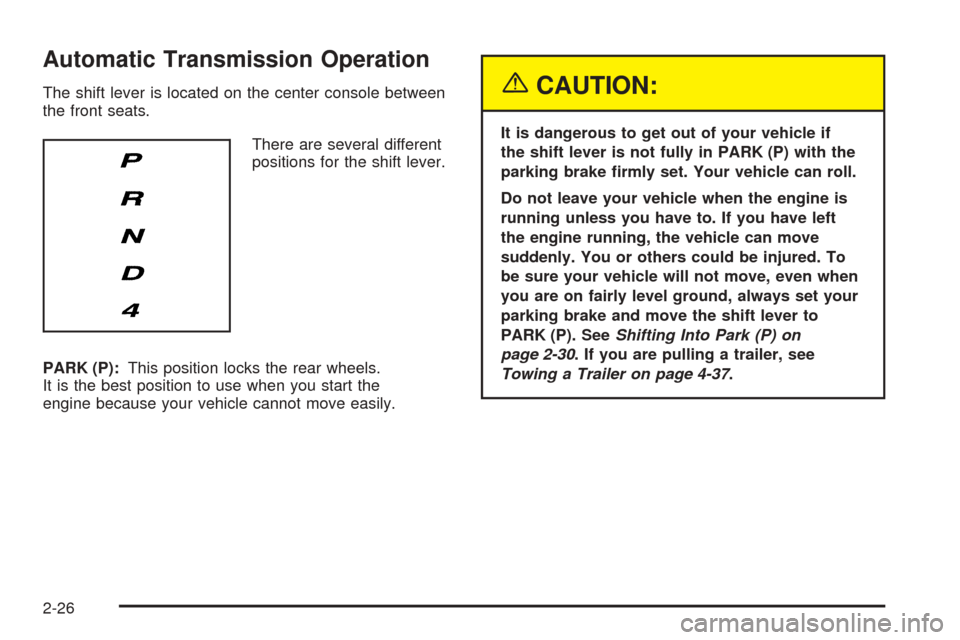
There are several different
positions for the shift lever.
PARK (P):This position locks the rear wheels.
It is the best position to use when you start the
engine because your vehicle cannot move easily.{CAUTION:
It is dangerous to get out of your vehicle if
the shift lever is not fully in PARK (P) with the
parking brake rmly set. Your vehicle can roll.
Do not leave your vehicle when the engine is
running unless you have to. If you have left
the engine running, the vehicle can move
suddenly. You or others could be injured. To
be sure your vehicle will not move, even when
you are on fairly level ground, always set your
parking brake and move the shift lever to
PARK (P). SeeShifting Into Park (P) on
page 2-30. If you are pulling a trailer, see
Towing a Trailer on page 4-37.
2-26
Page 91 of 446
Ensure the shift lever is fully in PARK (P) before starting
the engine. Your vehicle has an automatic transmission
shift lock control system. You must fully apply your
regular brakes before you can shift from PARK (P) when
the ignition is on. If you cannot shift out of PARK (P),
ease pressure on the shift lever. Push the shift lever all
the way into PARK (P) while pressing the button on
the shift lever as you maintain brake application. Then
move the shift lever into the gear you wish. SeeShifting
Out of Park (P) on page 2-31.
Notice:Shifting to REVERSE (R) while your vehicle
is moving forward could damage the transmission.
The repairs would not be covered by your warranty.
Shift to REVERSE (R) only after your vehicle is
stopped.
REVERSE (R):Use this gear to back up.
At low vehicle speeds, you can also use REVERSE (R)
to rock your vehicle back and forth to get out of
snow, ice or sand without damaging your transmission.
SeeIf Your Vehicle is Stuck in Sand, Mud, Ice or
Snow on page 4-29for additional information.NEUTRAL (N):In this position, the engine does not
connect with the wheels. To restart when you are
already moving, use NEUTRAL (N) only. You can also
use NEUTRAL (N) when your vehicle is being towed.
{CAUTION:
Shifting into a drive gear while your engine is
running at high speed is dangerous. Unless
your foot is rmly on the brake pedal, your
vehicle could move very rapidly. You could
lose control and hit people or objects. Do not
shift into a drive gear while your engine is
running at high speed.
Notice:Shifting out of PARK (P) or NEUTRAL (N)
with the engine running at high speed may
damage the transmission. The repairs would not
be covered by your warranty. Be sure the engine
is not running at high speed when shifting your
vehicle.
2-27
Page 95 of 446

Leaving Your Vehicle With the Engine
Running
{CAUTION:
It can be dangerous to leave your vehicle with
the engine running. Your vehicle could move
suddenly if the shift lever is not fully in
PARK (P) with the parking brake rmly set.
And, if you leave the vehicle with the engine
running, it could overheat and even catch re.
You or others could be injured. Do not leave
your vehicle with the engine running.
If you have to leave your vehicle with the engine
running, be sure your vehicle is in PARK (P) and your
parking brake is rmly set before you leave it. After you
have moved the shift lever into PARK (P), hold the
regular brake pedal down. Then, see if you can move
the shift lever away from PARK (P) without rst pushing
the button on the shift lever. If you can, it means that
the shift lever was not fully locked into PARK (P).
Torque Lock
If you are parking on a hill and you do not shift your
transmission into PARK (P) properly, the weight of the
vehicle may put too much force on the parking pawl
in the transmission. You may nd it difficult to pull the
shift lever out of PARK (P). This is called “torque
lock.” To prevent torque lock, set the parking brake and
then shift into PARK (P) properly before you leave
the driver’s seat. To nd out how, see “Shifting
Into PARK (P)” listed previously.
If torque lock does occur, you may need to have
another vehicle push yours a little uphill to take some of
the pressure from the parking pawl in the transmission,
so you can pull the shift lever out of PARK (P).
Shifting Out of Park (P)
Your vehicle has an automatic transmission shift lock
control system. You have to fully apply your regular
brake before you can shift from PARK (P) when
the vehicle is running. SeeAutomatic Transmission
Operation on page 2-26.
If you cannot shift out of PARK (P), ease pressure on the
shift lever – push the shift lever all the way into PARK (P)
and release the shift lever button as you maintain brake
application. Then press the shift lever button and move
the shift lever into the gear you wish.
2-31
Page 103 of 446
If further mirror adjustment is needed press the arrows
located on the outside mirror control pad. If the
outside mirror selector switch is in the middle position,
neither outside mirror will move.
When the vehicle is shifted out of REVERSE (R), and a
ve-second delay has occurred, the mirror will return to
its original position. The delay prevents movement of
the mirror if multiple gear transitions REVERSE (R) to
AUTOMATIC OVERDRIVE (D) to REVERSE (R) occur
during a parallel parking maneuver.
OnStar®System
OnStar®uses global positioning system (GPS) satellite
technology, wireless communications, and call centers
to provide you with a wide range of safety, security,
information, and convenience services.
A complete OnStar
®user’s guide and the terms and
conditions of the OnStar®Subscription Service
Agreement are included in the vehicle’s glove box
literature. For more information, visit www.onstar.com or
www.onstarcanada.com. Contact OnStar
®at
1-888-4-ONSTAR (1-888-466-7827), or press the
OnStar
®button to speak to an OnStar®advisor
24 hours a day, 7 days a week.
Terms and conditions of the Subscription Service
Agreement can be found at www.onstar.com or
www.onstarcanada.com.
OnStar®Services
The Directions and Connections Plan is included on
new vehicles for one year from the date of purchase.
The OnStar
®subscription can be extended for time
beyond the rst year to meet your needs. For more
information, press the OnStar
®button to speak with
an advisor.
Directions and Connections Plan
Advanced Automatic Collision Notication
Automatic Notication of Airbag Deployment
Emergency Services
Roadside Assistance
Stolen Vehicle Tracking
AccidentAssist
Remote Door Unlock/Vehicle Alert
Remote Diagnostics
Online Concierge
Driving Directions
RideAssist
Information and Convenience Services
2-39
Page 105 of 446
HomeLink®Wireless Control
System
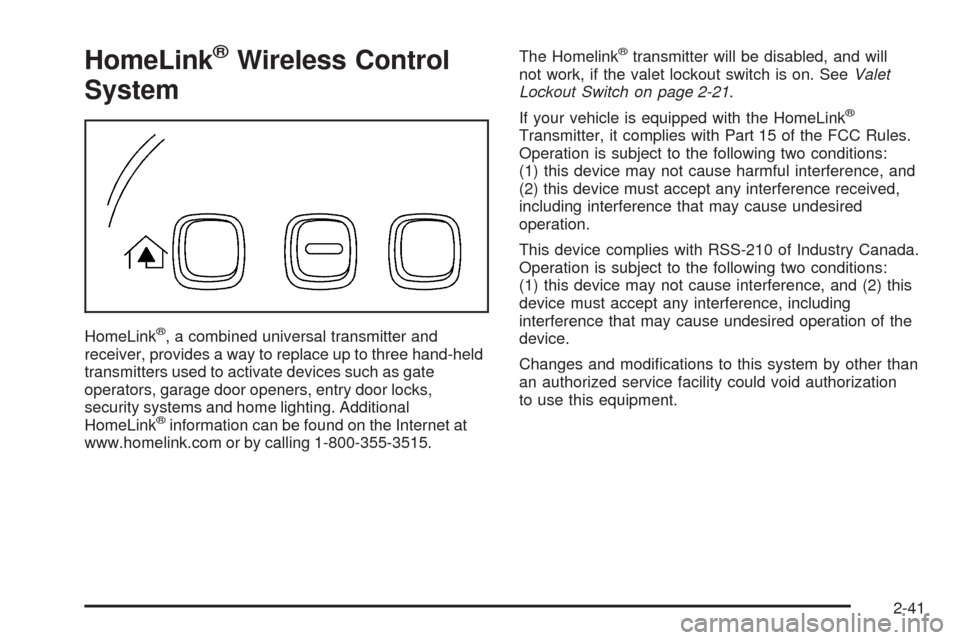
HomeLink®, a combined universal transmitter and
receiver, provides a way to replace up to three hand-held
transmitters used to activate devices such as gate
operators, garage door openers, entry door locks,
security systems and home lighting. Additional
HomeLink
®information can be found on the Internet at
www.homelink.com or by calling 1-800-355-3515.The Homelink
®transmitter will be disabled, and will
not work, if the valet lockout switch is on. SeeValet
Lockout Switch on page 2-21.
If your vehicle is equipped with the HomeLink
®
Transmitter, it complies with Part 15 of the FCC Rules.
Operation is subject to the following two conditions:
(1) this device may not cause harmful interference, and
(2) this device must accept any interference received,
including interference that may cause undesired
operation.
This device complies with RSS-210 of Industry Canada.
Operation is subject to the following two conditions:
(1) this device may not cause interference, and (2) this
device must accept any interference, including
interference that may cause undesired operation of the
device.
Changes and modications to this system by other than
an authorized service facility could void authorization
to use this equipment.
2-41
Page 111 of 446
Anti-Pinch:If an object is in the path of the sunroof
while it is closing, the anti-pinch feature will detect the
object and stop the sunroof from closing at the point
of the obstruction. The sunroof will then return to
the full-open or vent position. To close the sunroof once
it has re-opened, refer to the two options previously
described under the “Close” feature instructions.
Vehicle Personalization
Your vehicle is equipped with personalization that allows
you to program certain features to a preferred setting
for up to two people. The number of programmable
features varies depending upon which vehicle options
are purchased.
On all vehicles, features such as climate control
settings, radio and XM™ preset settings, exterior lighting
at unlock and remote lock unlock conrmation and
language have already been programmed for your
convenience. Your vehicle also has an automatic door
locking feature that is always on. You cannot turn
the automatic door locking feature off. See
Programmable Automatic Door Locks on page 2-12.Some vehicles are equipped with additional features
that can be programmed including the seat, steering
column, and outside rearview mirror position.
If your vehicle has the base audio system, the following
information explains the vehicle personalization on
your vehicle.
If your vehicle has the Navigation system, see
“Personalization” in the Index of the Navigation System
manual for information on vehicle personalization.
If your vehicle is equipped with the ability to program
additional personalization features, the driver’s
preferences are recalled by pressing any button on
the keyless access transmitter, 1 or 2 or by selecting
Driver 1 or 2 on the radio display. Certain features can
be programmed not to recall until the ignition is
turned off.
To change feature preferences, use the following
procedure.
2-47
Page 115 of 446

To program the vehicle to a different mode, use the
following procedure:
1. Enter the PERSONAL SETTINGS MENU by
following the instructions listed previously under
“Entering the Personal Settings Menu.”
2. Turn the tune/select knob until REMOTE START is
highlighted.
3. Press the tune/select knob to switch back and forth
between on and off.
When REMOTE START is on, a check mark will appear
next to the feature name. You can then choose to
activate any or all of the following features by turning
the tune/select knob to highlight the feature, then
pressing the knob to turn it on.
CLIMATE CONTROL:The climate control system will
engage when the vehicle is started using the remote
start feature. It will be at the same climate control setting
that was last used by the driver using that keyless
entry transmitter.
REAR WINDOW DEFOG:If this feature is active, the
rear defogger will engage when the vehicle is started
using the remote start feature.SEAT TEMP (Temperature) CONTROL:If this feature
is active, the seats will be heated or cooled, if
equipped, when the vehicle is started using the remote
start feature.
The mode you selected is now set. You can either exit
the programming mode by following the instructions
later in this section or program the next feature available
on your vehicle by pressing the F6 (BACK) button,
located on the radio, to return to the PERSONAL
SETTINGS MENU.
REMOTE RECALL MEMORY
If your vehicle has the optional memory package, you
will have this feature. When this feature is turned on, you
can recall any previously programmed seat position
and mirror position when the unlock button on the
keyless access transmitter is pressed.
Programmable Modes
Mode 1:ON
Mode 2:OFF
Before your vehicle was shipped from the factory, it was
programmed to Mode 2 with the exception of recall
seat to driver position which is on. The mode to which
the vehicle was programmed may have been changed
since it left the factory.
2-51
Page 118 of 446

To program the vehicle to a different mode, use the
following procedure:
1. Enter the PERSONAL SETTINGS MENU by
following the instructions listed previously under
“Entering the Personal Settings Menu.”
2. Turn the tune/select knob until AUTO EXIT
COLUMN is highlighted.
3. Press the tune/select knob to switch back and forth
between on and off.
When the mode is turned on, a check mark will
appear in the box next to the feature name.
The mode you selected is now set. You can either exit
the programming mode by following the instructions
later in this section or program the next feature available
on your vehicle.
LIGHTS FLASH AT UNLOCK
This feature allows the exterior lamps to ash when the
keyless access transmitter is used to unlock the
vehicle. All doors must be closed for this feature to
work, and the lamps will not ash if the parking lamps
or headlamps are on.If LIGHTS FLASH AT UNLOCK is turned on and either
KEYLESS FT DOOR UNLOCK or KEYLESS DOORS
UNLOCK is turned on, the exterior lamps will ash when
the doors are passively unlocked. See “KEYLESS FT
(Front) DOOR UNLOCK” and “KEYLESS DOORS
UNLOCK” later in this section for more information.
Programmable Modes
Mode 1:ON
Mode 2:OFF
Before your vehicle was shipped from the factory, it was
programmed to Mode 1. The mode to which the
vehicle was programmed may have been changed since
it left the factory.
To program the vehicle to a different mode, use the
following procedure:
1. Enter the PERSONAL SETTINGS MENU by
following the instructions listed previously under
“Entering the Personal Settings Menu.”
2. Turn the tune/select knob until LIGHTS FLASH AT
UNLOCK is highlighted.
3. Press the tune/select knob to switch back and forth
between on and off.
When the mode is turned on, a check mark will
appear next to the feature name.
2-54
Page 119 of 446

The mode you selected is now set. You can either exit
the programming mode by following the instructions
later in this section or program the next feature available
on your vehicle.
LIGHTS FLASH AT LOCK
This feature allows the exterior lamps to ash once
when the keyless access transmitter is used to lock the
vehicle. All doors must be closed for this feature to
work, and the lamps will not ash if the parking lamps
or headlamps are on.
If LIGHTS FLASH AT LOCK is turned on and either
KEYLESS FT DOOR UNLOCK or KEYLESS DOORS
UNLOCK is turned on, the exterior lamps will ash when
the doors are passively unlocked. See “KEYLESS
FT (Front) DOOR UNLOCK” and “KEYLESS DOORS
UNLOCK” later in this section for more information.
Programmable Modes
Mode 1:ON
Mode 2:OFF
Before your vehicle was shipped from the factory, it was
programmed to Mode 1. The mode to which the
vehicle was programmed may have been changed since
it left the factory.To program the vehicle to a different mode, use the
following procedure:
1. Enter the PERSONAL SETTINGS MENU by
following the instructions listed previously under
“Entering the Personal Settings Menu.”
2. Turn the tune/select knob until LIGHTS FLASH AT
LOCK is highlighted.
3. Press the tune/select knob to switch back and forth
between on and off.
When the mode is turned on, a check mark will
appear next to the feature name.
You can select this feature by itself, or you can combine
it with Horn Chirps At Lock so that both the exterior
lamps ash and the horn chirps when you lock
your vehicle.
The mode you selected is now set. You can either exit
the programming mode by following the instructions
later in this section or program the next feature available
on your vehicle.
2-55