engine CADILLAC STS 2006 1.G Workshop Manual
[x] Cancel search | Manufacturer: CADILLAC, Model Year: 2006, Model line: STS, Model: CADILLAC STS 2006 1.GPages: 480, PDF Size: 2.74 MB
Page 220 of 480
DIC Controls and Displays
The Driver Information Center (DIC) has different modes
which can be accessed by pressing the four DIC
buttons located on the instrument panel, to the left of
the steering wheel.
DIC Buttons (Base Level)
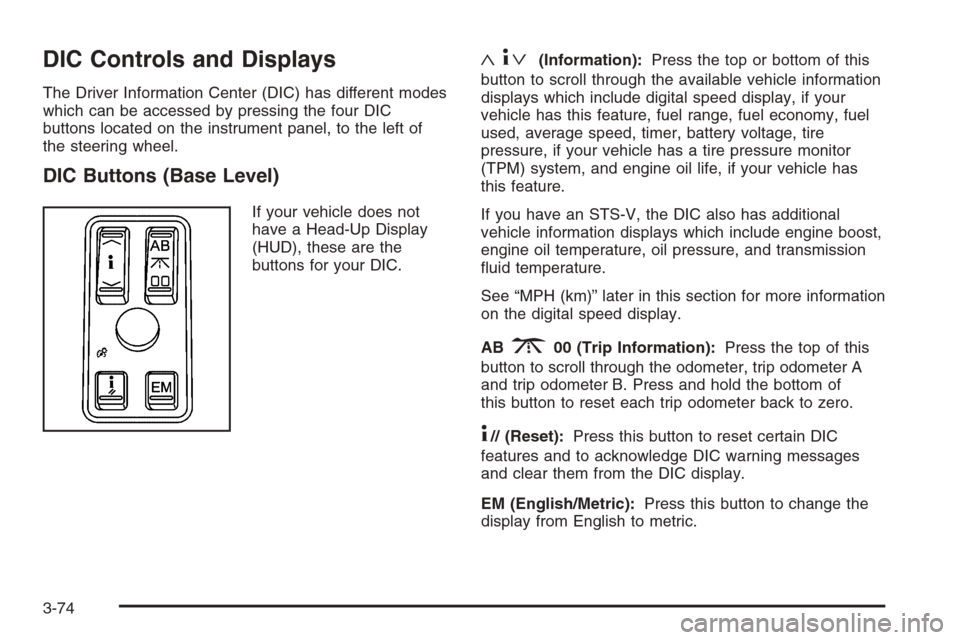
If your vehicle does not
have a Head-Up Display
(HUD), these are the
buttons for your DIC.
«4ª(Information):Press the top or bottom of this
button to scroll through the available vehicle information
displays which include digital speed display, if your
vehicle has this feature, fuel range, fuel economy, fuel
used, average speed, timer, battery voltage, tire
pressure, if your vehicle has a tire pressure monitor
(TPM) system, and engine oil life, if your vehicle has
this feature.
If you have an STS-V, the DIC also has additional
vehicle information displays which include engine boost,
engine oil temperature, oil pressure, and transmission
uid temperature.
See “MPH (km)” later in this section for more information
on the digital speed display.
AB
300 (Trip Information):Press the top of this
button to scroll through the odometer, trip odometer A
and trip odometer B. Press and hold the bottom of
this button to reset each trip odometer back to zero.
4// (Reset):Press this button to reset certain DIC
features and to acknowledge DIC warning messages
and clear them from the DIC display.
EM (English/Metric):Press this button to change the
display from English to metric.
3-74
Page 221 of 480
DIC Buttons (Uplevel)
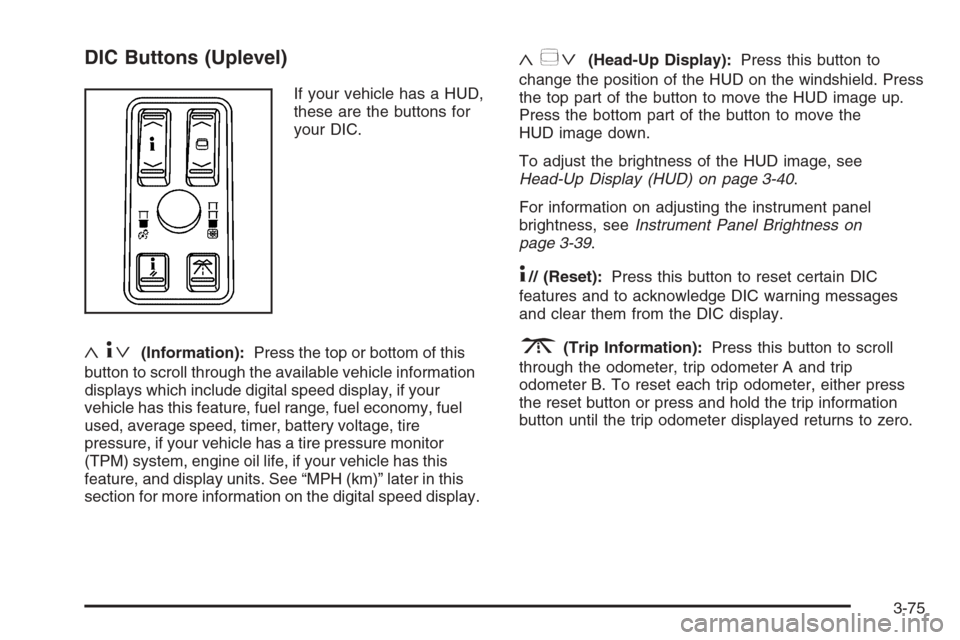
If your vehicle has a HUD,
these are the buttons for
your DIC.
«4ª(Information):Press the top or bottom of this
button to scroll through the available vehicle information
displays which include digital speed display, if your
vehicle has this feature, fuel range, fuel economy, fuel
used, average speed, timer, battery voltage, tire
pressure, if your vehicle has a tire pressure monitor
(TPM) system, engine oil life, if your vehicle has this
feature, and display units. See “MPH (km)” later in this
section for more information on the digital speed display.
«~ª(Head-Up Display):Press this button to
change the position of the HUD on the windshield. Press
the top part of the button to move the HUD image up.
Press the bottom part of the button to move the
HUD image down.
To adjust the brightness of the HUD image, see
Head-Up Display (HUD) on page 3-40.
For information on adjusting the instrument panel
brightness, seeInstrument Panel Brightness on
page 3-39.
4// (Reset):Press this button to reset certain DIC
features and to acknowledge DIC warning messages
and clear them from the DIC display.
3(Trip Information):Press this button to scroll
through the odometer, trip odometer A and trip
odometer B. To reset each trip odometer, either press
the reset button or press and hold the trip information
button until the trip odometer displayed returns to zero.
3-75
Page 224 of 480
ENGINE OIL LIFE
If your vehicle has this display, it shows the estimated
oil life remaining. If you see 99% ENGINE OIL LIFE
on the display, that means that 99% of the current oil
life remains.
When the oil life is depleted, the CHANGE ENGINE OIL
SOON message will appear on the display. You
should change your oil as soon as possible. In addition
to the engine oil life system monitoring the oil life,
additional maintenance is recommended in the
Maintenance Schedule in this manual. SeeScheduled
Maintenance on page 6-4andEngine Oil on page 5-18.
After an oil change, reset the ENGINE OIL LIFE
display. To reset, seeEngine Oil Life System on
page 5-22. The display will show 100% ENGINE OIL
LIFE after it has been reset. Also clear the CHANGE
ENGINE OIL SOON message from the display.
ENGLISH DISPLAY UNITS (METRIC
DISPLAY UNITS)
This display allows you to select between English and
metric units of measurement if your vehicle has the
uplevel DIC. Press the reset button to switch between
English and metric units.
Blank Line
This display shows no information.
ENGINE BOOST (STS-V Only)
This display shows a graphic that indicates the amount
of boost the engine is receiving in either pounds per
square inch (psi) or kilopascals (kPa).
ENGINE OIL TEMPERATURE (STS-V Only)
This display shows the engine oil temperature in
either degrees Fahrenheit (°F) or degrees Celsius (°C).
OIL PRESSURE (STS-V Only)
This display shows the oil pressure in either pounds per
square inch (psi) or kilopascals (kPa).
TRANS (Transmission) FLUID TEMP
(Temperature) (STS-V Only)
This display shows the transmission uid temperature in
either degrees Fahrenheit (°F) or degrees Celsius (°C).
Trip Information Display Menu Items
The following display menu items can be displayed by
pressing the trip Information button.
Odometer
Press the trip information button until the odometer
appears on the DIC display. The odometer shows the
total distance the vehicle has been driven in either
miles (mi) or kilometers (km).
3-78
Page 226 of 480
BATTERY SAVER ACTIVE
This message will display when the system detects that
the battery voltage is dropping beyond a reasonable
level. The battery saver system will start reducing certain
features of the vehicle that you may not be able to
notice. At the point that the features are disabled, this
message is displayed. It means that the vehicle is trying
to save the charge in the battery.
Turn off all unnecessary accessories to allow the battery
to recharge.
The normal battery voltage range is 11.5 to 15.5 volts.
You can monitor battery voltage on the DIC by pressing
the information button until you nd BATTERY VOLTS.
BATTERY VOLTAGE HIGH
This symbol appears with
the BATTERY VOLTAGE
HIGH message.
This message will display when the electrical charging
system is overcharging the battery. When the system
detects that the battery voltage is above approximately
16 volts, this message will be displayed.To reduce the charging overload, use the vehicle’s
accessories. Turn on the exterior lamps and radio, set the
climate control on AUTO and the fan speed on the
highest setting, and turn the rear window defogger on.
The normal battery voltage range is 11.5 to 15.5 volts
when the engine is running. You can monitor battery
voltage on the DIC by pressing the information button
until you nd BATTERY VOLTS.
BATTERY VOLTAGE LOW
This symbol appears with
the BATTERY VOLTAGE
LOW message.
When this message displays, the electrical system is
charging less than 10 volts or the battery has been
drained.
3-80
Page 227 of 480
If this message appears immediately after starting the
engine, it is possible that the generator can still recharge
the battery. The battery should recharge while driving
but may take a few hours to do so. Consider using
an auxiliary charger to boost the battery after returning
home or to a nal destination. Make sure you follow
the manufacturer’s instructions.
If this message appears while driving or after starting
your vehicle and stays on, have it checked immediately
to determine the cause of this problem.
To help the generator recharge the battery quickly, you
can reduce the load on the electrical system by
turning off the accessories.
The normal battery voltage range is 11.5 to 15.5 volts.
You can monitor battery voltage on the DIC by pressing
the information button until you nd BATTERY VOLTS.
CHANGE ENGINE OIL SOON
When this message displays, it means that service is
required for your vehicle. See your GM dealer. See
Engine Oil on page 5-18andScheduled Maintenance
on page 6-4for more information.
When you reset the CHANGE ENGINE OIL SOON
message by clearing it from the display, you still must
reset the engine oil life system separately. For more
information on resetting the engine oil life system, see
Engine Oil Life System on page 5-22.
CHECK BRAKE FLUID
This message will display if the ignition is on to inform
the driver that the brake uid level is low. Have the
brake system serviced by your GM dealer as soon as
possible. SeeBrake System Warning Light on page 3-64
for more information.
CHECK COOLANT LEVEL
This message will display when there is a low level of
engine coolant. Have the cooling system serviced
by your GM dealer as soon as possible. SeeEngine
Coolant on page 5-26for more information.
CHECK GAS CAP
When this message displays, the gas cap has not been
fully tightened. You should recheck the gas cap to
ensure that it is on and tightened properly.
CHECK OIL LEVEL
This message will display when the oil level is low. See
Engine Oil on page 5-18for more information on
checking your engine oil.
3-81
Page 229 of 480
COMPETITIVE DRIVING (STS-V Only)
When this message displays, it means that the
competitive driving mode is turned on with the traction
control button. The TC (traction control) light will be
on when the competitive driving mode is on. The traction
control system will not operate while in competitive
driving mode. You should adjust your driving
accordingly. SeeCompetitive Driving Mode (STS-V) on
page 4-10for more information.
DRIVER DOOR AJAR
This symbol appears with
the DRIVER DOOR AJAR
message.
When this message displays, it means that the driver’s
door was not closed completely. You should make
sure that the driver’s door is closed completely.
ENGINE COOLANT HOT IDLE ENGINE
Notice:If you drive your vehicle while the engine
is overheating, severe engine damage may occur. If
an overheat warning appears on the instrument
panel cluster and/or DIC, stop the vehicle as soon
as possible. Do not increase the engine speed above
normal idling speed. SeeEngine Overheating on
page 5-30for more information.
This symbol appears with
the ENGINE COOLANT
HOT IDLE ENGINE
message.
This message will display when the engine coolant
temperature is too hot. Stop and allow the vehicle to idle
until it cools down. SeeEngine Coolant Temperature
Warning Light on page 3-66.
SeeOverheated Engine Protection Operating Mode on
page 5-31for information on driving to a safe place
in an emergency.
3-83
Page 230 of 480
ENGINE HOT – AC
(Air Conditioning) OFF
This message will display when the engine coolant
becomes hotter than the normal operating temperature.
SeeEngine Coolant Temperature Gage on page 3-67.
To avoid added strain on a hot engine, the air
conditioning compressor is automatically turned off.
When the coolant temperature returns to normal, the air
conditioning compressor will turn back on. You can
continue to drive your vehicle.
If this message continues to appear, have the system
repaired by your GM dealer as soon as possible to avoid
damage to your engine.
ENGINE OVERHEATED STOP ENGINE
Notice:If you drive your vehicle while the engine
is overheating, severe engine damage may occur. If
an overheat warning appears on the instrument
panel cluster and/or DIC, stop the vehicle as soon
as possible. Do not increase the engine speed above
normal idling speed. SeeEngine Overheating on
page 5-30for more information.This message will display when the engine has
overheated. Immediately look for a safe place to pull
your vehicle over and turn the engine off right away to
avoid severe engine damage. SeeEngine Overheating
on page 5-30andOverheated Engine Protection
Operating Mode on page 5-31. A chime will also sound
when this message is displayed.
ENGINE POWER REDUCED
This message informs you that the engine power is being
reduced to protect the engine from damage. There could
be several malfunctions that might cause this message.
Reduced engine power can affect the vehicle’s ability to
accelerate. If this message is on, but there is no reduction
in performance, proceed to your destination. The
performance may be reduced the next time the vehicle is
driven. The vehicle may be driven at a reduced speed
while this message is on, but acceleration and speed may
be reduced. Anytime this message stays on, the vehicle
should be taken to your GM dealer for service as soon as
possible.
3-84
Page 233 of 480
NO FOB OFF OR RUN?
When this message displays, it means that the keyless
access transmitter is not detected inside the vehicle
while you are trying to turn the ignition off. Your vehicle
may be near a strong radio antenna signal causing
the keyless access system to be jammed. The vehicle
will remain in ACC until OFF or START has been
pressed or 10 minutes has expired. If you turn the
ignition off and you cannot nd the keyless access
transmitter, you will not be able to restart the vehicle.
The keyless access transmitter needs to be inside of the
vehicle in order for the vehicle to start. SeeStarting
the Engine on page 2-25for more information.
OIL PRESSURE LOW STOP ENGINE
Notice:If you drive your vehicle while the engine
oil pressure is low, severe engine damage may
occur. If a low oil pressure warning appears on the
instrument panel cluster and/or DIC, stop the
vehicle as soon as possible. Do not drive the vehicle
until the cause of the low oil pressure is corrected.
SeeEngine Oil on page 5-18for more information.
A multiple chime will sound when this message is
displayed. SeeEngine Oil on page 5-18for more
information.
PASSENGER DOOR AJAR
This symbol appears with
the PASSENGER DOOR
AJAR message.
When this message displays, it means that the
passenger’s side front door was not closed completely.
You should make sure that the door is closed
completely.
PRESS START AND BRAKE TO
START ENGINE
When this message displays, it means that you need to
press down on the brake pedal while pressing the
start button on the electronic keyless ignition when trying
to start your vehicle. SeeStarting the Engine on
page 2-25for more information.
3-87
Page 238 of 480
TRACTION ACTIVE
This message will display when the traction control
system is actively limiting wheel spin. Slippery
road conditions may exist if this message is displayed,
so adjust your driving accordingly. The message will
stay on for a few seconds after the traction control
system stops limiting wheel spin. SeeTraction Control
System (TCS) on page 4-9for more information.
TRANS (Transmission) HOT IDLE
ENGINE
This message will display when the transmission uid in
your vehicle is too hot. Stop the vehicle and allow it
to idle until the transmission cools down or until
this message is removed.
TRUNK OPEN
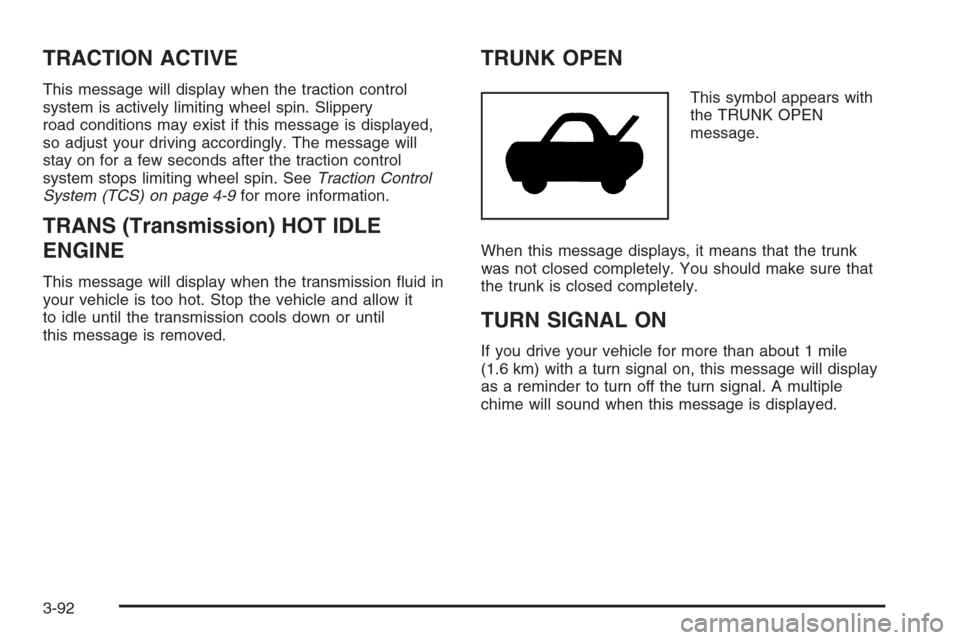
This symbol appears with
the TRUNK OPEN
message.
When this message displays, it means that the trunk
was not closed completely. You should make sure that
the trunk is closed completely.
TURN SIGNAL ON
If you drive your vehicle for more than about 1 mile
(1.6 km) with a turn signal on, this message will display
as a reminder to turn off the turn signal. A multiple
chime will sound when this message is displayed.
3-92
Page 239 of 480
Other Messages
Here are more messages that you can receive on your
Driver Information Center (DIC). To acknowledge a
message and read another message that may have
come on at the same time, press the reset button.
ACCESSORY ACTIVE
SeeIgnition Positions on page 2-24.
KNOWN FOB
See “Matching Transmitter(s) to Your Vehicle”
underKeyless Access System Operation on
page 2-5.
MAX # FOBS LEARNED
See “Matching Transmitter(s) to Your Vehicle”
underKeyless Access System Operation on
page 2-5.
OFF/ACC (Accessory) TO LEARN
See “Matching Transmitter(s) to Your Vehicle”
underKeyless Access System Operation on
page 2-5.
READY FOR FOB X
See “Matching Transmitter(s) to Your Vehicle”
underKeyless Access System Operation on
page 2-5.
SHIFT TO PARK
SeeStarting the Engine on page 2-25andShifting
Into Park (P) on page 2-36.
WAIT XX MIN (Minutes)
See “Matching Transmitter(s) to Your Vehicle”
underKeyless Access System Operation on
page 2-5.
3-93