audio CADILLAC STS 2008 1.G User Guide
[x] Cancel search | Manufacturer: CADILLAC, Model Year: 2008, Model line: STS, Model: CADILLAC STS 2008 1.GPages: 500, PDF Size: 5.81 MB
Page 252 of 500
Audio System(s)
Determine which radio your vehicle has and then
read the pages following to familiarize yourself with
its features.
{CAUTION:
This system provides you with far greater
access to audio stations and song listings.
Giving extended attention to entertainment
tasks while driving can cause a crash and you
or others can be injured or killed. Always keep
your eyes on the road and your mind on the
drive — avoid engaging in extended searching
while driving.
Keeping your mind on the drive is important for
safe driving. SeeDefensive Driving on page 4-2.
Here are some ways in which you can help avoid
distraction while driving.While your vehicle is parked:
Familiarize yourself with all of its controls.
Familiarize yourself with its operation.
Set up your audio system by presetting your
favorite radio stations, setting the tone, and
adjusting the speakers. Then, when driving
conditions permit, you can tune to your favorite
radio stations using the presets and steering
wheel controls if the vehicle has them.
Notice:Before adding any sound equipment to
your vehicle, such as an audio system, CD player,
CB radio, mobile telephone, or two-way radio, make
sure that it can be added by checking with your
dealer/retailer. Also, check federal rules covering
mobile radio and telephone units. If sound equipment
can be added, it is very important to do it properly.
Added sound equipment may interfere with the
operation of your vehicle’s engine, radio, or other
systems, and even damage them. Your vehicle’s
systems may interfere with the operation of sound
equipment that has been added.
Your vehicle has a feature called Retained Accessory
Power (RAP). With RAP, the audio system can be
played even after the ignition is turned off. SeeRetained
Accessory Power (RAP) on page 2-29for more
information.
3-98
Page 254 of 500
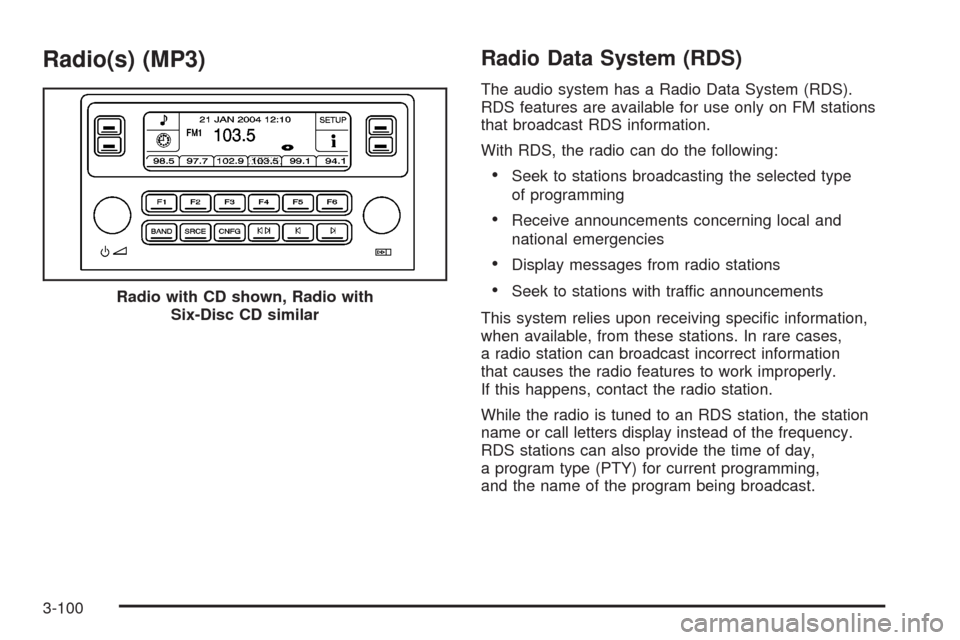
Radio(s) (MP3)Radio Data System (RDS)
The audio system has a Radio Data System (RDS).
RDS features are available for use only on FM stations
that broadcast RDS information.
With RDS, the radio can do the following:
Seek to stations broadcasting the selected type
of programming
Receive announcements concerning local and
national emergencies
Display messages from radio stations
Seek to stations with traffic announcements
This system relies upon receiving specic information,
when available, from these stations. In rare cases,
a radio station can broadcast incorrect information
that causes the radio features to work improperly.
If this happens, contact the radio station.
While the radio is tuned to an RDS station, the station
name or call letters display instead of the frequency.
RDS stations can also provide the time of day,
a program type (PTY) for current programming,
and the name of the program being broadcast. Radio with CD shown, Radio with
Six-Disc CD similar
3-100
Page 258 of 500
Setting the Tone
(Bass/Midrange/Treble)
To adjust the bass, midrange, and treble, perform the
following steps:
1. Press the
wknob to enter the main menu.
2. Press this knob to scroll through the settings.
3. Turn this knob to increase or to decrease the bass,
midrange, or treble. If a station is weak or noisy,
decrease the treble.
4. Press the same knob to set the adjustment.
5. Press the BACK (F6) button to exit the display. To
return to the original display repeatedly press the
BACK (F6) button or wait for the display to time out.
AUDIO EQUALIZER:This feature lets you select
customized equalization settings. To choose an
equalization setting (EQ0 through EQ5), perform the
following steps:
1. Press the
wknob to enter the main menu.
2. Turn this knob until EQUALIZER displays.
3. Press the same knob to set the equalization setting.
The equalization setting displays.4. Press the BACK (F6) button to exit the display. To
return to the original display, repeatedly press the
BACK (F6) button or wait for the display to time out.
The equalization settings are preset to EQ0 (Normal),
EQ1 (Pop), EQ2 (Rock), EQ3 (Jazz), EQ4 (Talk),
and EQ5 (Country).
Adjusting the Speakers (Balance/Fade)
To adjust the balance or fade, perform the following
steps:
1. Press the
wknob to enter the main menu.
2. Turn this knob until BASS-MID-TREBLE displays.
3. Press the same knob to enter the tone settings.
4. Press this knob to scroll to BALANCE or FADER.
5. Turn this knob to adjust the BALANCE to the right or
the left speakers and the FADER to the front or the
rear speakers.
6. Press the same knob to set the adjustment.
7. Press the BACK (F6) button to exit the display. To
return to the original display, repeatedly press the
BACK (F6) button or wait for the display to time out.
EQ0 does not display while in this mode.
3-104
Page 261 of 500
Radio Message
THEFTLOCK:This message displays when the
THEFTLOCK®system has been activated. Take
the vehicle to the dealer/retailer for service.
XM™ Satellite Radio Service
XM™ is a satellite radio service that is based in
the 48 contiguous United States and 10 Canadian
provinces. XM™ Satellite Radio has a wide variety
of programming and commercial-free music,
coast-to-coast, and in digital-quality sound. During
your trial or when you subscribe, you will get unlimited
access to XM™ Radio Online for when you are not
in your vehicle. A service fee is required to receive
the XM™ service. For more information, contact XM™
at www.xmradio.com or call 1-800-929-2100 in the
U.S. and www.xmradio.ca or call 1-877-438-9677
in Canada.
Radio Messages for XM™ Only
SeeXM Radio Messages on page 3-116later in
this section for further detail.
Using the Single CD Player
Insert a CD partway into the slot, label side up. The
player pulls it in. If the ignition and the radio are on,
the CD begins playing. A CD can be loaded with
the radio off, but it does not start playing until the
radio is on.
If the ignition or radio is turned off with a CD in the
player, it stays in the player. While the ignition or radio
is turned on, the CD starts to play where it stopped,
if it was the last selected audio source.
When the CD is inserted, CD displays. As each new
track starts to play, the track number displays.
The CD player can play the smaller 3 inch (8 cm)
single CDs with an adapter ring. Full-size CDs and
the smaller CDs are loaded in the same manner.
When a CD is inserted, the CD functions display
above the pushbuttons, in place of the preset stations
(if programmed).
F1
{(Reverse):Press and hold to reverse quickly
within a track. Release to play the passage. The elapsed
time of the track displays.
F2
|(Forward):Press and hold to advance quickly
within a track. Release to play the passage. The elapsed
time of the track displays.
3-107
Page 266 of 500
Once a feature is programmed to a key, the feature
does not display when programming the remaining
congurable keys. The congurable keys can be
changed at any time.
Using an MP3
MP3 CD-R Disc
MP3 Format
If you burn your own MP3 disc on a personal computer:
Make sure the MP3 les are recorded on a
CD-R disc.
Do not mix standard audio and MP3 les on one disc.
Make sure playlists have a .mp3 or .wpl extension,
other le extensions might not work.
Files can be recorded with a variety of xed or
variable bit rates. Song title, artist name, and album
are available for display by the radio when recorded
using ID3 tags version 1 and 2.
Create a folder structure that makes it easy to nd
songs while driving. Organize songs by albums using
one folder for each album. Each folder or album
should contain 18 songs or less.
Make sure to nalize the disc when burning an MP3
disc, using multiple sessions. It is usually better to
burn the disc all at once.
The player is able to read and play a maximum of
50 folders, 50 playlists, 10 sessions, and 255 les.
Long le names, folder names, or playlist names
might use more disc memory space than necessary.
To conserve space on the disc, minimize the length
of the le, folder, or playlist names. You can also play
an MP3 CD that was recorded using no le folders.
The system can support up to 11 folders in depth,
though, keep the depth of the folders to a minimum
in order to keep down the complexity and confusion
in trying to locate a particular folder during playback.
If a CD contains more than the maximum of 50 folders,
50 playlists, 10 sessions, and 255 les the player
lets you access and navigate up to the maximum,
but all items over the maximum are ignored.
3-112
Page 267 of 500
Root Directory
The root directory is treated as a folder. If the root
directory has compressed audio les, the directory
is displayed as F1 ROOT. All les contained directly
under the root directory are accessed prior to any root
directory folders. However, playlists (Px) are always
accessed before root folders or les.
Empty Directory or Folder
If a root directory or a folder exists somewhere in the le
structure that contains only folders/subfolders and no
compressed les directly beneath them, the player
advances to the next folder in the le structure that
contains compressed audio les. The empty folder is
not displayed.
No Folder
When the CD contains only compressed les, the les
are located under the root folder. The next and previous
folder functions do not function on a CD that was
recorded without folders or playlists. When displaying
the name of the folder the radio displays ROOT.
When the CD contains only playlists and compressed
audio les, but no folders, all les are located under the
root folder. The folder down and the folder up buttons
search playlists (Px) rst and then go to the root folder.
When the radio displays the name of the folder the
radio displays ROOT.
Order of Play
Tracks are played in the following order:
Play begins from the rst track in the rst playlist
and continues sequentially through all tracks in
each playlist. When the last track of the last playlist
has played, play continues from the rst track of
the rst playlist.
If the CD does not contain any playlists, then play
begins from the rst track under the root directory.
When all tracks from the root directory have
played, play continues from les according to
their numerical listing. After playing the last track
from the last folder, play begins again at the
rst track of the rst folder or root directory.
When play enters a new folder, the display does not
automatically show the new folder name. The new track
name displays.
File System and Naming
The song name that is displayed is the song name that is
contained in the ID3 tag. If the song name is not present
in the ID3 tag, then the radio displays the le name
without the extension (such as .mp3) as the track name.
Track names longer than 32 characters or four pages
are shortened. Parts of words on the last page of
text and the extension of the lename does not display.
3-113
Page 268 of 500
Preprogrammed Playlists
Preprogrammed playlists that were created using
WinAmp™, MusicMatch™, or Real Jukebox™ software
can be accessed, however, they cannot be edited
using the radio. These playlists are treated as special
folders containing compressed audio song les.
Playing an MP3
Insert a CD partway into the slot, label side up. The
player pulls it in, and LOADING CD displays. The CD
should begin playing and the CD symbol displays.
If the ignition and the radio are on, the CD begins
playing. A CD can be loaded with the radio off,
but it does not start playing until the radio is on.
F1
r(Previous Folder):Press this button to go
to the rst track in the previous folder.
Press and hold this button to reverse quickly within a
track. Release this button to play the passage. REV
and the elapsed time of the track displays.
Pressing this button while in folder random mode goes
to the previous folder and plays the tracks in that
folder in random order.F2
[(Next Folder):Press this button to go to the
rst track in the next folder.
Press and hold this button to advance quickly within a
track. Release this button to play the passage. FWD and
the elapsed time of the track displays.
Pressing this button while in folder random mode takes
you to the next folder and plays the tracks in that
folder in random order.
F3 RDM (Random):To play the tracks on the CD in
random, rather than sequential order, press and release
this pushbutton until RDM TRCK displays. Once all
of the tracks in the current folder or playlist have played,
the system moves on to the next folder or playlist and
plays all of the tracks in random order.
To play the tracks in the current folder in random, rather
than sequential order, press and release this button
until RDM FLDR displays. This feature does not work
with playlists.
While in random, pressing and releasing either
©¨seek arrow goes to the previous or to the
next random track.
3-114
Page 270 of 500
XM Radio Messages
XL (Explicit Language Channels):These channels,
or any others, can be blocked at a customer’s request,
by calling 1-800-852-XMXM (9696).
XM Updating:The encryption code in the receiver is
being updated, and no action is required. This process
should take no longer than 30 seconds.
No XM Signal:The system is functioning correctly,
but the vehicle is in a location that is blocking the XM™
signal. When the vehicle is moved into an open area,
the signal should return.
Loading XM:The audio system is acquiring and
processing audio and text data. No action is needed.
This message should disappear shortly.
Channel Off Air:This channel is not currently in
service. Tune in to another channel.
Channel Unavail:This previously assigned channel
is no longer assigned. Tune to another station.
If this station was one of the presets, choose another
station for that preset button.
No Artist Info:No artist information is available at this
time on this channel. The system is working properly.No Title Info:No song title information is available at
this time on this channel. The system is working
properly.
No CAT Info:No category information is available at this
time on this channel. The system is working properly.
No Information:No text or informational messages are
available at this time on this channel. The system is
working properly.
CAT Not Found:There are no channels available for
the selected category. The system is working properly.
XM Theftlocked:The XM™ receiver in your vehicle
could have previously been in another vehicle. For
security purposes, XM™ receivers cannot be swapped
between vehicles. If this message is received after having
your vehicle serviced, check with your dealer/retailer.
XM Radio ID:If tuned to channel 0, this message
alternates with the XM™ Radio 8 digit radio ID label.
This label is needed to activate the service.
Unknown:If this message is received when tuned to
channel 0, there could be a receiver fault. Consult
with your dealer/retailer.
Check XM Receivr:If this message does not clear
within a short period of time, the receiver could have a
fault. Consult with your dealer/retailer.
3-116
Page 271 of 500
Navigation/Radio System
Your vehicle may have a navigation radio system.
The navigation system has built-in features intended
to minimize driver distraction. Technology alone,
no matter how advanced, can never replace your own
judgment. See the Navigation System manual for
some tips to help you reduce distractions while driving.
Radio Personalization
Accessing the Radio’s Main Menu
(Base Audio System)
There are two different procedures for accessing the
radio’s main menu depending upon whether or not
your vehicle has the Navigation system.
To access the main menu of the radio, do one of
the following:
Using the Base audio system, press the
CNFG button located on the radio or press
the
w(tune) knob located on the right side
of the radio. Then turn the
wknob clockwise
or counterclockwise to scroll through the
menu items.
If your vehicle has the Navigation system, see
the Navigation System manual supplied with
your vehicle for more information on accessing
the main menu and for descriptions of the menu
items for the Navigation system.
The main menu for the Base audio system consists
of the following menu items:
eBASS - MID - TREBLE
xBALANCE - FADER
eEQ EQUALIZER
H/A (HOME/AWAY) PRESETS
AUTOSTORE PRESETS
CAT CATEGORY
TA TRAFFIC ANNOUNCE
RECALL RDS (Radio Data System) MESSAGE
ASEEK LOCAL/DISTANT
8SET CLOCK
BSET DATE
4INFO (Information)
LANG LANGUAGE
SETUP
3-117
Page 272 of 500
Radio Main Menu Item Descriptions
(Base Audio System)
The following descriptions are for the Base audio
system. For information pertaining to the Navigation
audio system, see “Audio System” in the Index of
the Navigation System manual supplied with your
vehicle.
eBASS - MID (Midrange) - TREBLE:This menu
item lets you adjust the levels for the bass, midrange
and treble features of the audio system. See “Setting
the Tone (Bass/Treble)” underRadio(s) (MP3) on
page 3-100for more information.
xBALANCE - FADER:This menu item lets you
adjust the levels for the balance and fader features
of the audio system. See “Adjusting the Speakers
(Balance/Fade)” underRadio(s) (MP3) on page 3-100
for more information.
eEQ (Equalizer):This menu item lets you choose
among ve preset equalizations for the audio system.
See “Audio Equalizer” underRadio(s) (MP3) on
page 3-100for more information.H/A (Home/Away) PRESETS:This menu item lets you
switch back and forth between your home and away
preset radio stations. See “Presets Home/Away” under
Radio(s) (MP3) on page 3-100for more information.
AUTOSTORE PRESETS:This menu item lets
you automatically store radio stations with the strongest
signals as presets. See “Autostore Presets” under
Radio(s) (MP3) on page 3-100for more information.
CAT (Category):This menu item lets you select radio
stations based on preset categories. See “Activating
Program Type (PTY) Stations” underRadio(s) (MP3)
on page 3-100for more information.
TA (Traffic Announcement):This menu item lets
you turn the TA feature on and off. See “TA (Traffic
Announcement)” underRadio(s) (MP3) on page 3-100
for more information.
RECALL RDS MESSAGE:This menu item lets you
view an RDS radio station message broadcast by
a radio station. See “MSG (Message)” underRadio(s)
(MP3) on page 3-100for more information.
3-118