audio CADILLAC STS 2008 1.G Owner's Manual
[x] Cancel search | Manufacturer: CADILLAC, Model Year: 2008, Model line: STS, Model: CADILLAC STS 2008 1.GPages: 500, PDF Size: 5.81 MB
Page 273 of 500
ASEEK LOCAL/DISTANT:This feature instructs the
audio system to seek only local radio stations with
the strongest signal or to seek all radio stations with
a strong signal in a large area. Use LOCAL while
in urban areas where there are several strong radio
station signals and you want to limit the number
of stations to those with the strongest signals only.
Use DISTANT while in rural areas where there are
fewer radio station signals available.
See “Local/Distant Selection” underRadio(s) (MP3)
on page 3-100for more information.
8SET CLOCK:Use this menu item to set the time.
SeeSetting the Time on page 3-99for more information.
BSET DATE:Use this menu item to set the date.
SeeSetting the Time on page 3-99for more information.
4(Information):This menu item is used to display
XM™ satellite radio service and CD MP3 playback
information. See “
4(Information)” underRadio(s) (MP3)
on page 3-100for more information.LANG (Language):To change the language displayed
on the radio, select LANGUAGE by pressing the
wknob. Turn thewknob to scroll through the
following available languages:
ENGLISH
GERMAN
FRENCH
SPANISH
JAPANESE
To make your selection, press the
wknob.
If you accidentally select a language that you did not
want, ENGLISH is always at the top of the language list.
SETUP:When you select this menu item, the following
submenu is available:
PERSONAL SETTINGS MENU
DRIVER SELECTION
DRIVER EXIT SETTINGS
CONFIGURE DISPLAY KEYS
3-119
Page 274 of 500
SETUP Submenu Items
The following choices are available for programming
using the Base audio system.
PERSONAL SETTINGS MENU
This item turns the entire list of personalization features
on or off. This item allows you to program certain
features to a preferred setting for up to two people.
The number of available features varies depending
upon which options are purchased. While this item is
on, a check mark appears after it. For more information
on the PERSONAL SETTINGS MENU item, see
Vehicle Personalization on page 2-60.
DRIVER SELECTION
When you select this item, the following submenu
displays:
DRIVER 1
DRIVER 2
RECALL DRIVER SETTINGS
STORE DRIVER SETTINGSFor more information on the DRIVER SELECTION
submenu item, see “Recalling Driver Settings”
and “Storing Driver Settings” underMemory Seat,
Mirrors and Steering Wheel on page 2-77.
DRIVER EXIT SETTINGS
When you select this item, the following submenu
displays:
RECALL EXIT SETTINGS
STORE EXIT SETTINGS
For more information on the DRIVER EXIT SETTINGS
submenu item, see “Recalling Exit Settings” and
“Storing Exit Settings” underMemory Seat, Mirrors
and Steering Wheel on page 2-77.
CONFIGURE DISPLAY KEYS
(Base Audio System)
This item lets you customize the functions of the
four congurable keys located to the left and right of the
audio display. See “Congurable Radio Display Keys”
underRadio(s) (MP3) on page 3-100for programming
information.
3-120
Page 275 of 500
Theft-Deterrent Feature
THEFTLOCK®is designed to discourage theft of your
vehicle’s radio. The feature works automatically by
learning a portion of the Vehicle Identication Number
(VIN). If the radio is moved to a different vehicle, it does
not operate and LOC, LOCK, or LOCKED could display.
With THEFTLOCK
®activated, the radio does not
operate if stolen.
Audio Steering Wheel Controls
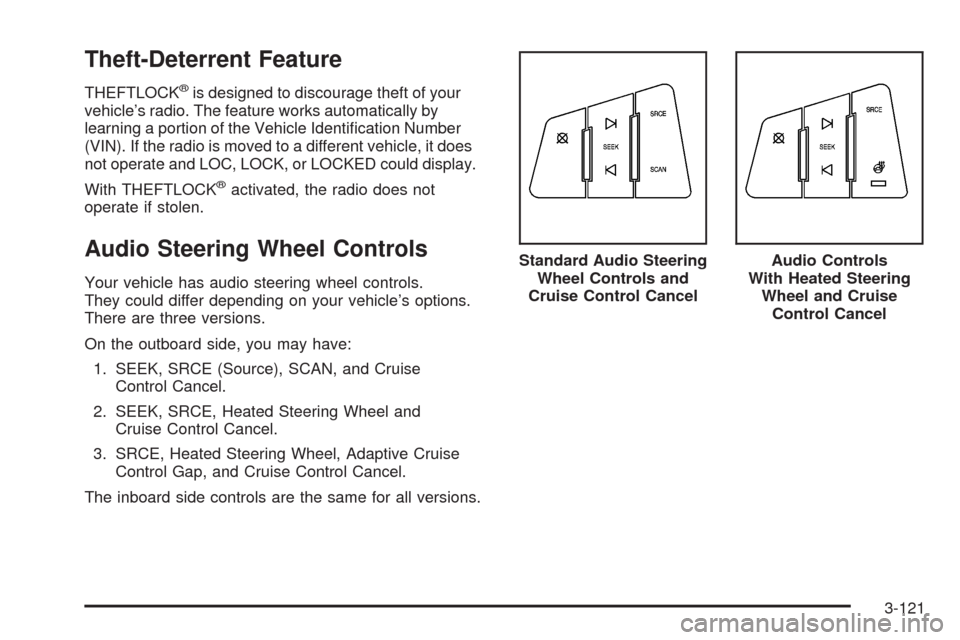
Your vehicle has audio steering wheel controls.
They could differ depending on your vehicle’s options.
There are three versions.
On the outboard side, you may have:
1. SEEK, SRCE (Source), SCAN, and Cruise
Control Cancel.
2. SEEK, SRCE, Heated Steering Wheel and
Cruise Control Cancel.
3. SRCE, Heated Steering Wheel, Adaptive Cruise
Control Gap, and Cruise Control Cancel.
The inboard side controls are the same for all versions.Standard Audio Steering
Wheel Controls and
Cruise Control Cancel
Audio Controls
With Heated Steering
Wheel and Cruise
Control Cancel
3-121
Page 276 of 500
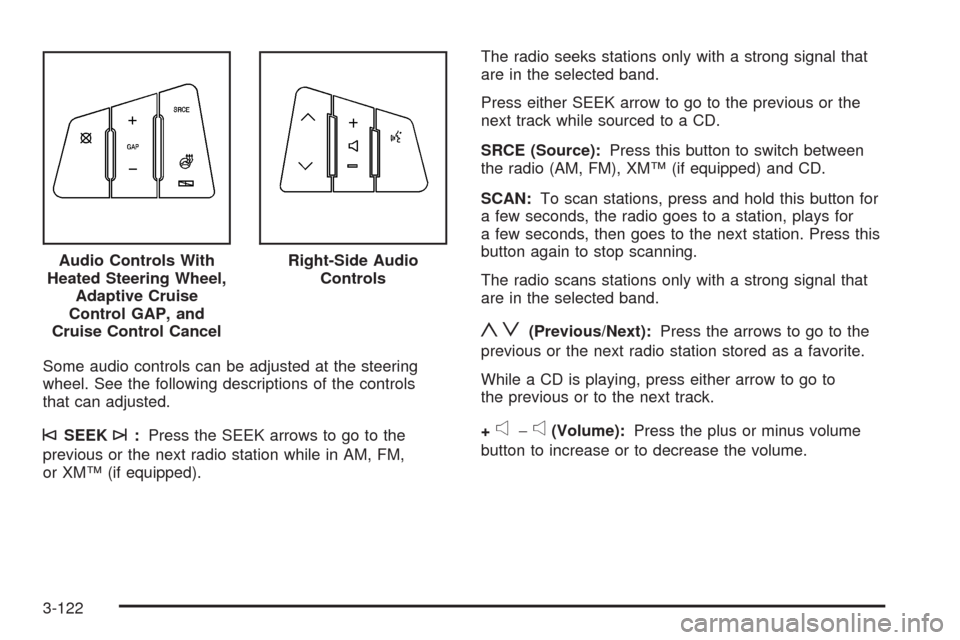
Some audio controls can be adjusted at the steering
wheel. See the following descriptions of the controls
that can adjusted.
©SEEK¨:Press the SEEK arrows to go to the
previous or the next radio station while in AM, FM,
or XM™ (if equipped).The radio seeks stations only with a strong signal that
are in the selected band.
Press either SEEK arrow to go to the previous or the
next track while sourced to a CD.
SRCE (Source):Press this button to switch between
the radio (AM, FM), XM™ (if equipped) and CD.
SCAN:To scan stations, press and hold this button for
a few seconds, the radio goes to a station, plays for
a few seconds, then goes to the next station. Press this
button again to stop scanning.
The radio scans stations only with a strong signal that
are in the selected band.
yz(Previous/Next):Press the arrows to go to the
previous or the next radio station stored as a favorite.
While a CD is playing, press either arrow to go to
the previous or to the next track.
+
e−e(Volume):Press the plus or minus volume
button to increase or to decrease the volume. Audio Controls With
Heated Steering Wheel,
Adaptive Cruise
Control GAP, and
Cruise Control Cancel
Right-Side Audio
Controls
3-122
Page 277 of 500
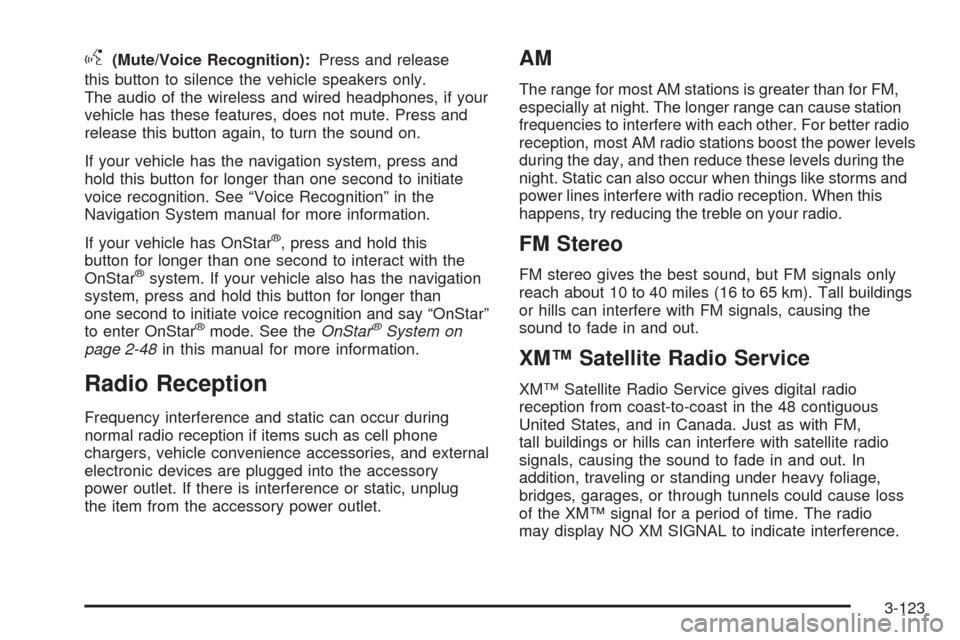
g(Mute/Voice Recognition):Press and release
this button to silence the vehicle speakers only.
The audio of the wireless and wired headphones, if your
vehicle has these features, does not mute. Press and
release this button again, to turn the sound on.
If your vehicle has the navigation system, press and
hold this button for longer than one second to initiate
voice recognition. See “Voice Recognition” in the
Navigation System manual for more information.
If your vehicle has OnStar
®, press and hold this
button for longer than one second to interact with the
OnStar
®system. If your vehicle also has the navigation
system, press and hold this button for longer than
one second to initiate voice recognition and say “OnStar”
to enter OnStar
®mode. See theOnStar®System on
page 2-48in this manual for more information.
Radio Reception
Frequency interference and static can occur during
normal radio reception if items such as cell phone
chargers, vehicle convenience accessories, and external
electronic devices are plugged into the accessory
power outlet. If there is interference or static, unplug
the item from the accessory power outlet.
AM
The range for most AM stations is greater than for FM,
especially at night. The longer range can cause station
frequencies to interfere with each other. For better radio
reception, most AM radio stations boost the power levels
during the day, and then reduce these levels during the
night. Static can also occur when things like storms and
power lines interfere with radio reception. When this
happens, try reducing the treble on your radio.
FM Stereo
FM stereo gives the best sound, but FM signals only
reach about 10 to 40 miles (16 to 65 km). Tall buildings
or hills can interfere with FM signals, causing the
sound to fade in and out.
XM™ Satellite Radio Service
XM™ Satellite Radio Service gives digital radio
reception from coast-to-coast in the 48 contiguous
United States, and in Canada. Just as with FM,
tall buildings or hills can interfere with satellite radio
signals, causing the sound to fade in and out. In
addition, traveling or standing under heavy foliage,
bridges, garages, or through tunnels could cause loss
of the XM™ signal for a period of time. The radio
may display NO XM SIGNAL to indicate interference.
3-123
Page 487 of 500
A
Accessories and Modications............................ 5-3
Adaptive Cruise Control...................................3-20
Adding Equipment to Your Airbag-Equipped
Vehicle.......................................................1-65
Additives, Fuel................................................. 5-6
Add-On Electrical Equipment...........................5-116
Air Cleaner/Filter, Engine.................................5-23
Air Conditioning..............................................3-48
Airbag
Passenger Status Indicator...........................3-61
Readiness Light..........................................3-60
Airbag System................................................1-51
What Will You See After an Airbag Inates?....1-58
When Should an Airbag Inate?....................1-56
Where Are the Airbags?...............................1-53
Airbag Systems
Adding Equipment to Your Airbag-Equipped
Vehicle...................................................1-65
How Does an Airbag Restrain?......................1-58
Passenger Sensing System...........................1-60
Servicing Your Airbag-Equipped Vehicle..........1-64
What Makes an Airbag Inate?......................1-57
All-Wheel Drive...............................................5-50
All-Wheel-Drive (AWD) System.........................4-13
Antenna, Backglass.......................................3-124
Antenna, XM™ Satellite Radio Antenna System . . . 3-124
Antilock Brake System (ABS)............................. 4-5
Antilock Brake, System Warning Light................3-65Appearance Care
Aluminum or Chrome-Plated Wheels.............5-112
Care of Safety Belts...................................5-110
Chemical Paint Spotting..............................5-114
Cleaning Exterior Lamps/Lenses..................5-111
Fabric/Carpet............................................5-108
Finish Care...............................................5-111
Finish Damage..........................................5-114
Instrument Panel, Vinyl, and Other
Plastic Surfaces.....................................5-109
Interior Cleaning........................................5-107
Leather....................................................
5-109
Sheet Metal Damage..................................5-113
Speaker Covers.........................................5-110
Tires........................................................5-113
Underbody Maintenance.............................5-114
Vehicle Care/Appearance Materials...............5-115
Washing Your Vehicle.................................5-110
Weatherstrips............................................5-110
Windshield and Wiper Blades......................5-112
Wood Panels............................................5-110
Appointments, Scheduling Service....................... 7-9
Ashtray.........................................................3-47
Audio System.................................................3-98
Audio Steering Wheel Controls....................3-121
Backglass Antenna.....................................3-124
Navigation/Radio System, see
Navigation Manual..................................3-117
Radio Personalization.................................3-117
Radio Reception........................................3-123
1
Page 488 of 500
Audio System (cont.)
Setting the Time..........................................3-99
Theft-Deterrent Feature...............................3-121
XM™ Satellite Radio Antenna System...........3-124
Audio System(s)............................................3-100
Automatic Transmission
Fluid..........................................................5-25
Operation...................................................2-32
B
Backglass Antenna........................................3-124
Battery..........................................................5-44
Electric Power Management..........................3-42
Exterior Lighting Battery Saver......................3-40
Inadvertent Power Saver..............................3-43
Load Management.......................................3-42
Brake
Emergencies................................................ 4-6
Brakes..........................................................5-41
Panic Assist................................................4-12
System Warning Light..................................3-64
Braking........................................................... 4-4
Braking in Emergencies..................................... 4-6
Break-In, New Vehicle.....................................2-27
Bulb Replacement...........................................5-54
Back-Up Lamps...........................................5-54
Halogen Bulbs............................................5-54
Headlamp Aiming........................................5-53Bulb Replacement (cont.)
High Intensity Discharge (HID) Lighting...........5-54
Replacement Bulbs......................................5-55
Buying New Tires...........................................5-76
C
Calibration...............................................1-7, 2-41
California Fuel.................................................. 5-6
California Perchlorate Materials Requirements....... 5-4
California Proposition 65 Warning....................... 5-3
Canadian Owners................................................ ii
Capacities and Specications..........................5-128
Carbon Monoxide...........2-16, 2-38, 4-22, 4-34, 4-40
Care of
Safety Belts..............................................5-110
CD, MP3 .....................................................3-112
Center Console Storage Area...........................2-58
Chains, Tire...................................................5-82
Charging System Light....................................3-63
Check
Engine Light...............................................3-68
Checking Things Under the Hood......................5-10
Chemical Paint Spotting.................................5-114
Child Restraints
Child Restraint Systems...............................1-34
Infants and Young Children...........................1-30
Lower Anchors and Tethers for Children..........1-37
Older Children.............................................1-28
2
Page 497 of 500
S
Safety Belt
Reminder Light............................................3-59
Safety Belts
Care of....................................................5-110
How to Wear Safety Belts Properly................1-13
Lap-Shoulder Belt........................................1-21
Safety Belt Extender....................................1-27
Safety Belt Use During Pregnancy.................1-27
Safety Belts Are for Everyone......................... 1-8
Safety Warnings and Symbols.............................. iii
Scheduled Maintenance..................................... 6-4
Seats
Head Restraints............................................ 1-6
Heated and Ventilated Seats........................... 1-3
Heated Seats............................................... 1-3
Heated Seats - Rear..................................... 1-7
Memory.....................................................2-77
Power Lumbar.............................................. 1-2
Power Reclining Seatbacks............................. 1-4
Power Seats................................................. 1-2
Securing a Child Restraint
Rear Seat Position......................................1-44
Right Front Seat Position..............................1-47
Security Light.................................................3-71
Service........................................................... 5-3
Accessories and Modications......................... 5-3
Adding Equipment to the Outside
of Your Vehicle.......................................... 5-4Service (cont.)
California Pershlorate Materials Requirements..... 5-4
California Proposition 65 Warning.................... 5-3
Doing Your Own Work................................... 5-4
Engine Soon Light.......................................3-68
Publications Ordering Information...................7-15
Service, Scheduling Appointments....................... 7-9
Servicing Your Airbag-Equipped Vehicle..............1-64
Sheet Metal Damage.....................................5-113
Shifting Into Park (P).......................................2-36
Shifting Out of Park (P)...................................2-37
Side Blind Zone Alert......................................2-47
Signals, Turn and Lane-Change.......................... 3-8
Spare Tire
Compact...................................................5-106
Installing....................................................5-99
Removing
...................................................5-98
Storing.....................................................5-104
Specications, Capacities...............................5-128
Speedometer..................................................3-59
StabiliTrak
®System.......................................... 4-8
Start Vehicle, Remote......................................2-12
Starting the Engine.........................................2-29
Steering........................................................4-13
Steering Wheel Controls, Audio.......................3-121
Steering Wheel Controls, Memory.....................2-77
Steering Wheel, Heated..................................... 3-7
Steering Wheel, Power Tilt Wheel and
Telescopic Steering Column............................ 3-7
11