light CADILLAC STS 2008 1.G Owner's Guide
[x] Cancel search | Manufacturer: CADILLAC, Model Year: 2008, Model line: STS, Model: CADILLAC STS 2008 1.GPages: 500, PDF Size: 5.81 MB
Page 126 of 500
4. Immediately, within one second, release the button
when the garage door moves. The indicator light
will blink rapidly until programming is complete.
5. Press and release the same button again.
The garage door should move, conrming
that programming is successful and complete.
To program another Rolling Code device such as an
additional garage door opener, a security device,
or home automation device, repeat Steps 1-5, choosing
a different function button in Step 3 than what you
used for the garage door opener.
If these instructions do not work, you probably have
a Fixed Code garage door opener. Follow the
Programming instructions that follow for a Fixed Code
garage door opener.
Programming Universal Home
Remote — Fixed Code
If you have questions or need help programming the
Universal Home Remote System, call 1-866-572-2728
or go to www.learcar2u.com.
Most garage door openers sold before 1996 are
Fixed Code units.
Programming a garage door opener involves
time-sensitive actions, so read the entire procedure
before you begin. If you do not follow these actions,
the device will time out and you will have to repeat the
procedure.To program up to three devices:
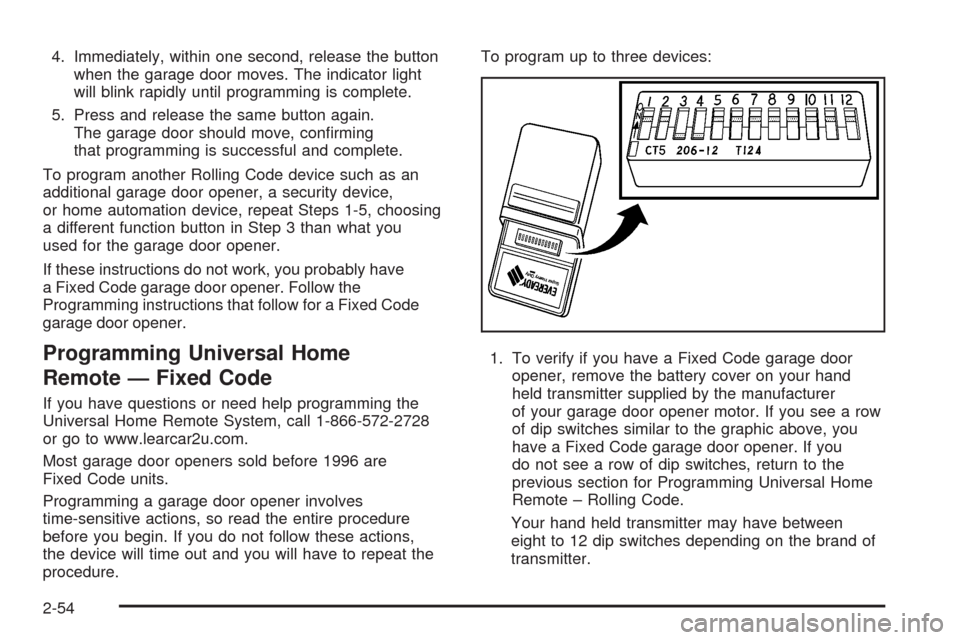
1. To verify if you have a Fixed Code garage door
opener, remove the battery cover on your hand
held transmitter supplied by the manufacturer
of your garage door opener motor. If you see a row
of dip switches similar to the graphic above, you
have a Fixed Code garage door opener. If you
do not see a row of dip switches, return to the
previous section for Programming Universal Home
Remote – Rolling Code.
Your hand held transmitter may have between
eight to 12 dip switches depending on the brand of
transmitter.
2-54
Page 128 of 500
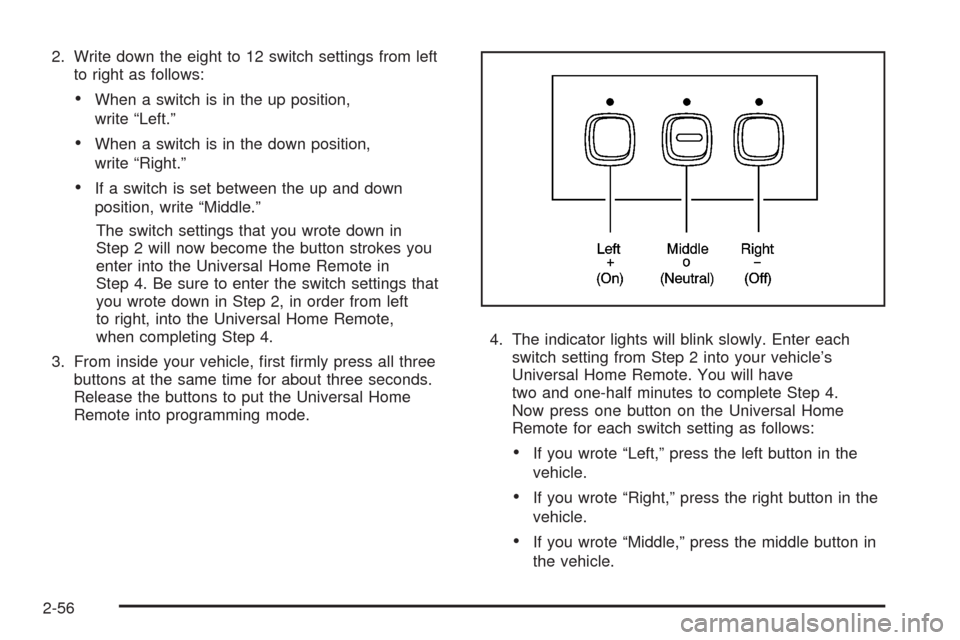
2. Write down the eight to 12 switch settings from left
to right as follows:
When a switch is in the up position,
write “Left.”
When a switch is in the down position,
write “Right.”
If a switch is set between the up and down
position, write “Middle.”
The switch settings that you wrote down in
Step 2 will now become the button strokes you
enter into the Universal Home Remote in
Step 4. Be sure to enter the switch settings that
you wrote down in Step 2, in order from left
to right, into the Universal Home Remote,
when completing Step 4.
3. From inside your vehicle, rst rmly press all three
buttons at the same time for about three seconds.
Release the buttons to put the Universal Home
Remote into programming mode.4. The indicator lights will blink slowly. Enter each
switch setting from Step 2 into your vehicle’s
Universal Home Remote. You will have
two and one-half minutes to complete Step 4.
Now press one button on the Universal Home
Remote for each switch setting as follows:
If you wrote “Left,” press the left button in the
vehicle.
If you wrote “Right,” press the right button in the
vehicle.
If you wrote “Middle,” press the middle button in
the vehicle.
2-56
Page 129 of 500
5. After entering all of the switch positions, again,
rmly press and release all three buttons at the
same time. The indicator lights will turn on.
6. Press and hold the button you would like to use to
control the garage door until the garage door
moves. The indicator light above the selected button
should slowly blink. You may need to hold the
button from ve to 55 seconds.
7. Immediately release the button when the garage
door moves. The indicator light will blink rapidly
until programming is complete.
8. Press and release the same button again.
The garage door should move, conrming
that programming is successful and complete.
To program another Fixed Code device such as an
additional garage door opener, a security device,
or home automation device, repeat Steps 1-8, choosing
a different button in Step 6 than what you used for
the garage door opener.
Using Universal Home Remote
Press and hold the appropriate button for at least half of
a second. The indicator light will come on while the
signal is being transmitted.
Reprogramming Universal Home
Remote Buttons
You can reprogram any of the three buttons by repeating
the instructions.
Erasing Universal Home Remote
Buttons
You should erase the programmed buttons when you
sell or terminate your lease.
To erase either Rolling Code or Fixed Code on the
Universal Home Remote device:
1. Press and hold the two outside buttons at the same
time for approximately 20 seconds, until the
indicator lights, located directly above the buttons,
begin to blink rapidly.
2. Once the indicator lights begin to blink, release both
buttons. The codes from all buttons will be erased.
For help or information on the Universal Home Remote
System, call the customer assistance phone number
underCustomer Assistance Offices on page 7-5.
2-57
Page 132 of 500
Vehicle Personalization
Your vehicle has personalization that allows you to
program certain features to a preferred setting for up to
two drivers. The back of the keyless access transmitters
are labelled 1 or 2. Additional keyless access transmitters
programmed to the vehicle, as 3 and/or 4, do not have
a number on the back and are not capable of being
personalized. The number of programmable features
varies depending upon which vehicle options are
purchased.
On all vehicles, features such as climate control settings,
radio and XM™ preset settings, exterior lighting at unlock
and remote lock unlock conrmation, and language have
already been programmed for your convenience. Your
vehicle also has an automatic door locking feature that is
always on. You cannot turn the automatic door locking
feature off. SeeProgrammable Automatic Door Locks on
page 2-15.
Some vehicles have additional features that can be
programmed including the seat, steering column, and
outside rearview mirror position.If your vehicle has the base audio system, the following
information explains the vehicle personalization on
your vehicle.
If your vehicle has the Navigation system, see
“Personalization” in the Index of the Navigation System
manual for information on vehicle personalization.
If your vehicle has the ability to program additional
personalization features, the driver’s preferences
are recalled by pressing any button on the keyless
access transmitter, 1 or 2, by selecting Driver 1 or 2 on
the radio display, or when a valid keyless access
transmitter is detected upon opening the driver’s door.
If more than one valid keyless access transmitter is
detected upon opening the driver’s door, the driver
preferences for the lowest driver number will be recalled.
Certain features can be programmed not to recall until
the ignition is turned off.
The default settings for the personalization features
were set when your vehicle left the factory, but
may have changed from their default state since then.
2-60
Page 134 of 500
Personal Settings Menu Items
The PERSONAL SETTINGS MENU must be selected
with a check mark to program the personalization
features. If it is not selected, press the tune/select knob
until the check mark appears. If it is selected, the
entire list of features will be available to program.
DRIVER GREETING
This feature allows you to type in a customized name or
greeting that will appear on the display whenever the
corresponding keyless access transmitter, 1 or 2, is used
or Driver 1 or Driver 2 is selected on the radio display.
If a customized name or greeting is not programmed, the
system will show Driver 1 or Driver 2 to correspond
with the numbers on the back of the keyless access
transmitters. In this case, the customized driver greeting
feature is factory shipped as off.
To turn the driver greeting feature on and to program a
customized name or greeting:
1. Enter the PERSONAL SETTINGS MENU by
following the instructions listed previously under
“Entering the Personal Settings Menu.”
2. Turn the tune/select knob until DRIVER GREETING
is highlighted.3. Press the tune/select knob to turn on the DRIVER
GREETING feature.
You will see a cursor on the screen.
4. Turn the tune/select knob until you reach the rst
letter you want; the letter will be highlighted.
There is a complete alphabet with both upper and
lower case letters and the numbers zero through
nine. Also included are spaces and other non-letter
characters such as the ampersand (&).
5. Press the tune/select knob once to select the letter.
The letter will then appear on the display and the
cursor will advance to the next letter.
If you make a mistake, press the F5 button, located
on the radio, repeatedly to cycle back through all
of the characters until you reach the character you
wish to change. Then turn the tune/select knob
until the letter you want is highlighted and press the
tune/select knob to select the new letter.
6. Repeat Steps 4 and 5 until the name or greeting
you want is complete. You can program up to
16 characters.
2-62
Page 135 of 500
The name or greeting you programmed is now set.
You can either exit the programming mode by following
the instructions later in this section or program the
next feature available on your vehicle by pressing the
F6 (BACK) button, located on the radio, to return to the
PERSONAL SETTINGS MENU. You will now see a
check mark next to the driver greeting menu item,
which means that the driver greeting feature is on and a
customized driver greeting is being used.
To turn off the customized driver greeting, and go back
to displaying either Driver 1 or Driver 2:
1. Enter the PERSONAL SETTINGS MENU by
following the instructions listed previously under
“Entering the Personal Settings Menu.”
2. Turn the tune/select knob until DRIVER GREETING
is highlighted.
3. Press the tune/select knob to turn on the DRIVER
GREETING feature. The check mark will be cleared
and the customized driver greeting is off.
The only way to correct a customized driver greeting
once you have exited the screen to spell the name, is to
turn the driver greeting feature off, and then turn it
back on.KEY FOB REMINDER
This feature chirps the horn three times when the
driver’s door is closed and there is a keyless access
transmitter left inside of the vehicle. This will only occur
when the vehicle is off.
Programmable Modes
Mode 1:ON (default)
Mode 2:OFF
To program the vehicle to a different mode:
1. Enter the PERSONAL SETTINGS MENU by
following the instructions listed previously under
“Entering the Personal Settings Menu.”
2. Turn the tune/select knob until KEY FOB
REMINDER is highlighted.
3. Press the tune/select knob to switch back and forth
between on and off.
When the mode is turned on, a check mark will
appear next to the feature name.
The mode you selected is now set. You can either exit
the programming mode by following the instructions
later in this section or program the next feature available
on your vehicle.
2-63
Page 136 of 500
REMOTE START
If your vehicle has this feature, it allows you to choose
the features you would like to have activated when
you engage the remote start on your vehicle.
These features include the climate control system,
the rear defogger, and the seat temperature, if your
vehicle has this feature. Activating these features helps
provide a more comfortable vehicle upon entry. See
Remote Vehicle Start on page 2-12for more information.
Programmable Modes
Mode 1:ON (default)
Mode 2:OFF
To program the vehicle to a different mode:
1. Enter the PERSONAL SETTINGS MENU by
following the instructions listed previously under
“Entering the Personal Settings Menu.”
2. Turn the tune/select knob until REMOTE START is
highlighted.
3. Press the tune/select knob to switch back and forth
between on and off.
When REMOTE START is on, a check mark will appear
next to the feature name. You can then choose to
activate any or all of the following features by turning
the tune/select knob to highlight the feature, then
pressing the knob to turn it on.CLIMATE CONTROL:The climate control system will
engage when the vehicle is started using the remote
start feature. It will be at the same climate control setting
that was last used by the driver using that keyless
entry transmitter.
REAR WINDOW DEFOG:If this feature is active, the
rear defogger will engage when the vehicle is started
using the remote start feature.
SEAT TEMP (Temperature) CONTROL:If your vehicle
has this feature and this feature is active, the seats
will be heated or cooled when the vehicle is started
using the remote start feature.
The mode you selected is now set. You can either exit
the programming mode by following the instructions
later in this section or program the next feature available
on your vehicle by pressing the F6 (BACK) button,
located on the radio, to return to the PERSONAL
SETTINGS MENU.
2-64
Page 137 of 500
REMOTE RECALL MEMORY
If your vehicle has the optional memory package, you
will have this feature. When this feature is turned on,
you can recall any previously programmed seat position
and mirror position when the unlock button on the
keyless access transmitter is pressed.
Programmable Modes
Mode 1:ON
Mode 2:OFF (default)
The exception to the default is the recall seat to driver
position which is on.
To program the vehicle to a different mode:
1. Enter the PERSONAL SETTINGS MENU by
following the instructions listed previously under
“Entering the Personal Settings Menu.”
2. Turn the tune/select knob until REMOTE RECALL
MEMORY is highlighted.
3. Press the tune/select knob to switch back and forth
between on and off.
When the mode is turned on, a check mark will
appear next to the feature name.
If this feature is selected, START BUTTON RECALL
cannot be selected.
The mode you selected is now set. You can either exit
the programming mode by following the instructions
later in this section or program the next feature available
on your vehicle.
START BUTTON RECALL
If your vehicle has the optional memory package, you
will have this feature. When this feature is turned on,
you can recall any previously programmed seat, mirror,
and steering column position when the start button
on the ignition is pressed.
Programmable Modes
Mode 1:ON
Mode 2:OFF (default)
To program the vehicle to a different mode:
1. Enter the PERSONAL SETTINGS MENU by
following the instructions listed previously under
“Entering the Personal Settings Menu.”
2. Turn the tune/select knob until START BUTTON
RECALL is highlighted.
3. Press the tune/select knob to switch back and forth
between on and off.
When the mode is turned on, a check mark will
appear next to the feature name.
If this feature is selected, REMOTE RECALL MEMORY
cannot be selected.
The mode you selected is now set. You can either exit
the programming mode by following the instructions
later in this section or program the next feature available
on your vehicle.
2-65
Page 138 of 500
AUTO EXIT SEAT
If your vehicle has the optional memory package, you
will have this feature. When this feature is turned on, you
can recall any previously programmed exit position for
the driver’s seat when the vehicle is off, the shift lever is
in PARK (P), and the driver’s door is opened.
Programmable Modes
Mode 1:ON
Mode 2:OFF (default)
To program the vehicle to a different mode:
1. Enter the PERSONAL SETTINGS MENU by
following the instructions listed previously under
“Entering the Personal Settings Menu.”
2. Turn the tune/select knob until AUTO EXIT SEAT is
highlighted.
3. Press the tune/select knob to switch back and forth
between on and off.
When the mode is turned on, a check mark will
appear in the box next to the feature name.
The mode you selected is now set. You can either exit
the programming mode by following the instructions
later in this section or program the next feature available
on your vehicle.
AUTO EXIT COLUMN
If your vehicle has the optional memory package, you
will have this feature. When this feature is turned on, you
can recall any previously programmed exit position for
the steering column when the vehicle is off, the shift
lever is in PARK (P), and the driver’s door is opened.
Programmable Modes
Mode 1:ON
Mode 2:OFF (default)
To program the vehicle to a different mode:
1. Enter the PERSONAL SETTINGS MENU by
following the instructions listed previously under
“Entering the Personal Settings Menu.”
2. Turn the tune/select knob until AUTO EXIT
COLUMN is highlighted.
3. Press the tune/select knob to switch back and forth
between on and off.
When the mode is turned on, a check mark will
appear in the box next to the feature name.
The mode you selected is now set. You can either exit
the programming mode by following the instructions
later in this section or program the next feature available
on your vehicle.
2-66
Page 139 of 500
LIGHTS FLASH AT UNLOCK
This feature allows the exterior lamps to ash when
the keyless access transmitter is used to unlock
the vehicle. All doors must be closed for this feature to
work, and the lamps will not ash if the parking
lamps or headlamps are on.
If LIGHTS FLASH AT UNLOCK is turned on and either
KEYLESS FT DOOR UNLOCK or KEYLESS DOORS
UNLOCK is turned on, the exterior lamps will ash when
the doors are passively unlocked. See “KEYLESS
FT (Front) DOOR UNLOCK” and “KEYLESS DOORS
UNLOCK” later in this section for more information.
Programmable Modes
Mode 1:ON (default)
Mode 2:OFFTo program the vehicle to a different mode:
1. Enter the PERSONAL SETTINGS MENU by
following the instructions listed previously under
“Entering the Personal Settings Menu.”
2. Turn the tune/select knob until LIGHTS FLASH AT
UNLOCK is highlighted.
3. Press the tune/select knob to switch back and forth
between on and off.
When the mode is turned on, a check mark will
appear next to the feature name.
The mode you selected is now set. You can either exit
the programming mode by following the instructions
later in this section or program the next feature available
on your vehicle.
2-67