audio CADILLAC STS 2009 1.G Owner's Manual
[x] Cancel search | Manufacturer: CADILLAC, Model Year: 2009, Model line: STS, Model: CADILLAC STS 2009 1.GPages: 514, PDF Size: 2.73 MB
Page 277 of 514
Using the Call Command
1. Press and holdbgfor two seconds. The system
responds with “Ready” followed by a tone.
2. Say “Call”. The system responds with “Call using
by a tone.
3. Say the name tag of the person to call.
If the system clearly recognizes the name tag it
responds with “OK, calling,
dials the number.
If the system is unsure it recognizes the right
name tag, it conrms the name tag followed
by a tone. If the name tag is correct, say “Yes”.
The system responds with “OK, calling,
tag is not correct, say “No”. The system will
ask for the name tag to be re-entered.
Once connected, the person called will be heard
through the audio speakers.
Using the Re-dial Command
1. Press and holdbgfor two seconds. The system
responds with “Ready” followed by a tone.
2. After the tone, say “Re-dial”. The system responds
with “Re-dial using
last number called from the connected Bluetooth
phone.
Once connected, the person called will be heard
through the audio speakers.
Receiving a Call
When an incoming call is received, the audio system
mutes and a ring tone is heard in the vehicle.
Press
bgand begin speaking to answer the call.
Call Waiting
Call waiting must be supported on the Bluetooth phone
and enabled by the wireless service carrier to work.
Pressbgto answer an incoming call when
another call is active. The original call is placed
on hold.
Pressbgagain to return to the original call.
To ignore the incoming call, continue with the original
call with no action.
3-123
Page 278 of 514
Three-Way Calling
Three-Way Calling must be supported on the Bluetooth
phone and enabled by the wireless service carrier
to work.
1. While on a call press
bg. The system responds
with “Ready” followed by a tone.
2. Say “Three-way call”. The system responds with
“Three-way call, please say dial or call”.
3. Use the dial or call command to dial the number of
the third party to be called.
4. Once the call is connected, press
bgto link all
the callers together.
Ending a Call
To end a call:
1. Press
bg. The system responds with “Ready”
followed by a tone.
2. Say “End Call”. The call is then ended.
Muting a Call
During a call, all sounds from inside the vehicle can
be muted so that the person on the other end of the
call cannot hear them.
To Mute a call
1. Pressbg. The system responds with “Ready”
followed by a tone.
2. Say “Mute Call”. The system responds with
“Call muted”.
To Cancel Mute
1. Pressbg. The system responds with “Ready”
followed by a tone.
2. After the tone, say “Mute Call”. The system
responds with “Resuming call”.
Transferring a Call
Audio can be transferred between the in-vehicle
Bluetooth system and the cell phone.
To Transfer Audio to the Cell Phone
During a call with the audio in the vehicle:
1. Press
bg. The system responds with “Ready”
followed by a tone.
2. Say “Transfer Call.” The system responds with
“Transferring call” and the audio will switch from
the vehicle to the cell phone.
3-124
Page 279 of 514
To Transfer Audio to the In-Vehicle
Bluetooth System
The cellular phone must be paired and connected with
the Bluetooth system before a call can be transferred.
The connection process can take up to two minutes after
the key is turned to the ON/RUN or ACC/ACCESSORY
position.
During a call with the audio on the cell phone,
press
bgfor more than two seconds. The audio
switches from the cell phone to the vehicle.
Voice Pass-Thru
Voice Pass-Thru allows access to the voice recognition
commands on the cell phone. See the cell phone
manufacturers user guide to see if the cell phone
supports this feature. This feature can be used to
verbally access contacts stored in the cell phone.
1. Press and hold
bgfor two seconds. The system
responds with “Ready” followed by a tone.
2. Say “Bluetooth”. The system responds with
“Bluetooth ready” followed by a tone.
3. Say “Voice”. The system responds with
“OK, accessing
The cell phone’s normal prompt messages will
go through its cycle according to the phone’s
operating instructions.
Dual Tone Multi-Frequency (DTMF)
Tones
The in-vehicle Bluetooth system can send numbers and
numbers stored as name tags during a call. This is used
when calling a menu driven phone system. Account
numbers can be programmed into the phonebook for
retrieval during menu driven calls.
Sending a Number During a Call
1. Pressbg. The system responds with “Ready”
followed by a tone.
2. Say “Dial”. The system responds with
“Say a number to send tones” followed by
a tone.
3. Say the number to send.
If the system clearly recognizes the number it
responds with “OK, Sending Number” and the
dial tones are sent and the call continues.
If the system is not sure it recognized the
number properly, it responds “Dial Number,
Please say yes or no?” followed by a tone.
If the number is correct, say “Yes”. The system
responds with “OK, Sending Number” and
the dial tones are sent and the call continues.
3-125
Page 281 of 514
Accessing the Main Menu
To access the main menu:
1. Press CNFG or
wto enter the main menu.
2. Turn
wto scroll through the menu items.
The main menu consists of the following menu items:
eBASS - MID - TREBLE
xBALANCE - FADER
eEQ EQUALIZER
H/A (HOME/AWAY) PRESETS
AUTOSTORE PRESETS
CAT CATEGORY
TA TRAFFIC ANNOUNCE
RECALL RDS (Radio Data System) MESSAGE
ASEEK LOCAL/DISTANT
8SET CLOCK
BSET DATE
4INFO (Information)
LANG LANGUAGE
SETUP
Radio Main Menu Item Descriptions
e
BASS - MID (Midrange) - TREBLE:This item
allows the bass, midrange and treble features of
the audio system to be adjusted. See “Setting the Tone
(Bass/Treble)” underRadio(s) on page 3-98for more
information.
xBALANCE - FADER:This item allows the balance
and fader features of the audio system to be adjusted.
See “Adjusting the Speakers (Balance/Fade)” under
Radio(s) on page 3-98for more information.
eEQ (Equalizer):This item allows one of the ve
preset equalizations for the audio system to
be selected. See “Audio Equalizer” underRadio(s)
on page 3-98for more information.
H/A (Home/Away) PRESETS:This item allows either
the home or away preset radio stations to be selected.
See “Presets Home/Away” underRadio(s) on page 3-98
for more information.
AUTOSTORE PRESETS:This item allows the radio to
automatically store stations with the strongest signals
as presets. See “Autostore Presets” underRadio(s)
on page 3-98for more information.
3-127
Page 282 of 514
CAT (Category):This item allows radio stations based
on preset categories to be selected. See “Activating
Program Type (PTY) Stations” underRadio(s) on
page 3-98for more information.
TA (Traffic Announcement):This item allows the
TA feature to be turned on and off. See “TA (Traffic
Announcement)” underRadio(s) on page 3-98for
more information.
RECALL RDS MESSAGE:This item allows the RDS
radio station messages broadcast by a radio station
to be viewed. See “MSG (Message)” underRadio(s)
on page 3-98for more information.
ASEEK LOCAL/DISTANT:This item allows the audio
system to seek only local radio stations with the strongest
signal or to seek all radio stations with a strong signal in a
large area. Use LOCAL while in urban areas where there
are several strong radio station signals and you want to
limit the number of stations to those with the strongest
signals only. Use DISTANT while in rural areas where
there are fewer radio station signals available.See “Local/Distant Selection” underRadio(s) on
page 3-98for more information.
8SET CLOCK:This item allows the clock to be
adjusted.
SeeSetting the Clock on page 3-98for more
information.
BSET DATE:This item allows the date to be
adjusted.
SeeSetting the Clock on page 3-98for more
information.
4(Information):This item allows XM satellite radio
service and CD MP3 playback information to be
displayed. See “
4(Information)” underRadio(s)
on page 3-98for more information.
3-128
Page 284 of 514
DRIVER SELECTION
The following submenu displays when this item is
selected:
DRIVER 1
DRIVER 2
RECALL DRIVER SETTINGS
STORE DRIVER SETTINGS
For more information on the DRIVER SELECTION
submenu item, see “Recalling Driver Settings”
and “Storing Driver Settings” underMemory Seat,
Mirrors and Steering Wheel on page 2-77.
DRIVER EXIT SETTINGS
The following submenu displays when this item is
selected:
RECALL EXIT SETTINGS
STORE EXIT SETTINGSFor more information on the DRIVER EXIT SETTINGS
submenu item, see “Recalling Exit Settings” and “Storing
Exit Settings” underMemory Seat, Mirrors and Steering
Wheel on page 2-77.
CONFIGURE DISPLAY KEYS
(Base Audio System)
This item allows the four congurable keys located to
the left and right of the audio display to be customized.
See “Congurable Radio Display Keys” underRadio(s)
on page 3-98for programming information.
Theft-Deterrent Feature
THEFTLOCK®is designed to discourage theft of the
vehicle’s radio by learning a portion of the Vehicle
Identication Number (VIN). The radio does not operate
if it is stolen or moved to a different vehicle.
3-130
Page 285 of 514
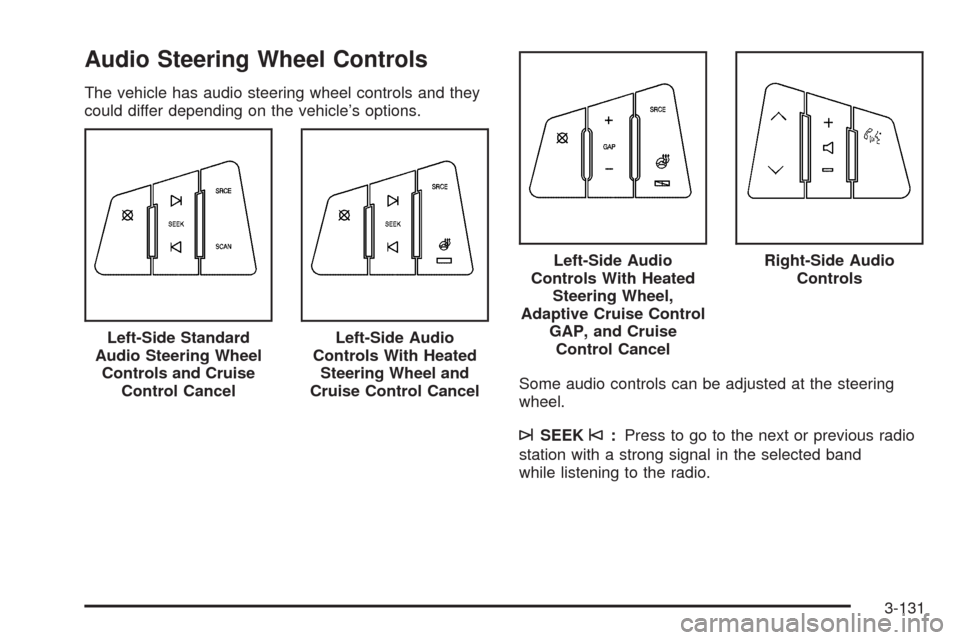
Audio Steering Wheel Controls
The vehicle has audio steering wheel controls and they
could differ depending on the vehicle’s options.
Some audio controls can be adjusted at the steering
wheel.
¨SEEK©:Press to go to the next or previous radio
station with a strong signal in the selected band
while listening to the radio. Left-Side Standard
Audio Steering Wheel
Controls and Cruise
Control Cancel
Left-Side Audio
Controls With Heated
Steering Wheel and
Cruise Control Cancel
Left-Side Audio
Controls With Heated
Steering Wheel,
Adaptive Cruise Control
GAP, and Cruise
Control CancelRight-Side Audio
Controls
3-131
Page 286 of 514
Press¨or©to go to the next or previous track while
a CD is playing,
SRCE (Source):Press to select between AM, FM, XM,
or CD.
SCAN:Press and hold for a few seconds to scan radio
stations, the radio goes to the next strongest station
in the selected band, plays for a few seconds, then goes
to the next station. Press SCAN again to stop scanning.
yz(Previous/Next):Press to go to the next or
previous radio station stored as a favorite while listening
to the radio.
Press
yorzto go to the next or previous track while
a CD is playing.
+
e−(Volume):Press to increase or to decrease the
volume.
bg(Mute/Voice Recognition):Press and release
to silence the vehicle speakers only. The audio of
the wireless and wired headphones, if the vehicle has
these features, does not mute. Press and release
this button again, to turn the sound on.
For vehicles with a navigation system, press and
hold
bgfor two seconds to initiate speech
recognition. See “Voice Recognition” in the
Navigation System manual for more information.
For vehicles with a navigation system and OnStar®,
press and hold
bgfor two seconds and then
say “OnStar” to interact with the OnStar system.
SeeOnStar
®System on page 2-50in this manual
for more information.
For vehicles with a navigation system and
Bluetooth®, see the Navigation System manual
for more information.
For vehicles without a navigation system, and
with Bluetooth or OnStar, press and hold
bgfor
two seconds to interact with the OnStar®or
Bluetooth system. SeeOnStar®System on
page 2-50,orBluetooth®on page 3-116for
more information about these features.
3-132
Page 501 of 514
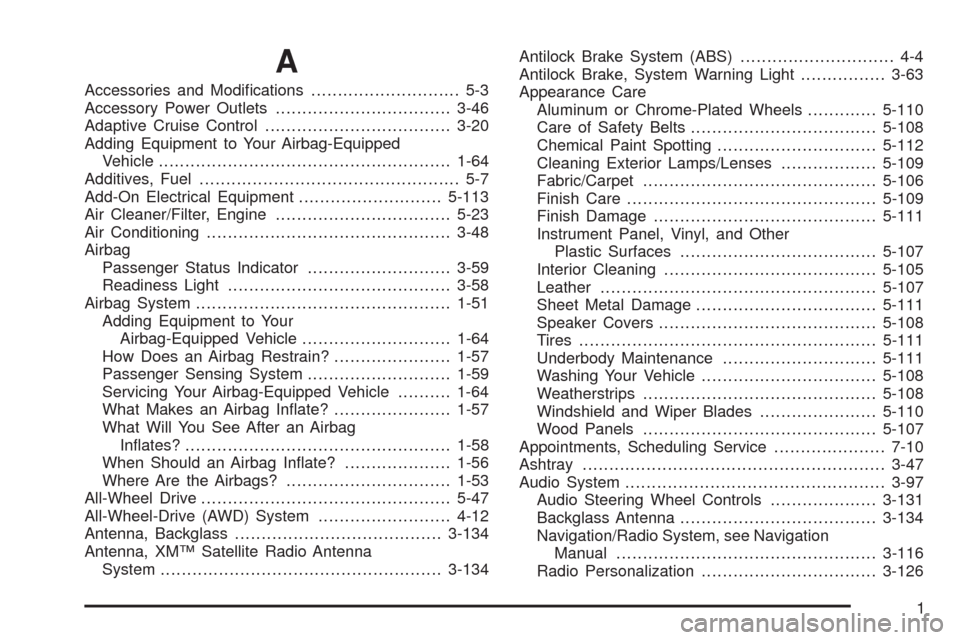
A
Accessories and Modications............................ 5-3
Accessory Power Outlets.................................3-46
Adaptive Cruise Control...................................3-20
Adding Equipment to Your Airbag-Equipped
Vehicle.......................................................1-64
Additives, Fuel................................................. 5-7
Add-On Electrical Equipment...........................5-113
Air Cleaner/Filter, Engine.................................5-23
Air Conditioning..............................................3-48
Airbag
Passenger Status Indicator...........................3-59
Readiness Light..........................................3-58
Airbag System................................................1-51
Adding Equipment to Your
Airbag-Equipped Vehicle............................1-64
How Does an Airbag Restrain?......................1-57
Passenger Sensing System...........................1-59
Servicing Your Airbag-Equipped Vehicle..........1-64
What Makes an Airbag Inate?......................1-57
What Will You See After an Airbag
Inates?..................................................1-58
When Should an Airbag Inate?....................1-56
Where Are the Airbags?...............................1-53
All-Wheel Drive...............................................5-47
All-Wheel-Drive (AWD) System.........................4-12
Antenna, Backglass.......................................3-134
Antenna, XM™ Satellite Radio Antenna
System.....................................................3-134Antilock Brake System (ABS)............................. 4-4
Antilock Brake, System Warning Light................3-63
Appearance Care
Aluminum or Chrome-Plated Wheels.............5-110
Care of Safety Belts...................................5-108
Chemical Paint Spotting..............................5-112
Cleaning Exterior Lamps/Lenses..................5-109
Fabric/Carpet............................................5-106
Finish Care...............................................5-109
Finish Damage..........................................5-111
Instrument Panel, Vinyl, and Other
Plastic Surfaces
.....................................5-107
Interior Cleaning........................................5-105
Leather....................................................5-107
Sheet Metal Damage..................................5-111
Speaker Covers.........................................5-108
Tires........................................................5-111
Underbody Maintenance.............................5-111
Washing Your Vehicle.................................5-108
Weatherstrips............................................5-108
Windshield and Wiper Blades......................5-110
Wood Panels............................................5-107
Appointments, Scheduling Service.....................7-10
Ashtray.........................................................3-47
Audio System.................................................3-97
Audio Steering Wheel Controls....................3-131
Backglass Antenna.....................................3-134
Navigation/Radio System, see Navigation
Manual.................................................3-116
Radio Personalization.................................3-126
1
Page 502 of 514

Audio System (cont.)
Radio Reception........................................3-133
Setting the Clock.........................................3-98
Theft-Deterrent Feature...............................3-130
XM™ Satellite Radio Antenna System...........3-134
Audio System(s).............................................3-98
Automatic Transmission
Fluid..........................................................5-25
Operation...................................................2-30
B
Backglass Antenna........................................3-134
Battery..........................................................5-42
Electric Power Management..........................3-42
Exterior Lighting Battery Saver......................3-40
Inadvertent Power Saver..............................3-42
Load Management.......................................3-41
Bluetooth
®....................................................3-116
Brake
Emergencies................................................ 4-5
Brake Fluid....................................................5-39
Brakes..........................................................5-39
System Warning Light..................................3-62
Braking........................................................... 4-3
Braking in Emergencies..................................... 4-5
Break-In, New Vehicle.....................................2-25Bulb Replacement...........................................5-51
Back-Up Lamps...........................................5-52
Halogen Bulbs............................................5-51
Headlamp Aiming........................................5-50
High Intensity Discharge (HID) Lighting...........5-51
Replacement Bulbs......................................5-52
Buying New Tires...........................................5-74
C
Calibration...............................................1-6, 2-38
California Fuel.................................................. 5-6
California Perchlorate Materials
Requirements............................................... 5-4
California Proposition 65 Warning....................... 5-4
Canadian Owners............................................... iii
Capacities and Specications..........................5-124
Carbon Monoxide...........................2-15, 2-36, 4-21
Care of
Safety Belts..............................................5-108
CD, MP3 .....................................................3-111
Center Console Storage Area...........................2-60
Chains, Tire...................................................5-81
Charging System Light....................................3-61
Check
Engine Lamp..............................................3-66
Checking Things Under the Hood......................5-10
2