display CADILLAC STS 2009 1.G Owners Manual
[x] Cancel search | Manufacturer: CADILLAC, Model Year: 2009, Model line: STS, Model: CADILLAC STS 2009 1.GPages: 514, PDF Size: 2.73 MB
Page 7 of 514
Heated Seats
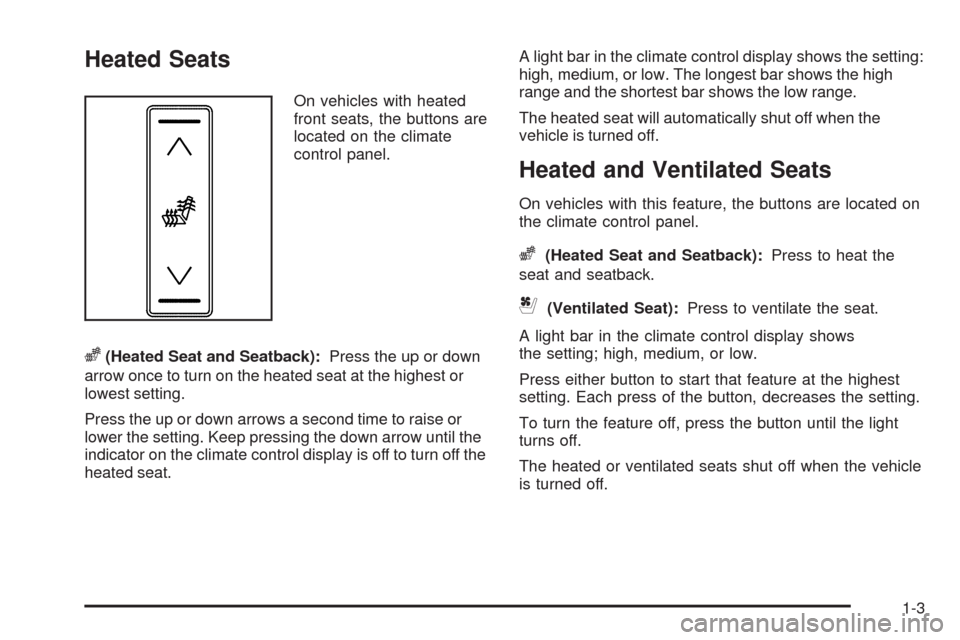
On vehicles with heated
front seats, the buttons are
located on the climate
control panel.
z(Heated Seat and Seatback):Press the up or down
arrow once to turn on the heated seat at the highest or
lowest setting.
Press the up or down arrows a second time to raise or
lower the setting. Keep pressing the down arrow until the
indicator on the climate control display is off to turn off the
heated seat.A light bar in the climate control display shows the setting:
high, medium, or low. The longest bar shows the high
range and the shortest bar shows the low range.
The heated seat will automatically shut off when the
vehicle is turned off.
Heated and Ventilated Seats
On vehicles with this feature, the buttons are located on
the climate control panel.
z(Heated Seat and Seatback):Press to heat the
seat and seatback.
{(Ventilated Seat):Press to ventilate the seat.
A light bar in the climate control display shows
the setting; high, medium, or low.
Press either button to start that feature at the highest
setting. Each press of the button, decreases the setting.
To turn the feature off, press the button until the light
turns off.
The heated or ventilated seats shut off when the vehicle
is turned off.
1-3
Page 79 of 514
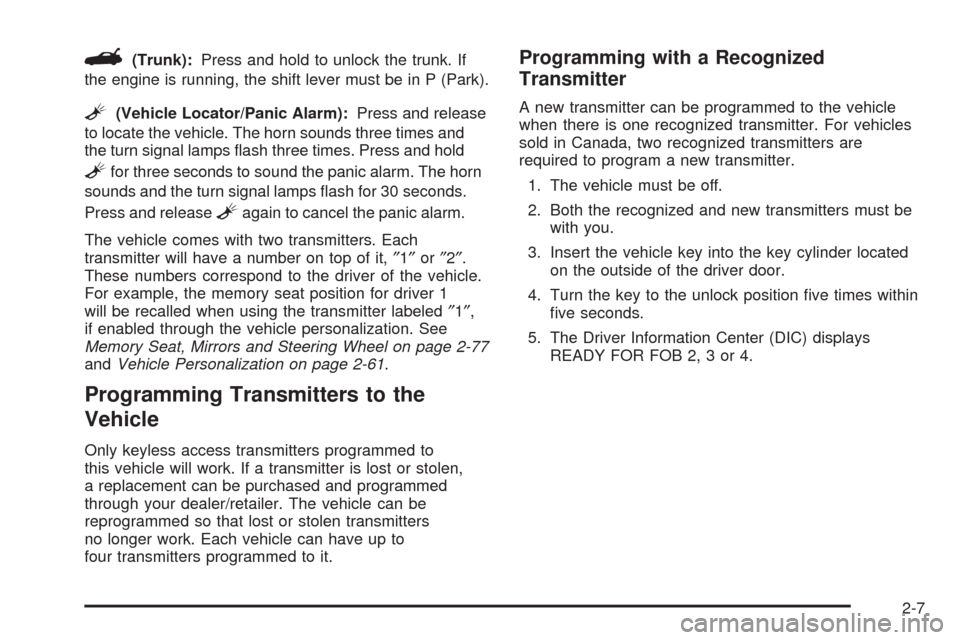
G(Trunk):Press and hold to unlock the trunk. If
the engine is running, the shift lever must be in P (Park).
L(Vehicle Locator/Panic Alarm):Press and release
to locate the vehicle. The horn sounds three times and
the turn signal lamps ash three times. Press and hold
Lfor three seconds to sound the panic alarm. The horn
sounds and the turn signal lamps ash for 30 seconds.
Press and release
Lagain to cancel the panic alarm.
The vehicle comes with two transmitters. Each
transmitter will have a number on top of it,″1″or″2″.
These numbers correspond to the driver of the vehicle.
For example, the memory seat position for driver 1
will be recalled when using the transmitter labeled″1″,
if enabled through the vehicle personalization. See
Memory Seat, Mirrors and Steering Wheel on page 2-77
andVehicle Personalization on page 2-61.
Programming Transmitters to the
Vehicle
Only keyless access transmitters programmed to
this vehicle will work. If a transmitter is lost or stolen,
a replacement can be purchased and programmed
through your dealer/retailer. The vehicle can be
reprogrammed so that lost or stolen transmitters
no longer work. Each vehicle can have up to
four transmitters programmed to it.
Programming with a Recognized
Transmitter
A new transmitter can be programmed to the vehicle
when there is one recognized transmitter. For vehicles
sold in Canada, two recognized transmitters are
required to program a new transmitter.
1. The vehicle must be off.
2. Both the recognized and new transmitters must be
with you.
3. Insert the vehicle key into the key cylinder located
on the outside of the driver door.
4. Turn the key to the unlock position ve times within
ve seconds.
5. The Driver Information Center (DIC) displays
READY FOR FOB 2, 3 or 4.
2-7
Page 80 of 514
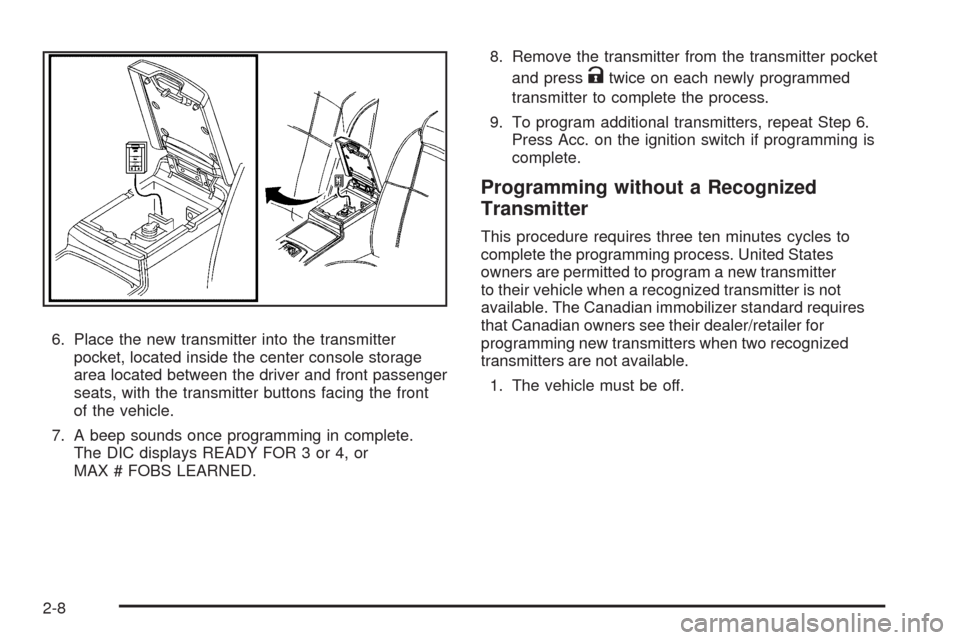
6. Place the new transmitter into the transmitter
pocket, located inside the center console storage
area located between the driver and front passenger
seats, with the transmitter buttons facing the front
of the vehicle.
7. A beep sounds once programming in complete.
The DIC displays READY FOR 3 or 4, or
MAX # FOBS LEARNED.8. Remove the transmitter from the transmitter pocket
and press
Ktwice on each newly programmed
transmitter to complete the process.
9. To program additional transmitters, repeat Step 6.
Press Acc. on the ignition switch if programming is
complete.
Programming without a Recognized
Transmitter
This procedure requires three ten minutes cycles to
complete the programming process. United States
owners are permitted to program a new transmitter
to their vehicle when a recognized transmitter is not
available. The Canadian immobilizer standard requires
that Canadian owners see their dealer/retailer for
programming new transmitters when two recognized
transmitters are not available.
1. The vehicle must be off.
2-8
Page 81 of 514
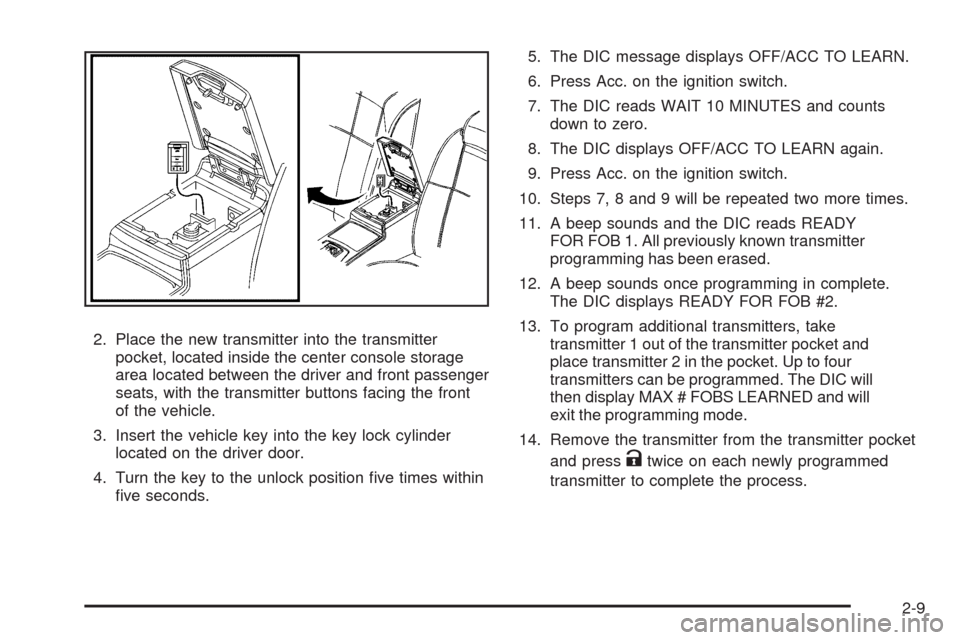
2. Place the new transmitter into the transmitter
pocket, located inside the center console storage
area located between the driver and front passenger
seats, with the transmitter buttons facing the front
of the vehicle.
3. Insert the vehicle key into the key lock cylinder
located on the driver door.
4. Turn the key to the unlock position ve times within
ve seconds.5. The DIC message displays OFF/ACC TO LEARN.
6. Press Acc. on the ignition switch.
7. The DIC reads WAIT 10 MINUTES and counts
down to zero.
8. The DIC displays OFF/ACC TO LEARN again.
9. Press Acc. on the ignition switch.
10. Steps 7, 8 and 9 will be repeated two more times.
11. A beep sounds and the DIC reads READY
FOR FOB 1. All previously known transmitter
programming has been erased.
12. A beep sounds once programming in complete.
The DIC displays READY FOR FOB #2.
13. To program additional transmitters, take
transmitter 1 out of the transmitter pocket and
place transmitter 2 in the pocket. Up to four
transmitters can be programmed. The DIC will
then display MAX # FOBS LEARNED and will
exit the programming mode.
14. Remove the transmitter from the transmitter pocket
and press
Ktwice on each newly programmed
transmitter to complete the process.
2-9
Page 82 of 514
Starting the Vehicle with a Low
Transmitter Battery
If the transmitter battery is weak, the DIC may display
NO FOBS DETECTED when trying to start the vehicle.
To start the vehicle, place the transmitter in the center
console storage area transmitter pocket with the buttons
facing to the front of the vehicle. Then, with the vehicle in
P (Park) OR N (Neutral), press the brake pedal and
/.
Replace the transmitter battery as soon as possible.
Change the transmitter battery if the DIC displays
KEY FOB BATTERY LOW.
Battery Replacement
Notice:When replacing the battery, do not touch
any of the circuitry on the transmitter. Static
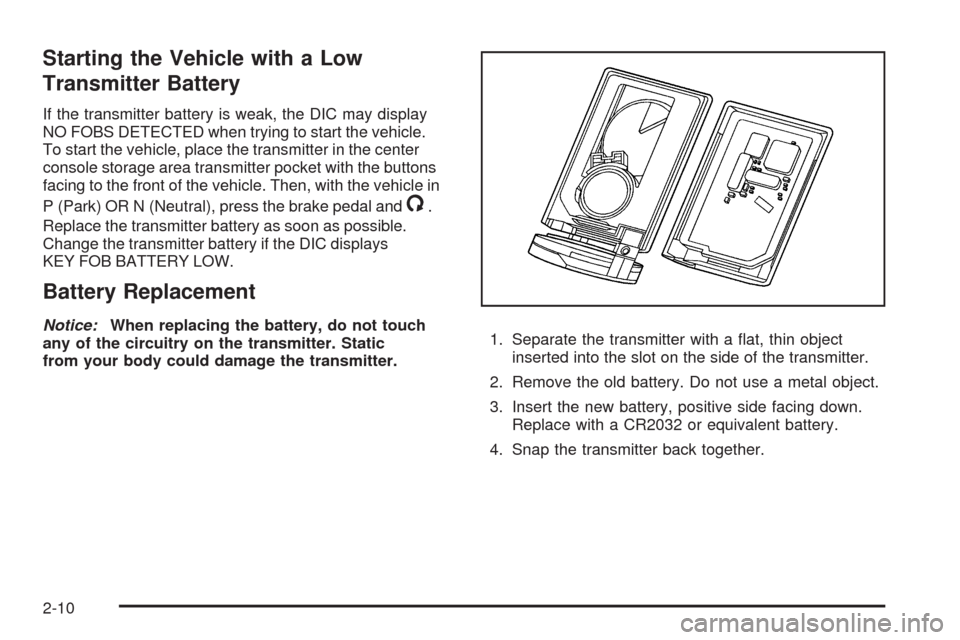
from your body could damage the transmitter.1. Separate the transmitter with a at, thin object
inserted into the slot on the side of the transmitter.
2. Remove the old battery. Do not use a metal object.
3. Insert the new battery, positive side facing down.
Replace with a CR2032 or equivalent battery.
4. Snap the transmitter back together.
2-10
Page 84 of 514

Do not use the remote start feature if your vehicle is low
on fuel. Your vehicle may run out of fuel.
The remote start feature provides two separate starts,
each with 10 minutes of engine running. If you press
the lock button and then hold the remote start button
on the keyless access transmitter again for at least
three seconds before the rst 10 minutes of engine
running time has expired, 10 minutes is added to the
remaining minutes. For example, if the remote start is
initiated again after ve minutes of the engine run time,
10 minutes is added and you now have 15 minutes with
the engine running. Once two remote starts or 20 minutes
of the engine running have been provided, the vehicle
must be started using the keyless access with pushbutton
start feature, if the engine needs to be restarted. See
Starting the Engine on page 2-27for more information
regarding the keyless ignition.The remote start feature will not operate if any of the
following occur:
The check engine light is displayed. See “Check
Engine Light” underMalfunction Indicator Lamp
on page 3-66.
The valet lockout switch is on.
The keyless access transmitter is in the vehicle.
The vehicle’s hood is open.
The vehicle personalization feature is not enabled.
An unauthorized vehicle entry or a vehicle theft
was attempted.
If your vehicle has the remote start feature, the keyless
access transmitter functions will have an increased
range of operation. However, the range may be
less while the vehicle is running.
There are other conditions which can affect the
performance of the transmitter, seeKeyless Access
System on page 2-4.
2-12
Page 86 of 514
Programmable Automatic Door
Locks
The vehicle was programmed so when the doors are
closed, the ignition is on, and the shift lever is moved
out of P (Park), all the doors will lock.
The front doors can still be opened from the inside while
the doors are locked. If a rear passenger needs to exit the
vehicle, have that person use the manual knob or use the
power door lock switch on either front door. When the
door is closed again, it will not lock automatically. Use
the manual knob or the power door lock switch to lock
the door.
The doors were also pre-programmed to unlock every
time the shift lever is moved into P (Park).
The power door locks can be programmed through the
radio display. The radio display allows you to choose
various lock and unlock settings. For more information
on programming, seeVehicle Personalization on
page 2-61.
Rear Door Security Locks
The vehicle has rear door security locks to prevent
passengers from opening the rear doors from the inside.
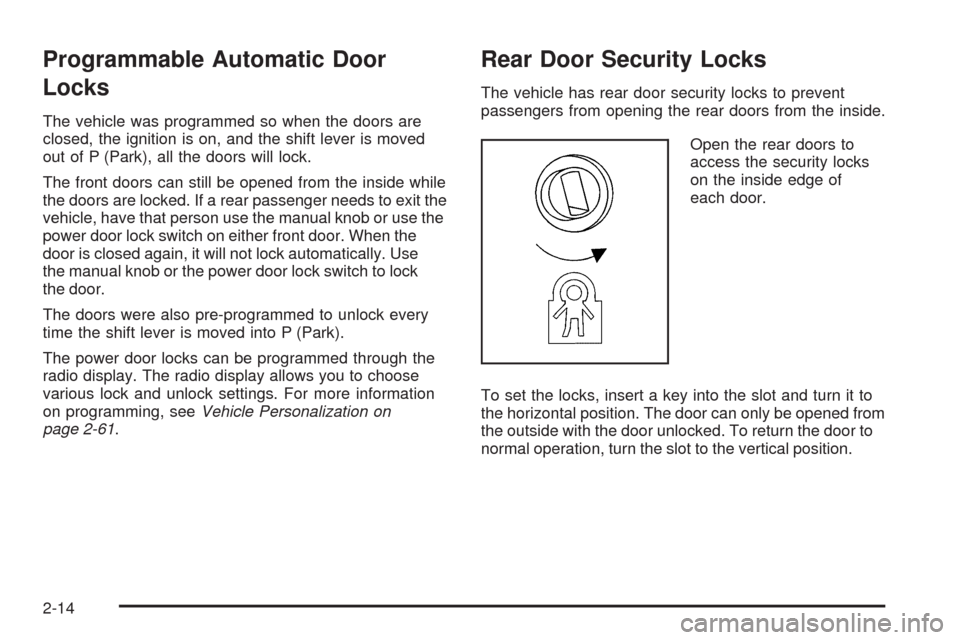
Open the rear doors to
access the security locks
on the inside edge of
each door.
To set the locks, insert a key into the slot and turn it to
the horizontal position. The door can only be opened from
the outside with the door unlocked. To return the door to
normal operation, turn the slot to the vertical position.
2-14
Page 98 of 514
Ignition Positions
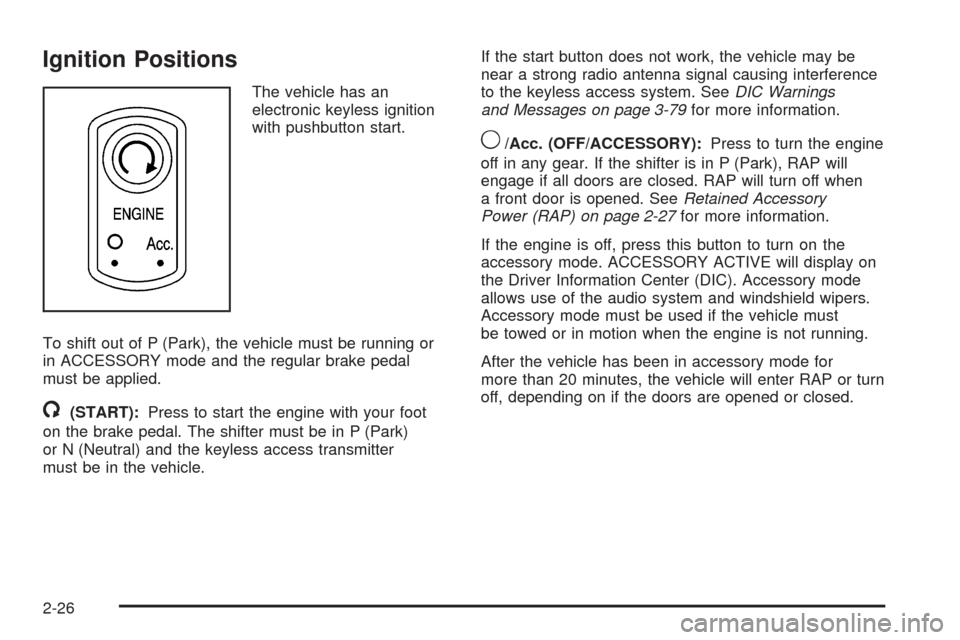
The vehicle has an
electronic keyless ignition
with pushbutton start.
To shift out of P (Park), the vehicle must be running or
in ACCESSORY mode and the regular brake pedal
must be applied.
/(START):Press to start the engine with your foot
on the brake pedal. The shifter must be in P (Park)
or N (Neutral) and the keyless access transmitter
must be in the vehicle.If the start button does not work, the vehicle may be
near a strong radio antenna signal causing interference
to the keyless access system. SeeDIC Warnings
and Messages on page 3-79for more information.
9/Acc. (OFF/ACCESSORY):Press to turn the engine
off in any gear. If the shifter is in P (Park), RAP will
engage if all doors are closed. RAP will turn off when
a front door is opened. SeeRetained Accessory
Power (RAP) on page 2-27for more information.
If the engine is off, press this button to turn on the
accessory mode. ACCESSORY ACTIVE will display on
the Driver Information Center (DIC). Accessory mode
allows use of the audio system and windshield wipers.
Accessory mode must be used if the vehicle must
be towed or in motion when the engine is not running.
After the vehicle has been in accessory mode for
more than 20 minutes, the vehicle will enter RAP or turn
off, depending on if the doors are opened or closed.
2-26
Page 99 of 514

Retained Accessory Power (RAP)
These vehicle accessories can be used for up to
20 minutes after the engine is turned off:
Audio System
Audio Steering Wheel Controls
Power Windows
Power to these accessories will work up to 20 minutes
or until one of the front doors is opened. For an additional
20 minutes of operation, close all the doors and press
Acc. to place the vehicle in accessory mode. Press the
button again to return to RAP.
Starting the Engine
To place the transmission in the proper gear:
Move the shift lever to P (Park) or N (Neutral).
To restart the engine when the vehicle is already
moving, use N (Neutral).
Notice:Do not try to shift to P (Park) if the
vehicle is moving. If you do, you could damage
the transmission. Shift to P (Park) only when the
vehicle is stopped.The keyless access transmitter must be inside the
vehicle for the ignition to work.
Cell phone chargers can interfere with the operation of
the Keyless Access System. Battery chargers should
not be plugged in when starting or turning off the engine.
To start the vehicle, do the following:
Starting Procedure
1. With your foot on the brake pedal, press the
START button located on the instrument panel.
If there is not a keyless access transmitter in
the vehicle or if there is something causing
interference with it, the DIC will display NO FOBS
DETECTED. SeeDIC Warnings and Messages
on page 3-79for more information.
2. When the engine begins cranking, let go of the
button and the engine cranks automatically until
it starts. If the battery in the keyless access
transmitter is weak, the DIC displays KEY FOB
BATTERY LOW. You can still drive the vehicle.
See “Battery Replacement” underKeyless Access
System Operation on page 2-5for more information.
If the fob battery is dead, you need to insert the
fob into the fob slot to enable engine starting.
See “No Fobs Detected” underDIC Warnings
and Messages on page 3-79.
2-27
Page 100 of 514

3. Do not race the engine immediately after starting it.
Operate the engine and transmission gently until
the oil warms up and lubricates all moving parts.
4. If the engine does not start and no DIC message is
displayed, wait 15 seconds before trying again to let
the cranking motor cool down.
If the engine does not start after 5-10 seconds,
especially in very cold weather (below 0°F or−18°C),
it could be ooded with too much gasoline. Try
pushing the accelerator pedal all the way to the oor
while cranking for up to 15 seconds maximum.
Notice:Cranking the engine for long periods of
time, by pressing the START button immediately
after cranking has ended, can overheat and damage
the cranking motor, and drain the battery. Wait at
least 15 seconds between each try, to allow the
cranking motor to cool down.When the engine starts, let go of the accelerator.
If the vehicle starts briey but then stops again,
do the same thing. This clears the extra gasoline
from the engine.
The vehicle has a Computer-Controlled Cranking
System. This feature assists in starting the engine and
protects components. Once cranking has been initiated,
the engine continues cranking for a few seconds or until
the vehicle starts. If the engine does not start, cranking
automatically stops after 15 seconds to prevent cranking
motor damage. To prevent gear damage, this system
also prevents cranking if the engine is already running.
Notice:The engine is designed to work with the
electronics in the vehicle. If you add electrical parts
or accessories, you could change the way the engine
operates. Before adding electrical equipment, check
with your dealer/retailer. If you do not, the engine
might not perform properly. Any resulting damage
would not be covered by the vehicle warranty.
2-28