light CADILLAC STS 2011 1.G User Guide
[x] Cancel search | Manufacturer: CADILLAC, Model Year: 2011, Model line: STS, Model: CADILLAC STS 2011 1.GPages: 528, PDF Size: 4.96 MB
Page 31 of 528
Black plate (25,1)Cadillac STS Owner Manual - 2011
OnStar service requires wireless communication
networks and the Global Positioning System (GPS)
satellite network. Not all OnStar services are available
everywhere or on all vehicles at all times.
OnStar service can’t work unless your vehicle is in
a place where OnStar has an agreement with a
wireless service provider for service in that area, and
the wireless service provider has coverage, network
capacity, reception, and technology compatible with
OnStar's service. Service involving location information
about your vehicle can’t work unless GPS signals are
available, unobstructed, and compatible with the OnStar
hardware. The vehicle has to have a working electrical
system and adequate battery power for the OnStar
equipment to operate. OnStar service may not work if
the OnStar equipment isn’t properly installed or you
haven’t maintained it and your vehicle is in good
working order and in compliance with all government
regulations. If you try to add, connect, or modify any
equipment or software in your vehicle, OnStar service
may not work. Other problems OnStar can’t control may
prevent service to you, such as hills, tall buildings,
tunnels, weather, electrical system design and
architecture of your vehicle, damage to important parts
of your vehicle in a crash, or wireless phone network
congestion or jamming.See
Radio Frequency Statementon page 8‑20for information regarding Part 15 of the Federal
Communications Commission (FCC) rules and
Industry Canada Standards RSS-210/220/310.
OnStar Steering Wheel Controls
This vehicle may have a Talk/Mute button that can be
used to interact with OnStar Hands-Free calling. See
Audio Steering Wheel Controls
on page 4‑124for more
information.
On some vehicles, the mute button can be used to dial
numbers into voice mail systems, or to dial phone
extensions. See the OnStar Owner's Guide for more
information.
Your Responsibility
Increase the volume of the radio if the OnStar advisor
cannot be heard.
If the light next to the OnStar buttons is red, the system
may not be functioning properly. Push the
Qbutton and
request a vehicle diagnostic. If the light appears clear
(no light appears), your OnStar subscription has
expired and all services have been deactivated. Push
the
Qbutton to confirm that the OnStar equipment is
active.
1-25
Page 36 of 528
Black plate (4,1)Cadillac STS Owner Manual - 2011
Heated Seats
{WARNING:
If you cannot feel temperature change or pain to
the skin, the seat heater may cause burns even at
low temperatures. To reduce the risk of burns,
people with such a condition should use care
when using the seat heater, especially for long
periods of time. Do not place anything on the seat
that insulates against heat, such as a blanket,
cushion, cover or similar item. This may cause the
seat heater to overheat. An overheated seat
heater may cause a burn or may damage
the seat.
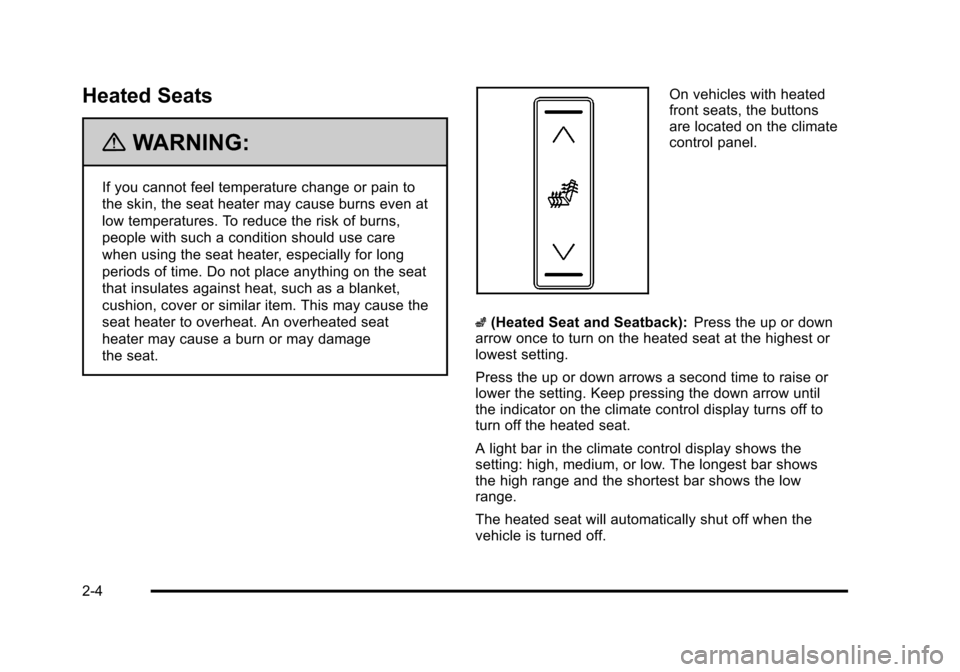
On vehicles with heated
front seats, the buttons
are located on the climate
control panel.
z (Heated Seat and Seatback): Press the up or down
arrow once to turn on the heated seat at the highest or
lowest setting.
Press the up or down arrows a second time to raise or
lower the setting. Keep pressing the down arrow until
the indicator on the climate control display turns off to
turn off the heated seat.
A light bar in the climate control display shows the
setting: high, medium, or low. The longest bar shows
the high range and the shortest bar shows the low
range.
The heated seat will automatically shut off when the
vehicle is turned off.
2-4
Page 37 of 528
Black plate (5,1)Cadillac STS Owner Manual - 2011
Heated and Ventilated Seats
{WARNING:
If you cannot feel temperature change or pain to
the skin, the seat heater may cause burns even at
low temperatures. See the Warning underHeated
Seats on page 2‑4.
On vehicles with this feature, the buttons are on the
climate control panel.
z(Heated Seat and Seatback): Press to heat the seat
and seatback.
{(Ventilated Seat): Press to ventilate the seat.
Press the button once for the highest setting. With each
press of the button, the setting will change to the next
lower setting, and then to the off setting.
A light bar in the climate control display shows the
setting: high, medium, or low.
The heated or ventilated seats shut off when the vehicle
is turned off.
Memory Seat, Mirrors and Steering
Wheel
If the vehicle has the memory feature, you can program
and recall memory settings for the following features for
up to two drivers:
.The driver seat position
.The outside rearview mirrors position
.The power tilt wheel and telescopic steering
column position
The following settings and presets are set automatically:
.The language, radio and XM™ presets, tone,
volume, playback mode (AM/FM or CD), last
displayed stations, and compact disc position
.The last climate control setting
.The Head-Up Display (HUD) position, if your
vehicle has this feature
.Other personalization settings, for example, remote
start settings
See Vehicle Personalization on page 3‑59.
2-5
Page 39 of 528
Black plate (7,1)Cadillac STS Owner Manual - 2011
Driver Selection Submenu Items
DRIVER 1/DRIVER 2
The numbers on the back of each keyless access
transmitter correspond to DRIVER 1 and DRIVER 2.
If you would like to recall or store driver settings for the
driver that does not correspond to the number on the
back of the keyless access transmitter that you are
using:1. Enter the memory programming mode for your driver settings by following the instructions listed
previously under “Entering the Driver Selection
Submenu.”
2. From the DRIVER SELECTION submenu, turn the tune/select knob to highlight the driver number that
you want, either DRIVER 1 or DRIVER 2.
3. Set your choice by pressing in the tune/ select knob.
If you would like to recall or store driver settings for the
selected driver, see “RECALL DRIVER SETTINGS” or
“STORE DRIVER SETTINGS” later in this section.
If you would like to recall or store exit settings for the
selected driver, see “RECALL EXIT SETTINGS” or
“STORE EXIT SETTINGS” later in this section.
RECALL DRIVER SETTINGS
To recall driver settings:
1. Enter the memory programming mode for your driver settings by following the instructions listed
previously under “Entering the Driver Selection
Submenu.”
2. From the DRIVER SELECTION submenu, turn the tune/select knob to scroll to RECALL DRIVER
SETTINGS and press in the knob.
If the vehicle is in P (Park), one beep will sound
and your previously saved driving position will then
be recalled.
If the vehicle is not in P (Park), three beeps will
sound and your previously saved driving position
will not be recalled.
A memory recall can be stopped by pressing any
memory seat or mirror position button.
If you would like the stored driving positions to be
recalled when unlocking your vehicle with the keyless
access transmitter or when starting your vehicle, see
“REMOTE RECALL MEMORY” or“START BUTTON
RECALL” underVehicle Personalization on page 3‑59.
2-7
Page 46 of 528
Black plate (14,1)Cadillac STS Owner Manual - 2011
Rear Seats
Heated Seats
{WARNING:
If you cannot feel temperature change or pain to
the skin, the seat heater may cause burns even at
low temperatures. See the Warning underHeated
Seats on page 2‑4.
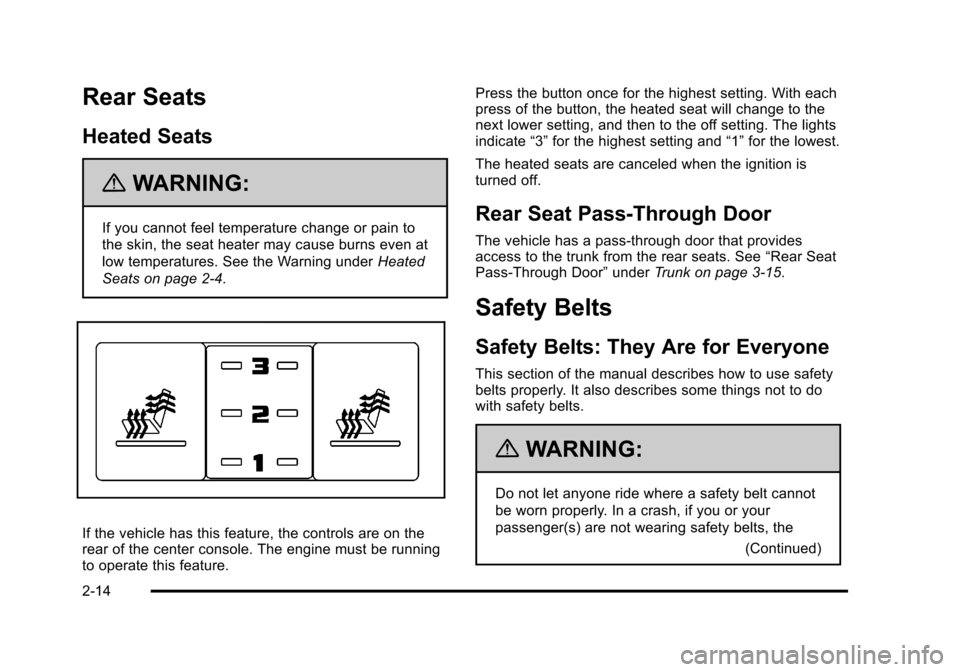
If the vehicle has this feature, the controls are on the
rear of the center console. The engine must be running
to operate this feature. Press the button once for the highest setting. With each
press of the button, the heated seat will change to the
next lower setting, and then to the off setting. The lights
indicate
“3”for the highest setting and “1”for the lowest.
The heated seats are canceled when the ignition is
turned off.
Rear Seat Pass-Through Door
The vehicle has a pass‐through door that provides
access to the trunk from the rear seats. See “Rear Seat
Pass‐Through Door” underTrunk on page 3‑15.
Safety Belts
Safety Belts: They Are for Everyone
This section of the manual describes how to use safety
belts properly. It also describes some things not to do
with safety belts.
{WARNING:
Do not let anyone ride where a safety belt cannot
be worn properly. In a crash, if you or your
passenger(s) are not wearing safety belts, the
(Continued)
2-14
Page 60 of 528
Black plate (28,1)Cadillac STS Owner Manual - 2011
Lap-Shoulder Belt
All seating positions in your vehicle have a
lap-shoulder belt.
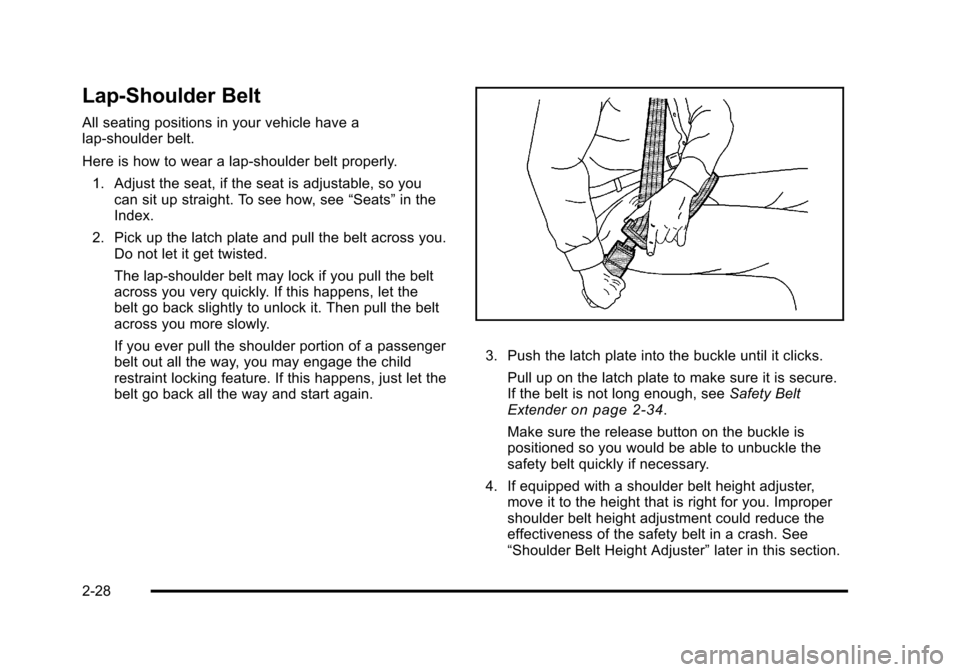
Here is how to wear a lap-shoulder belt properly.1. Adjust the seat, if the seat is adjustable, so you can sit up straight. To see how, see “Seats”in the
Index.
2. Pick up the latch plate and pull the belt across you. Do not let it get twisted.
The lap-shoulder belt may lock if you pull the belt
across you very quickly. If this happens, let the
belt go back slightly to unlock it. Then pull the belt
across you more slowly.
If you ever pull the shoulder portion of a passenger
belt out all the way, you may engage the child
restraint locking feature. If this happens, just let the
belt go back all the way and start again.
3. Push the latch plate into the buckle until it clicks.
Pull up on the latch plate to make sure it is secure.
If the belt is not long enough, see Safety Belt
Extender
on page 2‑34.
Make sure the release button on the buckle is
positioned so you would be able to unbuckle the
safety belt quickly if necessary.
4. If equipped with a shoulder belt height adjuster, move it to the height that is right for you. Improper
shoulder belt height adjustment could reduce the
effectiveness of the safety belt in a crash. See
“Shoulder Belt Height Adjuster” later in this section.
2-28
Page 61 of 528
Black plate (29,1)Cadillac STS Owner Manual - 2011
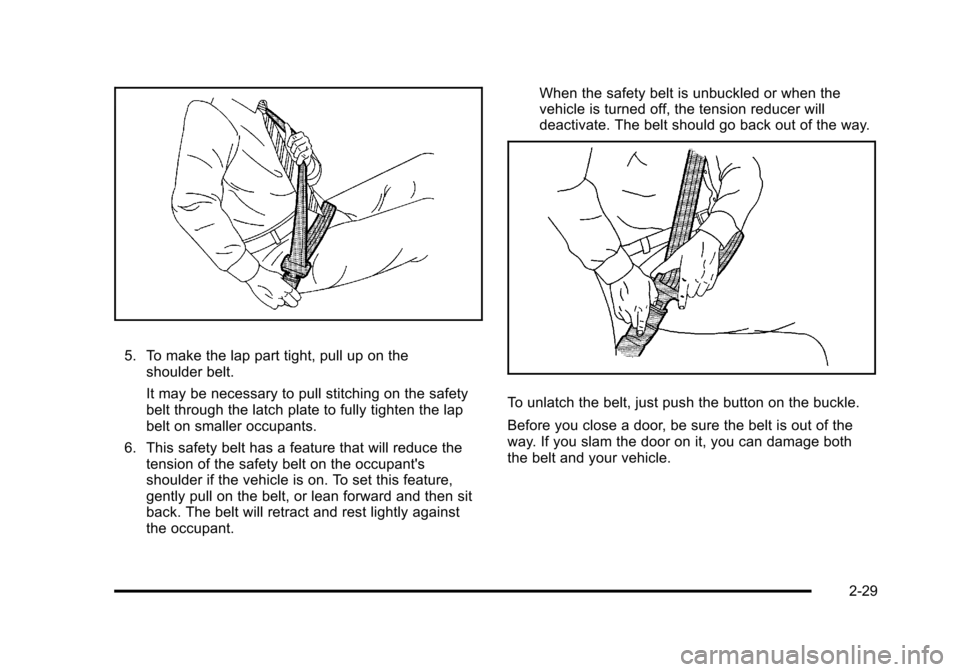
5. To make the lap part tight, pull up on theshoulder belt.
It may be necessary to pull stitching on the safety
belt through the latch plate to fully tighten the lap
belt on smaller occupants.
6. This safety belt has a feature that will reduce the tension of the safety belt on the occupant's
shoulder if the vehicle is on. To set this feature,
gently pull on the belt, or lean forward and then sit
back. The belt will retract and rest lightly against
the occupant. When the safety belt is unbuckled or when the
vehicle is turned off, the tension reducer will
deactivate. The belt should go back out of the way.
To unlatch the belt, just push the button on the buckle.
Before you close a door, be sure the belt is out of the
way. If you slam the door on it, you can damage both
the belt and your vehicle.
2-29
Page 87 of 528
Black plate (55,1)Cadillac STS Owner Manual - 2011
In Canada, the law requires that forward-facing child
restraints have a top tether, and that the tether be
attached.
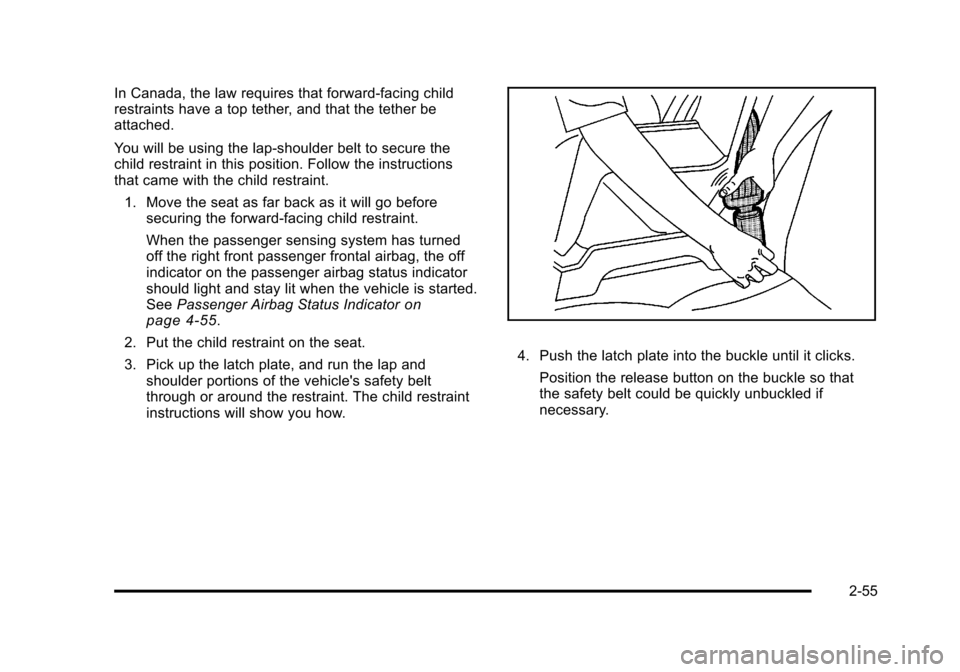
You will be using the lap-shoulder belt to secure the
child restraint in this position. Follow the instructions
that came with the child restraint.1. Move the seat as far back as it will go before securing the forward-facing child restraint.
When the passenger sensing system has turned
off the right front passenger frontal airbag, the off
indicator on the passenger airbag status indicator
should light and stay lit when the vehicle is started.
See Passenger Airbag Status Indicator
on
page 4‑55.
2. Put the child restraint on the seat.
3. Pick up the latch plate, and run the lap and shoulder portions of the vehicle's safety belt
through or around the restraint. The child restraint
instructions will show you how.
4. Push the latch plate into the buckle until it clicks.
Position the release button on the buckle so that
the safety belt could be quickly unbuckled if
necessary.
2-55
Page 91 of 528
Black plate (59,1)Cadillac STS Owner Manual - 2011
{WARNING:
Children who are up against, or very close to, any
airbag when it inflates can be seriously injured
or killed. Airbags plus lap-shoulder belts offer
protection for adults and older children, but not for
young children and infants. Neither the vehicle's
safety belt system nor its airbag system is
designed for them. Young children and infants
need the protection that a child restraint system
can provide. Always secure children properly in
your vehicle. To read how, seeOlder Children
on
page 2‑34
or Infants and Young Childrenon
page 2‑38
.
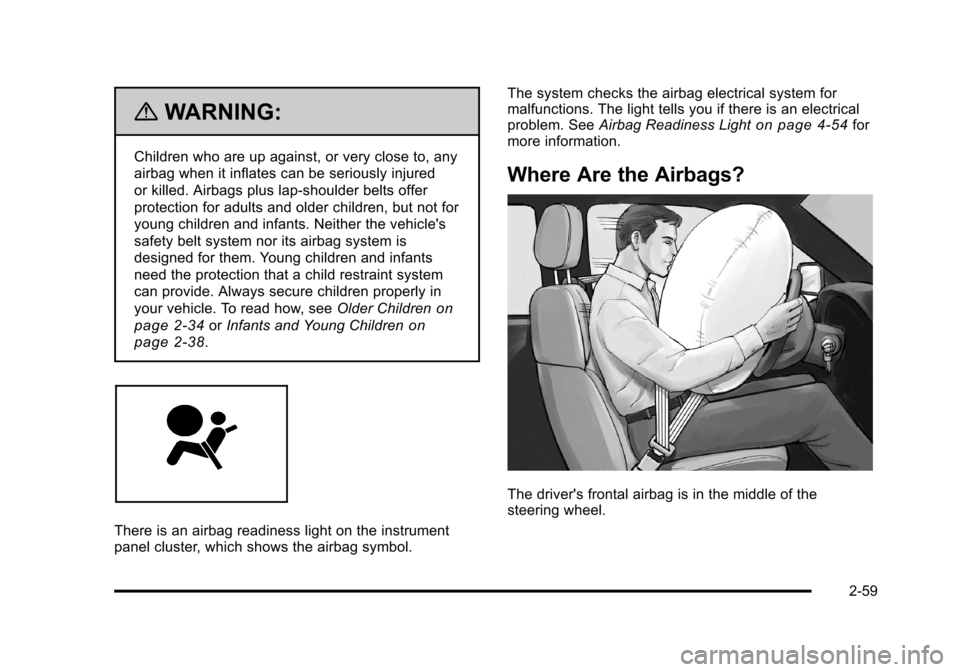
There is an airbag readiness light on the instrument
panel cluster, which shows the airbag symbol. The system checks the airbag electrical system for
malfunctions. The light tells you if there is an electrical
problem. See
Airbag Readiness Light
on page 4‑54for
more information.
Where Are the Airbags?
The driver's frontal airbag is in the middle of the
steering wheel.
2-59
Page 99 of 528
Black plate (67,1)Cadillac STS Owner Manual - 2011
{WARNING:
A child in a rear-facing child restraint can be
seriously injured or killed if the right front
passenger airbag inflates. This is because the
back of the rear-facing child restraint would be
very close to the inflating airbag. A child in a
forward-facing child restraint can be seriously
injured or killed if the right front passenger airbag
inflates and the passenger seat is in a forward
position.
Even if the passenger sensing system has turned
off the right front passenger frontal airbag, no
system is fail-safe. No one can guarantee that
an airbag will not deploy under some unusual
circumstance, even though the airbag is
turned off.
Secure rear-facing child restraints in a rear
seat, even if the airbag is off. If you secure a
forward-facing child restraint in the right front seat,
always move the front passenger seat as far back
as it will go. It is better to secure the child restraint
in a rear seat.The passenger sensing system is designed to turn off
the right front passenger frontal airbag if:
.The right front passenger seat is unoccupied.
.The system determines that an infant is present in
a rear-facing infant seat.
.The system determines that a small child is
present in a child restraint.
.The system determines that a small child is
present in a booster seat.
.A right front passenger takes his/her weight off of
the seat for a period of time.
.The right front passenger seat is occupied by a
smaller person, such as a child who has outgrown
child restraints.
.Or, if there is a critical problem with the airbag
system or the passenger sensing system.
When the passenger sensing system has turned off the
right front passenger's frontal airbag, the off indicator
will light and stay lit to remind you that the airbag is off.
See Passenger Airbag Status Indicator on page 4‑55.
If a child restraint has been installed and the on
indicator is lit, turn the vehicle off. Remove the child
restraint from the vehicle and reinstall the child restraint
following the child restraint manufacturer's directions
and refer to Securing a Child Restraint in the Right
Front Seat Position on page 2‑53.
2-67