light CADILLAC STS 2011 1.G Owners Manual
[x] Cancel search | Manufacturer: CADILLAC, Model Year: 2011, Model line: STS, Model: CADILLAC STS 2011 1.GPages: 528, PDF Size: 4.96 MB
Page 1 of 528

Black plate (1,1)Cadillac STS Owner Manual - 2011
2011 Cadillac STS Owner ManualM
In Brief. . . . . . . . . . . . . . . . . . . . . . . . . . . . . . . . . . . . . . . . . . . . 1-1
Instrument Panel . . . . . . . . . . . . . . . . . . . . . . . . . . . . . . . . . 1-2
Initial Drive Information . . . . . . . . . . . . . . . . . . . . . . . . . . . 1-4
Vehicle Features . . . . . . . . . . . . . . . . . . . . . . . . . . . . . . . . 1-16
Performance and Maintenance . . . . . . . . . . . . . . . . . . 1-21
Seats and Restraint System . . . . . . . . . . . . . . . . . . . . . . 2-1
Front Seats . . . . . . . . . . . . . . . . . . . . . . . . . . . . . . . . . . . . . . . 2-2
Rear Seats . . . . . . . . . . . . . . . . . . . . . . . . . . . . . . . . . . . . . . 2-14
Safety Belts . . . . . . . . . . . . . . . . . . . . . . . . . . . . . . . . . . . . . 2-14
Child Restraints . . . . . . . . . . . . . . . . . . . . . . . . . . . . . . . . . 2-34
Airbag System . . . . . . . . . . . . . . . . . . . . . . . . . . . . . . . . . . 2-57
Restraint System Check . . . . . . . . . . . . . . . . . . . . . . . . . 2-72
Features and Controls . . . . . . . . . . . . . . . . . . . . . . . . . . . . 3-1
Keys . . . . . . . . . . . . . . . . . . . . . . . . . . . . . . . . . . . . . . . . . . . . . 3-3
Doors and Locks . . . . . . . . . . . . . . . . . . . . . . . . . . . . . . . . 3-12
Windows . . . . . . . . . . . . . . . . . . . . . . . . . . . . . . . . . . . . . . . . 3-18
Theft-Deterrent Systems . . . . . . . . . . . . . . . . . . . . . . . . 3-22
Starting and Operating Your Vehicle . . . . . . . . . . . . . 3-25
Mirrors . . . . . . . . . . . . . . . . . . . . . . . . . . . . . . . . . . . . . . . . . . 3-37
Object Detection Systems . . . . . . . . . . . . . . . . . . . . . . . 3-41
Universal Home Remote System . . . . . . . . . . . . . . . . 3-49 Storage Areas . . . . . . . . . . . . . . . . . . . . . . . . . . . . . . . . . . . 3-56
Sunroof . . . . . . . . . . . . . . . . . . . . . . . . . . . . . . . . . . . . . . . . . 3-57
Vehicle Personalization . . . . . . . . . . . . . . . . . . . . . . . . . 3-59
Instrument Panel . . . . . . . . . . . . . . . . . . . . . . . . . . . . . . . . . 4-1
Instrument Panel Overview . . . . . . . . . . . . . . . . . . . . . . . 4-3
Climate Controls . . . . . . . . . . . . . . . . . . . . . . . . . . . . . . . . 4-43
Warning Lights, Gauges, and Indicators . . . . . . . . . 4-51
Driver Information Center (DIC) . . . . . . . . . . . . . . . . . 4-69
Audio System(s) . . . . . . . . . . . . . . . . . . . . . . . . . . . . . . . . 4-94
Driving Your Vehicle . . . . . . . . . . . . . . . . . . . . . . . . . . . . . . 5-1
Your Driving, the Road, and the Vehicle . . . . . . . . . . 5-2
Towing . . . . . . . . . . . . . . . . . . . . . . . . . . . . . . . . . . . . . . . . . . 5-29
Service and Appearance Care . . . . . . . . . . . . . . . . . . . 6-1
Service . . . . . . . . . . . . . . . . . . . . . . . . . . . . . . . . . . . . . . . . . . . 6-4
Fuel . . . . . . . . . . . . . . . . . . . . . . . . . . . . . . . . . . . . . . . . . . . . . . 6-6
Checking Things Under the Hood . . . . . . . . . . . . . . . 6-12
All-Wheel Drive . . . . . . . . . . . . . . . . . . . . . . . . . . . . . . . . . 6-43
Rear Axle . . . . . . . . . . . . . . . . . . . . . . . . . . . . . . . . . . . . . . . 6-44
Front Axle . . . . . . . . . . . . . . . . . . . . . . . . . . . . . . . . . . . . . . . 6-45
Headlamp Aiming . . . . . . . . . . . . . . . . . . . . . . . . . . . . . . . 6-46
Page 5 of 528
Black plate (5,1)Cadillac STS Owner Manual - 2011
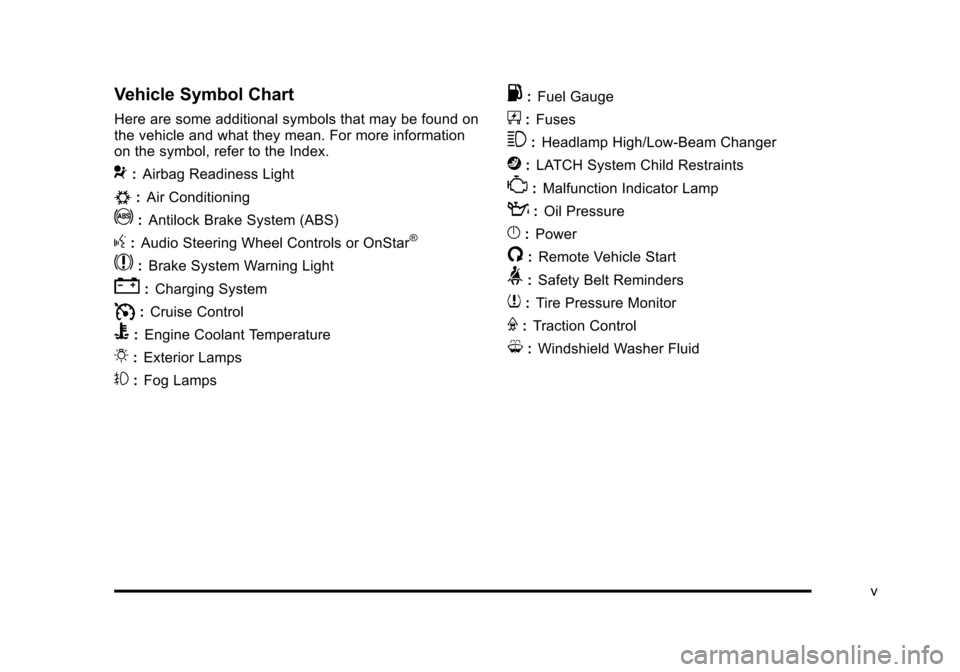
Vehicle Symbol Chart
Here are some additional symbols that may be found on
the vehicle and what they mean. For more information
on the symbol, refer to the Index.
9:Airbag Readiness Light
#:Air Conditioning
!:Antilock Brake System (ABS)
g:Audio Steering Wheel Controls or OnStar®
$: Brake System Warning Light
":Charging System
I:Cruise Control
B: Engine Coolant Temperature
O:Exterior Lamps
#:Fog Lamps
.: Fuel Gauge
+:Fuses
3: Headlamp High/Low-Beam Changer
j:LATCH System Child Restraints
*: Malfunction Indicator Lamp
::Oil Pressure
}:Power
/:Remote Vehicle Start
>:Safety Belt Reminders
7:Tire Pressure Monitor
F:Traction Control
M:Windshield Washer Fluid
v
Page 7 of 528
Black plate (1,1)Cadillac STS Owner Manual - 2011
Section 1 In Brief
Instrument Panel. . . . . . . . . . . . . . . . . . . . . . . . . . . . . . . . . . . 1-2
Initial Drive Information . . . . . . . . . . . . . . . . . . . . . . . . . . . 1-4
Remote Keyless Entry (RKE) System . . . . . . . . . . . 1-4
Remote Vehicle Start . . . . . . . . . . . . . . . . . . . . . . . . . . . 1-4
Door Locks . . . . . . . . . . . . . . . . . . . . . . . . . . . . . . . . . . . . . 1-5
Trunk . . . . . . . . . . . . . . . . . . . . . . . . . . . . . . . . . . . . . . . . . . . 1-6
Windows . . . . . . . . . . . . . . . . . . . . . . . . . . . . . . . . . . . . . . . . 1-6
Seat Adjustment . . . . . . . . . . . . . . . . . . . . . . . . . . . . . . . . 1-7
Memory Features . . . . . . . . . . . . . . . . . . . . . . . . . . . . . . . 1-8
Heated Seats (Front) . . . . . . . . . . . . . . . . . . . . . . . . . . . . 1-8
Heated Seats (Rear) . . . . . . . . . . . . . . . . . . . . . . . . . . . . 1-9
Heated and Ventilated Seats . . . . . . . . . . . . . . . . . . . . 1-9
Head Restraint Adjustment . . . . . . . . . . . . . . . . . . . . . . 1-9
Safety Belt . . . . . . . . . . . . . . . . . . . . . . . . . . . . . . . . . . . . . 1-10
Sensing System for Passenger Airbag . . . . . . . . . 1-10
Mirror Adjustment . . . . . . . . . . . . . . . . . . . . . . . . . . . . . . 1-11
Steering Wheel Adjustment . . . . . . . . . . . . . . . . . . . . 1-12
Interior Lighting . . . . . . . . . . . . . . . . . . . . . . . . . . . . . . . . 1-12
Exterior Lighting . . . . . . . . . . . . . . . . . . . . . . . . . . . . . . . 1-13
Windshield Wiper/Washer . . . . . . . . . . . . . . . . . . . . . . 1-14
Climate Controls . . . . . . . . . . . . . . . . . . . . . . . . . . . . . . . 1-15
Transmission . . . . . . . . . . . . . . . . . . . . . . . . . . . . . . . . . . 1-15 Vehicle Features
. . . . . . . . . . . . . . . . . . . . . . . . . . . . . . . . . . 1-16
Radio(s) . . . . . . . . . . . . . . . . . . . . . . . . . . . . . . . . . . . . . . . 1-16
Satellite Radio . . . . . . . . . . . . . . . . . . . . . . . . . . . . . . . . . 1-17
Steering Wheel Controls . . . . . . . . . . . . . . . . . . . . . . . 1-18
Bluetooth
®. . . . . . . . . . . . . . . . . . . . . . . . . . . . . . . . . . . . . 1-18
Navigation System . . . . . . . . . . . . . . . . . . . . . . . . . . . . . 1-18
Driver Information Center (DIC) . . . . . . . . . . . . . . . . 1-19
Vehicle Personalization . . . . . . . . . . . . . . . . . . . . . . . . 1-20
Cruise Control . . . . . . . . . . . . . . . . . . . . . . . . . . . . . . . . . 1-20
Power Outlets . . . . . . . . . . . . . . . . . . . . . . . . . . . . . . . . . 1-21
Performance and Maintenance . . . . . . . . . . . . . . . . . .1-21
Traction Control System (TCS) . . . . . . . . . . . . . . . . 1-21
StabiliTrak
®System . . . . . . . . . . . . . . . . . . . . . . . . . . . 1-21
Tire Pressure Monitor . . . . . . . . . . . . . . . . . . . . . . . . . . 1-22
Tire Sealant and Compressor Kit . . . . . . . . . . . . . . 1-22
Engine Oil Life System . . . . . . . . . . . . . . . . . . . . . . . . 1-22
Driving for Better Fuel Economy . . . . . . . . . . . . . . . 1-23
Roadside Service . . . . . . . . . . . . . . . . . . . . . . . . . . . . . . 1-23
OnStar
®. . . . . . . . . . . . . . . . . . . . . . . . . . . . . . . . . . . . . . . 1-24
1-1
Page 15 of 528
Black plate (9,1)Cadillac STS Owner Manual - 2011
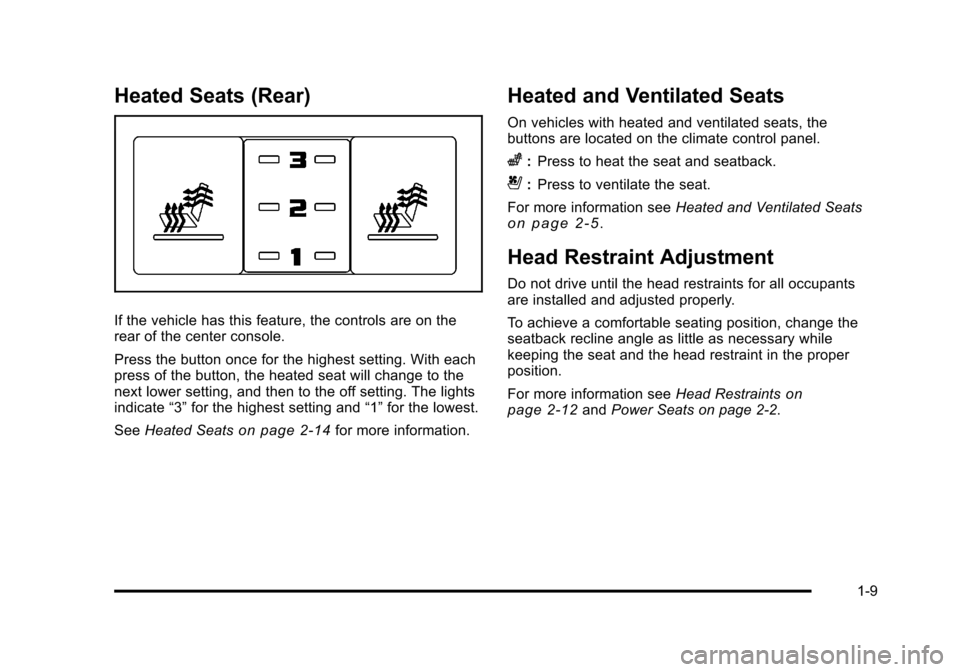
Heated Seats (Rear)
If the vehicle has this feature, the controls are on the
rear of the center console.
Press the button once for the highest setting. With each
press of the button, the heated seat will change to the
next lower setting, and then to the off setting. The lights
indicate“3”for the highest setting and “1”for the lowest.
See Heated Seats
on page 2‑14for more information.
Heated and Ventilated Seats
On vehicles with heated and ventilated seats, the
buttons are located on the climate control panel.
z:Press to heat the seat and seatback.
{:Press to ventilate the seat.
For more information see Heated and Ventilated Seats
on page 2‑5.
Head Restraint Adjustment
Do not drive until the head restraints for all occupants
are installed and adjusted properly.
To achieve a comfortable seating position, change the
seatback recline angle as little as necessary while
keeping the seat and the head restraint in the proper
position.
For more information seeHead Restraints
on
page 2‑12and Power Seats on page 2‑2.
1-9
Page 17 of 528
Black plate (11,1)Cadillac STS Owner Manual - 2011
Mirror Adjustment
Exterior Mirrors
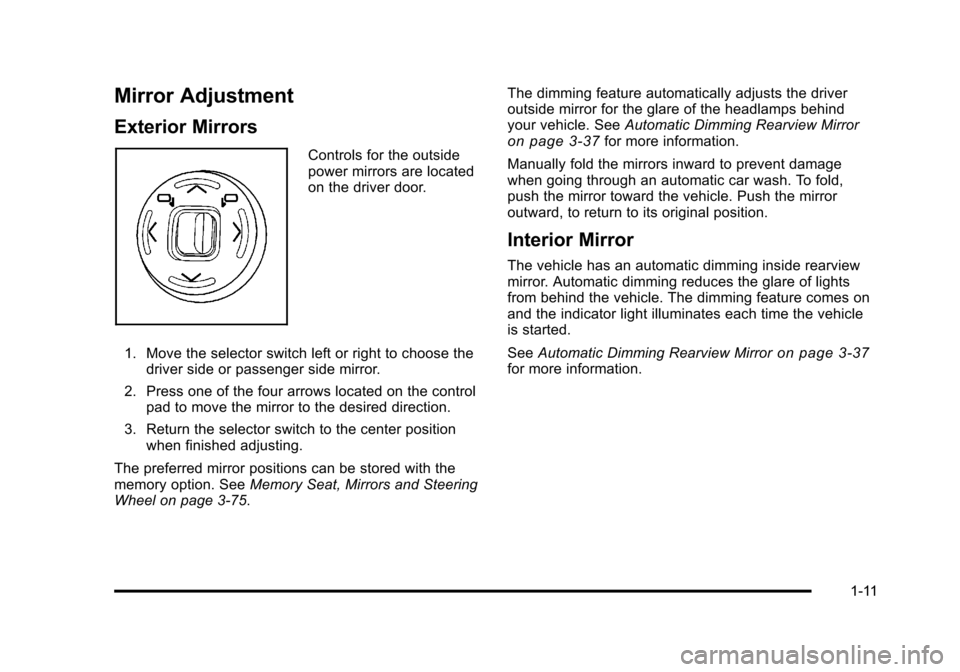
Controls for the outside
power mirrors are located
on the driver door.
1. Move the selector switch left or right to choose the driver side or passenger side mirror.
2. Press one of the four arrows located on the control pad to move the mirror to the desired direction.
3. Return the selector switch to the center position when finished adjusting.
The preferred mirror positions can be stored with the
memory option. See Memory Seat, Mirrors and Steering
Wheel on page 3‑75. The dimming feature automatically adjusts the driver
outside mirror for the glare of the headlamps behind
your vehicle. See
Automatic Dimming Rearview Mirroron page 3‑37for more information.
Manually fold the mirrors inward to prevent damage
when going through an automatic car wash. To fold,
push the mirror toward the vehicle. Push the mirror
outward, to return to its original position.
Interior Mirror
The vehicle has an automatic dimming inside rearview
mirror. Automatic dimming reduces the glare of lights
from behind the vehicle. The dimming feature comes on
and the indicator light illuminates each time the vehicle
is started.
See Automatic Dimming Rearview Mirror
on page 3‑37for more information.
1-11
Page 18 of 528
Black plate (12,1)Cadillac STS Owner Manual - 2011
Steering Wheel Adjustment
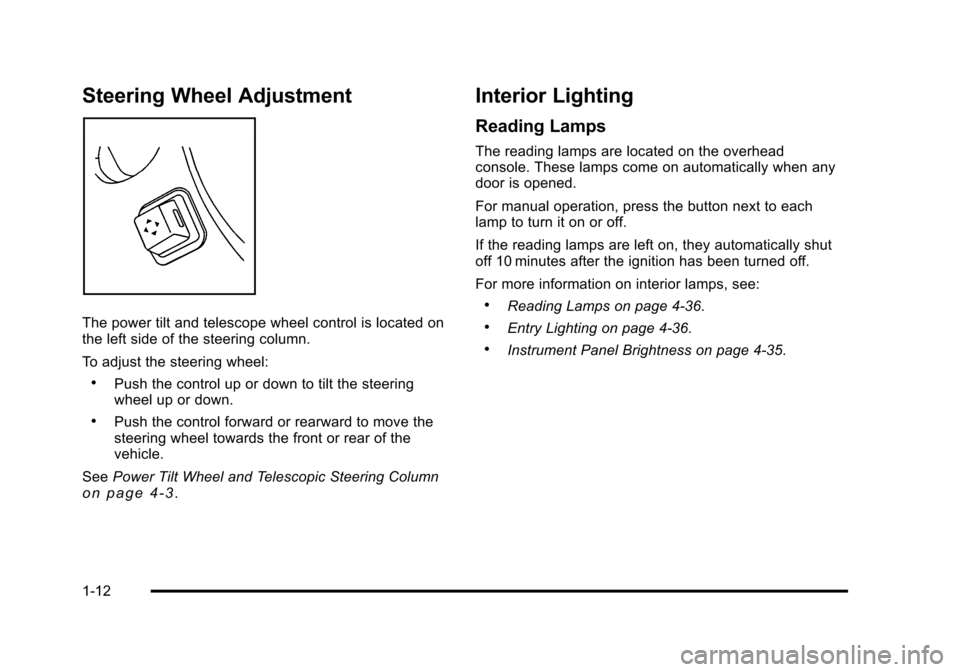
The power tilt and telescope wheel control is located on
the left side of the steering column.
To adjust the steering wheel:
.Push the control up or down to tilt the steering
wheel up or down.
.Push the control forward or rearward to move the
steering wheel towards the front or rear of the
vehicle.
See Power Tilt Wheel and Telescopic Steering Column
on page 4‑3.
Interior Lighting
Reading Lamps
The reading lamps are located on the overhead
console. These lamps come on automatically when any
door is opened.
For manual operation, press the button next to each
lamp to turn it on or off.
If the reading lamps are left on, they automatically shut
off 10 minutes after the ignition has been turned off.
For more information on interior lamps, see:
.Reading Lamps on page 4‑36.
.Entry Lighting on page 4‑36.
.Instrument Panel Brightness on page 4‑35.
1-12
Page 19 of 528
Black plate (13,1)Cadillac STS Owner Manual - 2011
Exterior Lighting
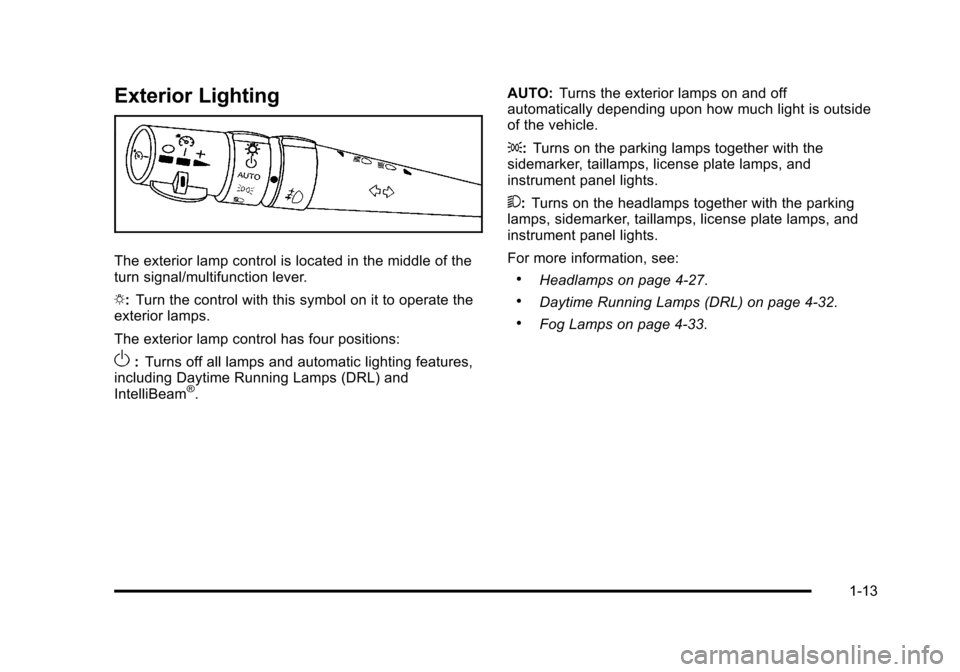
The exterior lamp control is located in the middle of the
turn signal/multifunction lever.
O:Turn the control with this symbol on it to operate the
exterior lamps.
The exterior lamp control has four positions:
O: Turns off all lamps and automatic lighting features,
including Daytime Running Lamps (DRL) and
IntelliBeam
®. AUTO:
Turns the exterior lamps on and off
automatically depending upon how much light is outside
of the vehicle.
;: Turns on the parking lamps together with the
sidemarker, taillamps, license plate lamps, and
instrument panel lights.
5: Turns on the headlamps together with the parking
lamps, sidemarker, taillamps, license plate lamps, and
instrument panel lights.
For more information, see:
.Headlamps on page 4‑27.
.Daytime Running Lamps (DRL) on page 4‑32.
.Fog Lamps on page 4‑33.
1-13
Page 26 of 528
Black plate (20,1)Cadillac STS Owner Manual - 2011
Vehicle Personalization
Some vehicle features can be programmed by using the
buttons on the remote keyless access transmitter and
the buttons on the audio system. The features that can
be programmed include:
.Driver Greeting
.Key Fob Reminder
.Remote Start
.Memory Features
.Lock and Unlock Feedback
.Lighting Features
.Door Lock and Unlock Settings
.Window Lock
.Chime Volume
.Suspension Mode
See Vehicle Personalization on page 3‑59.
Cruise Control
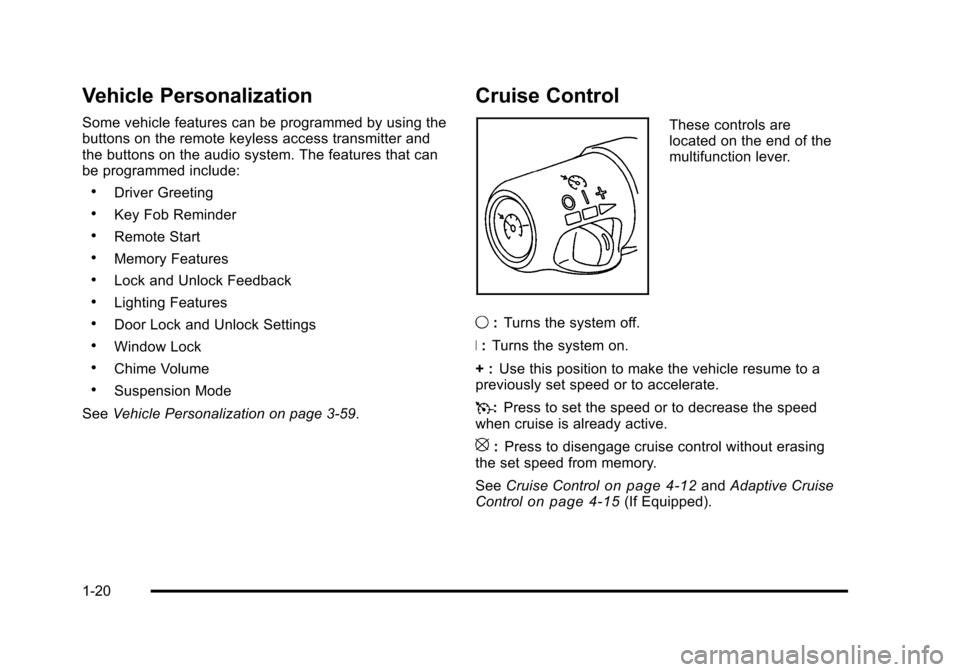
These controls are
located on the end of the
multifunction lever.
9 :Turns the system off.
R : Turns the system on.
+ : Use this position to make the vehicle resume to a
previously set speed or to accelerate.
T :Press to set the speed or to decrease the speed
when cruise is already active.
[: Press to disengage cruise control without erasing
the set speed from memory.
See Cruise Control
on page 4‑12andAdaptive Cruise
Controlon page 4‑15(If Equipped).
1-20
Page 28 of 528
Black plate (22,1)Cadillac STS Owner Manual - 2011
Tire Pressure Monitor
This vehicle may have a Tire Pressure Monitor
System (TPMS).
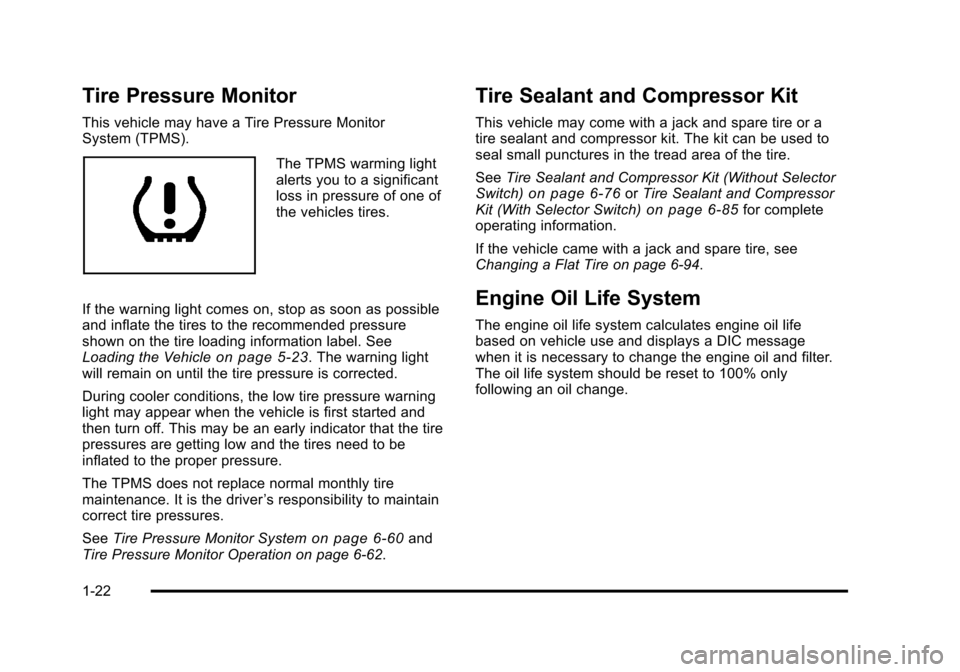
The TPMS warming light
alerts you to a significant
loss in pressure of one of
the vehicles tires.
If the warning light comes on, stop as soon as possible
and inflate the tires to the recommended pressure
shown on the tire loading information label. See
Loading the Vehicle
on page 5‑23. The warning light
will remain on until the tire pressure is corrected.
During cooler conditions, the low tire pressure warning
light may appear when the vehicle is first started and
then turn off. This may be an early indicator that the tire
pressures are getting low and the tires need to be
inflated to the proper pressure.
The TPMS does not replace normal monthly tire
maintenance. It is the driver ’s responsibility to maintain
correct tire pressures.
See Tire Pressure Monitor System
on page 6‑60and
Tire Pressure Monitor Operation on page 6‑62.
Tire Sealant and Compressor Kit
This vehicle may come with a jack and spare tire or a
tire sealant and compressor kit. The kit can be used to
seal small punctures in the tread area of the tire.
See Tire Sealant and Compressor Kit (Without Selector
Switch)
on page 6‑76or Tire Sealant and Compressor
Kit (With Selector Switch)on page 6‑85for complete
operating information.
If the vehicle came with a jack and spare tire, see
Changing a Flat Tire on page 6‑94.
Engine Oil Life System
The engine oil life system calculates engine oil life
based on vehicle use and displays a DIC message
when it is necessary to change the engine oil and filter.
The oil life system should be reset to 100% only
following an oil change.
1-22
Page 29 of 528
Black plate (23,1)Cadillac STS Owner Manual - 2011
Resetting the Oil Life System
1. Press the up or down arrow to scroll the DIC toshow OIL LIFE.
2. Once the XXX% ENGINE OIL LIFE menu item is highlighted, press and hold the RESET button until
the percentage shows 100%.
If the percentage does not return to 100% or if the
CHANGE ENGINE OIL SOON message comes
back on when the vehicle is started, the engine oil
life system has not reset. Repeat the procedure.
See Engine Oil Life System on page 6‑20.
Driving for Better Fuel Economy
Driving habits can affect fuel mileage. Here are some
driving tips to get the best fuel economy possible.
.Avoid fast starts and accelerate smoothly.
.Brake gradually and avoid abrupt stops.
.Avoid idling the engine for long periods of time.
.When road and weather conditions are
appropriate, use cruise control, if equipped.
.Always follow posted speed limits or drive more
slowly when conditions require.
.Keep vehicle tires properly inflated.
.Combine several trips into a single trip.
.Replace the vehicle's tires with the same TPC
Spec number molded into the tire's sidewall near
the size.
.Follow recommended scheduled maintenance.
Roadside Service
U.S. or Canada: 1-800-882-1112
TTY Users: 1-888-889-2438
As the owner of a new Cadillac, you are automatically
enrolled in the Roadside Service program which is
available 24 hours a day, 365 days a year to give minor
repair information or make towing arrangements.
For more information see Roadside Service
on
page 1‑23.
Roadside Service and OnStar
If you have a current OnStar subscription, press
the
Qbutton and the current GPS location will be sent
to an OnStar Advisor who will assess your problem,
contact Roadside Service, and relay exact location to
get you the help you need.
1-23