audio CADILLAC STS 2011 1.G Owners Manual
[x] Cancel search | Manufacturer: CADILLAC, Model Year: 2011, Model line: STS, Model: CADILLAC STS 2011 1.GPages: 528, PDF Size: 4.96 MB
Page 1 of 528

Black plate (1,1)Cadillac STS Owner Manual - 2011
2011 Cadillac STS Owner ManualM
In Brief. . . . . . . . . . . . . . . . . . . . . . . . . . . . . . . . . . . . . . . . . . . . 1-1
Instrument Panel . . . . . . . . . . . . . . . . . . . . . . . . . . . . . . . . . 1-2
Initial Drive Information . . . . . . . . . . . . . . . . . . . . . . . . . . . 1-4
Vehicle Features . . . . . . . . . . . . . . . . . . . . . . . . . . . . . . . . 1-16
Performance and Maintenance . . . . . . . . . . . . . . . . . . 1-21
Seats and Restraint System . . . . . . . . . . . . . . . . . . . . . . 2-1
Front Seats . . . . . . . . . . . . . . . . . . . . . . . . . . . . . . . . . . . . . . . 2-2
Rear Seats . . . . . . . . . . . . . . . . . . . . . . . . . . . . . . . . . . . . . . 2-14
Safety Belts . . . . . . . . . . . . . . . . . . . . . . . . . . . . . . . . . . . . . 2-14
Child Restraints . . . . . . . . . . . . . . . . . . . . . . . . . . . . . . . . . 2-34
Airbag System . . . . . . . . . . . . . . . . . . . . . . . . . . . . . . . . . . 2-57
Restraint System Check . . . . . . . . . . . . . . . . . . . . . . . . . 2-72
Features and Controls . . . . . . . . . . . . . . . . . . . . . . . . . . . . 3-1
Keys . . . . . . . . . . . . . . . . . . . . . . . . . . . . . . . . . . . . . . . . . . . . . 3-3
Doors and Locks . . . . . . . . . . . . . . . . . . . . . . . . . . . . . . . . 3-12
Windows . . . . . . . . . . . . . . . . . . . . . . . . . . . . . . . . . . . . . . . . 3-18
Theft-Deterrent Systems . . . . . . . . . . . . . . . . . . . . . . . . 3-22
Starting and Operating Your Vehicle . . . . . . . . . . . . . 3-25
Mirrors . . . . . . . . . . . . . . . . . . . . . . . . . . . . . . . . . . . . . . . . . . 3-37
Object Detection Systems . . . . . . . . . . . . . . . . . . . . . . . 3-41
Universal Home Remote System . . . . . . . . . . . . . . . . 3-49 Storage Areas . . . . . . . . . . . . . . . . . . . . . . . . . . . . . . . . . . . 3-56
Sunroof . . . . . . . . . . . . . . . . . . . . . . . . . . . . . . . . . . . . . . . . . 3-57
Vehicle Personalization . . . . . . . . . . . . . . . . . . . . . . . . . 3-59
Instrument Panel . . . . . . . . . . . . . . . . . . . . . . . . . . . . . . . . . 4-1
Instrument Panel Overview . . . . . . . . . . . . . . . . . . . . . . . 4-3
Climate Controls . . . . . . . . . . . . . . . . . . . . . . . . . . . . . . . . 4-43
Warning Lights, Gauges, and Indicators . . . . . . . . . 4-51
Driver Information Center (DIC) . . . . . . . . . . . . . . . . . 4-69
Audio System(s) . . . . . . . . . . . . . . . . . . . . . . . . . . . . . . . . 4-94
Driving Your Vehicle . . . . . . . . . . . . . . . . . . . . . . . . . . . . . . 5-1
Your Driving, the Road, and the Vehicle . . . . . . . . . . 5-2
Towing . . . . . . . . . . . . . . . . . . . . . . . . . . . . . . . . . . . . . . . . . . 5-29
Service and Appearance Care . . . . . . . . . . . . . . . . . . . 6-1
Service . . . . . . . . . . . . . . . . . . . . . . . . . . . . . . . . . . . . . . . . . . . 6-4
Fuel . . . . . . . . . . . . . . . . . . . . . . . . . . . . . . . . . . . . . . . . . . . . . . 6-6
Checking Things Under the Hood . . . . . . . . . . . . . . . 6-12
All-Wheel Drive . . . . . . . . . . . . . . . . . . . . . . . . . . . . . . . . . 6-43
Rear Axle . . . . . . . . . . . . . . . . . . . . . . . . . . . . . . . . . . . . . . . 6-44
Front Axle . . . . . . . . . . . . . . . . . . . . . . . . . . . . . . . . . . . . . . . 6-45
Headlamp Aiming . . . . . . . . . . . . . . . . . . . . . . . . . . . . . . . 6-46
Page 5 of 528
Black plate (5,1)Cadillac STS Owner Manual - 2011
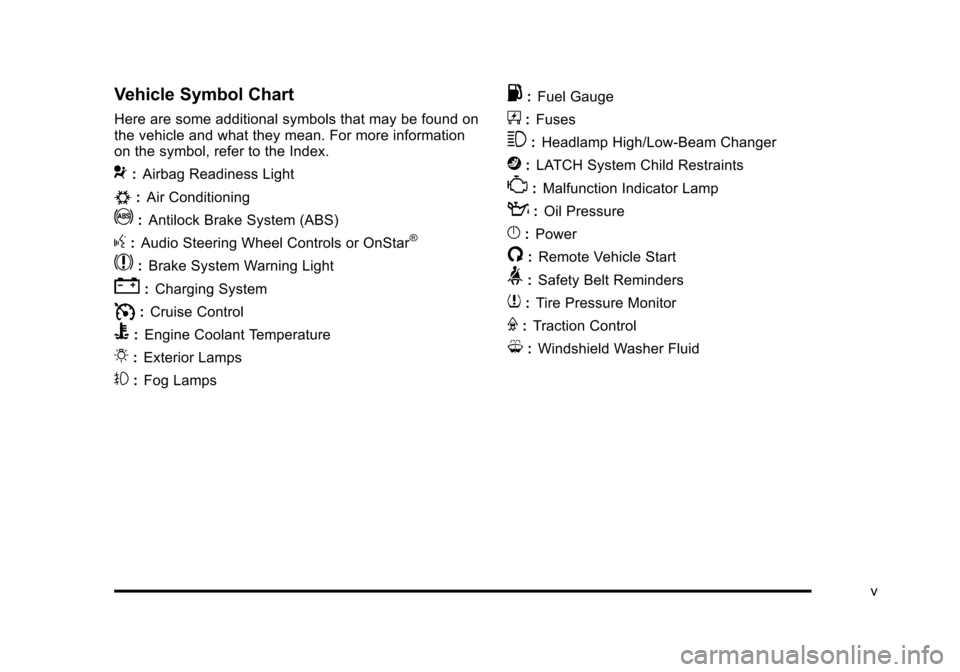
Vehicle Symbol Chart
Here are some additional symbols that may be found on
the vehicle and what they mean. For more information
on the symbol, refer to the Index.
9:Airbag Readiness Light
#:Air Conditioning
!:Antilock Brake System (ABS)
g:Audio Steering Wheel Controls or OnStar®
$: Brake System Warning Light
":Charging System
I:Cruise Control
B: Engine Coolant Temperature
O:Exterior Lamps
#:Fog Lamps
.: Fuel Gauge
+:Fuses
3: Headlamp High/Low-Beam Changer
j:LATCH System Child Restraints
*: Malfunction Indicator Lamp
::Oil Pressure
}:Power
/:Remote Vehicle Start
>:Safety Belt Reminders
7:Tire Pressure Monitor
F:Traction Control
M:Windshield Washer Fluid
v
Page 9 of 528

Black plate (3,1)Cadillac STS Owner Manual - 2011
A.Outlet Adjustment on page 4‑48.
B. Instrument Panel Brightness
on page 4‑35.
DIC Operation and Displays on page 4‑70.
Head-Up Display (HUD)
on page 4‑38(If Equipped).
C. Turn Signal/Multifunction Lever on page 4‑4.
Headlamps on page 4‑27.
Cruise Control on page 4‑12.
Adaptive Cruise Control
on page 4‑15(If Equipped).
Forward Collision Alert (FCA) System
on
page 4‑6(If Equipped).
D. Instrument Panel Cluster on page 4‑52.
E. Windshield Wipers on page 4‑10.
F. Audio System(s)
on page 4‑94.
Navigation/Radio System
on page 4‑113(If Equipped). G.
Audio Steering Wheel Controls
on page 4‑124(If Equipped).
Adaptive Cruise Control
on page 4‑15(If Equipped).
Heated Steering Wheel
on page 4‑4(If Equipped).
H. Data Link Connector (DLC). See Malfunction
Indicator Lamp on page 4‑62.
I. Power Tilt Wheel and Telescopic Steering Column
on page 4‑3.
J. Horn on page 4‑3.
K. Ignition Positions on page 3‑26.
L. Dual Climate Control System
on page 4‑43.
M. Hazard Warning Flashers on page 4‑3.
N. Cupholders on page 3‑56.
O. Traction Control System (TCS) on page 5‑9.
P. Shift Lever. See Automatic Transmission Operation
on page 3‑30.
Q. Glove Box on page 3‑56.
1-3
Page 14 of 528
Black plate (8,1)Cadillac STS Owner Manual - 2011
Memory Features
If the vehicle has the memory feature, you can program
and recall memory settings for the following features for
up to two drivers:
.The driver seat
.The outside rearview mirrors
.The power tilt wheel and telescopic steering
column
The following settings and presets are set automatically:
.The language, radio and XM™ presets, tone,
volume, playback mode (AM/FM or CD), last
displayed stations, and compact disc position
.The last climate control setting
.The Head-Up Display (HUD) position, if your
vehicle has this feature
.Other personalization settings, for example, remote
start settings
See Memory Seat, Mirrors and Steering Wheel
on
page 2‑5and Vehicle Personalizationon
page 3‑59for more information.
For vehicles with the base audio system, memory
features are programmed and recalled using the
radio menu. For vehicles with the Navigation system, memory
features are programmed and recalled using the
navigation display or voice commands. See
“Personalization”
and“Voice Recognition” in the Index
of the Navigation System manual for more information.
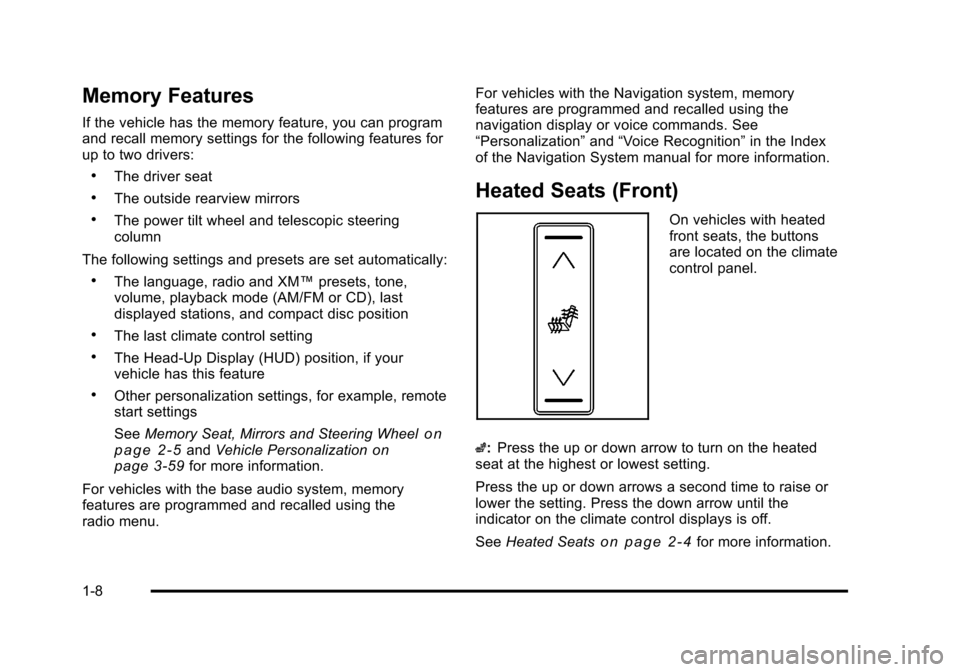
Heated Seats (Front)
On vehicles with heated
front seats, the buttons
are located on the climate
control panel.
z: Press the up or down arrow to turn on the heated
seat at the highest or lowest setting.
Press the up or down arrows a second time to raise or
lower the setting. Press the down arrow until the
indicator on the climate control displays is off.
See Heated Seats
on page 2‑4for more information.
1-8
Page 24 of 528
Black plate (18,1)Cadillac STS Owner Manual - 2011
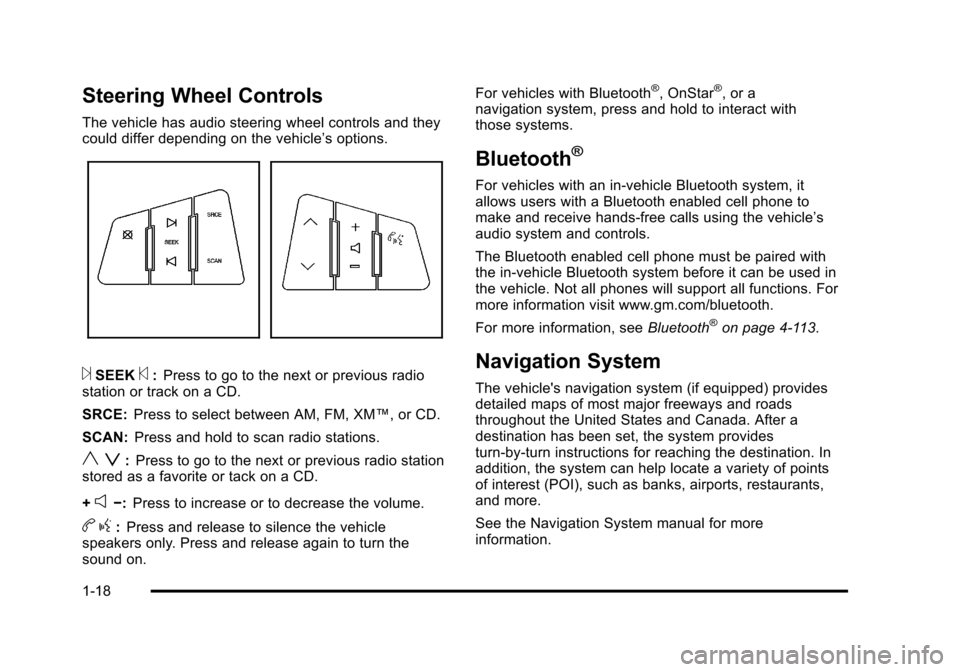
Steering Wheel Controls
The vehicle has audio steering wheel controls and they
could differ depending on the vehicle’s options.
¨SEEK©:Press to go to the next or previous radio
station or track on a CD.
SRCE: Press to select between AM, FM, XM™, or CD.
SCAN: Press and hold to scan radio stations.
y z:Press to go to the next or previous radio station
stored as a favorite or tack on a CD.
+
e−: Press to increase or to decrease the volume.
bg:Press and release to silence the vehicle
speakers only. Press and release again to turn the
sound on. For vehicles with Bluetooth
®, OnStar®, or a
navigation system, press and hold to interact with
those systems.
Bluetooth®
For vehicles with an in-vehicle Bluetooth system, it
allows users with a Bluetooth enabled cell phone to
make and receive hands-free calls using the vehicle’s
audio system and controls.
The Bluetooth enabled cell phone must be paired with
the in-vehicle Bluetooth system before it can be used in
the vehicle. Not all phones will support all functions. For
more information visit www.gm.com/bluetooth.
For more information, see Bluetooth
®on page 4‑113.
Navigation System
The vehicle's navigation system (if equipped) provides
detailed maps of most major freeways and roads
throughout the United States and Canada. After a
destination has been set, the system provides
turn-by-turn instructions for reaching the destination. In
addition, the system can help locate a variety of points
of interest (POI), such as banks, airports, restaurants,
and more.
See the Navigation System manual for more
information.
1-18
Page 26 of 528
Black plate (20,1)Cadillac STS Owner Manual - 2011
Vehicle Personalization
Some vehicle features can be programmed by using the
buttons on the remote keyless access transmitter and
the buttons on the audio system. The features that can
be programmed include:
.Driver Greeting
.Key Fob Reminder
.Remote Start
.Memory Features
.Lock and Unlock Feedback
.Lighting Features
.Door Lock and Unlock Settings
.Window Lock
.Chime Volume
.Suspension Mode
See Vehicle Personalization on page 3‑59.
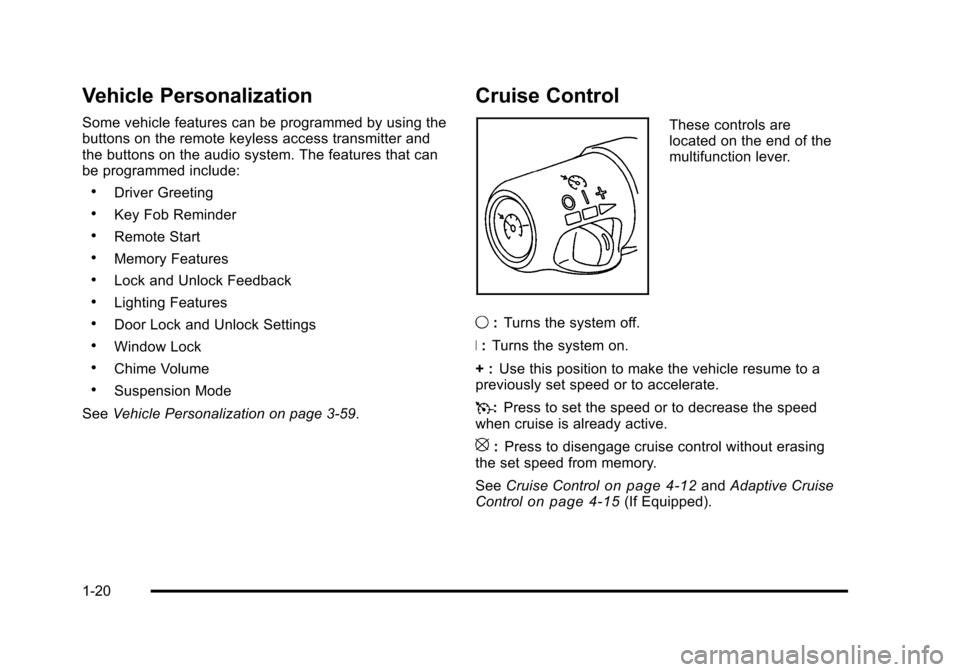
Cruise Control
These controls are
located on the end of the
multifunction lever.
9 :Turns the system off.
R : Turns the system on.
+ : Use this position to make the vehicle resume to a
previously set speed or to accelerate.
T :Press to set the speed or to decrease the speed
when cruise is already active.
[: Press to disengage cruise control without erasing
the set speed from memory.
See Cruise Control
on page 4‑12andAdaptive Cruise
Controlon page 4‑15(If Equipped).
1-20
Page 31 of 528
Black plate (25,1)Cadillac STS Owner Manual - 2011
OnStar service requires wireless communication
networks and the Global Positioning System (GPS)
satellite network. Not all OnStar services are available
everywhere or on all vehicles at all times.
OnStar service can’t work unless your vehicle is in
a place where OnStar has an agreement with a
wireless service provider for service in that area, and
the wireless service provider has coverage, network
capacity, reception, and technology compatible with
OnStar's service. Service involving location information
about your vehicle can’t work unless GPS signals are
available, unobstructed, and compatible with the OnStar
hardware. The vehicle has to have a working electrical
system and adequate battery power for the OnStar
equipment to operate. OnStar service may not work if
the OnStar equipment isn’t properly installed or you
haven’t maintained it and your vehicle is in good
working order and in compliance with all government
regulations. If you try to add, connect, or modify any
equipment or software in your vehicle, OnStar service
may not work. Other problems OnStar can’t control may
prevent service to you, such as hills, tall buildings,
tunnels, weather, electrical system design and
architecture of your vehicle, damage to important parts
of your vehicle in a crash, or wireless phone network
congestion or jamming.See
Radio Frequency Statementon page 8‑20for information regarding Part 15 of the Federal
Communications Commission (FCC) rules and
Industry Canada Standards RSS-210/220/310.
OnStar Steering Wheel Controls
This vehicle may have a Talk/Mute button that can be
used to interact with OnStar Hands-Free calling. See
Audio Steering Wheel Controls
on page 4‑124for more
information.
On some vehicles, the mute button can be used to dial
numbers into voice mail systems, or to dial phone
extensions. See the OnStar Owner's Guide for more
information.
Your Responsibility
Increase the volume of the radio if the OnStar advisor
cannot be heard.
If the light next to the OnStar buttons is red, the system
may not be functioning properly. Push the
Qbutton and
request a vehicle diagnostic. If the light appears clear
(no light appears), your OnStar subscription has
expired and all services have been deactivated. Push
the
Qbutton to confirm that the OnStar equipment is
active.
1-25
Page 38 of 528
Black plate (6,1)Cadillac STS Owner Manual - 2011
For vehicles with the base audio system, memory
features are programmed and recalled through the radio
from the DRIVER SELECTION and the DRIVER EXIT
SETTINGS submenus. See“Entering the Driver
Selection Submenu” and“Entering the Driver Exit
Settings Submenu” later in this section for more
information on recalling and programming the memory
settings using the base audio system.
For vehicles with the Navigation system, memory
features are programmed and recalled through the
navigation display. See “Personalization”in the Index of
the Navigation System manual for more information on
programming and recalling the memory settings using
the Navigation system.
For vehicles with the Navigation system, you can also
recall the memory features by using voice recognition,
if your vehicle has this feature. See “Voice Recognition”
in the Index of the Navigation System manual for more
information.Entering the Driver Selection Submenu
To enter the memory programming mode for your driver
settings:
1. The ignition must be either on, in ACCESSORY, or in RAP and the transmission in P (Park) or the
vehicle speed less than 6 mph (9 km/h).
2. Press any button on the appropriate keyless access transmitter to identify yourself as Driver 1 or
Driver 2.
3. Turn on the radio by pressing the power/ volume knob.
4. Press the CNFG radio button to enter the main menu of the radio.
5. Turn the tune/select knob and scroll to SETUP.
6. Press the tune/select knob to enter the SETUP menu.
7. Turn the tune/select knob and scroll to DRIVER SELECTION.
8. Press the tune/select knob to enter the DRIVER SELECTION submenu. The following items will
appear:
.DRIVER 1
.DRIVER 2
.RECALL DRIVER SETTINGS
.STORE DRIVER SETTINGS
2-6
Page 40 of 528
Black plate (8,1)Cadillac STS Owner Manual - 2011
STORE DRIVER SETTINGS
To store driver settings:1. Adjust your settings for the driver seat, the outside rearview mirrors, and the steering column to a
comfortable driving position.
2. Enter the memory programming mode for your driver settings by following the instructions listed
previously under “Entering the Driver Selection
Submenu.”
3. From the DRIVER SELECTION submenu, turn the tune/select knob to scroll to STORE DRIVER
SETTINGS and press in the knob. Two beeps will
sound to confirm that your driver settings are
saved.
4. Set the HUD position, if your vehicle has this feature, the climate control temperature, fan speed
and mode settings, the radio presets, tone,
volume, playback mode (AM/FM, XM™, or CD),
and compact disc position.
Your memory settings are now programmed.
Any changes that are made to the HUD, audio
system, and climate controls while driving will be
automatically stored when the ignition is turned off.
5. Repeat the procedure for a second driver by programming the other driver number.
Entering the Driver Exit Settings
Submenu
To enter the memory programming mode for your exit
settings:
1. The ignition must be either on, in ACCESSORY, or in RAP and the transmission in P (Park) or
the vehicle speed less than 6 mph (9 km/h).
2. Press any button on the appropriate keyless access transmitter to identify yourself as
Driver 1 or Driver 2.
3. Turn on the radio by pressing the power/ volume knob.
4. Press the CNFG radio button to enter the main menu of the radio.
5. Turn the tune/select knob and scroll to SETUP.
6. Press the tune/select knob to enter the SETUP menu.
7. Turn the tune/select knob and scroll to DRIVER EXIT SETTINGS.
8. Press the tune/select knob to enter the DRIVER EXIT SETTINGS submenu. The following items
will appear:
.RECALL EXIT SETTINGS
.STORE EXIT SETTINGS
2-8
Page 133 of 528
Black plate (27,1)Cadillac STS Owner Manual - 2011
If the engine is off, press this button to turn on the
accessory mode. ACCESSORY ACTIVE will display on
the Driver Information Center (DIC). Accessory mode
allows use of the audio system and windshield wipers.
Accessory mode must be used if the vehicle must be
towed or in motion when the engine is not running.
After the vehicle has been in accessory mode for more
than 20 minutes, the vehicle will enter RAP or turn off,
depending on if the doors are opened or closed.
Retained Accessory Power (RAP)
These vehicle accessories can be used for up to
20 minutes after the engine is turned off:
.Audio System
.Audio Steering Wheel Controls
.Power Windows
Power to these accessories will work up to 20 minutes
or until one of the front doors is opened. For an
additional 20 minutes of operation, close all the doors
and press Acc. to place the vehicle in accessory mode.
Press the button again to return to RAP.
Starting the Engine
To place the transmission in the proper gear:
Move the shift lever to P (Park) or N (Neutral). To restart
the engine when the vehicle is already moving, use
N (Neutral).
Notice: Do not try to shift to P (Park) if the
vehicle is moving. If you do, you could damage
the transmission. Shift to P (Park) only when the
vehicle is stopped.
The keyless access transmitter must be inside the
vehicle for the ignition to work.
Cell phone chargers can interfere with the operation of
the Keyless Access System. Battery chargers should
not be plugged in when starting or turning off the
engine.
To start the vehicle, do the following:
Starting Procedure
1. With your foot on the brake pedal, press the START button located on the instrument panel.
If there is not a keyless access transmitter
in the vehicle or if there is something causing
interference with it, the DIC will display NO FOBS
DETECTED. See DIC Warnings and Messages
on
page 4‑76for more information.
3-27