phone CADILLAC STS 2011 1.G Owners Manual
[x] Cancel search | Manufacturer: CADILLAC, Model Year: 2011, Model line: STS, Model: CADILLAC STS 2011 1.GPages: 528, PDF Size: 4.96 MB
Page 24 of 528
Black plate (18,1)Cadillac STS Owner Manual - 2011
Steering Wheel Controls
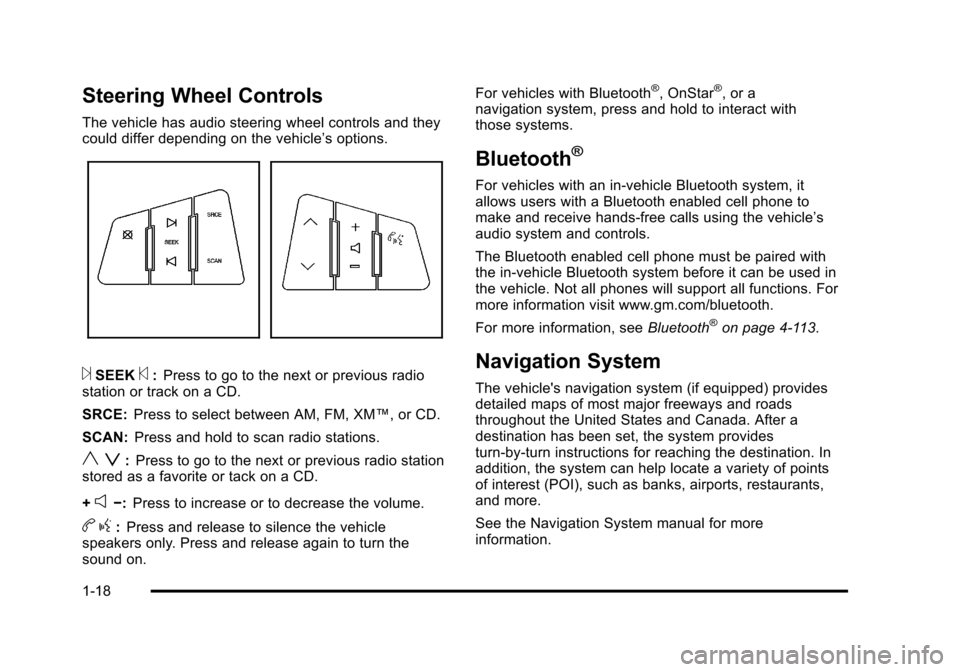
The vehicle has audio steering wheel controls and they
could differ depending on the vehicle’s options.
¨SEEK©:Press to go to the next or previous radio
station or track on a CD.
SRCE: Press to select between AM, FM, XM™, or CD.
SCAN: Press and hold to scan radio stations.
y z:Press to go to the next or previous radio station
stored as a favorite or tack on a CD.
+
e−: Press to increase or to decrease the volume.
bg:Press and release to silence the vehicle
speakers only. Press and release again to turn the
sound on. For vehicles with Bluetooth
®, OnStar®, or a
navigation system, press and hold to interact with
those systems.
Bluetooth®
For vehicles with an in-vehicle Bluetooth system, it
allows users with a Bluetooth enabled cell phone to
make and receive hands-free calls using the vehicle’s
audio system and controls.
The Bluetooth enabled cell phone must be paired with
the in-vehicle Bluetooth system before it can be used in
the vehicle. Not all phones will support all functions. For
more information visit www.gm.com/bluetooth.
For more information, see Bluetooth
®on page 4‑113.
Navigation System
The vehicle's navigation system (if equipped) provides
detailed maps of most major freeways and roads
throughout the United States and Canada. After a
destination has been set, the system provides
turn-by-turn instructions for reaching the destination. In
addition, the system can help locate a variety of points
of interest (POI), such as banks, airports, restaurants,
and more.
See the Navigation System manual for more
information.
1-18
Page 27 of 528
Black plate (21,1)Cadillac STS Owner Manual - 2011
Power Outlets
Accessory power outlets can be used to plug in
electrical equipment, such as a cellphone or MP3
player.
The vehicle has one outlet in front of the center
console, one in the center console lid and there may be
an additional outlet in the rear of the center console.
SeeAccessory Power Outlet(s) on page 4‑42.
Performance and Maintenance
Traction Control System (TCS)
The traction control system limits wheel spin. The
system turns on automatically every time the vehicle is
started.
.To turn off traction control, press and release thetbutton located on the console.iilluminates
when the system is turned off.
For more information, see Traction Control System
(TCS) on page 5‑9.
StabiliTrak®System
The StabiliTrak system assists with directional control of
the vehicle in difficult driving conditions. The system
turns on automatically every time the vehicle is started.
.To turn off both Traction Control and StabiliTrak,
press and hold
t, located on the console,
until
iilluminates and the appropriate DIC
message displays. See DIC Warnings and
Messages on page 4‑76.
.Press and release the button again to turn on both
systems.
For more information, see StabiliTrak
®Systemon
page 5‑6.
1-21
Page 31 of 528
Black plate (25,1)Cadillac STS Owner Manual - 2011
OnStar service requires wireless communication
networks and the Global Positioning System (GPS)
satellite network. Not all OnStar services are available
everywhere or on all vehicles at all times.
OnStar service can’t work unless your vehicle is in
a place where OnStar has an agreement with a
wireless service provider for service in that area, and
the wireless service provider has coverage, network
capacity, reception, and technology compatible with
OnStar's service. Service involving location information
about your vehicle can’t work unless GPS signals are
available, unobstructed, and compatible with the OnStar
hardware. The vehicle has to have a working electrical
system and adequate battery power for the OnStar
equipment to operate. OnStar service may not work if
the OnStar equipment isn’t properly installed or you
haven’t maintained it and your vehicle is in good
working order and in compliance with all government
regulations. If you try to add, connect, or modify any
equipment or software in your vehicle, OnStar service
may not work. Other problems OnStar can’t control may
prevent service to you, such as hills, tall buildings,
tunnels, weather, electrical system design and
architecture of your vehicle, damage to important parts
of your vehicle in a crash, or wireless phone network
congestion or jamming.See
Radio Frequency Statementon page 8‑20for information regarding Part 15 of the Federal
Communications Commission (FCC) rules and
Industry Canada Standards RSS-210/220/310.
OnStar Steering Wheel Controls
This vehicle may have a Talk/Mute button that can be
used to interact with OnStar Hands-Free calling. See
Audio Steering Wheel Controls
on page 4‑124for more
information.
On some vehicles, the mute button can be used to dial
numbers into voice mail systems, or to dial phone
extensions. See the OnStar Owner's Guide for more
information.
Your Responsibility
Increase the volume of the radio if the OnStar advisor
cannot be heard.
If the light next to the OnStar buttons is red, the system
may not be functioning properly. Push the
Qbutton and
request a vehicle diagnostic. If the light appears clear
(no light appears), your OnStar subscription has
expired and all services have been deactivated. Push
the
Qbutton to confirm that the OnStar equipment is
active.
1-25
Page 103 of 528
Black plate (71,1)Cadillac STS Owner Manual - 2011
Adding Equipment to Your
Airbag-Equipped Vehicle
Q: Is there anything I might add to or change aboutthe vehicle that could keep the airbags from
working properly?
A: Yes. If you add things that change your vehicle's
frame, bumper system, height, front end or side
sheet metal, they may keep the airbag system from
working properly. Changing or moving any parts of
the front seats, safety belts, the airbag sensing and
diagnostic module, steering wheel, instrument panel,
roof-rail airbag modules, ceiling headliner or pillar
garnish trim, overhead console, front sensors, side
impact sensors, or airbag wiring can affect the
operation of the airbag system.
In addition, your vehicle has a passenger sensing
system for the right front passenger's position, which
includes sensors that are part of the passenger's
seat. The passenger sensing system may not
operate properly if the original seat trim is replaced
with non-GM covers, upholstery or trim, or with GM
covers, upholstery or trim designed for a different
vehicle. Any object, such as an aftermarket seat
heater or a comfort enhancing pad or device, installed under or on top of the seat fabric, could
also interfere with the operation of the passenger
sensing system. This could either prevent proper
deployment of the passenger airbag(s) or prevent
the passenger sensing system from properly turning
off the passenger airbag(s). See
Passenger Sensing
System on page 2‑66.
If you have any questions about this, you should
contact Customer Assistance before you modify
your vehicle. The phone numbers and addresses
for Customer Assistance are in Step Two of the
Customer Satisfaction Procedure in this manual.
See Customer Satisfaction Procedure on page 8‑2.
Q: Because I have a disability, I have to get my vehicle modified. How can I find out whether this
will affect my airbag system?
A: If you have questions, call Customer Assistance.
The phone numbers and addresses for Customer
Assistance are in Step Two of the Customer
Satisfaction Procedure in this manual. See
Customer Satisfaction Procedure on page 8‑2.
In addition, your dealer and the service manual have
information about the location of the airbag sensors,
sensing and diagnostic module and airbag wiring.
2-71
Page 133 of 528
Black plate (27,1)Cadillac STS Owner Manual - 2011
If the engine is off, press this button to turn on the
accessory mode. ACCESSORY ACTIVE will display on
the Driver Information Center (DIC). Accessory mode
allows use of the audio system and windshield wipers.
Accessory mode must be used if the vehicle must be
towed or in motion when the engine is not running.
After the vehicle has been in accessory mode for more
than 20 minutes, the vehicle will enter RAP or turn off,
depending on if the doors are opened or closed.
Retained Accessory Power (RAP)
These vehicle accessories can be used for up to
20 minutes after the engine is turned off:
.Audio System
.Audio Steering Wheel Controls
.Power Windows
Power to these accessories will work up to 20 minutes
or until one of the front doors is opened. For an
additional 20 minutes of operation, close all the doors
and press Acc. to place the vehicle in accessory mode.
Press the button again to return to RAP.
Starting the Engine
To place the transmission in the proper gear:
Move the shift lever to P (Park) or N (Neutral). To restart
the engine when the vehicle is already moving, use
N (Neutral).
Notice: Do not try to shift to P (Park) if the
vehicle is moving. If you do, you could damage
the transmission. Shift to P (Park) only when the
vehicle is stopped.
The keyless access transmitter must be inside the
vehicle for the ignition to work.
Cell phone chargers can interfere with the operation of
the Keyless Access System. Battery chargers should
not be plugged in when starting or turning off the
engine.
To start the vehicle, do the following:
Starting Procedure
1. With your foot on the brake pedal, press the START button located on the instrument panel.
If there is not a keyless access transmitter
in the vehicle or if there is something causing
interference with it, the DIC will display NO FOBS
DETECTED. See DIC Warnings and Messages
on
page 4‑76for more information.
3-27
Page 162 of 528
Black plate (56,1)Cadillac STS Owner Manual - 2011
Using Universal Home Remote
Press and hold the appropriate button for at least half of
a second. The indicator light will come on while the
signal is being transmitted.
Reprogramming Universal Home
Remote Buttons
Any of the three buttons can be reprogrammed by
repeating the instructions.
Erasing Universal Home Remote
Buttons
The programmed buttons should be erased when the
vehicle is sold or the lease ends.
To erase either Rolling Code or Fixed Code on the
Universal Home Remote device:1. Press and hold the two outside buttons at the same time for approximately 20 seconds, until the
indicator lights, located directly above the buttons,
begin to blink rapidly.
2. Once the indicator lights begin to blink, release both buttons. The codes from all buttons will be
erased.
For help or information on the Universal Home Remote
System, call the customer assistance phone number
under Customer Assistance Offices on page 8‑6.
Storage Areas
Glove Box
Lift up on the glove box lever to open it.
Cupholders
The vehicle has two cupholders in the center
console area.
Center Console Storage
The vehicle has a center console storage area located
between the front seats. It includes storage areas, and
accessory power outlet(s) on the rear of the console.
Floor Mats
{WARNING:
If a floor mat is the wrong size or is not properly
installed, it can interfere with the accelerator pedal
and/or brake pedal. Interference with the pedals
can cause unintended acceleration and/or
(Continued)
3-56
Page 228 of 528
Black plate (42,1)Cadillac STS Owner Manual - 2011
Accessory Power Outlet(s)
Accessory power outlets can be used to plug in
electrical equipment, such as a cell phone or MP3
player.
The vehicle has one outlet in front of the center
console, one in the center console lid and there may be
an additional outlet in the rear of the center console.
The vehicle may have a small cap that must be
removed to access the accessory power outlet.
Replace the cap when not in use. use.
{WARNING:
Power is always supplied to the outlets. Do not
leave electrical equipment plugged in when the
vehicle is not in use because the vehicle could
catch fire and cause injury or death.Notice:
Leaving electrical equipment plugged in for
an extended period of time while the vehicle is off
will drain the battery. Always unplug electrical
equipment when not in use and do not plug in
equipment that exceeds the maximum 20 ampere
rating.
Certain accessory power plugs may not be compatible
to the accessory power outlet and could overload
vehicle and adapter fuses. If a problem is experienced,
see your dealer.
When adding electrical equipment, be sure to follow
the proper installation instructions included with the
equipment. See Add-On Electrical Equipment
on
page 6‑114.
Notice: Hanging heavy equipment from the power
outlet can cause damage not covered by the vehicle
warranty. The power outlets are designed for
accessory power plugs only, such as cell phone
charge cords.
4-42
Page 269 of 528
Black plate (83,1)Cadillac STS Owner Manual - 2011
NO FOBS DETECTED
This message displays if the vehicle does not detect the
presence of a keyless access transmitter when you
have attempted to start the vehicle or a vehicle door
has just closed. The following conditions may cause this
message to appear:
.Driver-added equipment plugged into the
accessory power outlet on the center console
is causing interference. Examples of these
devices are cell phones and cell phone chargers,
two-way radios, power inverters, or similar items.
Try moving the keyless access transmitter away
from these devices when starting the vehicle. In
addition, PDA devices and remote garage and
gate openers may also generate Electromagnetic
Interference (EMI) that may interfere with the
keyless access transmitter. Do not carry the
keyless access transmitter in the same pocket
or bag as these devices.
.The vehicle is experiencing Electromagnetic
Interference (EMI). Some locations, such as
airports, automatic toll booths, and some gas
stations, have EMI fields which may interfere
with the keyless access transmitter.
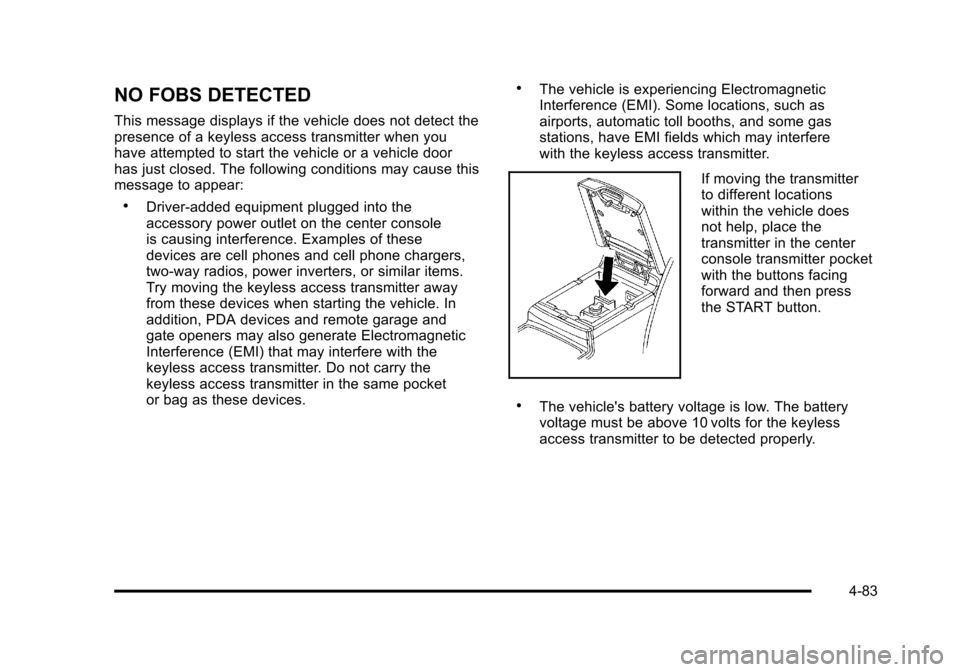
If moving the transmitter
to different locations
within the vehicle does
not help, place the
transmitter in the center
console transmitter pocket
with the buttons facing
forward and then press
the START button.
.The vehicle's battery voltage is low. The battery
voltage must be above 10 volts for the keyless
access transmitter to be detected properly.
4-83
Page 280 of 528
Black plate (94,1)Cadillac STS Owner Manual - 2011
Audio System(s)
Determine which radio the vehicle has and read the
following pages to become familiar with its features.
{WARNING:
Taking your eyes off the road for extended periods
could cause a crash resulting in injury or death to
you or others. Do not give extended attention to
entertainment tasks while driving.
This system provides access to many audio and non
audio listings. To minimize taking your eyes off the road while driving,
do the following while the vehicle is parked:
.Become familiar with the operation and controls of
the audio system.
.Set up the tone, speaker adjustments, and preset
radio stations.
For more information, see Defensive Driving
on
page 5‑2.
Notice: Contact your dealer before adding any
equipment.
Adding audio or communication equipment could
interfere with the operation of the vehicle's engine,
radio, or other systems, and could damage them.
Follow federal rules covering mobile radio and
telephone equipment.
The vehicle has Retained Accessory Power (RAP). With
RAP, the audio system can be played even after the
ignition is turned off. See Retained Accessory Power
(RAP)
on page 3‑27for more information.
4-94
Page 286 of 528
Black plate (100,1)Cadillac STS Owner Manual - 2011
Adjusting the Speakers (Balance/Fade)
To adjust the balance or fade:1. Press
wto enter the main menu.
2. Turn
wuntil BALANCE‐FADER displays.
3. Press
wto enter the settings.
4. Press
wto scroll to BALANCE or FADER.
5. Turn
wto adjust the BALANCE to the right or
the left speakers and the FADER to the front or the
rear speakers.
6. Press
wto set the adjustment.
7. Press F6 to exit the display. To return to the original display, repeatedly press F6 or wait for the
display to time out.
EQ0 does not display while in this mode.
RDS Messages
ALERT: Displays when local or national emergency
announcements are received. If the radio tunes to a
related network station for the announcement, it returns
to the original station when the announcement ends.
The announcement should be heard even if the volume
is low or a CD is playing. If a CD is playing, it will stop
playing during the announcement.
.The RDS alert feature is not supported by all RDS
radio stations.
.The RDS alert feature cannot be turned off.
.Alert is not affected by tests of the emergency
broadcast system.
Displays if the current RDS station has a message.
The message displays the artist, song title, call in phone
numbers, etc. If the entire message does not display,
parts of the message appear every three seconds until
the message is completed. MSG disappears from the
display once the completed message has displayed.
4-100