manual radio set CADILLAC STS 2011 1.G Owners Manual
[x] Cancel search | Manufacturer: CADILLAC, Model Year: 2011, Model line: STS, Model: CADILLAC STS 2011 1.GPages: 528, PDF Size: 4.96 MB
Page 14 of 528
Black plate (8,1)Cadillac STS Owner Manual - 2011
Memory Features
If the vehicle has the memory feature, you can program
and recall memory settings for the following features for
up to two drivers:
.The driver seat
.The outside rearview mirrors
.The power tilt wheel and telescopic steering
column
The following settings and presets are set automatically:
.The language, radio and XM™ presets, tone,
volume, playback mode (AM/FM or CD), last
displayed stations, and compact disc position
.The last climate control setting
.The Head-Up Display (HUD) position, if your
vehicle has this feature
.Other personalization settings, for example, remote
start settings
See Memory Seat, Mirrors and Steering Wheel
on
page 2‑5and Vehicle Personalizationon
page 3‑59for more information.
For vehicles with the base audio system, memory
features are programmed and recalled using the
radio menu. For vehicles with the Navigation system, memory
features are programmed and recalled using the
navigation display or voice commands. See
“Personalization”
and“Voice Recognition” in the Index
of the Navigation System manual for more information.
Heated Seats (Front)
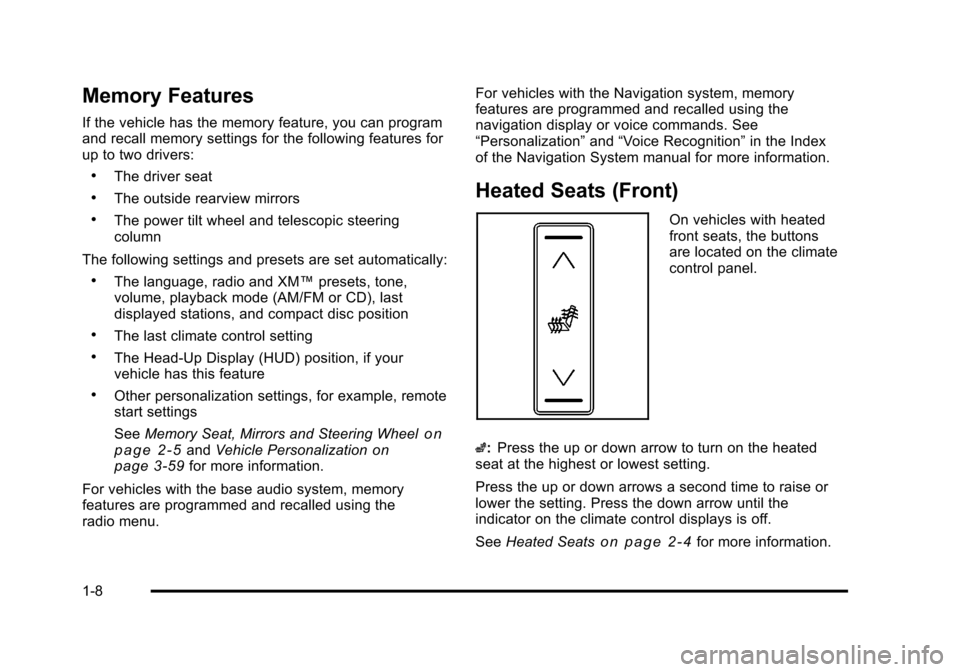
On vehicles with heated
front seats, the buttons
are located on the climate
control panel.
z: Press the up or down arrow to turn on the heated
seat at the highest or lowest setting.
Press the up or down arrows a second time to raise or
lower the setting. Press the down arrow until the
indicator on the climate control displays is off.
See Heated Seats
on page 2‑4for more information.
1-8
Page 22 of 528
Black plate (16,1)Cadillac STS Owner Manual - 2011
2. Press the shift lever forward to upshift or rearwardto downshift. See Automatic Transmission
Operation on page 3‑30.
Vehicle Features
Radio(s)
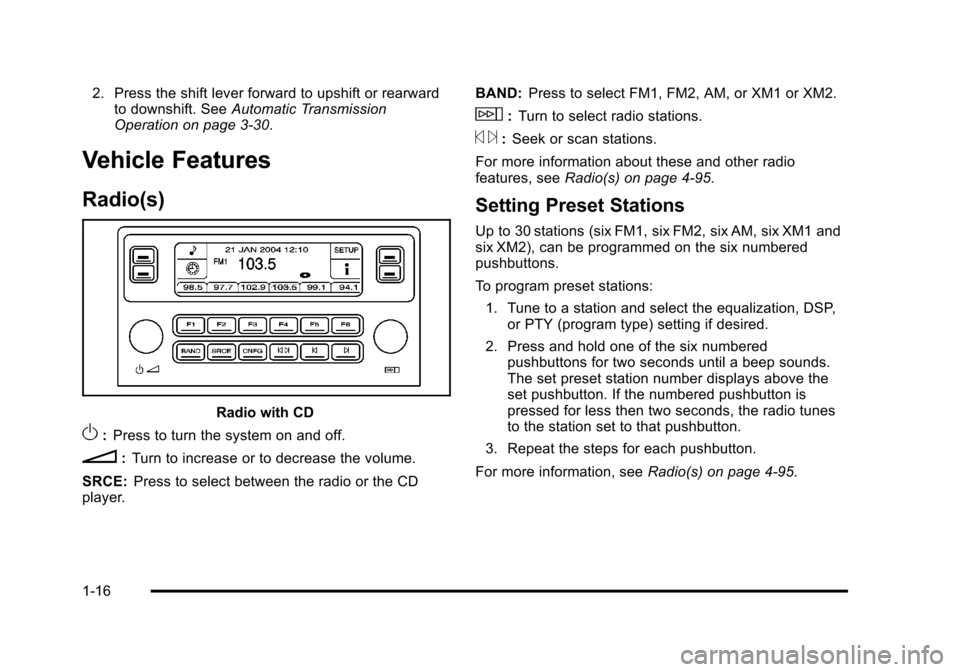
Radio with CD
O: Press to turn the system on and off.
n: Turn to increase or to decrease the volume.
SRCE: Press to select between the radio or the CD
player. BAND:
Press to select FM1, FM2, AM, or XM1 or XM2.
w:Turn to select radio stations.
© ¨:Seek or scan stations.
For more information about these and other radio
features, see Radio(s) on page 4‑95.
Setting Preset Stations
Up to 30 stations (six FM1, six FM2, six AM, six XM1 and
six XM2), can be programmed on the six numbered
pushbuttons.
To program preset stations:
1. Tune to a station and select the equalization, DSP, or PTY (program type) setting if desired.
2. Press and hold one of the six numbered pushbuttons for two seconds until a beep sounds.
The set preset station number displays above the
set pushbutton. If the numbered pushbutton is
pressed for less then two seconds, the radio tunes
to the station set to that pushbutton.
3. Repeat the steps for each pushbutton.
For more information, see Radio(s) on page 4‑95.
1-16
Page 23 of 528
Black plate (17,1)Cadillac STS Owner Manual - 2011
Setting the Clock
To adjust the time:1. Press
w, located on the radio, to enter the
main menu.
2. Turn
wuntil SET CLOCK displays.
3. Press
wto select SET CLOCK.
4. Turn
wto adjust the time.
5. Press
wto update the time and VEHICLE TIME
UPDATED displays.
To adjust the date:
1. Press
wto enter the main menu.
2. Turn
wuntil SET DATE displays.
3. Press
wto select SET DATE.
4. Turn
wto adjust the date.
5. Press
wto update the date and VEHICLE DATE
UPDATED displays.
Satellite Radio
XM is a satellite radio service that is based in the
48 contiguous United States and 10 Canadian
provinces. XM satellite radio has a wide variety
of programming and commercial-free music,
coast-to-coast, and in digital-quality sound.
A fee is required to receive the XM service.
For more information, refer to:
.www.xmradio.com or call 1-800-929-2100 (U.S.)
.www.xmradio.ca or call 1-877-438-9677 (Canada)
See “XM Satellite Radio Service” underRadio(s)
on
page 4‑95.
1-17
Page 24 of 528
Black plate (18,1)Cadillac STS Owner Manual - 2011
Steering Wheel Controls
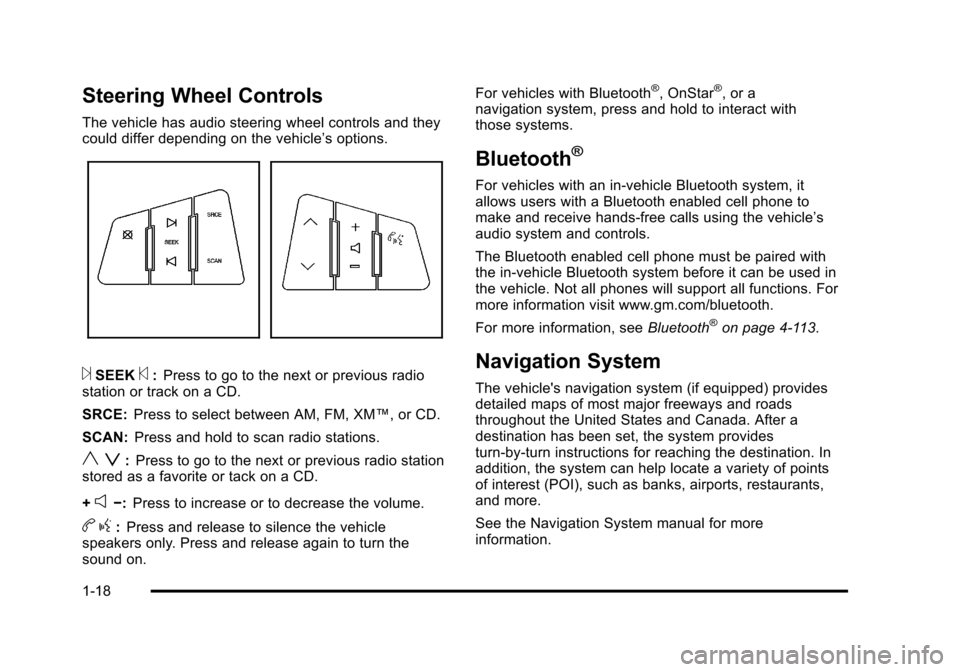
The vehicle has audio steering wheel controls and they
could differ depending on the vehicle’s options.
¨SEEK©:Press to go to the next or previous radio
station or track on a CD.
SRCE: Press to select between AM, FM, XM™, or CD.
SCAN: Press and hold to scan radio stations.
y z:Press to go to the next or previous radio station
stored as a favorite or tack on a CD.
+
e−: Press to increase or to decrease the volume.
bg:Press and release to silence the vehicle
speakers only. Press and release again to turn the
sound on. For vehicles with Bluetooth
®, OnStar®, or a
navigation system, press and hold to interact with
those systems.
Bluetooth®
For vehicles with an in-vehicle Bluetooth system, it
allows users with a Bluetooth enabled cell phone to
make and receive hands-free calls using the vehicle’s
audio system and controls.
The Bluetooth enabled cell phone must be paired with
the in-vehicle Bluetooth system before it can be used in
the vehicle. Not all phones will support all functions. For
more information visit www.gm.com/bluetooth.
For more information, see Bluetooth
®on page 4‑113.
Navigation System
The vehicle's navigation system (if equipped) provides
detailed maps of most major freeways and roads
throughout the United States and Canada. After a
destination has been set, the system provides
turn-by-turn instructions for reaching the destination. In
addition, the system can help locate a variety of points
of interest (POI), such as banks, airports, restaurants,
and more.
See the Navigation System manual for more
information.
1-18
Page 37 of 528
Black plate (5,1)Cadillac STS Owner Manual - 2011
Heated and Ventilated Seats
{WARNING:
If you cannot feel temperature change or pain to
the skin, the seat heater may cause burns even at
low temperatures. See the Warning underHeated
Seats on page 2‑4.
On vehicles with this feature, the buttons are on the
climate control panel.
z(Heated Seat and Seatback): Press to heat the seat
and seatback.
{(Ventilated Seat): Press to ventilate the seat.
Press the button once for the highest setting. With each
press of the button, the setting will change to the next
lower setting, and then to the off setting.
A light bar in the climate control display shows the
setting: high, medium, or low.
The heated or ventilated seats shut off when the vehicle
is turned off.
Memory Seat, Mirrors and Steering
Wheel
If the vehicle has the memory feature, you can program
and recall memory settings for the following features for
up to two drivers:
.The driver seat position
.The outside rearview mirrors position
.The power tilt wheel and telescopic steering
column position
The following settings and presets are set automatically:
.The language, radio and XM™ presets, tone,
volume, playback mode (AM/FM or CD), last
displayed stations, and compact disc position
.The last climate control setting
.The Head-Up Display (HUD) position, if your
vehicle has this feature
.Other personalization settings, for example, remote
start settings
See Vehicle Personalization on page 3‑59.
2-5
Page 38 of 528
Black plate (6,1)Cadillac STS Owner Manual - 2011
For vehicles with the base audio system, memory
features are programmed and recalled through the radio
from the DRIVER SELECTION and the DRIVER EXIT
SETTINGS submenus. See“Entering the Driver
Selection Submenu” and“Entering the Driver Exit
Settings Submenu” later in this section for more
information on recalling and programming the memory
settings using the base audio system.
For vehicles with the Navigation system, memory
features are programmed and recalled through the
navigation display. See “Personalization”in the Index of
the Navigation System manual for more information on
programming and recalling the memory settings using
the Navigation system.
For vehicles with the Navigation system, you can also
recall the memory features by using voice recognition,
if your vehicle has this feature. See “Voice Recognition”
in the Index of the Navigation System manual for more
information.Entering the Driver Selection Submenu
To enter the memory programming mode for your driver
settings:
1. The ignition must be either on, in ACCESSORY, or in RAP and the transmission in P (Park) or the
vehicle speed less than 6 mph (9 km/h).
2. Press any button on the appropriate keyless access transmitter to identify yourself as Driver 1 or
Driver 2.
3. Turn on the radio by pressing the power/ volume knob.
4. Press the CNFG radio button to enter the main menu of the radio.
5. Turn the tune/select knob and scroll to SETUP.
6. Press the tune/select knob to enter the SETUP menu.
7. Turn the tune/select knob and scroll to DRIVER SELECTION.
8. Press the tune/select knob to enter the DRIVER SELECTION submenu. The following items will
appear:
.DRIVER 1
.DRIVER 2
.RECALL DRIVER SETTINGS
.STORE DRIVER SETTINGS
2-6
Page 40 of 528
Black plate (8,1)Cadillac STS Owner Manual - 2011
STORE DRIVER SETTINGS
To store driver settings:1. Adjust your settings for the driver seat, the outside rearview mirrors, and the steering column to a
comfortable driving position.
2. Enter the memory programming mode for your driver settings by following the instructions listed
previously under “Entering the Driver Selection
Submenu.”
3. From the DRIVER SELECTION submenu, turn the tune/select knob to scroll to STORE DRIVER
SETTINGS and press in the knob. Two beeps will
sound to confirm that your driver settings are
saved.
4. Set the HUD position, if your vehicle has this feature, the climate control temperature, fan speed
and mode settings, the radio presets, tone,
volume, playback mode (AM/FM, XM™, or CD),
and compact disc position.
Your memory settings are now programmed.
Any changes that are made to the HUD, audio
system, and climate controls while driving will be
automatically stored when the ignition is turned off.
5. Repeat the procedure for a second driver by programming the other driver number.
Entering the Driver Exit Settings
Submenu
To enter the memory programming mode for your exit
settings:
1. The ignition must be either on, in ACCESSORY, or in RAP and the transmission in P (Park) or
the vehicle speed less than 6 mph (9 km/h).
2. Press any button on the appropriate keyless access transmitter to identify yourself as
Driver 1 or Driver 2.
3. Turn on the radio by pressing the power/ volume knob.
4. Press the CNFG radio button to enter the main menu of the radio.
5. Turn the tune/select knob and scroll to SETUP.
6. Press the tune/select knob to enter the SETUP menu.
7. Turn the tune/select knob and scroll to DRIVER EXIT SETTINGS.
8. Press the tune/select knob to enter the DRIVER EXIT SETTINGS submenu. The following items
will appear:
.RECALL EXIT SETTINGS
.STORE EXIT SETTINGS
2-8
Page 120 of 528
Black plate (14,1)Cadillac STS Owner Manual - 2011
Programmable Automatic Door
Locks
The vehicle was programmed so when the doors are
closed, the ignition is on, and the shift lever is moved
out of P (Park), all the doors will lock.
The front doors can still be opened from the inside while
the doors are locked. If a rear passenger needs to exit
the vehicle, have that person use the manual knob or
use the power door lock switch on either front door.
When the door is closed again, it will not lock
automatically. Use the manual knob or the power
door lock switch to lock the door.
The doors were also pre-programmed to unlock every
time the shift lever is moved into P (Park).
The power door locks can be programmed through the
radio display. The radio display allows you to choose
various lock and unlock settings. For more information
on programming, seeVehicle Personalization
on
page 3‑59.
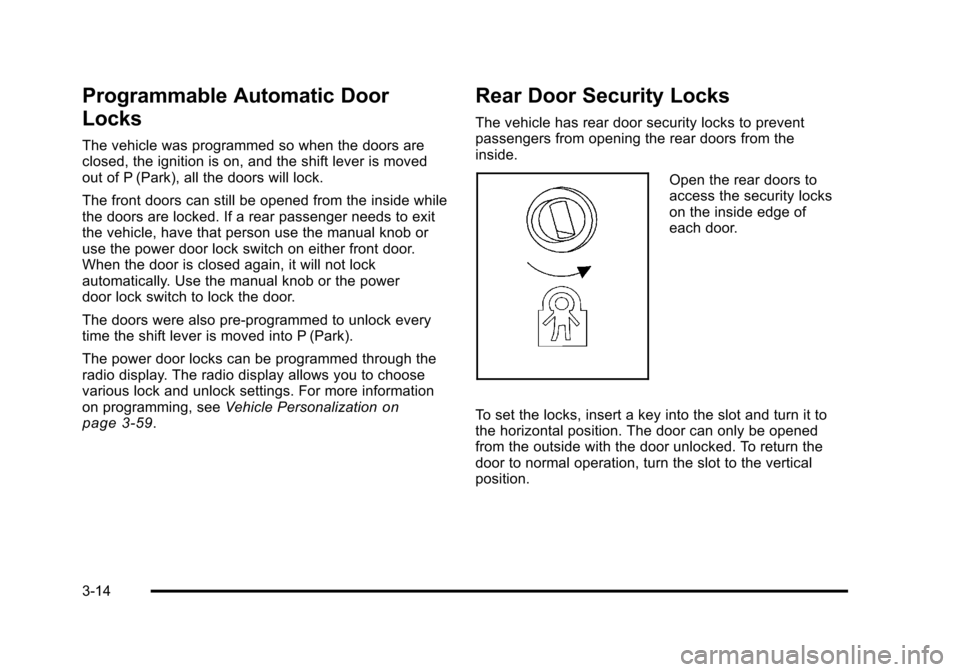
Rear Door Security Locks
The vehicle has rear door security locks to prevent
passengers from opening the rear doors from the
inside.
Open the rear doors to
access the security locks
on the inside edge of
each door.
To set the locks, insert a key into the slot and turn it to
the horizontal position. The door can only be opened
from the outside with the door unlocked. To return the
door to normal operation, turn the slot to the vertical
position.
3-14
Page 132 of 528

Black plate (26,1)Cadillac STS Owner Manual - 2011
Ignition Positions
The vehicle has an
electronic keyless ignition
with pushbutton start.
To shift out of P (Park), the vehicle must be running or
in ACCESSORY mode and the regular brake pedal
must be applied.
/ (START): Press to start the engine with your foot on
the brake pedal. The shifter must be in P (Park) or
N (Neutral) and the keyless access transmitter must be
in the vehicle.
If the start button does not work, the vehicle may be
near a strong radio antenna signal causing interference
to the keyless access system. See DIC Warnings and
Messages
on page 4‑76for more information. 9/Acc. (STOPPING THE ENGINE/OFF/
ACCESSORY):
When the vehicle is stopped with the
engine on, press the button once to turn the engine off.
If the shifter is in P (Park), RAP will engage if all doors
are closed. RAP will turn off when a front door is
opened. See Retained Accessory Power (RAP)
on
page 3‑27for more information.
Do not turn the engine off when the vehicle is moving.
This will cause a loss of power assist in the brake and
steering systems and disable the airbags.
In an emergency: 1. Brake using a firm and steady pressure. Do not pump the brakes repeatedly. This may deplete
power assist, requiring increased brake pedal
force.
2. Shift the vehicle to N (Neutral). This can be done while the vehicle is moving. After shifting
to N (Neutral), firmly apply the brakes and steer
the vehicle to a safe location.
3. Come to a complete stop, shift to P (Park), and switch the ignition to OFF. On vehicles with an
automatic transmission, the shift lever must be in
P (Park) to switch the ignition to the OFF position.
4. Set the parking brake. See Parking Brake
on
page 3‑33.
3-26
Page 165 of 528
Black plate (59,1)Cadillac STS Owner Manual - 2011
Vehicle Personalization
The vehicle has personalization that allows you to
program certain features to a preferred setting for
up to two drivers. The back of the keyless access
transmitters are labelled 1 or 2. Additional keyless
access transmitters programmed to the vehicle,
as 3 and/or 4, do not have a number on the back and
are not capable of being personalized. The number of
programmable features varies depending upon which
vehicle options are purchased.
On all vehicles, features such as climate control
settings, radio and XM™preset settings, exterior
lighting at unlock and remote lock unlock confirmation,
and language have already been programmed. Your
vehicle also has an automatic door locking feature
that is always on. You cannot turn the automatic door
locking feature off. See Programmable Automatic Door
Locks on page 3‑14.
Some vehicles have additional features that can be
programmed including the seat, steering column, and
outside rearview mirror position.
If your vehicle has the base audio system, the following
information explains the vehicle personalization on your
vehicle.
If your vehicle has the Navigation system, see
“Personalization” in the Index of the Navigation System
manual for information on vehicle personalization. If your vehicle has the ability to program additional
personalization features, the driver's preferences are
recalled by pressing any button on the keyless access
transmitter, 1 or 2, by selecting Driver 1 or 2 on the radio
display, or when a valid keyless access transmitter is
detected upon opening the driver's door.
If more than one valid keyless access transmitter is
detected upon opening the driver's door, the driver
preferences for the lowest driver number will be
recalled.
Certain features can be programmed not to recall until
the ignition is turned off.
The default settings were preset but may have been
changed.
To change feature preferences, use the following
procedure.
Entering the Personal Settings Menu
To enter the feature programming mode:
1. The ignition must be either on, in ACCESSORY, or in RAP and the transmission in P (Park) or the
vehicle speed less than 6 mph (9 km/h).
To avoid excessive drain on the battery, it is
recommended that the headlamps are turned off.
2. Press any button on the appropriate keyless access transmitter to identify yourself as Driver 1 or
Driver 2.
3-59