brake CADILLAC XLR 2004 1.G User Guide
[x] Cancel search | Manufacturer: CADILLAC, Model Year: 2004, Model line: XLR, Model: CADILLAC XLR 2004 1.GPages: 356, PDF Size: 2.36 MB
Page 83 of 356
When you move out of PARK (P) or NEUTRAL (N) and
the engine is running, the parking brake should
release. If the parking brake has not been fully released
and you try to drive off with the parking brake on, the
parking brake indicator light will come on and stay on.
If the parking brake does not fully release, you can
manually release the pedal. However, be sure to read
the following paragraphs:
{CAUTION:
Always shift to PARK (P) before pulling the
manual release lever. If your hand or arm is in
the way of the pedal you could be hurt. The
pedal springs back quickly. Keep your hand
and arm away when you use the manual
release lever.
Before releasing the manual parking brake, be sure to
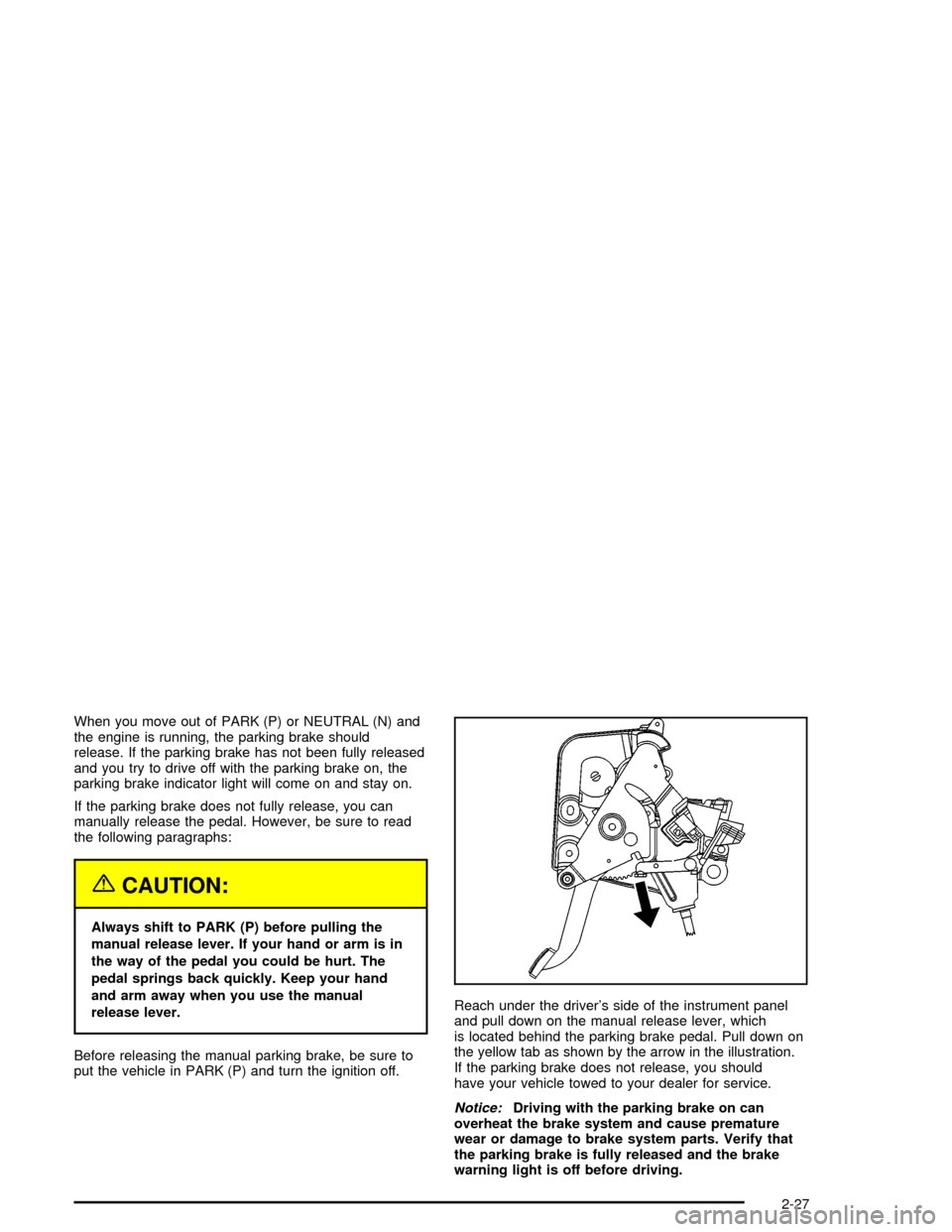
put the vehicle in PARK (P) and turn the ignition off.Reach under the driver's side of the instrument panel
and pull down on the manual release lever, which
is located behind the parking brake pedal. Pull down on
the yellow tab as shown by the arrow in the illustration.
If the parking brake does not release, you should
have your vehicle towed to your dealer for service.
Notice:Driving with the parking brake on can
overheat the brake system and cause premature
wear or damage to brake system parts. Verify that
the parking brake is fully released and the brake
warning light is off before driving.
2-27
Page 84 of 356
Shifting Into Park (P)
{CAUTION:
It can be dangerous to get out of your vehicle
if the shift lever is not fully in PARK (P) with
the parking brake ®rmly set. Your vehicle can
roll. If you have left the engine running, the
vehicle can move suddenly. You or others
could be injured. To be sure your vehicle will
not move, even when you are on fairly level
ground, use the steps that follow.
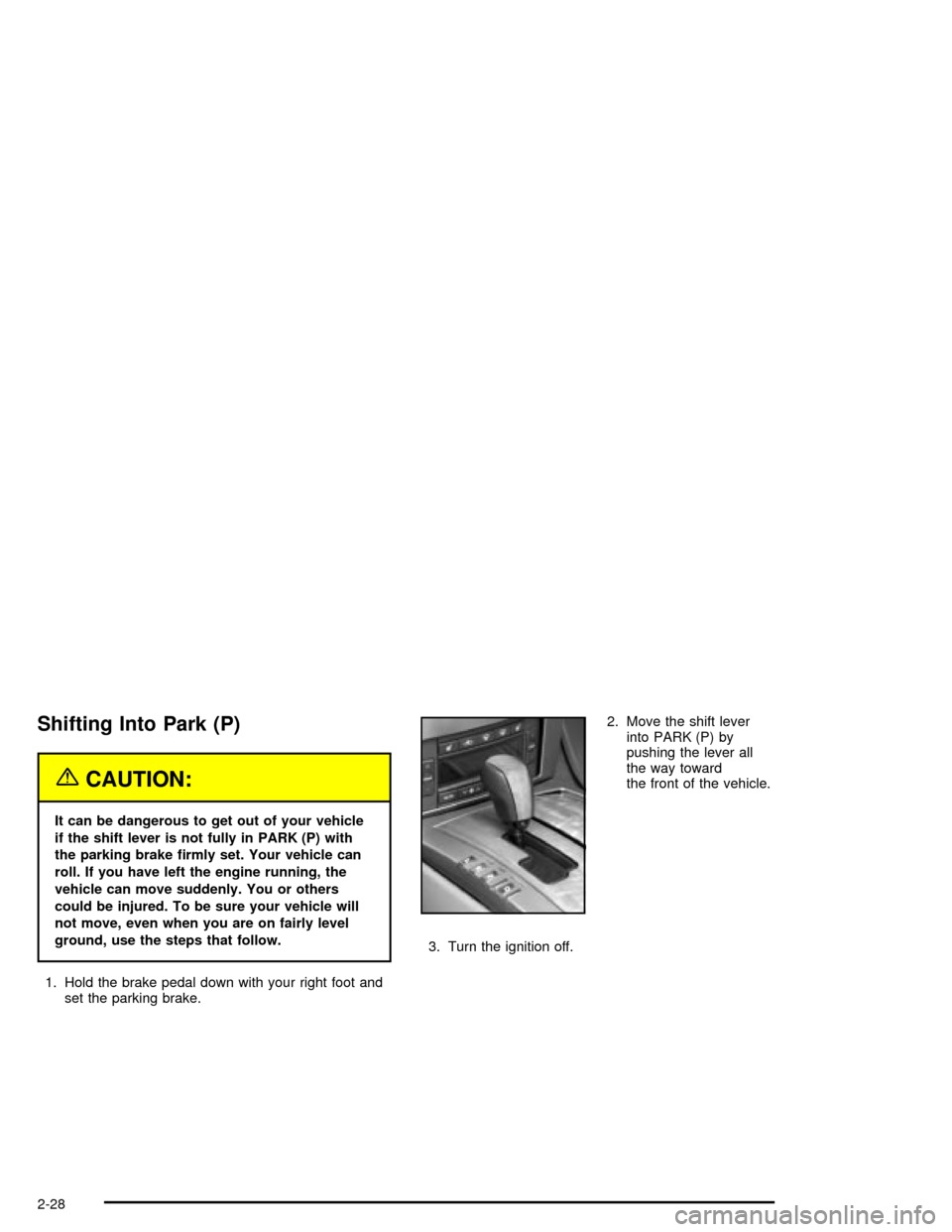
1. Hold the brake pedal down with your right foot and
set the parking brake.2. Move the shift lever
into PARK (P) by
pushing the lever all
the way toward
the front of the vehicle.
3. Turn the ignition off.
2-28
Page 85 of 356

Leaving Your Vehicle With the Engine
Running
{CAUTION:
It can be dangerous to leave your vehicle with
the engine running. Your vehicle could move
suddenly if the shift lever is not fully in
PARK (P) with the parking brake ®rmly set.
And, if you leave the vehicle with the engine
running, it could overheat and even catch ®re.
You or others could be injured. Do not leave
your vehicle with the engine running.
If you have to leave your vehicle with the engine
running, be sure your vehicle is in PARK (P) and your
parking brake is ®rmly set before you leave it. After you
have moved the shift lever into PARK (P), hold down
the regular brake pedal. See if you can move the
shift lever away from PARK (P) without ®rst pulling it
toward you. If you can, it means that the shift lever was
not fully locked into PARK (P).
Torque Lock
If you are parking on a hill and you do not shift your
transmission into PARK (P) properly, the weight of the
vehicle may put too much force on the parking pawl
in the transmission. You may ®nd it difficult to pull the
shift lever out of PARK (P). This is called ªtorque
lock.º To prevent torque lock, set the parking brake and
then shift into PARK (P) properly before you leave
the driver's seat. To ®nd out how, see ªShifting
Into PARK (P)º listed previously in this section.
When you are ready to drive, move the shift lever out of
PARK (P) before you release the parking brake.
If torque lock does occur, you may need to have another
vehicle push yours a little uphill to take some of the
pressure from the parking pawl in the transmission, so
you can pull the shift lever out of PARK (P).
2-29
Page 86 of 356

Shifting Out of Park (P)
Your vehicle has an automatic transmission shift lock
control system. You have to fully apply your regular
brake before you can shift from PARK (P) when
the vehicle is running. See
Automatic Transmission
Operation on page 2-23.
If you cannot shift out of PARK (P), ease pressure on
the shift lever ± push the shift lever all the way into
PARK (P) and release the shift lever button as
you maintain brake application. Then press the shift
lever button and move the shift lever into the gear
you wish.If you ever hold the brake pedal down but still cannot
shift out of PARK (P), try this:
1. Press the ACCESSORY button twice to place the
ignition in accessory mode.
2. Apply and hold the brake until the end of Step 4.
3. Shift to NEUTRAL (N).
4. Start the engine and then shift to the drive gear
you want.
5. Have your vehicle inspected by your dealer as soon
as possible.
2-30
Page 88 of 356

Running Your Engine While You
Are Parked
It is better not to park with the engine running. But if
you ever have to, here are some things to know.
{CAUTION:
Idling the engine with the climate control
system off could allow dangerous exhaust into
your vehicle. See the earlier Caution under
Engine Exhaust on page 2-31.
Also, idling in a closed-in place can let deadly
carbon monoxide (CO) into your vehicle even if
the climate control fan is at the highest setting.
One place this can happen is a garage.
Exhaust Ð with CO Ð can come in easily.
NEVER park in a garage with the engine
running.
Another closed-in place can be a blizzard. See
Winter Driving on page 4-28.
{CAUTION:
It can be dangerous to get out of your vehicle
if the shift lever is not fully in PARK (P) with
the parking brake ®rmly set. Your vehicle can
roll. Do not leave your vehicle when the engine
is running unless you have to. If you have left
the engine running, the vehicle can move
suddenly. You or others could be injured. To
be sure your vehicle will not move, even when
you are on fairly level ground, always set your
parking brake and move the shift lever to
PARK (P).
Follow the proper steps to be sure your vehicle will not
move. See
Shifting Into Park (P) on page 2-28.
2-32
Page 111 of 356

Instrument Panel Overview...............................3-2
Hazard Warning Flashers................................3-4
Other Warning Devices...................................3-4
Horn.............................................................3-5
Power Tilt Wheel and Telescopic Steering
Column......................................................3-5
Turn Signal/Multifunction Lever.........................3-5
Exterior Lamps.............................................3-22
Interior Lamps..............................................3-25
Head-Up Display (HUD).................................3-27
Ultrasonic Rear Parking Assist (URPA)............3-30
Accessory Power Outlets...............................3-32
Ashtrays and Cigarette Lighter........................3-33
Climate Controls............................................3-33
Dual Climate Control System..........................3-33
Outlet Adjustment.........................................3-38
Passenger Compartment Air Filter...................3-38
Warning Lights, Gages, and Indicators............3-39
Instrument Panel Cluster................................3-40
Speedometer and Odometer...........................3-41
Trip Odometer..............................................3-41
Tachometer.................................................3-41
Safety Belt Reminder Light.............................3-41
Air Bag Readiness Light................................3-42
Air Bag Off Light..........................................3-43
Voltmeter Gage............................................3-44
Brake System Warning Light..........................3-45
Anti-Lock Brake System Warning Light.............3-46Traction Control System (TCS) Warning Light . . .3-46
Engine Coolant Temperature Gage..................3-47
Tire Pressure Light.......................................3-48
Malfunction Indicator Lamp.............................3-48
Engine Oil Pressure Gage.............................3-52
Security Light...............................................3-52
Fog Lamp Light............................................3-53
Lights On Reminder......................................3-53
Fuel Gage...................................................3-54
Driver Information Center (DIC).......................3-55
DIC Controls and Displays.............................3-55
DIC Warnings and Messages.........................3-57
Other Messages...........................................3-65
DIC Vehicle Personalization............................3-66
Trip Computer................................................3-70
Oil Life Indicator...........................................3-70
Audio System(s).............................................3-70
Navigation/Radio System...............................3-71
Theft-Deterrent Feature..................................3-71
Audio Steering Wheel Controls.......................3-71
Radio Reception...........................................3-72
Care of Your CDs.........................................3-72
Care of Your CD Player................................3-72
Diversity Antenna System..............................3-73
XMŸ Satellite Radio Antenna System.............3-73
Section 3 Instrument Panel
3-1
Page 120 of 356

This device complies with RSS-210 of Industry Canada.
Operation is subject to the following two conditions:
1. This device may not cause interference, and
2. This device must accept any interference received,
including interference that may cause undesired
operation of the device.
Changes or modi®cations to this system by other than
an authorized service facility could void authorization to
use this equipment.
Adaptive Cruise Control (ACC) is an enhancement to
traditional cruise control and is not a safety system. ACC
allows you to keep cruise control engaged in moderate
traffic conditions without having to constantly reset
your cruise control. ACC uses radar to detect a vehicle
directly ahead in your path, within a distance of
328 ft (100 m), and operates at speeds above
25 mph (40 km/h). When it is engaged by the driver,
ACC can apply limited braking or acceleration of
the vehicle automatically to maintain a selected follow
distance to the vehicle ahead. ACC braking is limited to
0.3 g's (2.95 m/sec2) of deceleration, which is
comparable to moderate application of the vehicle's
brakes. To disengage ACC, apply the brake. If there is
no vehicle in your path, your vehicle will react like
traditional cruise control.
{CAUTION:
ACC will not apply hard braking or bring the
vehicle to a complete stop. ACC will not
respond to stopped vehicles, pedestrians or
animals. When you are approaching a vehicle
or object, ACC may not have time to slow your
vehicle enough to avoid a collision. Your
complete attention is always required while
driving and you should be ready to take action
and apply the brakes. For more information,
see
Defensive Driving on page 4-2.
3-10
Page 123 of 356

Once ACC is set, it may immediately apply the brakes if
it detects a vehicle ahead is too close or moving
slower than your vehicle.
This symbol will appear on
the Head-Up Display
(HUD) to indicate that ACC
is active. See
Head-Up
Display (HUD) on
page 3-27
for more
information.
Make sure the set speed is visible on the HUD so you
know the speed your vehicle will accelerate to if no
vehicle is detected in your path. Keep in mind speed
limits, surrounding traffic speeds and weather conditions
when adjusting your set speed.
Increasing Set Speed While Using ACC
There are two ways to increase set speed:
·Use the accelerator to get to the higher speed.
Press the set button at the end of the lever,
then release the button and the accelerator pedal.
You will now cruise at the higher speed.
·Move the ACC switch from on to resume/increase.
Hold it there until the desired set speed is displayed
in the HUD, then release the switch. To increase
your set speed in very small amounts, move
the switch brie¯y to resume/increase. Each time
you do this, your vehicle set speed will increase by
1 mph (1.6 km/h). Your vehicle will not reach the
set speed until ACC determines there is no vehicle
in front of you. At that point, your vehicle speed
will increase to the set speed.
Decreasing Set Speed While Using ACC
Press in the set/decrease button on the end of the lever
until you reach the lower speed you want, then
release it.
To slow down in very small amounts, brie¯y press the
set/decrease button. Each time you do this, your
set speed will be 1 mph (1.6 km/h) slower.
Resuming a Set Speed
Suppose you set your ACC at a desired speed and then
you apply the brake. This will disengage the ACC.
But you do not need to reset it.
Once you are going about 25 mph (40 km/h) or more,
you can move the ACC switch brie¯y from on to
resume/increase. ACC will be engaged with the
previously chosen set speed.
3-13
Page 125 of 356

Alerting the Driver
The alert symbol will ¯ash
on the HUD and a warning
beep will sound when
driver action is required.
Driver action is required when:
·ACC cannot apply sufficient braking because you
are approaching a vehicle too rapidly.
·The vehicle speed drops below about
20 mph (32 km/h).
·A temporary condition prohibits ACC from operating.
See
DIC Warnings and Messages on page 3-57for
more information.
·A malfunction is detected in the ACC system. See
DIC Warnings and Messages on page 3-57for
more information.
See
Defensive Driving on page 4-2for more information.
{CAUTION:
Adaptive Cruise Control has only limited
braking ability to slow your vehicle. In some
cases, ACC may not have time to slow your
vehicle enough to avoid a collision. Be ready
to take action and apply the brakes yourself.
See
Defensive Driving on page 4-2.
3-15
Page 126 of 356

Approaching and Following a Vehicle
The vehicle ahead symbol
will only appear on the
HUD when a vehicle ahead
is detected in your path.
If this symbol does not appear, or disappears brie¯y,
ACC will not respond to vehicles you may see ahead.{CAUTION:
When the ACC radar is blocked by snow, ice,
or dirt, it may not detect a vehicle ahead until
it is very close. ACC may not have time to
slow your vehicle enough to avoid a collision.
Do not use ACC when the radar is blocked by
snow, ice, or dirt. Keep your radar clean. See
ªCleaning the Systemº later in this section.
ACC will automatically slow your vehicle down when
approaching a slower moving vehicle. ACC will
then adjust your speed to follow the vehicle in front at
the selected follow distance. Your speed will increase or
decrease to follow the vehicle in front of you but will
never exceed the set speed. ACC may apply limited
braking if necessary. When braking is active, your brake
lights will come on. It may feel or sound different than
if you were applying the brakes yourself. This is normal.
3-16