steering CADILLAC XLR 2005 1.G Owner's Manual
[x] Cancel search | Manufacturer: CADILLAC, Model Year: 2005, Model line: XLR, Model: CADILLAC XLR 2005 1.GPages: 438, PDF Size: 3.69 MB
Page 140 of 438
Cleaning the System
The radar can become blocked by snow, ice or dirt. If so,
you may need to turn off the engine and clean the lens.
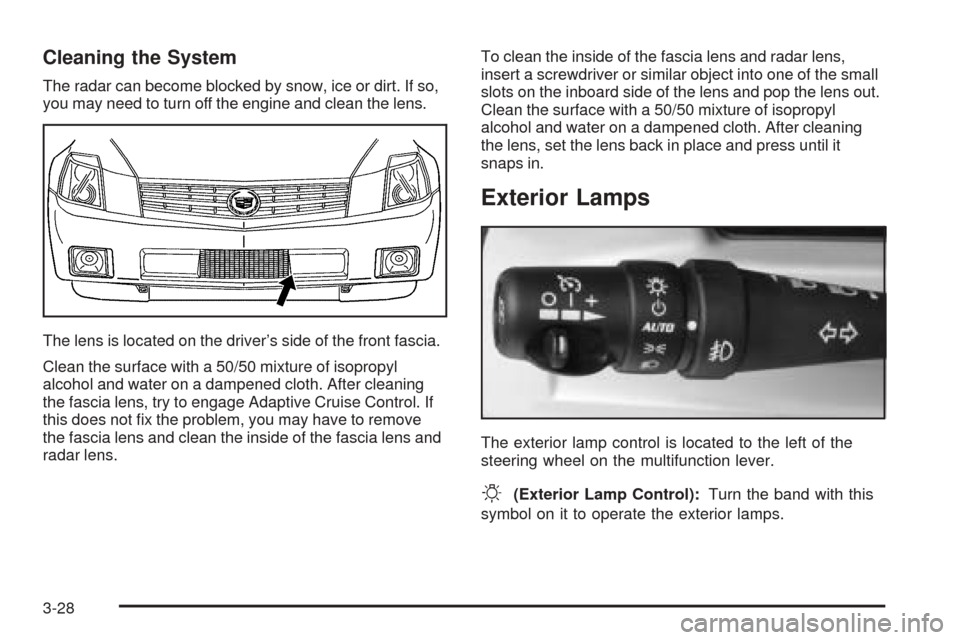
The lens is located on the driver’s side of the front fascia.
Clean the surface with a 50/50 mixture of isopropyl
alcohol and water on a dampened cloth. After cleaning
the fascia lens, try to engage Adaptive Cruise Control. If
this does not x the problem, you may have to remove
the fascia lens and clean the inside of the fascia lens and
radar lens.To clean the inside of the fascia lens and radar lens,
insert a screwdriver or similar object into one of the small
slots on the inboard side of the lens and pop the lens out.
Clean the surface with a 50/50 mixture of isopropyl
alcohol and water on a dampened cloth. After cleaning
the lens, set the lens back in place and press until it
snaps in.
Exterior Lamps
The exterior lamp control is located to the left of the
steering wheel on the multifunction lever.
O(Exterior Lamp Control):Turn the band with this
symbol on it to operate the exterior lamps.
3-28
Page 144 of 438
You can idle the vehicle with the lamps off, even when
it is dark outside. After starting the vehicle, turn the
exterior lamp control band to off, then release it.
The lamps will remain off until you turn the control band
to off again.
Twilight Sentinel
®also provides exterior illumination as
you leave the vehicle. If Twilight Sentinel®has turned
on the lamps when you turn off the ignition, your lamps
will remain on until:
The exterior lamp switch is moved from OFF to the
parking lamp position, or
a delay time that you select has elapsed.
SeeDriver Information Center (DIC) on page 3-61to
select the delay time that you want. You can also select
no delay time.
If you turn off the ignition with the exterior lamp switch
in the parking lamp or headlamp position, the Twilight
Sentinel
®delay will not occur. The lamps will turn off as
soon as the switch is turned off.
As with any vehicle, you should turn on the regular
headlamp system when you need it.
Exterior Lighting Battery Saver
If the manual parking lamps or headlamps have been left
on, the exterior lamps will turn off as soon as the ignition
is turned off or RAP is active. This protects against
draining the battery in case you have accidentally left the
headlamps or parking lamps on. The battery saver does
not work if the headlamps are turned on after the ignition
switch is turned to off.
If you need to leave the lamps on, use the exterior lamp
control to turn the lamps back on.
Instrument Panel Brightness
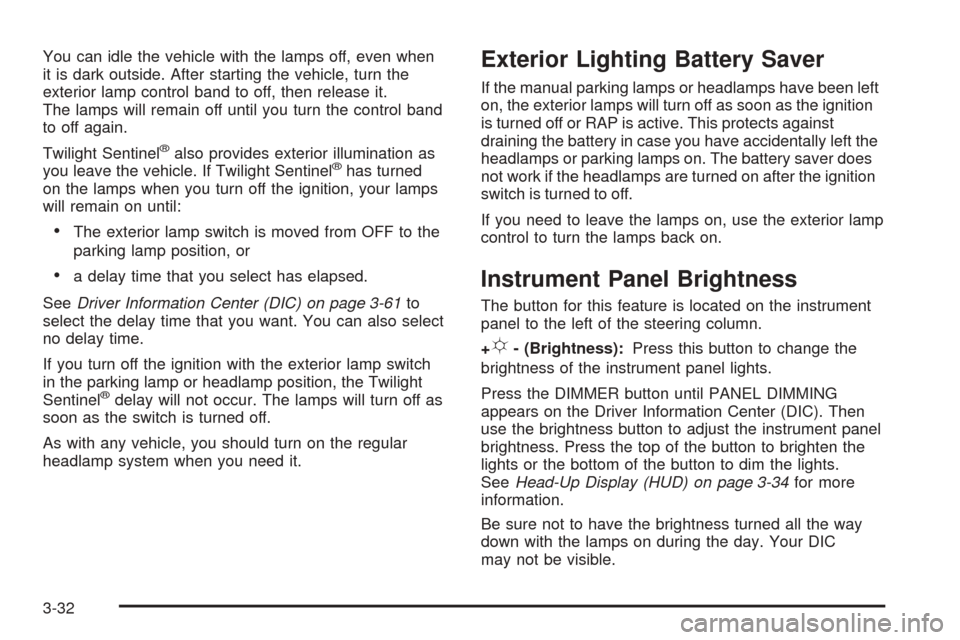
The button for this feature is located on the instrument
panel to the left of the steering column.
+
!- (Brightness):Press this button to change the
brightness of the instrument panel lights.
Press the DIMMER button until PANEL DIMMING
appears on the Driver Information Center (DIC). Then
use the brightness button to adjust the instrument panel
brightness. Press the top of the button to brighten the
lights or the bottom of the button to dim the lights.
SeeHead-Up Display (HUD) on page 3-34for more
information.
Be sure not to have the brightness turned all the way
down with the lamps on during the day. Your DIC
may not be visible.
3-32
Page 147 of 438
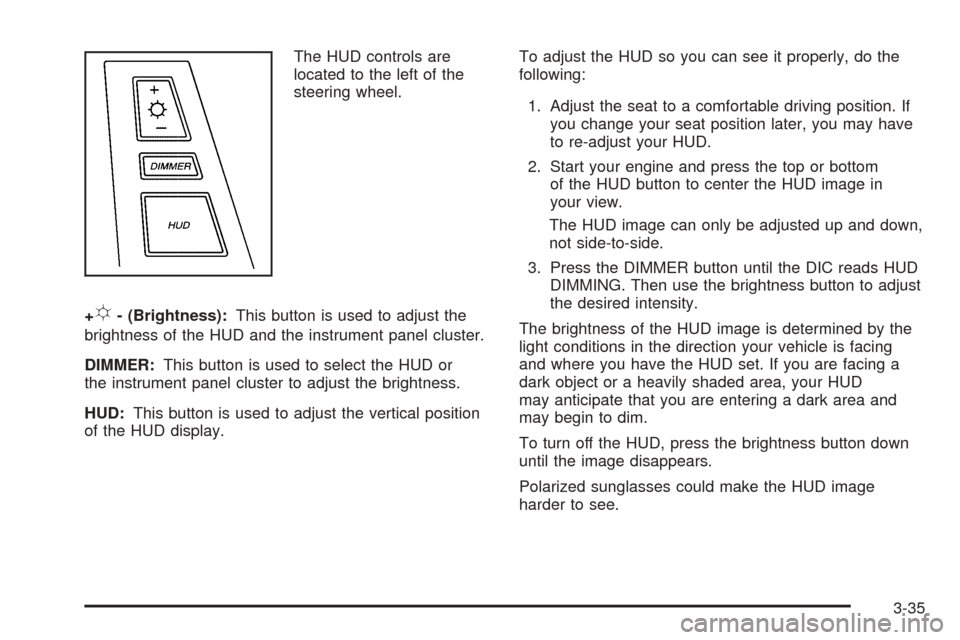
The HUD controls are
located to the left of the
steering wheel.
+
!- (Brightness):This button is used to adjust the
brightness of the HUD and the instrument panel cluster.
DIMMER:This button is used to select the HUD or
the instrument panel cluster to adjust the brightness.
HUD:This button is used to adjust the vertical position
of the HUD display.To adjust the HUD so you can see it properly, do the
following:
1. Adjust the seat to a comfortable driving position. If
you change your seat position later, you may have
to re-adjust your HUD.
2. Start your engine and press the top or bottom
of the HUD button to center the HUD image in
your view.
The HUD image can only be adjusted up and down,
not side-to-side.
3. Press the DIMMER button until the DIC reads HUD
DIMMING. Then use the brightness button to adjust
the desired intensity.
The brightness of the HUD image is determined by the
light conditions in the direction your vehicle is facing
and where you have the HUD set. If you are facing a
dark object or a heavily shaded area, your HUD
may anticipate that you are entering a dark area and
may begin to dim.
To turn off the HUD, press the brightness button down
until the image disappears.
Polarized sunglasses could make the HUD image
harder to see.
3-35
Page 173 of 438
You can use the Driver Information Center (DIC) to
display more detailed fuel information. While scrolling
through the DIC, you will also nd:
AVERAGE XX.X MPG (Average Miles Per Gallon):
The fuel economy calculated for the last 20 gallons
(76 L) of fuel used, or since you last reset the display.
INST XX.X MPG (Instantaneous Miles Per Gallon):
The fuel economy calculated for your current driving
conditions.
RANGE XXX MI:The approximate distance you can
drive before refueling.
SeeDIC Controls and Displays on page 3-61for more
information.
You should reset the fuel information display every time
you refuel. To reset AVERAGE, use the information up or
down button to scroll to AVE FUEL ECON and hold the
reset button. RANGE will automatically reset.
Driver Information Center (DIC)
This display gives you the status of many of your
vehicle’s systems. The DIC is also used to display driver
personalization features and warning/status messages.
All messages will appear in the DIC display, located
at the bottom of the instrument panel cluster.
DIC Controls and Displays
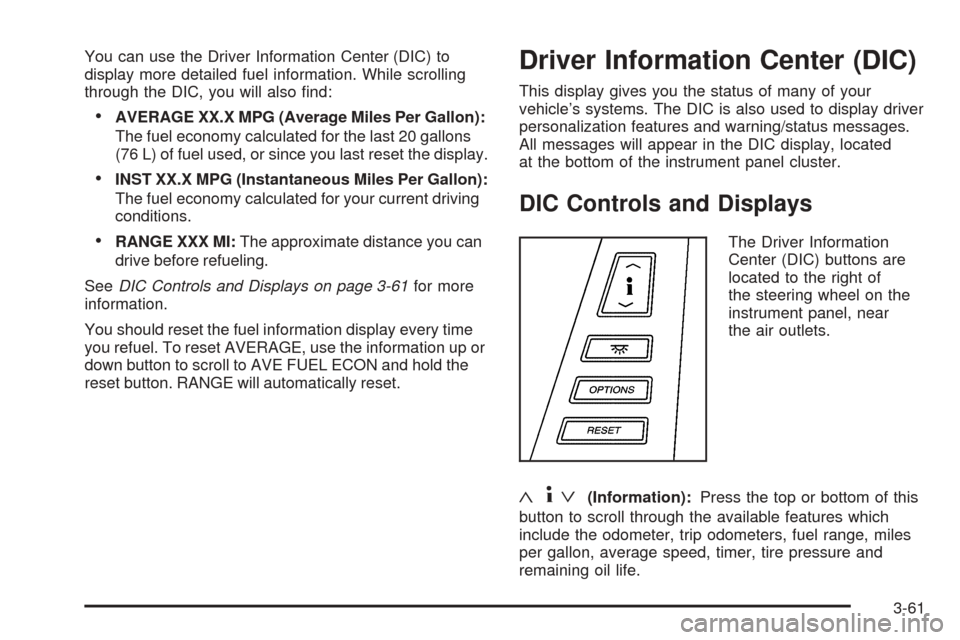
The Driver Information
Center (DIC) buttons are
located to the right of
the steering wheel on the
instrument panel, near
the air outlets.
«4ª(Information):Press the top or bottom of this
button to scroll through the available features which
include the odometer, trip odometers, fuel range, miles
per gallon, average speed, timer, tire pressure and
remaining oil life.
3-61
Page 182 of 438
STABILITRAK ACTIVE:You may see the
STABILITRAK ACTIVE message on the Driver
Information Center. It means that an advanced,
computer-controlled system has come on to help your
vehicle continue to go in the direction in which you
are steering. This stability enhancement system
activates when the computer senses that your vehicle is
just starting to spin, as it might if you hit a patch of
ice or other slippery spot on the road. When the system
is on, you may hear a noise or feel a vibration in the
brake pedal. This is normal.
When the STABILITRAK ACTIVE message is on, you
should continue to steer in the direction you want to go.
The system is designed to help you in bad weather
or other difficult driving situations by making the
most of whatever road conditions will permit. If the
STABILITRAK ACTIVE message comes on, you will
know that something has caused your vehicle to start to
spin, so you should consider slowing down. A single
chime will also sound when this message is displayed.
STABILITRAK READY:If you receive this message
and hear a chime, the system has completed the
functional check of the StabiliTrak
®System.STABILITRAK WARMING:When you rst start your
vehicle and drive away, especially during cold winter
weather, the STABILITRAK WARMING message may
be displayed in the DIC along with a chime and the
traction control warning light. This is normal. You can
acknowledge this message by pressing the RESET
button. The StabiliTrak
®performance is affected until the
STABILITRAK READY message is displayed in the
DIC, which can take up to 15 minutes.
SVC TIRE MONITOR:If this message comes on, a
part on the Tire Pressure Monitor (TPM) is not working
properly. If you drive your vehicle while any of the
four sensors are missing or inoperable, the warning will
come on in approximately 10 minutes. If all four
sensors are missing, the warning will come on in
approximately 15 to 20 minutes. (All the sensors would
be missing, for example, if you put different wheels
on your vehicle without transferring the sensors.) If the
warning comes on and stays on, there may be a
problem with the TPM. See your GM dealer.
TOO COLD TO MOVE TOP:This message will display
when the retractable hardtop button is pressed and the
hardtop pump motor temperature is below−4°F (−20°C).
Wait for the hardtop pump motor to warm up before using
the retractable hardtop.
3-70
Page 183 of 438
TOP INOP – VALET ON:This message will display
when the retractable hardtop button is pressed and the
valet switch is on. Turn off the valet switch before
using the retractable hardtop.
TOP INOP OUT OF PARK:This message will display if
the retractable hardtop button is pressed while the
vehicle is not in PARK (P).
TOP MOTOR OVER TEMP:This message will display
when the retractable hardtop button is pressed and
the hardtop pump motor temperature is over
221°F (105°C). Wait for the hardtop pump motor to cool
down before using the retractable hardtop.
TOP NOT SECURE:This message will display when
the retractable hardtop button is released before the top
open or close operation is complete. Press and hold
the retractable hardtop button to fully open or close
the top.
TRAC SYSTEM ACTIVE:When your traction control
system is limiting wheel spin, the TRACTION SYSTEM
ACTIVE message will be displayed. Slippery road
conditions may exist if this message is displayed, so
adjust your driving accordingly. This message will stay
on for a few seconds after the traction control system
stops limited wheel spin.TRAC/STABILITRAK OFF:This message indicates
that both the Traction Control System (TCS) and
StabiliTrak
®are off. The message will remain until the
systems are turned on again.
TRAC/STABILITRAK ON:This message indicates that
both the Traction Control System (TCS) and the
StabiliTrak
®are on.
TRACTION SYSTEM OFF:This message indicates
that the Traction Control System (TCS) is off but
StabiliTrak
®remains on.
TRACTION SYSTEM ON:This message indicates that
the Traction Control System (TCS) is on, but
StabiliTrak
®is off.
TRUNK AJAR:This message indicates that the trunk is
open while the vehicle is running and not in PARK (P).
WAIT FOR STABILITRAK:This message will be
displayed after driving 19 mph (30 km/h) for 10 seconds
if the steering is not centered. StabiliTrak
®is not
available until the steering centers itself and the
STABILITRAK READY message is displayed in the DIC.
3-71
Page 185 of 438
DIC Vehicle Personalization
Your vehicle is equipped with personalization capabilities
that allows you to program certain features to a
preferred setting for up to two drivers. The back of the
keyless access transmitters are labelled 1 or 2.
The current driver’s preferences are recalled when one
of the following occurs:
The lock or unlock button on the keyless access
transmitter, programmed as 1 or 2, is pressed.
The appropriate memory button, 1 or 2, located on
the driver’s seat is pressed. SeeMemory Seat,
Mirrors and Steering Wheel on page 2-54for more
information.
A valid keyless access transmitter is detected upon
opening the driver’s door.
If more than one valid keyless access transmitter is
detected upon opening the driver’s door, the driver
preferences for the lowest driver number will be recalled.
If a keyless access transmitter is programmed
as #3 or #4, the personalization system will not recognize
the transmitter. The Driver Information Center (DIC) will
not display a current driver number and the features that
are normally programmed through the DIC will be set to
the default states.Also, if the OPTIONS button is pressed, the DIC does not
display the menus used to set personalizations, but
instead displays OPTIONS UNAVAILABLE for a few
seconds.
Feature Programming
To change feature preferences, make sure the vehicle
is running and in PARK (P). Press the OPTIONS
button and the Driver Information Center (DIC) will
display the current driver for a few seconds, then display
the rst personalization menu item. You can now use
the OPTIONS button to change the setting of the
displayed feature. Press the top or bottom of the
information button to scroll up or down the list of
features. When you get to a feature you want to change,
press the OPTIONS button again. When you are
nished, press the RESET button to exit the
personalization menu. If no button is pressed within
45 seconds, the DIC will exit the personalization menu.
The following are DIC options that will be available
in the personalization menu.
3-73
Page 186 of 438
Auto Recall
This feature allows the steering column, outside mirrors
and the driver’s seat to automatically move to the current
driver’s set position when the engine starts. The DIC will
display AUTO RECALL OFF or AUTO RECALL ON.
Press the OPTIONS button to change the setting.
Auto Exit Recall
This feature allows the steering column and driver’s
seat to automatically move to the current driver’s
exit position when one of the following occurs:
The vehicle is turned off or in RAP or accessory
mode and the driver’s door is opened.
The vehicle is turned off or in RAP and the unlock
button on the keyless access transmitter is
pressed.
The DIC will display AUTO EXIT RECALL OFF or
AUTO EXIT RECALL ON. Press the OPTIONS button
to change the setting.
Approach Lights
This feature activates the parking lamps, front fog lamps
and back-up lamps during low light periods when the
unlock button on the keyless access transmitter is
pressed, both doors are closed and the vehicle is off or
in RAP. The lamps remain on for 20 seconds or until
a door is opened, the lock button on the keyless access
transmitter is pressed or the vehicle is no longer off
or in RAP.
The DIC will display APPROACH LIGHTS OFF or
APPROACH LIGHTS ON. Press the OPTIONS button
to change the setting.
Exit Lights
This feature activates the parking lamps and front fog
lamps for 15, 30 or 90 seconds. This will occur when the
vehicle is off or in RAP and the headlamps are on
due to the automatic headlamp system. The parking
lamps and front fog lamps will remain on until the driver
selected time period expires, the exterior lamp control
is activated or the vehicle is no longer off or in RAP.
The DIC will display EXIT LIGHTS OFF, EXIT
LIGHTS - 15 SEC, EXIT LIGHTS - 30 SEC or EXIT
LIGHTS - 90 SEC. Press the OPTIONS button to
change the setting.
3-74
Page 191 of 438
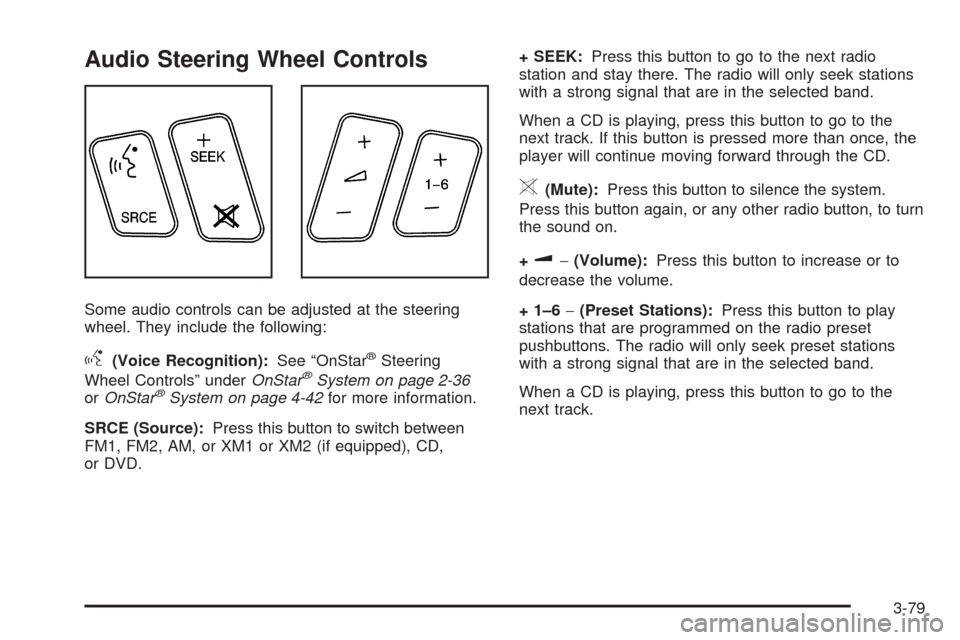
Audio Steering Wheel Controls
Some audio controls can be adjusted at the steering
wheel. They include the following:
g(Voice Recognition):See “OnStar®Steering
Wheel Controls” underOnStar®System on page 2-36
orOnStar®System on page 4-42for more information.
SRCE (Source):Press this button to switch between
FM1, FM2, AM, or XM1 or XM2 (if equipped), CD,
or DVD.+ SEEK:Press this button to go to the next radio
station and stay there. The radio will only seek stations
with a strong signal that are in the selected band.
When a CD is playing, press this button to go to the
next track. If this button is pressed more than once, the
player will continue moving forward through the CD.
>(Mute):Press this button to silence the system.
Press this button again, or any other radio button, to turn
the sound on.
+
u−(Volume):Press this button to increase or to
decrease the volume.
+ 1–6−(Preset Stations):Press this button to play
stations that are programmed on the radio preset
pushbuttons. The radio will only seek preset stations
with a strong signal that are in the selected band.
When a CD is playing, press this button to go to the
next track.
3-79
Page 236 of 438
If you do not want to use the rst method, keep your
currently selected search area region and enter your
destination. This method allows you only to select a
destination from the easy planning route method or from
the All Points of Interest (POI) categories with the “All
Search Areas” comment for US Only. For example,
Tourist is a category that features this comment. See
Enter Destination on page 4-21for more information.
If you are traveling in or to Canada and you cross the
regional border, the only map scale views available
are 4 mi, 8 mi, 31 mi, and 128 mi (8 km, 16 km,
64 km and 256 km). Change the selected search area
region when you get closer to the area you are traveling
to. See “Setting the Search Area” underMaps on
page 4-33for more information.
Remote Keyless Entry System
When you insert the key in the ignition, Driver 1 or
Driver 2 will be displayed on the screen. A message will
not appear on the screen if the driver is unknown. The
number on the back of the RKE transmitter corresponds
to driver 1 or driver 2. The navigation system can store
memory points for drivers 1 and 2 individually. See
Keyless Access System on page 2-4for more
information.
OnStar®System
When using the OnStar®system, the audio system will
be muted and the navigation voice prompts will be
disabled during the call. The volume of the OnStar
®call
can be adjusted by using the steering wheel volume
controls. SeeOnStar
®System on page 2-36for
more information.
Global Positioning System (GPS)
The navigation system determines the position of your
vehicle by using satellite signals, various vehicle signals,
and map data.
The Global Positioning System (GPS) locates the
current position of your vehicle using signals sent by the
United States Department of Defense GPS satellites.
While your vehicle is receiving signals from these
satellites, the GPS symbol will not appear on the map
screen. SeeSymbols on page 4-36for more information
on the GPS symbol.
However, at times, other interferences such as the
satellite condition, road conguration, the condition of
the vehicle, and/or other circumstances can interfere
with the system’s ability to determine the accurate
position of the vehicle. This is when the GPS symbol
will appear on the map screen.
4-42