mirror CADILLAC XLR 2005 1.G Owners Manual
[x] Cancel search | Manufacturer: CADILLAC, Model Year: 2005, Model line: XLR, Model: CADILLAC XLR 2005 1.GPages: 438, PDF Size: 3.69 MB
Page 1 of 438
Seats and Restraint Systems........................... 1-1
Front Seats
............................................... 1-2
Safety Belts
.............................................. 1-5
Child Restraints
.......................................1-19
Airbag System
.........................................1-36
Restraint System Check
............................1-48
Features and Controls..................................... 2-1
Keys
........................................................ 2-2
Doors and Locks
....................................... 2-9
Windows
.................................................2-16
Theft-Deterrent Systems
............................2-19
Starting and Operating Your Vehicle
...........2-21
Mirrors
....................................................2-34
OnStar
®System
......................................2-36
HomeLink®Transmitter
.............................2-38
Storage Areas
.........................................2-42
Retractable Hardtop
..................................2-45
Vehicle Personalization
.............................2-54
Instrument Panel............................................. 3-1
Instrument Panel Overview
.......................... 3-4
Climate Controls
......................................3-40
Warning Lights, Gages, and Indicators
........3-46
Driver Information Center (DIC)
..................3-61
Trip Computer
.........................................3-77
Audio System(s)
.......................................3-78Navigation System.......................................... 4-1
Overview
.................................................. 4-2
Features and Controls
................................ 4-4
Navigation Audio System
...........................4-45
Voice Recognition
......................................4-69
Driving Your Vehicle....................................... 5-1
Your Driving, the Road, and Your Vehicle
..... 5-2
Towing
...................................................5-35
Service and Appearance Care.......................... 6-1
Service
..................................................... 6-3
Fuel
......................................................... 6-5
Checking Things Under the Hood
...............6-10
Rear Axle
...............................................6-41
Headlamp Aiming
.....................................6-42
Bulb Replacement
....................................6-44
Windshield Wiper Blade Replacement
.........6-45
Tires
......................................................6-46
Appearance Care
.....................................6-70
Vehicle Identication
.................................6-79
Electrical System
......................................6-80
Capacities and Specications
.....................6-85
Maintenance Schedule..................................... 7-1
Maintenance Schedule
................................ 7-2
Customer Assistance and Information.............. 8-1
Customer Assistance and Information
........... 8-2
Reporting Safety Defects
...........................8-11
Index.................................................................1
2005 Cadillac XLR Owner ManualM
Page 57 of 438
Keys...............................................................2-2
Keyless Access System...................................2-4
Keyless Access System Operation....................2-5
Doors and Locks.............................................2-9
Door Locks....................................................2-9
Power Door Locks........................................2-11
Automatic Door Locks...................................2-12
Programmable Automatic Door Unlock.............2-12
Lockout Protection........................................2-12
Trunk..........................................................2-13
Windows........................................................2-16
Power Windows............................................2-17
Sun Visors...................................................2-18
Theft-Deterrent Systems..................................2-19
Theft-Deterrent System..................................2-19
Valet Lockout Switch.....................................2-21
Starting and Operating Your Vehicle................2-21
New Vehicle Break-In....................................2-21
Ignition Positions..........................................2-22
Retained Accessory Power (RAP)...................2-22
Starting Your Engine.....................................2-23
Engine Coolant Heater..................................2-24
Automatic Transmission Operation...................2-25
Parking Brake..............................................2-28
Shifting Into Park (P).....................................2-30
Shifting Out of Park (P).................................2-31
Parking Over Things That Burn.......................2-32Engine Exhaust............................................2-32
Running Your Engine While You Are Parked.......2-33
Mirrors...........................................................2-34
Automatic Dimming Rearview Mirror
with OnStar
®............................................2-34
Outside Power Heated Mirrors........................2-34
Outside Automatic Dimming Mirror..................2-35
Outside Curb View Assist Mirror.....................2-35
Outside Convex Mirror...................................2-36
OnStar
®System.............................................2-36
HomeLink®Transmitter...................................2-38
Programming the HomeLink®Transmitter.........2-39
Storage Areas................................................2-42
Glove Box...................................................2-42
Cupholder(s)................................................2-42
Center Console Storage Area.........................2-42
Map Pocket.................................................2-43
Floor Mats...................................................2-43
Rear Storage Area........................................2-44
Convenience Net..........................................2-44
Retractable Hardtop........................................2-45
Lowering the Retractable Hardtop...................2-45
Raising the Retractable Hardtop......................2-46
Vehicle Personalization...................................2-54
Memory Seat, Mirrors and Steering Wheel.......2-54
Section 2 Features and Controls
2-1
Page 61 of 438
Keyless Access System Operation
Your vehicle has a Keyless Access System that allows
you to lock and unlock your doors, unlock your trunk lid
and disarm or arm your theft-deterrent system. The range
distance is as much as 100 feet (30 m) away.
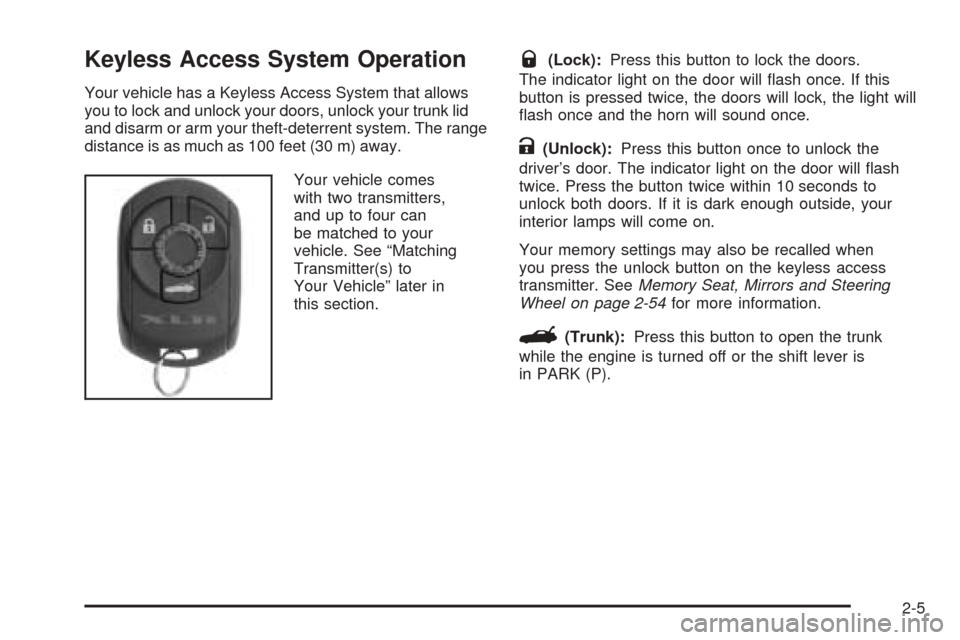
Your vehicle comes
with two transmitters,
and up to four can
be matched to your
vehicle. See “Matching
Transmitter(s) to
Your Vehicle” later in
this section.
Q(Lock):Press this button to lock the doors.
The indicator light on the door will ash once. If this
button is pressed twice, the doors will lock, the light will
ash once and the horn will sound once.
K(Unlock):Press this button once to unlock the
driver’s door. The indicator light on the door will ash
twice. Press the button twice within 10 seconds to
unlock both doors. If it is dark enough outside, your
interior lamps will come on.
Your memory settings may also be recalled when
you press the unlock button on the keyless access
transmitter. SeeMemory Seat, Mirrors and Steering
Wheel on page 2-54for more information.
G(Trunk):Press this button to open the trunk
while the engine is turned off or the shift lever is
in PARK (P).
2-5
Page 74 of 438
Anti-Pinch Feature
If any object is in the path of the window when the
express-up is active, the window will stop at the
obstruction and auto-reverse to a preset factory position.
Weather conditions such as severe icing may also
cause the window to auto-reverse. The window
will return to normal operation once the obstruction or
condition is removed.
{CAUTION:
If express override is activated, the window
will not reverse automatically. You or others
could be injured and the window could be
damaged. Before you use express override,
make sure that all people and obstructions are
clear of the window path.
Express Window Override
A condition may exist that causes auto-reversal of the
window due to weather or an obstruction. In an
emergency, the anti-pinch feature can be overridden in
a supervised mode. Hold the window switch all the
way down in the express position. The window will rise
for as long as the switch is held. Once the switch is
released, the express mode is re-activated.
In this mode, the window can still close on an object in
its path. Use care when using the override mode.
Window Indexing
This feature automatically lowers the window a small
amount when the door is opened. Then, when the door
is closed, the window will raise to its full up position.
Sun Visors
Swing down the visor to block out glare. It can also be
detached from the center mount and moved to the side.
Lighted Visor Vanity Mirrors
Swing the visor down and lift the cover. The lamp will
automatically come on when the cover is opened.
2-18
Page 90 of 438
Mirrors
Automatic Dimming Rearview Mirror
with OnStar
®
Your vehicle has an automatic dimming inside rearview
mirror. The mirror also contains OnStar®controls.
For more information about OnStar®, seeOnStar®
System on page 2-36.
O(On/Off):This button, located on the lower left side
of the mirror, is for the automatic dimming functions.
Mirror Operation
The automatic dimming feature is active each time the
vehicle is started.
To turn the automatic dimming feature on or off, press
and release the on/off button. The indicator light will
illuminate when this feature is active.
Cleaning the Mirror
When cleaning the mirror, use a paper towel or similar
material dampened with glass cleaner. Do not spray
glass cleaner directly on the mirror as that may cause
the liquid cleaner to enter the mirror housing.
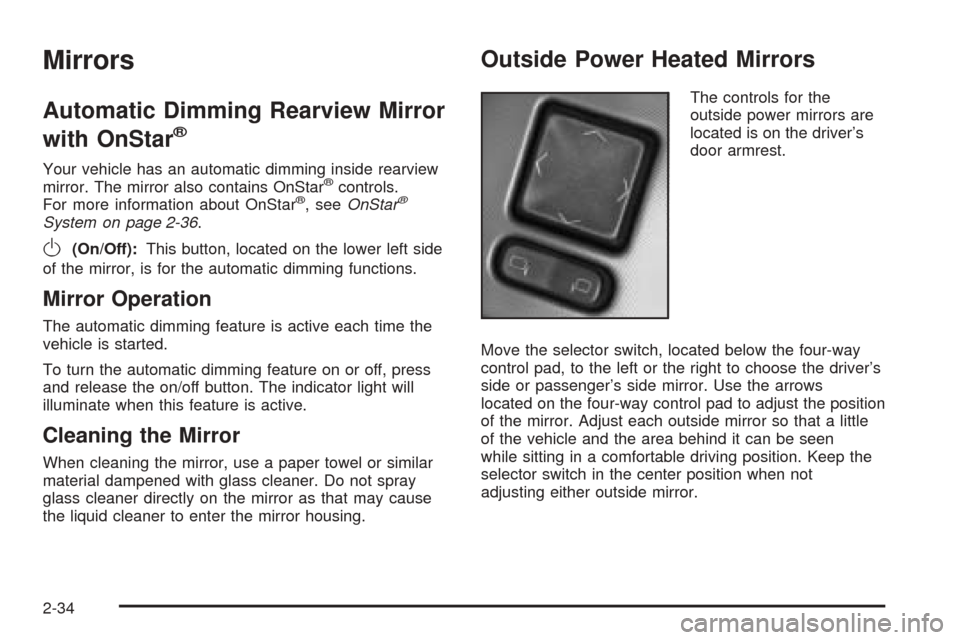
Outside Power Heated Mirrors
The controls for the
outside power mirrors are
located is on the driver’s
door armrest.
Move the selector switch, located below the four-way
control pad, to the left or the right to choose the driver’s
side or passenger’s side mirror. Use the arrows
located on the four-way control pad to adjust the position
of the mirror. Adjust each outside mirror so that a little
of the vehicle and the area behind it can be seen
while sitting in a comfortable driving position. Keep the
selector switch in the center position when not
adjusting either outside mirror.
2-34
Page 91 of 438

Both mirrors have a heated feature to rid them of snow,
ice, or condensation. They will heat when the rear
window defogger is turned on. See “Rear Window
Defogger” underDual Climate Control System on
page 3-40. If the vehicle has the memory option, the
preferred mirror position can be stored. SeeMemory
Seat, Mirrors and Steering Wheel on page 2-54.
Both mirrors can be manually folded inward by pulling
them toward the vehicle. This feature may be useful
when going through a car wash or a conned space.
Push the mirrors away from the vehicle, to the normal
position, before driving.
Outside Automatic Dimming Mirror
The driver’s side mirror will adjust for the glare of
headlamps behind you. This feature is controlled by the
on and off settings on the inside automatic dimming
rearview mirror. SeeAutomatic Dimming Rearview
Mirror with OnStar
®on page 2-34.
Outside Curb View Assist Mirror
The passenger’s side mirror is also capable of
performing the curb view assist feature. This feature will
cause the mirror to tilt to a factory programmed
position when the vehicle is in REVERSE (R). This
feature may be useful in allowing you to view the curb
when you are parallel parking.
If further adjustment is needed after the mirror is tilted,
the mirror switch may be used. The mirror will then
return to this new position when the vehicle is shifted
into REVERSE (R).
When the vehicle is shifted out of REVERSE (R) and
a ve-second delay has occurred, the passenger’s side
mirror will return to its original position.
This feature can be enabled/disabled through the
Driver Information Center (DIC). See “Park Assist” under
DIC Vehicle Personalization on page 3-73for more
information.
2-35
Page 92 of 438
Outside Convex Mirror
{CAUTION:
A convex mirror can make things (like other
vehicles) look farther away than they really are.
If you cut too sharply into the right lane, you
could hit a vehicle on your right. Check your
inside mirror or glance over your shoulder
before changing lanes.
The passenger’s side mirror is convex. A convex
mirror’s surface is curved so more can be seen from the
driver’s seat. It also makes things look farther away
than they really are.
OnStar®System
OnStar®uses global positioning system (GPS) satellite
technology, wireless communications, and call centers
to provide you with a wide range of safety, security,
information, and convenience services.
A complete OnStar
®user’s guide and the terms and
conditions of the OnStar®Subscription Service
Agreement are included in the vehicle’s glove box
literature. For more information, visit www.onstar.com
or www.onstarcanada.com. Contact OnStar
®at
1-888-4-ONSTAR (1-888-466-7827), or press the
OnStar
®button to speak to an OnStar®advisor
24 hours a day, 7 days a week.
Terms and conditions of the Subscription Service
Agreement can be found at www.onstar.com.
2-36
Page 110 of 438
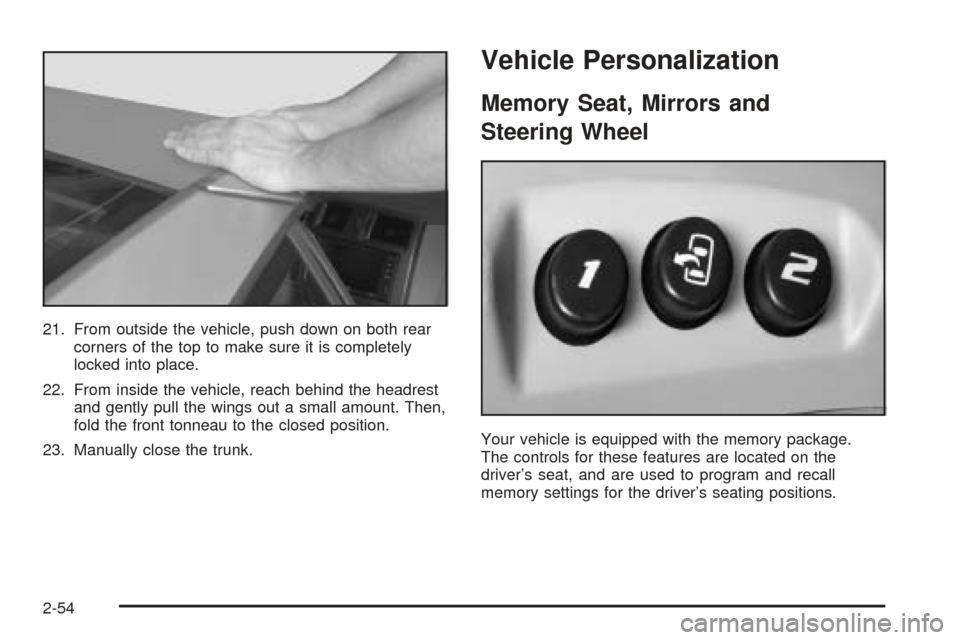
21. From outside the vehicle, push down on both rear
corners of the top to make sure it is completely
locked into place.
22. From inside the vehicle, reach behind the headrest
and gently pull the wings out a small amount. Then,
fold the front tonneau to the closed position.
23. Manually close the trunk.
Vehicle Personalization
Memory Seat, Mirrors and
Steering Wheel
Your vehicle is equipped with the memory package.
The controls for these features are located on the
driver’s seat, and are used to program and recall
memory settings for the driver’s seating positions.
2-54
Page 111 of 438
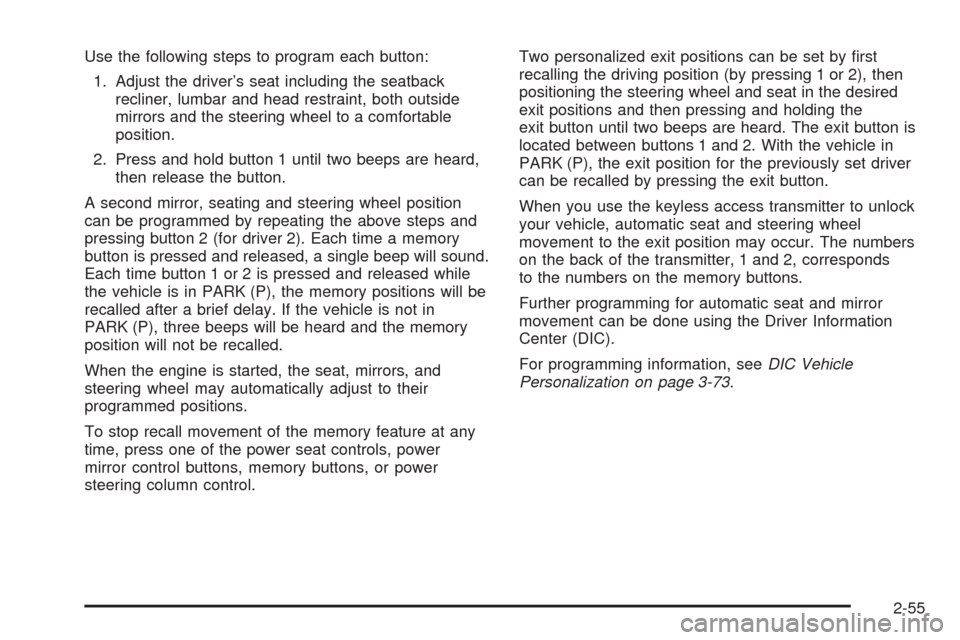
Use the following steps to program each button:
1. Adjust the driver’s seat including the seatback
recliner, lumbar and head restraint, both outside
mirrors and the steering wheel to a comfortable
position.
2. Press and hold button 1 until two beeps are heard,
then release the button.
A second mirror, seating and steering wheel position
can be programmed by repeating the above steps and
pressing button 2 (for driver 2). Each time a memory
button is pressed and released, a single beep will sound.
Each time button 1 or 2 is pressed and released while
the vehicle is in PARK (P), the memory positions will be
recalled after a brief delay. If the vehicle is not in
PARK (P), three beeps will be heard and the memory
position will not be recalled.
When the engine is started, the seat, mirrors, and
steering wheel may automatically adjust to their
programmed positions.
To stop recall movement of the memory feature at any
time, press one of the power seat controls, power
mirror control buttons, memory buttons, or power
steering column control.Two personalized exit positions can be set by rst
recalling the driving position (by pressing 1 or 2), then
positioning the steering wheel and seat in the desired
exit positions and then pressing and holding the
exit button until two beeps are heard. The exit button is
located between buttons 1 and 2. With the vehicle in
PARK (P), the exit position for the previously set driver
can be recalled by pressing the exit button.
When you use the keyless access transmitter to unlock
your vehicle, automatic seat and steering wheel
movement to the exit position may occur. The numbers
on the back of the transmitter, 1 and 2, corresponds
to the numbers on the memory buttons.
Further programming for automatic seat and mirror
movement can be done using the Driver Information
Center (DIC).
For programming information, seeDIC Vehicle
Personalization on page 3-73.
2-55
Page 119 of 438
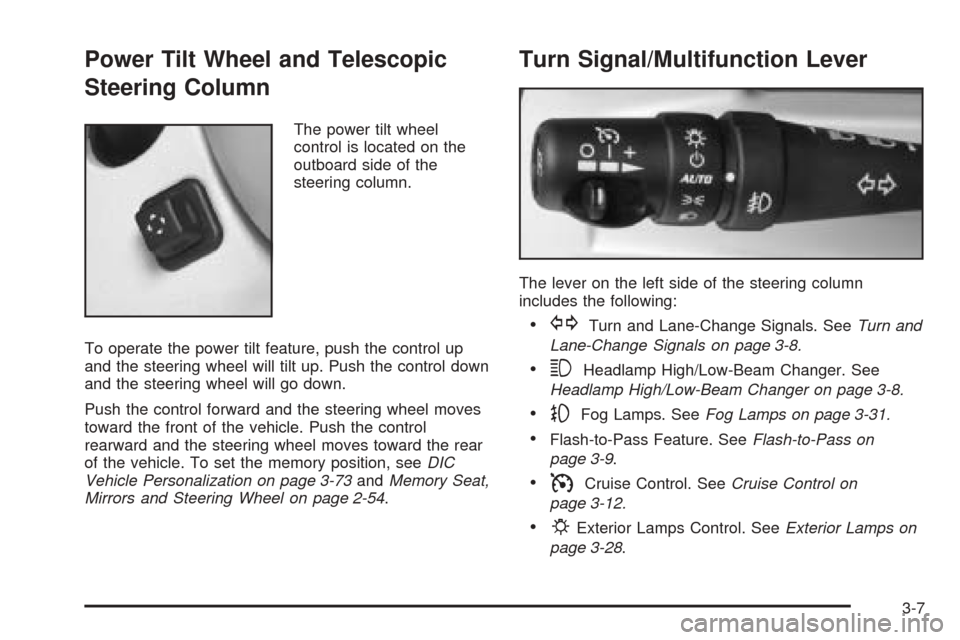
Power Tilt Wheel and Telescopic
Steering Column
The power tilt wheel
control is located on the
outboard side of the
steering column.
To operate the power tilt feature, push the control up
and the steering wheel will tilt up. Push the control down
and the steering wheel will go down.
Push the control forward and the steering wheel moves
toward the front of the vehicle. Push the control
rearward and the steering wheel moves toward the rear
of the vehicle. To set the memory position, seeDIC
Vehicle Personalization on page 3-73andMemory Seat,
Mirrors and Steering Wheel on page 2-54.
Turn Signal/Multifunction Lever
The lever on the left side of the steering column
includes the following:
GTurn and Lane-Change Signals. SeeTurn and
Lane-Change Signals on page 3-8.
3Headlamp High/Low-Beam Changer. See
Headlamp High/Low-Beam Changer on page 3-8.
-Fog Lamps. SeeFog Lamps on page 3-31.
Flash-to-Pass Feature. SeeFlash-to-Pass on
page 3-9.
ICruise Control. SeeCruise Control on
page 3-12.
PExterior Lamps Control. SeeExterior Lamps on
page 3-28.
3-7