CD player CADILLAC XLR 2008 1.G User Guide
[x] Cancel search | Manufacturer: CADILLAC, Model Year: 2008, Model line: XLR, Model: CADILLAC XLR 2008 1.GPages: 470, PDF Size: 8.39 MB
Page 275 of 470
No CAT Info:No category information is available.
The system is working properly.
CAT Not Found:There are no channels available for
the selected category. The system is working properly.
No Information:No text or informational messages
are available. The system is working properly.
XM Theftlocked:The XM™ receiver may have
previously been in another vehicle. For security
purposes, XM™ receivers cannot be swapped between
vehicles. If this message is received after having
your vehicle serviced, check with your dealer/retailer.
XM Radio ID:If tuned to channel 0, this message
will alternate with the XM™ Radio eight digit radio
ID label. This label is needed to activate the service.
Unknown:If this message is received when tuned
to channel 0, there may be a receiver fault. Consult with
your dealer/retailer.
Check XM Receiver:If this message does not clear
within a short period of time, the receiver may have
a fault. Consult with your dealer/retailer.Six-Disc CD Changer
With the compact disc changer, you can play up to
six normal size discs continuously.
When the radio is turned on, the changer will begin
checking for discs. This will continue for up to one and
a half minutes, depending on the number of discs
loaded. You may hear noise, but this is normal.
The CD changer is initializing.
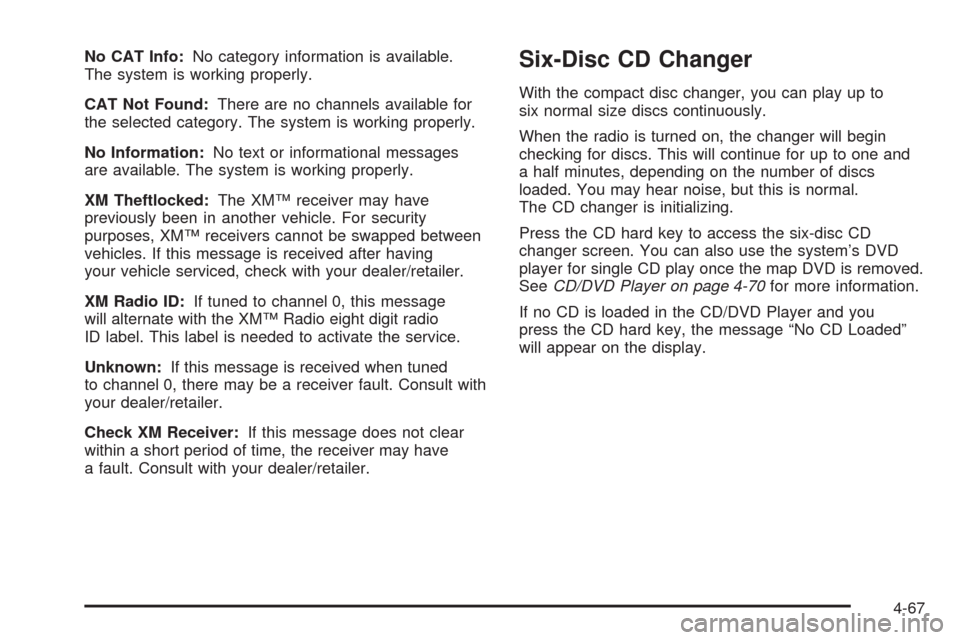
Press the CD hard key to access the six-disc CD
changer screen. You can also use the system’s DVD
player for single CD play once the map DVD is removed.
SeeCD/DVD Player on page 4-70for more information.
If no CD is loaded in the CD/DVD Player and you
press the CD hard key, the message “No CD Loaded”
will appear on the display.
4-67
Page 277 of 470
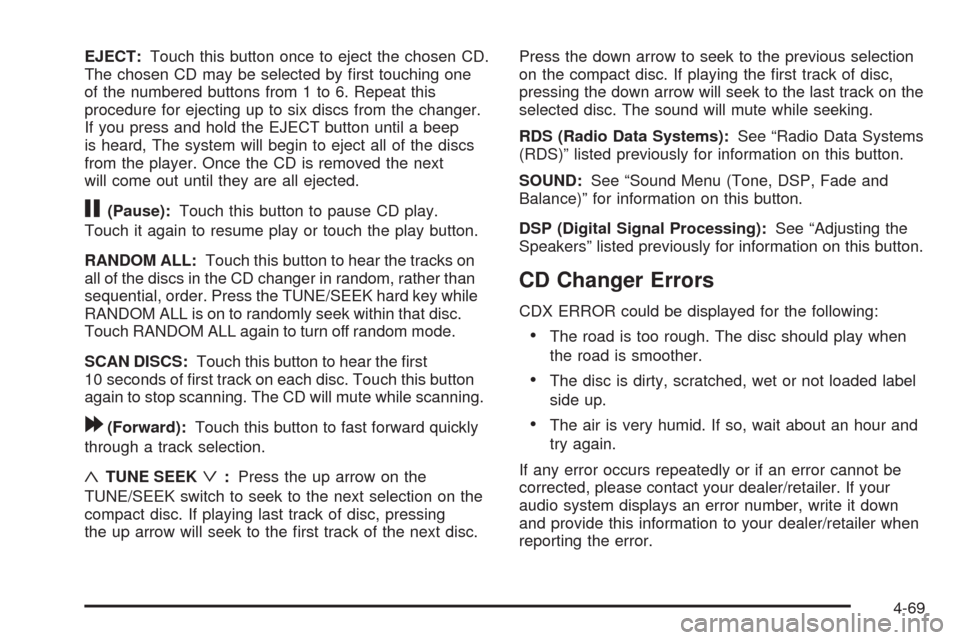
EJECT:Touch this button once to eject the chosen CD.
The chosen CD may be selected by rst touching one
of the numbered buttons from 1 to 6. Repeat this
procedure for ejecting up to six discs from the changer.
If you press and hold the EJECT button until a beep
is heard, The system will begin to eject all of the discs
from the player. Once the CD is removed the next
will come out until they are all ejected.
j(Pause):Touch this button to pause CD play.
Touch it again to resume play or touch the play button.
RANDOM ALL:Touch this button to hear the tracks on
all of the discs in the CD changer in random, rather than
sequential, order. Press the TUNE/SEEK hard key while
RANDOM ALL is on to randomly seek within that disc.
Touch RANDOM ALL again to turn off random mode.
SCAN DISCS:Touch this button to hear the rst
10 seconds of rst track on each disc. Touch this button
again to stop scanning. The CD will mute while scanning.
[(Forward):Touch this button to fast forward quickly
through a track selection.
«TUNE SEEKª:Press the up arrow on the
TUNE/SEEK switch to seek to the next selection on the
compact disc. If playing last track of disc, pressing
the up arrow will seek to the rst track of the next disc.Press the down arrow to seek to the previous selection
on the compact disc. If playing the rst track of disc,
pressing the down arrow will seek to the last track on the
selected disc. The sound will mute while seeking.
RDS (Radio Data Systems):See “Radio Data Systems
(RDS)” listed previously for information on this button.
SOUND:See “Sound Menu (Tone, DSP, Fade and
Balance)” for information on this button.
DSP (Digital Signal Processing):See “Adjusting the
Speakers” listed previously for information on this button.
CD Changer Errors
CDX ERROR could be displayed for the following:
The road is too rough. The disc should play when
the road is smoother.
The disc is dirty, scratched, wet or not loaded label
side up.
The air is very humid. If so, wait about an hour and
try again.
If any error occurs repeatedly or if an error cannot be
corrected, please contact your dealer/retailer. If your
audio system displays an error number, write it down
and provide this information to your dealer/retailer when
reporting the error.
4-69
Page 278 of 470

CD/DVD Player
The player that is used for the navigation map DVD can
also be used as a single music CD player or a video
DVD player.
CD Player
To use the player as a single music CD player, you
must rst remove the navigation map DVD. While
playing a CD in the CD/DVD Player, the navigation
system is not available. The message “The disc installed
is not a map DVD” will appear on the display if any of
the navigation hard keys are pressed.
To remove the navigation map DVD and load a music
CD, use the following steps:
1. Start the vehicle.
2. Press the TILT hard key until you hear a beep.
This will open the faceplate of the system.3. If one is loaded, the navigation map DVD will eject
from the slot.
4. Gently remove the navigation map DVD from the
slot and return it to its case.
5. Insert the music CD into the slot. The system will
pull the CD into the player.
6. Press and release the TILT hard key to close the
faceplate.
Notice:Shifting out of PARK (P) with the system’s
faceplate open will cause the faceplate to close
automatically. This could cause damage to a CD,
DVD or the system if it is partially loaded. Before
shifting out of PARK (P), make sure that the DVD or
CD is loaded properly. The vehicle must be shifted
back into PARK (P) to close the faceplate.
4-70
Page 279 of 470
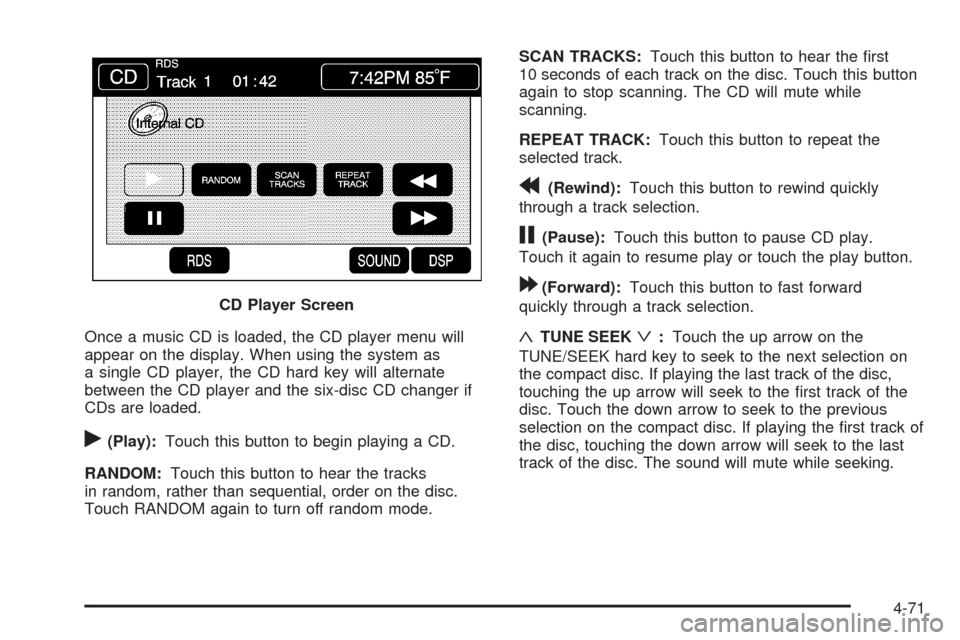
Once a music CD is loaded, the CD player menu will
appear on the display. When using the system as
a single CD player, the CD hard key will alternate
between the CD player and the six-disc CD changer if
CDs are loaded.
r(Play):Touch this button to begin playing a CD.
RANDOM:Touch this button to hear the tracks
in random, rather than sequential, order on the disc.
Touch RANDOM again to turn off random mode.SCAN TRACKS:Touch this button to hear the rst
10 seconds of each track on the disc. Touch this button
again to stop scanning. The CD will mute while
scanning.
REPEAT TRACK:Touch this button to repeat the
selected track.
r(Rewind):Touch this button to rewind quickly
through a track selection.
j(Pause):Touch this button to pause CD play.
Touch it again to resume play or touch the play button.
[(Forward):Touch this button to fast forward
quickly through a track selection.
«TUNE SEEKª:Touch the up arrow on the
TUNE/SEEK hard key to seek to the next selection on
the compact disc. If playing the last track of the disc,
touching the up arrow will seek to the rst track of the
disc. Touch the down arrow to seek to the previous
selection on the compact disc. If playing the rst track of
the disc, touching the down arrow will seek to the last
track of the disc. The sound will mute while seeking. CD Player Screen
4-71
Page 280 of 470

DVD Player
To use the player as a video DVD player, you must
rst remove the navigation map DVD or music CD.
While playing a video DVD, the navigation system is
not available. The message “The disc installed is not a
map DVD” will appear on the display if any of the
navigation hard keys are pressed.
This feature will not operate unless the vehicle is in
PARK (P).
To remove the navigation map DVD and load a video
DVD, use the following steps:
1. With the vehicle in PARK (P) and the vehicle
running, press the TILT hard key until a beep
is heard. The faceplate of the system will open.
2. If a map DVD or a music CD is loaded, the system
will automatically eject it. Gently remove it from the
slot and return it to its case.
3. Load the video DVD into the slot. The system will
pull the DVD into the player.
4. Press and release the TILT hard key to close the
faceplate.Notice:Shifting out of PARK (P) with the system’s
faceplate open will cause the faceplate to close
automatically. This could cause damage to a
CD, DVD or the system if it is partially loaded. Before
shifting out of PARK (P), make sure that the DVD
or CD is loaded properly. The vehicle must be
shifted back into PARK (P) to close the faceplate.
Once the faceplate is closed and a video DVD is loaded,
the system will automatically play the DVD.
Playing a DVD
There are three ways to play a DVD depending on
which screen you are on. They are the following:
Once a DVD is inserted, the system will
automatically play the DVD.
If you are on a map screen, touch the DVD source
button.
From the audio screen, press the DVD hard key.
4-72
Page 458 of 470
Appointments, Scheduling Service.....................8-10
Ashtray.........................................................3-37
Audio System.........................................3-81, 4-54
Audio Steering Wheel Controls......................3-82
Care of Your CD Player...............................3-85
Care of Your CDs........................................3-85
Diversity Antenna System.............................3-85
Radio Reception..........................................3-84
Theft-Deterrent Feature................................3-82
XM™ Satellite Radio Antenna System............3-85
Automatic Door Lock.......................................2-12
Automatic Transmission
Fluid..........................................................6-24
Operation...................................................2-26
Avoid Point/Area, Edit......................................4-26
B
Battery..........................................................6-40
Exterior Lighting Battery Saver......................3-32
Run-Down Protection...................................3-33
Brake
Emergencies................................................ 5-5
Brakes..........................................................6-37
System Warning Light..................................3-50Braking........................................................... 5-4
Braking in Emergencies..................................... 5-5
Break-In, New Vehicle.....................................2-23
Bulb Replacement...........................................6-50
Headlamp Aiming........................................6-47
Buying New Tires...........................................6-67
C
California Fuel.................................................. 6-6
California Perchlorate Materials Requirements....... 6-4
California Proposition 65 Warning....................... 6-3
Canadian Owners............................................... iii
Capacities and Specications............................6-97
Carbon Monoxide...................2-13, 2-34, 5-17, 5-27
Care of
Safety Belts................................................6-83
Your CD Player...........................................3-85
Your CDs ...................................................3-85
CD
Six-Disc Changer.........................................4-67
CD/DVD Player..............................................4-70
Center Console Storage Area...........................2-52
Chains, Tire...................................................6-73
Charging System Light....................................3-49
2
Page 460 of 470

Customer Assistance Information (cont.)
GM Mobility Reimbursement Program............... 8-7
Reporting Safety Defects to General Motors....8-16
Reporting Safety Defects to the
Canadian Government..............................8-15
Reporting Safety Defects to the
United States Government.........................8-15
Roadside Service.......................................... 8-7
Service Publications Ordering Information........8-16
D
Database Coverage Explanations......................4-53
Daytime Running Lamps..................................3-29
Defensive Driving............................................. 5-2
Diversity Antenna System.................................3-85
Doing Your Own Service Work........................... 6-4
Door
Automatic Door Lock....................................2-12
Locks........................................................2-10
Power Door Locks.......................................2-12
Programmable Automatic Door Unlock............2-12
Driver Information Center (DIC).........................3-60
DIC Operation and Displays..........................3-60
DIC Vehicle Personalization..........................3-76
DIC Warnings and Messages........................3-63
Other Messages..........................................3-74Driving
At Night.....................................................5-14
Before a Long Trip......................................5-15
Defensive..................................................... 5-2
Drunken....................................................... 5-2
Highway Hypnosis.......................................5-16
Hill and Mountain Roads..............................5-16
In Rain and on Wet Roads...........................5-14
Rocking Your Vehicle to Get it Out.................5-22
Winter........................................................5-17
Dual Climate Control System............................3-38
DVD, CD Player.............................................4-70
E
Edit
Avoid Point/Area..........................................4-26
Memory Point.............................................4-20
Waypoint....................................................4-24
EDR .............................................................8-17
Electrical System
Add-On Equipment......................................6-89
Fuses and Circuit Breakers...........................6-90
Instrument Panel Fuse Block.........................6-90
Power Windows and Other Power Options......6-90
Underhood Fuse Block.................................6-94
Windshield Wiper Fuses...............................6-90
4
Page 466 of 470

P
Paint, Damage...............................................6-87
Park Aid........................................................2-38
Park Assist Mirror...........................................2-37
Park Brake....................................................2-30
Park (P)
Shifting Into................................................2-32
Shifting Out of............................................2-33
Parking
Assist........................................................2-38
Over Things That Burn.................................2-34
Passenger Airbag Status Indicator.....................3-47
Passenger Compartment Air Filter.....................3-42
Passenger Sensing System..............................1-45
Passing.........................................................5-12
Perchlorate Materials Requirements, California...... 6-4
Plan Route....................................................4-19
Power
Door Locks.................................................2-12
Electrical System.........................................6-90
Lumbar Controls........................................... 1-2
Reclining Seatbacks...................................... 1-4
Retained Accessory (RAP)............................2-24
Seat............................................................ 1-2
Steering Fluid.............................................6-35
Tilt Wheel and Telescopic Steering Column....... 3-7
Windows....................................................2-17Privacy..........................................................8-17
Event Data Recorders..................................8-18
Navigation System.......................................8-19
OnStar.......................................................8-19
Radio Frequency Identication.......................8-19
Problems with Route Guidance.........................4-52
Programmable Automatic Door Unlock...............2-12
R
Racing or Other Competitive Driving..................5-13
Radio............................................................4-54
Personalization with Home and
Away Feature..........................................4-75
Radio Frequency Identication (RFID),
Privacy......................................................8-19
Radios..........................................................3-81
Care of Your CD Player...............................3-85
Care of Your CDs........................................3-85
Reception...................................................3-84
Theft-Deterrent............................................3-82
Rainsense™ Wipers........................................3-11
Raising the Retractable Hardtop........................2-55
Reading Lamps..............................................3-32
Rear Axle......................................................6-46
Limited-Slip.................................................. 5-7
Rear Storage Area..........................................2-53
10