ECO mode CADILLAC XLR 2008 1.G User Guide
[x] Cancel search | Manufacturer: CADILLAC, Model Year: 2008, Model line: XLR, Model: CADILLAC XLR 2008 1.GPages: 470, PDF Size: 8.39 MB
Page 201 of 470
You may temporarily disable the passive door locking
feature by pressing the door unlock switch for
three seconds on an open door. Passive door locking
will then remain disabled until a door lock switch is
pressed or until the power mode transitions from
the off power mode.
You can select to not have the horn sound when the
passive lock occurs. If you choose this setting, the doors
will automatically lock eight seconds after you turn the
ignition off, remove a keyless access transmitter
from the interior of the vehicle, and close both doors.
You can also select to have the horn sound once when
the passive lock occurs. If you choose this setting,
the doors will automatically lock and the horn will chirp
eight seconds after you turn the ignition off, remove
a keyless access transmitter from the interior of
the vehicle, and close both doors.
If you are parking in a quiet area and do not want the
horn to sound when the doors lock, press the lock button
on the keyless access transmitter immediately after
removing it from the interior and closing the doors.
This will lock the doors and cancel the passive locking
for this ignition cycle.
The DIC will display PASSIVE LOCKING OFF, SILENT
PASSIVE LOCK, or HORN AT PASSIVE LOCK.
Press the OPTIONS button to change the setting.Passive Unlocking
This feature allows you to select which doors will
automatically unlock when you approach and open the
driver’s door with your keyless access transmitter.
You can choose to have the driver’s door unlock or
both doors unlock. SeeDoor Locks on page 2-10
for more information.
The DIC will display PASSIVE UNLK DRIVER or
PASSIVE UNLK BOTH. Press the OPTIONS button
to change this setting.
Auto Unlock
This feature automatically unlocks either the driver’s
door or both doors, depending on the setting, when
the shift lever is moved to PARK (P).
The DIC will display AUTO UNLOCK OFF,
AUTO UNLOCK DRIVER, or AUTO UNLOCK BOTH.
Press the OPTIONS button to change the setting.
Park Assist
This feature tilts the passenger’s side mirror downward
when the shifter is moved to REVERSE (R). This can
help you to see the curb while backing up. If you adjust
the mirror while in REVERSE (R), the new position
will be saved as the park assist position.
The DIC will display PARK ASSIST OFF or
PARK ASSIST ON.
3-79
Page 205 of 470

Some audio controls can
be adjusted at the steering
wheel. See the following
descriptions of the controls
that can adjusted.
©SEEK¨:Press the SEEK arrows to go to the
previous or the next radio station while in AM, FM, or
XM™ (if equipped).
The radio seeks stations only with a strong signal that
are in the selected band.
Press either SEEK arrow to go to the previous or the
next track while sourced to a CD.
SRCE (Source):Press this button to switch between
the radio (AM, FM), XM™ (if equipped) and CD.
SCAN:To scan stations, press and hold this button for
a few seconds, the radio goes to a station, plays for
a few seconds, then goes to the next station. Press this
button again to stop scanning.The radio scans stations only with a strong signal that
are in the selected band.
yz(Previous/Next):Press the arrows to go to the
previous or the next radio station stored as a favorite.
When a CD is playing, press either arrow to go to
the previous or to the next track.
+
e−e(Volume):Press the plus or minus volume
button to increase or to decrease the radio volume.
g(Mute/Voice Recognition):Press and release this
button to silence the vehicle speakers only. The audio of
the wireless and wired headphones, if your vehicle has
these features, does not mute. Press and release this
button again, to turn the sound on.
If your vehicle has the navigation system, press and hold
this button for longer than one second to initiate voice
recognition. See “Voice Recognition” in the Navigation
System manual for more information.
If your vehicle has OnStar
®, press and hold this button
for longer than one second to interact with the OnStar®
system. If your vehicle also has the navigation system,
press and hold this button for longer than one second to
initiate voice recognition and say “OnStar” to enter
OnStar
®mode. See theOnStar®System on page 2-41
OnStar®System Right-Side Audio
Controls
3-83
Page 271 of 470
the current station. If the current station does not
broadcast traffic announcements, the audio system will
seek to a station which will. When the audio system nds
a station which broadcasts traffic announcements, it will
stop. If no station is found, TA will turn off.
While a traffic announcement plays, the audio system
uses TA volume. To increase TA volume, touch the VOL
button on your steering wheel or use the VOL up or down
buttons during the announcement. See “Voice Guidance
Volume Settings” underSetup Menu on page 4-13for
more information.
When a traffic announcement comes on the current radio
station or a related network station, you will hear it even if
the volume is muted or a CD is playing. If the audio
system tunes to a related network station for a traffic
announcement, it will return to the original station when
the announcement is nished. If the CD player was being
used, the CD will stay in the player and resume play at
the point where it stopped.
Touch RDS followed by TA again to turn TA off.
MSG (Message):When RDS is on, if the current station
has a message, MSG will appear on the display. Touch
MSG from the preset menu to view the message. If the
whole message does not appear on the display, parts of
the message will appear every three seconds until the
message is completed. Once the complete message hasbeen displayed, MSG will disappear from the display until
another new message is received. MSG will remain
available to allow you to display the entire message
again.
PTY:PTY allows you to seek only stations with types
of programs you want to listen to. This button is used to
turn on and off Program Type (PTY) features.
With RDS on, touch RDS, followed by PTY. The PTY
display will turn on. Touch RDS followed by this button
again to turn the PTY display off.
Select PTY (Select Program Type):With RDS and
PTY on, touch RDS, then SEL PTY. The PTY menu will
appear. Use the up and down arrows to select a PTY.
Touch your PTY selection and the system will return
you to the screen with the preset stations shown.
See Steps 1 through 7 under “Preset Station Menu” to
store the selected PTYs. The selected PTY is then
stored on the preset. You can now touch the PTY preset
to recall your settings.
When the PTY display is on, press TUNE/SEEK and
SCAN to nd radio stations of the PTY selected. The last
PTY selected will be used for seek and scan modes.
If a station with the selected PTY is not found, NONE
FOUND will appear on the display. If both PTY and TA
are on, the audio system will search for stations with
traffic announcements and the selected PTY.
4-63
Page 272 of 470

PTY (Program Type) Presets:The six presets let you
return to your favorite PTYs. These presets have
factory PTY preset stations. See “RDS Program Type
(PTY) Selections” later in this section. You can set up to
12 PTYs, 6 FM 1 and 6 FM2. To save a PTY preset,
do the following:
1. Touch FM1 or FM2.
2. Touch RDS to enter the RDS menu.
3. Touch RDS ON/OFF to turn RDS on.
4. Touch PTY.
5. Touch SEL PTY and select the desired PTY from
the list.
6. Touch and hold one of the six presets for more
than two seconds until you hear a beep. Whenever
you touch that numbered preset for less than
two seconds, the PTY you set will return.
7. Repeat the steps for each preset.
Once you have stored a PTY for each of your preset
stations, you can recall a PTY preset by touching
the preset station for less than two seconds. Then use
TUNE/SEEK or SCAN to locate a station for that
PTY selection.ALERT:This type of announcement warns of national or
local emergencies. You will not be able to turn off alert
announcements. Alert announcements will come on
even if RDS mode is turned off. ALERT appears on the
display when an alert announcement plays. The audio
system uses TA volume during these announcements.
To increase volume, touch the VOL button on your
steering wheel or use the VOL up and down buttons
during the announcement. See “Voice Guidance Volume
Settings” underSetup Menu on page 4-13for more
information. When an alert announcement comes on the
tuned radio station or a related network station, you will
hear it even if the volume is muted or a CD is playing.
If the audio system tunes to a related network station for
an alert announcement, it will return to the original station
when the announcement is nished. If the CD player is
playing, the player will stop for the announcement and
resume when the announcement is nished.
4-64
Page 273 of 470

XM™ Satellite Radio Service
XM™ is a satellite radio service that is based in the
48 contiguous United States and in Canada. XM™ offers
a large variety of coast-to-coast channels including
music, news, sports, talk/weather (U.S. subscribers),
and children’s programming. XM™ provides digital
quality audio and text information that includes
the channel name and number, song title, and
artist name. A service fee is required in order to
receive the XM™ service. For more information,
contact XM™; in the U.S. at www.xmradio.com or
call 1-800-852-XMXM (9696) or in Canada at
www.xmradio.ca or call 1-877-GET-XMSR (438-9677).INFO (Information):Touch INFO while in XM™ mode
to retrieve various pieces of information related to
the current song or channel. By touching INFO, you may
retrieve four different categories of information: Artist
Name/Feature, Song/Program Title, Channel Category,
and other Additional Information that may be broadcast
on that channel. Additional Information messages
may only be available at certain times or on certain
programs. If an Additional Information message is being
broadcast on the tuned channel, INFO will appear on
the display.
Each of the four information types may have multiple
pages of text. To reach a category, touch INFO
repeatedly until the desired type is displayed. If there
are multiple pages of text for the information selected
type, the radio will automatically display all the pages for
that type at a rate of about one page every three
seconds before timing out and returning to the default
display. You may override this feature by touching INFO
to review all of the pages at your own pace.
4-65
Page 276 of 470

Once you access the CD changer screen, you can
select one of the numbered buttons to go from
one compact disc to another among those loaded in
the CD changer and use the arrows to rewind or
fast forward through the disc selected.
The following features are also available from this
screen:
LOAD
EJECT
SCAN THE DISCS or SCAN THE TRACKS
and RANDOM ALL or RANDOM DISC.The numbered buttons (1 through 6) represent the order
of the discs loaded in the changer. If there are only
two CDs loaded, buttons 1 and 2 will only be available
to choose from.
LOAD:Touch this button once each time you wish to
load a CD into the changer. It may take up to
10 seconds for the changer to accept the CD into the
slot depending on the changer initializing. Repeat
this procedure for loading up to six discs. Press and
hold the LOAD button until a beep is heard to put
the changer in LOAD ALL mode. Once the Insert CD
message is displayed, you can load all six discs,
one after the other.
r(Play):Touch this button to begin playing a CD.
RANDOM DISC:Touch this button to hear the tracks in
random, rather than sequential, order on the disc
selected. Press the TUNE/SEEK hard key to randomly
seek through the tracks on this disc. Touch RANDOM
DISC again to turn off random play mode.
SCAN TRACKS:Touch this button to hear the rst
10 seconds of each track on the selected disc. Touch
this button again to stop scanning. The CD will mute
while scanning.
r(Rewind):Touch this button to rewind quickly
through a track selection. CD Changer Screen
4-68
Page 277 of 470
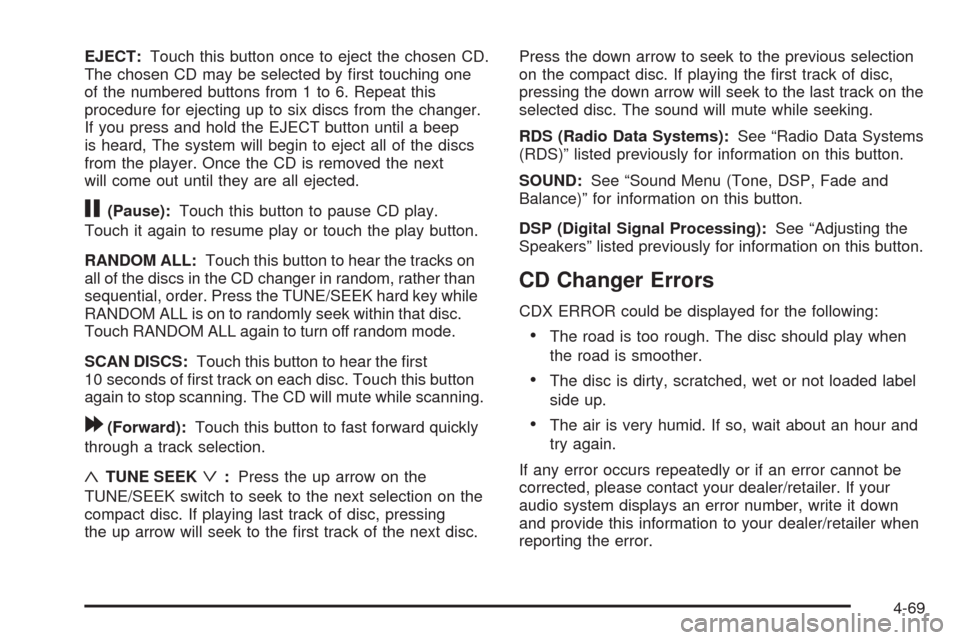
EJECT:Touch this button once to eject the chosen CD.
The chosen CD may be selected by rst touching one
of the numbered buttons from 1 to 6. Repeat this
procedure for ejecting up to six discs from the changer.
If you press and hold the EJECT button until a beep
is heard, The system will begin to eject all of the discs
from the player. Once the CD is removed the next
will come out until they are all ejected.
j(Pause):Touch this button to pause CD play.
Touch it again to resume play or touch the play button.
RANDOM ALL:Touch this button to hear the tracks on
all of the discs in the CD changer in random, rather than
sequential, order. Press the TUNE/SEEK hard key while
RANDOM ALL is on to randomly seek within that disc.
Touch RANDOM ALL again to turn off random mode.
SCAN DISCS:Touch this button to hear the rst
10 seconds of rst track on each disc. Touch this button
again to stop scanning. The CD will mute while scanning.
[(Forward):Touch this button to fast forward quickly
through a track selection.
«TUNE SEEKª:Press the up arrow on the
TUNE/SEEK switch to seek to the next selection on the
compact disc. If playing last track of disc, pressing
the up arrow will seek to the rst track of the next disc.Press the down arrow to seek to the previous selection
on the compact disc. If playing the rst track of disc,
pressing the down arrow will seek to the last track on the
selected disc. The sound will mute while seeking.
RDS (Radio Data Systems):See “Radio Data Systems
(RDS)” listed previously for information on this button.
SOUND:See “Sound Menu (Tone, DSP, Fade and
Balance)” for information on this button.
DSP (Digital Signal Processing):See “Adjusting the
Speakers” listed previously for information on this button.
CD Changer Errors
CDX ERROR could be displayed for the following:
The road is too rough. The disc should play when
the road is smoother.
The disc is dirty, scratched, wet or not loaded label
side up.
The air is very humid. If so, wait about an hour and
try again.
If any error occurs repeatedly or if an error cannot be
corrected, please contact your dealer/retailer. If your
audio system displays an error number, write it down
and provide this information to your dealer/retailer when
reporting the error.
4-69
Page 279 of 470
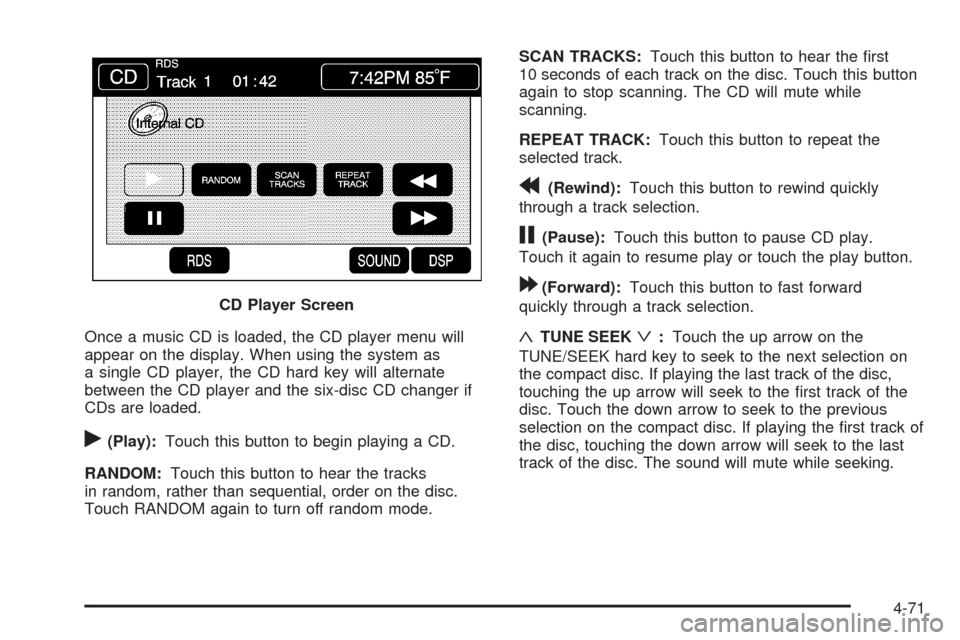
Once a music CD is loaded, the CD player menu will
appear on the display. When using the system as
a single CD player, the CD hard key will alternate
between the CD player and the six-disc CD changer if
CDs are loaded.
r(Play):Touch this button to begin playing a CD.
RANDOM:Touch this button to hear the tracks
in random, rather than sequential, order on the disc.
Touch RANDOM again to turn off random mode.SCAN TRACKS:Touch this button to hear the rst
10 seconds of each track on the disc. Touch this button
again to stop scanning. The CD will mute while
scanning.
REPEAT TRACK:Touch this button to repeat the
selected track.
r(Rewind):Touch this button to rewind quickly
through a track selection.
j(Pause):Touch this button to pause CD play.
Touch it again to resume play or touch the play button.
[(Forward):Touch this button to fast forward
quickly through a track selection.
«TUNE SEEKª:Touch the up arrow on the
TUNE/SEEK hard key to seek to the next selection on
the compact disc. If playing the last track of the disc,
touching the up arrow will seek to the rst track of the
disc. Touch the down arrow to seek to the previous
selection on the compact disc. If playing the rst track of
the disc, touching the down arrow will seek to the last
track of the disc. The sound will mute while seeking. CD Player Screen
4-71
Page 377 of 470
Load Index:An assigned number ranging from
1 to 279 that corresponds to the load carrying
capacity of a tire.
Maximum Ination Pressure
:The maximum air
pressure to which a cold tire can be inated.
The maximum air pressure is molded onto the
sidewall.
Maximum Load Rating
:The load rating for a tire
at the maximum permissible ination pressure
for that tire.
Maximum Loaded Vehicle Weight
:The sum of
curb weight, accessory weight, vehicle capacity
weight, and production options weight.
Normal Occupant Weight
:The number of
occupants a vehicle is designed to seat multiplied
by 150 lbs (68 kg). SeeLoading Your Vehicle
on page 5-22.
Occupant Distribution
:Designated seating
positions.
Outward Facing Sidewall
:The side of an
asymmetrical tire that has a particular side that
faces outward when mounted on a vehicle.
The side of the tire that contains a whitewall,
bears white lettering, or bears manufacturer,
brand, and/or model name molding that is higher
or deeper than the same moldings on the
other sidewall of the tire.Passenger (P-Metric) Tire
:A tire used on
passenger cars and some light duty trucks and
multipurpose vehicles.
Recommended Ination Pressure
:Vehicle
manufacturer’s recommended tire ination
pressure as shown on the tire placard.
SeeInflation - Tire Pressure on page 6-60
andLoading Your Vehicle on page 5-22.
Radial Ply Tire
:A pneumatic tire in which the
ply cords that extend to the beads are laid at
90 degrees to the centerline of the tread.
Rim
:A metal support for a tire and upon which
the tire beads are seated.
Sidewall
:The portion of a tire between the tread
and the bead.
Speed Rating
:An alphanumeric code assigned to
a tire indicating the maximum speed at which a
tire can operate.
Traction
:The friction between the tire and the
road surface. The amount of grip provided.
Tread
:The portion of a tire that comes into
contact with the road.
6-57
Page 450 of 470

Remove any valuables from your vehicle before it is
towed away. Make sure this includes your insurance
information and registration if you keep these
items in your vehicle.
Gather the important information you will need from
the other driver. Things like name, address, phone
number, driver’s license number, vehicle license
plate, vehicle make, model and model year, Vehicle
Identication Number (VIN), insurance company
and policy number, and a general description of
the damage to the other vehicle.
If possible, call your insurance company from the
scene of the crash. They will walk you through the
information they will need. If they ask for a police
report, phone or go to the police department
headquarters the next day and you can get a copy of
the report for a nominal fee. In some states/provinces
with “no fault” insurance laws, a report may not be
necessary. This is especially true if there are no
injuries and both vehicles are driveable.
Choose a reputable collision repair facility for your
vehicle. Whether you select a GM dealer/retailer
or a private collision repair facility to x the damage,
make sure you are comfortable with them.
Remember, you will have to feel comfortable
with their work for a long time.
Once you have an estimate, read it carefully and
make sure you understand what work will be
performed on your vehicle. If you have a question,
ask for an explanation. Reputable shops welcome
this opportunity.
Managing the Vehicle Damage Repair
Process
In the event that your vehicle requires damage repairs,
GM recommends that you take an active role in its
repair. If you have a pre-determined repair facility of
choice, take your vehicle there, or have it towed there.
Specify to the facility that any required replacement
collision parts be original equipment parts, either new
Genuine GM parts or recycled original GM parts.
Remember, recycled parts will not be covered by
your GM vehicle warranty.
Insurance pays the bill for the repair, but you must
live with the repair. Depending on your policy limits,
your insurance company may initially value the repair
using aftermarket parts. Discuss this with your repair
professional, and insist on Genuine GM parts. Remember
if your vehicle is leased you may be obligated to have
the vehicle repaired with Genuine GM parts, even if
your insurance coverage does not pay the full cost.
8-14