light CADILLAC XLR 2008 1.G Repair Manual
[x] Cancel search | Manufacturer: CADILLAC, Model Year: 2008, Model line: XLR, Model: CADILLAC XLR 2008 1.GPages: 470, PDF Size: 8.39 MB
Page 193 of 470

SERVICE AFS (Adaptive Forward
Lighting System) LAMPS
This message displays when the Adaptive Forward
Lighting System (AFS) is disabled and needs service.
See your dealer/retailer. SeeAdaptive Forward Lighting
System on page 3-30for more information.
SERVICE ELECT (Electrical) SYSTEM
This message displays if an electrical problem has
occurred within the Powertrain Control Module (PCM).
Have your vehicle serviced by your dealer/retailer.
SERVICE FUEL SYSTEM
This message displays when the Powertrain Control
Module (PCM) has detected a problem within the
fuel system. Have your vehicle serviced by your
dealer/retailer. This message will also be displayed
when the cluster is not getting fuel information from
the PCM.
SERVICE RADAR CRUISE
If your vehicle has this feature, this message displays
when the Adaptive Cruise Control (ACC) system is
disabled and needs service. See your dealer/retailer.
SERVICE RIDE CONTROL
This message displays when there is a problem with
the Magnetic Ride Control System. Have your vehicle
serviced by your dealer/retailer.
SERVICE TRACTION SYS (System)
This message displays when there is a problem with
the Traction Control System (TCS). Have your vehicle
serviced by your dealer/retailer.
SERVICE STABILITRAK
If this message displays, it means there may be a
problem with the stability enhancement system.
If you see this message, try to reset the system.
Stop, turn off the engine, then start the engine again.
If this message still comes on, it means there is a
problem. You should see your dealer/retailer for service.
Reduce your speed and drive accordingly. A single
chime also sounds when this message is displayed.
SERVICE TRANSMISSION
This message displays when there is a problem with
the transmission. Have your vehicle serviced by
your dealer/retailer.
3-71
Page 194 of 470

SERVICE VEHICLE SOON
This message displays when a non-emissions related
powertrain malfunction occurs. Have your vehicle
serviced by your dealer/retailer as soon as possible.
SHIFT TO PARK
This message displays if the vehicle is not in PARK (P)
when the engine is being turned off. The vehicle will
be in accessory mode. Once the shift lever is moved
to PARK (P), the vehicle will turn off.
STABILITRAK ACTIVE
You may see this message on the DIC. It means that
an advanced, computer-controlled system has come on
to help your vehicle continue to go in the direction in
which you are steering. This stability enhancement
system activates when the computer senses that your
vehicle is just starting to spin, as it might if you hit
a patch of ice or other slippery spot on the road.
When the system is on, you may hear a noise or
feel a vibration in the brake pedal. This is normal.When this message is on, continue to steer in the
direction you want to go. The system is designed to
help you in bad weather or other difficult driving situations
by making the most of whatever road conditions will
permit. If this message comes on, you will know that
something has caused your vehicle to start to spin,
so consider slowing down. A single chime also sounds
when this message is displayed.
STABILITRAK READY
If this message displays and a chime sounds, the
system has completed the functional check of the
StabiliTrak
®System.
STABILITRAK WARMING
When you rst start your vehicle and drive away,
especially during cold winter weather, this message
may display along with a chime and the traction control
warning light. This is normal. You can acknowledge
this message by pressing the RESET button. The
StabiliTrak
®System performance is affected until the
STABILITRAK READY message is displayed in the DIC,
which can take up to 15 minutes.
3-72
Page 195 of 470
SVC (Service) TIRE MONITOR
This message displays if a part on the Tire Pressure
Monitor System (TPMS) is not working properly. The tire
pressure light also ashes and then remains on during
the same ignition cycle. SeeTire Pressure Light on
page 3-53. Several conditions may cause this message
to appear. SeeTire Pressure Monitor Operation on
page 6-63for more information. If the warning comes on
and stays on, there may be a problem with the TPMS.
See your dealer/retailer.
TOO COLD TO MOVE TOP
This message displays when the retractable hardtop
button is pressed and the hardtop pump motor
temperature is below−4°F (−20°C). Wait for the hardtop
pump motor to warm up before using the retractable
hardtop.
TOP INOP (Inoperative) – VALET ON
This message displays when the retractable hardtop
button is pressed and the valet switch is on. Turn off
the valet switch before using the retractable hardtop.
TOP INOP (Inoperative) OUT OF PARK
This message displays if the retractable hardtop
button is pressed while the vehicle is not in PARK (P).
TOP MOTOR OVER TEMP
(Temperature)
This message displays when the retractable hardtop
button is pressed and the hardtop pump motor
temperature is over 221°F (105°C). Wait for the hardtop
pump motor to cool down before using the retractable
hardtop.
TOP NOT SECURE
This message displays when the retractable hardtop
button is released before the top open or close operation
is complete. Press and hold the retractable hardtop
button to fully open or close the top.
TRAC (Traction) SYSTEM ACTIVE
This message displays when the Traction Control System
(TCS) is limiting wheel spin. Slippery road conditions may
exist if this message is displayed, so adjust your driving
accordingly. This message stays on for a few seconds
after the TCS stops limited wheel spin.
TRAC (Traction)/STABILITRAK OFF
This message displays when both the Traction Control
System (TCS) and the StabiliTrak®System are off.
This message will remain until the systems are turned
on again.
3-73
Page 199 of 470
Auto Recall
This feature allows the steering column, outside mirrors
and the driver’s seat to automatically move to the current
driver’s set position when the engine starts. The DIC will
display AUTO RECALL OFF or AUTO RECALL ON.
Press the OPTIONS button to change the setting.
Auto Exit Recall
This feature allows the steering column and driver’s
seat to automatically move to the current driver’s
exit position when one of the following occurs:
The vehicle is turned off or in RAP or accessory
mode and the driver’s door is opened.
The vehicle is turned off or in RAP and the
unlock button on the keyless access transmitter
is pressed.
The DIC will display AUTO EXIT RECALL OFF or
AUTO EXIT RECALL ON. Press the OPTIONS
button to change the setting.
Approach Lights
This feature activates the parking lamps, front fog lamps
and back-up lamps during low light periods when the
unlock button on the keyless access transmitter is
pressed, both doors are closed and the vehicle is off or
in RAP. The lamps remain on for 20 seconds or until
a door is opened, the lock button on the keyless access
transmitter is pressed or the vehicle is no longer off
or in RAP.
The DIC will display APPROACH LIGHTS OFF or
APPROACH LIGHTS ON. Press the OPTIONS button
to change the setting.
Exit Lights
This feature activates the parking lamps and front fog
lamps for 15, 30 or 90 seconds. This will occur when
the vehicle is off or in RAP and the headlamps are on
due to the automatic headlamp system. The parking
lamps and front fog lamps will remain on until the driver
selected time period expires, the exterior lamp control
is activated or the vehicle is no longer off or in RAP.
The DIC will display EXIT LIGHTS OFF, EXIT
LIGHTS - 15 SEC, EXIT LIGHTS - 30 SEC, or
EXIT LIGHTS - 90 SEC. Press the OPTIONS button
to change the setting.
3-77
Page 207 of 470

Care of Your CDs
Handle CDs carefully. Store them in their original
cases or other protective cases and away from direct
sunlight and dust. The CD player scans the bottom
surface of the disc. If the surface of a CD is damaged,
such as cracked, broken, or scratched, the CD does
not play properly or not at all. If the surface of a CD is
soiled, take a soft, lint free cloth or dampen a clean,
soft cloth in a mild, neutral detergent solution mixed
with water, and clean it. Make sure the wiping process
starts from the center to the edge.
Do not touch the bottom side of a CD while handling
it; this could damage the surface. Pick up CDs by
grasping the outer edges or the edge of the hole and
the outer edge.
Care of the CD Player
Do not use CD lens cleaners for CD players because
the lens of the CD optics can become contaminated
by lubricants.
Diversity Antenna System
The AM-FM antennas are located under the decklid
surface in the trunk compartment. The antennas
are hidden from view and are not accessible.
If adding an aftermarket cellular telephone to your
vehicle, do not attach the antenna to the rear glass.
This would interfere with the convertible top retraction
operation and could cause damage to the
nished/painted surfaces.
XM™ Satellite Radio Antenna
System
Your vehicle may have the XM™ Satellite Radio
antennas that are located in the outside rear view
mirrors. These antennas are hidden from view and
are not accessible.
3-85
Page 215 of 470
Setting the Time
To set the time, do the following:
1. Press the PWR/VOL knob to turn the system on.
2. Press the
e/z(Audio/Adjust) hard key.
3. Press the
8clock symbol screen button.
4. Select the 12H or 24H screen button to display the
time in standard or military time.
5. Press and hold the HOUR and MIN. (minute) arrow
buttons to increase or to decrease the time.
6. Select the appropriate time zone screen button.
7. Select the Daylight Saving Time screen button,
if necessary.
The radio will use the GPS satellite to set the time.
The vehicle needs to be in an open area to receive the
signal. See “Clock Adjust Menu” underNavigation
Audio System on page 4-54for more information.
Setting the Search Area, Entering an
Address and Point of Interest, Storing a
Home Destination, and Using Your
Home or Previous Destinations
Before entering an Address, Point of Interest, Home, or
Preset Destination, select the appropriate region that
contains the nal destination. Your vehicle must
be stopped to perform this operation.
Setting the Search Area
To set the search area, do the following:
1. If the radio is already on with a map disc inserted,
skip to Step 5.
2. Press the PWR/VOL knob to turn the system on.
3. Insert the DVD map disc. See “Regional Maps”
underMaps on page 4-39for more information.
4. A notice may appear. Touch the I AGREE screen
button to proceed.
5. Press the ROUTE hard key.
6. Press the Enter Destination screen button.
7. Press the Change screen button.
8. Select the appropriate region numbered screen
button that contains your nal destination.
The system will return to the Destination menu. See
Enter Destination on page 4-28for more information.
4-7
Page 217 of 470
Entering a Point of Interest (POI)
To set a destination by entering a Point of Interest (POI),
do the following:
1. If the radio is already on with a map disc inserted,
skip to Step 5.
2. Press the power/volume knob to turn the system on.
3. Insert the DVD map disc. See “Regional Maps”
underMaps on page 4-39for more information.
4. A notice may appear. Touch the I AGREE screen
button to proceed.
5. Press the ROUTE hard key.
6. Press the Enter Destination screen button.
Verify that the selected Search Area is correct.
7. Press the All Points of Interest screen button.
8. Enter the specic title of the POI in the Name space
(i.e. Washington Monument) using the alpha
keypad on the screen.
9. Select the POI from the list.
10. Press the Enter screen button to plan your route.
Using the Category or City selections will aid the
system in nding your POI by limiting the search
options.
See “All Points of Interest” underEnter Destination on
page 4-28for more information.
Storing a Home Destination
1. If the radio is already on with a map disc inserted,
skip to Step 5.
2. Press the power/volume knob to turn the system on.
3. Insert the DVD map disc. See “Regional Maps”
underMaps on page 4-39for more information.
4. A notice may appear. Touch the I AGREE screen
button to proceed.
5. Press the ROUTE hard key.
6. Press the Edit Memory Point screen button.
7. Press the Home screen button.
8. Press the Register screen button.
Select a method for entering a destination.
SeeEnter Destination on page 4-28for more
information.
9. Press the Enter screen button to store the Home
destination.
The
LHome icon will be highlighted on the
DESTINATION screen. See “Using Your Home or
Previous Destinations” next to use the home or
previous destinations as a route.
4-9
Page 220 of 470
MAP:Press the MAP key to view the map screen
showing current vehicle position.
The map screen can also display the following
information:
North or Heading Up symbol. SeeSymbols on
page 4-44.
Map scale. SeeMaps on page 4-39.
Distance to destination.
GPS symbol if GPS signal is not being received.
SeeGlobal Positioning System (GPS) on page 4-50.
Options you have selected for reaching your current
destination.
Driver Information.
Radio band and presets.
ROUTE:Press the ROUTE key to display the PLAN
ROUTE menu. SeePlan Route on page 4-19.
MENU:Press the MENU key to display the SETUP
MENU. SeeSetup Menu on page 4-13.
TILT
X:Press the TILT key to open the navigation
system faceplate for loading or removing the map DVD,
a video DVD, or an audio CD. This key can only be
used while the vehicle is in PARK (P).
Alpha-Numeric Keypad
Letters of the alphabet, symbols, punctuation, and
numbers, when available to you, will be displayed on
the navigation screen as an alpha or numeric keypad.
The alpha keypad will be displayed when the system
needs you to input a city or street name. You can also
touch Char at the bottom of the alpha keypad to
access the numeric keypad when inputting a house
address, punctuation mark, or other character.
Touch A - Z to return to the alpha keypad.
All characters are touch-sensitive screen buttons.
Touch a character to select it.
Select the space symbol to enter a space between
characters or the words of a name.
V:Select the backspace symbol if you have selected
an incorrect character.
To make your name selections easier, the system will
only allow you to select a character which can follow the
last one entered. For example, if you enter Z, you
would not be allowed to follow it with T. The system will
highlight the available characters and darken the
unavailable characters.
4-12
Page 221 of 470
If you are unsuccessful when inputting a name, it may
need to be selected differently. It is also possible that the
map DVD database may not contain that information
or the correct search area has not been selected.
SeeDatabase Coverage Explanations on page 4-53
for more information.
Touch Sensitive Buttons
Touch-sensitive buttons are located on the screen.
When you have successfully selected a screen button,
a beep will be heard. These buttons will be highlighted
when a feature is available and dim when they are
unavailable. There are some toggle screen buttons that
will be light blue when active and dark blue when
inactive.
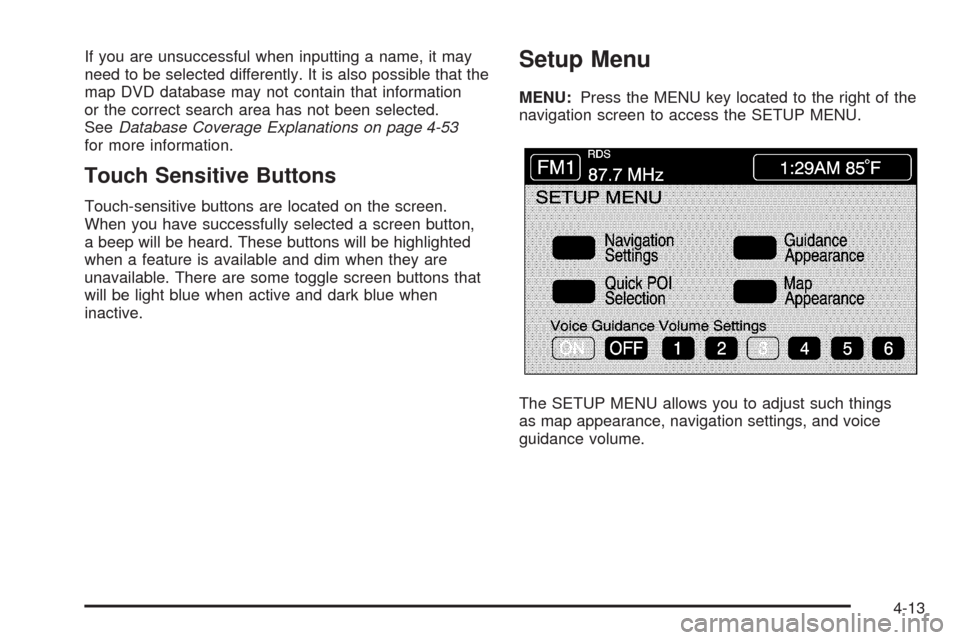
Setup Menu
MENU:Press the MENU key located to the right of the
navigation screen to access the SETUP MENU.
The SETUP MENU allows you to adjust such things
as map appearance, navigation settings, and voice
guidance volume.
4-13
Page 225 of 470
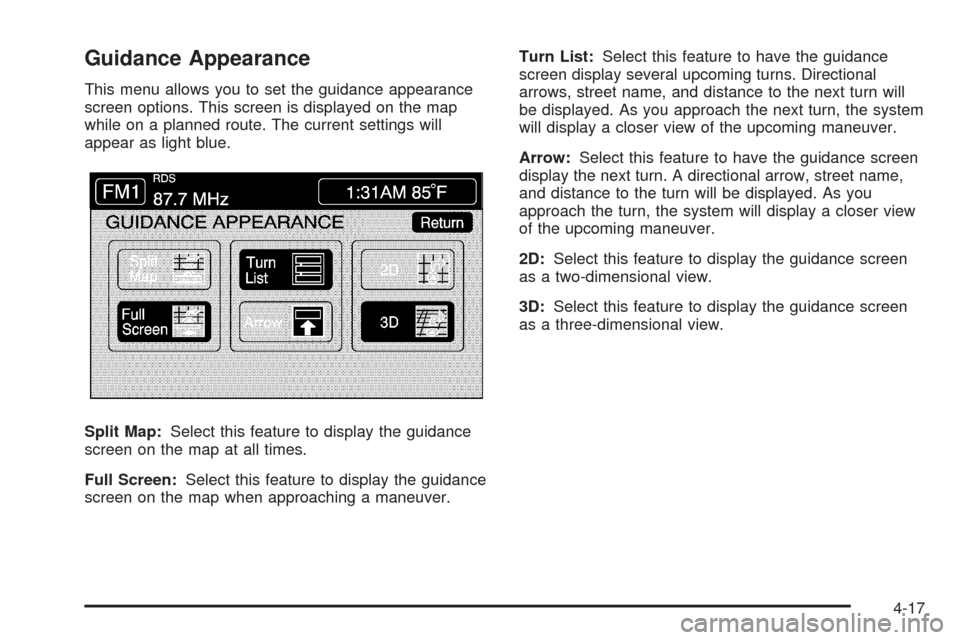
Guidance Appearance
This menu allows you to set the guidance appearance
screen options. This screen is displayed on the map
while on a planned route. The current settings will
appear as light blue.
Split Map:Select this feature to display the guidance
screen on the map at all times.
Full Screen:Select this feature to display the guidance
screen on the map when approaching a maneuver.Turn List:Select this feature to have the guidance
screen display several upcoming turns. Directional
arrows, street name, and distance to the next turn will
be displayed. As you approach the next turn, the system
will display a closer view of the upcoming maneuver.
Arrow:Select this feature to have the guidance screen
display the next turn. A directional arrow, street name,
and distance to the turn will be displayed. As you
approach the turn, the system will display a closer view
of the upcoming maneuver.
2D:Select this feature to display the guidance screen
as a two-dimensional view.
3D:Select this feature to display the guidance screen
as a three-dimensional view.
4-17