light CADILLAC XLR 2008 1.G Manual PDF
[x] Cancel search | Manufacturer: CADILLAC, Model Year: 2008, Model line: XLR, Model: CADILLAC XLR 2008 1.GPages: 470, PDF Size: 8.39 MB
Page 226 of 470
Map Appearance
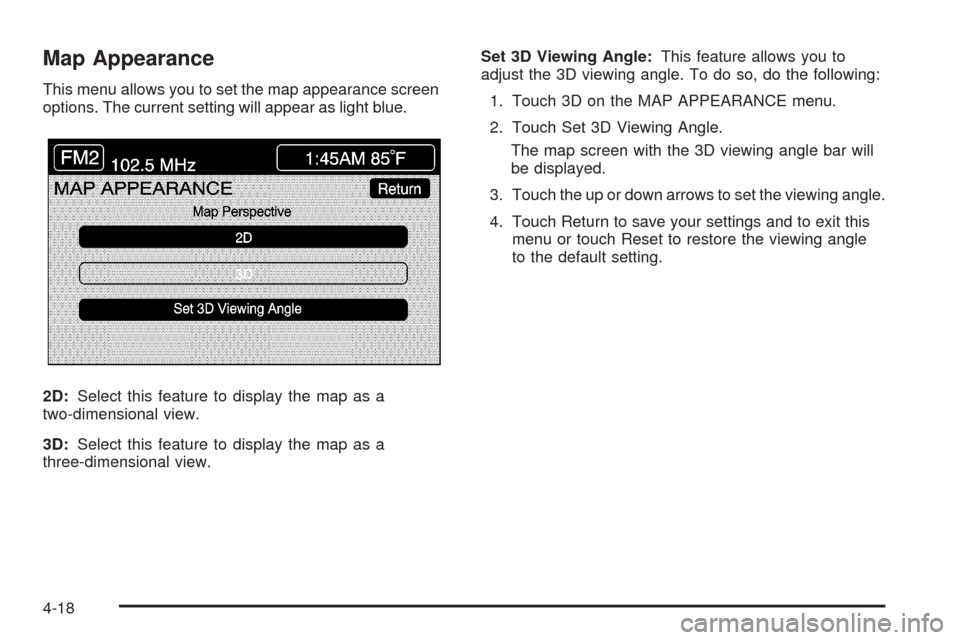
This menu allows you to set the map appearance screen
options. The current setting will appear as light blue.
2D:Select this feature to display the map as a
two-dimensional view.
3D:Select this feature to display the map as a
three-dimensional view.Set 3D Viewing Angle:This feature allows you to
adjust the 3D viewing angle. To do so, do the following:
1. Touch 3D on the MAP APPEARANCE menu.
2. Touch Set 3D Viewing Angle.
The map screen with the 3D viewing angle bar will
be displayed.
3. Touch the up or down arrows to set the viewing angle.
4. Touch Return to save your settings and to exit this
menu or touch Reset to restore the viewing angle
to the default setting.
4-18
Page 229 of 470
Editing Memory Points
This feature allows you to edit the contents stored in
memory. The following options are available:
Icon Editing of a Memory Point
Each memory point is displayed with a default icon.
To edit an icon, do the following:
1. Select the category of the memory point.
2. Select the item you want to edit.
3. Touch the icon. The EDIT MEMORY POINT icon
screen will appear.
4. Touch the icon you would like to use. The system will
then return to the EDIT MEMORY POINT menu.
5. Touch Return to go back to the previous screen.
You will see the new memory point icon on the map.
When selecting an icon, you can choose from
18 different icons, three of which are sound icons.
The same icon may be used for other memory points
as well.
Name Editing of a Memory Point
To modify the name of a stored memory point, do the
following:
1. Select the category of the memory point.
2. Select the item you want to edit.
3. Touch the NAME screen button and use the alpha
keypad to edit the name. Names may contain up to
15 alpha and/or numeric characters.
4. Touch Return to go to the previous screen.
Moving Memory Points
To move a memory point from one category to another,
do the following:
1. Select the category of the memory point.
2. Select the memory point you want to edit.
3. Touch CATEGORY. A list of categories will appear.
The current category for the item will be highlighted
and cannot be selected.
4. Touch the screen button for the category you want
the memory point placed in. A pop-up window will
appear displaying the change in category.
5. Touch Return to go back to the previous screen.
4-21
Page 236 of 470

Enter Destination
The DESTINATION menu will give you several ways to
plan a route. Touch the Enter Destination screen
button from the PLAN ROUTE menu to display the
DESTINATION menu.
For destination entry methods listed on the second page
of the DESTINATION menu, touch the Next Page arrow.
Touch the Prev. Page arrow to return to the rst page.To enter a destination, choose from one of the
destination entry methods following in this section.
After entering a destination, If available, the system
will display up to three routes in a pop-up window
indicating the total mileage and time to destination for
each route. Select a route by touching NEXT. The map
will display each route in a different color. The selected
route will be highlighted in red.
To start route guidance, touch Start or begin driving
your vehicle. Route guidance will automatically begin
after a short distance.
If you touch CHG ROUTE before touching Start, you will
be able to change route preferences. SeeRoute
Preference on page 4-37for more information.
When a route has been planned, it will be highlighted
and a bulls-eye symbol will appear on the map to show
your nal destination.
If you wish to cancel a route that has been set, see
“Cancel Route” underRoute Preference on page 4-37.
4-28
Page 250 of 470
Handling the DVD Map Disc
When handling the DVD map disc, be careful of the
following:
Handle the disc very carefully to avoid
contamination or aws. Signals may not read out
properly if the disc gets contaminated or awed.
If the disc gets soiled, use a soft cloth to gently wipe
it out from the center of the disc to the outside.
Do not use photographic record cleaner, solvents,
or other cleaners.
Do not use the disc to rest on while writing or
drawing using any writing utensil or attach a seal
to any of the sides or the disc.
Do not keep the disc in direct sunlight, high
temperatures, or humidity.
After using the disc, place it back into the
original case.
Setting the Search Area
To determine or change the system’s search area,
do the following:
1. Press the ROUTE key.
2. Touch the Enter Destination screen button.
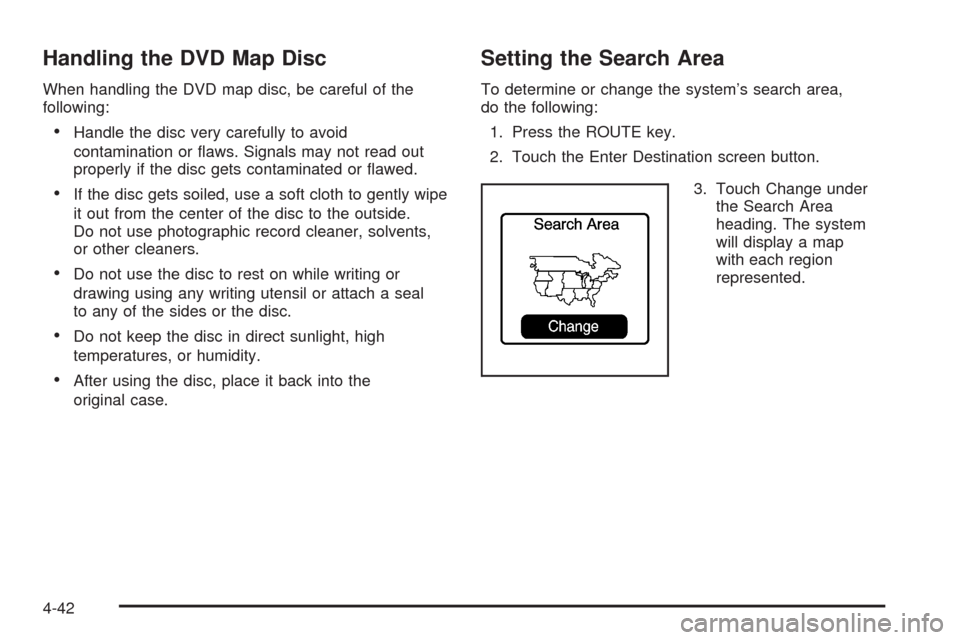
3. Touch Change under
the Search Area
heading. The system
will display a map
with each region
represented.
4-42
Page 251 of 470

4. Select the desired region by touching the
appropriate screen button to the left of the
U.S. map. The name of the states or the country
included in the selected region will be displayed
at the bottom of the screen and the region will be
highlighted.
5. Touch Enter to set the region as the search area.
6. Touch Return to go back to the previous screen.
Map Adjustments
The system allows you to adjust the scale of view on
the map. The map will scroll automatically based on the
direction you are traveling.
Map Scales
To view a larger or smaller
scale of the map, touch
the map scale arrows.
You may also adjust the scale of the map by touching
the scale on the bar. The scale of a map can range from
1/32 of a mile (0.05 km) to 128 miles (256 km).
4-43
Page 257 of 470

Touching the up arrow will give you upcoming streets.
At times, there may not be names available for entrance
or exit ramps.
To avoid a turn, touch AVOID next to the turn you want
to avoid. You can use REDUCE or ENLARGE to edit
the avoided point. Touch Reroute or press the MAP key
to calculate your new route.
Touch Return to view your current position and to turn
the turn list screen off.
Touch REROUTE or press the MAP key to calculate a
new route.
Auto Reroute
When your destination is set and you travel off of the
planned route, the system will automatically begin
to reroute you. You will see the new route highlighted
on the screen.
Traveling Across Regions
If you plan to drive across several states, you may have
to change the selected region to represent the area
you are traveling to.
There are two ways you can plan a destination when
traveling across regions.The following method is suggested and provides the
most route guidance and map display functions:
1. Change the selected search area region when
you get closer to the area you are traveling to.
See “Setting the Search Area” underMaps on
page 4-39.
2. Enter your destination and route settings.
SeeEnter Destination on page 4-28for more
information.
If you do not want to use the rst method, keep your
currently selected search area region and enter your
destination. This method allows you only to select a
destination from the easy planning route method or
from the All Points of Interest (POI) categories with the
“All Search Areas” comment for US Only. For example,
Tourist is a category that features this comment. See
Enter Destination on page 4-28for more information.
If you are traveling in or to Canada and you cross the
regional border, the only map scale views available
are 4 mi, 8 mi, 31 mi, and 128 mi (8 km, 16 km, 64 km
and 256 km). Change the selected search area region
when you get closer to the area you are traveling to.
See “Setting the Search Area” underMaps on page 4-39
for more information.
4-49
Page 264 of 470
Clock Adjust Menu
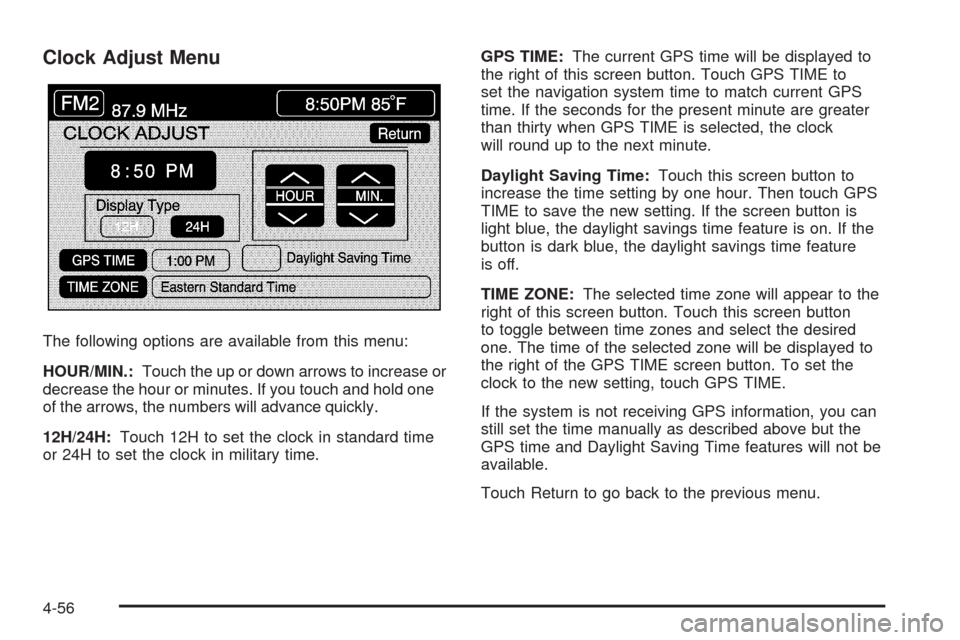
The following options are available from this menu:
HOUR/MIN.:Touch the up or down arrows to increase or
decrease the hour or minutes. If you touch and hold one
of the arrows, the numbers will advance quickly.
12H/24H:Touch 12H to set the clock in standard time
or 24H to set the clock in military time.GPS TIME:The current GPS time will be displayed to
the right of this screen button. Touch GPS TIME to
set the navigation system time to match current GPS
time. If the seconds for the present minute are greater
than thirty when GPS TIME is selected, the clock
will round up to the next minute.
Daylight Saving Time:Touch this screen button to
increase the time setting by one hour. Then touch GPS
TIME to save the new setting. If the screen button is
light blue, the daylight savings time feature is on. If the
button is dark blue, the daylight savings time feature
is off.
TIME ZONE:The selected time zone will appear to the
right of this screen button. Touch this screen button
to toggle between time zones and select the desired
one. The time of the selected zone will be displayed to
the right of the GPS TIME screen button. To set the
clock to the new setting, touch GPS TIME.
If the system is not receiving GPS information, you can
still set the time manually as described above but the
GPS time and Daylight Saving Time features will not be
available.
Touch Return to go back to the previous menu.
4-56
Page 265 of 470
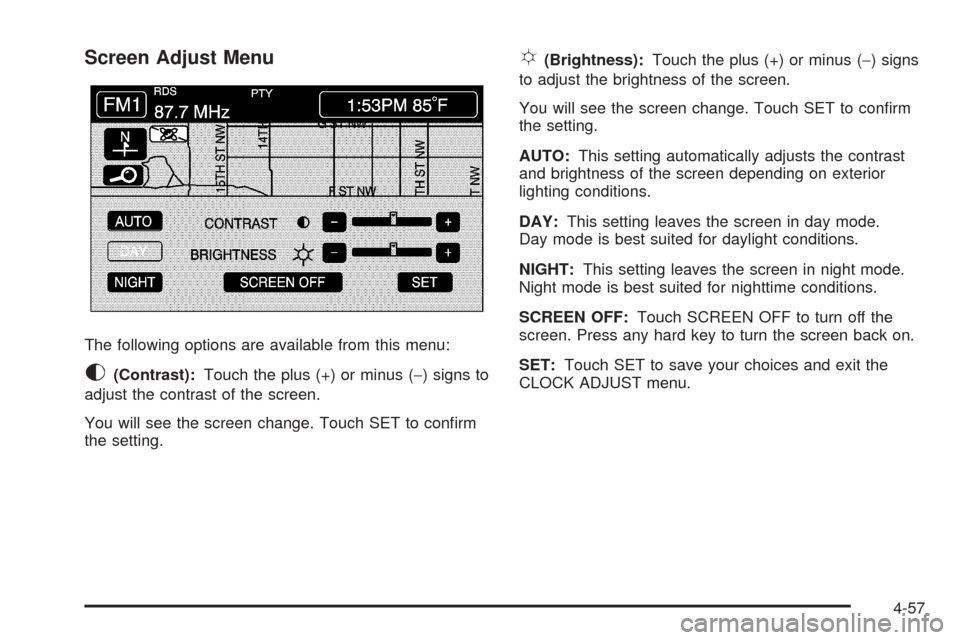
Screen Adjust Menu
The following options are available from this menu:
K(Contrast):Touch the plus (+) or minus (−) signs to
adjust the contrast of the screen.
You will see the screen change. Touch SET to conrm
the setting.
!(Brightness):Touch the plus (+) or minus (−) signs
to adjust the brightness of the screen.
You will see the screen change. Touch SET to conrm
the setting.
AUTO:This setting automatically adjusts the contrast
and brightness of the screen depending on exterior
lighting conditions.
DAY:This setting leaves the screen in day mode.
Day mode is best suited for daylight conditions.
NIGHT:This setting leaves the screen in night mode.
Night mode is best suited for nighttime conditions.
SCREEN OFF:Touch SCREEN OFF to turn off the
screen. Press any hard key to turn the screen back on.
SET:Touch SET to save your choices and exit the
CLOCK ADJUST menu.
4-57
Page 296 of 470
Braking
SeeBrake System Warning Light on page 3-50.
Braking action involves perception time and reaction
time. First, you have to decide to push on the brake
pedal. That is perception time. Then you have to bring
up your foot and do it. That is reaction time.
Average reaction time is about three-fourths of a
second. But that is only an average. It might be less
with one driver and as long as two or three seconds or
more with another. Age, physical condition, alertness,
coordination, and eyesight all play a part. So do alcohol,
drugs, and frustration. But even in three-fourths of a
second, a vehicle moving at 60 mph (100 km/h) travels
66 feet (20 m). That could be a lot of distance in an
emergency, so keeping enough space between
your vehicle and others is important.
And, of course, actual stopping distances vary greatly
with the surface of the road, whether it is pavement
or gravel; the condition of the road, whether it is
wet, dry, or icy; tire tread; the condition of the brakes;
the weight of the vehicle; and the amount of brake
force applied.Avoid needless heavy braking. Some people drive
in spurts — heavy acceleration followed by heavy
braking — rather than keeping pace with traffic. This is
a mistake. The brakes might not have time to cool
between hard stops. The brakes will wear out much
faster if you do a lot of heavy braking. If you keep pace
with the traffic and allow realistic following distances,
you will eliminate a lot of unnecessary braking.
That means better braking and longer brake life.
If your vehicle’s engine ever stops while you are driving,
brake normally but do not pump the brakes. If you do,
the pedal could get harder to push down. If the
engine stops, you will still have some power brake
assist. But you will use it when you brake. Once the
power assist is used up, it can take longer to stop and
the brake pedal will be harder to push.
Adding non-dealer/non-retailer accessories can affect
your vehicle’s performance. SeeAccessories and
Modifications on page 6-3.
5-4
Page 297 of 470
Antilock Brake System (ABS)
Your vehicle has the Antilock Brake System (ABS), an
advanced electronic braking system that will help
prevent a braking skid.
When you start the engine and begin to drive away,
ABS will check itself. You might hear a momentary
motor or clicking noise while this test is going on, and
you might even notice that the brake pedal moves
a little. This is normal.
If there is a problem with
ABS, this warning light will
stay on. SeeAntilock
Brake System Warning
Light on page 3-51.
Let us say the road is wet and you are driving safely.
Suddenly, an animal jumps out in front of you. You slam
on the brakes and continue braking. Here is what
happens with ABS:
A computer senses that wheels are slowing down.
If one of the wheels is about to stop rolling, the computer
will separately work the brakes at each wheel.ABS can change the brake pressure faster than any
driver could. The computer is programmed to make the
most of available tire and road conditions. This can
help you steer around the obstacle while braking hard.
As you brake, the computer keeps receiving updates on
wheel speed and controls braking pressure accordingly.
Remember: ABS does not change the time you need to
get your foot up to the brake pedal or always decrease
stopping distance. If you get too close to the vehicle
in front of you, you will not have time to apply the brakes
if that vehicle suddenly slows or stops. Always leave
enough room up ahead to stop, even though you
have ABS.
Using ABS
Do not pump the brakes. Just hold the brake pedal
down rmly and let antilock work for you. You might hear
a motor or clicking noise and feel the brake pedal
move a little during a stop, but this is normal.
Braking in Emergencies
With ABS, you can steer and brake at the same time.
In many emergencies, steering can help you more than
even the very best braking.
5-5