tires CADILLAC XLR 2008 1.G Owners Manual
[x] Cancel search | Manufacturer: CADILLAC, Model Year: 2008, Model line: XLR, Model: CADILLAC XLR 2008 1.GPages: 470, PDF Size: 8.39 MB
Page 2 of 470

Service and Appearance Care.......................... 6-1
Service
..................................................... 6-3
Fuel
......................................................... 6-5
Checking Things Under the Hood
...............6-10
Rear Axle
...............................................6-46
Headlamp Aiming
.....................................6-47
Bulb Replacement
....................................6-50
Windshield Replacement
...........................6-50
Windshield Wiper Blade Replacement
.........6-50
Tires
......................................................6-52
Appearance Care
.....................................6-80Vehicle Identication
.................................6-89
Electrical System
......................................6-89
Capacities and Specications
.....................6-97
Maintenance Schedule..................................... 7-1
Maintenance Schedule
................................ 7-2
Customer Assistance Information.................... 8-1
Customer Assistance and Information
........... 8-2
Reporting Safety Defects
...........................8-15
Vehicle Data Recording and Privacy
...........8-17
Index................................................................ 1
Page 88 of 470
NEUTRAL (N):In this position, your engine does not
connect with the wheels. To restart when you are
already moving, use NEUTRAL (N) only. Also, use
NEUTRAL (N) when your vehicle is being towed.
Use Neutral (N) if the vehicle must be moved with the
engine off for short distances. Please seeTowing
Your Vehicle on page 5-27.
{CAUTION:
Shifting into a drive gear while the engine is
running at high speed is dangerous. Unless
your foot is rmly on the brake pedal, your
vehicle could move very rapidly. You could
lose control and hit people or objects. Do not
shift into a drive gear while your engine is
running at high speed.
Notice:Shifting out of PARK (P) or NEUTRAL (N)
with the engine running at high speed may damage
the transmission. The repairs would not be
covered by your warranty. Be sure the engine is not
running at high speed when shifting your vehicle.DRIVE (D):This position is for normal driving.
It provides the best fuel economy for your vehicle.
If you need more power for passing and you are:
Going less than about 35 mph (56 km/h),
push the accelerator pedal about halfway down.
Going about 35 mph (56km/h) or more, push the
accelerator all the way down.
Downshifting the transmission in slippery road conditions
could result in skidding, see “Skidding” underLoss of
Control on page 5-12.
Notice:Spinning the tires or holding the vehicle
in one place on a hill using only the accelerator
pedal may damage the transmission. The repair will
not be covered by your warranty. If you are stuck,
do not spin the tires. When stopping on a hill,
use the brakes to hold the vehicle in place.
Maximum engine speed is limited to protect driveline
components from improper operation.
2-28
Page 175 of 470
Engine Coolant Temperature Gage
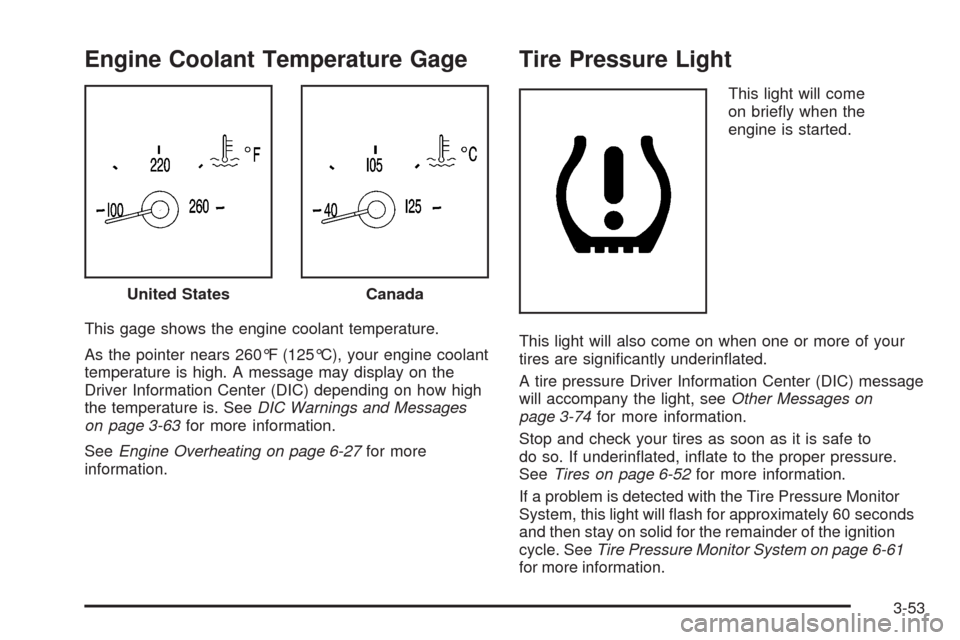
This gage shows the engine coolant temperature.
As the pointer nears 260°F (125°C), your engine coolant
temperature is high. A message may display on the
Driver Information Center (DIC) depending on how high
the temperature is. SeeDIC Warnings and Messages
on page 3-63for more information.
SeeEngine Overheating on page 6-27for more
information.
Tire Pressure Light
This light will come
on briey when the
engine is started.
This light will also come on when one or more of your
tires are signicantly underinated.
A tire pressure Driver Information Center (DIC) message
will accompany the light, seeOther Messages on
page 3-74for more information.
Stop and check your tires as soon as it is safe to
do so. If underinated, inate to the proper pressure.
SeeTires on page 6-52for more information.
If a problem is detected with the Tire Pressure Monitor
System, this light will ash for approximately 60 seconds
and then stay on solid for the remainder of the ignition
cycle. SeeTire Pressure Monitor System on page 6-61
for more information. United States
Canada
3-53
Page 176 of 470

Malfunction Indicator Lamp
Check Engine Light
A computer system called OBD II (On-Board
Diagnostics-Second Generation) monitors operation
of the fuel, ignition, and emission control systems.
It makes sure that emissions are at acceptable levels
for the life of the vehicle, helping to produce a cleaner
environment.
The check engine light
comes on to indicate
that there is an OBD II
problem and service
is required.
Malfunctions often are indicated by the system before
any problem is apparent. This can prevent more serious
damage to your vehicle. This system is also designed
to assist your service technician in correctly diagnosing
any malfunction.
Notice:If you keep driving your vehicle with
this light on, after a while, the emission controls
might not work as well, your vehicle’s fuel economymight not be as good, and the engine might not
run as smoothly. This could lead to costly repairs
that might not be covered by your warranty.
Notice:Modications made to the engine,
transmission, exhaust, intake, or fuel system of
your vehicle or the replacement of the original tires
with other than those of the same Tire Performance
Criteria (TPC) can affect your vehicle’s emission
controls and can cause this light to come on.
Modications to these systems could lead to costly
repairs not covered by your warranty. This could
also result in a failure to pass a required Emission
Inspection/Maintenance test. SeeAccessories
and Modifications on page 6-3.
This light comes on briey, as a check to show it is
working, as you start the engine. If the light does not
come on, have it repaired. This light also comes
on during a malfunction in one of two ways:
Light Flashing— A misre condition has been
detected. A misre increases vehicle emissions
and could damage the emission control system
on your vehicle. Diagnosis and service might
be required.
Light On Steady— An emission control system
malfunction has been detected on your vehicle.
Diagnosis and service might be required.
3-54
Page 184 of 470
AVERAGE SPEED:This feature shows the average
speed the vehicle has traveled since the last time
the value was reset. To reset the value, press the
information button to display AVERAGE SPEED, then
press and hold the RESET button until AVERAGE
SPEED 00.0 is displayed.
ELAPSED TIME:This feature is like a stopwatch, in
that you can clock the time it takes to get from one point
to another.
To operate, press the information button to display
ELAPSED TIME. Each of the elds for the hours,
minutes, and seconds are two numeric digits.
Once ELAPSED TIME 00:00:00 is displayed, press the
RESET button to start the timing feature. Press the
RESET button again to stop it. If you will be starting and
stopping your vehicle, during a trip for instance, the
ELAPSED TIME feature will automatically start timing
where it left off when you last stopped. To reset it,
press and hold the RESET button until the display
reads ELAPSED TIME 00:00:00. Press the information
button to exit from the ELAPSED TIME display.FRONT Lxx Rxx PSI:This feature shows the tire
pressure for the front left and right tires.
REAR Lxx Rxx PSI:This feature shows the tire
pressure for the rear left and right tires.
OIL LIFE:This feature shows the estimated oil life
remaining. SeeOil Life Indicator on page 3-80for more
information. To reset the engine oil life system, see
Engine Oil Life System on page 6-20. This only needs
to be reset after you have had the oil changed.
In addition to the engine oil life system monitoring oil
life, additional maintenance is recommended in the
Maintenance Schedule in this manual. SeeScheduled
Maintenance on page 7-4andEngine Oil on page 6-16
for more information.
ENG/METRIC (English/Metric):This feature allows
you to switch the DIC displays between English
and Metric. Press the RESET button to switch the
display between English and Metric. There will be
an arrow next to the option that is selected.
3-62
Page 259 of 470
Vehicle Positioning
At times, the position of the vehicle on the map may be
inaccurate due to one or more of the following reasons:
The road system has changed.
The vehicle is driving on slippery road surfaces such
as in sand, gravel, and/or snow.
The vehicle is traveling on winding roads.
The vehicle is on a long straight road.
The vehicle is approaching a tall building or a large
vehicle.
The surface streets run parallel to a freeway.
The vehicle has just been transferred by a vehicle
carrier or a ferry.
The current position calibration is set incorrectly.
The vehicle is traveling at high speed.
The vehicle changes directions more than once, or
when the vehicle is turning on a turn table in a
parking lot.
The vehicle is entering and/or exiting a parking lot,
garage, or a lot with a roof.
The GPS signal is not received.
A roof carrier is installed on your vehicle.
The vehicle is being driven with tire chains.
The tires are replaced.
The tire pressure for your tires is incorrect.
The tires are worn.
The rst time the map DVD is inserted.
The battery is disconnected for several days.
The vehicle is driving in heavy traffic where driving is
at low speeds, and the vehicle is stopped and started
repeatedly.
If you experience problems with your system, see
“Adjust Vehicle Position” underSetup Menu on
page 4-13to calibrate the system.
4-51
Page 295 of 470

Police records show that almost 40 percent of all motor
vehicle-related deaths involve alcohol. In most cases,
these deaths are the result of someone who was
drinking and driving. In recent years, more than
17,000 annual motor vehicle-related deaths have been
associated with the use of alcohol, with about
250,000 people injured.
For persons under 21, it is against the law in every
U.S. state to drink alcohol. There are good medical,
psychological, and developmental reasons for
these laws.
The obvious way to eliminate the leading highway
safety problem is for people never to drink alcohol
and then drive.
Medical research shows that alcohol in a person’s
system can make crash injuries worse, especially
injuries to the brain, spinal cord, or heart. This means
that when anyone who has been drinking — driver
or passenger — is in a crash, that person’s chance of
being killed or permanently disabled is higher than if the
person had not been drinking.Control of a Vehicle
The following three systems help to control your
vehicle while driving — brakes, steering, and
accelerator. At times, as when driving on snow or ice,
it is easy to ask more of those control systems than the
tires and road can provide. Meaning, you can lose
control of your vehicle. SeeTraction Control System
(TCS) on page 5-6andStabiliTrak
®System on
page 5-8.
Adding non-dealer/non-retailer accessories can affect
your vehicle’s performance. SeeAccessories and
Modifications on page 6-3.
5-3
Page 301 of 470

The system comes on automatically whenever you start
your vehicle. To help maintain directional control of
the vehicle, you should always leave the system on.
You can turn the system off if you ever need to. If you
turn the StabiliTrak
®system off, the Traction Control
System will also be turned off. Adjust your driving
accordingly.
To turn the system off,
press and hold the front
part of the traction
control button on the
console for ve seconds
with the vehicle stopped.
You can turn the system back on at any time by pressing
the button. The DIC will display the appropriate message
when you push the button, either TRAC/STABILITRAK
ON or TRAC/STABILITRAK OFF.
Steering
Power Steering
If you lose power steering assist because the engine
stops or the system is not functioning, you can steer but
it will take much more effort.
Magnetic Speed Variable Assist
Steering
Your vehicle has a steering system that continuously
adjusts the effort you feel when steering at all vehicle
speeds. It provides ease when parking, yet a rm,
solid feel at highway speeds.
Steering Tips
It is important to take curves at a reasonable speed.
A lot of the “driver lost control” accidents mentioned on
the news happen on curves. Here is why:
Experienced driver or beginner, each of us is subject
to the same laws of physics when driving on curves.
The traction of the tires against the road surface makes
it possible for the vehicle to change its path when
you turn the front wheels. If there is no traction, inertia
will keep the vehicle going in the same direction.
If you have ever tried to steer a vehicle on wet ice,
you will understand this.
5-9
Page 302 of 470
The traction you can get in a curve depends on the
condition of the tires and the road surface, the angle at
which the curve is banked, and your speed. While
you are in a curve, speed is the one factor you
can control.
Suppose you are steering through a sharp curve.
Then you suddenly accelerate. Both control
systems — steering and acceleration — have to do
their work where the tires meet the road. Adding
the sudden acceleration can demand too much of those
places. You can lose control. SeeTraction Control
System (TCS) on page 5-6.
What should you do if this ever happens? Ease up on
the accelerator pedal, steer the vehicle the way you
want it to go, and slow down.
Speed limit signs near curves warn that you should
adjust your speed. Of course, the posted speeds
are based on good weather and road conditions.
Under less favorable conditions you will want to go
slower.
If you need to reduce your speed as you approach a
curve, do it before you enter the curve, while the
front wheels are straight ahead.Try to adjust your speed so you can drive through the
curve. Maintain a reasonable, steady speed. Wait to
accelerate until you are out of the curve, and then
accelerate gently into the straightaway.
Adding non-dealer/non-retailer accessories can affect
your vehicle’s performance. SeeAccessories and
Modifications on page 6-3.
Steering in Emergencies
There are times when steering can be more effective
than braking. For example, you come over a hill and nd
a truck stopped in your lane, or a car suddenly pulls
out from nowhere, or a child darts out from between
parked cars and stops right in front of you. You can
avoid these problems by braking — if you can stop in
time. But sometimes you cannot; there is not room.
That is the time for evasive action — steering around
the problem.
Your vehicle can perform very well in emergencies
like these. First apply the brakes. SeeBraking on
page 5-4. It is better to remove as much speed as you
can from a possible collision. Then steer around the
problem, to the left or right depending on the space
available.
5-10
Page 304 of 470
Passing
Passing another vehicle on a two-lane road can be
dangerous. To reduce the risk of danger while passing,
we suggest the following tips:
Look down the road, to the sides, and to crossroads
for situations that might affect a successful pass.
If in doubt, wait.
Watch for traffic signs, pavement markings, and
lines that could indicate a turn or an intersection.
Never cross a solid or double-solid line on your side
of the lane.
Do not get too close to the vehicle you want to
pass. Doing so can reduce your visibility.
Wait your turn to pass a slow vehicle.
When you are being passed, ease to the right.
Loss of Control
Let us review what driving experts say about what
happens when the three control systems — brakes,
steering, and acceleration — do not have enough friction
where the tires meet the road to do what the driver
has asked.
In any emergency, do not give up. Keep trying to steer
and constantly seek an escape route or area of less
danger.
Skidding
In a skid, a driver can lose control of the vehicle.
Defensive drivers avoid most skids by taking reasonable
care suited to existing conditions, and by not overdriving
those conditions. But skids are always possible.
The three types of skids correspond to your vehicle’s
three control systems. In the braking skid, the wheels
are not rolling. In the steering or cornering skid, too
much speed or steering in a curve causes tires to slip
and lose cornering force. And in the acceleration skid,
too much throttle causes the driving wheels to spin.
A cornering skid is best handled by easing your foot off
the accelerator pedal.
Remember: Any traction control system helps avoid only
the acceleration skid. If your traction control system is
off, then an acceleration skid is also best handled
by easing your foot off the accelerator pedal.
If your vehicle starts to slide, ease your foot off the
accelerator pedal and quickly steer the way you want
the vehicle to go. If you start steering quickly enough,
your vehicle may straighten out. Always be ready
for a second skid if it occurs.
5-12