steering CADILLAC XLR 2009 1.G User Guide
[x] Cancel search | Manufacturer: CADILLAC, Model Year: 2009, Model line: XLR, Model: CADILLAC XLR 2009 1.GPages: 462, PDF Size: 3.72 MB
Page 83 of 462
9Acc. (OFF/ACCESSORY):When this button is
pressed, the engine will turn off even if the shifter is not
in P (Park). If the shifter is in P (Park), the ignition
mode will change to Retained Accessory Power (RAP),
if all doors are closed. The ignition mode will change
to off, if a front door is opened. SeeRetained Accessory
Power (RAP) on page 2-25for more information.
If the shifter is not in P (Park), the ignition mode will
change to Acc. SeeShifting Into Park on page 2-33.
When the engine is off, press this button to place the
vehicle in accessory mode. ACCESSORY MODE ON will
display on the Driver Information Center (DIC). This mode
allows you to use things like the radio and the windshield
wipers while the engine is off. Use accessory mode if you
must have the vehicle in motion while the engine is off, for
example, if the vehicle is being towed. If the door is open
while in accessory mode, the key in reminder chime will
sound continuously.If the push-button start is not working, the vehicle may be
near a strong radio antenna signal causing interference to
the keyless access system. SeeDIC Warnings and
Messages on page 3-60for more information.
After being in ACCESSORY mode for about 20 minutes,
the vehicle will automatically enter RAP or will turn off,
depending on if the doors are opened or closed.
Retained Accessory Power (RAP)
Power to the following accessories continues to work for
up to 10 minutes after the engine is turned off or until
a door is opened:
Audio System
Audio Steering Wheel Controls
Power Windows
For an additional 10 minutes of operation, close all the
doors and press the Acc. button to place the vehicle in
accessory mode. Press the button again to return to RAP.
2-25
Page 97 of 462
Outside Automatic Dimming Mirror
The driver’s side mirror adjusts for the glare of
headlamps behind you. This feature is controlled by the
on and off settings on the inside automatic dimming
rearview mirror. SeeAutomatic Dimming Rearview
Mirror on page 2-38for more information.
Park Assist Mirror
Vehicles with the memory package are capable of having
the passenger mirror tilt to a preselected position when
the vehicle is in R (Reverse). This feature lets the driver
view the curb when parallel parking. If further adjustment
is needed after the mirror is tilted, the mirror switch may
be used. The mirror then returns to this new position
when the vehicle is shifted into R (Reverse).
When the vehicle is shifted out of R (Reverse) and a
ve-second delay has occurred, the passenger
side mirror returns to its original position.
Turn this feature on or off through the Driver Information
Center (DIC). SeeDIC Vehicle Personalization on
page 3-72for more information.
Outside Convex Mirror
{CAUTION:
A convex mirror can make things (like other
vehicles) look farther away than they really are.
If you cut too sharply into the right lane, you could
hit a vehicle on the right. Check the inside mirror or
glance over your shoulder before changing lanes.
The passenger side mirror is convex shaped. A convex
mirror’s surface is curved so more can be seen from
the driver’s seat.
Outside Heated Mirrors
<(Rear Window Defogger):Press to heat the
mirrors. See “Rear Window Defogger” underDual
Climate Control System on page 3-36.
Store the preferred mirror position by using the memory
option. SeeMemory Seat, Mirrors and Steering
Wheel on page 1-3.
2-39
Page 102 of 462

OnStar Virtual Advisor
OnStar Virtual Advisor is a feature of OnStar Hands-Free
Calling that uses minutes to access location-based
weather, local traffic reports, and stock quotes. Press
the phone button and give a few simple voice commands
to browse through the various topics. See the OnStar
Owner’s Guide for more information. This feature is
only available in the continental U.S.
OnStar Steering Wheel Controls
This vehicle may have a Talk/Mute button that can be
used to interact with OnStar Hands-Free Calling.
SeeAudio Steering Wheel Controls on page 3-88for
more information.
On some vehicles, the mute button can be used to dial
numbers into voice mail systems, or to dial phone
extensions. See the OnStar Owner’s Guide for more
information.
How OnStar Service Works
The OnStar system can record and transmit vehicle
information. This information is automatically sent to an
OnStar Call Center when the OnStar button is pressed,
the emergency button is pressed, or if the airbags or
AACN system deploy. This information usually includes
the vehicle’s GPS location and, in the event of a crash,
additional information regarding the crash that the vehicle
was involved in (e.g. the direction from which the vehicle
was hit). When the Virtual Advisor feature of OnStar
Hands-Free Calling is used, the vehicle also sends
OnStar the vehicle’s GPS location so they can provide
services where it is located.
OnStar service cannot work unless the vehicle is in a
place where OnStar has an agreement with a wireless
service provider for service in that area. OnStar service
also cannot work unless the vehicle is in a place where
the wireless service provider OnStar has hired for that
area has coverage, network capacity and reception when
the service is needed, and technology that is compatible
with the OnStar service. Not all services are available
everywhere, particularly in remote or enclosed areas, or
at all times.
2-44
Page 123 of 462

Instrument Panel Overview...............................3-4
Hazard Warning Flashers................................3-6
Horn .............................................................3-6
Power Tilt Wheel and Telescopic Steering
Column......................................................3-6
Heated Steering Wheel...................................3-7
Turn Signal/Multifunction Lever.........................3-7
Turn and Lane-Change Signals........................3-7
Headlamp High/Low-Beam Changer..................3-8
Flash-to-Pass.................................................3-8
Windshield Wipers..........................................3-8
Rainsense™ Wipers.......................................3-9
Windshield Washer.......................................3-10
Headlamp Washer........................................3-11
Cruise Control..............................................3-11
Adaptive Cruise Control.................................3-14
Exterior Lamps.............................................3-26
Wiper Activated Headlamps............................3-27Headlamps on Reminder................................3-27
Daytime Running Lamps (DRL).......................3-27
Adaptive Forward Lighting System...................3-28
Fog Lamps ..................................................3-28
Twilight Sentinel
®..........................................3-29
Exterior Lighting Battery Saver........................3-30
Instrument Panel Brightness...........................3-30
Courtesy Lamps...........................................3-30
Entry/Exit Lighting.........................................3-30
Reading Lamps............................................3-30
Battery Run-Down Protection..........................3-31
Head-Up Display (HUD).................................3-31
Accessory Power Outlet(s).............................3-34
Ashtray(s) and Cigarette Lighter......................3-35
Climate Controls............................................3-36
Dual Climate Control System..........................3-36
Outlet Adjustment.........................................3-40
Passenger Compartment Air Filter...................3-41
Section 3 Instrument Panel
3-1
Page 124 of 462
Warning Lights, Gages, and Indicators............3-41
Instrument Panel Cluster................................3-42
Speedometer and Odometer...........................3-43
Trip Odometer..............................................3-43
Tachometer.................................................3-43
Safety Belt Reminders...................................3-44
Airbag Readiness Light..................................3-44
Passenger Airbag Status Indicator...................3-45
Charging System Light..................................3-46
Voltmeter Gage............................................3-46
Brake System Warning Light..........................3-47
Antilock Brake System (ABS) Warning Light.....3-48
StabiliTrak
®/Traction Control System (TCS)
Warning Light...........................................3-48
Engine Coolant Temperature Gage..................3-49
Tire Pressure Light.......................................3-50
Malfunction Indicator Lamp.............................3-50
Engine Oil Pressure Gage.............................3-54
Security Light...............................................3-55
Fog Lamp Light............................................3-55Lights On Reminder......................................3-55
Highbeam On Light.......................................3-55
Fuel Gage...................................................3-56
Driver Information Center (DIC).......................3-57
DIC Operation and Displays...........................3-57
DIC Warnings and Messages.........................3-60
Other Messages...........................................3-70
DIC Vehicle Personalization............................3-72
Trip Computer................................................3-76
Oil Life Indicator...........................................3-76
Audio System(s).............................................3-76
Bluetooth®...................................................3-77
Theft-Deterrent Feature..................................3-88
Audio Steering Wheel Controls.......................3-88
Radio Reception...........................................3-90
Care of Your CDs.........................................3-91
Care of the CD Player...................................3-91
Diversity Antenna System..............................3-91
XM™ Satellite Radio Antenna System.............3-91
Section 3 Instrument Panel
3-2
Page 127 of 462
The main components of the instrument panel are the following:
A.Head-Up Display (HUD) on page 3-31orInstrument
Panel Brightness on page 3-30.
B.Turn Signal/Multifunction Lever on page 3-7.Cruise
Control on page 3-11.Exterior Lamps on page 3-26.
Fog Lamps on page 3-28.
C.Instrument Panel Cluster on page 3-42.
D.Windshield Wipers on page 3-8andWindshield
Washer on page 3-10.
E. Driver Information Center (DIC) Controls/Interior
Lamps. SeeDIC Operation and Displays on
page 3-57.
F.Outlet Adjustment on page 3-40.
G.Hazard Warning Flashers on page 3-6.
H.Audio Steering Wheel Controls on page 3-88.
Adaptive Cruise Control on page 3-14(If Equipped).
Heated Steering Wheel on page 3-7. Voice
Commands. SeeOnStar
®System on page 2-42.I.Power Tilt Wheel and Telescopic Steering Column
on page 3-6.
J.Horn on page 3-6.
K.Ignition Positions on page 2-24.
L. Shift Lever. SeeAutomatic Transmission Operation
on page 2-28.
M.Traction Control System (TCS) on page 5-8.
N.Retractable Hardtop on page 2-54.
O.Cupholders on page 2-53.
P. Cigarette Lighter. SeeAshtray(s) and Cigarette
Lighter on page 3-35.
Q.Dual Climate Control System on page 3-36.
R. Audio/Navigation System. SeeNavigation System
Overview on page 4-2.
S.Glove Box on page 2-53.
3-5
Page 128 of 462

Hazard Warning Flashers
The hazard warning ashers warns others that you have
a problem. The button is located near the center of
the instrument panel.
|:Press to make the front and rear turn signal lamps
ash on and off. Press again to turn the ashers off.
The hazard warning ashers work no matter what mode
the ignition is in, even if the ignition is turned off.
When the hazard warning ashers are on, the turn
signals will not work.
Horn
Press near or on the horn symbols on the steering
wheel pad to sound the horn.
Power Tilt Wheel and Telescopic
Steering Column
The power tilt and
telescope wheel control is
located on the outboard
side of the steering
column.
To operate the power tilt feature, push the control up
and the steering wheel tilts up. Push the control
down and the steering wheel goes down.
Push the control forward and the steering wheel moves
toward the front of the vehicle. Push the control rearward
and the steering wheel moves toward the rear of the
vehicle. To set the memory position, seeDIC Vehicle
Personalization on page 3-72andMemory Seat, Mirrors
and Steering Wheel on page 1-3.
3-6
Page 129 of 462
Heated Steering Wheel
For vehicles with a heated steering wheel, the button for
this feature is located on the steering wheel.
(:Press to turn the heated steering wheel on or off.
A light on the button displays when the feature is
turned on.
The steering wheel takes about three minutes to start
heating.
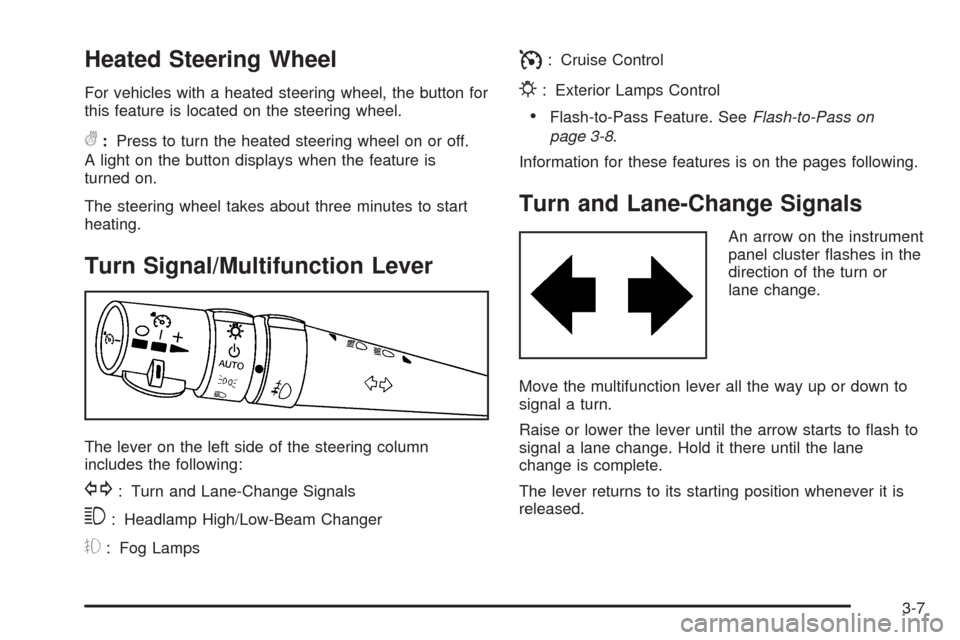
Turn Signal/Multifunction Lever
The lever on the left side of the steering column
includes the following:
G: Turn and Lane-Change Signals
3: Headlamp High/Low-Beam Changer
#: Fog Lamps
I: Cruise Control
P: Exterior Lamps Control
Flash-to-Pass Feature. SeeFlash-to-Pass on
page 3-8.
Information for these features is on the pages following.
Turn and Lane-Change Signals
An arrow on the instrument
panel cluster ashes in the
direction of the turn or
lane change.
Move the multifunction lever all the way up or down to
signal a turn.
Raise or lower the lever until the arrow starts to ash to
signal a lane change. Hold it there until the lane
change is complete.
The lever returns to its starting position whenever it is
released.
3-7
Page 130 of 462
If after signaling a turn or a lane change the arrows
ash rapidly or do not come on, a signal bulb could be
burned out.
Have the bulbs replaced. If the bulb is not burned out,
check the fuses. SeeFuses and Circuit Breakers
on page 6-83.
Turn Signal on Chime
A chime will remind you if the turn signal is left on for
more than 3/4 mile (1.2 km) of driving.
If you need to leave the turn signal on for more than
3/4 mile (1.2 km), turn off the signal and then turn it
back on.
Headlamp High/Low-Beam Changer
Push the turn signal lever all the way forward to
change the headlamps from low beam to high beam.
When the high beams are on, this light
$appears on
the instrument panel cluster.
Pull the lever rearward to change the headlamps back
to low beam.
Flash-to-Pass
This feature lets you use the high-beam headlamps to
signal the driver in front of you that you want to pass.
Pull and hold the turn signal lever toward you to use.
When you do, the following will occur:
If the low-beam headlamps are on, the high-beam
headlamps will turn on. They will stay on as long as
you hold the lever there. Release the lever to turn
them off.
If the headlamps are on high-beam, they will switch
to low-beam. To return to high beam, push the lever
away from you.
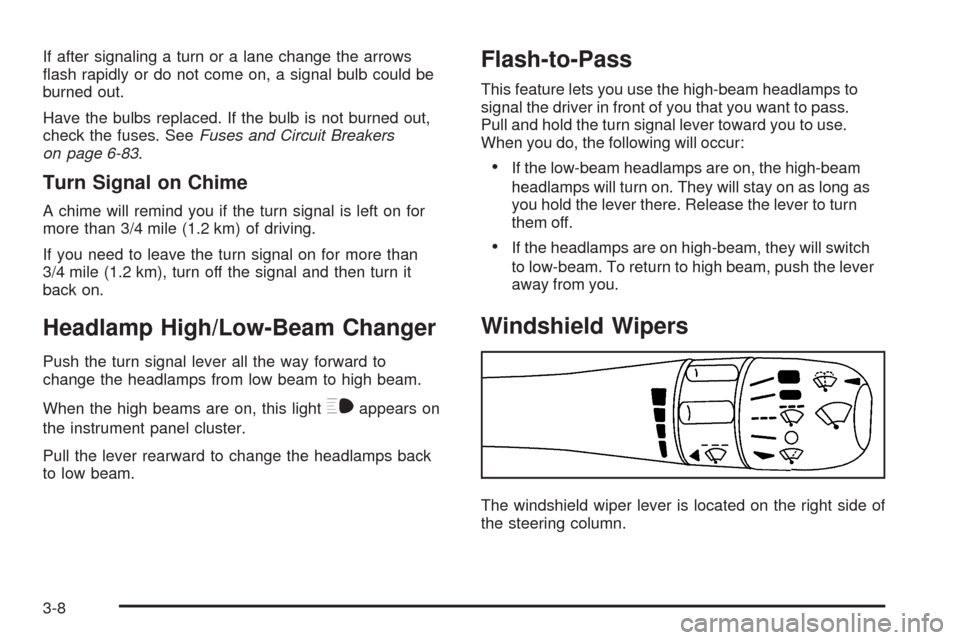
Windshield Wipers
The windshield wiper lever is located on the right side of
the steering column.
3-8
Page 132 of 462
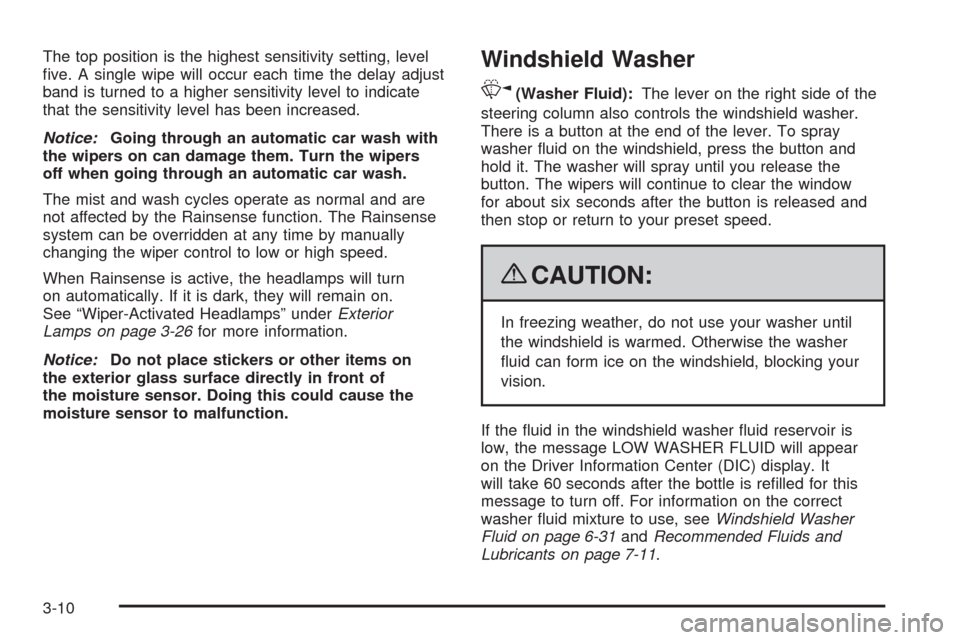
The top position is the highest sensitivity setting, level
ve. A single wipe will occur each time the delay adjust
band is turned to a higher sensitivity level to indicate
that the sensitivity level has been increased.
Notice:Going through an automatic car wash with
the wipers on can damage them. Turn the wipers
off when going through an automatic car wash.
The mist and wash cycles operate as normal and are
not affected by the Rainsense function. The Rainsense
system can be overridden at any time by manually
changing the wiper control to low or high speed.
When Rainsense is active, the headlamps will turn
on automatically. If it is dark, they will remain on.
See “Wiper-Activated Headlamps” underExterior
Lamps on page 3-26for more information.
Notice:Do not place stickers or other items on
the exterior glass surface directly in front of
the moisture sensor. Doing this could cause the
moisture sensor to malfunction.Windshield Washer
K(Washer Fluid):The lever on the right side of the
steering column also controls the windshield washer.
There is a button at the end of the lever. To spray
washer uid on the windshield, press the button and
hold it. The washer will spray until you release the
button. The wipers will continue to clear the window
for about six seconds after the button is released and
then stop or return to your preset speed.
{CAUTION:
In freezing weather, do not use your washer until
the windshield is warmed. Otherwise the washer
uid can form ice on the windshield, blocking your
vision.
If the uid in the windshield washer uid reservoir is
low, the message LOW WASHER FLUID will appear
on the Driver Information Center (DIC) display. It
will take 60 seconds after the bottle is relled for this
message to turn off. For information on the correct
washer uid mixture to use, seeWindshield Washer
Fluid on page 6-31andRecommended Fluids and
Lubricants on page 7-11.
3-10