battery CADILLAC XLR 2009 1.G Owner's Manual
[x] Cancel search | Manufacturer: CADILLAC, Model Year: 2009, Model line: XLR, Model: CADILLAC XLR 2009 1.GPages: 462, PDF Size: 3.72 MB
Page 175 of 462
Emissions Inspection and
Maintenance Programs
Some state/provincial and local governments have or
might begin programs to inspect the emission control
equipment on the vehicle. Failure to pass this inspection
could prevent getting a vehicle registration.
Here are some things to know to help the vehicle pass
an inspection:
The vehicle will not pass this inspection if the check
engine light is on with the engine running.
To perform a check engine light bulb check with the
keyless ignition, make sure the transmitter fob is in
the passenger compartment. SeeIgnition Positions
on page 2-24. Press the bottom of the Acc. button on
the instrument panel and hold the button down for
ve seconds. The instrument panel, including the
check engine light, will light up and the ignition will be
on, but the engine will not start — press the bottom
of the Acc. button only briey, less than ve seconds,
the accessory power mode will be turned on, but not
the ignition. After the bulb check, press and release
the Acc. button again to turn the ignition off and avoid
draining the vehicle’s battery.
The vehicle will not pass this inspection if the
OBD II (on-board diagnostic) system determines
that critical emission control systems have not
been completely diagnosed by the system.
The vehicle would be considered not ready for
inspection. This can happen if the battery has
recently been replaced or if the battery has run down.
The diagnostic system is designed to evaluate critical
emission control systems during normal driving.
This can take several days of routine driving. If this
has been done and the vehicle still does not pass the
inspection for lack of OBD II system readiness, your
dealer/retailer can prepare the vehicle for inspection.
3-53
Page 184 of 462
DRIVER NO. X (1 OR 2)
This message displays when the vehicle is started or
when there is a change of driver. The message
shows which driver is activating the personalization
feature. It will only stay on for ve seconds.
ENGINE HOT, STOP ENGINE
This message displays when the engine has overheated.
Stop and turn the engine off immediately to avoid
severe engine damage. SeeEngine Overheating on
page 6-27. A multiple chime also sounds when
this message displays.
ENGINE PROTECTION REDUCE
ENGINE RPM
If this message displays, the control system has
determined that continued operation at the existing
engine speed may lead to engine overheating. Lower
the engine speed by upshifting the transmission or drive
at a lower speed.
HEADLAMPS SUGGESTED
This message displays if it is dark enough outside and
the headlamps and Twilight Sentinel®controls are
off. This message informs the driver that turning on theexterior lamps is recommended. It has become dark
enough outside to require the headlamps and/or other
exterior lamps. This message also displays if the
optional Rainsense™ wiping feature is on and the
Twilight Sentinel is off.
HIGH TRANS (Transmission) TEMP
(Temperature)
This message displays when the transmission uid in
the vehicle is too hot. Stop and allow the vehicle to idle
until it cools down or until this message is removed.
HIGH VOLTAGE
This message displays when the electrical charging
system is overcharging. To avoid being stranded, have
the electrical system checked by your dealer/retailer.
You can reduce the charging overload by using
the accessories. Turn on the lamps and radio, set the
climate control on AUTO and the fan speed on HI,
and turn the rear window defogger on. You can monitor
battery voltage on the DIC by pressing the information
button. The normal range is 11.5 to 15.5 volts when the
engine is running.
3-62
Page 186 of 462
LOW OIL PRESSURE
Notice:If you drive your vehicle while the engine
oil pressure is low, severe engine damage may
occur. If a low oil pressure warning appears on the
Driver Information Center (DIC), stop the vehicle
as soon as possible. Do not drive the vehicle until
the cause of the low oil pressure is corrected.
SeeEngine Oil on page 6-15for more information.
If this message displays while the engine is running,
stop the engine and do not operate the vehicle until the
cause of low oil pressure is corrected. Severe damage
to the engine can result. A multiple chime sounds when
this message is displayed.
LOW VOLTAGE
This message displays when the electrical system
is charging less than 10 volts or if the battery has
been drained. If this message displays immediately
after starting, it is possible that the generator can still
recharge the battery. The battery should recharge while
driving, but may take a few hours to do so. Consider
using an auxiliary charger to boost the battery after
returning home or to a nal destination. Make sure you
follow the manufacturer’s instructions. If this message
displays while driving or after starting the vehicleand stays on, have it checked immediately by your
dealer/retailer to determine the cause of this problem.
To help the generator recharge the battery quickly,
you can reduce the load on the electrical system
by turning off the accessories. You can monitor battery
voltage on the DIC by pressing the INFO button.
The normal range is 11.5 to 15.5 volts.
LOW WASHER FLUID
This message displays when the windshield washer
uid is low. Fill the windshield washer uid reservoir as
soon as possible. SeeEngine Compartment Overview
on page 6-12for the location of the windshield
washer uid reservoir. Also, seeWindshield Washer
Fluid on page 6-31for more information.
MAX (Maximum) SPEED XX MPH
(XX KM/H)
This message displays when a failure in the magnetic
ride control system has occurred. The Powertrain
Control Module (PCM) determines the speed to which
the vehicle is limited. Have the vehicle serviced by your
dealer/retailer if this message appears.
3-64
Page 187 of 462
NO FOB DETECTED
This message displays if the vehicle does not detect the
presence of a keyless access transmitter when you
have attempted to start the vehicle or a vehicle door has
just closed. The following conditions may cause this
message to appear:
Driver-added equipment plugged into the accessory
power outlet on the center console is causing
interference. Examples of these devices are cell
phones and cell phone chargers, two-way radios,
power inverters, or similar items. Try moving
the keyless access transmitter away from these
devices when starting the vehicle. In addition,
PDA devices and remote garage and gate openers
may also generate Electromagnetic Interference
(EMI) that may interfere with the keyless access
transmitter. Do not carry the keyless access
transmitter in the same pocket or bag as these
devices.
The vehicle is experiencing Electromagnetic
Interference (EMI). Some locations, such as
airports, automatic toll booths, and some gas
stations, have EMI elds which may interfere with
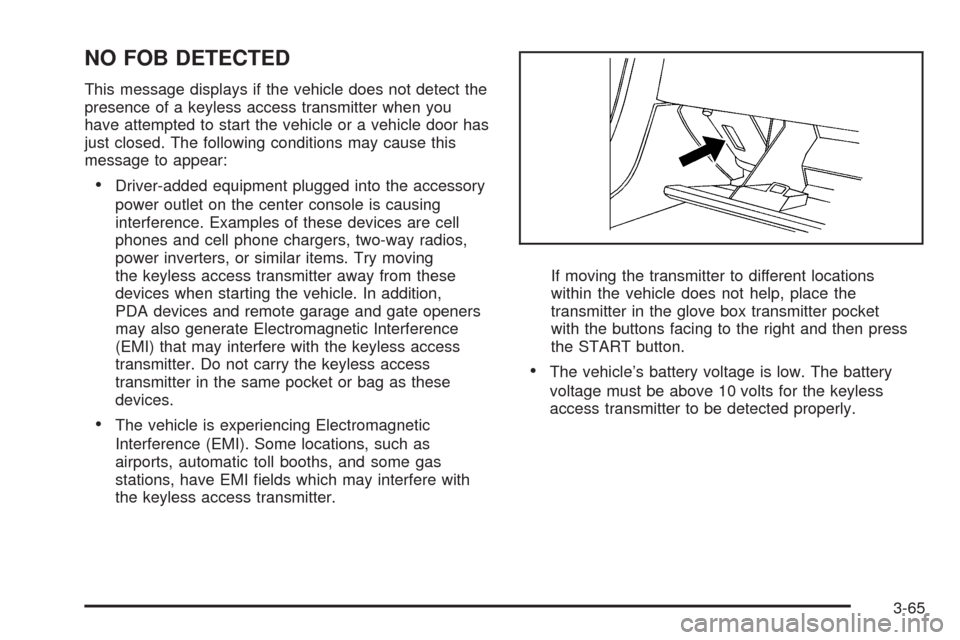
the keyless access transmitter.If moving the transmitter to different locations
within the vehicle does not help, place the
transmitter in the glove box transmitter pocket
with the buttons facing to the right and then press
the START button.
The vehicle’s battery voltage is low. The battery
voltage must be above 10 volts for the keyless
access transmitter to be detected properly.
3-65
Page 192 of 462
TRAC (Traction)/STABILITRAK OFF
This message displays when both the Traction Control
System (TCS) and the StabiliTrak®System are off.
This message will remain until the systems are turned
on again.
TRAC (Traction)/STABILITRAK ON
This message displays when both the Traction Control
System (TCS) and the StabiliTrak®System are on.
TRACTION SYSTEM OFF
This message displays when the Traction Control
System (TCS) is off, but the StabiliTrak®System
remains on.
TRACTION SYSTEM ON
This message displays when the Traction Control
System (TCS) is on.
TRUNK AJAR
This message displays when the trunk is open while the
vehicle is running and is not in P (Park).
Other Messages
Here are more messages that you can receive on the
Driver Information Center (DIC). To acknowledge a
message and read another message that may have
come on at the same time, press the RESET button.
ACCESSORY MODE ON
SeeIgnition Positions on page 2-24.
CHANGE OIL SOON
SeeEngine Oil on page 6-15andEngine Oil Life
System on page 6-18.
FOB BATTERY LOW
See “Battery Replacement” underKeyless Access
System Operation on page 2-5.
HIGH TIRE PRESS LF
SeeInflation - Tire Pressure on page 6-54.
HIGH TIRE PRESS RF
SeeInflation - Tire Pressure on page 6-54.
HIGH TIRE PRESS LR
SeeInflation - Tire Pressure on page 6-54.
HIGH TIRE PRESS RR
SeeInflation - Tire Pressure on page 6-54.
3-70
Page 194 of 462
DIC Vehicle Personalization
The vehicle has personalization capabilities that allow
you to program certain features to a preferred setting for
up to two drivers. The back of the keyless access
transmitters are labelled 1 or 2.
The current driver preferences are recalled when one of
the following occurs:
The lock or unlock button on the keyless access
transmitter, programmed as 1 or 2, is pressed.
The appropriate memory button, 1 or 2, located on
the driver seat is pressed. SeeMemory Seat,
Mirrors and Steering Wheel on page 1-3for more
information.
A valid keyless access transmitter is detected upon
opening the driver door.
If more than one valid keyless access transmitter is
detected upon opening the driver door, the driver
preferences for the lowest driver number will be recalled.
If a keyless access transmitter is programmed as
#3 or #4, the personalization system will not recognize
the transmitter. The Driver Information Center (DIC)
will not display a current driver number and the features
that are normally programmed through the DIC will
be set to the default states. Also, if the OPTIONS button
is pressed, the DIC does not display the menus used
to set personalizations, but instead displays OPTIONS
UNAVAILABLE for a few seconds.
Feature Programming
To change feature preferences, make sure the vehicle
is running and in P (Park). To avoid excessive drain
on the battery, it is recommended that the headlamps
are turned off. Press the OPTIONS button and the Driver
Information Center (DIC) will display the current driver
for a few seconds, then display the rst personalization
menu item. You can now use the OPTIONS button
to change the setting of the displayed feature. Press the
top or bottom of the information button to scroll up or
down the list of features. When you get to a feature you
want to change, press the OPTIONS button again.
When you are nished, press the RESET button to exit
the personalization menu. If no button is pressed within
45 seconds, the DIC will exit the personalization menu.
The following are DIC options that will be available in the
personalization menu.
Auto Recall
This feature allows the steering column, outside mirrors
and the driver seat to automatically move to the
current driver’s set position when the engine starts.
The DIC will display AUTO RECALL OFF or AUTO
RECALL ON. Press the OPTIONS button to change
the setting.
3-72
Page 212 of 462
Radio Reception
Frequency interference and static can occur during
normal radio reception if items such as cell phone
chargers, vehicle convenience accessories, and external
electronic devices are plugged into the accessory
power outlet. If there is interference or static, unplug
the item from the accessory power outlet.
AM
The range for most AM stations is greater than for
FM, especially at night. The longer range can cause
station frequencies to interfere with each other.
For better radio reception, most AM radio stations
boost the power levels during the day, and then reduce
these levels during the night. Static can also occur
when things like storms and power lines interfere with
radio reception. When this happens, try reducing
the treble on the radio.
FM Stereo
FM signals only reach about 10 to 40 miles
(16 to 65 km). Although the radio has a built-in electronic
circuit that automatically works to reduce interference,
some static can occur, especially around tall buildings or
hills, causing the sound to fade in and out.
XM Satellite Radio Service
XM Satellite Radio Service gives digital radio reception
from coast-to-coast in the 48 contiguous United States,
and in Canada. Just as with FM, tall buildings or
hills can interfere with satellite radio signals, causing
the sound to fade in and out. In addition, traveling
or standing under heavy foliage, bridges, garages, or
tunnels may cause loss of the XM signal for a period
of time.
Cellular Phone Usage
Cellular phone usage may cause interference with the
vehicle’s radio. This interference may occur when
making or receiving phone calls, charging the phone’s
battery, or simply having the phone on. This interference
causes an increased level of static while listening to
the radio. If static is received while listening to the radio,
unplug the cellular phone and turn it off.
3-90
Page 264 of 462

Vehicle Positioning
At times, the position of the vehicle on the map may be
inaccurate due to one or more of the following reasons:
The road system has changed.
The vehicle is driving on slippery road surfaces such
as in sand, gravel, and/or snow.
The vehicle is traveling on winding roads.
The vehicle is on a long straight road.
The vehicle is approaching a tall building or a large
vehicle.
The surface streets run parallel to a freeway.
The vehicle has just been transferred by a vehicle
carrier or a ferry.
The current position calibration is set incorrectly.
The vehicle is traveling at high speed.
The vehicle changes directions more than once, or
when the vehicle is turning on a turn table in a
parking lot.
The vehicle is entering and/or exiting a parking lot,
garage, or a lot with a roof.
The GPS signal is not received.
A roof carrier is installed on the vehicle.
The vehicle is being driven with tire chains.
The tires are replaced.
The tire pressure for the tires is incorrect.
The tires are worn.
The rst time the map DVD is inserted.
The battery is disconnected for several days.
The vehicle is driving in heavy traffic where driving is
at low speeds, and the vehicle is stopped and started
repeatedly.
If problems are experienced with the navigation system,
see “Adjust Vehicle Position” underSetup Menu on
page 4-12to calibrate the system.
4-50
Page 287 of 462
c(Stop):Touch to stop the DVD.
j(Pause):Touch to pause the DVD.
[(Forward):Touch to advance rapidly during
playback.
L(Frame Advance):Touch to advance by chapter
during playback.
Radio Personalization with Home
and Away Feature
With this feature, the latest audio system settings can be
recalled that were adjusted the last time the vehicle was
operated. This feature allows two different drivers to store
and recall their own audio system settings. The settings
recalled by the audio system are determined by which
transmitter (1 or 2) was used to enter the vehicle.
The number on the back of the transmitter corresponds
to driver 1 or to driver 2. The audio system settings will
automatically adjust to where they were last set by the
identied driver. The settings can also be recalled by
briey pressing the MEMORY seat switches 1 or 2
located on the driver door.The audio system can store HOME and AWAY preset
stations. HOME and AWAY preset stations allow use of
one set of preset radio settings in the area where you
live, and another set when you go out of town. That way,
there is no need to reprogram the preset stations
every time you travel.
To select HOME and AWAY preset stations:
1. With the audio system on, touch the Audio hard key
and turn the audio system off.
2. Touch the HOME or AWAY button from the main
audio screen.
The next time the audio system is turned on, the
system recalls the last active preset selection.
When battery power is removed and later applied, the
home audio system preset stations do not have to
be reset because the audio system remembers them.
However, the away radio preset stations have to
be reset.
4-73
Page 313 of 462

{CAUTION:
Snow can trap engine exhaust under the vehicle.
This may cause exhaust gases to get inside.
Engine exhaust contains carbon monoxide (CO)
which cannot be seen or smelled. It can cause
unconsciousness and even death.
If the vehicle is stuck in the snow:
Clear away snow from around the base of
your vehicle, especially any that is blocking
the exhaust pipe.
Check again from time to time to be sure
snow does not collect there.
Open a window about two inches on the side
of the vehicle that is away from the wind to
bring in fresh air.
Fully open the air outlets on or under the
instrument panel.
Adjust the Climate Control system to a setting
that circulates the air inside the vehicle and
set the fan speed to the highest setting.
See Climate Control System in the Index.
For more information about carbon monoxide,
seeEngine Exhaust on page 2-36.
CAUTION: (Continued)
CAUTION: (Continued)
Snow can trap exhaust gases under your vehicle.
This can cause deadly CO (carbon monoxide) gas
to get inside. CO could overcome you and kill you.
You cannot see it or smell it, so you might not
know it is in your vehicle. Clear away snow from
around the base of your vehicle, especially any
that is blocking the exhaust.
Run the engine for short periods only as needed to
keep warm, but be careful.
To save fuel, run the engine for only short periods as
needed to warm the vehicle and then shut the engine off
and close the window most of the way to save heat.
Repeat this until help arrives but only when you
feel really uncomfortable from the cold. Moving about to
keep warm also helps.
If it takes some time for help to arrive, now and then
when you run the engine, push the accelerator
pedal slightly so the engine runs faster than the idle
speed. This keeps the battery charged to restart
the vehicle and to signal for help with the headlamps.
Do this as little as possible to save fuel.
5-19