trunk CADILLAC XLR 2009 1.G Owner's Manual
[x] Cancel search | Manufacturer: CADILLAC, Model Year: 2009, Model line: XLR, Model: CADILLAC XLR 2009 1.GPages: 462, PDF Size: 3.72 MB
Page 192 of 462
TRAC (Traction)/STABILITRAK OFF
This message displays when both the Traction Control
System (TCS) and the StabiliTrak®System are off.
This message will remain until the systems are turned
on again.
TRAC (Traction)/STABILITRAK ON
This message displays when both the Traction Control
System (TCS) and the StabiliTrak®System are on.
TRACTION SYSTEM OFF
This message displays when the Traction Control
System (TCS) is off, but the StabiliTrak®System
remains on.
TRACTION SYSTEM ON
This message displays when the Traction Control
System (TCS) is on.
TRUNK AJAR
This message displays when the trunk is open while the
vehicle is running and is not in P (Park).
Other Messages
Here are more messages that you can receive on the
Driver Information Center (DIC). To acknowledge a
message and read another message that may have
come on at the same time, press the RESET button.
ACCESSORY MODE ON
SeeIgnition Positions on page 2-24.
CHANGE OIL SOON
SeeEngine Oil on page 6-15andEngine Oil Life
System on page 6-18.
FOB BATTERY LOW
See “Battery Replacement” underKeyless Access
System Operation on page 2-5.
HIGH TIRE PRESS LF
SeeInflation - Tire Pressure on page 6-54.
HIGH TIRE PRESS RF
SeeInflation - Tire Pressure on page 6-54.
HIGH TIRE PRESS LR
SeeInflation - Tire Pressure on page 6-54.
HIGH TIRE PRESS RR
SeeInflation - Tire Pressure on page 6-54.
3-70
Page 195 of 462

Auto Exit Recall
This feature allows the steering column and driver seat
to automatically move to the current driver’s exit
position when one of the following occurs:
The vehicle is turned off or in RAP or accessory
mode and the driver’s door is opened.
The vehicle is turned off or in RAP and the unlock
button on the keyless access transmitter is
pressed.
The DIC will display AUTO EXIT RECALL OFF or
AUTO EXIT RECALL ON. Press the OPTIONS button
to change the setting.
Approach Lights
This feature activates the parking lamps, front fog lamps
and back-up lamps during low light periods when the
unlock button on the keyless access transmitter is
pressed, both doors are closed and the vehicle is off or
in RAP. The lamps remain on for 20 seconds or until
a door is opened, the lock button on the keyless access
transmitter is pressed or the vehicle is no longer off
or in RAP.
The DIC will display APPROACH LIGHTS OFF or
APPROACH LIGHTS ON. Press the OPTIONS button
to change the setting.
Exit Lights
This feature activates the parking lamps and front fog
lamps for 15, 30 or 90 seconds. This will occur when the
vehicle is off or in RAP and the headlamps are on
due to the automatic headlamp system. The parking
lamps and front fog lamps will remain on until the driver
selected time period expires, the exterior lamp control
is activated or the vehicle is no longer off or in RAP.
The DIC will display EXIT LIGHTS OFF, EXIT
LIGHTS - 15 SEC, EXIT LIGHTS - 30 SEC, or EXIT
LIGHTS - 90 SEC. Press the OPTIONS button to
change the setting.
Flash at Unlock
This feature activates the front and rear turn signals for
two short ashes when the unlock or trunk button on
the keyless access transmitter is pressed. This will only
occur when the vehicle is off.
The DIC will display NO FLASH AT UNLOCK or
FLASH AT UNLOCK. Press the OPTIONS button to
change the setting.
3-73
Page 329 of 462
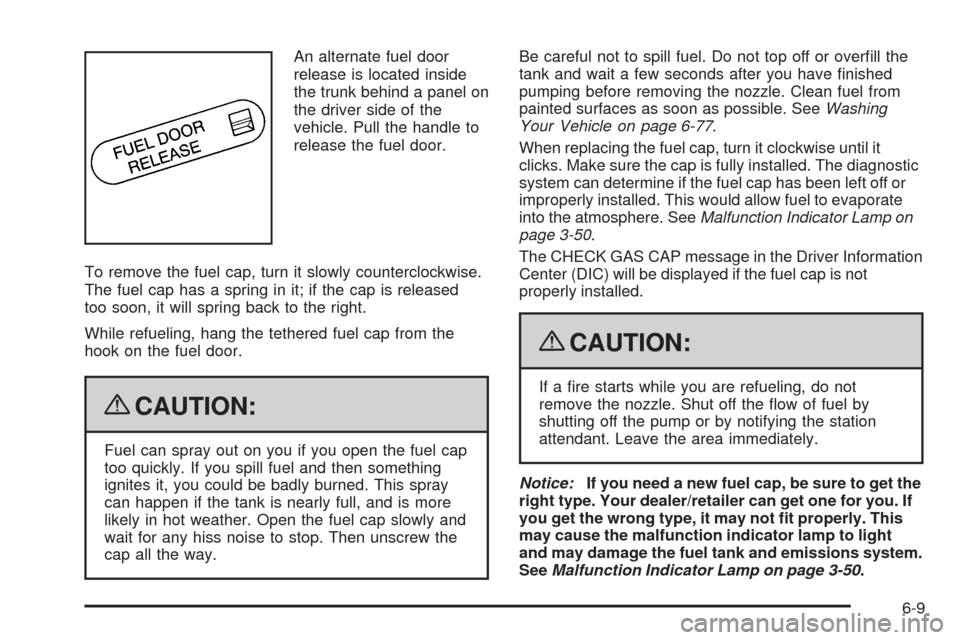
An alternate fuel door
release is located inside
the trunk behind a panel on
the driver side of the
vehicle. Pull the handle to
release the fuel door.
To remove the fuel cap, turn it slowly counterclockwise.
The fuel cap has a spring in it; if the cap is released
too soon, it will spring back to the right.
While refueling, hang the tethered fuel cap from the
hook on the fuel door.
{CAUTION:
Fuel can spray out on you if you open the fuel cap
too quickly. If you spill fuel and then something
ignites it, you could be badly burned. This spray
can happen if the tank is nearly full, and is more
likely in hot weather. Open the fuel cap slowly and
wait for any hiss noise to stop. Then unscrew the
cap all the way.Be careful not to spill fuel. Do not top off or overll the
tank and wait a few seconds after you have nished
pumping before removing the nozzle. Clean fuel from
painted surfaces as soon as possible. SeeWashing
Your Vehicle on page 6-77.
When replacing the fuel cap, turn it clockwise until it
clicks. Make sure the cap is fully installed. The diagnostic
system can determine if the fuel cap has been left off or
improperly installed. This would allow fuel to evaporate
into the atmosphere. SeeMalfunction Indicator Lamp on
page 3-50.
The CHECK GAS CAP message in the Driver Information
Center (DIC) will be displayed if the fuel cap is not
properly installed.
{CAUTION:
If a re starts while you are refueling, do not
remove the nozzle. Shut off the ow of fuel by
shutting off the pump or by notifying the station
attendant. Leave the area immediately.
Notice:If you need a new fuel cap, be sure to get the
right type. Your dealer/retailer can get one for you. If
you get the wrong type, it may not t properly. This
may cause the malfunction indicator lamp to light
and may damage the fuel tank and emissions system.
SeeMalfunction Indicator Lamp on page 3-50.
6-9
Page 330 of 462
Filling a Portable Fuel Container
{CAUTION:
Never ll a portable fuel container while it is in the
vehicle. Static electricity discharge from the
container can ignite the fuel vapor. You can be
badly burned and the vehicle damaged if this
occurs. To help avoid injury to you and others:
Dispense fuel only into approved containers.
Do not ll a container while it is inside a
vehicle, in a vehicle’s trunk, pickup bed, or on
any surface other than the ground.
Bring the ll nozzle in contact with the inside
of the ll opening before operating the nozzle.
Contact should be maintained until the lling
is complete.
Do not smoke while pumping fuel.
Do not use a cellular phone while
pumping fuel.
Checking Things Under
the Hood
{CAUTION:
An electric fan under the hood can start up and
injure you even when the engine is not running.
Keep hands, clothing, and tools away from any
underhood electric fan.
{CAUTION:
Things that burn can get on hot engine parts and
start a re. These include liquids like fuel, oil,
coolant, brake uid, windshield washer and other
uids, and plastic or rubber. You or others could
be burned. Be careful not to drop or spill things
that will burn onto a hot engine.
6-10
Page 356 of 462
Vehicle Storage
{CAUTION:
Batteries have acid that can burn you and gas that
can explode. You can be badly hurt if you are not
careful. SeeJump Starting on page 6-36for tips
on working around a battery without getting hurt.
Infrequent Usage: If the vehicle is driven infrequently,
remove the black, negative (−) cable from the battery.
This helps keep the battery from running down.
See “Power Window Initialization” inPower Windows on
page 2-18.
Extended Storage: For extended storage of the vehicle,
remove the black, negative (−) cable from the battery or
use a battery trickle charger. This helps maintain the
charge of the battery over an extended period of time.
All doors and the trunk must be closed before
reconnecting the battery. After reconnecting the battery,
press the unlock button on the keyless access
transmitter. Failure to follow this procedure could result
in the alarm sounding. Pressing unlock on the keyless
access transmitter will stop the alarm.
Jump Starting
If the vehicle’s battery has run down, you may want to
use another vehicle and some jumper cables to start
your vehicle. Be sure to use the following steps to do it
safely.
{CAUTION:
Batteries can hurt you. They can be dangerous
because:
They contain acid that can burn you.
They contain gas that can explode or ignite.
They contain enough electricity to burn you.
If you do not follow these steps exactly, some or
all of these things can hurt you.
6-36
Page 402 of 462
Engine Identication
The eighth character in the VIN is the engine code.
This code helps identify the vehicle’s engine,
specications, and replacement parts. See “Engine
Specications” underCapacities and Specifications on
page 6-90for your vehicle’s engine code.
Service Parts Identication Label
This label is on the rear compartment cover in the
trunk. It is very helpful if you ever need to order parts.
The label has the following information:
Vehicle Identication Number (VIN)
Model designation
Paint information
Production options and special equipment
Do not remove this label from the vehicle.
Electrical System
Add-On Electrical Equipment
Notice:Do not add anything electrical to the
vehicle unless you check with your dealer/retailer
rst. Some electrical equipment can damage
the vehicle and the damage would not be covered
by the vehicle’s warranty. Some add-on electrical
equipment can keep other components from
working as they should.
Add-on equipment can drain the vehicle battery, even if
the vehicle is not operating.
The vehicle has an airbag system. Before attempting to
add anything electrical to the vehicle, seeServicing
Your Airbag-Equipped Vehicle on page 1-50.
6-82
Page 405 of 462
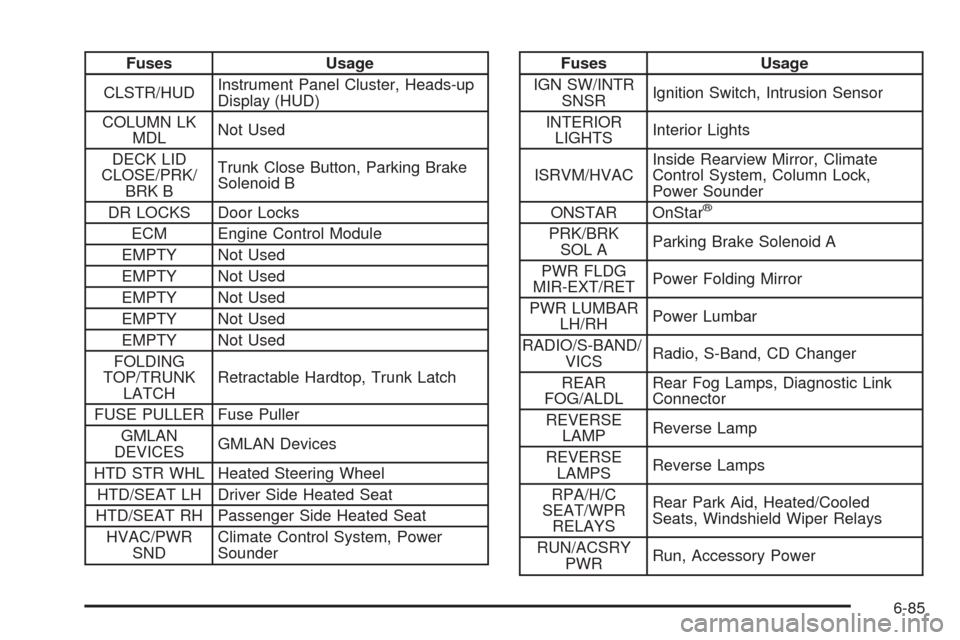
Fuses Usage
CLSTR/HUDInstrument Panel Cluster, Heads-up
Display (HUD)
COLUMN LK
MDLNot Used
DECK LID
CLOSE/PRK/
BRK BTrunk Close Button, Parking Brake
Solenoid B
DR LOCKS Door Locks
ECM Engine Control Module
EMPTY Not Used
EMPTY Not Used
EMPTY Not Used
EMPTY Not Used
EMPTY Not Used
FOLDING
TOP/TRUNK
LATCHRetractable Hardtop, Trunk Latch
FUSE PULLER Fuse Puller
GMLAN
DEVICESGMLAN Devices
HTD STR WHL Heated Steering Wheel
HTD/SEAT LH Driver Side Heated Seat
HTD/SEAT RH Passenger Side Heated Seat
HVAC/PWR
SNDClimate Control System, Power
SounderFuses Usage
IGN SW/INTR
SNSRIgnition Switch, Intrusion Sensor
INTERIOR
LIGHTSInterior Lights
ISRVM/HVACInside Rearview Mirror, Climate
Control System, Column Lock,
Power Sounder
ONSTAR OnStar
®
PRK/BRK
SOL AParking Brake Solenoid A
PWR FLDG
MIR-EXT/RETPower Folding Mirror
PWR LUMBAR
LH/RHPower Lumbar
RADIO/S-BAND/
VICSRadio, S-Band, CD Changer
REAR
FOG/ALDLRear Fog Lamps, Diagnostic Link
Connector
REVERSE
LAMPReverse Lamp
REVERSE
LAMPSReverse Lamps
RPA/H/C
SEAT/WPR
RELAYSRear Park Aid, Heated/Cooled
Seats, Windshield Wiper Relays
RUN/ACSRY
PWRRun, Accessory Power
6-85
Page 420 of 462
(d)Lubricate the trunk key lock cylinder. Lubricate all
body door hinges. Lubricate all hinges and latches,
including those for the hood, trunk, console door, and
any folding seat hardware. More frequent lubrication may
be required when exposed to a corrosive environment.
Applying silicone grease on weatherstrips with a clean
cloth will make them last longer, seal better, and not stick
or squeak.
(e)If driving regularly under dusty conditions, the filter
may require replacement more often.
(f)Change automatic transmission fluid and filter if the
vehicle is mainly driven under one or more of these
conditions:
In heavy city traffic where the outside temperature
regularly reaches 90°F (32°C) or higher.
In hilly or mountainous terrain.
Uses such as high performance operation.
(g)Drain, flush, and refill cooling system. This service
can be complex; you should have your dealer/retailer
perform this service. See Engine Coolant on page 6-23
for what to use. Inspect hoses. Clean radiator,
condenser, pressure cap, and filler neck. Pressure
test the cooling system and pressure cap.
(h)If driving regularly under dusty conditions, inspect
the filter at each engine oil change.(j)Visually inspect belt for fraying, excessive cracks, or
obvious damage. Replace belt if necessary.
(k)Drain, flush, and refill intercooler system. This
service can be complex; you should have your dealer/
retailer perform this service. See Engine Coolant on
page 6-23 for what to use. Inspect hoses. Clean pressure
cap and filler neck. Pressure test the system and
pressure cap.
(l)Visually inspect brake lines and hoses for proper
hook-up, binding, leaks, cracks, chafing, etc. Inspect
disc brake pads for wear and rotors for surface
condition. Inspect other brake parts, including calipers,
parking brake, etc.
(m)Visually inspect hoses and have them replaced if
they are cracked, swollen, or deteriorated. Inspect all
pipes, fittings, and clamps; replace with genuine parts as
needed. To help ensure proper operation, a pressure test
of the cooling system and pressure cap and cleaning the
outside of the radiator and air conditioning condenser is
recommended at least once a year.
(n)Visually inspect front and rear suspension and
steering system for damaged, loose, or missing parts or
signs of wear. Inspect power steering lines and hoses
for proper hook-up, binding, leaks, cracks, chafing,
etc. XLR-V Only: Lubricate the outer ends of both rear
toe-links every other oil change.
7-8
Page 424 of 462
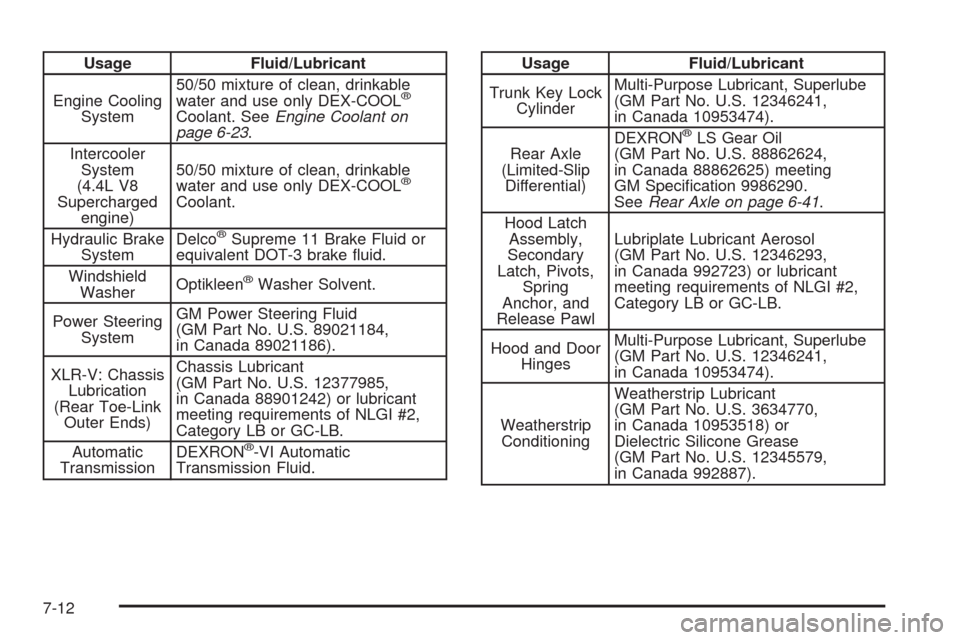
Usage Fluid/Lubricant
Engine Cooling
System50/50 mixture of clean, drinkable
water and use only DEX-COOL
®
Coolant. SeeEngine Coolant on
page 6-23.
Intercooler
System
(4.4L V8
Supercharged
engine)50/50 mixture of clean, drinkable
water and use only DEX-COOL
®
Coolant.
Hydraulic Brake
SystemDelco
®Supreme 11 Brake Fluid or
equivalent DOT-3 brake uid.
Windshield
WasherOptikleen
®Washer Solvent.
Power Steering
SystemGM Power Steering Fluid
(GM Part No. U.S. 89021184,
in Canada 89021186).
XLR-V: Chassis
Lubrication
(Rear Toe-Link
Outer Ends)Chassis Lubricant
(GM Part No. U.S. 12377985,
in Canada 88901242) or lubricant
meeting requirements of NLGI #2,
Category LB or GC-LB.
Automatic
TransmissionDEXRON
®-VI Automatic
Transmission Fluid.
Usage Fluid/Lubricant
Trunk Key Lock
CylinderMulti-Purpose Lubricant, Superlube
(GM Part No. U.S. 12346241,
in Canada 10953474).
Rear Axle
(Limited-Slip
Differential)DEXRON
®LS Gear Oil
(GM Part No. U.S. 88862624,
in Canada 88862625) meeting
GM Specication 9986290.
SeeRear Axle on page 6-41.
Hood Latch
Assembly,
Secondary
Latch, Pivots,
Spring
Anchor, and
Release PawlLubriplate Lubricant Aerosol
(GM Part No. U.S. 12346293,
in Canada 992723) or lubricant
meeting requirements of NLGI #2,
Category LB or GC-LB.
Hood and Door
HingesMulti-Purpose Lubricant, Superlube
(GM Part No. U.S. 12346241,
in Canada 10953474).
Weatherstrip
ConditioningWeatherstrip Lubricant
(GM Part No. U.S. 3634770,
in Canada 10953518) or
Dielectric Silicone Grease
(GM Part No. U.S. 12345579,
in Canada 992887).
7-12
Page 461 of 462
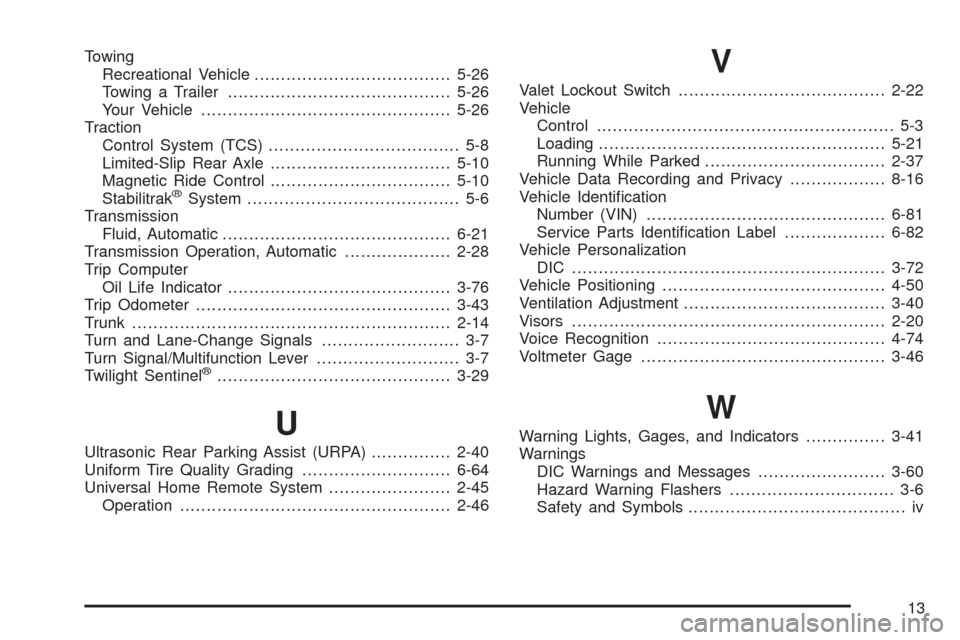
Towing
Recreational Vehicle.....................................5-26
Towing a Trailer..........................................5-26
Your Vehicle...............................................5-26
Traction
Control System (TCS).................................... 5-8
Limited-Slip Rear Axle..................................5-10
Magnetic Ride Control..................................5-10
Stabilitrak
®System........................................ 5-6
Transmission
Fluid, Automatic...........................................6-21
Transmission Operation, Automatic....................2-28
Trip Computer
Oil Life Indicator..........................................3-76
Trip Odometer................................................3-43
Trunk............................................................2-14
Turn and Lane-Change Signals.......................... 3-7
Turn Signal/Multifunction Lever........................... 3-7
Twilight Sentinel
®............................................3-29
U
Ultrasonic Rear Parking Assist (URPA)...............2-40
Uniform Tire Quality Grading............................6-64
Universal Home Remote System.......................2-45
Operation...................................................2-46
V
Valet Lockout Switch.......................................2-22
Vehicle
Control........................................................ 5-3
Loading......................................................5-21
Running While Parked..................................2-37
Vehicle Data Recording and Privacy..................8-16
Vehicle Identication
Number (VIN).............................................6-81
Service Parts Identication Label...................6-82
Vehicle Personalization
DIC ...........................................................3-72
Vehicle Positioning..........................................4-50
Ventilation Adjustment......................................3-40
Visors...........................................................2-20
Voice Recognition...........................................4-74
Voltmeter Gage..............................................3-46
W
Warning Lights, Gages, and Indicators...............3-41
Warnings
DIC Warnings and Messages........................3-60
Hazard Warning Flashers............................... 3-6
Safety and Symbols......................................... iv
13