light CADILLAC XLR 2009 1.G Repair Manual
[x] Cancel search | Manufacturer: CADILLAC, Model Year: 2009, Model line: XLR, Model: CADILLAC XLR 2009 1.GPages: 462, PDF Size: 3.72 MB
Page 195 of 462

Auto Exit Recall
This feature allows the steering column and driver seat
to automatically move to the current driver’s exit
position when one of the following occurs:
The vehicle is turned off or in RAP or accessory
mode and the driver’s door is opened.
The vehicle is turned off or in RAP and the unlock
button on the keyless access transmitter is
pressed.
The DIC will display AUTO EXIT RECALL OFF or
AUTO EXIT RECALL ON. Press the OPTIONS button
to change the setting.
Approach Lights
This feature activates the parking lamps, front fog lamps
and back-up lamps during low light periods when the
unlock button on the keyless access transmitter is
pressed, both doors are closed and the vehicle is off or
in RAP. The lamps remain on for 20 seconds or until
a door is opened, the lock button on the keyless access
transmitter is pressed or the vehicle is no longer off
or in RAP.
The DIC will display APPROACH LIGHTS OFF or
APPROACH LIGHTS ON. Press the OPTIONS button
to change the setting.
Exit Lights
This feature activates the parking lamps and front fog
lamps for 15, 30 or 90 seconds. This will occur when the
vehicle is off or in RAP and the headlamps are on
due to the automatic headlamp system. The parking
lamps and front fog lamps will remain on until the driver
selected time period expires, the exterior lamp control
is activated or the vehicle is no longer off or in RAP.
The DIC will display EXIT LIGHTS OFF, EXIT
LIGHTS - 15 SEC, EXIT LIGHTS - 30 SEC, or EXIT
LIGHTS - 90 SEC. Press the OPTIONS button to
change the setting.
Flash at Unlock
This feature activates the front and rear turn signals for
two short ashes when the unlock or trunk button on
the keyless access transmitter is pressed. This will only
occur when the vehicle is off.
The DIC will display NO FLASH AT UNLOCK or
FLASH AT UNLOCK. Press the OPTIONS button to
change the setting.
3-73
Page 213 of 462
Care of Your CDs
Handle CDs carefully. Store them in their original cases
or other protective cases and away from direct sunlight
and dust. The CD player scans the bottom surface of the
disc. If the surface of a CD is damaged, such as cracked,
broken, or scratched, the CD does not play properly or
not at all. If the surface of a CD is soiled, take a soft, lint
free cloth or dampen a clean, soft cloth in a mild, neutral
detergent solution mixed with water, and clean it. Make
sure the wiping process starts from the center to
the edge.
Do not touch the bottom side of a CD while handling it;
this could damage the surface. Pick up CDs by
grasping the outer edges or the edge of the hole and
the outer edge.
Care of the CD Player
Do not use CD lens cleaners for CD players because
the lens of the CD optics can become contaminated
by lubricants.
Diversity Antenna System
The AM-FM antenna is a hidden self tuning system.
It optimizes the AM and FM signals relative to the
vehicle’s position and radio station source.
No maintenance or adjustments are needed.
XM™ Satellite Radio Antenna
System
The vehicle may have the XM™ Satellite Radio
antennas that are located in the outside rear view
mirrors. These antennas are hidden from view and
are not accessible.
3-91
Page 220 of 462
Setting the Clock
To set the time:
1. Press the PWR/VOL knob to turn the system on.
2. Press the
e/z(Audio/Adjust) hard key.
3. Press the
8clock symbol screen button.
4. Select the 12H or 24H screen button to display the
time in standard or military time.
5. Press and hold the HOUR and MIN. (minute) arrow
buttons to increase or to decrease the time.
6. Select the appropriate time zone screen button.
7. Select the Daylight Saving Time screen button,
if necessary.
The radio uses the GPS satellite to set the time.
The vehicle needs to be in an open area to receive the
signal. See “Clock Adjust Menu” underNavigation
Audio System on page 4-52for more information.
Setting the Search Area, Entering an
Address and Point of Interest, Storing a
Home Destination, and Using The
Home or Previous Destinations
Before entering an Address, Point of Interest, Home, or
Preset Destination, select the appropriate region that
contains the nal destination. The vehicle must be
stopped to perform this operation.
Setting the Search Area
To set the search area:
1. If the radio is already on with a map disc inserted,
skip to Step 5.
2. Press the PWR/VOL knob to turn the system on.
3. Insert the DVD map disc. See “Regional Maps”
underMaps on page 4-38for more information.
4. A notice may appear. Touch the I AGREE screen
button to proceed.
5. Press the ROUTE hard key.
6. Press the Enter Destination screen button.
7. Press the Change screen button.
8. Select the appropriate region numbered screen
button that contains your nal destination.
The system returns to the Destination menu. SeeEnter
Destination on page 4-27for more information.
4-6
Page 222 of 462
Entering a Point of Interest (POI)
To set a destination by entering a Point of Interest (POI):
1. If the radio is already on with a map disc inserted,
skip to Step 5.
2. Press the power/volume knob to turn the system on.
3. Insert the DVD map disc. See “Regional Maps”
underMaps on page 4-38for more information.
4. A notice may appear. Touch the I AGREE screen
button to proceed.
5. Press the ROUTE hard key.
6. Press the Enter Destination screen button.
Verify the selected Search Area is correct.
7. Press the All Points of Interest screen button.
8. Enter the specic title of the POI in the Name space
(i.e. Washington Monument) using the alpha
keypad on the screen.
9. Select the POI from the list.
10. Press the Enter screen button to plan the route.
Using the Category or City selections aid the
system in nding your POI by limiting the search
options.
See “All Points of Interest” underEnter Destination on
page 4-27for more information.
Storing a Home Destination
1. If the radio is already on with a map disc inserted,
skip to Step 5.
2. Press the power/volume knob to turn the system on.
3. Insert the DVD map disc. See “Regional Maps”
underMaps on page 4-38for more information.
4. A notice may appear. Touch the I AGREE screen
button to proceed.
5. Press the ROUTE hard key.
6. Press the Edit Memory Point screen button.
7. Press the Home screen button.
8. Press the Register screen button.
Select a method for entering a destination.
SeeEnter Destination on page 4-27for more
information.
9. Press the Enter screen button to store the Home
destination.
The
LHome icon will be highlighted on the
DESTINATION screen. See “Using The Home or
Previous Destinations” next to use the home
or previous destinations as a route.
4-8
Page 226 of 462
Select the space symbol to enter a space between
characters or the words of a name.
V:Select the backspace symbol if an incorrect
character has been selected.
To make the name selections easier, the system only
allows a selection of a character which can follow
the last one entered. For example, if Z is entered,
T could not be entered after it. The system highlights
the available characters and darken the unavailable
characters.
If unsuccessful when entering a name, it may need to
be entered differently. It is also possible that the
map DVD database may not contain that information or
the correct search area has not been selected. See
Database Coverage Explanations on page 4-52for more
information.
Touch Sensitive Buttons
Touch-sensitive buttons are located on the screen.
After successfully selecting a screen button, a beep is
heard. These buttons highlight when a feature is
available and are dim when not unavailable. There are
some toggle screen buttons that are light blue when
active and dark blue when inactive.
Setup Menu
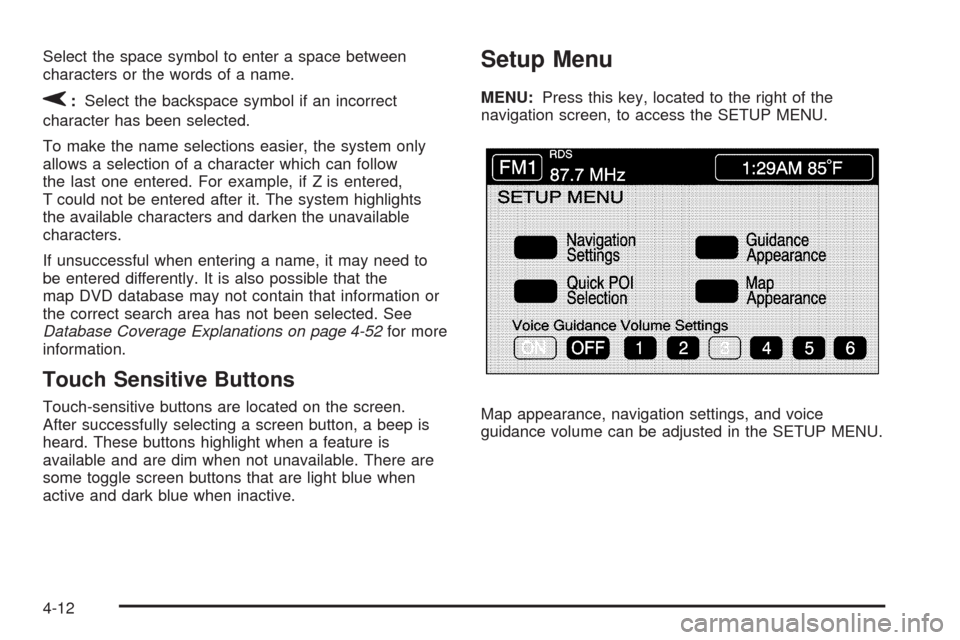
MENU:Press this key, located to the right of the
navigation screen, to access the SETUP MENU.
Map appearance, navigation settings, and voice
guidance volume can be adjusted in the SETUP MENU.
4-12
Page 230 of 462
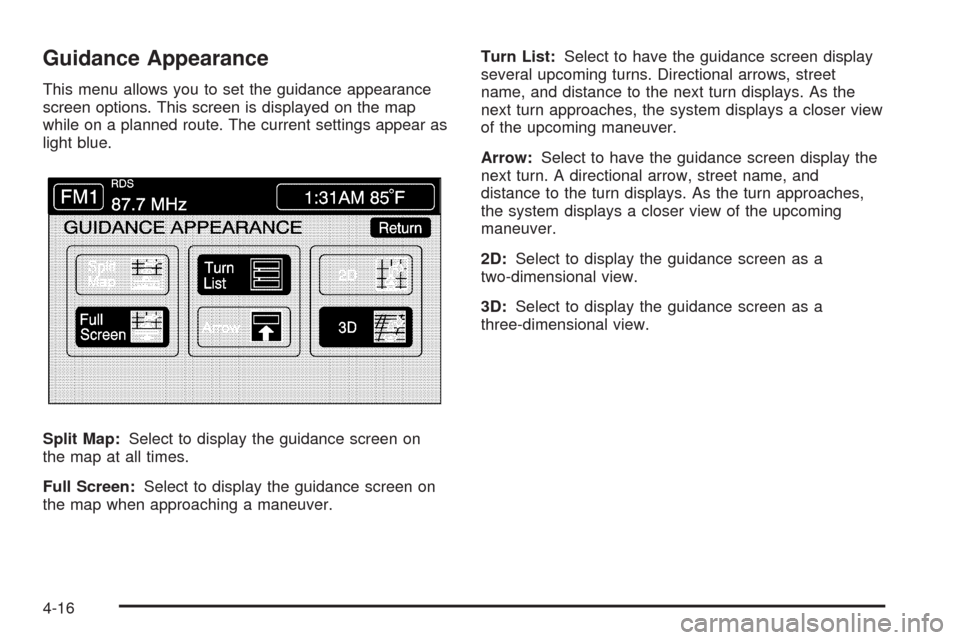
Guidance Appearance
This menu allows you to set the guidance appearance
screen options. This screen is displayed on the map
while on a planned route. The current settings appear as
light blue.
Split Map:Select to display the guidance screen on
the map at all times.
Full Screen:Select to display the guidance screen on
the map when approaching a maneuver.Turn List:Select to have the guidance screen display
several upcoming turns. Directional arrows, street
name, and distance to the next turn displays. As the
next turn approaches, the system displays a closer view
of the upcoming maneuver.
Arrow:Select to have the guidance screen display the
next turn. A directional arrow, street name, and
distance to the turn displays. As the turn approaches,
the system displays a closer view of the upcoming
maneuver.
2D:Select to display the guidance screen as a
two-dimensional view.
3D:Select to display the guidance screen as a
three-dimensional view.
4-16
Page 231 of 462
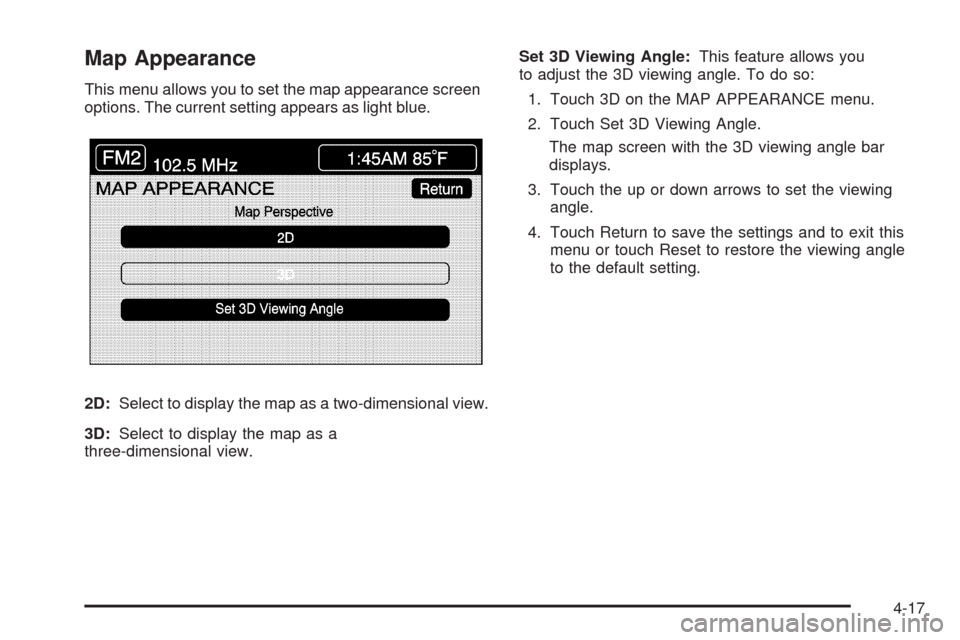
Map Appearance
This menu allows you to set the map appearance screen
options. The current setting appears as light blue.
2D:Select to display the map as a two-dimensional view.
3D:Select to display the map as a
three-dimensional view.Set 3D Viewing Angle:This feature allows you
to adjust the 3D viewing angle. To do so:
1. Touch 3D on the MAP APPEARANCE menu.
2. Touch Set 3D Viewing Angle.
The map screen with the 3D viewing angle bar
displays.
3. Touch the up or down arrows to set the viewing
angle.
4. Touch Return to save the settings and to exit this
menu or touch Reset to restore the viewing angle
to the default setting.
4-17
Page 234 of 462
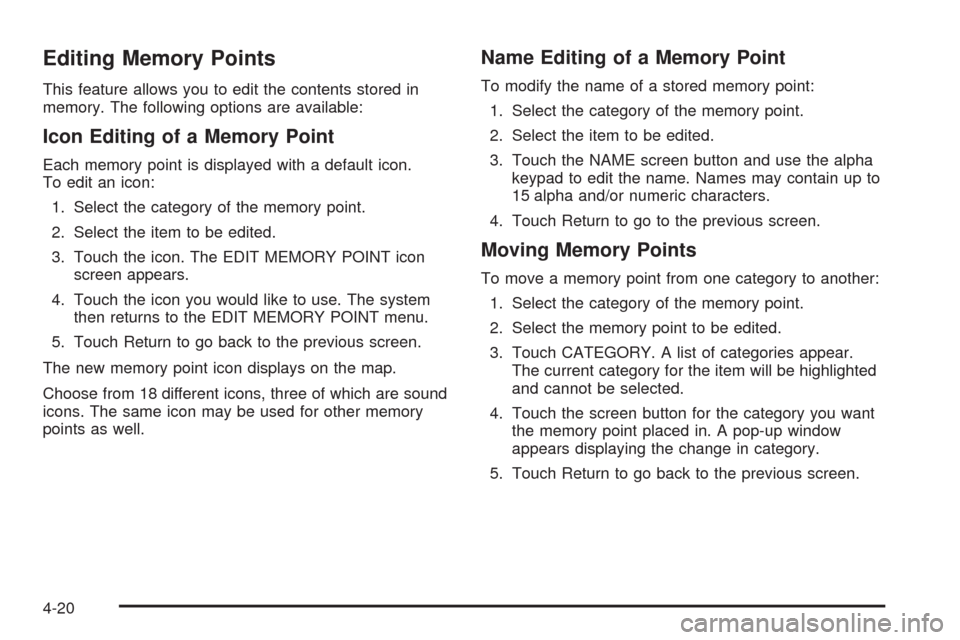
Editing Memory Points
This feature allows you to edit the contents stored in
memory. The following options are available:
Icon Editing of a Memory Point
Each memory point is displayed with a default icon.
To edit an icon:
1. Select the category of the memory point.
2. Select the item to be edited.
3. Touch the icon. The EDIT MEMORY POINT icon
screen appears.
4. Touch the icon you would like to use. The system
then returns to the EDIT MEMORY POINT menu.
5. Touch Return to go back to the previous screen.
The new memory point icon displays on the map.
Choose from 18 different icons, three of which are sound
icons. The same icon may be used for other memory
points as well.
Name Editing of a Memory Point
To modify the name of a stored memory point:
1. Select the category of the memory point.
2. Select the item to be edited.
3. Touch the NAME screen button and use the alpha
keypad to edit the name. Names may contain up to
15 alpha and/or numeric characters.
4. Touch Return to go to the previous screen.
Moving Memory Points
To move a memory point from one category to another:
1. Select the category of the memory point.
2. Select the memory point to be edited.
3. Touch CATEGORY. A list of categories appear.
The current category for the item will be highlighted
and cannot be selected.
4. Touch the screen button for the category you want
the memory point placed in. A pop-up window
appears displaying the change in category.
5. Touch Return to go back to the previous screen.
4-20
Page 241 of 462
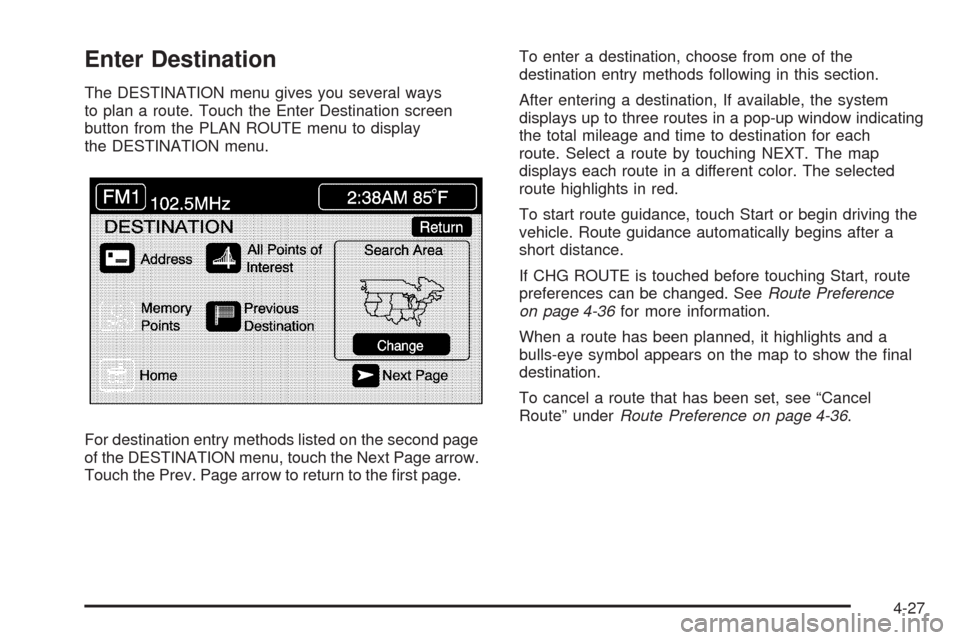
Enter Destination
The DESTINATION menu gives you several ways
to plan a route. Touch the Enter Destination screen
button from the PLAN ROUTE menu to display
the DESTINATION menu.
For destination entry methods listed on the second page
of the DESTINATION menu, touch the Next Page arrow.
Touch the Prev. Page arrow to return to the rst page.To enter a destination, choose from one of the
destination entry methods following in this section.
After entering a destination, If available, the system
displays up to three routes in a pop-up window indicating
the total mileage and time to destination for each
route. Select a route by touching NEXT. The map
displays each route in a different color. The selected
route highlights in red.
To start route guidance, touch Start or begin driving the
vehicle. Route guidance automatically begins after a
short distance.
If CHG ROUTE is touched before touching Start, route
preferences can be changed. SeeRoute Preference
on page 4-36for more information.
When a route has been planned, it highlights and a
bulls-eye symbol appears on the map to show the nal
destination.
To cancel a route that has been set, see “Cancel
Route” underRoute Preference on page 4-36.
4-27
Page 254 of 462
DVD Map Disc Messages
If an error appears on the display and/or the map disc
comes out, it could be for one of the following reasons:
If the map disc was installed into the CD slot.
See “Installing the DVD Map Disc” previously.
It is very hot, when the temperature returns to
normal, the map disc should play.
You are driving on a very rough road. When the road
becomes smoother, the map disc should play.
The map disc is dirty, scratched, wet, or
upside down.
If any error occurs repeatedly or if an error cannot be
corrected, contact your dealer/retailer.
Ejecting the DVD Map Disc
When the DVD map disc is not loaded, the navigation
portion of the system cannot be used.
1. Turn the ignition on.
2. With the vehicle in P (Park), press and hold the
TILT key until a beep is heard. The system’s
faceplate opens.
3. The map DVD ejects from the slot. Pull the
disc out.
4. Press and release the TILT key to close the
faceplate.Notice:Shifting out of P (Park) with the system’s
faceplate open will cause the faceplate to close
automatically. This could cause damage to a
CD, DVD or the system if it is partially loaded. Before
shifting out of P (Park), make sure that the DVD or
CD is loaded properly. The vehicle must be
shifted back into P (Park) to close the faceplate.
Handling the DVD Map Disc
When handling the DVD map disc, be careful of the
following:
Handle the disc very carefully to avoid
contamination or aws. Signals may not read out
properly if the disc gets contaminated or awed.
If the disc gets soiled, use a soft cloth to gently wipe
it out from the center of the disc to the outside.
Do not use photographic record cleaner, solvents,
or other cleaners.
Do not use the disc to rest on while writing or
drawing using any writing utensil or attach a seal to
any of the sides or the disc.
Do not keep the disc in direct sunlight, high
temperatures, or humidity.
After using the disc, place it back into the
original case.
4-40