Power steering CADILLAC XLR V 2006 1.G User Guide
[x] Cancel search | Manufacturer: CADILLAC, Model Year: 2006, Model line: XLR V, Model: CADILLAC XLR V 2006 1.GPages: 456, PDF Size: 3.74 MB
Page 271 of 456
Voice Recognition
The navigation system’s voice recognition allows for
hands-free operation of navigation and audio system
features. Voice recognition can be used when the
ignition is on or when Retained Accessory Power (RAP)
is active.
This feature only works if the map DVD is inserted and
I AGREE has been selected. If you try to use voice
recognition without the map DVD inserted, the system
will display “Please insert the navigation map DVD
to use the voice recognition feature.”
To use navigation voice recognition, do the following:
1. Press the talk symbol
steering wheel control
and release it, when
you hear a beep.
The audio system,
if on, will mute.2. Clearly state one of the commands listed on the
following pages. For example, say “FM1”.
3. The system will tell you the command being
implemented. For example, the system will
say “FM1 Radio” and change the audio system to
the FM1 source.
You can end voice recognition by not speaking any
commands. After about ve seconds of silence,
the system will automatically cancel voice recognition.
At times, the system may not understand a spoken
command. If this happens, try saying the command
again. If a spoken command is not available, the system
will provide feedback based on availability.
While using voice recognition, make sure to keep
interior noise levels to a minimum. Otherwise, the
system might not recognize voice commands.
The system will only recognize commands spoken
in English.
4-75
Page 287 of 456
Remember: ABS does not change the time you need to
get your foot up to the brake pedal or always decrease
stopping distance. If you get too close to the vehicle
in front of you, you will not have time to apply your
brakes if that vehicle suddenly slows or stops. Always
leave enough room up ahead to stop, even though
you have ABS.
Using ABS
Do not pump the brakes. Just hold the brake pedal
down rmly and let anti-lock work for you. You may
hear a motor or clicking noise and feel the brake pedal
move a little during a stop, but this is normal.
Braking in Emergencies
With ABS, you can steer and brake at the same time.
In many emergencies, steering can help you more
than even the very best braking.
Traction Control System (TCS)
Your vehicle has a traction control system that limits
wheel spin. This is especially useful in slippery
road conditions. The system operates only if it senses
that one or both of the rear wheels are spinning or
beginning to lose traction. When this happens,
the system works the rear brakes and reduces engine
power to limit wheel spin.
The TRAC SYSTEM ACTIVE message will display on
the Driver Information Center (DIC) when the traction
control system is limiting wheel spin. SeeDIC Warnings
and Messages on page 3-67. You may feel or hear
the system working, but this is normal.
If your vehicle is in cruise control when the traction
control system begins to limit wheel spin, the cruise
control will automatically disengage. When road
conditions allow you to safely use it again, you may
reengage the cruise control. SeeAdaptive Cruise
Control on page 3-15orCruise Control on page 3-12
for more information.
5-9
Page 291 of 456
Steering
Power Steering
If you lose power steering assist because the engine
stops or the system is not functioning, you can steer
but it will take much more effort.
Magnetic Speed Variable Assist
Steering
Your vehicle is equipped with a steering system that
continuously adjusts the effort you feel when steering
at all vehicle speeds. It provides ease when parking,
yet a rm, solid feel at highway speeds.
Steering Tips
It is important to take curves at a reasonable speed.
A lot of the “driver lost control” accidents mentioned
on the news happen on curves. Here is why:
Experienced driver or beginner, each of us is subject
to the same laws of physics when driving on curves.The traction of the tires against the road surface
makes it possible for the vehicle to change its path
when you turn the front wheels. If there is no traction,
inertia will keep the vehicle going in the same direction.
If you have ever tried to steer a vehicle on wet ice,
you will understand this.
The traction you can get in a curve depends on the
condition of your tires and the road surface, the angle
at which the curve is banked, and your speed. While you
are in a curve, speed is the one factor you can control.
Suppose you are steering through a sharp curve.
Then you suddenly accelerate. Both control
systems — steering and acceleration — have to do
their work where the tires meet the road. Adding the
sudden acceleration can demand too much of those
places. You can lose control. SeeTraction Control
System (TCS) on page 5-9.
What should you do if this ever happens? Ease up
on the accelerator pedal, steer the vehicle the way
you want it to go, and slow down.
5-13
Page 317 of 456
Service............................................................6-3
Accessories and Modications..........................6-3
California Proposition 65 Warning.....................6-3
Doing Your Own Service Work.........................6-4
Adding Equipment to the Outside
of Your Vehicle...........................................6-4
Fuel................................................................6-4
Gasoline Octane............................................6-5
Gasoline Specications....................................6-5
California Fuel...............................................6-5
Additives.......................................................6-6
Fuels in Foreign Countries...............................6-6
Filling the Tank..............................................6-7
Filling a Portable Fuel Container.....................6-10
Checking Things Under the Hood....................6-10
Hood Release..............................................6-11
Engine Compartment Overview.......................6-12
Engine Oil...................................................6-15
Engine Oil Life System..................................6-18
Engine Air Cleaner/Filter................................6-20
Automatic Transmission Fluid.........................6-21
Engine Coolant.............................................6-22
Coolant Surge Tank Pressure Cap..................6-25
Engine Overheating.......................................6-25
Overheated Engine Protection
Operating Mode........................................6-27Cooling System............................................6-28
Power Steering Fluid.....................................6-33
Windshield Washer Fluid................................6-34
Brakes........................................................6-35
Battery........................................................6-38
Jump Starting...............................................6-39
Rear Axle.......................................................6-44
Headlamp Aiming...........................................6-45
Headlamp Vertical Aiming..............................6-46
Bulb Replacement..........................................6-48
Windshield Replacement.................................6-49
Windshield Wiper Blade Replacement..............6-49
Tires..............................................................6-50
Tire Sidewall Labeling...................................6-52
Tire Terminology and Denitions.....................6-54
Run-Flat Tires..............................................6-56
Ination - Tire Pressure.................................6-58
Tire Pressure Monitor System.........................6-59
Tire Inspection and Rotation...........................6-62
When It Is Time for New Tires.......................6-63
Buying New Tires.........................................6-64
Different Size Tires and Wheels......................6-65
Uniform Tire Quality Grading..........................6-66
Wheel Alignment and Tire Balance..................6-67
Wheel Replacement......................................6-67
Section 6 Service and Appearance Care
6-1
Page 329 of 456
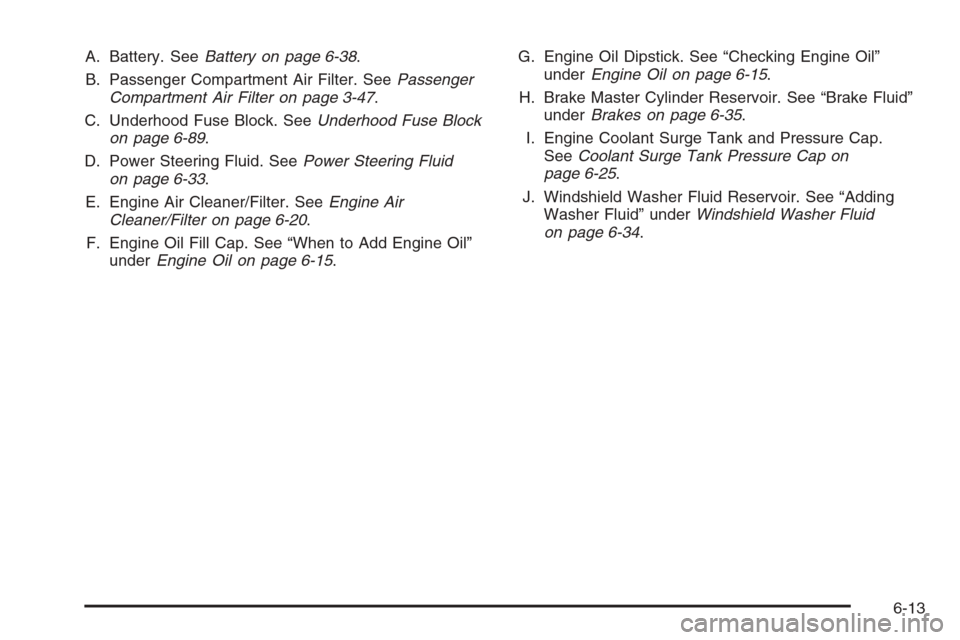
A. Battery. SeeBattery on page 6-38.
B. Passenger Compartment Air Filter. SeePassenger
Compartment Air Filter on page 3-47.
C. Underhood Fuse Block. SeeUnderhood Fuse Block
on page 6-89.
D. Power Steering Fluid. SeePower Steering Fluid
on page 6-33.
E. Engine Air Cleaner/Filter. SeeEngine Air
Cleaner/Filter on page 6-20.
F. Engine Oil Fill Cap. See “When to Add Engine Oil”
underEngine Oil on page 6-15.G. Engine Oil Dipstick. See “Checking Engine Oil”
underEngine Oil on page 6-15.
H. Brake Master Cylinder Reservoir. See “Brake Fluid”
underBrakes on page 6-35.
I. Engine Coolant Surge Tank and Pressure Cap.
SeeCoolant Surge Tank Pressure Cap on
page 6-25.
J. Windshield Washer Fluid Reservoir. See “Adding
Washer Fluid” underWindshield Washer Fluid
on page 6-34.
6-13
Page 331 of 456
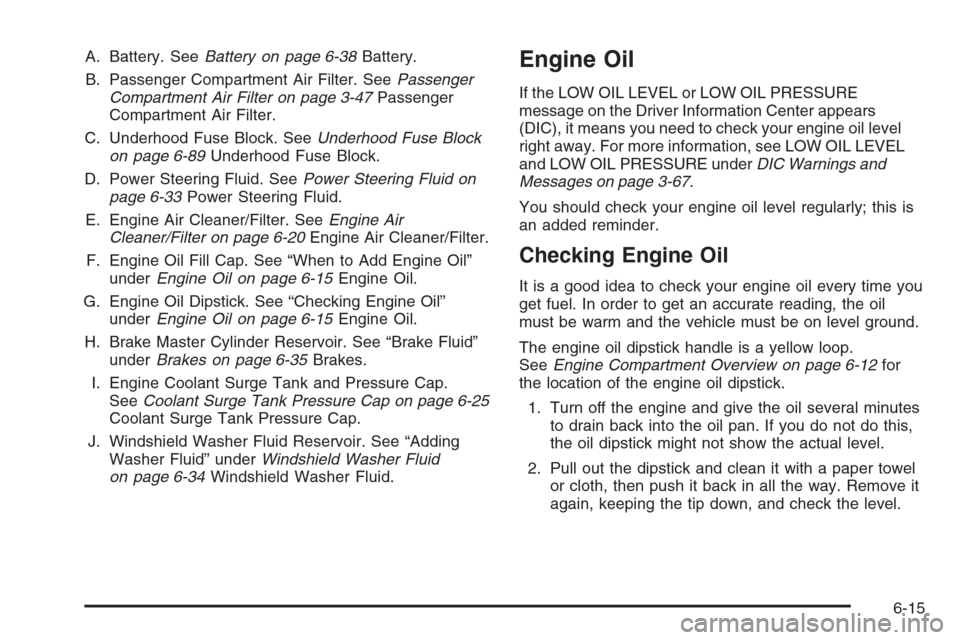
A. Battery. SeeBattery on page 6-38Battery.
B. Passenger Compartment Air Filter. SeePassenger
Compartment Air Filter on page 3-47Passenger
Compartment Air Filter.
C. Underhood Fuse Block. SeeUnderhood Fuse Block
on page 6-89Underhood Fuse Block.
D. Power Steering Fluid. SeePower Steering Fluid on
page 6-33Power Steering Fluid.
E. Engine Air Cleaner/Filter. SeeEngine Air
Cleaner/Filter on page 6-20Engine Air Cleaner/Filter.
F. Engine Oil Fill Cap. See “When to Add Engine Oil”
underEngine Oil on page 6-15Engine Oil.
G. Engine Oil Dipstick. See “Checking Engine Oil”
underEngine Oil on page 6-15Engine Oil.
H. Brake Master Cylinder Reservoir. See “Brake Fluid”
underBrakes on page 6-35Brakes.
I. Engine Coolant Surge Tank and Pressure Cap.
SeeCoolant Surge Tank Pressure Cap on page 6-25
Coolant Surge Tank Pressure Cap.
J. Windshield Washer Fluid Reservoir. See “Adding
Washer Fluid” underWindshield Washer Fluid
on page 6-34Windshield Washer Fluid.Engine Oil
If the LOW OIL LEVEL or LOW OIL PRESSURE
message on the Driver Information Center appears
(DIC), it means you need to check your engine oil level
right away. For more information, see LOW OIL LEVEL
and LOW OIL PRESSURE underDIC Warnings and
Messages on page 3-67.
You should check your engine oil level regularly; this is
an added reminder.
Checking Engine Oil
It is a good idea to check your engine oil every time you
get fuel. In order to get an accurate reading, the oil
must be warm and the vehicle must be on level ground.
The engine oil dipstick handle is a yellow loop.
SeeEngine Compartment Overview on page 6-12for
the location of the engine oil dipstick.
1. Turn off the engine and give the oil several minutes
to drain back into the oil pan. If you do not do this,
the oil dipstick might not show the actual level.
2. Pull out the dipstick and clean it with a paper towel
or cloth, then push it back in all the way. Remove it
again, keeping the tip down, and check the level.
6-15
Page 349 of 456
If the LOW COOLANT message does not appear on the
Driver Information Center (DIC) after two minutes, the
coolant is at the proper ll level. If a LOW COOLANT
message does appear, repeat Steps 1 through 3
then reinstall the pressure cap, or see your dealer.
Power Steering Fluid
SeeEngine Compartment
Overview on page 6-12for
reservoir location.
When to Check Power Steering Fluid
It is not necessary to regularly check power steering uid
unless you suspect there is a leak in the system or
you hear an unusual noise. A uid loss in this system
could indicate a problem. Have the system inspected
and repaired.
How to Check Power Steering Fluid
To check the power steering uid, do the following:
1. Turn the ignition off and let the engine compartment
cool down.
2. Wipe the cap and the top of the reservoir clean.
3. Unscrew the cap and wipe the dipstick with a
clean rag.
4. Replace the cap and completely tighten it.
5. Remove the cap again and look at the uid level
on the dipstick.
The level should be at the FULL COLD mark.
If necessary, add only enough uid to bring the
level up to the mark.
What to Use
To determine what kind of uid to use, see
Recommended Fluids and Lubricants on page 7-11.
Always use the proper uid. Failure to use the proper
uid can cause leaks and damage hoses and seals.
6-33
Page 370 of 456
Tire Terminology and Denitions
Air Pressure:The amount of air inside the tire pressing
outward on each square inch of the tire. Air pressure
is expressed in pounds per square inch (psi) or
kilopascal (kPa).
Accessory Weight:This means the combined weight
of optional accessories. Some examples of optional
accessories are, automatic transmission, power steering,
power brakes, power windows, power seats, and
air conditioning.
Aspect Ratio:The relationship of a tire’s height to
its width.
Belt:A rubber coated layer of cords that is located
between the plies and the tread. Cords may be made
from steel or other reinforcing materials.
Bead:The tire bead contains steel wires wrapped by
steel cords that hold the tire onto the rim.
Bias Ply Tire:A pneumatic tire in which the plies are
laid at alternate angles less than 90 degrees to the
centerline of the tread.
Cold Ination Pressure:The amount of air pressure
in a tire, measured in pounds per square inch (psi)
or kilopascals (kPa) before a tire has built up heat from
driving. SeeInation - Tire Pressure on page 6-58.Curb Weight:This means the weight of a motor
vehicle with standard and optional equipment including
the maximum capacity of fuel, oil, and coolant, but
without passengers and cargo.
DOT Markings:A code molded into the sidewall of a
tire signifying that the tire is in compliance with the
U.S. Department of Transportation (DOT) motor vehicle
safety standards. The DOT code includes the Tire
Identication Number (TIN), an alphanumeric designator
which can also identify the tire manufacturer, production
plant, brand, and date of production.
GVWR:Gross Vehicle Weight Rating, seeLoading
Your Vehicle on page 5-33.
GAWR FRT:Gross Axle Weight Rating for the front
axle, seeLoading Your Vehicle on page 5-33.
GAWR RR:Gross Axle Weight Rating for the rear axle,
seeLoading Your Vehicle on page 5-33.
Intended Outboard Sidewall:The side of an
asymmetrical tire, that must always face outward when
mounted on a vehicle.
Kilopascal (kPa):The metric unit for air pressure.
Light Truck (LT-Metric) Tire:A tire used on light duty
trucks and some multipurpose passenger vehicles.
6-54
Page 404 of 456
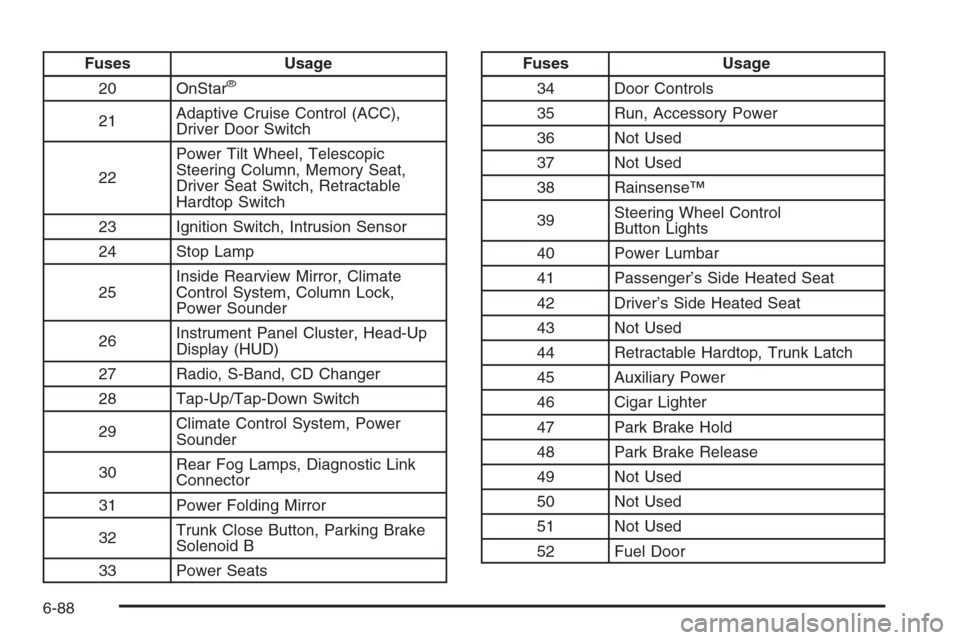
Fuses Usage
20 OnStar
®
21Adaptive Cruise Control (ACC),
Driver Door Switch
22Power Tilt Wheel, Telescopic
Steering Column, Memory Seat,
Driver Seat Switch, Retractable
Hardtop Switch
23 Ignition Switch, Intrusion Sensor
24 Stop Lamp
25Inside Rearview Mirror, Climate
Control System, Column Lock,
Power Sounder
26Instrument Panel Cluster, Head-Up
Display (HUD)
27 Radio, S-Band, CD Changer
28 Tap-Up/Tap-Down Switch
29Climate Control System, Power
Sounder
30Rear Fog Lamps, Diagnostic Link
Connector
31 Power Folding Mirror
32Trunk Close Button, Parking Brake
Solenoid B
33 Power Seats
Fuses Usage
34 Door Controls
35 Run, Accessory Power
36 Not Used
37 Not Used
38 Rainsense™
39Steering Wheel Control
Button Lights
40 Power Lumbar
41 Passenger’s Side Heated Seat
42 Driver’s Side Heated Seat
43 Not Used
44 Retractable Hardtop, Trunk Latch
45 Auxiliary Power
46 Cigar Lighter
47 Park Brake Hold
48 Park Brake Release
49 Not Used
50 Not Used
51 Not Used
52 Fuel Door
6-88
Page 419 of 456
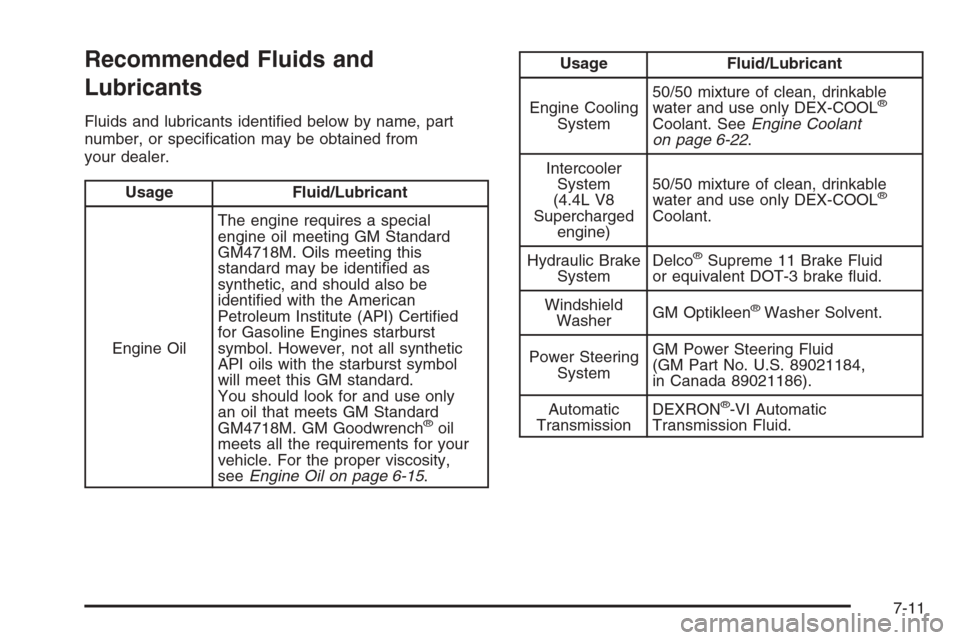
Recommended Fluids and
Lubricants
Fluids and lubricants identied below by name, part
number, or specication may be obtained from
your dealer.
Usage Fluid/Lubricant
Engine OilThe engine requires a special
engine oil meeting GM Standard
GM4718M. Oils meeting this
standard may be identied as
synthetic, and should also be
identied with the American
Petroleum Institute (API) Certied
for Gasoline Engines starburst
symbol. However, not all synthetic
API oils with the starburst symbol
will meet this GM standard.
You should look for and use only
an oil that meets GM Standard
GM4718M. GM Goodwrench
®oil
meets all the requirements for your
vehicle. For the proper viscosity,
seeEngine Oil on page 6-15.
Usage Fluid/Lubricant
Engine Cooling
System50/50 mixture of clean, drinkable
water and use only DEX-COOL
®
Coolant. SeeEngine Coolant
on page 6-22.
Intercooler
System
(4.4L V8
Supercharged
engine)50/50 mixture of clean, drinkable
water and use only DEX-COOL
®
Coolant.
Hydraulic Brake
SystemDelco
®Supreme 11 Brake Fluid
or equivalent DOT-3 brake uid.
Windshield
WasherGM Optikleen
®Washer Solvent.
Power Steering
SystemGM Power Steering Fluid
(GM Part No. U.S. 89021184,
in Canada 89021186).
Automatic
TransmissionDEXRON
®-VI Automatic
Transmission Fluid.
7-11