brake CADILLAC XT4 2019 User Guide
[x] Cancel search | Manufacturer: CADILLAC, Model Year: 2019, Model line: XT4, Model: CADILLAC XT4 2019Pages: 381, PDF Size: 6.4 MB
Page 44 of 381
Cadillac XT4 Owner Manual (GMNA-Localizing-U.S./Canada/Mexico-
12017481) - 2019 - CRC - 11/5/18
40 KEYS, DOORS, AND WINDOWS
4. Release the door handle.
5. Check that the cap is secure.
Free-Turning Locks
The door key lock cylinder turns freely
when either the wrong key is used,
or the correct key is not fully inserted.
The free-turning door lock feature
prevents the lock from being forced
open. To reset the lock, turn it to the
vertical position with the correct key
fully inserted. Remove the key and
insert it again. If this does not reset
the lock, turn the key halfway around
in the cylinder and repeat the reset
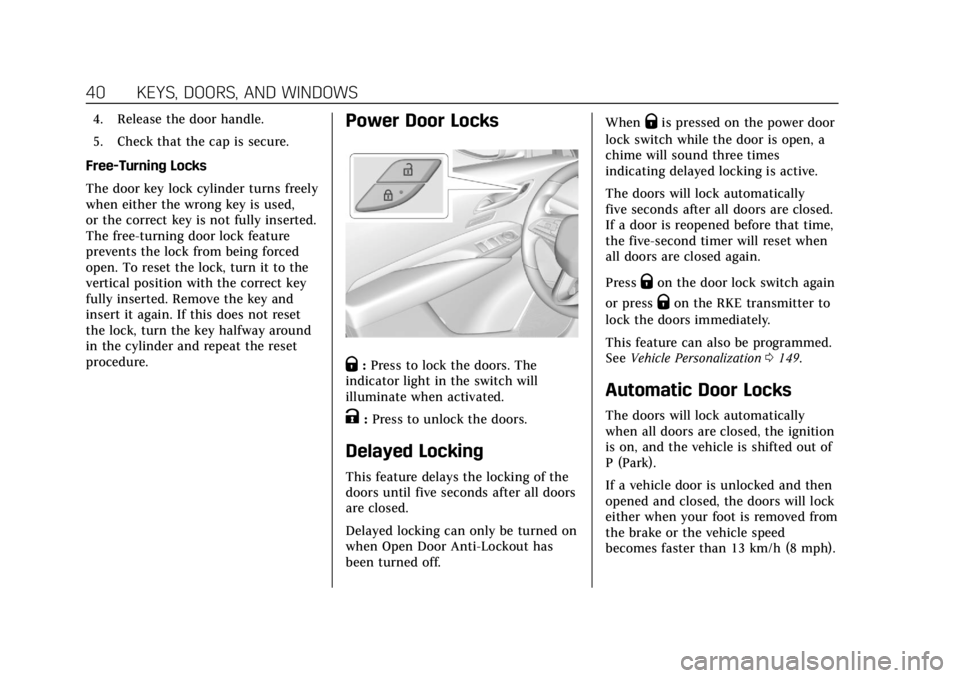
procedure.Power Door Locks
Q: Press to lock the doors. The
indicator light in the switch will
illuminate when activated.
K: Press to unlock the doors.
Delayed Locking
This feature delays the locking of the
doors until five seconds after all doors
are closed.
Delayed locking can only be turned on
when Open Door Anti-Lockout has
been turned off. When
Qis pressed on the power door
lock switch while the door is open, a
chime will sound three times
indicating delayed locking is active.
The doors will lock automatically
five seconds after all doors are closed.
If a door is reopened before that time,
the five-second timer will reset when
all doors are closed again.
Press
Qon the door lock switch again
or press
Qon the RKE transmitter to
lock the doors immediately.
This feature can also be programmed.
See Vehicle Personalization 0149.
Automatic Door Locks
The doors will lock automatically
when all doors are closed, the ignition
is on, and the vehicle is shifted out of
P (Park).
If a vehicle door is unlocked and then
opened and closed, the doors will lock
either when your foot is removed from
the brake or the vehicle speed
becomes faster than 13 km/h (8 mph).
Page 90 of 381
Cadillac XT4 Owner Manual (GMNA-Localizing-U.S./Canada/Mexico-
12017481) - 2019 - CRC - 11/5/18
86 SEATS AND RESTRAINTS
{Warning
When an airbag inflates, there may
be dust in the air. This dust could
cause breathing problems for
people with a history of asthma or
other breathing trouble. To avoid
this, everyone in the vehicle should
get out as soon as it is safe to do
so. If you have breathing problems
but cannot get out of the vehicle
after an airbag inflates, then get
fresh air by opening a window or a
door. If you experience breathing
problems following an airbag
deployment, you should seek
medical attention.
The vehicle has a feature that may
automatically unlock the doors, turn
on the interior lamps and hazard
warning flashers, and shut off the fuel
system after the airbags inflate. The
feature may also activate, without
airbag inflation, after an event that
exceeds a predetermined threshold.
After turning the ignition off and then
on again, the fuel system will return to normal operation; the doors can be
locked, the interior lamps can be
turned off, and the hazard warning
flashers can be turned off using the
controls for those features. If any of
these systems are damaged in the
crash they may not operate as normal.
{Warning
A crash severe enough to inflate the
airbags may have also damaged
important functions in the vehicle,
such as the fuel system, brake and
steering systems, etc. Even if the
vehicle appears to be drivable after
a moderate crash, there may be
concealed damage that could make
it difficult to safely operate the
vehicle.
Use caution if you should attempt
to restart the engine after a crash
has occurred.
In many crashes severe enough to
inflate the airbag, windshields are
broken by vehicle deformation. Additional windshield breakage may
also occur from the front outboard
passenger airbag.
.
Airbags are designed to inflate
only once. After an airbag inflates,
you will need some new parts for
the airbag system. If you do not
get them, the airbag system will
not be there to help protect you in
another crash. A new system will
include airbag modules and
possibly other parts. The service
manual for the vehicle covers the
need to replace other parts.
. The vehicle has a crash sensing
and diagnostic module which
records information after a crash.
See Vehicle Data Recording and
Privacy 0352 and Event Data
Recorders 0352.
. Let only qualified technicians
work on the airbag systems.
Improper service can mean that
an airbag system will not work
properly. See your dealer for
service.
Page 120 of 381
Cadillac XT4 Owner Manual (GMNA-Localizing-U.S./Canada/Mexico-
12017481) - 2019 - CRC - 11/5/18
116 INSTRUMENTS AND CONTROLS
Instruments and
Controls
Controls
Steering Wheel Adjustment . . . . . 117
Steering Wheel Controls . . . . . . . . . 117
Heated Steering Wheel . . . . . . . . . . 117
Horn . . . . . . . . . . . . . . . . . . . . . . . . . . . . . . . 118
Windshield Wiper/Washer . . . . . . . 118
Rear Window Wiper/Washer . . . . 120
Compass . . . . . . . . . . . . . . . . . . . . . . . . . . 121
Clock . . . . . . . . . . . . . . . . . . . . . . . . . . . . . . 121
Power Outlets . . . . . . . . . . . . . . . . . . . . . 121
Wireless Charging . . . . . . . . . . . . . . . . 122
Cigarette Lighter . . . . . . . . . . . . . . . . . . 124
Ashtrays . . . . . . . . . . . . . . . . . . . . . . . . . . 125
Warning Lights, Gauges, and
Indicators
Warning Lights, Gauges, andIndicators . . . . . . . . . . . . . . . . . . . . . . . 125
Instrument Cluster . . . . . . . . . . . . . . . 126
Speedometer . . . . . . . . . . . . . . . . . . . . . . 129
Odometer . . . . . . . . . . . . . . . . . . . . . . . . . 129
Trip Odometer . . . . . . . . . . . . . . . . . . . . 129
Tachometer . . . . . . . . . . . . . . . . . . . . . . . 129
Fuel Gauge . . . . . . . . . . . . . . . . . . . . . . . . 129 Engine Coolant Temperature
Gauge . . . . . . . . . . . . . . . . . . . . . . . . . . . . 130
Seat Belt Reminders . . . . . . . . . . . . . . 131
Airbag Readiness Light . . . . . . . . . . 131
Passenger Airbag Status Indicator . . . . . . . . . . . . . . . . . . . . . . . . . 132
Charging System Light . . . . . . . . . . . 133
Malfunction Indicator Lamp (Check Engine Light) . . . . . . . . . . . 133
Brake System Warning Light . . . . 135
Electric Parking Brake Light . . . . . 136
Service Electric Parking Brake Light . . . . . . . . . . . . . . . . . . . . . . . . . . . . . 136
Antilock Brake System (ABS) Warning Light . . . . . . . . . . . . . . . . . . 136
All-Wheel-Drive Light . . . . . . . . . . . . 137
Lane Keep Assist (LKA) Light . . . 137
Vehicle Ahead Indicator . . . . . . . . . 137
Pedestrian Ahead Indicator . . . . . . 137
Traction Off Light . . . . . . . . . . . . . . . . 138
StabiliTrak OFF Light . . . . . . . . . . . . 138
Traction Control System (TCS)/ StabiliTrak Light . . . . . . . . . . . . . . . . 138
Engine Coolant Temperature Warning Light . . . . . . . . . . . . . . . . . . 139
Driver Mode Control Light . . . . . . . 139
Tire Pressure Light . . . . . . . . . . . . . . . 139
Engine Oil Pressure Light . . . . . . . . 140
Low Fuel Warning Light . . . . . . . . . 140
Security Light . . . . . . . . . . . . . . . . . . . . . 140 High-Beam On Light . . . . . . . . . . . . . 141
Lamps On Reminder . . . . . . . . . . . . . 141
Cruise Control Light . . . . . . . . . . . . . . 141
Door Ajar Light . . . . . . . . . . . . . . . . . . . 142
Information Displays
Driver Information
Center (DIC) . . . . . . . . . . . . . . . . . . . . . 142
Head-Up Display (HUD) . . . . . . . . . 145
Vehicle Messages
Vehicle Messages . . . . . . . . . . . . . . . . . 148
Engine Power Messages . . . . . . . . . . 148
Vehicle Speed Messages . . . . . . . . . 149
Vehicle Personalization
Vehicle Personalization . . . . . . . . . . 149
Universal Remote System
Universal Remote System . . . . . . . . 154
Universal Remote System Programming . . . . . . . . . . . . . . . . . . . 154
Universal Remote System Operation . . . . . . . . . . . . . . . . . . . . . . . . 156
Page 139 of 381
Cadillac XT4 Owner Manual (GMNA-Localizing-U.S./Canada/Mexico-
12017481) - 2019 - CRC - 11/5/18
INSTRUMENTS AND CONTROLS 135
12-volt battery has recently been
replaced or run down, or if the
vehicle has been recently serviced.
See your dealer if the vehicle will not
pass or cannot be made ready for
the test.
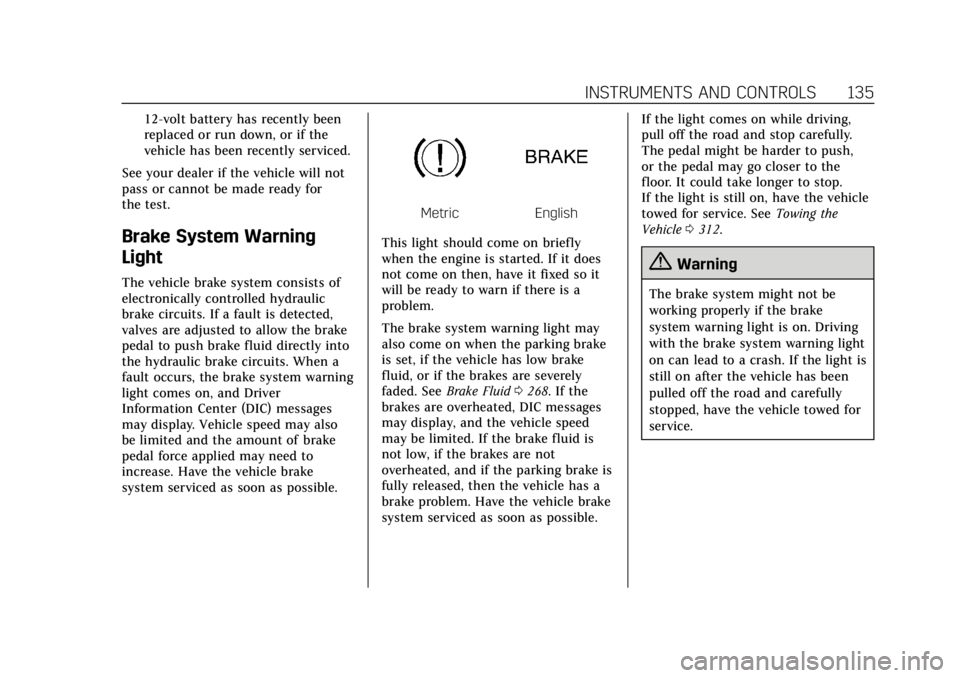
Brake System Warning
Light
The vehicle brake system consists of
electronically controlled hydraulic
brake circuits. If a fault is detected,
valves are adjusted to allow the brake
pedal to push brake fluid directly into
the hydraulic brake circuits. When a
fault occurs, the brake system warning
light comes on, and Driver
Information Center (DIC) messages
may display. Vehicle speed may also
be limited and the amount of brake
pedal force applied may need to
increase. Have the vehicle brake
system serviced as soon as possible.
MetricEnglish
This light should come on briefly
when the engine is started. If it does
not come on then, have it fixed so it
will be ready to warn if there is a
problem.
The brake system warning light may
also come on when the parking brake
is set, if the vehicle has low brake
fluid, or if the brakes are severely
faded. See Brake Fluid 0268. If the
brakes are overheated, DIC messages
may display, and the vehicle speed
may be limited. If the brake fluid is
not low, if the brakes are not
overheated, and if the parking brake is
fully released, then the vehicle has a
brake problem. Have the vehicle brake
system serviced as soon as possible. If the light comes on while driving,
pull off the road and stop carefully.
The pedal might be harder to push,
or the pedal may go closer to the
floor. It could take longer to stop.
If the light is still on, have the vehicle
towed for service. See
Towing the
Vehicle 0312.
{Warning
The brake system might not be
working properly if the brake
system warning light is on. Driving
with the brake system warning light
on can lead to a crash. If the light is
still on after the vehicle has been
pulled off the road and carefully
stopped, have the vehicle towed for
service.
Page 140 of 381
Cadillac XT4 Owner Manual (GMNA-Localizing-U.S./Canada/Mexico-
12017481) - 2019 - CRC - 11/5/18
136 INSTRUMENTS AND CONTROLS
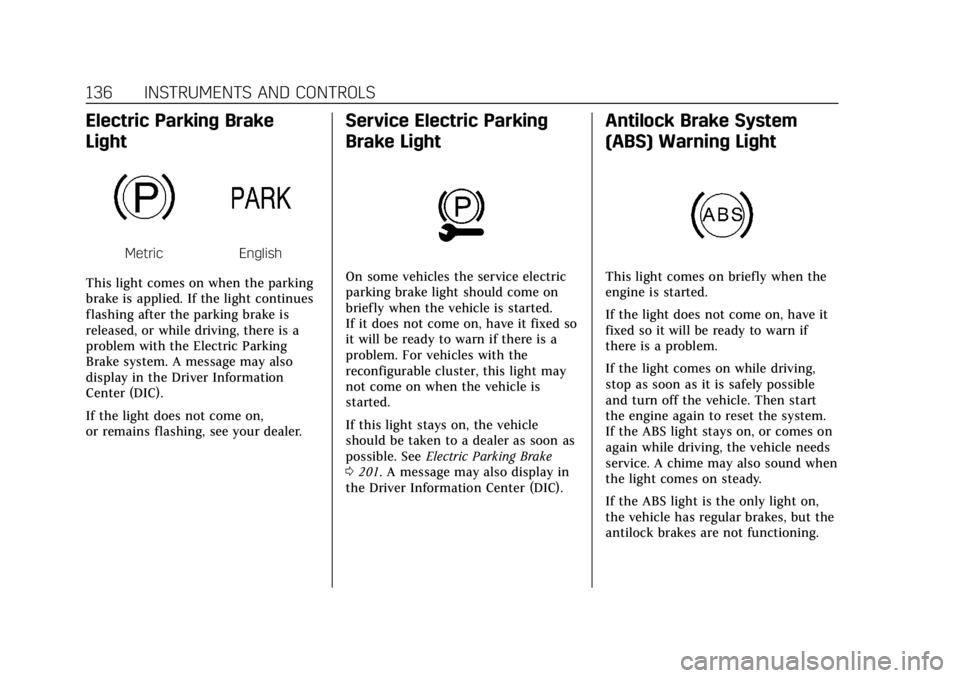
Electric Parking Brake
Light
MetricEnglish
This light comes on when the parking
brake is applied. If the light continues
flashing after the parking brake is
released, or while driving, there is a
problem with the Electric Parking
Brake system. A message may also
display in the Driver Information
Center (DIC).
If the light does not come on,
or remains flashing, see your dealer.
Service Electric Parking
Brake Light
On some vehicles the service electric
parking brake light should come on
briefly when the vehicle is started.
If it does not come on, have it fixed so
it will be ready to warn if there is a
problem. For vehicles with the
reconfigurable cluster, this light may
not come on when the vehicle is
started.
If this light stays on, the vehicle
should be taken to a dealer as soon as
possible. See Electric Parking Brake
0 201. A message may also display in
the Driver Information Center (DIC).
Antilock Brake System
(ABS) Warning Light
This light comes on briefly when the
engine is started.
If the light does not come on, have it
fixed so it will be ready to warn if
there is a problem.
If the light comes on while driving,
stop as soon as it is safely possible
and turn off the vehicle. Then start
the engine again to reset the system.
If the ABS light stays on, or comes on
again while driving, the vehicle needs
service. A chime may also sound when
the light comes on steady.
If the ABS light is the only light on,
the vehicle has regular brakes, but the
antilock brakes are not functioning.
Page 141 of 381
Cadillac XT4 Owner Manual (GMNA-Localizing-U.S./Canada/Mexico-
12017481) - 2019 - CRC - 11/5/18
INSTRUMENTS AND CONTROLS 137
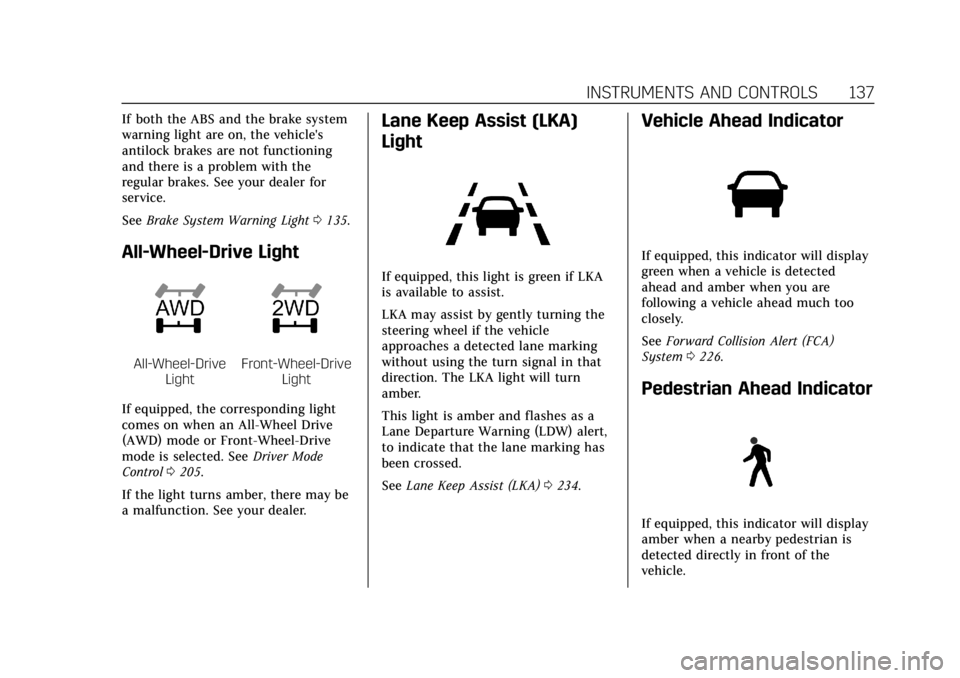
If both the ABS and the brake system
warning light are on, the vehicle's
antilock brakes are not functioning
and there is a problem with the
regular brakes. See your dealer for
service.
SeeBrake System Warning Light 0135.
All-Wheel-Drive Light
All-Wheel-Drive
LightFront-Wheel-Drive Light
If equipped, the corresponding light
comes on when an All-Wheel Drive
(AWD) mode or Front-Wheel-Drive
mode is selected. See Driver Mode
Control 0205.
If the light turns amber, there may be
a malfunction. See your dealer.
Lane Keep Assist (LKA)
Light
If equipped, this light is green if LKA
is available to assist.
LKA may assist by gently turning the
steering wheel if the vehicle
approaches a detected lane marking
without using the turn signal in that
direction. The LKA light will turn
amber.
This light is amber and flashes as a
Lane Departure Warning (LDW) alert,
to indicate that the lane marking has
been crossed.
See Lane Keep Assist (LKA) 0234.
Vehicle Ahead Indicator
If equipped, this indicator will display
green when a vehicle is detected
ahead and amber when you are
following a vehicle ahead much too
closely.
See Forward Collision Alert (FCA)
System 0226.
Pedestrian Ahead Indicator
If equipped, this indicator will display
amber when a nearby pedestrian is
detected directly in front of the
vehicle.
Page 152 of 381
Cadillac XT4 Owner Manual (GMNA-Localizing-U.S./Canada/Mexico-
12017481) - 2019 - CRC - 11/5/18
148 INSTRUMENTS AND CONTROLS
HUD Troubleshooting
If you cannot see the HUD image
when the ignition is on, check that:
.Nothing is covering the HUD lens.
. The HUD brightness setting is not
too dim or too bright.
. The HUD is adjusted to the proper
height.
. Polarized sunglasses are not worn.
. The windshield and HUD lens are
clean.
If the HUD image is not correct,
contact your dealer.
The windshield is part of the HUD
system. See Windshield Replacement
0 272.
Vehicle Messages
Messages displayed on the Driver
Information Center (DIC) indicate the
status of the vehicle or some action
that may be needed to correct a
condition. Multiple messages may
appear one after another.
The messages that do not require
immediate action can be
acknowledged and cleared by pressing
the thumbwheel. The messages that
require immediate action cannot be
cleared until that action is performed.
All messages should be taken
seriously; clearing the message does
not correct the problem.
If a SERVICE message appears, see
your dealer.
Follow the instructions given in the
messages. The system displays
messages regarding the following
topics:
.
Service Messages
. Fluid Levels
. Vehicle Security
. Brakes .
Steering
. Ride Control Systems
. Driver Assistance Systems
. Cruise Control
. Lighting and Bulb Replacement
. Wiper/Washer Systems
. Doors and Windows
. Seat Belts
. Airbag Systems
. Engine and Transmission
. Tire Pressure
. Battery
Engine Power Messages
ENGINE POWER IS REDUCED
This message displays when the
vehicle's propulsion power is reduced.
A reduction in propulsion power can
affect the vehicle's ability to
accelerate. If this message is on, but
there is no observed reduction in
performance, proceed to your
destination. The performance may be
reduced the next time the vehicle is
Page 154 of 381
Cadillac XT4 Owner Manual (GMNA-Localizing-U.S./Canada/Mexico-
12017481) - 2019 - CRC - 11/5/18
150 INSTRUMENTS AND CONTROLS
Auto Cooled Seats
This setting automatically turns on
and regulates the ventilated seats
when the cabin temperature is warm.
SeeHeated and Ventilated Front Seats
0 69.
Touch Off or On.
Auto Heated Seats
This setting automatically turns on
and regulates the heated seats when
the cabin temperature is cool. The
auto heated seats can be turned off by
using the heated seat buttons on the
center stack. See Heated and Ventilated
Front Seats 069.
Touch Off or On.
Auto Defog
This setting automatically turns the
front defogger on when the engine is
started.
Touch Off or On.
Auto Rear Defog
This setting automatically turns the
rear defogger on when the engine is
started. Touch Off or On.
Ionizer
If equipped and on, this feature helps
to clean the air inside the vehicle and
remove contaminants such as pollen,
odors, and dust. See
Dual Automatic
Climate Control System 0166.
Touch Off or On.
Collision / Detection Systems
Touch and the following may display:
. Alert Type
. Forward Collision System
. Front Pedestrian Detection
. Adaptive Cruise Go Notifier
. Lane Change Alert
. Rear Camera Park Assist Symbols
. Rear Cross Traffic Alert
Alert Type
This setting specifies the type of
vehicle feedback provided, either a
beep or seat vibration, when you are
in danger of colliding with an object.
Touch Beeps or Safety Alert Seat. Forward Collision System
This setting controls the vehicle
response when detecting a vehicle
ahead of you. The Off setting disables
all FCA and FAB functions. With the
Alert and Brake setting, both FCA and
FAB are available. The Alert setting
disables FAB. See
Forward Automatic
Braking (FAB) 0228.
Touch Off, Alert, or Alert and Brake.
Front Pedestrian Detection
This feature may help avoid or reduce
the harm caused by front-end crashes
with nearby pedestrians.
See Front Pedestrian Braking (FPB)
System 0230.
Select Off, Alert, or Alert and Brake.
Adaptive Cruise Go Notifier
This setting determines if an alert will
appear when Adaptive Cruise Control
brings the vehicle to a complete stop
and the vehicle ahead of you starts
moving again. See Adaptive Cruise
Control 0209.
Touch Off or On.
Page 164 of 381

Cadillac XT4 Owner Manual (GMNA-Localizing-U.S./Canada/Mexico-
12017481) - 2019 - CRC - 11/5/18
160 LIGHTING
Exterior Lamps Off
Reminder
A warning chime sounds if the driver
door is opened while the ignition is off
and the exterior lamps are on.
Headlamp High/Low-Beam
Changer
3
:Push the turn signal lever away
from you and release, to turn the high
beams on. To return to low beams,
push the lever again or pull it toward
you and release.
This indicator light turns on in the
instrument cluster when the
high-beam headlamps are on.
Flash-to-Pass
To flash the high beams, pull the turn
signal lever toward you, and release.
Daytime Running
Lamps (DRL)
DRL can make it easier for others to
see the front of your vehicle during
the day. Fully functional DRL are
required on all vehicles first sold in
Canada.
The dedicated DRL will come on when
all of the following conditions are met:
. The ignition is on.
. The exterior lamp control is
in AUTO.
. The light sensor determines it is
daytime.
. The parking brake is released or
the vehicle is not in P (Park).
When the DRL are on, the taillamps,
sidemarker lamps, and other lamps
will not be on.
The DRL turn off when the headlamps
are turned to
Oor the ignition is off.
For vehicles first sold in Canada, the
DRL can only be turned off when the
vehicle is parked.
Automatic Headlamp
System
When the exterior lamp control is set
to AUTO and it is dark enough
outside, the headlamps come on
automatically.
There is a light sensor on top of the
instrument panel. Do not cover the
sensor.
The system may also turn on the
headlamps when driving through a
parking garage or tunnel.
Page 176 of 381
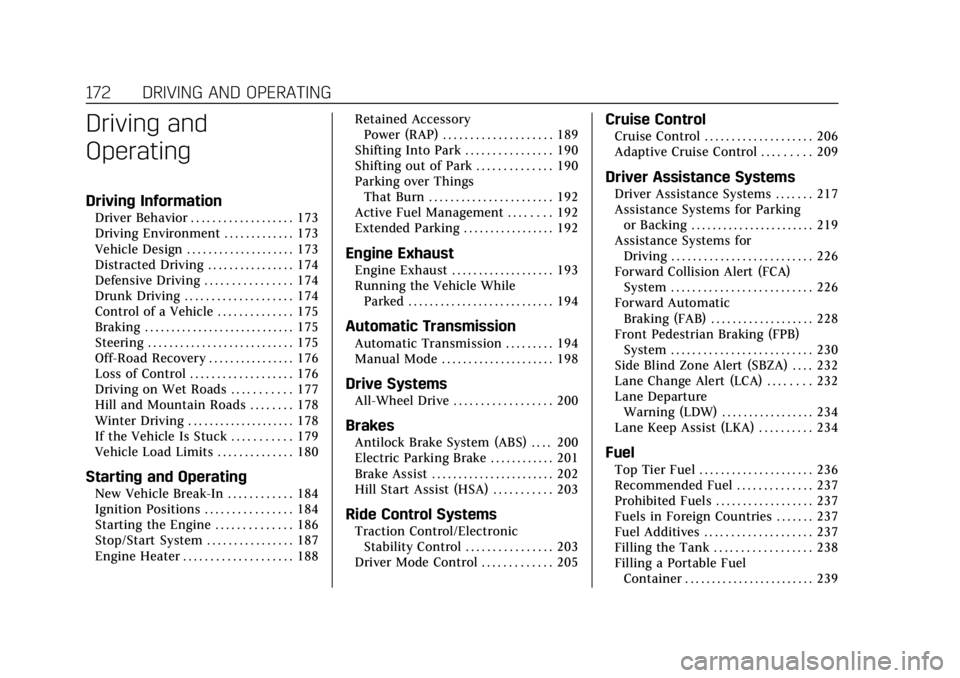
Cadillac XT4 Owner Manual (GMNA-Localizing-U.S./Canada/Mexico-
12017481) - 2019 - CRC - 11/5/18
172 DRIVING AND OPERATING
Driving and
Operating
Driving Information
Driver Behavior . . . . . . . . . . . . . . . . . . . 173
Driving Environment . . . . . . . . . . . . . 173
Vehicle Design . . . . . . . . . . . . . . . . . . . . 173
Distracted Driving . . . . . . . . . . . . . . . . 174
Defensive Driving . . . . . . . . . . . . . . . . 174
Drunk Driving . . . . . . . . . . . . . . . . . . . . 174
Control of a Vehicle . . . . . . . . . . . . . . 175
Braking . . . . . . . . . . . . . . . . . . . . . . . . . . . . 175
Steering . . . . . . . . . . . . . . . . . . . . . . . . . . . 175
Off-Road Recovery . . . . . . . . . . . . . . . . 176
Loss of Control . . . . . . . . . . . . . . . . . . . 176
Driving on Wet Roads . . . . . . . . . . . 177
Hill and Mountain Roads . . . . . . . . 178
Winter Driving . . . . . . . . . . . . . . . . . . . . 178
If the Vehicle Is Stuck . . . . . . . . . . . 179
Vehicle Load Limits . . . . . . . . . . . . . . 180
Starting and Operating
New Vehicle Break-In . . . . . . . . . . . . 184
Ignition Positions . . . . . . . . . . . . . . . . 184
Starting the Engine . . . . . . . . . . . . . . 186
Stop/Start System . . . . . . . . . . . . . . . . 187
Engine Heater . . . . . . . . . . . . . . . . . . . . 188Retained Accessory
Power (RAP) . . . . . . . . . . . . . . . . . . . . 189
Shifting Into Park . . . . . . . . . . . . . . . . 190
Shifting out of Park . . . . . . . . . . . . . . 190
Parking over Things That Burn . . . . . . . . . . . . . . . . . . . . . . . 192
Active Fuel Management . . . . . . . . 192
Extended Parking . . . . . . . . . . . . . . . . . 192
Engine Exhaust
Engine Exhaust . . . . . . . . . . . . . . . . . . . 193
Running the Vehicle While Parked . . . . . . . . . . . . . . . . . . . . . . . . . . . 194
Automatic Transmission
Automatic Transmission . . . . . . . . . 194
Manual Mode . . . . . . . . . . . . . . . . . . . . . 198
Drive Systems
All-Wheel Drive . . . . . . . . . . . . . . . . . . 200
Brakes
Antilock Brake System (ABS) . . . . 200
Electric Parking Brake . . . . . . . . . . . . 201
Brake Assist . . . . . . . . . . . . . . . . . . . . . . . 202
Hill Start Assist (HSA) . . . . . . . . . . . 203
Ride Control Systems
Traction Control/ElectronicStability Control . . . . . . . . . . . . . . . . 203
Driver Mode Control . . . . . . . . . . . . . 205
Cruise Control
Cruise Control . . . . . . . . . . . . . . . . . . . . 206
Adaptive Cruise Control . . . . . . . . . 209
Driver Assistance Systems
Driver Assistance Systems . . . . . . . 217
Assistance Systems for Parking or Backing . . . . . . . . . . . . . . . . . . . . . . . 219
Assistance Systems for Driving . . . . . . . . . . . . . . . . . . . . . . . . . . 226
Forward Collision Alert (FCA) System . . . . . . . . . . . . . . . . . . . . . . . . . . 226
Forward Automatic Braking (FAB) . . . . . . . . . . . . . . . . . . . 228
Front Pedestrian Braking (FPB) System . . . . . . . . . . . . . . . . . . . . . . . . . . 230
Side Blind Zone Alert (SBZA) . . . . 232
Lane Change Alert (LCA) . . . . . . . . 232
Lane Departure Warning (LDW) . . . . . . . . . . . . . . . . . 234
Lane Keep Assist (LKA) . . . . . . . . . . 234
Fuel
Top Tier Fuel . . . . . . . . . . . . . . . . . . . . . 236
Recommended Fuel . . . . . . . . . . . . . . 237
Prohibited Fuels . . . . . . . . . . . . . . . . . . 237
Fuels in Foreign Countries . . . . . . . 237
Fuel Additives . . . . . . . . . . . . . . . . . . . . 237
Filling the Tank . . . . . . . . . . . . . . . . . . 238
Filling a Portable Fuel Container . . . . . . . . . . . . . . . . . . . . . . . . 239