air condition CADILLAC XT4 2023 User Guide
[x] Cancel search | Manufacturer: CADILLAC, Model Year: 2023, Model line: XT4, Model: CADILLAC XT4 2023Pages: 476, PDF Size: 5.37 MB
Page 222 of 476
Cadillac XT4 Owner Manual (GMNA-Localizing-U.S./Canada/Mexico-
16412876) - 2023 - CRC - 3/25/22
Climate Controls 221
Climate Controls
Climate Control Systems
Dual Automatic ClimateControl System . . . . . . . . . . . 221
Air Vents
Air Vents . . . . . . . . . . . . . . . . . . . . . 225
Maintenance
Passenger CompartmentAir Filter . . . . . . . . . . . . . . . . . . . . 226
Service . . . . . . . . . . . . . . . . . . . . . . . 226
Climate Control Systems
Dual Automatic Climate Control System
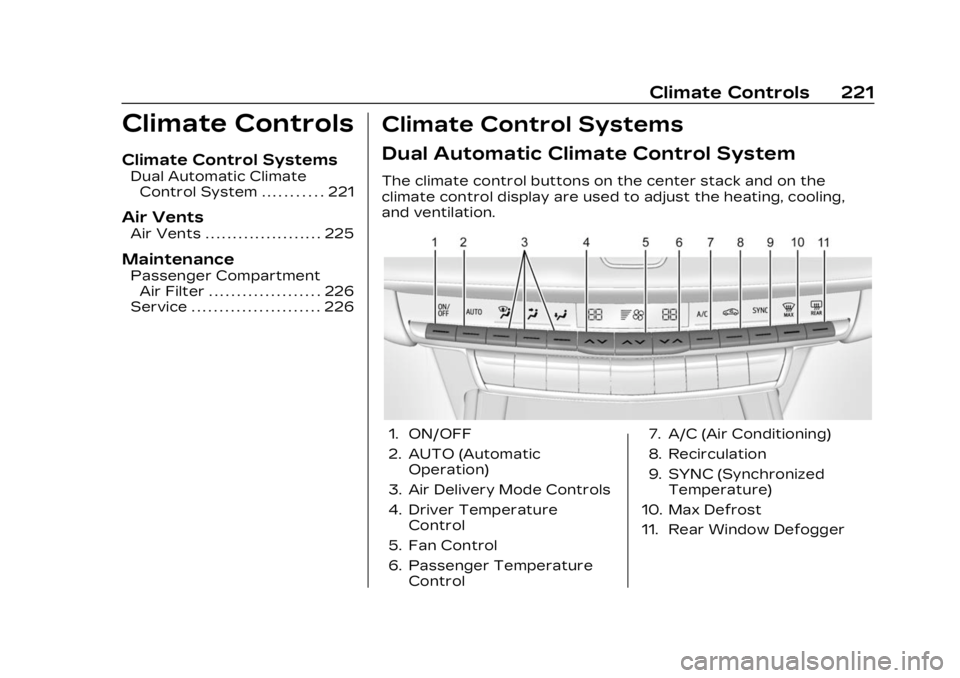
The climate control buttons on the center stack and on the
climate control display are used to adjust the heating, cooling,
and ventilation.
1. ON/OFF
2. AUTO (Automatic Operation)
3. Air Delivery Mode Controls
4. Driver Temperature Control
5. Fan Control
6. Passenger Temperature Control 7. A/C (Air Conditioning)
8. Recirculation
9. SYNC (Synchronized
Temperature)
10. Max Defrost
11. Rear Window Defogger
Page 223 of 476
Cadillac XT4 Owner Manual (GMNA-Localizing-U.S./Canada/Mexico-
16412876) - 2023 - CRC - 3/25/22
222 Climate Controls
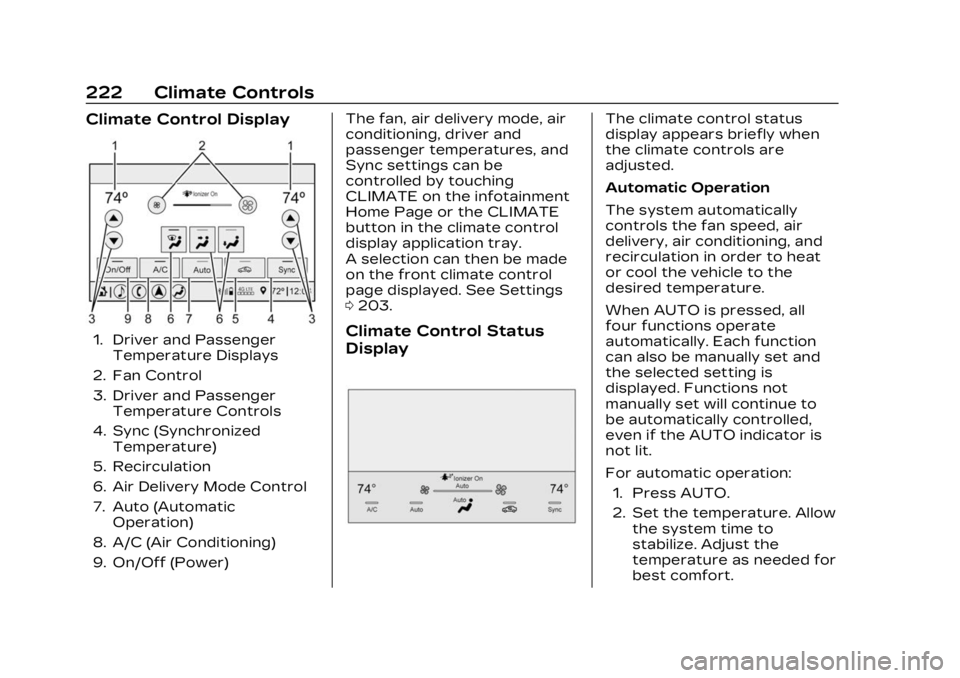
Climate Control Display
1. Driver and PassengerTemperature Displays
2. Fan Control
3. Driver and Passenger Temperature Controls
4. Sync (Synchronized Temperature)
5. Recirculation
6. Air Delivery Mode Control
7. Auto (Automatic Operation)
8. A/C (Air Conditioning)
9. On/Off (Power) The fan, air delivery mode, air
conditioning, driver and
passenger temperatures, and
Sync settings can be
controlled by touching
CLIMATE on the infotainment
Home Page or the CLIMATE
button in the climate control
display application tray.
A selection can then be made
on the front climate control
page displayed. See Settings
0
203.Climate Control Status
Display
The climate control status
display appears briefly when
the climate controls are
adjusted.
Automatic Operation
The system automatically
controls the fan speed, air
delivery, air conditioning, and
recirculation in order to heat
or cool the vehicle to the
desired temperature.
When AUTO is pressed, all
four functions operate
automatically. Each function
can also be manually set and
the selected setting is
displayed. Functions not
manually set will continue to
be automatically controlled,
even if the AUTO indicator is
not lit.
For automatic operation:
1. Press AUTO.
2. Set the temperature. Allow the system time to
stabilize. Adjust the
temperature as needed for
best comfort.
Page 225 of 476

Cadillac XT4 Owner Manual (GMNA-Localizing-U.S./Canada/Mexico-
16412876) - 2023 - CRC - 3/25/22
224 Climate Controls
A/C :Press to turn the air
conditioning system on or off.
If the climate control system is
turned off or the outside
temperature falls below
freezing, the air conditioner
will not run.
Pressing this button cancels
automatic air conditioning and
turns off the air conditioner.
Press AUTO to return to
automatic operation and the
air conditioner runs
automatically as needed.
When the indicator light is on,
the air conditioner runs
automatically to cool the air
inside the vehicle or to dry the
air needed to defog the
windshield faster.
@: Press to turn on
recirculation. An indicator light
comes on. Air is recirculated to
quickly cool the inside of the
vehicle or to reduce the entry
of outside air and odors.
Auto Defog : The climate
control system may have a
sensor to automatically detect high humidity inside the
vehicle. When high humidity is
detected, the climate control
system may adjust to outside
air supply and turn on the air
conditioner. The fan speed
may slightly increase to help
prevent fogging. If the climate
control system does not
detect possible window
fogging, it returns to normal
operation. To turn Auto Defog
off or on, select Settings >
Climate and Air Quality > Auto
Defog > Select ON or OFF.
Ionizer :
If equipped with an
ionizer, this feature helps to
clean the air inside the vehicle
and remove contaminants
such as pollen, odors, and
dust. If the climate control
system is on and the ionizer is
enabled, the ionizer status
indicator will be lit on the
climate control display. To turn
the Ionizer off or on, select
Settings > Climate and Air
Quality > Ionizer > Select ON
or OFF.
Rear Window Defogger
K: Press to turn the rear
window defogger on or off. An
indicator light on the button
comes on to show that the
rear window defogger is on.
The defogger can be turned
off by turning the vehicle off
or to accessory mode.
To turn Auto Rear Defog off
or on, select Settings >
Climate and Air Quality > Auto
Rear Defog > Select ON or
OFF. When auto rear defog is
selected, the rear window
defogger turns on
automatically when the
interior temperature is cold
and the outside temperature
is about 7 °C (44 °F) and below.
The auto rear defogger turns
off automatically.
If equipped, the heated
outside mirrors turn on when
the rear window defogger
button is on and help to clear
Page 226 of 476

Cadillac XT4 Owner Manual (GMNA-Localizing-U.S./Canada/Mexico-
16412876) - 2023 - CRC - 3/25/22
Climate Controls 225
fog or frost from the surface
of the mirror. See Heated
Mirrors036.
Caution
Do not try to clear frost or
other material from the
inside of the front
windshield and rear window
with a razor blade or
anything else that is sharp.
This may damage the rear
window defogger grid and
affect the radio's ability to
pick up stations clearly. The
repairs would not be
covered by the vehicle
warranty.
Remote Start Climate
Control Operation :
If equipped with remote start,
the climate control system
may run when the vehicle is
started remotely. If equipped
with heated or ventilated
seats or a heated steering
wheel, these features may
come on during a remote start. See Remote Vehicle Start
018,
Heated and Ventilated Front
Seats 053, and Heated
Steering Wheel 0110.Sensor
The solar sensor, on top of the
instrument panel near the
windshield, monitors the solar
intensity.
The climate control system
uses the sensor information to
adjust the temperature, fan
speed, recirculation, and air
delivery mode for best
comfort. If the sensor is covered, the
automatic climate control
system may not work properly.
Afterblow Feature
If equipped, under certain
conditions, the fan may stay
on or may turn on and off
several times after you turn
off and lock the vehicle. This is
normal.
Air Vents
Page 227 of 476
Cadillac XT4 Owner Manual (GMNA-Localizing-U.S./Canada/Mexico-
16412876) - 2023 - CRC - 3/25/22
226 Climate Controls
Adjustable air vents are in the
center and on the sides of the
instrument panel, and on the
rear of the center console
storage.
Move the slider knobs to
change the direction of or to
close off the airflow.
Operation Tips
.Clear away any ice, snow,
or leaves from air inlets at
the base of the windshield
that could block the flow of
air into the vehicle.
.Clear snow off the hood to
improve visibility and help
decrease moisture drawn
into the vehicle.
.Keep the path under the
front seats clear of objects
to help circulate the air
inside of the vehicle more
effectively.
.Use of non-GM approved
hood deflectors can
adversely affect the
performance of the system.Check with your dealer
before adding equipment to
the outside of the vehicle.
.Do not attach any devices to
the air vent slats. This
restricts airflow and may
cause damage to the air
vents.
Maintenance
Passenger
Compartment Air
Filter
The filter reduces dust, pollen,
and other airborne irritants
from outside air that is pulled
into the vehicle. The filter
should be replaced as part of
routine scheduled
maintenance. See
Maintenance Schedule
0425.
See your dealer regarding
replacement of the filter.
Service
All vehicles have a label
underhood that identifies the
refrigerant used in the vehicle.
The refrigerant system should
only be serviced by trained
and certified technicians. The
air conditioning evaporator
should never be repaired or
replaced by one from a
salvage vehicle. It should only
be replaced by a new
evaporator to ensure proper
and safe operation.
During service, all refrigerants
should be reclaimed with
proper equipment. Venting
refrigerants directly to the
atmosphere is harmful to the
environment and may also
create unsafe conditions
based on inhalation,
combustion, frostbite, or other
health-based concerns.
The air conditioning system
requires periodic maintenance.
See Maintenance Schedule
0 425.
Page 252 of 476

Cadillac XT4 Owner Manual (GMNA-Localizing-U.S./Canada/Mexico-
16412876) - 2023 - CRC - 3/25/22
Driving and Operating 251
When thehindicator is
illuminated, the system is
enabled.
Winter Cover
If equipped, the winter cover
can be used to enhance
heater performance in
extremely cold conditions
below −0 °C (32 °F). The winter
cover installs over the grille
and restricts airflow to the
engine compartment.
Usage Guidelines
The winter cover should only
be used while operating the
vehicle in extremely cold
temperatures or in heavy
snow for extended periods. In
these temperatures, the
vehicle does not need a large
amount of air to properly cool
the engine. When more airflow
is required to cool the vehicle,
the winter cover should not be
used. The following usage
guidelines will allow adequate
airflow for proper radiator and
air cooler performance:
.Do not use the winter cover
if towing a trailer. The
vehicle may overheat if the
radiator is covered while
towing.
.Do not modify the cover. The
winter cover does not cover
some sections of the front
of the vehicle to provide
enough airflow.
.Keep the underside of the
winter cover as clean as
possible. Remove monthly or
as necessary and clean away
dust and debris.
.Do not use the winter cover
above −0 °C (32 °F).
Use only a mild soap to clean.
Do not use harsh soap, strong
detergents, or vinyl
protectant/sealant type
products as they may damage
the special finish. Allow the
winter cover to dry completely
before reinstalling.
Installation Instructions
When first trying to fit the
cover, it may appear to be
undersized but will stretch
during installation to ensure a
tight fit. The initial installation
of the cover is best performed
when the winter cover
is warm.
1. Center grille cover and make sure that it is
positioned correctly.
Page 253 of 476

Cadillac XT4 Owner Manual (GMNA-Localizing-U.S./Canada/Mexico-
16412876) - 2023 - CRC - 3/25/22
252 Driving and Operating
2. Push plastic hooks back toengage grille slats. It is
recommended to start with
the lower hooks at the
center of the grille.
3. Repeat for all hooks to fully engage cover to grille.
For vehicles equipped with
a front license plate
bracket, only the outer
clips will be engaged on
the upper row. Ensure the
top center portion of the
cover is positioned
securely behind the license
plate bracket. 4. Make sure all clips remain
engaged during
installation. Cover should
be stretched to a tight fit
when properly installed.
Engine Heater
The engine heater, if available,
can help in cold weather
conditions at or below
−18 °C (0 °F) for easier starting
and better fuel economy
during engine warm-up. Plug in
the engine heater at least four
hours before starting the
vehicle. An internal thermostat
in the plug end of the cord will
prevent engine heater
operation at temperatures
above −18 °C (0 °F).
{Warning
Do not plug in the engine
block heater while the
vehicle is parked in a garage
or under a carport. Property
damage or personal injury
may result. Always park the
(Continued)
Warning (Continued)
vehicle in a clear open area
away from buildings or
structures.
To Use the Engine Heater
1. Turn off the engine.
2. Open the hood and unwrapthe electrical cord. The
cord is located on the
passenger side of the
compartment near the air
cleaner/filter.
Page 262 of 476

Cadillac XT4 Owner Manual (GMNA-Localizing-U.S./Canada/Mexico-
16412876) - 2023 - CRC - 3/25/22
Driving and Operating 261
Car Wash Mode (Engine On–
Driver out of Vehicle)
To place the vehicle in
N (Neutral) with the engine on
and the vehicle unoccupied:
1. Drive to the entrance of the car wash.
2. Apply the brake pedal.
3. Open the door.
4. Shift to N (Neutral), then release the brake pedal.
5. The indicator should continue to show N. If it
does not, repeat
Steps 2–4.
6. Exit the vehicle and close the door. The vehicle is
now ready for the
car wash.
7. The vehicle may automatically shift to
P (Park) upon re-entry.Caution
A transmission hot message
may display if the automatic
transmission fluid is too hot.
Driving under this condition
can damage the vehicle.
Stop and idle the engine to
cool the automatic
transmission fluid. This
message clears when the
transmission fluid has cooled
sufficiently.
D : This position is for normal
driving. If more power is
needed for passing, press the
accelerator pedal down.
To shift into D (Drive):
1. Bring the vehicle to a complete stop.
2. From the center position, move the shift lever back.
.If the vehicle is in
P (Park), press the shift
lock release button while
pulling the shift
lever back.
.D will illuminate in red.
.After releasing the shift
lever, it will return to the
center position.
To shift out of D (Drive): 1. Bring the vehicle to a complete stop.
2. Shift to the desired gear.
3. After releasing the shift lever, it will return to the
center position.
Downshifting the transmission
in slippery road conditions
could result in skidding. See
“Skidding” under Loss of
Control 0233.
Caution
Spinning the tires or holding
the vehicle in one place on a
hill using only the
accelerator pedal may
damage the transmission.
The repair will not be
covered by the vehicle
warranty. If the vehicle is
stuck, do not spin the tires.
(Continued)
Page 286 of 476

Cadillac XT4 Owner Manual (GMNA-Localizing-U.S./Canada/Mexico-
16412876) - 2023 - CRC - 3/25/22
Driving and Operating 285
Warning (Continued)
Under many conditions,
these systems will not:
.Detect children,
pedestrians, bicyclists,
or animals.
.Detect vehicles or objects
outside the area
monitored by the system.
.Work at all driving speeds.
.Warn you or provide you
with enough time to avoid
a crash.
.Work under poor visibility
or bad weather conditions.
.Work if the detection
sensor is not cleaned or is
covered by ice, snow, mud,
or dirt.
.Work if the detection
sensor is covered up, such
as with a sticker, magnet,
or metal plate.(Continued)
Warning (Continued)
.Work if the detection
sensor viewing zone is
interrupted by an installed
accessory, such as a bike
rack, or hitch mounted
cargo carrier.
.Work if the area
surrounding the detection
sensor is damaged or not
properly repaired.
Complete attention is
always required while
driving, and you should be
ready to take action and
apply the brakes and/or
steer the vehicle to avoid
crashes.
Audible or Safety Alert Seat
Some driver assistance
features alert the driver of
obstacles by beeping. To view
available settings for this
feature, touch the Settings
icon on the infotainment home
page. Select “Vehicle”to display the list of available
options and select
“Comfort
and Convenience”.
If equipped with the Safety
Alert Seat, the driver seat
cushion may provide a
vibrating pulse alert instead of
beeping. To view available
settings for this feature, touch
the Settings icon on the
infotainment home page.
Select “Vehicle” to display the
list of available options and
select “Collision/Detection
Systems”.
Cleaning
Depending on vehicle options,
keep these areas of the
vehicle clean to ensure the
best driver assistance feature
performance. Driver
Information Center (DIC)
messages may display when
the systems are unavailable or
blocked.
Page 292 of 476

Cadillac XT4 Owner Manual (GMNA-Localizing-U.S./Canada/Mexico-
16412876) - 2023 - CRC - 3/25/22
Driving and Operating 291
TheXbutton is used to turn
on or off the Park Assist,
which also turns on or off the
Backing Warning and Reverse
Automatic Braking (RAB) at
the same time. When the
system is turned off, a system
off message is shown on the
display. This message
disappears after a short
period of time.
Turn off Park Assist when
towing a trailer to prevent
unwanted beeps and when a
bike rack is attached to ensure
proper operation.
When the System Does Not
Seem to Work Properly
If a service message displays,
check the following conditions:
.The sensors may not be
clean. Keep the vehicle's
front and rear bumpers free
of mud, dirt, snow, ice, and
slush. For cleaning
instructions, see Exterior
Care 0412.
.The Park Assist sensors may
be covered by frost or ice.
Frost or ice can form around
and behind the sensors and
may not always be seen; this
can occur after washing the
vehicle in cold weather. The
message may not clear until
the frost or ice has melted.
If a service message displays
and the above conditions do
not exist, take the vehicle to
your dealer for repairs.
If the Park Assist System does
not activate due to a
temporary condition, a system
off message is shown on the
display. This can occur under
the following conditions:
.The driver has disabled the
system.
.An object is currently
blocking the rear sensors
(for example, bike rack,
tailgate, trailer hitch, etc.).
Once the object is removed,
Park Assist will return to
normal operation.
.The bumper is damaged.
Take the vehicle to your
dealer for repairs.
.Other conditions, such as
vibrations from a
jackhammer or the
compression of air brakes on
a very large truck, are
affecting system
performance.
Automatic Parking
Assist (APA)
Automatic Parking Assist
(APA) with Braking
If equipped, under certain
conditions APA with Braking
can use sensors based on
sonar technology along the
vehicle’s front, rear and sides
to detect a parking spot, and
automatically park the vehicle
with some driver assistance.
The vehicle will automatically
maneuver into a detected spot
moving at or near idle speed.
It does this by automatically
steering and braking while the
driver is responsible for