Driver Mode Control CADILLAC XT5 2018 Owner's Manual
[x] Cancel search | Manufacturer: CADILLAC, Model Year: 2018, Model line: XT5, Model: CADILLAC XT5 2018Pages: 380, PDF Size: 6.21 MB
Page 8 of 380

Cadillac XT5 Owner Manual (GMNA-Localizing-U.S./Canada/Mexico-
11349110) - 2018 - CRC - 9/28/17
IN BRIEF 7
1.Air Vents 0175.
2. Exterior Lamp Controls 0160.
Turn Signal Lever. See Turn and
Lane-Change Signals 0163.
IntelliBeam
®System Button (If
Equipped). See Exterior Lamp
Controls 0160.
3. Tap Shift Controls. See Manual
Mode 0200.
4. Instrument Cluster (Uplevel
Cluster) 0125 orInstrument
Cluster (Base Level Cluster) 0123.
Driver Information Center (DIC)
Display. See Driver Information
Center (DIC) 0141.
5. Windshield Wiper/Washer 0114.
Rear Window Wiper/Washer
0 117.
6. ENGINE START/STOP Button. See Ignition Positions 0188.
7. Parking Assist Button. See Assistance Systems for Parking or
Backing 0220. Automatic Parking Assist (APA)
Button. See
Assistance Systems
for Parking or Backing 0220.
8. Light Sensor. See Automatic
Headlamp System 0162.
9. Hazard Warning Flashers 0163.
10. Infotainment 0167.
11. Heated and Ventilated Front Seats
064 (If Equipped).
12. Dual Automatic Climate Control
System 0168.
13. MODE Switch. See Driver Mode
Control 0207.
Traction Control/Electronic
Stability Control 0205.
All-Wheel Drive 0201 (If
Equipped).
14. Shift Lever. See Automatic
Transmission 0196.
15. Steering Wheel Controls 0114.
Driver Information Center (DIC)
Controls. See Driver Information
Center (DIC) 0141.
16. Steering Wheel Controls 0114. 17.
Horn 0114.
18. Forward Collision Alert (FCA)
System 0226 (If Equipped).
Lane Keep Assist (LKA) 0234 (If
Equipped).
Heated Steering Wheel 0114 (If
Equipped).
19. Cruise Control 0208.
Adaptive Cruise Control 0210 (If
Equipped).
Phone Button. See Steering Wheel
Controls 0114.
20. Steering Wheel Adjustment 0114
(Out of View).
21. Head-Up Display (HUD) 0144 (If
Equipped).
22. Hood Release. See Hood0252.
Data Link Connector (DLC) (Out
of View). See Malfunction
Indicator Lamp (Check Engine
Light) 0133.
23. Instrument Panel Illumination
Control 0164.
24. Electric Parking Brake 0203.
Page 11 of 380
Cadillac XT5 Owner Manual (GMNA-Localizing-U.S./Canada/Mexico-
11349110) - 2018 - CRC - 9/28/17
10 IN BRIEF
Liftgate
Power Liftgate Operation
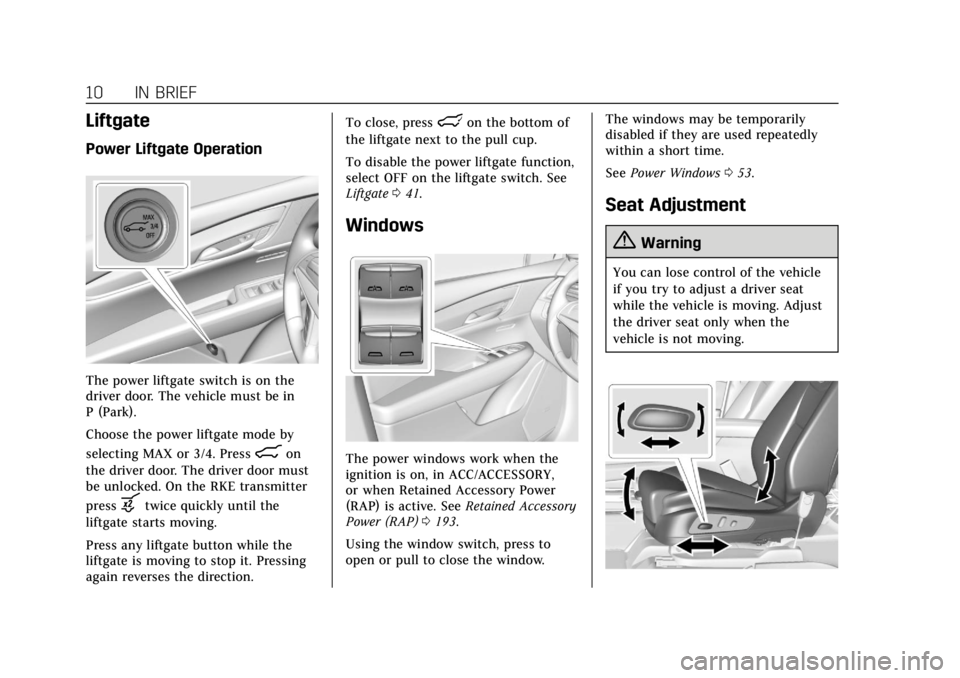
The power liftgate switch is on the
driver door. The vehicle must be in
P (Park).
Choose the power liftgate mode by
selecting MAX or 3/4. Press
8on
the driver door. The driver door must
be unlocked. On the RKE transmitter
press
btwice quickly until the
liftgate starts moving.
Press any liftgate button while the
liftgate is moving to stop it. Pressing
again reverses the direction. To close, press
lon the bottom of
the liftgate next to the pull cup.
To disable the power liftgate function,
select OFF on the liftgate switch. See
Liftgate 041.
Windows
The power windows work when the
ignition is on, in ACC/ACCESSORY,
or when Retained Accessory Power
(RAP) is active. See Retained Accessory
Power (RAP) 0193.
Using the window switch, press to
open or pull to close the window. The windows may be temporarily
disabled if they are used repeatedly
within a short time.
See
Power Windows 053.
Seat Adjustment
{Warning
You can lose control of the vehicle
if you try to adjust a driver seat
while the vehicle is moving. Adjust
the driver seat only when the
vehicle is not moving.
Page 19 of 380
Cadillac XT5 Owner Manual (GMNA-Localizing-U.S./Canada/Mexico-
11349110) - 2018 - CRC - 9/28/17
18 IN BRIEF
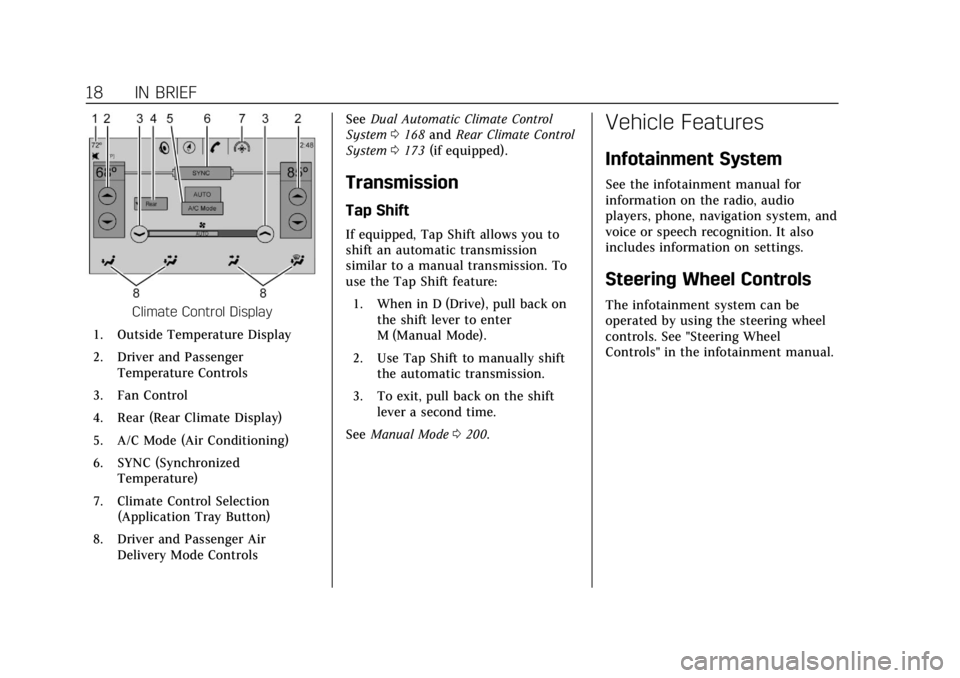
Climate Control Display
1. Outside Temperature Display
2. Driver and Passenger Temperature Controls
3. Fan Control
4. Rear (Rear Climate Display)
5. A/C Mode (Air Conditioning)
6. SYNC (Synchronized Temperature)
7. Climate Control Selection (Application Tray Button)
8. Driver and Passenger Air Delivery Mode Controls See
Dual Automatic Climate Control
System 0168 and Rear Climate Control
System 0173 (if equipped).
Transmission
Tap Shift
If equipped, Tap Shift allows you to
shift an automatic transmission
similar to a manual transmission. To
use the Tap Shift feature:
1. When in D (Drive), pull back on the shift lever to enter
M (Manual Mode).
2. Use Tap Shift to manually shift the automatic transmission.
3. To exit, pull back on the shift lever a second time.
See Manual Mode 0200.
Vehicle Features
Infotainment System
See the infotainment manual for
information on the radio, audio
players, phone, navigation system, and
voice or speech recognition. It also
includes information on settings.
Steering Wheel Controls
The infotainment system can be
operated by using the steering wheel
controls. See "Steering Wheel
Controls" in the infotainment manual.
Page 24 of 380
Cadillac XT5 Owner Manual (GMNA-Localizing-U.S./Canada/Mexico-
11349110) - 2018 - CRC - 9/28/17
IN BRIEF 23
Sunroof
If equipped, the ignition must be on
or in ACC/ACCESSORY, or Retained
Accessory Power (RAP), must be
active to operate the sunroof.
SeeIgnition Positions 0188 and
Retained Accessory Power (RAP) 0193.
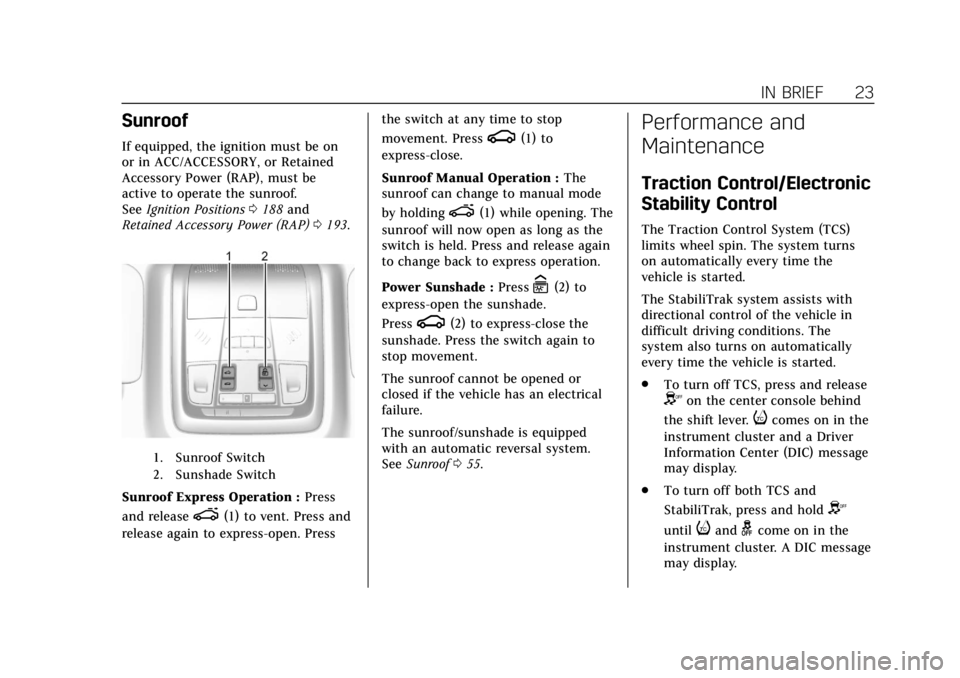
1. Sunroof Switch
2. Sunshade Switch
Sunroof Express Operation : Press
and release
e(1) to vent. Press and
release again to express-open. Press the switch at any time to stop
movement. Press
g(1) to
express-close.
Sunroof Manual Operation : The
sunroof can change to manual mode
by holding
e(1) while opening. The
sunroof will now open as long as the
switch is held. Press and release again
to change back to express operation.
Power Sunshade : Press
C(2) to
express-open the sunshade.
Press
g(2) to express-close the
sunshade. Press the switch again to
stop movement.
The sunroof cannot be opened or
closed if the vehicle has an electrical
failure.
The sunroof/sunshade is equipped
with an automatic reversal system.
See Sunroof 055.
Performance and
Maintenance
Traction Control/Electronic
Stability Control
The Traction Control System (TCS)
limits wheel spin. The system turns
on automatically every time the
vehicle is started.
The StabiliTrak system assists with
directional control of the vehicle in
difficult driving conditions. The
system also turns on automatically
every time the vehicle is started.
.
To turn off TCS, press and release
Yon the center console behind
the shift lever.
icomes on in the
instrument cluster and a Driver
Information Center (DIC) message
may display.
. To turn off both TCS and
StabiliTrak, press and hold
Y
untiliandgcome on in the
instrument cluster. A DIC message
may display.
Page 26 of 380
Cadillac XT5 Owner Manual (GMNA-Localizing-U.S./Canada/Mexico-
11349110) - 2018 - CRC - 9/28/17
IN BRIEF 25
E85 or FlexFuel
No E85 or FlexFuel
Gasoline-ethanol fuel blends greater
than E15 (15% ethanol by volume),
such as E85, cannot be used in this
vehicle.
Engine Oil Life System
The engine oil life system calculates
engine oil life based on vehicle use
and displays the CHANGE ENGINE
OIL SOON message when it is time to
change the engine oil and filter. The
oil life system should be reset to 100%
only following an oil change.Resetting the Oil Life System
1. Using the DIC controls on the right side of the steering wheel,
display REMAINING OIL LIFE on
the DIC. See Driver Information
Center (DIC) 0141. When
remaining oil life is low, the
CHANGE ENGINE OIL SOON
message will appear on the
display.
2. Press and hold SEL to clear the CHANGE ENGINE OIL SOON
message and reset the oil life
at 100%.
Be careful not to reset the oil life
display accidentally at any time
other than after the oil is
changed. It cannot be reset
accurately until the next oil
change.
The oil life system can also be reset as
follows: 1. Display REMAINING OIL LIFE on the DIC. See Driver Information
Center (DIC) 0141. 2. Fully press and release the
accelerator pedal three times
within five seconds.
If the CHANGE ENGINE OIL
SOON message is not on, the
system is reset.
See Engine Oil Life System 0256.
Driving for Better Fuel
Economy
Driving habits can affect fuel mileage.
Here are some driving tips to get the
best fuel economy possible.
.
On AWD vehicles, use Tour Mode
when conditions permit.
. Avoid fast starts and accelerate
smoothly.
. Brake gradually and avoid abrupt
stops.
. Avoid idling the engine for long
periods of time.
. When road and weather
conditions are appropriate, use
cruise control.
Page 75 of 380
Cadillac XT5 Owner Manual (GMNA-Localizing-U.S./Canada/Mexico-
11349110) - 2018 - CRC - 10/2/17
74 SEATS AND RESTRAINTS
Automatic Seat Belt Tightening
System
The vehicle may have the Automatic
Seat Belt Tightening System.
Each time the vehicle is started with
the front seat belts buckled, the
system activates once to tighten the
seat belts when the forward vehicle
speed exceeds the threshold for
activation.
The system also activates during
emergency braking and/or sudden
driving maneuvers and releases when
driving conditions return to normal.
The system will not activate if the
Traction Control/Electronic Stability
Control system is not functioning
properly. SeeTraction Control/
Electronic Stability Control 0205.
If there is a problem with the
Automatic Seat Belt Tightening
System, a message displays on the
Driver Information Center (DIC). If a
system unavailable message displays
repeatedly or a service message
displays, see your dealer. Other seat belt functions are not affected by the
Automatic Seat Belt Tightening
System.
Seat Belt Pretensioners
This vehicle has seat belt
pretensioners for front outboard
occupants. Although the seat belt
pretensioners cannot be seen, they are
part of the seat belt assembly. They
can help tighten the seat belts during
the early stages of a moderate to
severe frontal, near frontal, or rear
crash if the threshold conditions for
pretensioner activation are met. Seat
belt pretensioners can also help
tighten the seat belts in a side crash
or a rollover event.
Pretensioners work only once. If the
pretensioners activate in a crash, the
pretensioners and probably other
parts of the vehicle’s seat belt system
will need to be replaced. See
Replacing
Seat Belt System Parts after a Crash
0 77. Do not sit on the outboard seat belt
while entering or exiting the vehicle or
at any time while sitting in the seat.
Sitting on the seat belt can damage
the webbing and hardware.Rear Seat Belt Comfort Guides
{Warning
A seat belt that is not properly
worn may not provide the
protection needed in a crash. The
person wearing the belt could be
seriously injured. The shoulder belt
should go over the shoulder and
across the chest. These parts of the
body are best able to take belt
restraining forces.
Rear seat belt comfort guides may
provide added seat belt comfort for
older children who have outgrown
booster seats and for some adults.
When installed on a shoulder belt, the
comfort guide positions the shoulder
belt away from the neck and head.
Page 127 of 380
Cadillac XT5 Owner Manual (GMNA-Localizing-U.S./Canada/Mexico-
11349110) - 2018 - CRC - 9/28/17
126 INSTRUMENTS AND CONTROLS
Cluster Menu
There is an interactive display area in
the center of the instrument cluster.
Use the right steering wheel control to
open and scroll through the different
items and displays.
Press
Sto access the cluster
applications. Use
yorzto scroll
through the list of available
applications. Not all applications will
be available on all vehicles.
Info App
This is where the selected Driver
Information Center (DIC) displays can
be viewed. See Driver Information
Center (DIC) 0141.
Audio
Press SEL to select the Audio app,
then press
Tto enter the Audio
menu. In the Audio menu browse for
music, select from the favorites,
or change the audio source. Use
yor
zto change the station or go to the
next or previous track. Phone
Press SEL to select the Phone app,
then press
Tto enter the Phone
menu. In the Phone menu, if there is
no active phone call, view recent calls,
or scroll through contacts. If there is
an active call, mute the phone or
switch to handset operation.
Navigation
Press SEL to select the Navigation
app, then press
Tto enter the
Navigation menu. If there is no active
route, you can resume the last route
and turn the voice prompts on/off.
If there is an active route, press SEL
to cancel or resume route guidance or
turn the voice prompts on or off.
Options
Press SEL to select the Options app,
then press
Tto enter the Options
menu. Use
yorzto scroll through
items in the Options menu.
Units : Press
Twhile Units is
displayed to enter the Units menu.
Choose US or Metric units by pressing SEL while the desired item is
highlighted. A checkmark will be
displayed next to the selected item.
Display Themes :
There are three
instrument cluster display
configurations to choose from:
Standard, Technology, and Media.
Head-up Display (HUD) Rotation :
This feature allows for adjusting the
angle of the HUD image. Press SEL on
the steering wheel controls while
Head-up Display Rotation is
highlighted to enter Adjust Mode.
Press
yorzto adjust the angle of
the HUD display. Press
SorTto
highlight OK, then press SEL to save
the setting. Cancel can also be
selected to cancel the setting. The
vehicle must be in P (Park).
Info Pages : Press
Twhile Info Pages
is displayed to enter the Info Pages
menu and select the items to be
displayed in the Info app. See Driver
Information Center (DIC) 0141.
Page 128 of 380
Cadillac XT5 Owner Manual (GMNA-Localizing-U.S./Canada/Mexico-
11349110) - 2018 - CRC - 9/28/17
INSTRUMENTS AND CONTROLS 127
Open Source Software :Press SEL
while Open Source Software is
highlighted to display open source
software information.
Speedometer
The speedometer shows the vehicle's
speed in either kilometers per hour
(km/h) or miles per hour (mph).
Odometer
The odometer shows how far the
vehicle has been driven, in either
kilometers or miles.
Trip Odometer
The trip odometer shows how far the
vehicle has been driven since the trip
odometer was last reset.
The trip odometer is accessed and
reset through the Driver Information
Center (DIC). See Driver Information
Center (DIC) 0141.
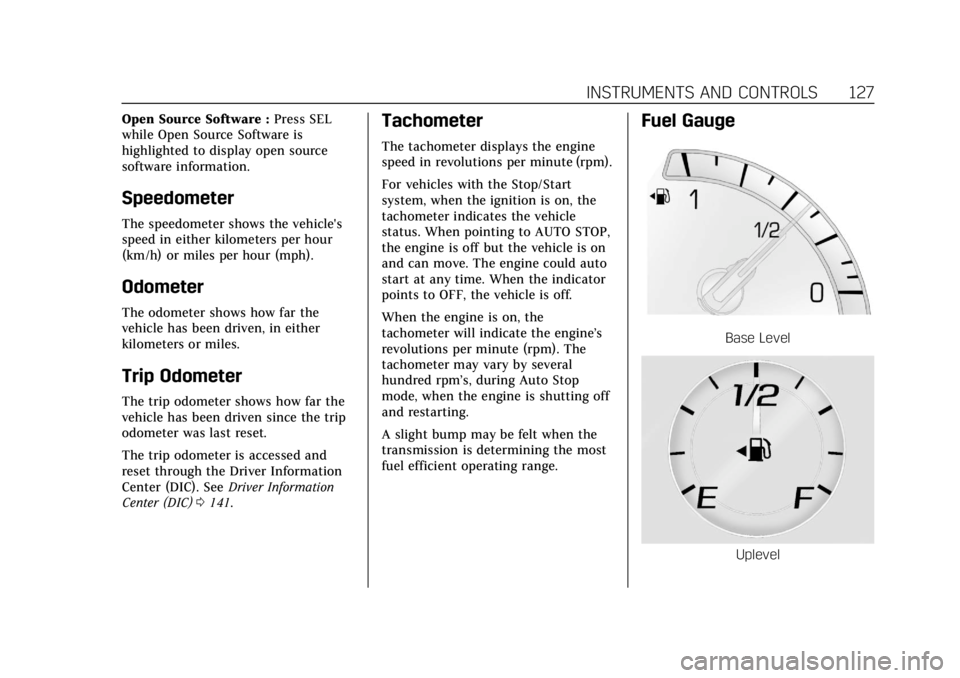
Tachometer
The tachometer displays the engine
speed in revolutions per minute (rpm).
For vehicles with the Stop/Start
system, when the ignition is on, the
tachometer indicates the vehicle
status. When pointing to AUTO STOP,
the engine is off but the vehicle is on
and can move. The engine could auto
start at any time. When the indicator
points to OFF, the vehicle is off.
When the engine is on, the
tachometer will indicate the engine’s
revolutions per minute (rpm). The
tachometer may vary by several
hundred rpm’s, during Auto Stop
mode, when the engine is shutting off
and restarting.
A slight bump may be felt when the
transmission is determining the most
fuel efficient operating range.
Fuel Gauge
Base Level
Uplevel
Page 134 of 380
Cadillac XT5 Owner Manual (GMNA-Localizing-U.S./Canada/Mexico-
11349110) - 2018 - CRC - 9/28/17
INSTRUMENTS AND CONTROLS 133
Warning (Continued)
Airbag Readiness Light0131 for
more information, including
important safety information.
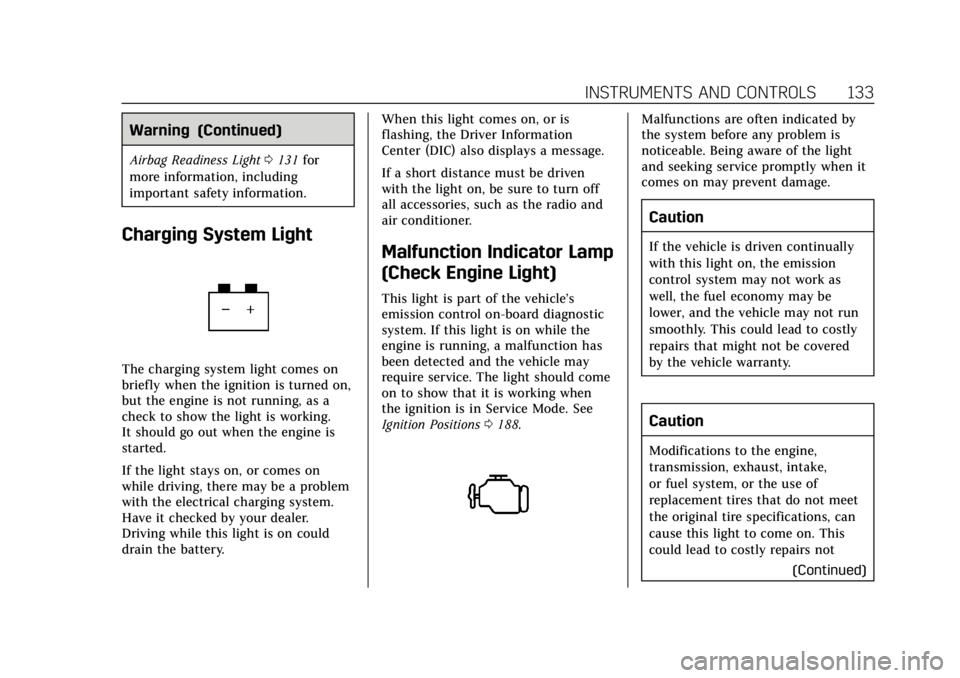
Charging System Light
The charging system light comes on
briefly when the ignition is turned on,
but the engine is not running, as a
check to show the light is working.
It should go out when the engine is
started.
If the light stays on, or comes on
while driving, there may be a problem
with the electrical charging system.
Have it checked by your dealer.
Driving while this light is on could
drain the battery. When this light comes on, or is
flashing, the Driver Information
Center (DIC) also displays a message.
If a short distance must be driven
with the light on, be sure to turn off
all accessories, such as the radio and
air conditioner.
Malfunction Indicator Lamp
(Check Engine Light)
This light is part of the vehicle’s
emission control on-board diagnostic
system. If this light is on while the
engine is running, a malfunction has
been detected and the vehicle may
require service. The light should come
on to show that it is working when
the ignition is in Service Mode. See
Ignition Positions
0188.
Malfunctions are often indicated by
the system before any problem is
noticeable. Being aware of the light
and seeking service promptly when it
comes on may prevent damage.
Caution
If the vehicle is driven continually
with this light on, the emission
control system may not work as
well, the fuel economy may be
lower, and the vehicle may not run
smoothly. This could lead to costly
repairs that might not be covered
by the vehicle warranty.
Caution
Modifications to the engine,
transmission, exhaust, intake,
or fuel system, or the use of
replacement tires that do not meet
the original tire specifications, can
cause this light to come on. This
could lead to costly repairs not
(Continued)
Page 149 of 380
Cadillac XT5 Owner Manual (GMNA-Localizing-U.S./Canada/Mexico-
11349110) - 2018 - CRC - 9/28/17
148 INSTRUMENTS AND CONTROLS
on, but maximum acceleration and
speed may be reduced. Anytime this
message stays on, or displays
repeatedly, the vehicle should be
taken to your dealer for service as
soon as possible.
Vehicle Speed Messages
SPEED LIMITED TO
XXX KM/H (MPH)
This message shows that the vehicle
speed has been limited to the speed
displayed. The limited speed is a
protection for various propulsion and
vehicle systems, such as lubrication,
thermal, suspension, Teen Driver if
equipped, or tires.
Vehicle Personalization
Use the audio system controls to
access the personalization menus for
customizing vehicle features.
The following are all possible
personalization features. Depending
on the vehicle, some may not be
available.
Infotainment System Audio System
Controls
To access the personalization menu:1. Touch SETTINGS on the Home Page on the infotainment display.
2. Touch the desired feature to display a list of available options.
3. Touch to select the desired feature setting.
4. Touch
SBack to exit or move
backward in a menu.
Personalization Menus
The following list of menu items may
be available:
. Time and Date
. Rear Seat Reminder .
Language
. Teen Driver
. Valet Mode
. Radio
. Vehicle
. Bluetooth
. Apple CarPlay
. Android Auto
. Voice
. Display
. Rear Camera
. Return to Factory Settings
. Software Information
. Wi-Fi
Each menu is detailed in the following
information.
Time and Date
Manually set the time and date. See
Clock 0118.