Manual start CADILLAC XT5 2019 User Guide
[x] Cancel search | Manufacturer: CADILLAC, Model Year: 2019, Model line: XT5, Model: CADILLAC XT5 2019Pages: 388, PDF Size: 6.29 MB
Page 27 of 388
Cadillac XT5 Owner Manual (GMNA-Localizing-U.S./Canada/Mexico-
12146119) - 2019 - crc - 7/27/18
26 KEYS, DOORS, AND WINDOWS
Keys, Doors, and
Windows
Keys and Locks
Keys . . . . . . . . . . . . . . . . . . . . . . . . . . . . . . . . 26
Remote Keyless Entry (RKE)System . . . . . . . . . . . . . . . . . . . . . . . . . . . . 27
Remote Keyless Entry (RKE) System Operation . . . . . . . . . . . . . . . . 27
Remote Vehicle Start . . . . . . . . . . . . . . 33
Door Locks . . . . . . . . . . . . . . . . . . . . . . . . . 35
Power Door Locks . . . . . . . . . . . . . . . . . 38
Delayed Locking . . . . . . . . . . . . . . . . . . . 38
Automatic Door Locks . . . . . . . . . . . . 38
Lockout Protection . . . . . . . . . . . . . . . . 38
Safety Locks . . . . . . . . . . . . . . . . . . . . . . . . 39
Doors
Liftgate . . . . . . . . . . . . . . . . . . . . . . . . . . . . . 40
Vehicle Security
Vehicle Security . . . . . . . . . . . . . . . . . . . . 45
Vehicle Alarm System . . . . . . . . . . . . . 45
Immobilizer . . . . . . . . . . . . . . . . . . . . . . . . 46
Immobilizer Operation . . . . . . . . . . . . 47
Exterior Mirrors
Convex Mirrors . . . . . . . . . . . . . . . . . . . . 48
Power Mirrors . . . . . . . . . . . . . . . . . . . . . . 48 Folding Mirrors . . . . . . . . . . . . . . . . . . . . 48
Heated Mirrors . . . . . . . . . . . . . . . . . . . . . 49
Automatic Dimming Mirror . . . . . . . 49
Reverse Tilt Mirrors . . . . . . . . . . . . . . . 49
Interior Mirrors
Interior Rearview Mirrors . . . . . . . . . 50
Manual Rearview Mirror . . . . . . . . . . 50
Automatic Dimming Rearview
Mirror . . . . . . . . . . . . . . . . . . . . . . . . . . . . . 50
Rear Camera Mirror . . . . . . . . . . . . . . . 50
Windows
Windows . . . . . . . . . . . . . . . . . . . . . . . . . . . 52
Power Windows . . . . . . . . . . . . . . . . . . . . 52
Sun Visors . . . . . . . . . . . . . . . . . . . . . . . . . . 54
Roof
Sunroof . . . . . . . . . . . . . . . . . . . . . . . . . . . . . 54
Keys and Locks
Keys
{Warning
Leaving children in a vehicle with a
Remote Keyless Entry (RKE)
transmitter is dangerous and
children or others could be
seriously injured or killed. They
could operate the power windows
or other controls or make the
vehicle move. The windows will
function with the RKE transmitter
in the vehicle, and children or
others could be caught in the path
of a closing window. Do not leave
children in a vehicle with an RKE
transmitter.
Page 29 of 388
Cadillac XT5 Owner Manual (GMNA-Localizing-U.S./Canada/Mexico-
12146119) - 2019 - crc - 7/27/18
28 KEYS, DOORS, AND WINDOWS
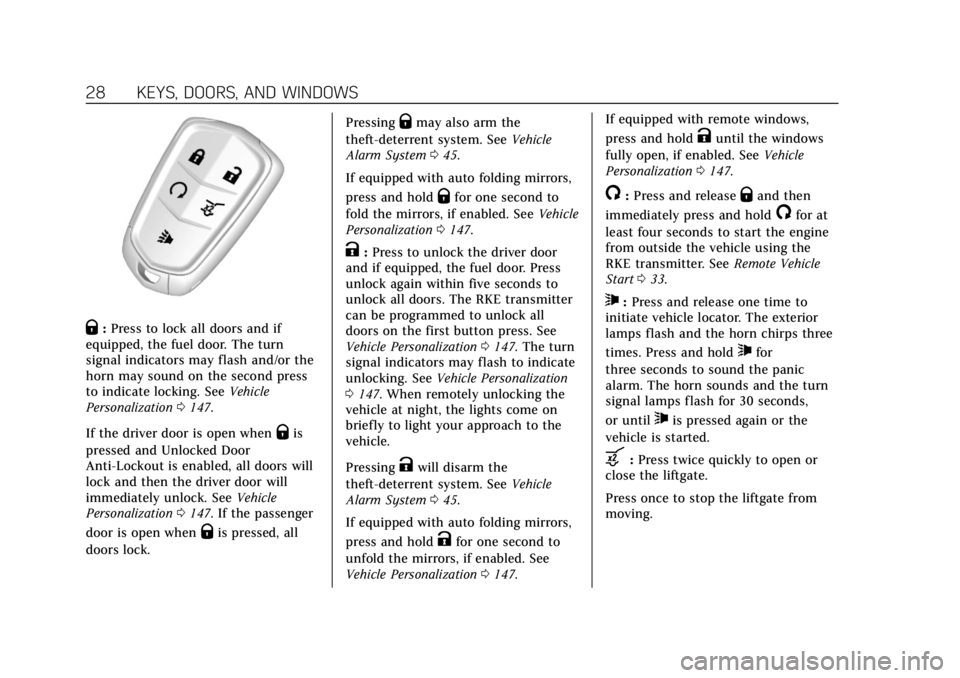
Q:Press to lock all doors and if
equipped, the fuel door. The turn
signal indicators may flash and/or the
horn may sound on the second press
to indicate locking. See Vehicle
Personalization 0147.
If the driver door is open when
Qis
pressed and Unlocked Door
Anti-Lockout is enabled, all doors will
lock and then the driver door will
immediately unlock. See Vehicle
Personalization 0147. If the passenger
door is open when
Qis pressed, all
doors lock. Pressing
Qmay also arm the
theft-deterrent system. See Vehicle
Alarm System 045.
If equipped with auto folding mirrors,
press and hold
Qfor one second to
fold the mirrors, if enabled. See Vehicle
Personalization 0147.
K:Press to unlock the driver door
and if equipped, the fuel door. Press
unlock again within five seconds to
unlock all doors. The RKE transmitter
can be programmed to unlock all
doors on the first button press. See
Vehicle Personalization 0147. The turn
signal indicators may flash to indicate
unlocking. See Vehicle Personalization
0 147. When remotely unlocking the
vehicle at night, the lights come on
briefly to light your approach to the
vehicle.
Pressing
Kwill disarm the
theft-deterrent system. See Vehicle
Alarm System 045.
If equipped with auto folding mirrors,
press and hold
Kfor one second to
unfold the mirrors, if enabled. See
Vehicle Personalization 0147. If equipped with remote windows,
press and hold
Kuntil the windows
fully open, if enabled. See Vehicle
Personalization 0147.
/:Press and releaseQand then
immediately press and hold
/for at
least four seconds to start the engine
from outside the vehicle using the
RKE transmitter. See Remote Vehicle
Start 033.
7:Press and release one time to
initiate vehicle locator. The exterior
lamps flash and the horn chirps three
times. Press and hold
7for
three seconds to sound the panic
alarm. The horn sounds and the turn
signal lamps flash for 30 seconds,
or until
7is pressed again or the
vehicle is started.
b: Press twice quickly to open or
close the liftgate.
Press once to stop the liftgate from
moving.
Page 32 of 388
Cadillac XT5 Owner Manual (GMNA-Localizing-U.S./Canada/Mexico-
12146119) - 2019 - crc - 7/27/18
KEYS, DOORS, AND WINDOWS 31
driver door and turn the key
counterclockwise, to the unlock
position, five times within
10 seconds.
The DIC displays READY FOR
REMOTE #2, 3, 4, ETC.
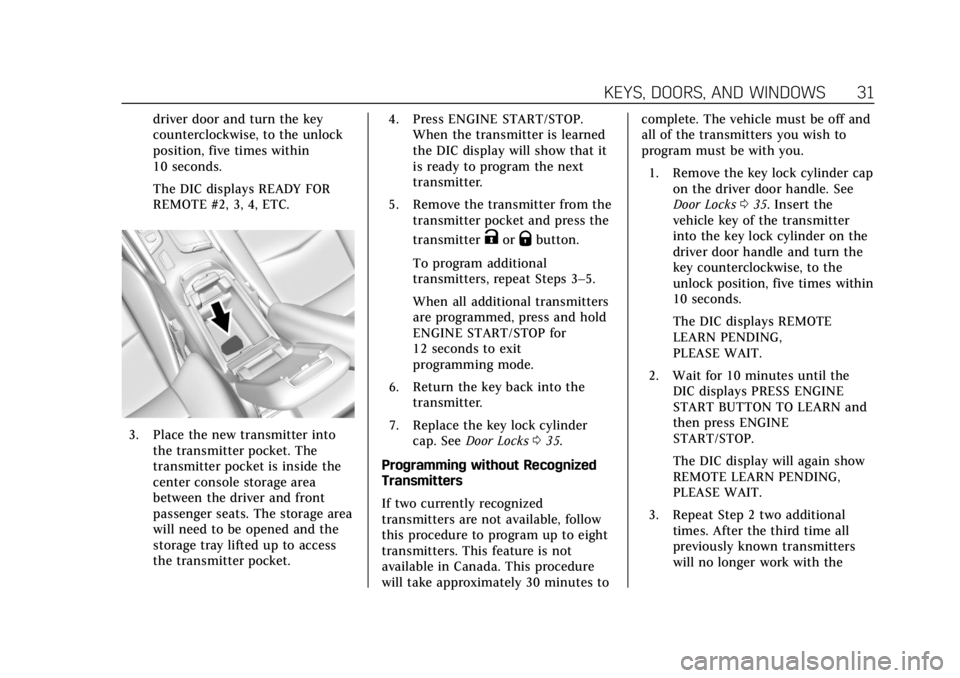
3. Place the new transmitter intothe transmitter pocket. The
transmitter pocket is inside the
center console storage area
between the driver and front
passenger seats. The storage area
will need to be opened and the
storage tray lifted up to access
the transmitter pocket. 4. Press ENGINE START/STOP.
When the transmitter is learned
the DIC display will show that it
is ready to program the next
transmitter.
5. Remove the transmitter from the transmitter pocket and press the
transmitter
KorQbutton.
To program additional
transmitters, repeat Steps 3–5.
When all additional transmitters
are programmed, press and hold
ENGINE START/STOP for
12 seconds to exit
programming mode.
6. Return the key back into the transmitter.
7. Replace the key lock cylinder cap. See Door Locks 035.
Programming without Recognized
Transmitters
If two currently recognized
transmitters are not available, follow
this procedure to program up to eight
transmitters. This feature is not
available in Canada. This procedure
will take approximately 30 minutes to complete. The vehicle must be off and
all of the transmitters you wish to
program must be with you.
1. Remove the key lock cylinder cap on the driver door handle. See
Door Locks 035. Insert the
vehicle key of the transmitter
into the key lock cylinder on the
driver door handle and turn the
key counterclockwise, to the
unlock position, five times within
10 seconds.
The DIC displays REMOTE
LEARN PENDING,
PLEASE WAIT.
2. Wait for 10 minutes until the DIC displays PRESS ENGINE
START BUTTON TO LEARN and
then press ENGINE
START/STOP.
The DIC display will again show
REMOTE LEARN PENDING,
PLEASE WAIT.
3. Repeat Step 2 two additional times. After the third time all
previously known transmitters
will no longer work with the
Page 33 of 388
Cadillac XT5 Owner Manual (GMNA-Localizing-U.S./Canada/Mexico-
12146119) - 2019 - crc - 7/27/18
32 KEYS, DOORS, AND WINDOWS
vehicle. Remaining transmitters
can be relearned during the next
steps.
The DIC display should now
show READY FOR REMOTE # 1.
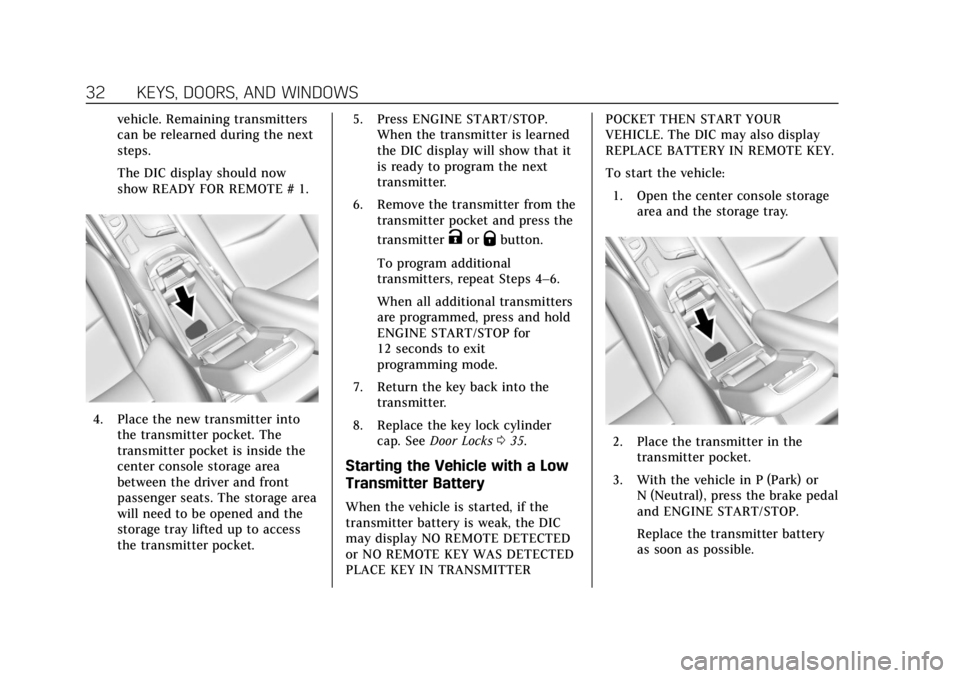
4. Place the new transmitter intothe transmitter pocket. The
transmitter pocket is inside the
center console storage area
between the driver and front
passenger seats. The storage area
will need to be opened and the
storage tray lifted up to access
the transmitter pocket. 5. Press ENGINE START/STOP.
When the transmitter is learned
the DIC display will show that it
is ready to program the next
transmitter.
6. Remove the transmitter from the transmitter pocket and press the
transmitter
KorQbutton.
To program additional
transmitters, repeat Steps 4–6.
When all additional transmitters
are programmed, press and hold
ENGINE START/STOP for
12 seconds to exit
programming mode.
7. Return the key back into the transmitter.
8. Replace the key lock cylinder cap. See Door Locks 035.
Starting the Vehicle with a Low
Transmitter Battery
When the vehicle is started, if the
transmitter battery is weak, the DIC
may display NO REMOTE DETECTED
or NO REMOTE KEY WAS DETECTED
PLACE KEY IN TRANSMITTER POCKET THEN START YOUR
VEHICLE. The DIC may also display
REPLACE BATTERY IN REMOTE KEY.
To start the vehicle:
1. Open the center console storage area and the storage tray.
2. Place the transmitter in thetransmitter pocket.
3. With the vehicle in P (Park) or N (Neutral), press the brake pedal
and ENGINE START/STOP.
Replace the transmitter battery
as soon as possible.
Page 34 of 388
Cadillac XT5 Owner Manual (GMNA-Localizing-U.S./Canada/Mexico-
12146119) - 2019 - crc - 7/27/18
KEYS, DOORS, AND WINDOWS 33
Battery ReplacementCaution
When replacing the battery, do not
touch any of the circuitry on the
transmitter. Static from your body
could damage the transmitter.
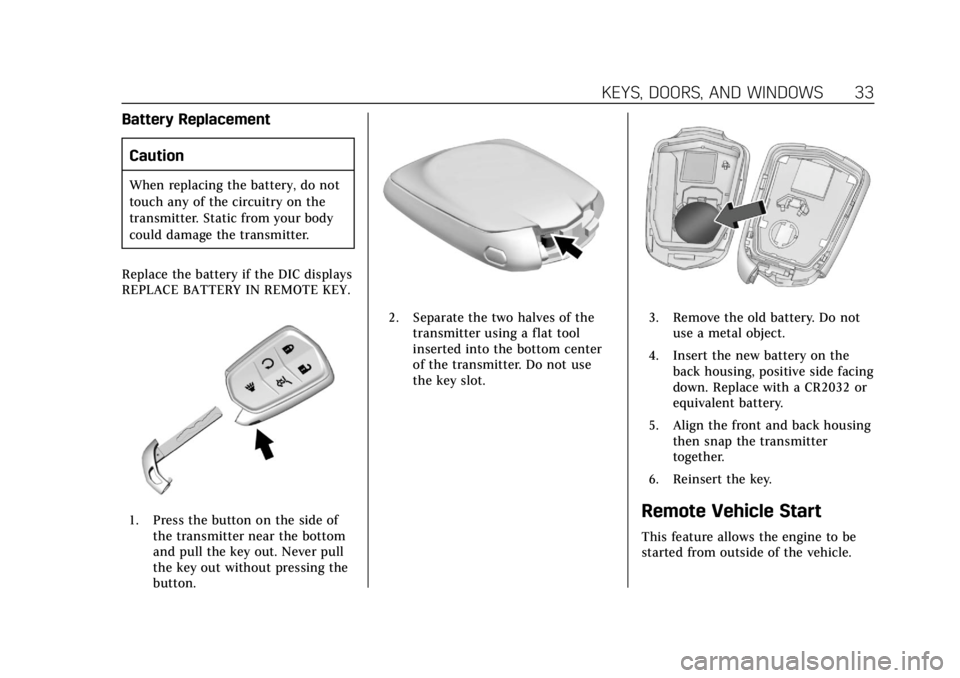
Replace the battery if the DIC displays
REPLACE BATTERY IN REMOTE KEY.
1. Press the button on the side of the transmitter near the bottom
and pull the key out. Never pull
the key out without pressing the
button.
2. Separate the two halves of thetransmitter using a flat tool
inserted into the bottom center
of the transmitter. Do not use
the key slot.3. Remove the old battery. Do notuse a metal object.
4. Insert the new battery on the back housing, positive side facing
down. Replace with a CR2032 or
equivalent battery.
5. Align the front and back housing then snap the transmitter
together.
6. Reinsert the key.
Remote Vehicle Start
This feature allows the engine to be
started from outside of the vehicle.
Page 35 of 388
Cadillac XT5 Owner Manual (GMNA-Localizing-U.S./Canada/Mexico-
12146119) - 2019 - crc - 7/27/18
34 KEYS, DOORS, AND WINDOWS
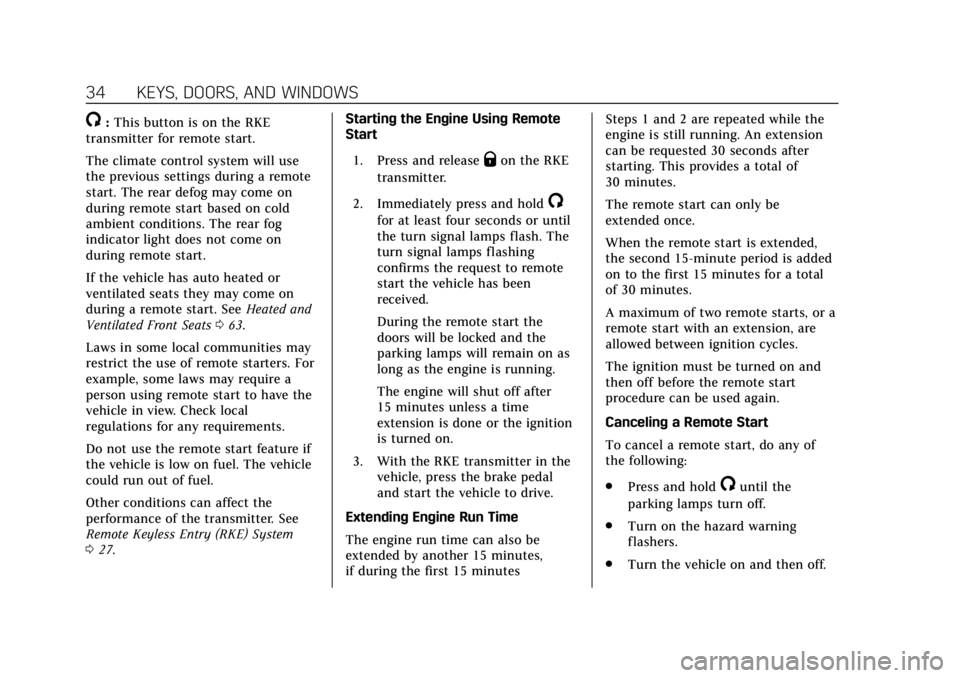
/:This button is on the RKE
transmitter for remote start.
The climate control system will use
the previous settings during a remote
start. The rear defog may come on
during remote start based on cold
ambient conditions. The rear fog
indicator light does not come on
during remote start.
If the vehicle has auto heated or
ventilated seats they may come on
during a remote start. See Heated and
Ventilated Front Seats 063.
Laws in some local communities may
restrict the use of remote starters. For
example, some laws may require a
person using remote start to have the
vehicle in view. Check local
regulations for any requirements.
Do not use the remote start feature if
the vehicle is low on fuel. The vehicle
could run out of fuel.
Other conditions can affect the
performance of the transmitter. See
Remote Keyless Entry (RKE) System
0 27. Starting the Engine Using Remote
Start
1. Press and release
Qon the RKE
transmitter.
2. Immediately press and hold
/
for at least four seconds or until
the turn signal lamps flash. The
turn signal lamps flashing
confirms the request to remote
start the vehicle has been
received.
During the remote start the
doors will be locked and the
parking lamps will remain on as
long as the engine is running.
The engine will shut off after
15 minutes unless a time
extension is done or the ignition
is turned on.
3. With the RKE transmitter in the vehicle, press the brake pedal
and start the vehicle to drive.
Extending Engine Run Time
The engine run time can also be
extended by another 15 minutes,
if during the first 15 minutes Steps 1 and 2 are repeated while the
engine is still running. An extension
can be requested 30 seconds after
starting. This provides a total of
30 minutes.
The remote start can only be
extended once.
When the remote start is extended,
the second 15-minute period is added
on to the first 15 minutes for a total
of 30 minutes.
A maximum of two remote starts, or a
remote start with an extension, are
allowed between ignition cycles.
The ignition must be turned on and
then off before the remote start
procedure can be used again.
Canceling a Remote Start
To cancel a remote start, do any of
the following:
.
Press and hold
/until the
parking lamps turn off.
. Turn on the hazard warning
flashers.
. Turn the vehicle on and then off.
Page 36 of 388
Cadillac XT5 Owner Manual (GMNA-Localizing-U.S./Canada/Mexico-
12146119) - 2019 - crc - 7/27/18
KEYS, DOORS, AND WINDOWS 35
Conditions in Which Remote Start
Will Not Work
The remote start will not operate if
any of the following occur:
.The RKE transmitter is in the
vehicle.
. The hood is not closed.
. The hazard warning flashers
are on.
. There is an emission control
system malfunction.
. The engine coolant temperature is
too high.
. The oil pressure is low.
. Two remote vehicle starts or a
start with an extension have
already been used.
. The vehicle is not in P (Park).Door Locks
{Warning
Unlocked doors can be dangerous.
. Passengers, especially
children, can easily open the
doors and fall out of a moving
vehicle. The doors can be
unlocked and opened while
the vehicle is moving. The
chance of being thrown out of
the vehicle in a crash is
increased if the doors are not
locked. So, all passengers
should wear seat belts
properly and the doors should
be locked whenever the
vehicle is driven.
. Young children who get into
unlocked vehicles may be
unable to get out. A child can
be overcome by extreme heat
and can suffer permanent
injuries or even death from
heat stroke. Always lock the
vehicle whenever leaving it.
(Continued)
Warning (Continued)
.Outsiders can easily enter
through an unlocked door
when you slow down or stop
the vehicle. Locking the doors
can help prevent this from
happening.
To lock/unlock the doors from outside
the vehicle:
. Press
QorKon the Remote
Keyless Entry (RKE) transmitter.
See Remote Keyless Entry (RKE)
System Operation 027.
. Use the key in the key lock
cylinder in the driver door. The
key lock cylinder is covered with
a cap.
To lock/unlock the doors from inside
the vehicle:
. Press
QorKon the power door
lock switch. See Power Door Locks
0 38.
Page 42 of 388
Cadillac XT5 Owner Manual (GMNA-Localizing-U.S./Canada/Mexico-
12146119) - 2019 - crc - 7/27/18
KEYS, DOORS, AND WINDOWS 41
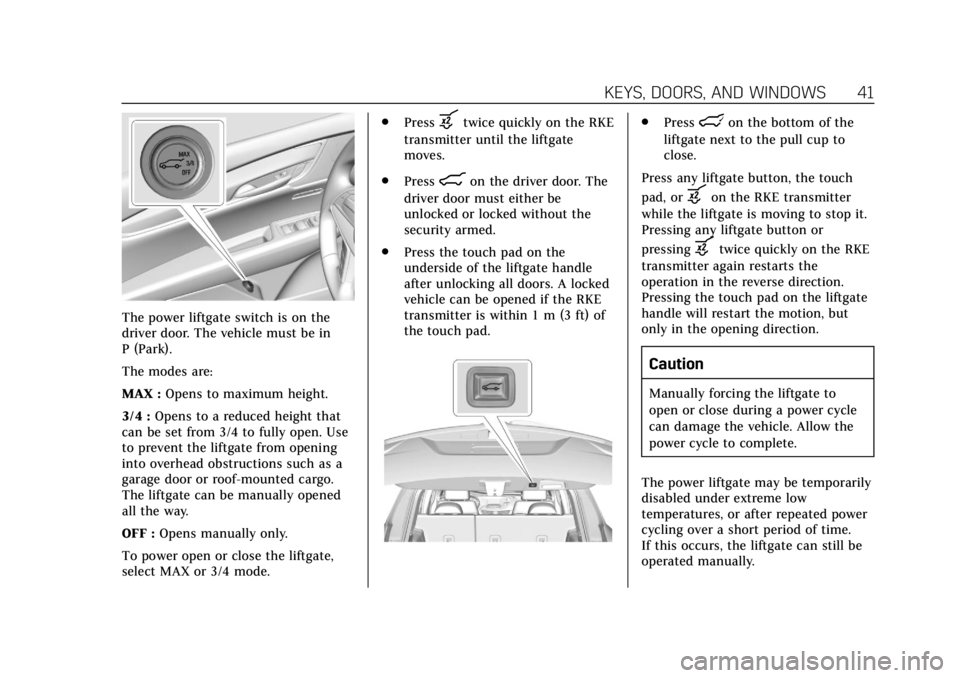
The power liftgate switch is on the
driver door. The vehicle must be in
P (Park).
The modes are:
MAX :Opens to maximum height.
3/4 : Opens to a reduced height that
can be set from 3/4 to fully open. Use
to prevent the liftgate from opening
into overhead obstructions such as a
garage door or roof-mounted cargo.
The liftgate can be manually opened
all the way.
OFF : Opens manually only.
To power open or close the liftgate,
select MAX or 3/4 mode. .
Press
btwice quickly on the RKE
transmitter until the liftgate
moves.
. Press
8on the driver door. The
driver door must either be
unlocked or locked without the
security armed.
. Press the touch pad on the
underside of the liftgate handle
after unlocking all doors. A locked
vehicle can be opened if the RKE
transmitter is within 1 m (3 ft) of
the touch pad.
.Presslon the bottom of the
liftgate next to the pull cup to
close.
Press any liftgate button, the touch
pad, or
bon the RKE transmitter
while the liftgate is moving to stop it.
Pressing any liftgate button or
pressing
btwice quickly on the RKE
transmitter again restarts the
operation in the reverse direction.
Pressing the touch pad on the liftgate
handle will restart the motion, but
only in the opening direction.
Caution
Manually forcing the liftgate to
open or close during a power cycle
can damage the vehicle. Allow the
power cycle to complete.
The power liftgate may be temporarily
disabled under extreme low
temperatures, or after repeated power
cycling over a short period of time.
If this occurs, the liftgate can still be
operated manually.
Page 45 of 388
Cadillac XT5 Owner Manual (GMNA-Localizing-U.S./Canada/Mexico-
12146119) - 2019 - crc - 7/27/18
44 KEYS, DOORS, AND WINDOWS
On-Open Only :The kicking motion is
activated to only open the liftgate.
Off : The feature is disabled.
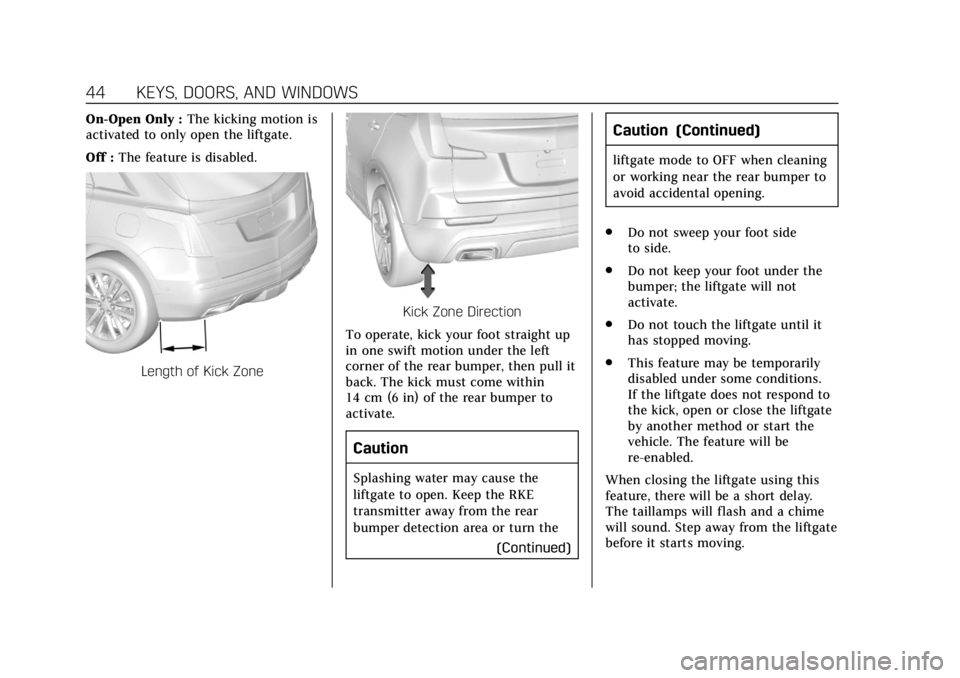
Length of Kick Zone
Kick Zone Direction
To operate, kick your foot straight up
in one swift motion under the left
corner of the rear bumper, then pull it
back. The kick must come within
14 cm (6 in) of the rear bumper to
activate.
Caution
Splashing water may cause the
liftgate to open. Keep the RKE
transmitter away from the rear
bumper detection area or turn the (Continued)
Caution (Continued)
liftgate mode to OFF when cleaning
or working near the rear bumper to
avoid accidental opening.
. Do not sweep your foot side
to side.
. Do not keep your foot under the
bumper; the liftgate will not
activate.
. Do not touch the liftgate until it
has stopped moving.
. This feature may be temporarily
disabled under some conditions.
If the liftgate does not respond to
the kick, open or close the liftgate
by another method or start the
vehicle. The feature will be
re-enabled.
When closing the liftgate using this
feature, there will be a short delay.
The taillamps will flash and a chime
will sound. Step away from the liftgate
before it starts moving.
Page 46 of 388
Cadillac XT5 Owner Manual (GMNA-Localizing-U.S./Canada/Mexico-
12146119) - 2019 - crc - 7/27/18
KEYS, DOORS, AND WINDOWS 45
Vehicle Security
This vehicle has theft-deterrent
features; however, they do not make
the vehicle impossible to steal.
Vehicle Alarm System
This vehicle has an anti-theft alarm
system.
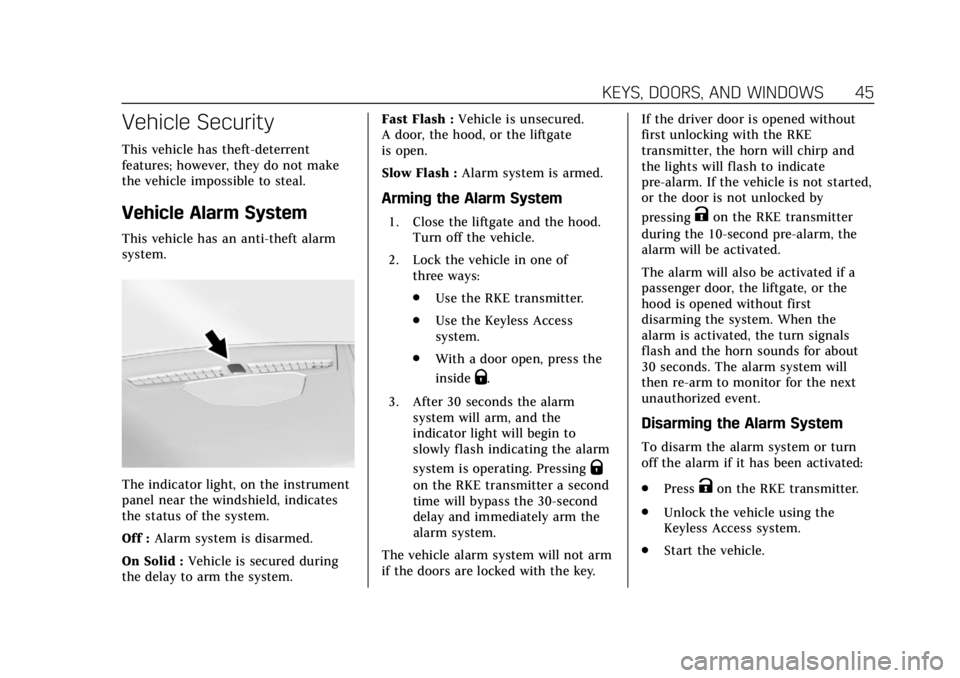
The indicator light, on the instrument
panel near the windshield, indicates
the status of the system.
Off :Alarm system is disarmed.
On Solid : Vehicle is secured during
the delay to arm the system. Fast Flash :
Vehicle is unsecured.
A door, the hood, or the liftgate
is open.
Slow Flash : Alarm system is armed.
Arming the Alarm System
1. Close the liftgate and the hood.
Turn off the vehicle.
2. Lock the vehicle in one of three ways:
.Use the RKE transmitter.
. Use the Keyless Access
system.
. With a door open, press the
inside
Q.
3. After 30 seconds the alarm system will arm, and the
indicator light will begin to
slowly flash indicating the alarm
system is operating. Pressing
Q
on the RKE transmitter a second
time will bypass the 30-second
delay and immediately arm the
alarm system.
The vehicle alarm system will not arm
if the doors are locked with the key. If the driver door is opened without
first unlocking with the RKE
transmitter, the horn will chirp and
the lights will flash to indicate
pre-alarm. If the vehicle is not started,
or the door is not unlocked by
pressing
Kon the RKE transmitter
during the 10-second pre-alarm, the
alarm will be activated.
The alarm will also be activated if a
passenger door, the liftgate, or the
hood is opened without first
disarming the system. When the
alarm is activated, the turn signals
flash and the horn sounds for about
30 seconds. The alarm system will
then re-arm to monitor for the next
unauthorized event.
Disarming the Alarm System
To disarm the alarm system or turn
off the alarm if it has been activated:
. Press
Kon the RKE transmitter.
. Unlock the vehicle using the
Keyless Access system.
. Start the vehicle.