ECU CADILLAC XT6 2022 Service Manual
[x] Cancel search | Manufacturer: CADILLAC, Model Year: 2022, Model line: XT6, Model: CADILLAC XT6 2022Pages: 447, PDF Size: 7.21 MB
Page 187 of 447
Cadillac XT6 Owner Manual (GMNA-Localizing-U.S./Canada-15218998) -
2022 - CRC - 10/22/21
186 INFOTAINMENT SYSTEM
Play, and other marks are trademarks
of Google Inc.; Apple CarPlay is a
trademark of Apple Inc.
Press
{on the center stack to exit
Android Auto or Apple CarPlay. To
enter back into Android Auto or Apple
CarPlay, press and hold
{on the
center stack.
Apple CarPlay and Android Auto can
be disabled from the infotainment
system. To do this, touch Home,
Settings, and then touch the Apps tab
along the top of the display. Use the
On/Off toggled to turn off Apple
CarPlay or Android Auto.
Settings
Certain settings can be managed in
the Owner Center sites when an
account is established, and may be
modified if other users have accessed
the vehicle or created accounts. This
may result in changes to the security
or functionality of the infotainment
system. Some settings may also be
transferred to a new vehicle, if equipped. For instructions, in the
U.S. see my.cadillac.com or in Canada
see mycadillac.ca or moncadillac.ca.
Refer to the User Terms and Privacy
Statement for important details. To
view, touch the Settings icon on the
Home Page of the infotainment
display.
The settings menu may be organized
into four categories. Select the desired
category by touching System, Apps,
Vehicle, or Personal.
To access the personalization menus:
1. Touch Settings on the Home Page on the infotainment display.
2. Touch the desired category to display a list of available options.
3. Touch to select the desired feature setting.
4. Touch the options on the infotainment display to disable or
enable a feature.
5. Touch
zto go to the top level of
the Settings menu.
System
The menu may contain the following:
Time / Date
Use the following features to set the
clock:
.Automatic Time and Date: Touch
Off or On to enable or disable
automatic update of the time and
date. When this feature is on, the
time and date cannot be
manually set.
.Set Time: Touch to manually set the
time using the controls on the
infotainment display.
.Set Date: Touch to manually set the
date using the controls on the
infotainment display.
.Automatic Time Zone: If equipped,
touch Off or On to disable or enable
automatic update of the time zone
based on vehicle location. When
this feature is on, the time zone
cannot be manually set.
.Select Time Zone: Touch to
manually set the time zone. Touch
a time zone from the list.
Page 190 of 447
Cadillac XT6 Owner Manual (GMNA-Localizing-U.S./Canada-15218998) -
2022 - CRC - 10/22/21
INFOTAINMENT SYSTEM 189
.Tutorial Mode: Touch Off or On to
provide tutorial feedback on the
display.
.Allow Prompt Interruptions: This
setting controls whether voice
commands can be spoken before
voice prompts finish. Turn this on
to speak commands without hearing
the full prompt. Speaking while the
prompt is still playing will
immediately stop playing the
current prompt and recognize your
command. Background noise may
cause accidental interruptions.
Touch Off or On.
Favorites
Touch and the following may display:
.Manage Favorites: Touch to display
a list of Audio, Phone, and
Navigation favorites.
Favorites can be moved, renamed,
or deleted.
To move, touch and hold the
favorite, and then drag up or down
to rearrange the position.
.Set Number of Audio Favorites:
Touch to select how many favorites
pages can be viewed from the audio application. The Auto setting will
automatically adjust this number
based on the number of favorites
you have saved. Touch Auto, 5, 10,
15, 20, 25, 30, 35, or 40.
Updates
If equipped, the vehicle can download
and install select software updates
over a wireless connection. The
system will prompt for certain
updates to be downloaded and
installed. There is also an option to
check for updates manually.
To manually check for updates, touch
Settings on the Home Page and select
the System tab. Go to the Vehicle
Software section and touch Updates.
Follow the on-screen prompts. The
steps to check for, download, and
install updates may vary by vehicle.
The vehicle can be used normally
during the software download. Once
the download is complete, there may
be a prompt to accept the installation
of the update upon the next ignition
cycle or the next time the vehicle is
shifted into P (Park). For most
updates, the vehicle will be disabled
and cannot be driven during the installation. The system will deliver
messages indicating success or error
during and after the download and
installation processes.
Downloading Over-the-Air vehicle
software updates requires Internet
connectivity, which can be accessed
through the vehicle’s built-in 4G LTE
connection, if equipped and active.
If required, data plans are provided by
a third party. Optionally, a secure
Wi-Fi hotspot such as a compatible
mobile device hotspot, home hotspot,
or public hotspot can be used.
Applicable data rates may apply.
To connect the infotainment system
to a secured mobile device hotspot,
home hotspot, or public hotspot,
touch Settings on the Home Page,
select the System tab, followed by
Wi-Fi Networks. Select the appropriate
Wi-Fi network, and follow the
on-screen prompts. Download speeds
may vary.
On most compatible mobile devices,
activation of the Wi-Fi hotspot is in
the Settings menu under Mobile
Network Sharing, Personal Hotspot,
Mobile Hotspot, or similar.
Page 194 of 447
Cadillac XT6 Owner Manual (GMNA-Localizing-U.S./Canada-15218998) -
2022 - CRC - 10/22/21
INFOTAINMENT SYSTEM 193
Vehicle
This menu allows adjustment of
different vehicle features. SeeVehicle
Personalization 0130.
Personal
If equipped, this menu allows
adjustment of different user profile
settings. See “Users”in Using the
System 0149 for information on
setting up user profiles.
The menu may contain the following:
Name
Touch to edit your user name that will
be displayed in the vehicle.
Vehicle Account Information
Touch to view the vehicle account
information and to change the
account password.
An “unverified user account ”pop-up
will display until the account
information verification process has
been completed on the Internet.
Check your registered e-mail account
for an activation e-mail to complete
the verification process. Profile Picture
Touch to choose or change your
profile picture.
Profile Identifiers
Touch to have the vehicle recognize
the identifier you choose.
Touch Vehicle Key 1 and/or
Vehicle Key 2.
If the Remote Keyless Entry (RKE)
transmitter is lost or stolen, see your
dealer.
Security
Touch to have your profile secured
with a Personal Identification
Number (PIN).
Touch No or Yes.
Vehicle Name
Touch to edit your vehicle name.
Vehicle Account
Touch to view the vehicle account
information and to change the
account password.
Delete Profile
Touch to remove the profile from the
vehicle.
Touch Remove or Cancel.Teen Driver
If equipped, this allows multiple keys
to be registered for beginner drivers to
encourage safe driving habits. When
the vehicle is started with a Teen
Driver key, it will automatically
activate certain safety systems, allow
setting of some features, and limit the
use of others. The Report Card will
record vehicle data about driving
behavior that can be viewed later.
When the vehicle is started with a
registered key, the Driver Information
Center (DIC) displays a message that
Teen Driver is active.
To access:
1. Touch Settings on the Home Page, then touch Vehicle, and then Teen
Driver.
Page 197 of 447
Cadillac XT6 Owner Manual (GMNA-Localizing-U.S./Canada-15218998) -
2022 - CRC - 10/22/21
196 INFOTAINMENT SYSTEM
Report Card
The vehicle owner must secure the
driver’s consent to record certain
vehicle data when the vehicle is driven
with a registered Teen Driver key.
There is one Report Card per vehicle.
Data is only recorded when a
registered Teen Driver key is used to
operate the vehicle.
The Report Card data is collected from
the time Teen Driver is activated or
the last time the Report Card was
reset. The following items may be
recorded:
.Distance Driven–the total distance
driven.
.Maximum Speed –the maximum
vehicle speed detected.
.Overspeed Warnings –the number
of times the speed warning setting
was exceeded.
.Wide Open Throttle –the number
of times the accelerator pedal was
pressed nearly all the way down.
.Forward Collision Alerts –the
number of times the driver was
notified when approaching a vehicle
ahead too quickly and at potential
risk for a crash.
.Forward Automatic Braking, also
called Automatic Emergency
Braking (if equipped) –the number
of times the vehicle detected that a
forward collision was imminent and
applied the brakes.
.Reverse Automatic Braking (if
equipped) –the number of times
the vehicle detected that a rearward
collision was imminent and applied
the brakes.
.Traction Control –the number of
times the Traction Control System
activated to reduce wheel spin or
loss of traction.
.Stability Control –the number of
events which required the use of
electronic stability control.
.Antilock Braking System Active –
The number of Antilock Brake
System activations.
.Tailgating Alerts –the number of
times the driver was alerted for
following a vehicle ahead too
closely.
Report Card Data
Cumulative Data is saved for all trips
until the Report Card is reset or until
the maximum count is exceeded.
If the maximum count is exceeded for
a Report Card line item, that item will
no longer be updated in the Report
Card until it is reset. Each item will
report a maximum of 1,000 counts.
The distance driven will report a
maximum of 64 374 km (40,000 mi).
To delete Report Card data, do one of
the following:
.From the Report Card display, touch
Reset.
.Touch Clear All Teen Keys and PIN
from the Teen Driver menu. This
will also unregister any Teen Driver
keys and delete the PIN.
Forgotten PIN
See your dealer to reset the PIN.
Page 221 of 447

Cadillac XT6 Owner Manual (GMNA-Localizing-U.S./Canada-15218998) -
2022 - CRC - 10/22/21
220 DRIVING AND OPERATING
Off-Road Driving
All-Wheel Drive vehicles can be used
for off-road driving. Vehicles without
All-Wheel Drive and vehicles not
equipped with All Terrain (AT) or
On-Off Road (OOR) tires must not be
driven off-road except on a level, solid
surface. To contact the tire
manufacturer for more information
about the original equipment tires, see
the Limited Warranty and Owner
Assistance Information manual.
Controlling the vehicle is the key to
successful off-road driving. One of the
best ways to control the vehicle is to
control the speed.
{Warning
When driving off-road, bouncing
and quick changes in direction can
easily throw you out of position.
This could cause you to lose control
and crash. You and your passengers
should always wear seat belts.
Before Driving Off-Road
.Have all necessary maintenance and
service work completed.
.Fuel the vehicle, fill fluid levels, and
check inflation pressure in all tires,
including the spare, if equipped.
.Read all the information about
All-Wheel Drive vehicles in this
manual.
.Make sure all underbody shields,
if equipped, are properly attached.
.Know the local laws that apply to
off-road driving.
To gain more ground clearance if
needed, it may be necessary to remove
the front fascia lower air dam.
However, driving without the air dam
reduces fuel economy.
Caution
Operating the vehicle for extended
periods without the front fascia
lower air dam installed can cause
improper airf low to the engine.
Reattach the front fascia air dam
after off-road driving.
Loading the Vehicle for Off-Road
Driving
{Warning
.Unsecured cargo on the load
floor can be tossed about when
driving over rough terrain. You or
your passengers can be struck by
flying objects. Secure the cargo
properly.
.Keep cargo in the cargo area as
far forward and as low as
possible. The heaviest things
should be on the floor, forward
of the rear axle.
.Heavy loads on the roof raise the
vehicle's center of gravity,
making it more likely to roll over.
You can be seriously or fatally
injured if the vehicle rolls over.
Put heavy loads inside the cargo
area, not on the roof.
For more information about loading
the vehicle, see Vehicle Load Limits
0 226.
Page 231 of 447

Cadillac XT6 Owner Manual (GMNA-Localizing-U.S./Canada-15218998) -
2022 - CRC - 10/22/21
230 DRIVING AND OPERATING
{Warning
Things inside the vehicle can
strike and injure people in a
sudden stop or turn, or in a
crash.
.Put things in the cargo area
of the vehicle. In the cargo
area, put them as far forward
as possible. Try to spread the
weight evenly.
.Never stack heavier things,
like suitcases, inside the
vehicle so that some of them
are above the tops of the
seats.
.Do not leave an unsecured
child restraint in the vehicle.
.Secure loose items in the
vehicle.
.Do not leave a seat folded
down unless needed.
Starting and Operating
New Vehicle Break-In
Caution
The vehicle does not need an
elaborate break-in. But it will
perform better in the long run if
you follow these guidelines:
.Do not drive at any one constant
speed, fast or slow, for the first
800 km (500 mi). Do not make
full-throttle starts. Avoid
downshifting to brake or slow the
vehicle.
.Avoid making hard stops for the
first 300 km (200 mi) or so.
During this time the new brake
linings are not yet broken in.
Hard stops with new linings can
mean premature wear and earlier
replacement. Follow this
breaking-in guideline every time
you get new brake linings. (Continued)
Caution (Continued)
.Do not tow a trailer during
break-in. SeeTrailer Towing 0308
for the trailer towing capabilities
of the vehicle and more
information.
Following break-in, engine speed
and load can be gradually
increased.
On new vehicles, the various
mechanical and electrical systems
experience a “break-in”period during
the first 6 400 km (4,000 mi) of
routine driving. As the vehicle is
driven, the mechanical systems adjust
to provide optimal fuel economy and
transmission shift performance.
Electrical systems will adapt and
calibrate during the break-in period.
A one-time occurrence of clicks and
similar vehicle noises is normal during
this process.
Normal driving charges the vehicle’s
battery to achieve the best operation
of the vehicle, including fuel economy
and the Stop/Start System. See Stop/
Start System 0233.
Page 308 of 447

Cadillac XT6 Owner Manual (GMNA-Localizing-U.S./Canada-15218998) -
2022 - CRC - 10/22/21
DRIVING AND OPERATING 307
trailer brake controller to check the
trailer brakes work. During the trip,
occasionally check that the cargo and
trailer are secure and that the lamps
and any trailer brakes are working.
Towing with a Stability Control
System
When towing, the stability control
system might be heard. The system
reacts to vehicle movement caused by
the trailer, which mainly occurs
during cornering. This is normal when
towing heavier trailers.
Following Distance
Stay at least twice as far behind the
vehicle ahead as you would when
driving without a trailer. This can help
to avoid heavy braking and sudden
turns.
Passing
More passing distance is needed when
towing a trailer. The combination of
the vehicle and trailer will not
accelerate as quickly and is much
longer than the vehicle alone. It is
necessary to go much farther beyondthe passed vehicle before returning to
the lane. Pass on level roadways.
Avoid passing on hills if possible.
Backing Up
Hold the bottom of the steering wheel
with one hand. To move the trailer to
the left, move that hand to the left. To
move the trailer to the right, move
that hand to the right. Always back up
slowly and, if possible, have someone
guide you.
Making Turns
Caution
Turn more slowly and make wider
arcs when towing a trailer to
prevent damage to your vehicle.
Making very sharp turns could
cause the trailer to contact the
vehicle.
Make wider turns than normal when
towing, so the trailer will not go over
soft shoulders, over curbs, or strike
road signs, trees, or other objects.
Always signal turns well in advance.
Do not steer or brake suddenly.
Driving on Grades
Reduce speed and shift to a lower gear
before starting down a long or steep
downhill grade. If the transmission is
not shifted down, the brakes may
overheat and result in reduced braking
efficiency.
The vehicle can tow in D (Drive). Shift
the transmission to a lower gear if the
transmission shifts too often under
heavy loads and/or hilly conditions.
When towing at higher altitudes,
engine coolant will boil at a lower
temperature than at lower altitudes.
If the engine is turned off immediately
after towing at high altitude on steep
uphill grades, the vehicle could show
signs similar to engine overheating. To
avoid this, let the engine run,
preferably on level ground, with the
transmission in P (Park) for a few
minutes before turning the engine off.
If the overheat warning comes on, see
Engine Overheating 0334.
Page 334 of 447
Cadillac XT6 Owner Manual (GMNA-Localizing-U.S./Canada-15218998) -
2022 - CRC - 10/22/21
VEHICLE CARE 333
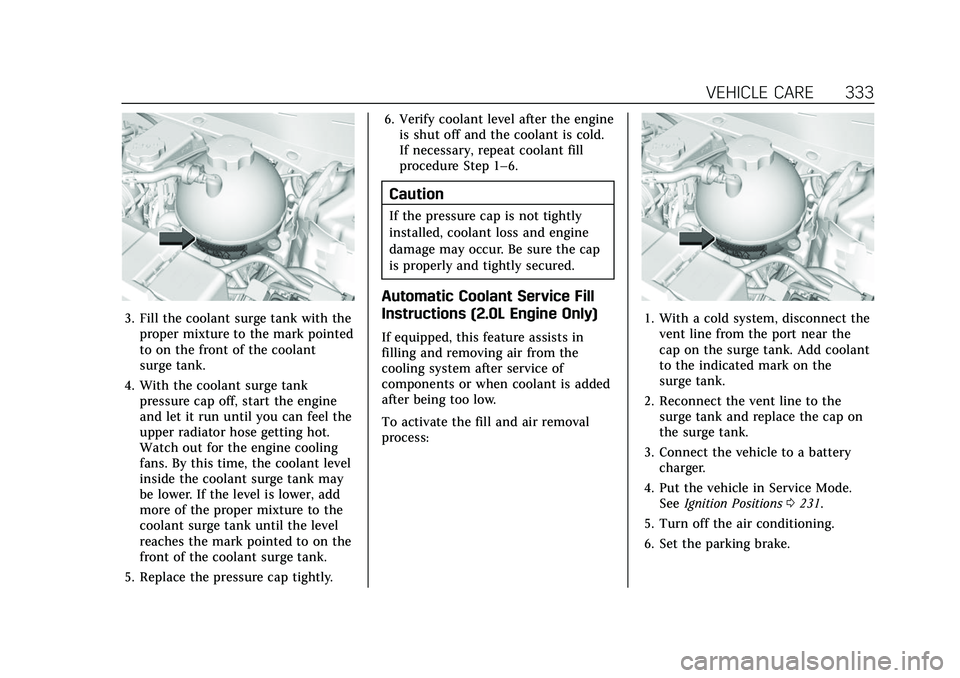
3. Fill the coolant surge tank with theproper mixture to the mark pointed
to on the front of the coolant
surge tank.
4. With the coolant surge tank pressure cap off, start the engine
and let it run until you can feel the
upper radiator hose getting hot.
Watch out for the engine cooling
fans. By this time, the coolant level
inside the coolant surge tank may
be lower. If the level is lower, add
more of the proper mixture to the
coolant surge tank until the level
reaches the mark pointed to on the
front of the coolant surge tank.
5. Replace the pressure cap tightly. 6. Verify coolant level after the engine
is shut off and the coolant is cold.
If necessary, repeat coolant fill
procedure Step 1–6.
Caution
If the pressure cap is not tightly
installed, coolant loss and engine
damage may occur. Be sure the cap
is properly and tightly secured.
Automatic Coolant Service Fill
Instructions (2.0L Engine Only)
If equipped, this feature assists in
filling and removing air from the
cooling system after service of
components or when coolant is added
after being too low.
To activate the fill and air removal
process:
1. With a cold system, disconnect thevent line from the port near the
cap on the surge tank. Add coolant
to the indicated mark on the
surge tank.
2. Reconnect the vent line to the surge tank and replace the cap on
the surge tank.
3. Connect the vehicle to a battery charger.
4. Put the vehicle in Service Mode. See Ignition Positions 0231.
5. Turn off the air conditioning.
6. Set the parking brake.
Page 340 of 447
Cadillac XT6 Owner Manual (GMNA-Localizing-U.S./Canada-15218998) -
2022 - CRC - 10/22/21
VEHICLE CARE 339
Front Wiper Blade Replacement
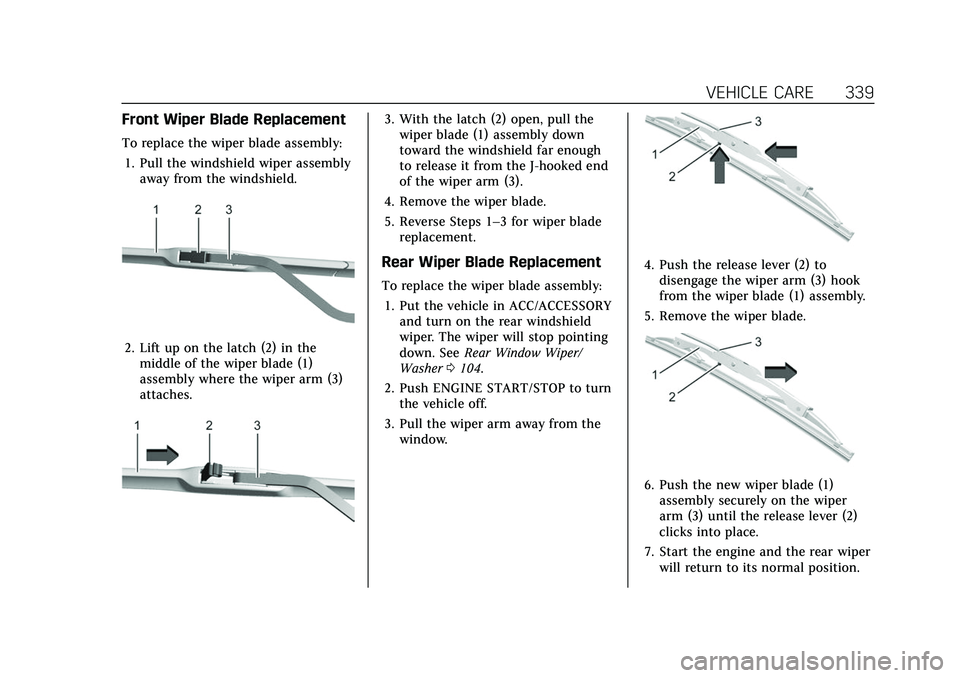
To replace the wiper blade assembly:1. Pull the windshield wiper assembly away from the windshield.
2. Lift up on the latch (2) in themiddle of the wiper blade (1)
assembly where the wiper arm (3)
attaches.
3. With the latch (2) open, pull thewiper blade (1) assembly down
toward the windshield far enough
to release it from the J-hooked end
of the wiper arm (3).
4. Remove the wiper blade.
5. Reverse Steps 1–3 for wiper blade replacement.
Rear Wiper Blade Replacement
To replace the wiper blade assembly:
1. Put the vehicle in ACC/ACCESSORY and turn on the rear windshield
wiper. The wiper will stop pointing
down. See Rear Window Wiper/
Washer 0104.
2. Push ENGINE START/STOP to turn the vehicle off.
3. Pull the wiper arm away from the window.
4. Push the release lever (2) todisengage the wiper arm (3) hook
from the wiper blade (1) assembly.
5. Remove the wiper blade.
6. Push the new wiper blade (1) assembly securely on the wiper
arm (3) until the release lever (2)
clicks into place.
7. Start the engine and the rear wiper will return to its normal position.
Page 372 of 447

Cadillac XT6 Owner Manual (GMNA-Localizing-U.S./Canada-15218998) -
2022 - CRC - 10/22/21
VEHICLE CARE 371
Warning (Continued)
used on a vehicle without the
proper amount of clearance can
cause damage to the brakes,
suspension, or other vehicle parts.
The area damaged by the tire
chains could cause loss of control
and a crash. Use another type of
traction device only if its
manufacturer recommends it for
the vehicle's tire size combination
and road conditions. Follow that
manufacturer's instructions. To
avoid vehicle damage, drive slow
and readjust or remove the traction
device if it contacts the vehicle. Do
not spin the wheels. If traction
devices are used, install them on
the front tires.
Caution
If the vehicle is equipped with a tire
size other than 265/45R21, use tire
chains only where legal and only
when necessary. Use low profile
chains that add no more than(Continued)
Caution (Continued)
12 mm thickness to the tire tread
and inner sidewall. Use chains that
are the proper size for the tires.
Install them on the tires of the
front axle. Do not use chains on the
tires of the rear axle. Tighten them
as tightly as possible with the ends
securely fastened. Drive slowly and
follow the chain manufacturer's
instructions. If the chains contact
the vehicle, stop and retighten
them. If the contact continues, slow
down until it stops. Driving too fast
or spinning the wheels with chains
on will damage the vehicle.
If a Tire Goes Flat
It is unusual for a tire to blow out
while driving, especially if the tires are
maintained properly. See Tires0351.
If air goes out of a tire, it is much
more likely to leak out slowly. But if
there is ever a blowout, here are a few
tips about what to expect and what
to do: If a front tire fails, the flat tire creates
a drag that pulls the vehicle toward
that side. Take your foot off the
accelerator pedal and grip the steering
wheel firmly. Steer to maintain lane
position, and then gently brake to a
stop, well off the road, if possible.
A rear blowout, particularly on a
curve, acts much like a skid and may
require the same correction as used in
a skid. Stop pressing the accelerator
pedal and steer to straighten the
vehicle. It may be very bumpy and
noisy. Gently brake to a stop, well off
the road, if possible.
{Warning
Driving on a flat tire will cause
permanent damage to the tire.
Re-inflating a tire after it has been
driven on while severely
underinflated or flat may cause a
blowout and a serious crash. Never
attempt to re-inflate a tire that has
been driven on while severely
underinflated or flat. Have your
(Continued)