brake CADILLAC XT6 2023 Repair Manual
[x] Cancel search | Manufacturer: CADILLAC, Model Year: 2023, Model line: XT6, Model: CADILLAC XT6 2023Pages: 507, PDF Size: 6.49 MB
Page 303 of 507
Cadillac XT6 Owner Manual (GMNA-Localizing-U.S./Canada-16405819) -
2023 - CRC - 3/22/22
302 Driving and Operating
Stationary or Very
Slow-Moving Objects;
Cross-Traffic
{Warning
Super Cruise is not a crash
avoidance system and will
not steer or brake to avoid a
crash. Super Cruise does
not steer to prevent a crash
with stopped or slow-moving
vehicles. You must supervise
the driving task and may
need to steer and brake to
prevent a crash, especially in
stop-and-go traffic or when
a vehicle suddenly enters
your lane. Always pay
attention when using Super
Cruise. Failure to do so
could result in a crash
involving serious injury or
death.Curves in the Road
{Warning
The vehicle could drift out of
your lane of travel. To
prevent crashes, always be
ready to manually steer.
Super Cruise may not detect
your lane on curves in the
road. Super Cruise may not
detect the markings that
show your lane. You may not
have time to react to a
vehicle in the lane next to
your vehicle while on curves
in the road.
Super Cruise may operate
differently in sharp curves.
It may drift out of your lane of
travel if the curve is too sharp.
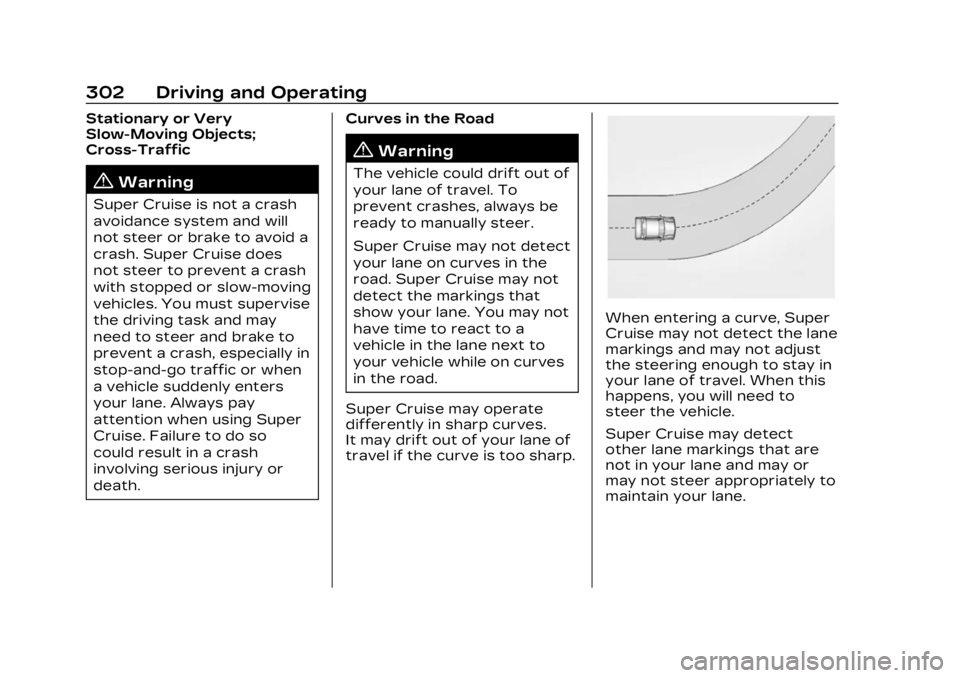
When entering a curve, Super
Cruise may not detect the lane
markings and may not adjust
the steering enough to stay in
your lane of travel. When this
happens, you will need to
steer the vehicle.
Super Cruise may detect
other lane markings that are
not in your lane and may or
may not steer appropriately to
maintain your lane.
Page 304 of 507
Cadillac XT6 Owner Manual (GMNA-Localizing-U.S./Canada-16405819) -
2023 - CRC - 3/22/22
Driving and Operating 303
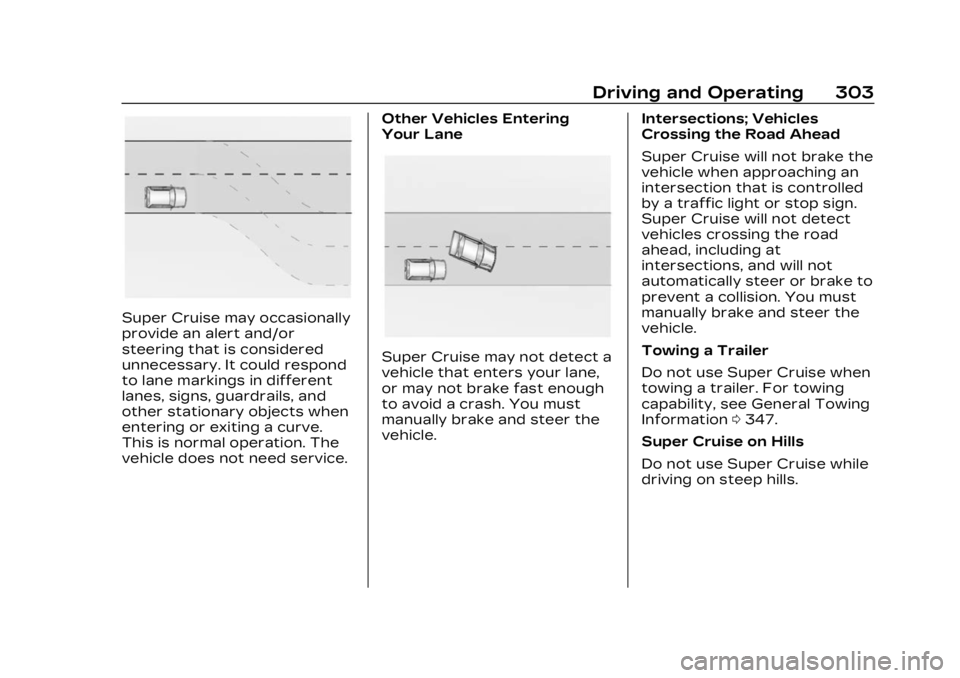
Super Cruise may occasionally
provide an alert and/or
steering that is considered
unnecessary. It could respond
to lane markings in different
lanes, signs, guardrails, and
other stationary objects when
entering or exiting a curve.
This is normal operation. The
vehicle does not need service.Other Vehicles Entering
Your Lane
Super Cruise may not detect a
vehicle that enters your lane,
or may not brake fast enough
to avoid a crash. You must
manually brake and steer the
vehicle.
Intersections; Vehicles
Crossing the Road Ahead
Super Cruise will not brake the
vehicle when approaching an
intersection that is controlled
by a traffic light or stop sign.
Super Cruise will not detect
vehicles crossing the road
ahead, including at
intersections, and will not
automatically steer or brake to
prevent a collision. You must
manually brake and steer the
vehicle.
Towing a Trailer
Do not use Super Cruise when
towing a trailer. For towing
capability, see General Towing
Information
0347.
Super Cruise on Hills
Do not use Super Cruise while
driving on steep hills.
Page 307 of 507
![CADILLAC XT6 2023 Repair Manual Cadillac XT6 Owner Manual (GMNA-Localizing-U.S./Canada-16405819) -
2023 - CRC - 3/22/22
306 Driving and Operating
Disengaging Super Cruise
There are two ways to
disengage Super Cruise:
.Press]while yo](/img/23/58694/w960_58694-306.png "CADILLAC XT6 2023 Repair Manual Cadillac XT6 Owner Manual (GMNA-Localizing-U.S./Canada-16405819) -
2023 - CRC - 3/22/22
306 Driving and Operating
Disengaging Super Cruise
There are two ways to
disengage Super Cruise:
.Press]while yo")
Cadillac XT6 Owner Manual (GMNA-Localizing-U.S./Canada-16405819) -
2023 - CRC - 3/22/22
306 Driving and Operating
Disengaging Super Cruise
There are two ways to
disengage Super Cruise:
.Press]while your hands
are on the steering wheel.
The Super Cruise steering
will disengage.
.Press the brake pedal while
your hands are on the
steering wheel. Both Super
Cruise steering and Adaptive
Cruise Control will
disengage. Super Cruise Messages
If
^does not appear,]can
be pressed to display a DIC
message as to why the system
is unavailable.
Immediately after a
disengagement, pressing the
]within 10 seconds will
display a DIC message with
the reason for Super Cruise
disengagement.
Page 308 of 507
Cadillac XT6 Owner Manual (GMNA-Localizing-U.S./Canada-16405819) -
2023 - CRC - 3/22/22
Driving and Operating 307
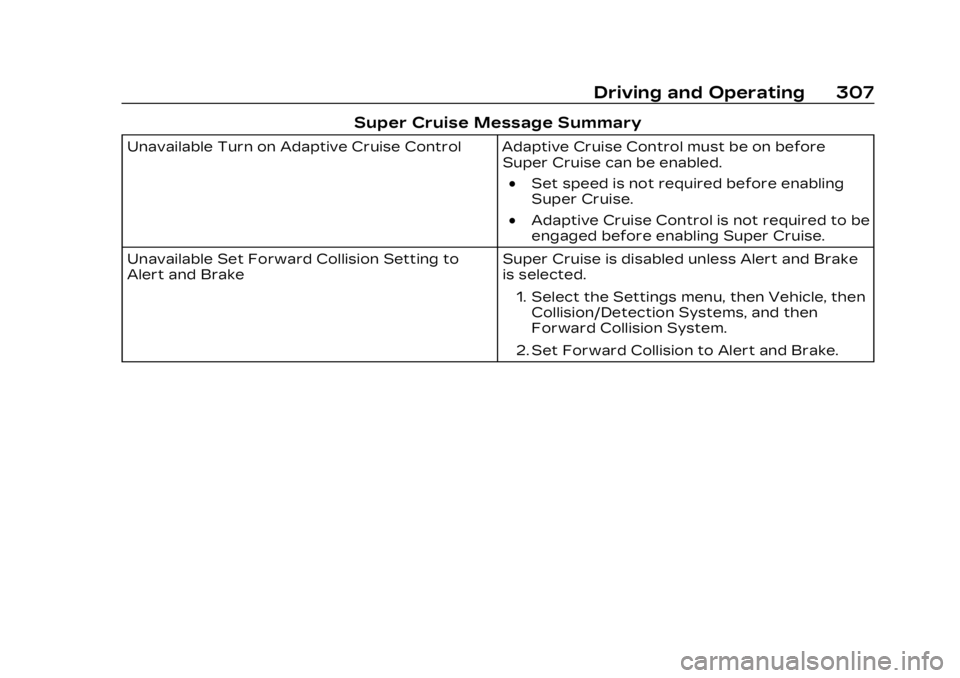
Super Cruise Message Summary
Unavailable Turn on Adaptive Cruise Control Adaptive Cruise Control must be on beforeSuper Cruise can be enabled.
.Set speed is not required before enabling
Super Cruise.
.Adaptive Cruise Control is not required to be
engaged before enabling Super Cruise.
Unavailable Set Forward Collision Setting to
Alert and Brake Super Cruise is disabled unless Alert and Brake
is selected.
1. Select the Settings menu, then Vehicle, then Collision/Detection Systems, and then
Forward Collision System.
2. Set Forward Collision to Alert and Brake.
Page 311 of 507

Cadillac XT6 Owner Manual (GMNA-Localizing-U.S./Canada-16405819) -
2023 - CRC - 3/22/22
310 Driving and Operating
Super Cruise Message Summary (cont'd)
Unavailable Press OnStar Button.The owner’s required Connected Services
subscription may have ended.
.There may be poor GPS reception (e.g., in
isolated areas).
.The GPS reception may be blocked by
objects such as tall buildings or large
structures.
.Press the blue OnStar button in your vehicle
to speak with an OnStar representative, who
can help determine the issue and what
actions to take.
Unavailable You Have Taken Vehicle Control
.The brake pedal is being pressed.
.The Adaptive Cruise Control has been
canceled or turned off.
Unavailable Sensor Blocked Clear snow, ice, dirt, or other contaminants from the front and rear areas of the vehicle.
Unavailable Sharp Curve Some curves are too sharp to be navigated by the Super Cruise system. Super Cruise will be
available after the curve is traveled.
Super Cruise Unavailable Super Cruise is unavailable for reasons not described in other messages.
Super Cruise Locked Out See Owner’s Manual The driver did not take control of the vehicle when prompted by the Super Cruise system.
The Super Cruise system will be disabled until
the ignition is turned off and back on.
Page 314 of 507

Cadillac XT6 Owner Manual (GMNA-Localizing-U.S./Canada-16405819) -
2023 - CRC - 3/22/22
Driving and Operating 313
Warning (Continued)
accessory, such as a bike
rack, or hitch mounted
cargo carrier.
.Work if the area
surrounding the detection
sensor is damaged or not
properly repaired.
Complete attention is
always required while
driving, and you should be
ready to take action and
apply the brakes and/or
steer the vehicle to avoid
crashes.
Audible or Safety Alert Seat
Some driver assistance
features alert the driver of
obstacles by beeping. To view
available settings for this
feature, touch the Settings
icon on the infotainment home
page. Select “Vehicle”to
display the list of available
options and select “Comfort
and Convenience”. If equipped with the Safety
Alert Seat, the driver seat
cushion may provide a
vibrating pulse alert instead of
beeping. To view available
settings for this feature, touch
the Settings icon on the
infotainment home page.
Select
“Vehicle” to display the
list of available options and
select “Collision/Detection
Systems”.
Cleaning
Depending on vehicle options,
keep these areas of the
vehicle clean to ensure the
best driver assistance feature
performance. Driver
Information Center (DIC)
messages may display when
the systems are unavailable or
blocked.
.Front and rear bumpers and
the area below the bumpers
.Front grille and headlamps
Page 318 of 507
Cadillac XT6 Owner Manual (GMNA-Localizing-U.S./Canada-16405819) -
2023 - CRC - 3/22/22
Driving and Operating 317
If equipped, the front view
camera also displays when the
Park Assist system detects an
object within 30 cm (12 in).
Front/Rear Overhead View :
Displays a front or rear
overhead view of the vehicle.
Touching the button will
toggle between the two views.
Side Forward/Rearward
View :Displays a view that
shows objects next to the
front or rear sides of the
vehicle. Touch Side Forward/
Rearward View on the
infotainment display when a
camera view is active.
Touching the button multiple
times will toggle between
forward and rearward views.
Park Assist and RCTA
overlays are not available
when Side Forward/Rearward
view is active.
Hitch View : If equipped,
assists while connecting to a
trailer. Displays a zoomed-in
view of the hitch to help align
the vehicle’s hitch ball with the trailer coupler. Shifting into
P (Park) while in this view will
automatically engage the
Electronic Parking
Brake (EPB).
Guidance Lines :
Displays
available guidelines. The
horizontal markings represent
distance from the vehicle.
Top Down View : Displays an
image of the area surrounding
the vehicle, along with other
views in the infotainment
display. Top Down can be
enabled or disabled by
touching the Top Down View
button multiple times.
Hitch Guidance
If equipped, this feature
displays a single, centered
guideline on the camera
display to assist with aligning a
vehicle’s hitch ball with a
trailer coupler. Select the
trailer guidance line button,
then align the trailer guidance
line over the trailer coupler.
Continuously steer the vehicle
to keep the guidance line centered on the coupler when
backing. RVC Park Assist
overlays will not display when
the trailer guidance line is
active. Hitch Guidance is only
available in Standard View.
To check the trailer when in a
forward gear above 12 km/h
(8 mph), touch CAMERA on
the infotainment display to
view the rear camera. Touch X
to exit the view or it will be
removed automatically after
eight seconds.
{Warning
Use Hitch Guidance only to
help back the vehicle to a
trailer hitch or, when
traveling above 12 km/h
(8 mph), to briefly check the
status of your trailer. Do not
use for any other purpose,
such as making lane change
decisions. Before making a
lane change, always check
the mirrors and glance over
(Continued)
Page 320 of 507

Cadillac XT6 Owner Manual (GMNA-Localizing-U.S./Canada-16405819) -
2023 - CRC - 3/22/22
Driving and Operating 319
driver's seat will pulse five
times. Beeps for front are
higher pitched than the rear.
Turning the System On
and Off
The Park Assist System can
be turned on or off using the
infotainment system. To view
available settings for this
feature, touch the Settings
icon on the infotainment home
page. Select“Vehicle”to
display the list of available
options and select “Collision/
Detection Systems”.
The
Xbutton is used to turn
on or off the Park Assist,
which also turns on or off the
Backing Warning and Reverse Automatic Braking (RAB) at
the same time. When the
system is turned off, a system
off message is shown on the
display. This message
disappears after a short
period of time.
Turn off Park Assist when
towing a trailer to prevent
unwanted beeps and when a
bike rack is attached to ensure
proper operation.
When the System Does Not
Seem to Work Properly
If a service message displays,
check the following conditions:
.The sensors may not be
clean. Keep the vehicle's
front and rear bumpers free
of mud, dirt, snow, ice, and
slush. For cleaning
instructions, see Exterior
Care
0440.
.The Park Assist sensors may
be covered by frost or ice.
Frost or ice can form around
and behind the sensors and
may not always be seen; this
can occur after washing the vehicle in cold weather. The
message may not clear until
the frost or ice has melted.
If a service message displays
and the above conditions do
not exist, take the vehicle to
your dealer for repairs.
If the Park Assist System does
not activate due to a
temporary condition, a system
off message is shown on the
display. This can occur under
the following conditions:
.The driver has disabled the
system.
.An object is currently
blocking the rear sensors
(for example, bike rack,
tailgate, trailer hitch, etc.).
Once the object is removed,
Park Assist will return to
normal operation.
.The bumper is damaged.
Take the vehicle to your
dealer for repairs.
.Other conditions, such as
vibrations from a
jackhammer or the
compression of air brakes on
Page 322 of 507

Cadillac XT6 Owner Manual (GMNA-Localizing-U.S./Canada-16405819) -
2023 - CRC - 3/22/22
Driving and Operating 321
parking spot or, if available,
change the parking mode in
the infotainment display.
APA cannot park in all empty
parking spots. The parking
spot must:
.Be sufficiently large to fit the
vehicle comfortably.
.Have an adjacent vehicle,
wall, or pillar for the system
to align to.
After completely passing an
eligible parking spot, a beep
sounds and a red stop symbol
is displayed in the driver
information center. Generally,
APA selects the nearest
empty parking spot behind the
vehicle, but under some
conditions may select a spacethat is further back. Slow
down and bring the vehicle to
a complete stop to begin.
Follow the displayed
instructions. When instructed
to drive in reverse, shift to
R (Reverse) while holding the
brakes. The steering wheel will
vibrate briefly as a reminder to
remove hands from the
steering wheel. After the
vibration stops, check your
surroundings and release the
brakes to begin automatic
parking. As the vehicle
automatically steers, and
brakes into the parking spot,
check surroundings and
continue to apply acceleration
if necessary and shift gears as
needed. Be prepared to stop
to avoid vehicles, pedestrians,
or objects.
A progress arrow displays the
status of the parking
maneuver. Once automatic
parking is finished and the
vehicle has come to a full stop,
APA will beep and display a
message indicating parking is
complete. Shift the vehicle to
P (Park) and apply the parking
brake
Automatic Parking
Automatic Unparking
Page 323 of 507

Cadillac XT6 Owner Manual (GMNA-Localizing-U.S./Canada-16405819) -
2023 - CRC - 3/22/22
322 Driving and Operating
How to Cancel Automatic
Parking
To cancel automatic parking
or automatic unparking at any
time, press
O. Be prepared to
resume full control of the
vehicle. APA holds the vehicle
until the parking brake or
brake is applied, or the vehicle
is shifted into P (Park). To start
driving away, press the brakes
and shift into D (Drive).
Certain vehicle conditions and
driver interferences may also
cancel automatic parking:
.The driver manually steers
the vehicle.
.The maximum allowed speed
is exceeded.
.There is a failure with the
APA system.
.Electronic stability control or
antilock brakes are
activated.
.The parking brake is applied.
.Driver unbuckles the seat
belt and opens the door. System Limitations
Automatic Parking Assist has
certain limitations. The system
cannot:
.Continue to operate if the
maneuver speed exceeds
5 km/h (3 mph).
.Detect whether a parking
space is legal or restricted.
.Detect pavement markings
or lines.
.Park the vehicle closely lined
up with the vehicle next to it,
particularly if the spot is
approached at an angle or if
the parking space is angled.
.Park exactly centered in a
very large spot.
.Always detect short curbs.
.Operate while towing any
trailer.
.Function the vehicle is raised
or lowered by air
suspension,if equipped.
When the System Does Not
Seem to Work Properly
If the vehicle does not reverse
into the expected parking
space, the system could be
maneuvering the vehicle into a
previously detected space.
Reverse Automatic
Braking (RAB)
Backing Warning and
Reverse Automatic
Braking (RAB)
If equipped, vehicles with
Adaptive Cruise Control (ACC)
have the Backing Warning
System and Reverse
Automatic Braking (RAB)
system. When in R (Reverse),
Backing Warning alerts of rear
objects at vehicle speeds
greater than 8 km/h (5 mph),
and RAB may automatically
brake hard at speeds between
1–32 km/h (0.5–20 mph).
The Backing Warning System
will beep once from the rear
when an object is first